

Why ERP Platforms Miss Collections Logic and Payment Matching

In short:
Most ERPs record transactions but don’t manage collections workflows or reconcile messy payment scenarios in real time. That architectural gap creates status conflicts: an invoice shows closed in your collections platform while the ERP still ages it as unpaid. Your team makes credit decisions on stale data, customers get dunned for balances they already paid, and nobody trusts the automation anymore. Purpose-built AR platforms fix this by syncing payment status bidirectionally so collections workflows run on actual cash application data, not yesterday’s batch export.
Core Gaps in ERP Collections & Payment Matching
Your ERP wasn’t built to run collections. It’s a transaction system that records what happened, not a workflow engine that manages what comes next. The gap shows up fast when your finance team tries to match payments, track collection status, or reconcile invoices across systems that don’t talk to each other in real time.
Data sits in one system while decision logic lives in another. By the time you know a customer paid, your collections workflow already sent three reminder emails.
The Open-vs-Closed Status Trap
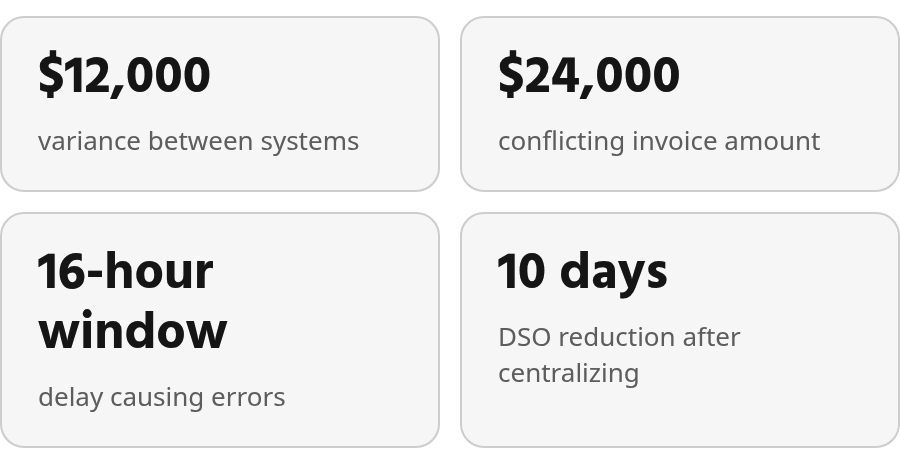
The most damaging mismatch: an invoice appears closed in your collections platform but still shows open in the ERP. Credit teams report accounts with a $12,000 variance between systems—invoices marked settled in one place while the general ledger still ages the debt. You’re making credit decisions on stale data, and your customer is getting dunned for a balance they already paid.
This isn’t a rounding error. It’s a conflict that stops orders, damages relationships, and creates audit exposure. When your collections platform says “ship the order” and your ERP says “customer still owes $24,000,” nobody trusts the automation anymore.
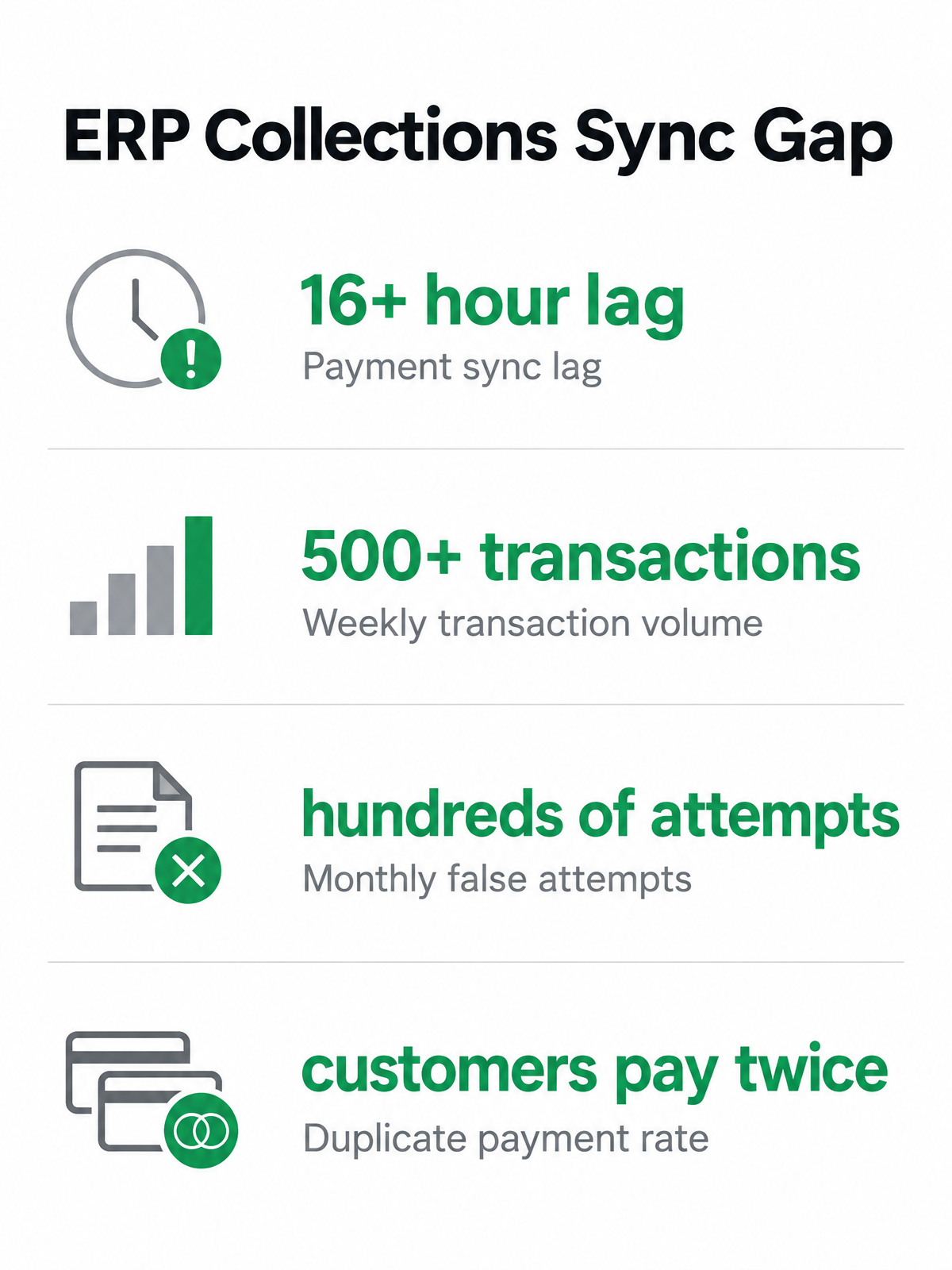
Batch sync logic drives most of these conflicts. A payment posts in the ERP at 10:00 AM, but the collections platform doesn’t see it until 2:00 AM the next day. That 16-hour window is when the damage happens: automated dunning emails go out, orders get held, and customers call to ask why they’re being chased for invoices they just paid.
Real-time visibility solves this, but only if your systems exchange data bidirectionally. One-way syncs (invoices flow from ERP to collections, but status updates don’t flow back) create parallel realities. A collector closes an invoice as a dispute in the platform, but the ERP keeps aging it as unpaid. Neither system knows what the other decided.
Payment Matching Breaks on Exceptions
ERPs handle straightforward payment matching: one check, one invoice, exact amount. They struggle with the scenarios that define B2B commerce—partial payments, overpayments, remittance data that doesn’t match invoice numbers, and bulk deposits that cover multiple accounts.
Standard ERP matching logic relies on date-and-value fields. Complex scenarios need multi-field, one-to-many and many-to-many matching that most ERPs can’t execute. You end up routing exceptions to a manual queue, and your finance team spends significant time each week reconciling what automation missed.
Firms implementing accounts receivable automation often see DSO reductions, largely by fixing the matching and reconciliation gaps that ERPs leave open. The improvement comes from connecting the ERP to purpose-built cash application tools that handle the exceptions standard matching logic can’t resolve.
Automated health checks help catch variance before it compounds. Set alerts when total AR variance between your ERP and collections platform crosses a threshold that makes sense for your operation. That approach flags data drift early, before a mismatch turns into manual cleanup and customer disputes.
Late payments often trace back to billing errors, not customer intent. When your ERP and collections data don’t match, you’re not just dealing with sync delays—you’re sending invoices that contradict your own records, which destroys the credibility of every follow-up your team makes.
Quick Answers
ERP collections gaps usually come from separating the system of record from the system running follow-up decisions.
Payment-status conflicts can stop orders, trigger unnecessary reminders, and make credit teams distrust automation. Batch-based integrations create a lag between cash posting and collections action, which is where most customer-facing mistakes occur.
Standard ERP matching logic struggles when remittance details are incomplete, payments are grouped, or customers don’t pay invoice-by-invoice.
One-way syncs leave dispute notes, collector decisions, and status updates stranded outside the ERP. Purpose-built AR platforms connect invoicing, collections, credit, and cash application so teams work from the same receivables picture.
Dedicated Collections Platforms: What They Offer
When finance teams move AR workflows into dedicated platforms, they’re solving a specific failure mode: the invoice-closed-in-collections-open-in-ERP trap. Teams that operate across multiple ERPs or legacy systems frequently find that a single customer account shows different payment statuses depending on which system you check. That fragmentation forces collections staff to verify payment context before sending a dunning notice, adding unnecessary friction to the workflow.
Purpose-built AR platforms connect invoicing, collections, credit management, and cash application into one workflow, then sync the results back to your ERP. Upflow positions its cash application engine to feed directly into AR and collections status, so your team always knows who paid before they send the next dunning email. Billtrust takes a broader approach, combining invoicing, collections, credit decisions, payment acceptance, and cash application in a single platform.
The reconciliation payoff shows up fast. Automated cash application matches payments to invoices before collections starts chasing, which eliminates the morning scramble to figure out who actually paid yesterday. When unified AR layers write back to the ERP, customer status inquiries drop dramatically—a signal that internal teams finally have visibility into the same payment data.
Manual Work Drops, Billing Accuracy Climbs
Automated contract-to-cash workflows reduce manual work and improve billing accuracy. AI models interpret B2B contract structures (ramp periods, usage tiers, milestone payments) and translate them into billing logic automatically. This matters when your ERP can record what happened but can’t interpret what the contract said should happen.
| Capability | What It Solves | What Teams Report |
|---|---|---|
| Automated cash application | Payments matched to invoices before collections starts chasing | Collections starts with payment status already verified |
| ERP write-back | Status syncs eliminating the open-vs-closed paradox | Customer inquiries drop significantly |
| Contract-aware billing | Complex terms interpreted without manual re-keying | Less manual work, better billing accuracy |
DSO Improvements and Receivables Health
When ERP and collections data finally reflect the same payment status, aging buckets become more reliable and forecasting stops running on two versions of the truth.
The conservative-matching debate matters here. Upflow’s Cash App Agent only auto-applies transactions when the match is unambiguous. If there’s doubt, it flags the transaction for review rather than guessing. That design choice trades automation volume for accuracy—because chasing a customer who already paid destroys more value than a few minutes of manual review saves.
Some platforms optimize differently. Esker argues payment matching should be handed over to AI completely, reporting auto-match rates above 90% when the AI is embedded in workflows rather than bolted on as a side tool. The right approach depends on your business model. Conservative matching wins for high-value B2B relationships where one false positive wrecks a negotiation. Aggressive AI matching wins for high-volume subscription businesses where speed matters more than individual account sensitivity.
Skip purpose-built AR tools if your ERP already handles complex, multi-system reconciliation without manual workarounds. But if your team spends hours every week validating payment status across systems, or if collections keeps chasing accounts that already closed, the gap is real—and it’s costing you more than the platform fee.
Head-to-Head Comparison: ERP vs. Dedicated vs. Blixo
When a collections platform shows an account in good standing while your ERP marks it overdue, you’re managing chaos, not receivables. This gap happens because collections logic typically sits outside the system controlling your books.
ERP-Connected Collections: Where Payment Status Breaks Down
Most ERPs handle the general ledger. They weren’t built to run collections workflows, reconcile partial payments, or sync dunning status the moment payment activity changes. The architecture creates friction: credit teams frequently have to investigate which application reflects the actual customer balance before deciding whether to release orders, pause outreach, or escalate an account.
Batch syncs compound the problem because collections actions often run on a different schedule than cash posting. Even a routine integration delay can make a customer look delinquent after payment has already been received. In high-volume environments, those stale windows create false collection attempts, unnecessary verification calls, and extra work for teams that should be focused on exceptions.
Duplicate payments follow the same pattern. When a customer portal shows a balance due because the sync hasn’t run yet, customers pay twice. Organizations frequently report receiving duplicate payments when systems aren’t in lockstep, then spend days issuing refunds and managing credit memos.
Best for: Organizations comfortable with manual reconciliation overhead and slower payment visibility in exchange for lower upfront software costs.
Dedicated AR Platforms: Purpose-Built Reconciliation and Cash Application
Dedicated AR platforms are designed around the work ERP modules usually treat as secondary: interpreting remittance data, applying cash, coordinating collector action, and pushing clean status updates back into the accounting environment. Instead of forcing collectors to check multiple screens, they bring payment context into the workflow where decisions are made.
Many dedicated platforms integrate directly with ERPs to reduce manual handoffs. These solutions typically handle multi-field matching for cash application and offer real-time or near-real-time ERP write-back so collections workflows reflect actual payment status. The trade-off is implementation complexity: dedicated platforms often require longer deployment timelines than simple invoicing tools because you’re replacing fragmented manual workflows with automated matching and collections workflows.
Purpose-built platforms handle scale and complexity that ERPs weren’t designed for. They fit organizations processing high transaction volumes that need accurate cash application.
Best for: Finance teams processing high transaction volumes who need accurate cash application and collections workflows that sync back to the ERP in real time.
| Dimension | ERP-Connected Collections | Dedicated AR Platforms | Blixo |
|---|---|---|---|
| Payment-status sync | Batch-based, with delayed visibility | Real-time or near-real-time | Real-time |
| Cash application matching | Limited to date/value fields | Multi-field matching with AI support | AI-powered matching with approval workflow |
| Manual reconciliation work | High (frequent variance checks required) | Low (automated matching handles most cases) | Low (exception-based review only) |
Blixo: Built to Close the ERP Collections Gap
Blixo automates cash application with a matching engine that flags uncertain matches for review rather than guessing. The goal is for every auto-applied transaction to be one your team would approve. Chasing a customer who already paid damages relationships that took months to build.
Blixo is designed so collections workflows pull from reconciliation data, which helps your team separate paid, unpaid, and should-not-have-been-chased accounts. The real-time status update is meant to eliminate delayed visibility before it turns into a customer-facing mistake. Your AR team moves from reactive verification work to proactive customer management.
Best for: Service businesses and SaaS companies that need ERP-grade reconciliation accuracy and fast implementation.
Real-World Outcomes & What to Do Next
Organizations wrestling with split-brain data report time lost to reconciliation, duplicate payments from customers acting on stale portal data, and uncomfortable conversations with clients who thought they had already settled their balance.
The choice is whether to accept systems that can’t agree on basic facts.
When System Mismatches Create Real Damage
Credit teams see this pattern frequently: a workflow action changes in the collections platform while the ERP keeps treating the balance as collectible. One system may stop outreach or clear the customer for additional business; the other continues aging the exposure. The gap often surfaces only after someone manually investigates the account history, creating awkward conversations with customers and internal stakeholders.
Delayed syncs make it worse. A payment can be properly recorded in the accounting system while the collections queue still reflects the prior state. In that period, the team may send a reminder, pause fulfillment, or escalate an account that no longer belongs in the delinquency workflow. Late data is as dangerous as wrong data in high-volume B2B commerce.
The operational cost compounds over time. When your most experienced credit analysts spend Tuesday mornings hunting down why the collection queue still shows accounts that paid on Friday, you’re burning salary dollars on problems that shouldn’t exist.
What Dedicated AR Automation Actually Delivers
Blixo pairs automated matching with an approval workflow for manual edits, so your team reviews exceptions instead of rebuilding the match from scratch.
Companies implementing integrated AR automation report reduced Days Sales Outstanding, faster reconciliation cycles, and improved cash flow visibility. Unapplied cash shrinks significantly when systems stay synchronized, because collections and cash application stop chasing two different versions of the same account.
AR platforms that integrate directly with the ERP rather than sitting on the sidelines help increase the share of balances in the current aging bucket, easing cash flow strain and strengthening financial stability. Finance teams gain timely visibility into which customers are current, which are aging, and which require intervention, without waiting for overnight jobs to finish.
Organizations that move from manual reconciliation to automated cash application report reclaiming significant weekly time previously lost to data verification. Finance teams describe the shift from heavy recurring reconciliation to a narrower exception-review process. That recovered capacity gets redirected toward higher-value activities: credit limit reviews, customer payment term negotiations, and proactive outreach before accounts become delinquent.
Understanding Fit and Scale
Different platforms serve different scales. Some target mid-sized and scaling companies with conservative cash matching that only applies transactions automatically when the supporting evidence is clear. If there is uncertainty, the transaction surfaces as a suggestion for your team to review. Tools that optimize for automation volume make different trade-offs. Conservative matching optimizes for accuracy. That’s not a limitation. It’s a deliberate design choice built around what actually goes wrong when reconciliation gets it wrong.
Enterprise-scale platforms operate in high-volume contexts and aim to complete most payment reconciliation automatically before the workday starts.
What I’d Actually Do
If you’re seeing significant variances between your ERP and collections platform, if your team spends substantial portions of each week reconciling data, or if you’re chasing customers who already paid, you need integrated AR automation. Companies that implemented dedicated AR platforms report reduced DSO, dramatically shortened reconciliation cycles, and improved aging bucket performance.
The choice depends on your transaction volume, customer base, and tolerance for false positives. A careful review model is better for relationship-driven B2B accounts where accuracy protects trust. More aggressive automation can make sense where payment volume is high, invoice values are lower, and speed carries more operational value than account-by-account review.
Closing the gap doesn’t require an ERP overhaul. It requires placing a single layer on top of the entire AR cycle that leaves systems of record undisturbed. When that layer syncs status updates bidirectionally (invoices, customer master data, and payments flowing up; notes, promises-to-pay, disputes, and contact info flowing down), you eliminate the reconciliation nightmare before it starts.
Quick Questions, Straight Answers
What happens if my ERP and collections platform show different balances for the same customer account?
Your team has to pause and determine which system is authoritative before taking action. Without that check, collectors may contact customers who are already current, credit teams may make decisions from incomplete information, and internal teams lose confidence in automated workflows. The larger issue is not just the balance difference—it is the fact that two systems are driving business decisions from different versions of receivables truth.
How do partial payments and overpayments break standard ERP matching logic?
They break the assumption that payment activity maps cleanly to a single invoice and amount. In real B2B receivables, remittance files may be incomplete, a single deposit may cover several invoices, deductions may be taken without clear explanation, and invoice references may not match your ERP records. Cash application tools with richer matching logic can compare more fields and route only unclear cases to review.