

PayPal Recurring Billing for Service Firms: Where Invoicing, Reminders, and Collections Still Break

Why Recurring Billing Matters for Service Firms
Nearly half of all B2B sales in Western Europe hit late-payment issues in Q2 2024. When you’re running a service business on monthly retainers, that’s not just annoying — it compounds. Your AR balance grows, your DSO climbs, and you’re chasing invoices instead of doing the work clients hired you for.
Can PayPal Handle Recurring Invoices and Auto-Reminders?
PayPal supports recurring invoices and automated reminders, but reviewed documentation suggests narrower scope than many subscription models need. Current pricing and transaction fees should be verified directly with PayPal. Auto-reminders are on by default, though specific caps on manual reminder frequency should be confirmed before you commit to a cadence.
A common reminder sequence is before the due date, on the due date, then after it. PayPal’s documented cap is two manual reminders per invoice within 24 hours, so a pre-due/on-due/post-due sequence quickly becomes a scheduling constraint. For firms managing dozens of monthly retainers, manual tracking across all those cycles is exactly where the time savings from basic recurring billing get erased.
Why Subscription Models Need More Than Basic Automation
Many subscription businesses now offer weekly, monthly, and quarterly billing cycles across product lines. Payment processing also requires technical investment.
The problem with subscriptions is silent failure. A customer buying something once completes the transaction actively. A subscription payment fails without customer intervention — expired card, insufficient funds, billing address mismatch. When a subscription payment fails during month-start processing peaks, you’re left manually matching partial payments or hunting down expired cards.
PayPal’s QuickBooks integration reduces manual entry for paid invoices. Payments and fees sync automatically. But that integration only covers invoice delivery and payment recording. It doesn’t solve reconciliation when a card expires and fails silently, or when a client downgrades mid-cycle and you need to prorate the refund. Those scenarios still need manual work, and standard recurring-invoice features typically don’t include automated dunning or account updater services to catch expired cards before they decline.
Recurring billing stabilizes cash flow and reduces admin overhead. The evidence supports that goal for straightforward monthly retainers billed at the same amount each cycle. For more complex scenarios, usage-based billing, mid-cycle adjustments, multi-currency clients, recurring invoice features generally handle the scheduling but leave the edge cases to you. Learn more about PayPal automatic payment vs recurring invoices to figure out which path fits your model.
The Short Version
PayPal covers recurring invoice creation and basic reminder automation. The harder work starts when a scheduled payment doesn’t clear.
- Late-payment exposure turns recurring revenue into a working-capital problem when you depend on predictable retainer cash flow.
- Reminder timing matters. Overdue accounts need a planned sequence, not ad hoc follow-up whenever someone checks the dashboard.
- Accounting integrations reduce rekeying after payment, but they don’t automatically resolve every failed charge, prorated adjustment, or client-specific exception.
- Subscription billing should be evaluated around recovery workflows as much as invoice scheduling, especially when clients aren’t actively checking out each cycle.
PayPal Recurring Billing: What’s Actually There
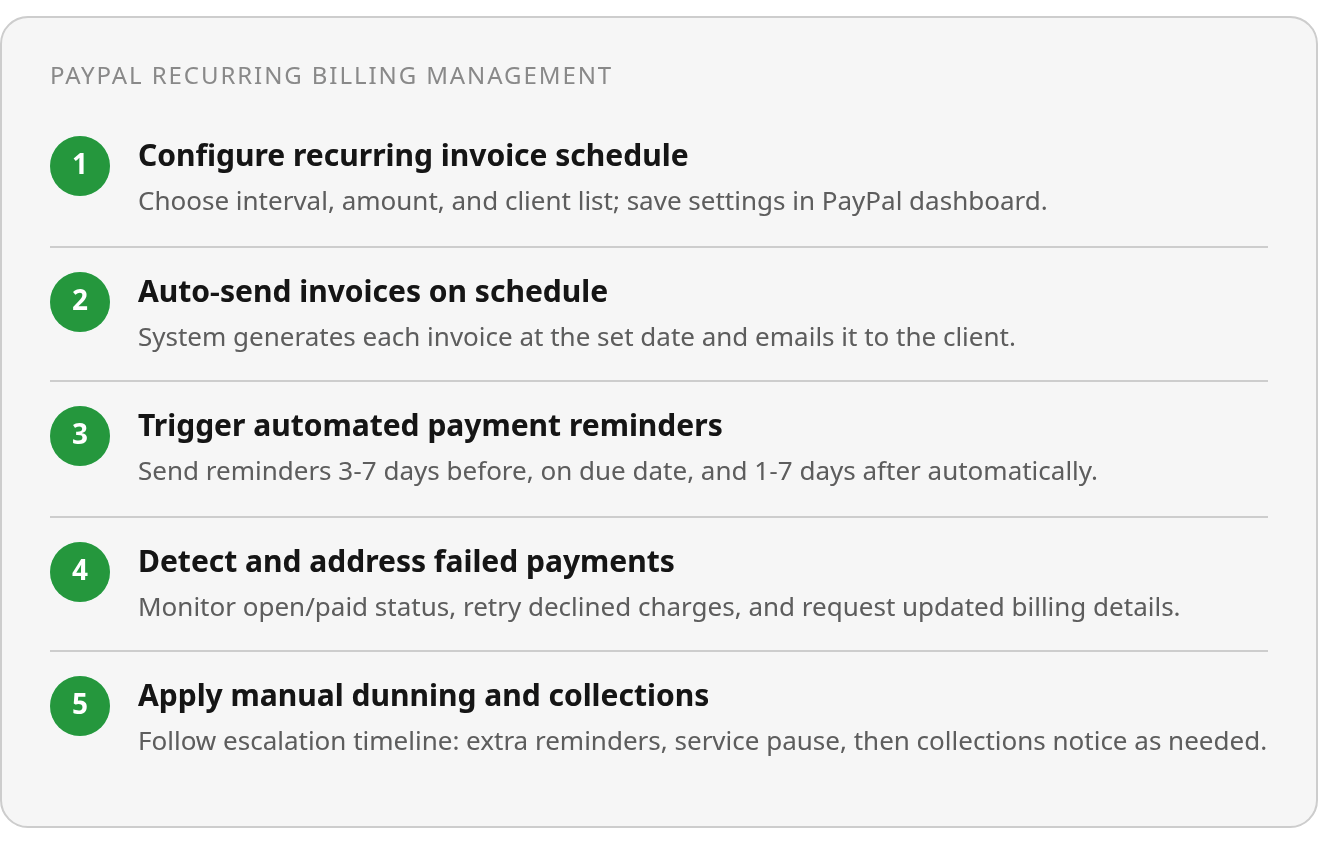
PayPal lets you set up recurring invoice series from your dashboard — weekly, monthly, quarterly, or custom intervals. Once configured, PayPal auto-generates and sends each invoice on schedule. That’s solid automation for retainer clients or subscription services.
Where Reminders Stop and Multi-Stage Dunning Should Start
PayPal’s automated reminders fire around due dates when enabled in your invoice settings. Available research confirms they can be triggered automatically, but doesn’t document built-in dunning workflows — no staged retry logic when cards decline, no automated escalation from reminder to collections notice.
That distinction matters when follow-up becomes conditional. A client one day late may need a polite nudge. A client with a failed payment method needs a different message, a retry attempt, and a secure way to update billing details. If your team decides those steps manually for every exception, recurring billing shifts from automation to queue management.
Reviewed materials confirm batch-send capability via CSV upload and basic recurring-invoice setup. For straightforward monthly billing without failed-payment complexity, that covers the basics. For subscription models where unattended payment failures cluster around renewal dates, PayPal’s automatic-payment path may fit better than recurring invoices.
Where PayPal Breaks Under Scale
When a recurring invoice goes unpaid, the work doesn’t stay isolated to that one invoice. Someone has to notice the exception, decide whether to remind, retry, pause service, or escalate, then keep the account record aligned with whatever happens next. Service firms start to feel the gap between sending invoices and managing collections.
Manual Reminder Limits
PayPal’s help docs cap manual invoice reminders at two per invoice within 24 hours. Best practice wants a reminder before the due date, on the due date, and after the due date; with PayPal’s cap, a team sending both a due-date and post-due reminder can hit the ceiling before escalation has started. Automatic reminders help when clients pay on time. The moment a card expires or a payment fails silently, you’re back to manual intervention under that two-reminder cap.
Card expiration accounts for a meaningful share of recurring-payment declines, and subscription payments fail without customer intervention — there’s no checkout step where the buyer notices the problem. Multi-step collections workflows matter here. Reviewed materials don’t document whether PayPal supports staged retry logic or dunning workflows that adapt reminder tone and timing automatically. If your process needs more than the documented reminder ceiling or conditional escalation based on payment-attempt history, those capabilities weren’t evidenced in available help materials.
| Workflow Step | Best-Practice Timing | PayPal Manual Cap | Result for Scale |
|---|---|---|---|
| First overdue reminder | 1–7 days after due date | 2 reminders per 24h | Works for small volumes |
| Escalation reminder | 7–14 days overdue | Same 24h limit | Requires manual tracking |
| Collections notice | 30+ days overdue | Same 24h limit | No staged automation |
The reviewed materials confirm the two-reminder cap and batch-send capability. What they don’t confirm is the reconciliation layer: matching partial payments against open invoices, reconciling batch deposits, or tracking which client paid which retainer cycle. Don’t rely on PayPal’s public documentation for those exception paths — verify them in a live demo or with PayPal directly before committing your AR workflow.
What’s Missing from PayPal’s Automation
PayPal sends invoices on schedule and lets you track open/paid status. That’s helpful for initial delivery. The question is what happens after the platform handles the basics. A recurring invoice can be generated perfectly and still create work if the payment method fails, the client changes plan terms, or the amount collected doesn’t match the expected retainer.

The architectural gap is reconciliation at scale. If you bill a large book of monthly clients and a small subset fails, PayPal’s public materials don’t confirm automatic matching of partial payments to open invoices, optimized retry timing, or account-updater support for expired card details. Without those pieces, the collections process depends on staff reviewing invoice status, cross-checking deposits, and contacting clients whose payment details need attention.
What to Verify Before You Switch
Before evaluating any AR tool, confirm these capabilities in a live demo rather than relying on marketing copy:
- Automated retry logic that attempts failed payments on a schedule
- Multi-stage dunning workflows that adjust reminder tone and frequency based on how long the payment has been overdue
- Real-time reconciliation that matches incoming payments to invoices automatically, even when amounts don’t align perfectly due to proration or credits
- Account-updater integration that refreshes expired card details before the next billing cycle without requiring customer action
Documentation often lags product updates. Run a trial that includes a failed recurring payment, a partial payment, and a retry before you commit.
Side-by-Side: What’s Confirmed vs. Unknown
PayPal handles basic recurring billing and automated reminders, but public documentation leaves important operational questions unanswered when you’re managing subscription-based service work at scale.
What PayPal Actually Documents
PayPal’s published materials confirm batch invoicing exists but don’t specify how many invoices you can generate in a single operation or whether custom fields carry through bulk uploads. Transaction fees for invoice payments aren’t listed in public help articles. The recurring billing feature appears in support docs, but pricing for add-on plans and whether they include automated payment retry logic remains unconfirmed without direct vendor contact.
What PayPal’s documentation does not confirm is automated reconciliation workflows or payment-to-invoice matching beyond basic open/paid status tracking. Public materials don’t detail dunning rules, credit-note workflows for subscription downgrades, or how expired card updates integrate with recurring series. That doesn’t mean the features are absent; it means don’t put your retainer collections on PayPal’s recurring invoices without testing them first.
| Feature | PayPal (Documented) | Legacy AR Tools | Modern AR SaaS |
|---|---|---|---|
| Manual reminder cap | 2 per 24 hours (confirmed) | Unknown — needs vendor docs | Unknown — needs vendor docs |
| Invoice payment fee | Unknown — needs vendor docs | Varies by processor | Varies by processor |
| Recurring billing add-on | $10/month (reviewed; verify current) | Unknown — needs vendor docs | Unknown — needs vendor docs |
| Batch invoice limit | Unknown — needs vendor docs | Unknown — needs vendor docs | Unknown — needs vendor docs |
| Automated dunning workflows | Not documented | Unknown — needs vendor docs | Unknown — needs vendor docs |
| Payment-to-invoice reconciliation | Not documented | Unknown — needs vendor docs | Unknown — needs vendor docs |
| Credit-note automation | Not documented | Unknown — needs vendor docs | Unknown — needs vendor docs |
The table shows the operational gaps that matter. Validate the remaining Unknown cells in a live demo before you commit your AR workflow.
FAQ
1. Can PayPal automatically retry failed subscription payments when a card expires mid-cycle?
The materials reviewed do not verify an automated recovery sequence for failed subscription charges. Treat this as a demo question: ask PayPal or any alternative provider to show how the system detects the failed attempt, schedules the next action, notifies the client, and records the outcome.
2. How do I reconcile partial payments against open invoices when clients pay less than the full retainer amount?
Start by checking whether the payment record can be tied to the original invoice without manual adjustment. The reviewed documentation does not establish how credits, prorated changes, or underpayments are resolved inside the billing workflow.
3. What happens when I need to send more than two reminders in one day for an overdue subscription payment?
You run into PayPal’s documented manual-reminder ceiling for that invoice and must continue later or use another communication path. For teams with formal collections processes, the bigger issue is whether overdue accounts can move through a defined escalation sequence without someone maintaining a separate tracker.
4. Does PayPal support different billing cycles for clients on weekly versus quarterly retainers within one account?
Yes, PayPal’s recurring-invoice setup supports multiple interval types from the dashboard, including weekly, monthly, quarterly, and custom schedules. Before using that for a mixed client base, verify how client-specific terms, custom fields, bulk setup, and any related pricing rules behave in your account.