

Can PayPal Invoicing Run Subscription Billing in 2026: Recurring Series, Auto Reminders, and Payment Tracking

The Short Version
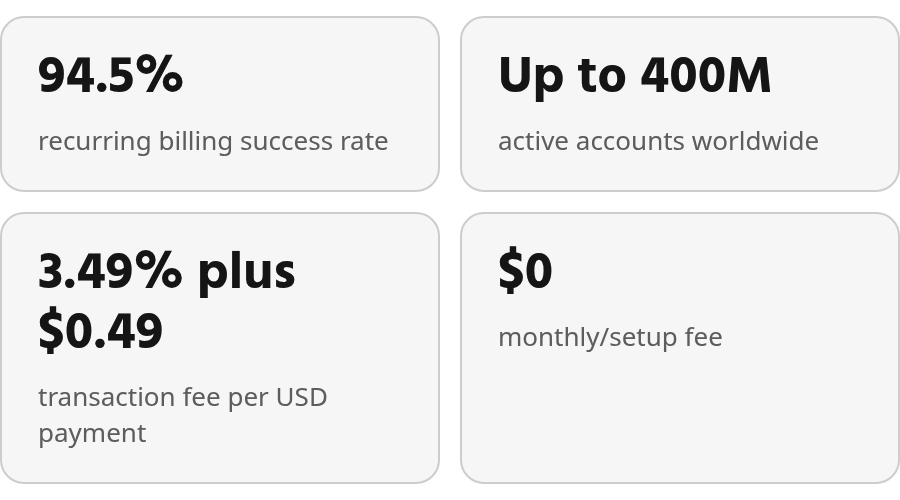
- PayPal reports a 94.5% average payment success rate for recurring billing. That figure is broader than PayPal Invoicing alone and is not tied to Recurring Series in reviewed materials.
- The platform covers up to 400 million active accounts across 200+ markets, so many clients are already in the ecosystem.
- No monthly or setup fee for invoicing; USD transactions run 3.49% plus $0.49.
- Recurring Series handles weekly, monthly, quarterly, and custom schedules, so multiple retainer plans can run concurrently from one account.
- Auto reminders fire on due and overdue dates out of the box, with further scheduling options available in Invoice Settings.
- Wallet, card, and bank transfer payments carry different fee structures — the method your client prefers can shift your effective cost meaningfully across a 12-month retainer.
What PayPal Invoicing Actually Gives Service Teams
In short: Public materials suggest PayPal’s toolset can support automated billing cycles and payment notifications for subscription-based service businesses. Reviewed documentation confirms the entry cost is lightweight compared with platforms that require a standing subscription. Verify specific workflow details and full AR automation claims in a live setup before you commit.
For agencies and dev shops billing retainers, the mechanics work. Recurring Series automatically charge customers on a defined schedule, with billing notifications that keep clients informed. Reminder settings live in Invoice Settings, and auto reminders fire on due and overdue dates by default.
PayPal’s main advantage is familiarity. Many clients already have a PayPal account somewhere in their financial stack, which makes the payment step feel less foreign than a completely new portal. For service teams trying to cut down on unpaid invoices sitting in follow-up, that familiarity matters.
Does PayPal Invoicing Actually Reduce Late Payments?
Within scope, yes. Automated billing and messaging are part of the recurring payments feature, with the stated goal of keeping customers informed. Payment can be made directly from the invoice without a PayPal account, which removes a common client-side barrier. The range of available payment methods still affects first-attempt payment, so check the current list against your client mix before quoting.
The better the checkout fit, the less your team has to chase routine invoices. That doesn’t make PayPal Invoicing a full collections platform, but it can reduce friction in the basic retainer loop.
| Metric | PayPal Reported Figure |
|---|---|
| Recurring billing success rate | 94.5% |
| Active accounts | Up to 400M, 200+ markets |
| Monthly/setup fee | $0 |
Full AR automation and cash application go beyond what public invoicing documentation confirms. That boundary is covered further in your broader AR stack.
PayPal Invoicing: How It Handles Recurring Series, Auto Reminders, and Payment Tracking
Reviewed documentation describes Recurring Series that create and send invoices on a chosen cadence, with reminder behavior configurable inside the invoicing settings. Scheduling and nudging are covered. Cash application and reconciliation are separate questions.
The core workflow is straightforward. Build a template for each client or service type, attach it to a Recurring Series, and PayPal creates and sends each invoice as the series runs. Different retainers can run side by side from the same account. The reviewed pages don’t explain how template edits flow into invoices already scheduled in a series, so test that in a live account before relying on it for mid-contract changes.
Reminders Run Before You Configure Anything
The useful point isn’t just that reminders exist. PayPal treats them as part of the invoice workflow, not as a separate collections process. For a small service team, that means more consistent follow-up.
Customization lives in the invoice settings area, where you can adjust timing around the invoice due date. For teams with predictable retainer cycles, that gives you a basic nudge system without forcing your staff to manually track every aging invoice.
Payment Method Choice Sets Your Real Fee
Clients can pay without a PayPal account. Paid funds land in your PayPal balance, where you can access them. But the payment method your client picks drives what you actually pay per transaction, and those rates shift over time. Check PayPal’s current published fees before quoting retainers — don’t work off old marketing copy.
The reviewed materials don’t break down per-method fees in a single comparison. That means looking up the current rate for whichever method your retainer clients are most likely to use. Even a small processing difference adds up when the same client is billed every month for a year.
The gap shows up after payment too. Reviewed pages don’t document how payments get matched to open invoices at volume, or how partial payments get handled. Missing evidence isn’t a confirmed missing feature; test a partial payment in your live PayPal account before scaling.
Head‑to‑Head: PayPal Invoicing vs. Blixo vs. One Popular Alternative
The table below is PayPal-side only; Blixo and Stripe Billing need separate documentation before their columns can be filled.
What Does the Evidence Actually Cover?
| Feature | Blixo | PayPal Invoicing | Stripe Billing |
|---|---|---|---|
| Recurring Series | Requires validation | Weekly, monthly, quarterly, custom | Requires validation |
| Auto Reminders | Requires validation | On by default; adjust via Invoice Settings > Auto Reminders | Requires validation |
| Payment Methods | Requires validation | Wallet, card, and bank transfer supported | Requires validation |
| Payment Speed | Requires validation | Requires validation | Requires validation |
| Recurring tx fee | Requires validation | 3.49% + $0.49 for USD; varies by payment method | Requires validation |
| Cards / Apple Pay | Requires validation | Card supported | Requires validation |
| Pay by Bank (ACH) | Requires validation | Bank transfer supported | Requires validation |
| Market reach | Requires validation | 200+ markets; currency count requires validation | Requires validation |
| Funds availability | Requires validation | Direct to PayPal balance on payment | Requires validation |
| Cash application | — | Needs source validation | — |
| Dunning escalation | — | Needs source validation | — |
| Accounting export | — | Needs source validation | — |
| Unified reporting | — | Needs source validation | — |
Market reach is confirmed: PayPal lists 200+ markets. Settlement currencies and local payment method availability still vary by region. Paid funds land in your PayPal balance. Payout timing and destination options for Blixo or Stripe Billing remain source-validation gaps.
For agencies billing international retainers, geography isn’t just a sales detail. A client in a region where the preferred local method is unavailable can become a collections problem even when the invoice sequence itself runs fine. PayPal has a broad footprint; whether Blixo or Stripe Billing better fits your specific client markets is a live-account question, not a table question.
What I’d Actually Do
My advice: PayPal is enough for lightweight subscription billing. It falls short when you need cash application, reconciliation, or advanced dunning beyond the documented reminder flow. Test those gaps before migrating to Blixo or another AR platform.
PayPal’s Recurring Invoice and Reminder Automation: What the Evidence Shows
For a small agency or dev shop, PayPal covers the core billing loop. A recurring invoice fires on schedule, reaches the client by email with a pay-now link, and supports payment directly from the invoice. When a due date passes without payment, the reminder sequence can continue without someone manually writing each follow-up. QuickBooks and Xero sync adds a bookkeeping bridge without extra tooling.
The cost conversation should happen before you build volume projections around PayPal. The platform can look simple at entry, but processing cost depends on how clients actually pay. USD transactions run 3.49% plus $0.49; wallet, card, and bank transfer methods can shift that, and cross-border fees may apply. Check PayPal’s current published fee schedule before quoting retainers.
When to Look Beyond PayPal’s Invoicing Features
When PayPal is enough: core recurring invoicing, auto reminders, direct-to-balance payments, and QuickBooks/Xero sync cover the retainer loop.
When it breaks: if your workflow needs automated cash application, reconciliation, aging analysis, or multi-channel dunning, reviewed PayPal materials don’t document that ground. That’s a gap in the evidence, not a confirmed absence of a feature.
Before migrating to Blixo or another AR platform, run three tests: (1) a mid-contract template change in PayPal to see if it flows into scheduled invoices; (2) a partial payment to see how it is matched to an open invoice; (3) a collections or reconciliation scenario in the AR trial to confirm the claimed automation. Documentation tells you what’s advertised; a live account shows what your team can run.
Questions People Ask
1. Do clients need a PayPal account to pay recurring invoices?
A PayPal account isn’t required on the client side; payment can be made directly from the invoice PayPal sends. That removes a common friction point for retainer clients who do not want to create another wallet login. PayPal doesn’t publish a complete list of supported card networks and local payment options in the reviewed materials, so check that against your specific client mix before quoting.
2. The listed transaction rate is 3.49% plus $0.49, but does the payment method a client chooses actually change what I pay?
Yes. PayPal’s fee structure can vary by payment type, and those differences matter more when invoices repeat throughout a client relationship. Before setting your retainer pricing, compare PayPal’s current fee schedule with the payment methods your clients are most likely to use.
3. What happens if I need to adjust a retainer rate or scope after a Recurring Series is already running?
The reviewed documentation doesn’t describe how template edits carry through to invoices already scheduled in an active series. That’s a gap worth testing in a live account before you depend on it, especially if rate changes or scope shifts come up regularly in your retainer work.