

How to Recover Failed Subscription Payments with Automated Dunning in Blixo

Key Takeaways
- Roughly 9% of monthly recurring revenue disappears to failed payments each month.
- About 80% of payment failures are fixable: expired cards, issuer declines, billing mismatches, not customers who want out.
- Half of subscription churn isn’t churn at all. It’s payment infrastructure failing in the background.
- Dunning retries failed charges on a schedule, typically at 3, 7, and 15 days after the decline.
- Accounts stay active during recovery. Subscribers keep access while the system waits for the card to clear.
- Recovered payments sync straight into cash application, closing the invoice without anyone touching a spreadsheet.
- Revenue leaks when billing and accounting don’t talk. A cleared retry that doesn’t match its invoice is still a reconciliation problem.
Quick Summary
Most subscription payment failures aren’t customers leaving. They’re expired cards, temporary issuer declines, or a billing address that doesn’t match. The system flags it as failed, but if your dunning process can’t recover it fast, you lose the subscriber anyway. That’s involuntary churn: users who were happy with the product, but got dropped because the payment plumbing broke.
What Dunning Actually Does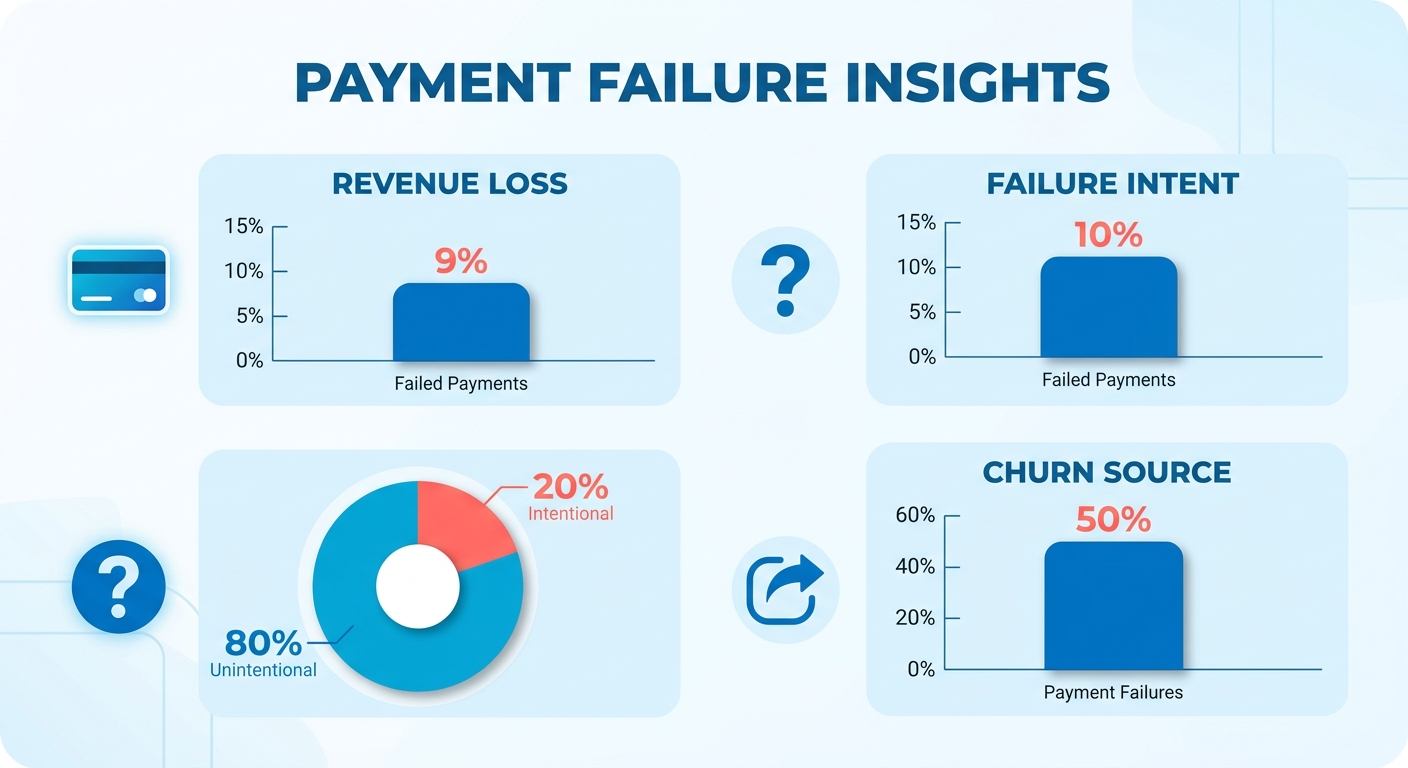
Dunning retries failed payments on a schedule while keeping the customer informed. Service stays live during the window. When a retry clears, the ledger updates immediately.
The gap between systems is where revenue leaks. A payment recovered through dunning still needs reconciliation if your billing tool and accounting platform don’t sync. We built our dunning to push recovered payments straight into cash application. The moment a retry clears, the invoice closes and the balance updates in real time.
How Different Dunning Strategies Compare
Not every retry schedule recovers at the same rate. A fixed schedule, retry on day 3, 7, and 15, is simple to configure for smaller subscriber bases. Smart retry logic adapts timing based on card issuer behavior and your transaction history. If your processor sees that Visa declines on weekends clear better on Tuesday mornings, smart retries adjust. The tradeoff: fixed schedules need no tuning; intelligent retries need volume to train.
| Strategy | Best For | Recovery Rate | Setup Time | Ongoing Work |
|---|---|---|---|---|
| Fixed 3-7-15 schedule | Under 500 active subscriptions | 60–70% | 15 minutes | None |
| Smart retry timing | 500+ subscriptions, high card variety | 75–85% | 1–2 hours | Monthly review |
| Multi-channel (email + SMS) | High-value B2C subscriptions | 70–80% | 30 minutes | Template updates |
| In-app payment prompts | SaaS with active daily users | 65–75% | 2–3 hours | None |
| Manual outreach after auto | Enterprise accounts, $500+ MRR | 85–95% | Varies | Per-account work |
Multi-channel, email, SMS, and in-app notification reaches customers faster than email alone, but you need copy for each channel. Blixo automates collections and dunning across emails, text messages, phone calls, and letters. You can layer SMS reminders onto your email flow and reach subscribers on the channel they actually check.
What Happens When Dunning Fails vs. Succeeds
If all retries fail and the account expires, 37% of customers cancel outright rather than manually re-subscribing. Not because they didn’t want the product. Because the friction of re-entering payment details feels like starting over. The customer who would have stayed for another year is gone because the dunning process gave up too early or communicated the failure poorly.
When dunning succeeds, the payment clears, the invoice closes, and the subscriber never experiences a service interruption. The difference between those two outcomes is often as simple as retry timing: issuers approve the same card on the second attempt if you wait 72 hours instead of 24. Skip overly aggressive schedules. Daily attempts for a week burn through your retry allowance and still lose the customer.
Why Automated Dunning Matters
Failed payments in subscription billing aren’t lost customers. They’re recoverable revenue sitting in limbo. When a charge declines, a manual process treats it as a collections problem. Automated dunning treats it as a retention problem and starts working before the customer notices.
Most teams miss this: recovery is only half the win. The other half is what happens to the money after it clears. The real drag isn’t the failed charge. It’s the hours your finance team spends matching recovered payments back to open invoices by hand.
Involuntary churn is addressable revenue loss
Involuntary churn accounts for 20% to 40% of total subscriber churn across subscription businesses. Not fringe leakage. A large, addressable slice of revenue walks out the door because a card expired or an issuer threw a temporary decline.
The timing of your response matters more than most teams expect. Recovery rates drop sharply the longer a failed charge sits untouched. The majority of declines are soft declines that clear on a second or third attempt. The failure itself rarely ends the relationship. The silence after it does. If nobody retries the charge and nobody tells the customer what happened, a fixable glitch turns into permanent loss.
What automated dunning actually recovers
The numbers from teams running structured dunning are hard to argue with. One company lifted its automated dunning success rate to 27.8% with a 12% save rate: a 224% improvement over its previous setup. Another recovered 60% of its formerly unpaid accounts after switching to structured dunning. A third trimmed average days-to-recovery from weeks to under 48 hours by moving retries and customer notices onto an automated schedule.
These wins come from timing and routing, not from chasing customers harder. Prevention beats retries. The cheapest payment to recover is the one that never fails, so refreshing expiring cards before the charge attempt matters as much as the retry logic.
How recovery connects to cash application
This is where dunning stops being a collections task and becomes an accounting one. When Blixo’s automated dunning recovers a payment, it bridges the gap between billing and accounting. The system updates the ledger automatically, recognizing recovered funds against the outstanding balance immediately.
Generic retry tools recover the dollar and then hand you a reconciliation headache. Blixo’s workflow handles recovery and matching in one motion. Your MRR stays intact and your books stay clean.
For teams scaling past a few hundred subscriptions, that integration separates recovery that saves revenue from recovery that creates more manual work.
Build Customer Communication Templates That Work
Dunning templates do one job: tell the customer what failed, why it’s easy to fix, and what happens next. The best ones read like a helpful heads-up, not a collections notice. The tone of that message decides whether a routine card decline turns into a canceled account.
A well-built template isn’t just customer-facing copy. It carries the necessary metadata and invoice reference to keep the transaction fully traceable throughout the recovery cycle.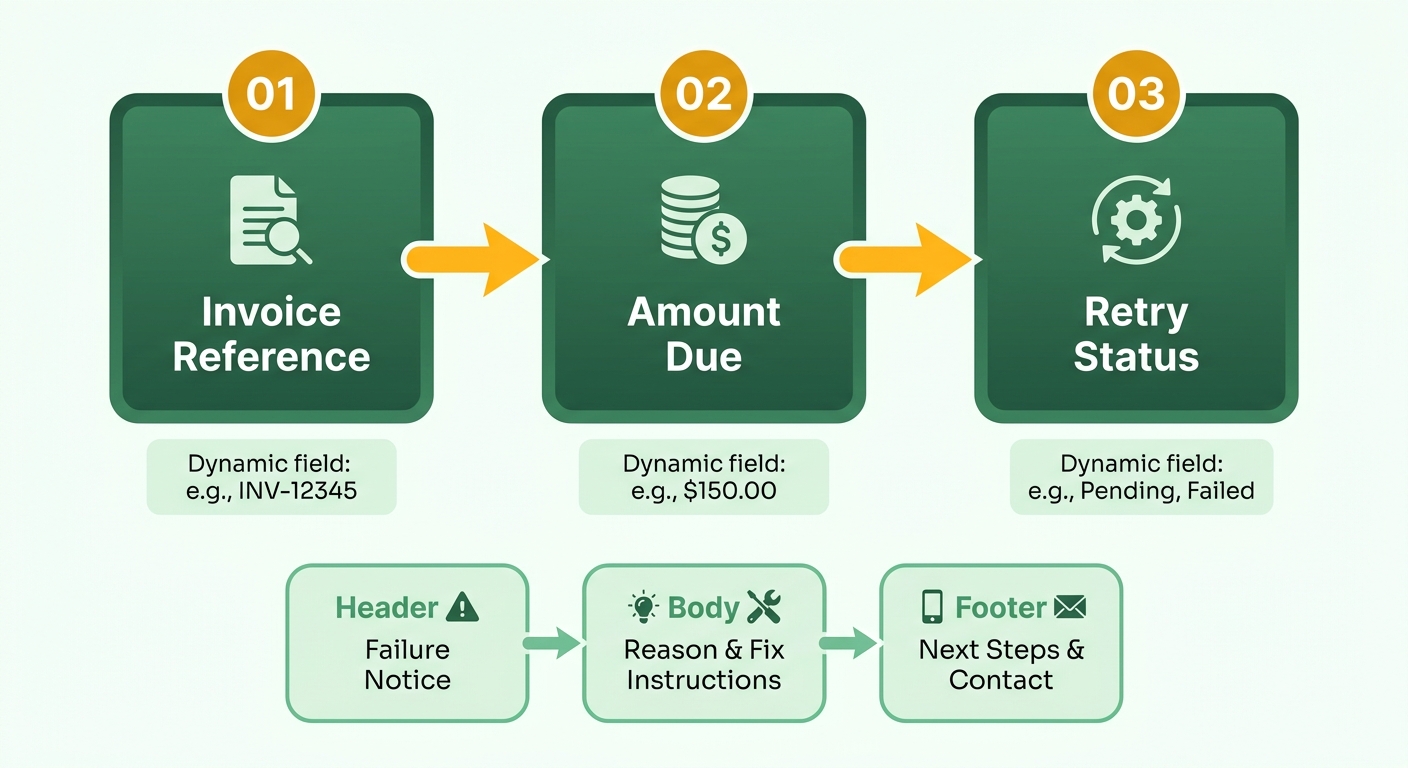
What makes a dunning template recover payments
A strong dunning template is a short, specific message tied to one failed invoice. It states the amount, the reason, and a one-click path to fix it. Four elements:
- A plain-language reason. “Your card ending in 4242 expired” beats “payment processing error.” Specificity removes friction.
- The exact amount and invoice. Naming the open invoice keeps the message honest and lets the recovered payment reconcile itself once it clears.
- A single action. One button to update the card. Not three links and a phone number.
- A clear timeline. Tell them when the next retry runs so the message feels like a schedule, not a threat.
When there’s no recovery process, customers who hit a payment problem often cancel rather than resolve it. The template is what catches them.
How templates should change across customer segments
Personalize by failure type and customer value. An expired card needs a gentle nudge and an update link. A hard decline on a high-value account might warrant a shorter grace window and a direct reply-to address. Match the message to the reason.
Timing follows the same logic. Send a short payment-issue notice within 15 minutes of the first failure, then escalate to a final note by day seven. Subject lines matter: a message that names the specific card and amount gets opened far more often than a generic “payment failed” alert. An unopened dunning email recovers nothing.
Segment your templates around three variables:
- Failure type. Soft decline, expired card, or hard decline each need different urgency.
- Customer tenure. Long-standing accounts get a warmer, more forgiving tone.
- Invoice size. Larger balances justify more personal, faster outreach.
Common mistakes that sink recovery
Skip the guilt-trip tone. Threatening language on a card that expired through no fault of the customer damages a relationship you were trying to save. The failure usually isn’t intentional, so the message shouldn’t read like an accusation.
Don’t send generic blasts that omit the invoice reference. You lose the automatic match into cash application and force manual reconciliation later. Don’t over-message. The goal isn’t more reminders. It’s recovering revenue before a technical decline becomes churn.
For a deeper look at wiring this into a full workflow, see our guide on dunning and collections automation for scalable subscription businesses.
Integrate Payment Processors
Connecting your payment processor is the first move, and it decides everything downstream. Once the processor is linked, every failed charge, retry, and recovered payment flows into one system. The integration transforms your billing setup from a simple transaction engine into an active recovery system. Successful retries immediately update your financial records.
Most teams treat the processor connection as a way to collect money. We treat it as the pipe that carries recovery data. When a card decline gets resolved on subsequent attempts, the system marks the corresponding invoice as settled automatically, keeping accounts receivable accurate without manual intervention.
How to connect your payment processor
The setup follows the same shape for any processor. Authorize the connection with your processor API credentials, map your subscription plans to the corresponding products, and confirm that events are flowing both ways.
Event sync matters most. A failed charge fires an event, the retry schedule kicks in, and every status change reports back. When a payment fails, that event triggers the retry timing and customer messaging. Each status update reports back to keep everything current. The goal is clean two-way sync, so a recovered payment updates the invoice without a manual touch.
Before you go live, run a test transaction with a card designed to decline. Watch the retry fire, resolve it, and confirm the recovered amount reconciles against the invoice automatically. If that loop closes cleanly in testing, it will hold up in production.
What retry schedule to configure
Start with a standard multi-day retry schedule spaced over two weeks. This works well for most catalogs and keeps operations simple. A fixed cadence is predictable and easy to explain to your team.
But fixed timing hits a ceiling as volume grows. Smart retries that optimize around card issuer behavior recover more than a rigid calendar, and the gap widens with scale. Run a basic interval schedule until your monthly transaction count makes a percentage point of recovery worth the added complexity, then switch to issuer-aware timing. While standard intervals recover a solid portion of failed charges, layering in a multi-channel communication sequence significantly boosts recovery rates.
One caution: avoid over-communicating. A card that is nearing its expiration date requires a different touchpoint strategy than a temporary network decline.
Common integration snags
Two issues account for most integration headaches. First, events that don’t sync back leave invoices stuck as unpaid even after recovery. Verify the event listener during setup, not after go-live. Second, plan mismatches between your processor and your billing catalog cause charges to post against the wrong invoice.
Our intelligent matching engine and automated collections tools handle dunning and reconciliation end to end, so recovered payments match back to the right invoice without manual work.
Monitor Dunning Performance with Analytics
Analytics turn dunning from a set-and-forget rule into a system you actually improve. The point of monitoring isn’t a prettier dashboard. It’s spotting where recovered payments stall before they close out an invoice. That stall is usually the reconciliation gap, not the retry itself.
Most analytics setups measure whether a charge cleared, then stop. But a payment that clears and still sits unmatched against its invoice isn’t fully recovered. Companies running integrated payment analytics alongside MRR tracking see higher revenue growth than teams stitching together disconnected systems. The advantage isn’t the reporting. It’s that recovered money lands against the right open invoice automatically, so your recovery numbers reflect cash you can actually count.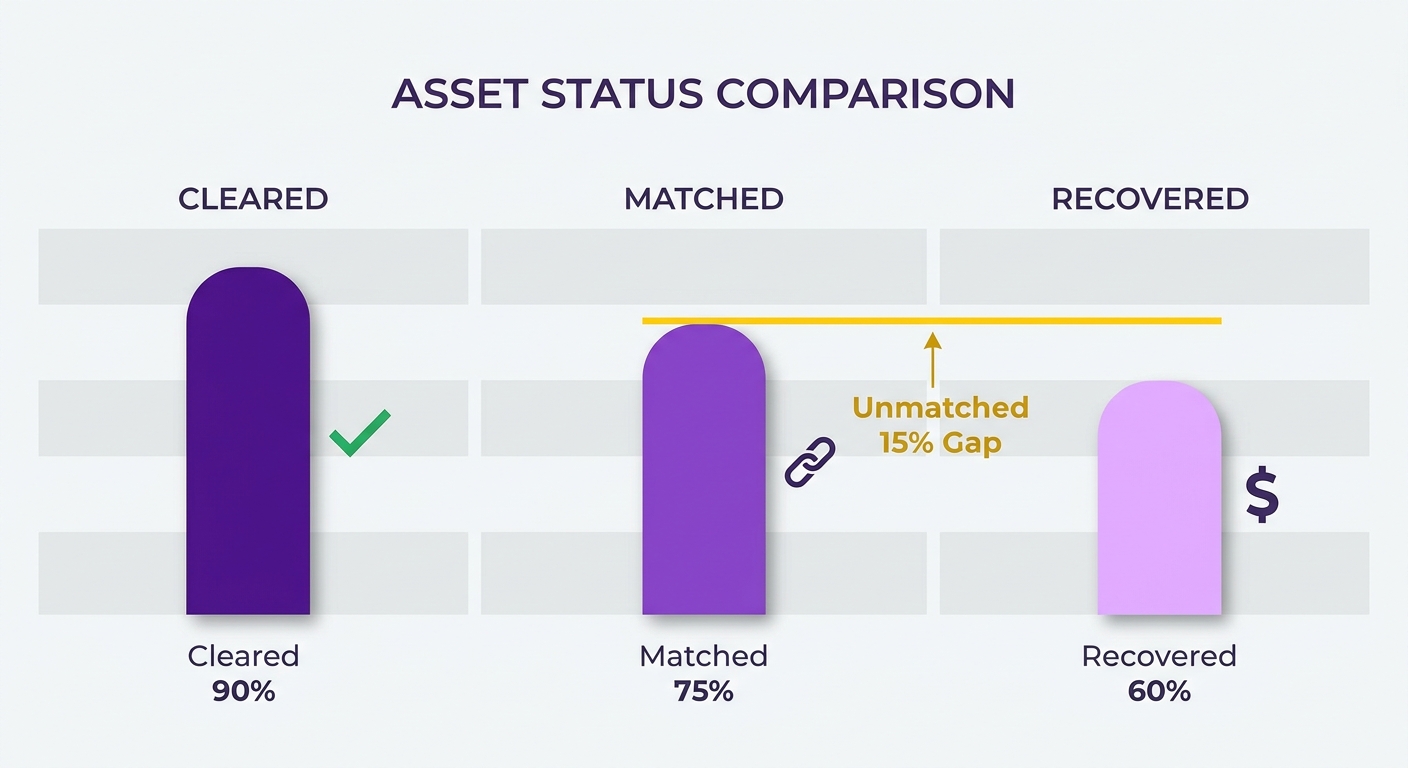
What metrics to track for dunning performance
Track four at minimum: recovery rate, involuntary churn rate, authorization rate, and time-to-reconciliation.
Recovery rate is the headline. It’s the percentage of failed charges you claw back through retries and communication. A publication that recovers 30% of its failed payments holds onto subscribers who were already engaged, which is far cheaper than replacing them.
Involuntary churn rate tells you the size of the problem. Failed transactions drive a meaningful slice of total subscriber churn, and watching this number trend down confirms your dunning is working. Authorization rate flags issuer-side patterns worth fixing. Time-to-reconciliation is the metric almost no one tracks. It measures how long recovered money takes to close its invoice. When cash application is automatic, that number sits near zero.
How to read the numbers to optimize retry timing
Start with recovery rate segmented by retry attempt. If your second and third attempts recover far less than the first, your schedule is fighting issuer behavior instead of working with it.
A standard interval schedule is simple to run and works fine at low volume. But smart retries that time re-attempts around issuer patterns recover more as transaction volume climbs. Watch the crossover in your own data. When your recovery rate per attempt flattens as volume grows, that’s the signal to move off fixed intervals.
One subscription team saw first-attempt recovery holding steady but later attempts decaying month over month. The analytics pointed to declines clustering right after monthly billing runs. Shifting retry timing lifted later-attempt recovery without touching the email copy.
Where to find improvement areas
- Segment recovery by failure reason. Expired cards, insufficient funds, and issuer declines each respond to different fixes.
- Watch the gap between “payment cleared” and “invoice closed.” A widening gap means reconciliation is leaking manual work back in.
- Review communication touches against recovery. Sequences of three to five messages over the grace period tend to recover the most.
- Tie every recovered dollar back to its invoice before calling it recovered.
The teams that improve fastest treat their dunning analytics and collections automation as one loop: retry, recover, reconcile, then read the numbers and adjust.
Design Escalation Paths and Account Suspension
Escalation paths are the ordered set of actions your system takes when a retry fails and the clock keeps running: reminder, retry, final notice, then suspension. A good escalation path gives the customer every chance to fix the charge and keeps the recovered amount tied to its open invoice so cash application closes the loop the moment payment clears.
Most teams design escalation around punishment. They suspend fast and cut access instead of focusing on recovery. Suspension isn’t the goal. It’s the last exit, and it should fire only after the recovery data has already been captured and matched. The real cost shows up in customer lifetime value: a payment failure that triggers premature suspension kills a recurring revenue stream that could have run for years.
What a well-designed escalation path looks like
A strong escalation path moves through timed stages with clear exit conditions at each one. Send an immediate notification following the initial decline, space out subsequent retries, escalate to a final warning near the end of the grace period, and suspend only if every attempt lands empty.
A card declines on renewal. On day zero, the customer receives a notification detailing the issue. Over the next two weeks, the system retries the card and sends follow-up reminders. If a retry clears midway through the cycle, the system updates the ledger automatically. If the entire grace period passes with no successful payment, the account moves to suspension, and the invoice remains flagged as open rather than being silently written off.
The tension: basic interval schedules are simple, but smart retries timed to issuer behavior recover more as volume grows. Start with a straightforward cadence, then switch to intelligent timing once your failed-charge count makes the extra recovery worth the complexity.
How to build escalation paths with automated collections
You build escalation paths as a sequence of triggers and actions, each stage carrying the invoice reference forward. Set the trigger (payment failed), define retry timing, attach the customer message, and set the suspension rule as the final branch. Every recovered payment flows, tagged to the right invoice.
Blixo automates collections, chasing, and dunning with your choice of reminders. Custom dunning and task management let your collectors follow up on delinquent accounts with a human touch before suspension. This keeps the relationship professional while actively working to resolve outstanding balances.
Common pitfalls to avoid
- Suspending too early. Cutting access before retries finish converts recoverable failures into real churn. Give the grace period room to work.
- Breaking the invoice link. If suspension logic drops the invoice reference, recovered payments can’t auto-match, and you’re back to manual reconciliation.
- One path for everyone. A 30-day trial user and a multi-year account shouldn’t hit the same suspension trigger. Segment first.
- No clean exit. Without a stop condition, the sequence keeps firing after payment clears, annoying customers who already paid.
Get these right, and suspension becomes rare because most charges recover and reconcile themselves long before the grace period ends.
Frequently Asked Questions
1. What’s the difference between a soft decline and a hard decline for retry purposes?
Soft declines are temporary issuer rejections that often clear on a second or third attempt, making them ideal candidates for automated retries. Hard declines and expired cards, on the other hand, signal permanent issues that require direct customer action to update payment details.
2. Why shouldn’t I retry a failed card every day for a week?
Aggressive daily retries can trigger fraud alerts with card issuers and exhaust your retry limits without improving recovery. Spacing out your attempts allows time for temporary issues, like credit limits or processing glitches, to resolve naturally.
3. When should I switch from a fixed schedule to smart retry timing?
Transition to intelligent retry timing when your transaction volume scales to the point where even minor improvements in recovery rates yield significant revenue gains. While a standard interval schedule is highly effective early on, larger subscriber bases benefit from machine-learning models that analyze issuer patterns.
4. Do customers lose access to their subscription while dunning runs?
Typically, best practices dictate keeping subscriptions active during the recovery window. This prevents immediate service disruption, preserving the customer experience while your automated systems work to resolve the payment issue in the background.
5. What is time-to-reconciliation, and why does it matter?
This metric tracks the duration between a successful payment recovery and the formal closing of the associated invoice. Minimizing this gap is crucial because delayed reconciliation creates administrative overhead and distorts your real-time financial reporting.
6. If dunning fails and the account suspends, is the invoice written off?
Not necessarily. When an account is suspended, the outstanding invoice should remain open in your accounting system. This ensures that if the customer eventually returns to update their billing details, the outstanding balance can still be resolved and properly accounted for.
7. Does personalizing dunning messages just mean inserting the customer’s name?
True personalization goes beyond basic mail-merge fields. It involves tailoring the communication strategy based on the customer’s history, the value of the account, and the specific nature of the payment failure to ensure the message feels relevant and helpful.