

Why Recurring Payment Tools Fail at Cash Application and Reconciliation
Why Recurring Payment Tools Fail at Cash Application and Reconciliation

Key Takeaways
- Recurring payment tools charge cards on schedule but leave deposit-to-invoice matching manual, where reconciliation actually breaks down.
- Around 44% of organizations still run cash application with little or no automation.
- Only 13% of businesses get paid on time, and disorganized cash application is a major contributor.
- The tools that work connect subscription billing to cash application and reconciliation in one flow, rather than treating them as separate jobs.
- Blixo pairs revenue recognition with an AI matching engine and auto-reconciles across bank and ERP feeds, which works for complex or mixed payment behaviors.
- Payment gateways handle recurring charges only, offering no cash application or reconciliation. They’re built for checkout, not accounts receivable.
- Legacy AR and ERP add-ons deliver strong but rigid reconciliation while demanding weeks of high-effort setup, best supported by large enterprise IT teams.
Quick Summary
Most recurring payment tools handle the charge but drop the ball after the money lands. They fire off an automatic subscription billing run, then leave you to match deposits to invoices by hand. That gap is where reconciliation breaks down, forcing finance teams to spend hours on manual data entry.
Billing a card on schedule is easy. Tying that payment back to the right invoice, recognizing the revenue, and reconciling it against your bank feed is the hard part most tools skip. When cash application is disorganized, it delays cash availability and stretches out outstanding receivables.
Which recurring payment tool actually closes the loop?
Effective platforms integrate automatic subscription billing directly with cash application and reconciliation. By keeping recurring revenue and cash receipts in a single loop, you avoid manually stitching data together at month-end.
| Tool type | Subscription billing | Cash application | Reconciliation | Setup effort | Best for |
|---|---|---|---|---|---|
| Blixo (AR + billing SaaS) | Yes, with revenue recognition | AI matching engine | Auto-reconcile, bank + ERP synced | Straightforward setup | Complex or mixed payment behaviors |
| Standalone subscription tools | Yes | Limited or none | Manual export | Medium | Simple flat-rate SaaS |
| MSP reconciliation software | Basic | Partial | Strong for MSP stacks | Medium | ConnectWise/SuperOps shops |
| Legacy AR/ERP add-ons | Add-on | Rules-based | Strong but rigid | High, weeks | Large enterprises with IT support |
| Payment gateways | Recurring charges only | None | None | Low | Checkout, not AR |
Where does the real ROI show up?
The payoff isn’t matching more payments. It’s resolving exceptions faster. Coca-Cola Bottlers recovered $33.4 million with a 34-day resolution time](https://www.highradius.com/resources/Blog/best-practices-for-accounts-receivable-management/) against a 90-day average, and Konica Minolta [banked $1.3 million in annual interest savings by tightening cash application. Companies that automate reconciliation eliminate thousands in monthly manual processing costs.
Those numbers come from cutting the time money sits unapplied, not from chasing a perfect straight-through rate. Red Bull hit 96% straight-through by first automating remittance capture. But roughly 12-18% of payments arrive unmatchable each month, which caps auto-matching near 89% no matter how smart the engine is.
That’s the case for fixing this upstream. You can’t match on invoice references you never captured, so the fix starts at billing. If your subscription tool and your cash application tool are separate systems, you’re rebuilding that reference chain by hand each cycle. Our QuickBooks recurring payments comparison digs into how that split slows teams down.
When to skip an all-in-one and when to commit
Skip the integrated approach if you bill a single flat rate to a handful of customers. A basic gateway plus a spreadsheet is fine at that scale.
Commit to it when you run metered billing, add-ons, coupons, prepayments, or partial payments. That’s where separate tools force manual reconciliation and errors creep in. The right design surfaces low-confidence matches for a human to review rather than auto-applying them, which protects you from chasing invoices your customer already paid.
Why Cash Application and Reconciliation Matter
Billing a card is the easy 10% of the job. The hard 90% is tying each deposit back to the right invoice, recognizing the revenue, and matching it against your bank feed. Most automatic subscription billing tools nail the charge and then hand you a spreadsheet for everything after. That gap costs real money: 78% of finance professionals say manual cash application leads to errors, and 69% of businesses have watched late payments climb over the past year.
For subscription businesses, this gap widens fast. Recurring revenue combines the two conditions that break manual reconciliation hardest: high transaction volume and payments scattered across gateways, cards, and currencies. The moment your subscription billing scales, your reconciliation debt scales with it.
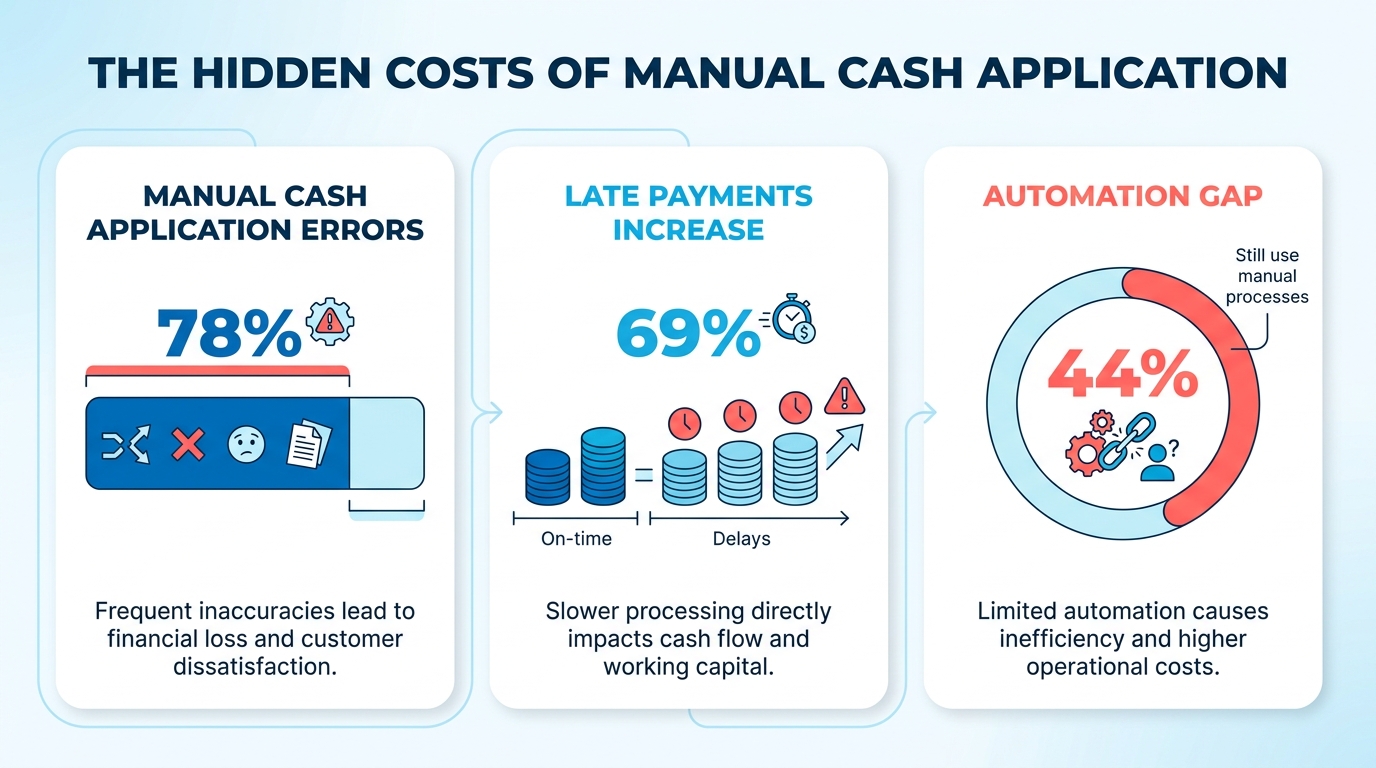
What does inefficient cash application actually cost?
It costs cash flow, staff hours, and customer trust. When a $10,000 payment gets applied to the wrong account, as it did for one mid-size manufacturer in Tesorio’s research, the discrepancy ripples through AR aging and someone ends up chasing an invoice the customer already paid.
That last part is the quiet killer. Upflow’s data shows inaccurate matching damages relationships because teams mistakenly send collection notices for completed transactions. The ResearchGate study on AR management locates the root cause upstream: high DSO and disputes are symptoms of visibility and process failures, not customers refusing to pay. The customer-facing harm is downstream of a reconciliation gap you never see on your billing dashboard.
The upside of fixing it is measurable. Automated reconciliation cuts reconciliation time by 70 to 90%, and mature setups hit straight-through processing above 90% on incoming payments. Laticrete boosted cash receipts by $6 million through AR automation; TireHub reclaimed 200 hours a week.
Is your processor’s dashboard the same as reconciliation?
No. A processor’s settlement report is passive confirmation that money moved. Reconciliation actively matches transactions across your billing records, bank feed, and ledger. Rapyd’s guide is blunt: settlement reporting can contain errors and quietly creates cash-flow blindness.
This is where single-processor recurring tools leave founders exposed. If your only source of truth is the billing tool’s dashboard, you’re mistaking settlement for verified cash application.
| Capability | Single-processor recurring tool | Standalone cash-app software | Bridged billing + cash application |
|---|---|---|---|
| Schedules recurring charges | Yes | No | Yes |
| Matches payments to invoices | Basic | Yes | Yes |
| Reconciles against bank feed | Limited | Yes | Yes |
| Ties revenue recognition to receipts | No | Partial | Yes |
| One workflow, no CSV handoffs | No | No | Yes |
Where do AI and human review fit?
Machine-learning matching raises automatic match rates by interpreting messy remittance data over time. But there’s a real tension in the field. Upflow argues a tool should be conservative, only applying matches when certain; HighRadius pushes interpretive AI that maximizes coverage.
Precision wins on the money you can’t afford to misapply. By routing low-confidence matches to a dedicated review queue, teams maintain strict control over ledger accuracy. This hybrid approach ensures that automated speed doesn’t compromise data integrity. For teams evaluating the tooling side of this, our guide on cloud accounting software that auto-reconciles recurring payments digs deeper.
Recurring Payment Tools: An Overview
Most recurring payment tools treat billing and reconciliation as separate jobs. They’ll fire off an automatic subscription billing run, confirm the charge went through, then hand you a CSV for everything that happens after. That disconnect is where the workflow breaks: you’ve billed the customer, the money landed in your account, but now you’re manually matching deposits to invoices while your AR aging report drifts further from reality.
The gap widens the moment transaction volume climbs. To resolve this, billing systems must embed unique tracking identifiers directly into the payment request, ensuring that downstream matching engines have structured data to read when the funds settle.
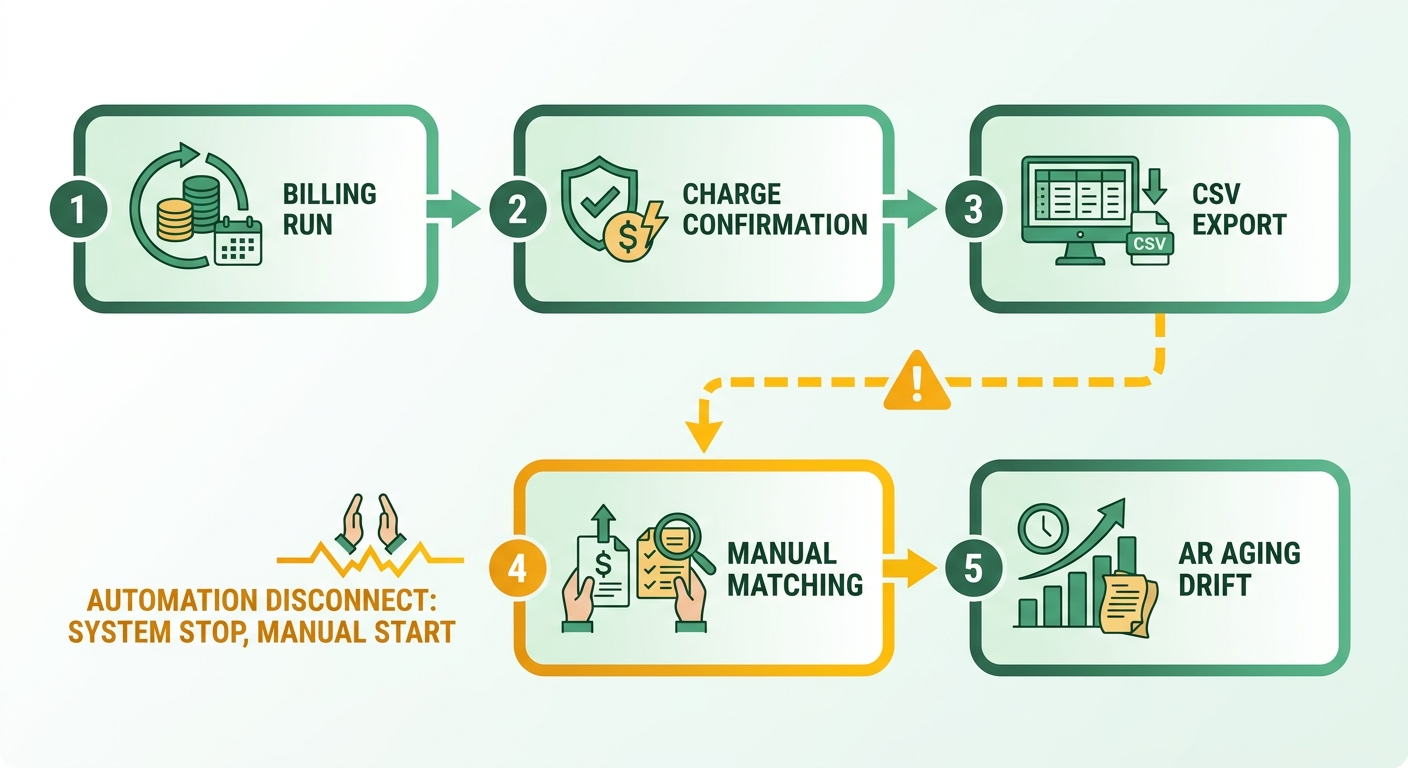
What Most Tools Handle Well
The core billing loop is table stakes. Stripe, Chargebee, and Recurly all handle subscription billing cycles, retry logic, and dunning without manual intervention. They’ll charge the card, log the transaction, and surface failed payments for follow-up. If your business runs exclusively through one processor and you never reconcile against a bank feed, these tools work fine.
Stripe’s cash application stays inside its own ecosystem, accurate for Stripe transactions and invisible for everything else. That works when 100% of your revenue flows through Stripe, but the moment you accept ACH, wire transfers, or payments through a second gateway, you’re reconciling in a spreadsheet. The platform lacks external reconciliation workflows, so finance teams export transaction logs and match them manually.
Chargebee and Recurly follow a similar pattern. They automate the subscription lifecycle and provide settlement reporting, but these reports operate in isolation from your bank ledger. Knowing a processor received funds does not tell you if those funds have cleared your bank account or if they match the corresponding open receivables. Without direct ledger integration, teams remain exposed to timing discrepancies and unrecognized transaction fees.
Where Reconciliation Falls Apart
Legacy ERP systems struggle with real-world payment complexity. NetSuite’s cash application module works when remittance data is clean: customer name matches exactly, invoice number is present, one payment per invoice. The moment a payment arrives as a bulk transfer covering six invoices, or a wire with no reference beyond “March services,” the system flags it for manual review.
Microsoft Dynamics 365 Finance offers automatic settlement of open invoices based on user-defined rules, but those rules assume structured data. When remittance arrives as a PDF attachment or an email note, the automation stops. Finance teams spend hours every month translating unstructured remittance into the format their ERP expects, exactly the manual bottleneck automation was supposed to eliminate.
The 36% of MSPs wasting 9 hours monthly on reconciliation aren’t using broken tools; they’re using tools that solve half the problem. The billing side runs smoothly, then the reconciliation side dumps everything into a manual queue because the remittance data doesn’t match the format the system requires.
Tools Built for Continuous Cash Application
A smaller set of platforms treats cash application as a continuous process instead of a month-end batch job. Ledge extracts remittance from PDFs and emails, matches payments using full transaction context, and surfaces exceptions with enough detail for quick resolution. It keeps AR and cash balances current throughout the month rather than syncing once at close.
This architecture prioritizes ledger integrity over raw automation speed. By isolating ambiguous transactions in a dedicated queue, it prevents incorrect postings that distort financial reporting. Finance teams gain immediate visibility into which accounts require manual intervention versus those that are truly delinquent.
HighRadius takes a similar stance with agentic AI that interprets unstructured remittance data. The system learns over time, so partial payments, bulk transfers, and decoupled remittances that would break rule-based matching get resolved automatically. Walmart reduced their cash application time by 70% after implementing intelligent remittance capture, not through faster manual work, but by eliminating the manual work entirely for straightforward cases.
How Blixo Closes the Loop
Our platform unifies these steps by using a single database for billing schedules, invoice generation, and bank feed ingestion. This eliminates the need for CSV exports or cross-system verification. When a transaction settles, the system cross-references the bank feed with open invoices in real time, flagging discrepancies immediately.
If a payment lacks clear identifiers, the interface presents the operator with historical customer data and open balances to streamline manual assignment. This unified data model minimizes the time spent resolving unmatched deposits. For teams looking to optimize their accounting stack, our analysis of cloud accounting software that auto-reconciles every recurring payment outlines how these integrations function at scale.
| Feature | Stripe | Chargebee | NetSuite | Blixo |
|---|---|---|---|---|
| Subscription Billing | ✓ | ✓ | ✓ | ✓ |
| Multi-Gateway Reconciliation | ✗ | ✗ | Manual | ✓ |
| Bank Feed Integration | ✗ | ✗ | ✓ | ✓ |
| Unstructured Remittance Handling | ✗ | ✗ | ✗ | ✓ |
| Revenue Recognition | Limited | ✓ | ✓ | ✓ |
| Continuous Cash Application | ✗ | ✗ | ✗ | ✓ |
The most efficient systems eliminate manual handoffs between payment processing and ledger reconciliation. By maintaining a continuous data flow, finance teams can keep accurate books without relying on manual spreadsheets.
Decoupled Remittance and Missing Payment Information
When a customer pays you, the money shows up in your bank account, but the invoice reference often doesn’t. That disconnect, what the industry calls decoupled remittance, is the reason most automatic subscription billing tools hand you a clean charge confirmation, then leave you staring at a spreadsheet trying to figure out which deposit belongs to which invoice.
The root cause isn’t customer negligence. It’s that payment networks and billing systems treat remittance data as optional metadata rather than a required field. A customer pays via ACH, the bank processes the transfer, and the reference number you embedded in the invoice never makes the trip. Your billing run fired perfectly, but the cash application team now has a $3,500 deposit and six open invoices between $2,800 and $4,200 to choose from.
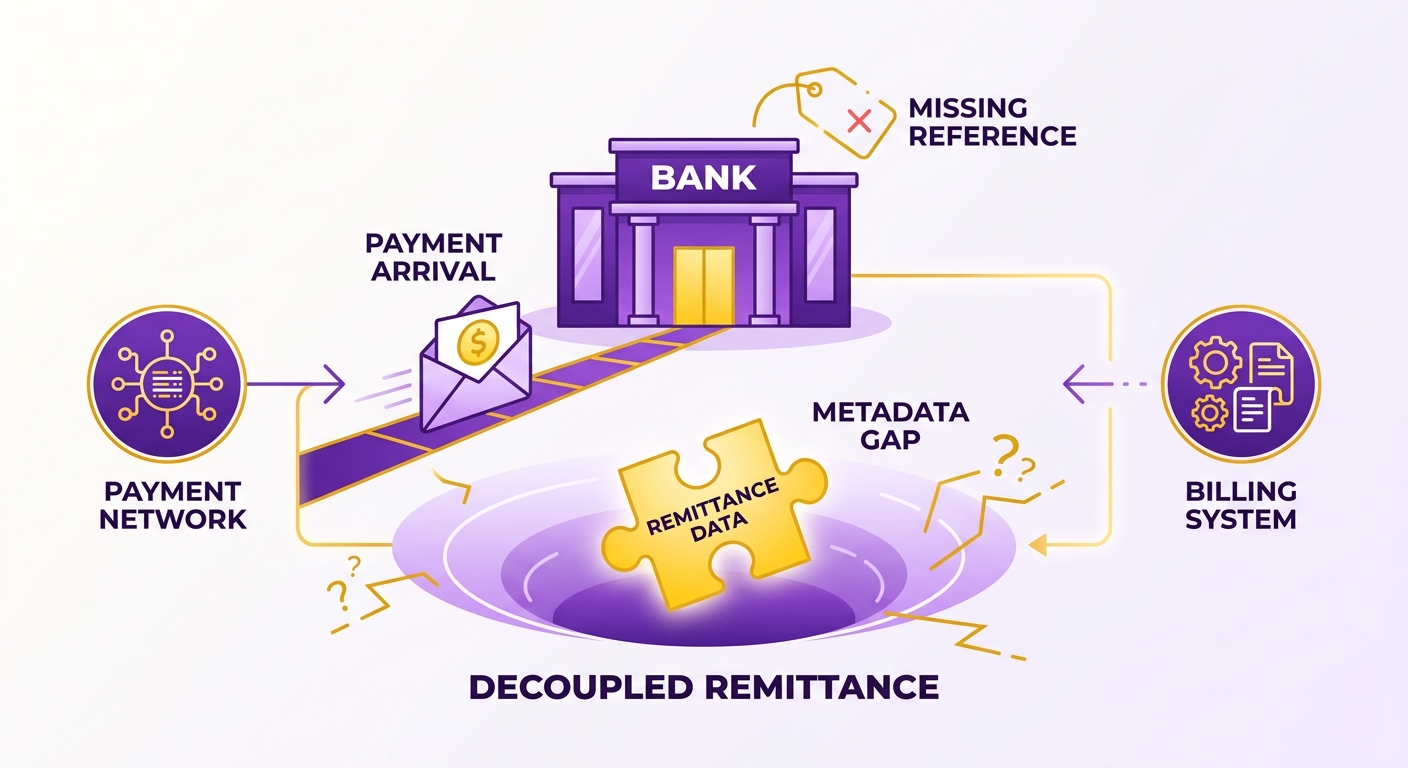
Why Missing Payment Information Breaks Automated Matching
Automation can only match what it can see. When payments arrive without invoice numbers, customer IDs, or contract references, even machine-learning cash application tools fall back to probabilistic matching, guessing based on amount, timing, and customer history. That works until you have multiple invoices for the same customer in the same amount range, or a customer pays three invoices with one transfer and provides no breakdown.
The problem intensifies when payment methods change mid-contract. A customer starts on credit card autopay through your billing portal, switches to ACH after the first year, then moves to wire transfers once their contract exceeds $50K annually. Each transition strips away a layer of automated matching. The credit card payment carries full metadata because it flows through your gateway. The ACH transfer includes a customer name but no invoice number. The wire arrives with only your company name and a transaction ID your bank generated.
Relying solely on gateway logs introduces significant risk. A gateway may mark a transaction as successful, but the actual bank deposit might reflect a different net amount due to processing fees, chargebacks, or currency adjustments. True reconciliation requires comparing the bank statement directly against the internal ledger to identify these discrepancies before closing the period.
How Recurring Payment Tools Handle (or Ignore) the Problem
Most billing platforms solve the billing side, then stop. They’ll retry failed charges, send dunning emails, and update subscription statuses, but once the payment clears the gateway, reconciliation becomes your problem. The pattern holds: clean in-network transactions, customer pays via the billing portal with the invoice ID pre-filled, reconcile automatically. External payments, ACH transfers, wire payments, checks mailed to your office, drop into a manual queue.
Dedicated cash application software attempts to solve this by using optical character recognition (OCR) and document parsing to pull remittance data from email attachments and billing portals. While this helps match unstructured data, it often creates a synchronization problem. If your billing engine, document parser, and ERP operate on separate databases, updates do not propagate automatically. An invoice marked as cleared in one tool may still show as outstanding in your primary ledger, leading to fragmented reporting.
The disconnect shows up clearest when partial payments arrive. A customer owes $15,000 across three invoices, sends $10,000 with no allocation instructions, and your billing system has to decide: apply it to the oldest invoice, split it proportionally, or wait for clarification? Different tools make different assumptions, which means your revenue recognition timing depends on which software you chose, not what the customer actually paid for.
To prevent this fragmentation, our platform captures payment metadata at the moment of transaction initiation. By linking the billing engine directly to the reconciliation ledger, the system matches incoming funds using pre-validated transaction IDs. When manual adjustments are required, the machine-learning engine records the operator’s corrections, improving its matching accuracy for future cycles and maintaining a unified ledger.
The fix isn’t better matching algorithms alone. It’s ensuring the data you need for reconciliation gets captured at billing, not hunted down after the deposit clears.
Data Inconsistencies in Multi-ERP Environments
When you run more than one ERP, the same customer, invoice, and payment can exist in three slightly different forms at once. That mismatch is where recurring payment tools quietly break. An automatic subscription billing engine fires a charge in one system, the deposit lands in a bank feed tied to another, and your revenue ledger sits in a third. Each system spells the customer name differently, formats the invoice number its own way, and stamps the transaction with its own timestamp.
The result is a reconciliation gap that no matching algorithm can close on its own. Tools assume clean, consistent data flowing between systems. Real multi-ERP setups rarely deliver that. A business running one ERP for its US entity and another for its EU operations ends up with two charts of accounts, two tax treatments, and two definitions of “paid.”
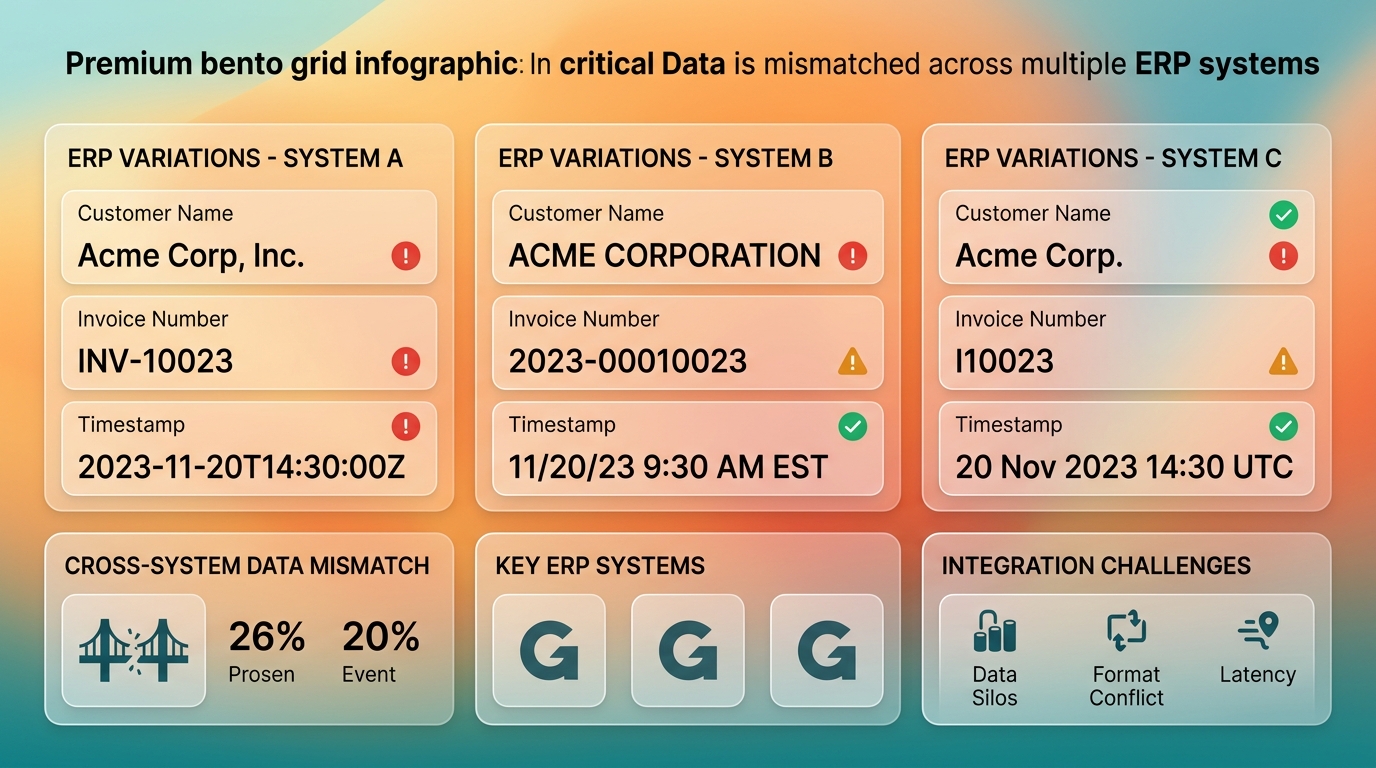
Why do multiple ERPs create matching failures?
Multi-ERP environments break matching because each system normalizes data differently, so identical transactions look like different records. Currency conversion timing makes this worse. Timing discrepancies in currency conversion create settlement gaps, where the amount your processor reports never quite equals the amount that settles.
A cross-border SaaS deal: your billing ERP invoices in EUR, your processor settles in USD two days later, and your accounting ERP records the payment at a third exchange rate. Three systems, three numbers, one invoice. Without normalization, your team spends month-end chasing a variance that was never a real discrepancy.
This is why the standard reconciliation pipeline runs data collection, normalization, transaction matching, exception handling, then reporting. Skip normalization and every downstream step inherits the noise.
Conservative matching or interpretive AI?
Both approaches serve distinct operational needs. Machine learning is highly effective for normalizing inconsistent naming conventions across legacy databases, while strict validation rules prevent incorrect ledger postings. A balanced workflow uses automated matching for standardized records and routes anomalies to a central review dashboard, ensuring data integrity across all entities.
| Approach | Strength | Risk |
|---|---|---|
| Interpretive AI matching | High straight-through rate on messy data | False positives on ambiguous records |
| Conservative rule-based | Precision, fewer misapplied payments | Lower coverage, more manual work |
| Unified billing + cash app | Shared data model, no cross-ERP drift | Requires consolidating systems |
The payoff for getting normalization right is measurable. Teams that standardize data formats across systems see payment posting errors drop by 40 to 60 percent, and resolution cycles tighten from weeks to days. A European logistics firm cut cross-entity reconciliation from 12 days to 3 after implementing unified customer identifiers across its German and French ERPs, eliminating 80 percent of manual investigation time.
For SaaS teams, the cleanest fix is standardizing the data at the source. When billing and cash application share a unified data model, cross-entity discrepancies are eliminated. Our platform maps multi-currency transactions and entity-specific ledgers to a single source of truth, preventing data drift before it reaches your accounting systems.
Complex Payment Behaviors and Exception Management

Complex payment behaviors are the payments that refuse to match cleanly: partial payments, one transfer covering five invoices, overpayments, credits applied to the wrong period, and currency timing gaps. These are exactly where many billing tools fall apart. They were built to charge a card on schedule, not to untangle what actually lands in your bank a few days later.
The scale of the mess is bigger than most teams admit. 91% of finance tech leaders say their organization still receives checks, so even a modern billing stack has to cope with mixed payment streams it never generated. A manufacturing company processing wire transfers from international distributors might receive three payments in one day, each covering different combinations of invoices from the past quarter, with no remittance detail beyond a customer name.
Why Do Complex Payments Break Automated Matching?
Exception: any payment that can’t be matched to an invoice by the tool’s default rules. Short payments, split payments, and multi-currency settlements all land here.
Multi-currency operations compound this issue. When exchange rates fluctuate between the invoice date, the payment date, and the bank deposit date, standard billing tools struggle to allocate the resulting variances. Without a system that automatically calculates and logs these exchange differences to a realized gain/loss account, finance teams must manually adjust the ledger for every international transaction.
Minimizing exceptions requires capturing structured payment instructions at the point of interaction. If the billing portal allows customers to pay arbitrary amounts without selecting which invoices they are paying, manual intervention is inevitable. The solution lies in designing payment workflows that require or guide the user to allocate funds during checkout.
How Does Exception Management Separate Good Tools From Bad?
The best tools don’t just flag exceptions. They surface each one with full transaction context so a human can resolve it in seconds instead of chasing three systems. Finance teams using manual cash application report that 40% of their payment volume requires some form of research before posting. Reducing that to single-digit exception rates changes how fast you can close the books.
Here’s how the common approaches stack up on exception handling:
| Capability | Generic subscription billing tool | ERP cash-app module | Blixo |
|---|---|---|---|
| Handles short/split payments | Manual | Partial | Automated matching |
| Surfaces exceptions with context | Rarely | Limited | Yes |
| Multi-gateway reconciliation | No | Depends on setup | Yes |
| Billing + revenue recognition + cash application | Billing only | Separate modules | One workflow |
Our platform addresses this by linking the customer payment portal directly to the open receivables ledger. When a customer initiates a payment, they must select the specific invoices they are settling, or the system automatically applies the payment according to pre-configured business rules, such as oldest invoice first. This structured capture prevents orphaned deposits from reaching the bank feed.
How Automated Exception Management Delivers Real Savings
Automating exception management removes the manual queue that typically consumes finance team hours. A company processing 500 transactions monthly can spend 15-20 hours on exceptions alone when using disconnected tools. For SaaS teams reconciling recurring revenue against scattered receipts, closing the loop between systems is what keeps that tax off your books. If your payment data is already clean and single-gateway, though, a lightweight tool is fine. This depth only pays off once volume and payment variety climb.
FAQ
What is cash application in accounts receivable?
Cash application is the process of matching incoming payments to open invoices in your AR ledger. It converts a bank deposit into a cleared receivable by linking the payment to the correct customer and invoice. Without accurate cash application, your books show deposits but no reduction in outstanding invoices.
Why do recurring payment tools fail at reconciliation?
Most recurring payment tools automate billing but leave reconciliation manual. They charge the card on schedule, confirm the transaction, then hand you a CSV for matching deposits to invoices. That disconnect forces finance teams to manually reconcile payments against bank feeds and open receivables.
What is decoupled remittance?
Decoupled remittance occurs when payment arrives without invoice references. A customer pays via ACH or wire transfer, but the bank processes the transaction without passing along the invoice number or customer ID you embedded in the billing request. Your team receives a deposit with no clear way to match it to an open receivable.
How does multi-ERP complexity break cash application?
Multi-ERP environments store customer names, invoice numbers, and payment records in different formats across systems. When your billing ERP, processor, and accounting ERP each normalize data differently, the same transaction looks like three different records. Reconciliation tools struggle to match across these inconsistencies.
What is an exception in cash application?
An exception is any payment that can’t be automatically matched to an invoice. Partial payments, split payments covering multiple invoices, overpayments, and payments with missing remittance data all become exceptions. They require manual review to post correctly.
How does Blixo handle complex payment behaviors?
Blixo captures payment metadata at the point of transaction, linking the billing engine directly to the reconciliation ledger. When payments arrive without clear identifiers, the interface surfaces historical customer data and open balances to streamline manual assignment. The AI matching engine learns from operator corrections, improving accuracy over time.
What is the ROI of automating cash application?
Automated cash application cuts reconciliation time by 70 to 90%. Coca-Cola Bottlers recovered $33.4 million](https://www.highradius.com/resources/Blog/best-practices-for-accounts-receivable-management/) with a 34-day resolution time, and [Konica Minolta saved $1.3 million annually by tightening cash application. The ROI comes from reducing the time money sits unapplied, not from increasing the straight-through match rate.
When should I use a unified billing and cash application platform?
Use a unified platform when you run metered billing, add-ons, coupons, prepayments, or partial payments. That’s where separate tools force manual reconciliation and errors creep in. If you bill a single flat rate to a handful of customers, a basic gateway plus spreadsheet is fine.
References
[1] Best Practices for Accounts Receivable Management - https://www.highradius.com/resources/Blog/best-practices-for-accounts-receivable-management/
[2] Cash Application in Accounts Receivable - https://www.highradius.com/resources/Blog/cash-application-in-accounts-receivable/
[3] O2C Automation - https://upflow.io/blog/o2c-automation
[4] Accounts Receivable Reconciliation: A Comprehensive Guide - https://www.tesorio.com/blog/accounts-receivable-reconciliation-a-comprehensive-guide/
[5] Optimizing Accounts Receivable Management - https://www.researchgate.net/publication/384524476_Optimizing_Accounts_Receivable_Management_Best_Practices_and_Innovative_Strategies_for_Financial_Health
[6] Reconciliation vs Settlement: What’s the Difference? - https://www.rapyd.net/resources/articles/reconciliation-vs-settlement-whats-the-difference/
[7] QuickBooks Recurring Payments vs Blixo - https://blixo.com/blog/en/post/quickbooks-recurring-payments-vs-blixo-which-bills-saas-subscriptions-faster-e063/
[8] Cloud Accounting Software That Auto-Reconciles Every Recurring Payment - https://blixo.com/blog/en/post/pick-cloud-accounting-software-that-auto-reconciles-every-recurring-payment-78b0/
[9] Stripe Billing Documentation - https://stripe.com/docs/billing
[10] Chargebee - https://www.chargebee.com/
[11] Recurly - https://recurly.com/
[12] NetSuite Cash Application - https://www.netsuite.com/portal/resource/articles/accounting/cash-application.shtml
[13] Microsoft Dynamics 365 Finance - Settle Remainder - https://learn.microsoft.com/en-us/dynamics365/finance/cash-bank-management/settle-remainder
[14] MSP Accounting Mistakes: Reconciliation - https://www.hellobaton.com/blog/msp-accounting-mistakes-reconciliation
[15] Ledge - https://www.getledge.com/
[16] HighRadius - https://www.highradius.com/