

Best Accounts Receivable Software for Subscription Service Businesses: Where PayPal Invoicing Fits
In short: PayPal Invoicing can schedule recurring invoices and send payment reminders, but it doesn’t track subscriptions as financial records. You won’t find proration for mid-cycle upgrades, usage metering for overage billing, or structured dunning workflows for failed payments. A subscription business billing hundreds of customers needs more than invoice automation—it needs subscription-aware AR that ties billing logic to customer lifecycle changes.
What you need to know up front
PayPal Invoicing works for freelancers sending the same monthly retainer to a handful of clients. If your service business runs on tiered pricing, usage charges, or payment recovery workflows, you’re going to hit PayPal’s limits fast.
Can PayPal Invoicing handle recurring invoices and automated payment reminders for subscription-based service businesses?
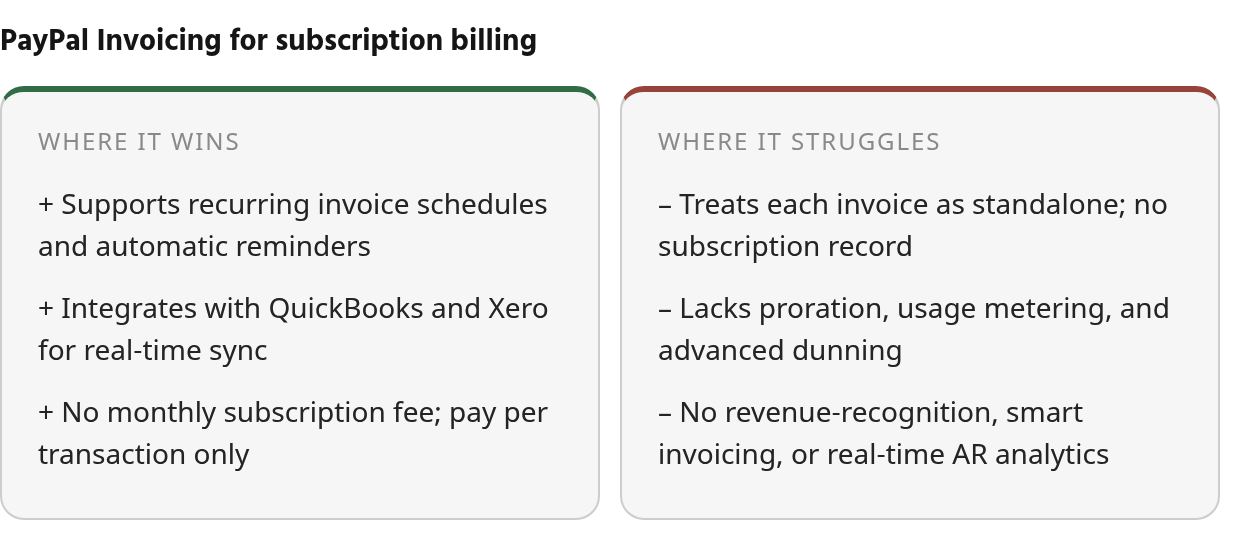
PayPal Invoicing supports recurring invoice schedules and automatic payment reminders that cover basic subscription models. You set weekly, monthly, quarterly, or custom intervals, and the system sends reminders before, on, and after the due date by default. For a simple monthly retainer or quarterly consulting package, this keeps cash flowing without manual follow-up.
PayPal’s recurring billing treats each invoice as a standalone transaction, not a subscription record. You won’t find proration logic for mid-cycle upgrades, usage metering for overage charges, structured dunning with retry schedules when payments fail, or ASC 606 revenue recognition for audit-ready reporting. For companies managing tiered plans, add-ons, or seat-based pricing, PayPal’s simplicity turns into a constraint as invoice volume grows.
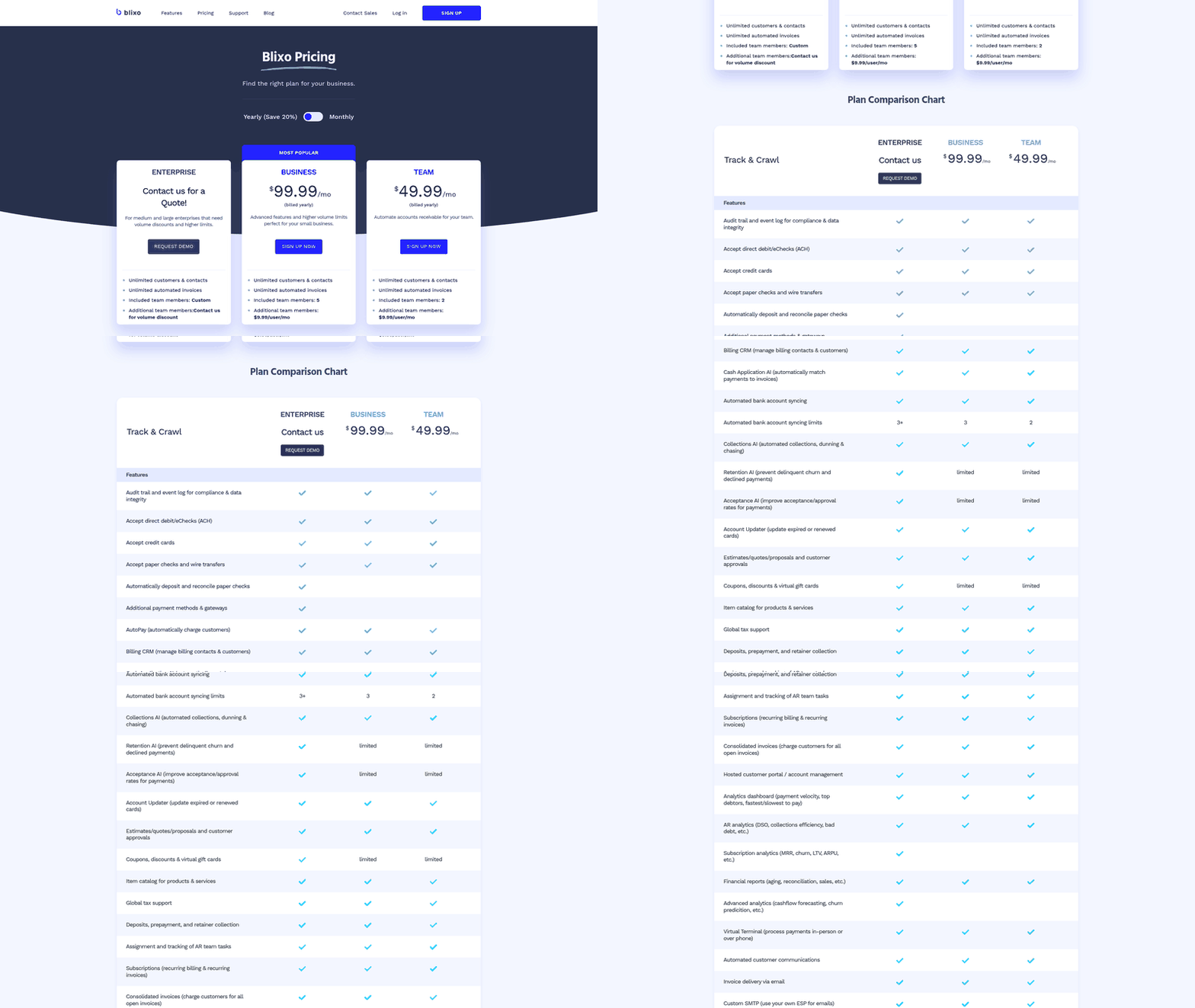
Blixo offers automated collections, dunning, and chasing with customizable reminders. It ties payments to subscription records, enabling failed-payment recovery and usage-based billing.
| Tool | Recurring invoices | Dunning / failed-payment recovery |
|---|---|---|
| PayPal Invoicing | Yes | Auto-reminders only |
| Blixo | Yes | Automated collections, dunning, chasing |
Many businesses start with simpler tools for invoicing, then migrate when they need subscription-aware features. The gap isn’t a fault of basic invoicing—it serves a different purpose than subscription billing platforms.
Why subscription AR is different from invoicing
Recurring billing at scale creates problems that simple invoicing tools were never designed to solve. A service business starts with basic invoicing, then discovers its tool can’t handle contract changes, variable charges, or payment recovery without manual finance work. That’s when cash flow disruption becomes real.
Late payments hit subscription businesses hard.
For straightforward billing, PayPal gives teams the core workflow: scheduled invoices and reminder emails.
The stress points appear when the customer relationship changes after the invoice template is created. Annual-plan discounts, contract amendments, payment method updates, or seat-count changes all require billing context that a payment-gateway invoice doesn’t maintain on its own. Instead of updating a subscription record and letting the system calculate the downstream invoice impact, your team makes those decisions manually.
Chargebee Receivables is one example of a subscription-aware approach because it associates PayPal payments with recurring customer records rather than treating collection as a disconnected event. QuickBooks Payments can be a sensible fit for companies already working inside QuickBooks and using simple recurring auto-charge workflows. For SaaS or B2B service businesses with layered contracts, the better benchmark is whether the AR tool understands the subscription lifecycle from quote through renewal.
| Business Profile | Subscription AR Need | Where PayPal Invoicing Fits |
|---|---|---|
| Freelancer, simple monthly retainers | Basic recurring invoicing, payment reminders | Works well—low complexity, low volume |
| Service agency with tiered pricing | Annual discounts, mid-cycle changes, payment method updates | Requires manual workarounds for proration and contract amendments |
| B2B SaaS with usage-based billing | Metering, dunning, subscription lifecycle management | Outgrown—needs subscription-native platform |
The deployment gap for AR automation isn’t ROI—it’s implementation complexity and vendor selection paralysis, especially for subscription businesses that need billing-aware AR rather than generic invoicing.
What PayPal Invoicing actually does
PayPal Invoicing lets you create professional invoices from your PayPal business account and collect payments online through cards, PayPal, Venmo, or ACH. For subscription-based service businesses needing recurring invoices and automated payment reminders, it covers the basics: you can set repeat billing schedules and have the system send follow-ups when invoices are due or overdue.
Public materials say PayPal charges a per-transaction percentage plus a fixed fee per paid invoice in the US. Pricing should be verified directly with PayPal.
What PayPal Invoicing actually automates
Three automation features matter for recurring billing: reusable invoice templates, recurring invoice series, and automatic payment reminders. Templates save customer details, line items, pricing, and terms so you’re not rebuilding invoices from scratch. Recurring series let you attach a template to a billing schedule, and PayPal sends each invoice automatically—no manual trigger, no missed cycles.
Reminders run by default when invoices reach payment milestones. You can adjust timing in the invoice settings, but the evidence describes this as a single-layer reminder system. Our research didn’t document multi-step escalation logic, channel mixing, or the dunning intelligence subscription platforms build for failed payment recovery.
Where the AR capabilities end
PayPal Invoicing syncs with QuickBooks and Xero through Accounting Sync, which pushes invoicing details, payment updates, and transaction records into your accounting system in real time. That integration handles basic cash-flow tracking, but we didn’t find documentation of a dedicated cash-application engine or automated reconciliation workflows that full AR platforms provide.
The dividing line is adaptability. PayPal can repeat an invoice, but it doesn’t dynamically rebuild the billing event when a plan, quantity, or contract term changes. The platform works well for straightforward recurring services, but it wasn’t built for the subscription-management complexity that SaaS or professional-service businesses often encounter as their billing needs grow.
What subscription AR should do that PayPal doesn’t
A practical way to evaluate PayPal is to separate invoice automation from subscription AR. PayPal automates sending and reminding. Subscription AR automates the financial logic behind the invoice: what should be billed, when it should change, how failed payments should be recovered, and how the result should flow into reporting.
This difference matters in everyday finance operations. If a customer upgrades mid-month, a subscription platform should calculate the adjustment. In PayPal, a team member decides the amount and edits the invoice. If a card fails, PayPal can notify the customer, but it doesn’t orchestrate a recovery sequence with retry rules and escalation logic.
QuickBooks Payments and Zoho Books both accept PayPal as a payment method while offering recurring billing and auto-charge features, but they still lack deep collections tools and failed-payment recovery tactics. Subscription-focused AR platforms integrate with multiple payment gateways including PayPal and tie collections activity to the customer lifecycle, which matters when you need a single view of upgrades, downgrades, renewals, and add-ons.
| Feature | PayPal Invoicing | QuickBooks Payments | Subscription AR Platform |
|---|---|---|---|
| Recurring billing | ✓ (basic schedules) | ✓ (auto-charge) | ✓ (subscription-native) |
| Usage-based billing | ✗ | ✗ | ✓ |
| Proration for upgrades | ✗ | ✗ | ✓ |
| Advanced dunning | ✗ | ✗ | ✓ |
| PayPal integration | Native | Supported | Supported |
Once finance teams are managing higher invoice volumes, layered pricing, or payment-risk workflows, the manual steps erase the time savings automation was meant to deliver.
Smart invoicing and automated dunning
Smart invoicing for subscription businesses means automated invoice creation that handles recurring charges, discounts, usage or hybrid charges, taxes, and contract terms without manual calculation. B2B subscription contracts often include tiered discounts—15% off for committing to an annual plan—and the invoice needs to reflect that automatically each billing cycle. When a customer changes plans mid-month, the system should prorate the charges and generate an accurate invoice without a finance team member recalculating line items in a spreadsheet.
Subscription billing errors don’t just delay cash flow—they damage customer trust and affect retention metrics. Many B2B customers prefer that suppliers send invoices to their accounting team for review and approval rather than using auto-pay, which means your invoicing system needs to generate accurate, transparent invoices that won’t trigger disputes or require correction.
Automated dunning refers to structured, scheduled payment outreach around due dates and failed payments. For subscription businesses, this includes declined-payment workflows, escalating messages, and handoff rules for accounts that need human intervention. The goal is to recover revenue without turning every late invoice into a one-off support task.
PayPal Invoicing’s reminder controls help prompt payment on an invoice, but they don’t adjust cadence based on customer risk, subscription status, or prior payment behavior. If an account needs a different recovery path, your finance or customer-success team manages that outside the platform.
AI-powered cash application and real-time reporting
AI-powered cash application automates matching incoming payments to open invoices. Instead of a finance team manually reconciling bank deposits with outstanding invoices at month-end, the system reads remittance data, applies payments to the correct invoice, and syncs the result to your accounting software. This eliminates hours of manual work and reduces errors that create downstream reporting problems.
AR automation can reduce DSO, lower manual processing work, and improve forecasting accuracy. Advanced platforms use AI for capture, classification, and prioritization, with policy-driven decision rules. The shift is from receivables backlog to measurable operational outcomes.
Real-time reporting and forecasting give you live visibility into what’s current, overdue, and at risk, filtered by customer, aging bucket, or sales rep. This matters for subscription businesses that rely on predictable revenue streams. PayPal Invoicing offers real-time invoice tracking from your business dashboard—you can see when an invoice is sent, viewed, paid, or overdue—but it doesn’t provide aging reports, DSO metrics, or cash-flow forecasting.
For subscription businesses managing many customers monthly, the gap between invoice tracking and AR analytics becomes material. You need to know which customers are at risk of churn due to payment issues, which accounts require immediate follow-up, and how upcoming renewals will impact cash flow. PayPal Invoicing tracks individual invoice status but doesn’t aggregate that data into actionable metrics.
Integration breadth and compliance verification
Integration breadth determines how well your AR software connects with the rest of your financial stack. Subscription-focused AR platforms integrate with multiple payment gateways including PayPal, which means you can offer customers multiple payment methods while managing all transactions in one system. QuickBooks Payments and Zoho Books both support PayPal and sync invoices with accounting software, reducing manual data entry.
PayPal Invoicing offers Accounting Sync that connects to QuickBooks and Xero, bringing invoicing details, payment updates, and transaction records into your accounting system automatically. For businesses already using QuickBooks or Xero, this eliminates tedious manual entry and keeps records up to date in real time.
The limitation is that PayPal Invoicing doesn’t integrate with CRM or subscription management platforms, which creates data silos when you’re tracking customer relationships, payment history, and subscription changes across multiple systems. If you need to pull a report showing which customers upgraded, downgraded, or churned in the last quarter, you’re exporting data from PayPal and matching it manually with your CRM records.
Compliance and security matter for recurring payments, especially when handling customer payment data. PayPal Invoicing is PCI-compliant, but the platform doesn’t support revenue recognition under ASC 606 or IFRS 15, which subscription businesses need for financial reporting and audit trails. If your business is scaling toward an IPO or investor audit, you’ll need subscription-aware AR software that tracks revenue recognition alongside payment collection.
| Capability | PayPal Invoicing | QuickBooks Payments | Subscription AR Platform |
|---|---|---|---|
| Smart invoicing (recurring + discounts) | Partial | ✓ | ✓ |
| Automated dunning | Basic reminders | Limited | ✓ |
| AI cash application | ✗ | ✗ | ✓ |
| Real-time reporting / forecasting | Invoice tracking only | ✓ | ✓ |
| Integration breadth | QuickBooks, Xero | Native QuickBooks | Multiple gateways |
| Compliance (ASC 606 / IFRS 15) | ✗ | ✗ | ✓ |
Skip PayPal Invoicing if the billing operation depends on complex pricing, variable usage, or systematic recovery of unpaid recurring charges. The right move is adopting subscription-aware AR software that treats PayPal as a payment method rather than the billing system.
How Blixo handles what PayPal doesn’t
Blixo is built for subscription service businesses that outgrow PayPal Invoicing’s basic recurring schedules. If you’re asking whether PayPal invoicing can handle recurring invoices and automated payment reminders for subscription-based service businesses, the honest answer is: it handles simple recurring invoicing, but it’s not designed to manage the billing operations behind a mature subscription model.
What Blixo handles that PayPal Invoicing doesn’t
Blixo treats subscription billing as the core financial workflow, not an add-on to generic invoicing. We automate recurring invoice generation, track subscription lifecycle events like plan changes, and sync with accounting software like QuickBooks, Xero, Sage Intacct, and NetSuite so your books stay current. PayPal can pass invoice and payment information into accounting systems, but it doesn’t maintain the subscription context your finance team needs when the customer relationship changes.
We support multiple payment methods and gateways so you collect through the channel each customer prefers. Our collections workflows coordinate outreach across multiple channels so delinquent accounts are managed by a repeatable process rather than an inbox checklist. PayPal’s reminder workflow is useful for basic follow-up, but it doesn’t replace an AR operation built around collections strategy.
Our intelligent matching engine reconciles incoming payments to open invoices automatically. That matters when a customer pays several invoices together, applies a credit, or sends a partial payment. Without that matching layer, finance teams often compare deposits, invoices, and GL entries by hand.
| Feature | Blixo | PayPal Invoicing |
|---|---|---|
| Recurring billing engine | Native subscription management with recurring invoices and plan changes | Basic recurring schedules (weekly/monthly/quarterly) |
| Revenue tracking | Real-time revenue data via accounting integrations | Via accounting software sync only |
| Failed payment recovery | Automated collections and dunning | Overdue reminders only |
| Payment methods | Multiple gateways and payment methods including ACH, cards, checks | PayPal ecosystem only |
| Cash application | Intelligent matching engine for payments and invoices | Marks invoices paid; manual reconciliation |
| Best for | B2B SaaS, subscription services with recurring billing needs | Freelancers, micro-businesses with simple retainers |
Blixo works for B2B SaaS and professional service teams billing customers with tiered pricing or usage-based models. If your subscription model fits a single monthly rate and you send under 20 invoices per month, PayPal Invoicing’s pay-per-transaction pricing may cover your needs. Once you need subscription management, collections automation, or streamlined cash application, the gap becomes expensive in manual work and lost recovery opportunities.
Common Questions
Does PayPal Invoicing support proration when a subscription customer upgrades or downgrades mid-cycle?
No. PayPal Invoicing can repeat an invoice, but it does not calculate the financial adjustment created by a mid-cycle subscription change. If customers frequently move between plans, add seats, remove seats, or renegotiate contract terms, you will need either a manual review step or a subscription-native platform that records the change and generates the corrected charge.
What happens when a credit card declines on a recurring PayPal invoice—does the system retry automatically?
PayPal Invoicing can notify customers that an invoice is unpaid, but the recovery process remains limited compared with subscription AR tools. It does not run a full collections playbook tied to customer segment, risk level, payment history, and escalation rules. Teams that need stronger failed-payment recovery should look for software that manages retries and follow-up as part of the recurring-revenue workflow.
Can I use PayPal Invoicing if my subscription business needs ASC 606 revenue recognition for audit reporting?
PayPal is suitable for collecting payments and tracking invoice status, but it is not a revenue-recognition system. If audit reporting, investor diligence, or subscription accounting controls are part of your roadmap, choose AR software that connects billing, collection, and revenue schedules in one process rather than relying on invoice data alone.
How does Blixo’s intelligent matching engine differ from PayPal’s invoice-paid confirmation for cash application?
A paid-invoice status confirms that money came in for a specific invoice. Blixo goes further by matching payments from multiple sources to the correct open items, including more complicated remittance situations such as credits, partial payments, and grouped payments. That distinction becomes important when finance teams need clean reconciliation instead of a simple payment notification.