

Skip the AR Tool Shortlist: Test Payment Posting on Your Messiest Remittance

Quick Answers
- A three-day posting lag on a day-30 payment adds exactly three days of artificial DSO. Process delay, not credit risk, does the damage.
- Unapplied cash is money that cleared the bank but stays unmatched to invoices. It inflates open AR and makes aging reports unreliable for forecasting.
- Rules-based matching handles the obvious cases. Anything that deviates from exact amounts, invoice numbers, or identifiers goes straight to a manual queue where backlogs build.
- Unmatched payments trigger dunning notices for invoices customers already paid. That friction is a process problem wearing a collections costume.
- Retail and wholesale remittances carry the most line items and deduction codes. They generate the most posting friction before anything reaches the ledger.
- Vendor sandboxes with clean test data prove nothing about exception handling. Only a live run against your actual messy remittances exposes where matching logic breaks.
Why Accurate Payment Posting Matters
In short: every day a matched payment sits unposted is a day your DSO climbs for no reason. If your team still hand-matches messy remittances, run a posting test before you shortlist any AR automation tool.
Payment posting is the moment revenue becomes working capital. When it goes slowly, the damage spreads across DSO, cash forecasting, and your collections queue in ways that don’t always trace back to the posting step itself.
Manual cash application spends most of its effort on interpretation. Your team confirms which customer paid, figures out which invoices belong to that payment, and reconciles remittance details that may arrive separately from the money. At volume, that work becomes a timing problem as much as an accounting one: cash hits the bank while the ledger still shows the invoice as open.
What Posting Lag Actually Costs You
When cleared payments sit unresolved, open AR stops reflecting economic reality. Aging reports get noisy. Forecasts get harder to trust. Your finance team starts spending time explaining timing differences instead of managing cash.
There’s a collections cost hiding in there too. A payment sits unmatched, the customer gets a dunning notice for an invoice they already paid. That’s friction you created, not a credit problem you found.
- Check unresolved cash as a percentage of total cash received. If that figure is growing, you probably have a posting problem, not a collections problem. Diagnosing the wrong one wastes everyone’s time.
- Track the time from payment receipt to posted cash. Automation should compress that window. A persistent gap between clearing and posting means your cash-flow forecast is not reflecting reality.
Where Messy Remittances Break the Process
Posting delays concentrate at the point where payment evidence has to become a ledger decision. A check arrives with no useful reference. An ACH memo is too vague to act on. The backup lives in a customer portal someone has to log into manually. The harder a payment is to explain, the longer it waits.
Older automation clears the obvious cases. Its weakness shows up when customer names vary, references are incomplete, deductions go unexplained, or one payment spans several open items. Those are the transactions that quietly become backlog.
The exceptions decide how fast your cash actually arrives. A feature list won’t tell you how a tool handles your actual payment mix. Only a live test will.
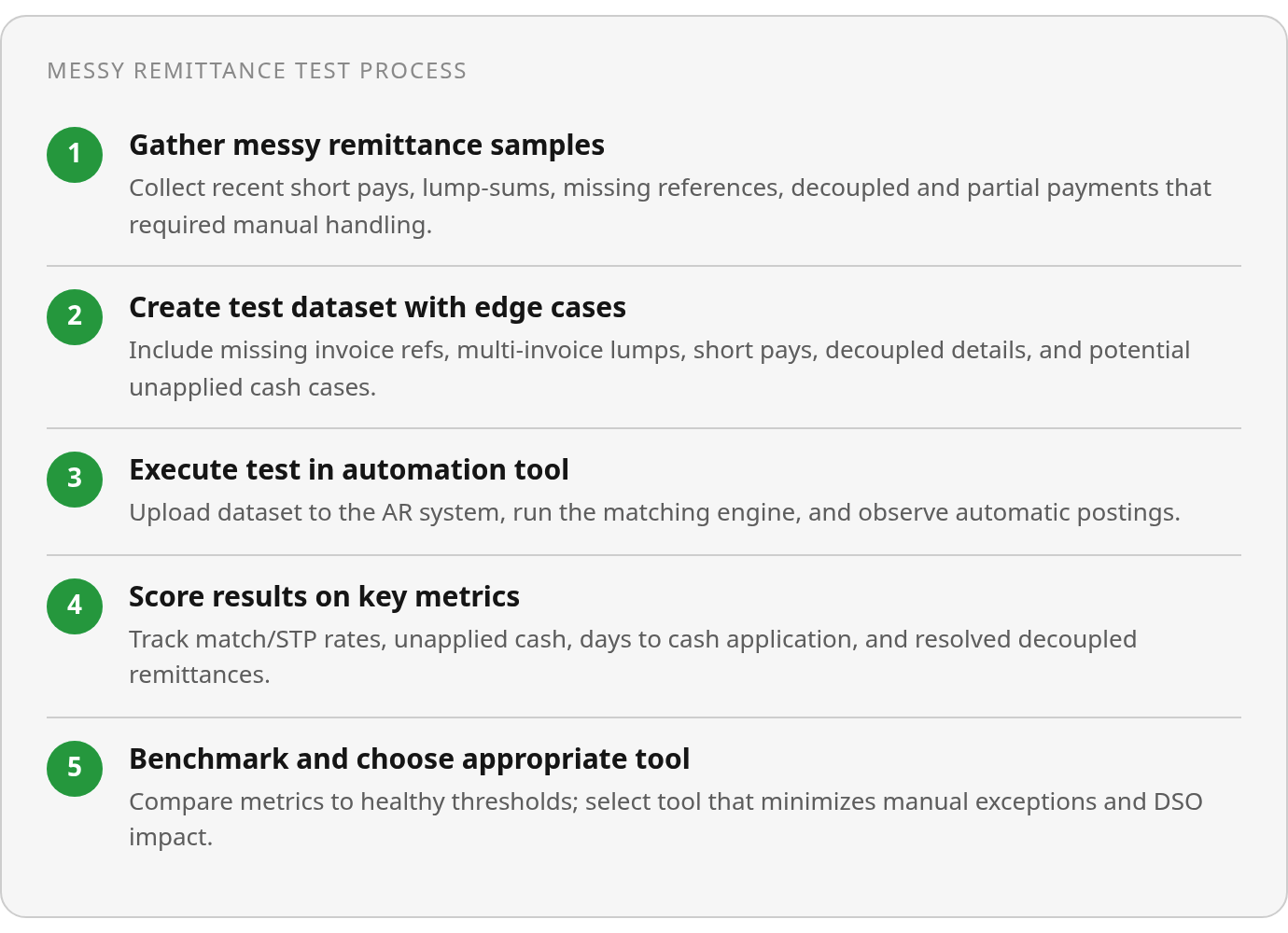
- Collect your messiest recent remittances: short pays, lump-sum payments, missing references, and remittance details sent separately from the payment.
- Note which ones required manual intervention and how long each sat unposted before it cleared.
- Use that sample as your test dataset before shortlisting any tool. Controllers, AR managers, and shared-services leads get a cleaner ROI signal from real exception handling than from any demo.
The Messy Remittance Test: Step by Step
In short: build your test from the ugliest real remittances you can find, not clean one-invoice, one-payment matches. Score touchless rate, unresolved cash, and days to cash application, not feature lists.
The right decision starts with measurement, not the vendor shortlist. Most accounts receivable automation evaluations begin with demos and a sandbox full of polished sample data. That proves very little. The question that matters is whether the system can connect imperfect payment evidence to the right open items without turning every ambiguity into a human task.
What Goes Into Your Test
Pull from real remittance scenarios your team has worked recently. Don’t construct synthetic clean payments. The test file is where you find out whether the system can reason or just match.
- Include missing invoice references: payments with a blank bank memo or a check with no invoice number.
- Add lump-sum payments covering multiple invoices in one transaction with no line-by-line breakdown.
- Include short pays with no explanation, payments below invoice amount where the customer took a deduction without notice.
- Add decoupled remittances where payment detail arrives separately by email, portal, or phone, not with the payment itself.
- Include at least one payment likely to create unapplied cash: a partial payment, a cross-entity check, or a wire with a cryptic reference.

Before running the test, inventory your remittance sources. Map which customers send remittance by email, which require portal logins, and which don’t send it at all. Higher decoupled remittance volume means more manual work. That’s the load a good matching engine should take off your plate.
Also map payer identifiers and invoice-reference patterns. The system needs your open invoice list, payment amount, and customer context to attempt a match. Test whether the engine handles name variations, not just exact matches.
How to Score the Results
Don’t judge the system on whether it posted clean payments. Judge it on what happened to the mess.
- Track match rate and STP rate separately. Headline match rates can look strong while line-item discrepancies hide underneath.
- Measure unapplied cash after the test: how much landed in suspense and how fast it resolved.
- Track days to cash application, the gap between receipt and posted match. That gap inflates DSO.
- Count decoupled-remittance volume the system resolved without manual lookup. This is where most tools plateau.
- Verify exception handling for ambiguous matches, short pays, and deductions. Did the system flag and route them, or dump them in a queue?
The goal isn’t 100% STP. Some payments will always need human judgment. The aim is to shrink the exception queue to cases requiring judgment, not clerical matching.
For scaling economics, start with what manual processing costs today. Add up staff time, error correction, and any third-party keying services, then multiply by monthly check volume before comparing against automation cost. The touchless rate from your test tells you how many of those checks you stop paying someone to handle manually.
Reading the Numbers
In short: your test results live or die on six numbers. If your tool can’t sustain high straight-through processing on messy remittances, it’s rules-based matching in an AI wrapper. The share needing review tells you whether your queue is clerical drag or judgment work.
Run a messy-remittance test through any AR automation system and the output falls into six columns: percent matched or STP, total unapplied cash, exception list, short-pay and deduction cases, decoupled-remittance count, and days to cash application. Each one shows where the tool adds value versus where it routes you back to manual work.
Real Automation vs. Rules in Disguise
You need benchmarks to know what good looks like. Manual operations leave the bulk of cash application to human effort. Top automated systems push straight-through processing toward its practical ceiling. The gap between those ranges is your decision.
Cash application plateaus without AI that reasons through messy remittances and short pays. If your tool lands in the middle ground, that’s rules-based matching with an automation label. The gap between that plateau and top-tier automation is where reasoning AI earns its keep. Rules cannot close it because the exceptions are exactly what rules cannot handle.
Unapplied cash tells the other half. A healthy operation keeps it to a small fraction of total cash received. A persistent climb signals a systematic matching problem, not occasional exceptions. Track this number weekly during your pilot, not just at the end.
Making Sense of the Exception Queue
Every system produces unmatched items. The question is what kind of work they create. Flag these patterns in your results:
- Missing invoice references, where payments arrive with no link to open invoices and force manual cross-referencing
- Unhelpful ACH memo text with free-text fields that say nothing useful about which invoices they cover
- Decoupled remittances that arrive separately by email, portal, or fax instead of with the payment
- Lump-sum payments covering multiple invoices that require allocation logic the system must reason through
- Short pays with no explanation, where customers take deductions with no reason code or communication
- Large multi-line checks where each line item requires deduction coding before posting
Treat unmatched items as a human exception queue, not a failure. Top systems still route a meaningful share of payments for review. A useful quality check: sort your exception queue by reason code and measure what share reflects genuinely complex business decisions versus simple reference mismatches. What matters is whether the queue holds judgment calls or clerical matching that better automation should have caught.
Track decoupled-remittance volume as a health signal. Above that, it becomes a primary driver of manual work, meaning your automation isn’t fixing the root ingestion problem.
Set monitoring alerts for four conditions: match or STP rate dropping, unapplied cash above healthy thresholds, days to cash application slipping past 1 day, and decoupled remittances above 10%. Run a periodic reconciliation check comparing posted payments against bank receipts, open invoice lists, and exception records to catch silent posting errors.
Compare automation cost against lockbox or key-in costs of $1-3 per check. If automated posting costs more per transaction than manual key-in at your volume, the math doesn’t work yet.
FAQ
1. Why would a high match rate still not be enough to trust an AR automation tool?
Because “matched” can still mean your team had to research, correct, approve, or manually allocate the payment before it posted. Ask vendors to show which items posted without human contact, which required review, and which remained unresolved after the run. That separation tells you whether the system is reducing work or simply giving manual effort a cleaner label.
2. When my exception queue grows, should I add headcount or fix the matching configuration?
Start by diagnosing the queue, not staffing it. Group exceptions by cause: missing remittance, payer-name mismatch, deduction research, short pay, portal lookup, or allocation judgment. Configuration issues should be corrected in the matching logic and source-data mapping. Only the items that require business judgment belong with people.