

Blixo Cloud Based Accounts Receivable Software Guide

Key Takeaways
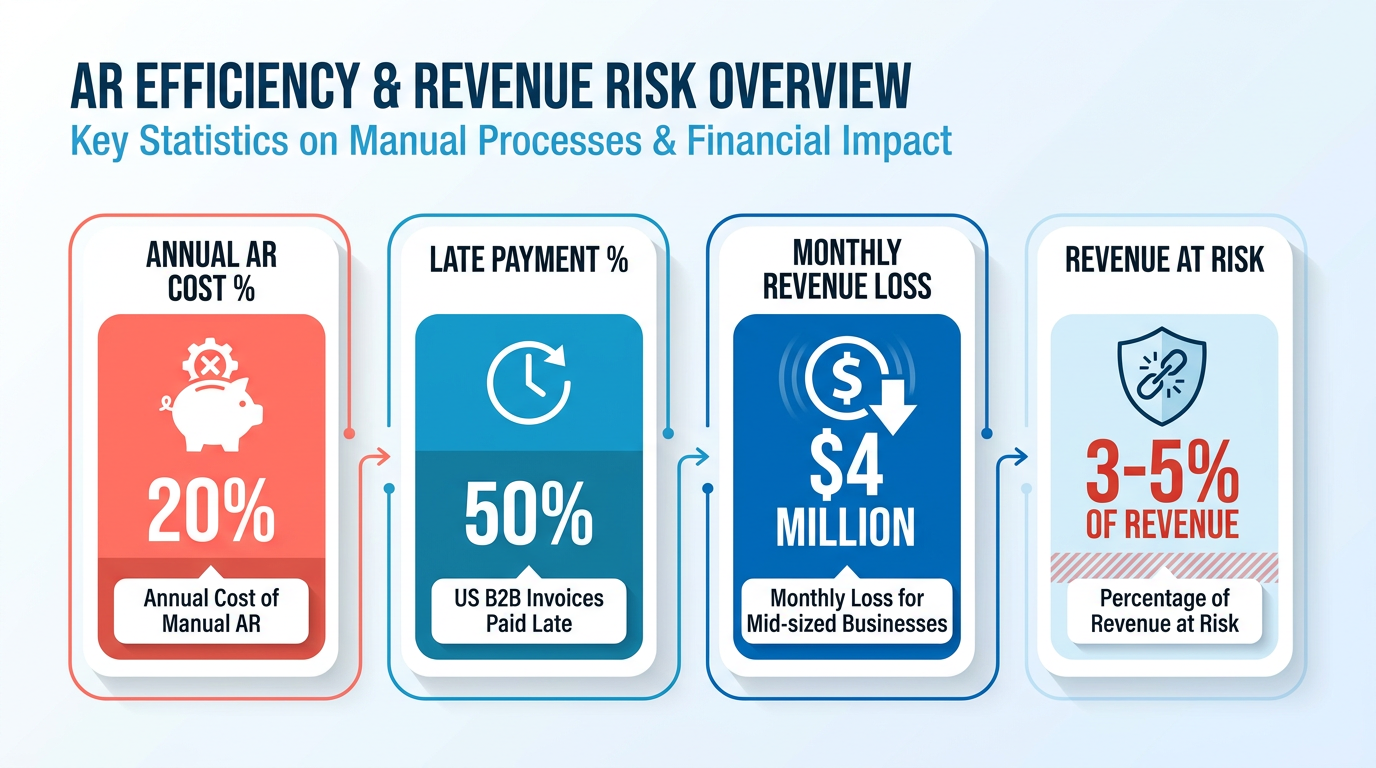
- Manual AR processes cost companies up to 20% annually in late payments and errors, with 50% of U.S. B2B invoices paid late.
- Mid-sized businesses lose $4 million monthly due to unpaid invoices and delayed collections, underscoring automation’s urgency.
- 77% of AR teams struggle with delayed collections and reconciliation errors, creating cash flow gaps and forecasting issues.
- Blixo’s AI-powered cash application reduces manual processing errors by 76%, accelerating payment allocation and reducing corrections.
- Digital invoicing and automated reminders improved 90% of customer payments to timely for a construction company case study.
- Cloud-based solutions centralize data and automate tasks, cutting reconciliation time and providing real-time financial visibility.
- Automating AR workflows can reduce time spent chasing payments by hours weekly, redirecting resources toward business growth.
Why Cloud-Based Accounts Receivable Software Matters
Cloud-based accounts receivable software like Blixo transforms how businesses manage cash flow by eliminating inefficiencies that drain revenue. Manual AR processes cost companies up to 20% annually in late payments and errors, while 50% of U.S. B2B invoices are paid late. Mid-sized businesses report losing $4 million monthly to unpaid invoices and delayed collections. These challenges highlight why automation isn’t just beneficial-it’s essential for survival in competitive markets.
Why Manual Processes Cost Businesses Millions
Manual accounts receivable workflows are error-prone, time-consuming, and costly. For example, 77% of AR teams struggle with delayed collections and reconciliation errors, leading to cash flow gaps and forecasting inaccuracies. Consider a construction company that improved 90% of customer payments to timely by switching to digital invoicing and automated reminders. Without automation, teams waste hours chasing payments, reconciling statements, and resolving disputes-resources that could fuel growth.
Cloud solutions solve these issues by centralizing data, automating repetitive tasks, and providing real-time visibility. Blixo’s AI-powered cash application, as detailed in the AI-Powered Cash Application and Intelligent Matching Engine section, reduces manual processing errors by up to 76%, ensuring payments are correctly allocated instantly. This cuts the time spent on corrections and accelerates cash availability.
Real-World Impact: From Weeks to Hours
Businesses adopting cloud-based AR software see measurable improvements in efficiency and revenue. One company reduced past-due invoices by 70% after implementing automated collections, while another cut weekly AR management time from 5 hours to 1. A finance manager at a tech firm noted, “The platform’s intuitive design made training faster than expected,” reducing onboarding friction.
For subscription-based models, Blixo’s recurring billing automation, highlighted in the Core Features of Blixo section, ensures accurate, timely invoicing. A SaaS business using Blixo reported a 250% growth in annual recurring revenue (ARR) by streamlining payment tracking and reducing churn from failed transactions. These results underscore how automation turns AR from a cost center into a revenue accelerator.
Who Thrives with Cloud-Based AR Automation?
Businesses with recurring billing models, high transaction volumes, or global operations benefit most. Blixo’s real-time reporting features, discussed in the Real-Time Accounts Receivable Reporting in Blixo section, provide instant visibility into financial health, enabling proactive cash flow management. Self-service payment portals and customizable dunning workflows further enhance collections efficiency.
- B2B SaaS companies automate invoicing and payment reminders, reducing manual follow-ups by 80%.
- E-commerce platforms use real-time analytics to forecast cash flow and identify payment risks.
- Professional services firms streamline customer payments with customizable invoicing and dispute resolution tools.
For example, a company using Blixo eliminated 200+ monthly customer calls by implementing a self-service portal, saving 8–10 hours per month. This scalability makes Blixo ideal for growing businesses needing to adapt quickly to changing demands.
Key Features That Set Blixo Apart
Blixo addresses common AR pain points with targeted features:
- Predictive analytics: Forecasts payment risks and identifies late-paying customers.
- Automated dispute resolution: Reduces time spent resolving payment conflicts.
- Role-based access controls: Ensures data security while enabling team collaboration.
These tools empower finance teams to focus on strategic initiatives rather than administrative tasks. As one revenue manager shared, “Our ability to collect on outstanding invoices has improved significantly. The amount of time it takes has dropped.”.
By automating workflows and providing actionable insights, Blixo doesn’t just solve immediate challenges-it future-proofs businesses against the inefficiencies of manual processes.
Explore Blixo’s cloud-based invoice processing checklist to see how automation aligns with your business needs.
Core Features of Blixo
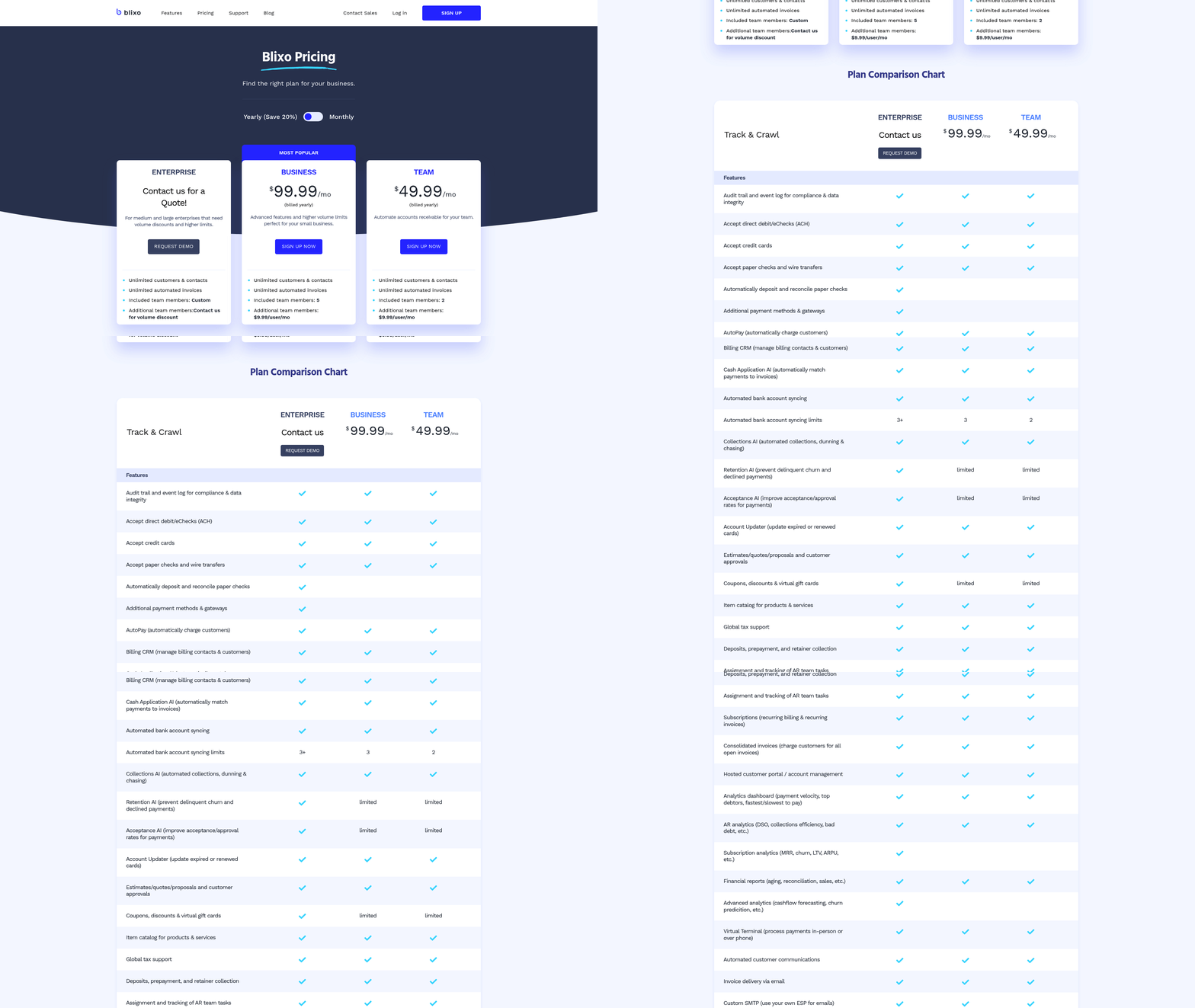
Blixo’s core features are designed to streamline accounts receivable processes, making them ideal for businesses seeking efficiency and accuracy. From automated billing to advanced subscription management, each tool addresses common pain points in financial operations. Below, we break down how these features work and their real-world impact..
How Does Blixo’s Automated Billing Work?
Blixo automates invoice creation, delivery, and payment tracking, reducing manual effort for finance teams. For subscription-based businesses, it generates recurring invoices based on predefined schedules, ensuring consistent cash flow. Users can customize payment terms, add late fees, and send automated reminders. The system integrates with major accounting platforms like QuickBooks and NetSuite, ensuring data syncs seamlessly across tools. For example, a SaaS company using Blixo might set up monthly invoices for customers, with dunning workflows that escalate missed payments automatically. As mentioned in the Automating Billing Processes with Blixo section, connecting accounting systems is the first step in configuring these workflows. This automation saves time-one company reported reducing AR reporting time from 2-3 weeks to near-instant updates, thanks to real-time revenue tracking.com/blog/en/post/cloud-based-invoice-processing-checklist-for-blixo-66d6/)..
What Is Blixo’s AI-Powered Cash Application?
Blixo’s cash application engine uses artificial intelligence to match incoming payments with the correct invoices, eliminating the need for manual reconciliation. The system identifies payment patterns, applies funds accurately, and flags discrepancies for review. This reduces errors and accelerates cash flow visibility. Building on concepts from the AI-Powered Cash Application and Intelligent Matching Engine section, this automation extends to handling complex payment scenarios. For instance, if a customer pays $500 to settle two invoices totaling $500, Blixo’s AI determines which invoices to apply the payment to-whether splitting amounts or prioritizing older debts. This intelligence cuts down on time spent resolving payment mismatches. One business saw a 32% reduction in days sales outstanding after implementing similar automation, highlighting the potential efficiency gains.
The tool also provides real-time dashboards, letting teams monitor cash flow and identify bottlenecks instantly. For a deeper dive into automating invoice processing, explore Blixo’s guide on cloud-based automation..
How Does Blixo Handle Subscription Management?
Blixo simplifies recurring billing for subscription models by managing prorations, upgrades, and cancellations. Businesses can set up tiered pricing plans, adjust billing cycles mid-subscription, and offer discounts without manual intervention. For example, a software provider could switch a customer from monthly to annual billing and apply prorated credits automatically. For businesses looking to align these customizations with strategic goals, the Best Practices for Maximizing Blixo ROI section offers guidance on optimizing workflows. The platform supports flexible payment plans, including trial periods and usage-based invoicing. If a customer exceeds their monthly data limit, Blixo generates an additional invoice for the overage. This adaptability ensures businesses can scale their billing models without complexity.
A retail company might use Blixo to manage seasonal subscriptions, adjusting billing schedules during peak shopping periods. By centralizing all subscription data, teams avoid fragmented systems and maintain accurate records..
Can Blixo’s Features Be Customized?
Blixo offers extensive customization to fit diverse business needs. Users can tailor dunning messages to match brand voice, set up multi-currency invoicing for international clients, and define custom workflows for collections. For example, a global e-commerce business could issue invoices in USD, EUR, or GBP while tracking payments in real time. The platform also supports conditional logic. A company might configure rules to send late notices only after three missed payment attempts or trigger discounts for early payments. These customizations ensure the software aligns with unique operational requirements. Teams can further extend functionality via APIs, integrating Blixo with CRM or ERP systems. This flexibility makes it suitable for businesses ranging from startups to enterprises..
What Security Measures Does Blixo Offer?
Blixo prioritizes data protection with enterprise-grade security features. All transactions are encrypted in transit and at rest, meeting standards like PCI-DSS and SOC 2. Role-based access controls ensure only authorized users can modify sensitive financial data. The platform also includes audit trails, logging every action taken within the system to deter fraud. For compliance, Blixo adheres to GDPR for European clients and supports tax reporting requirements in multiple jurisdictions. These measures give businesses confidence in handling customer financial information securely. By combining automation with strong security, Blixo helps companies focus on growth without compromising financial integrity.
Automating Billing Processes with Blixo
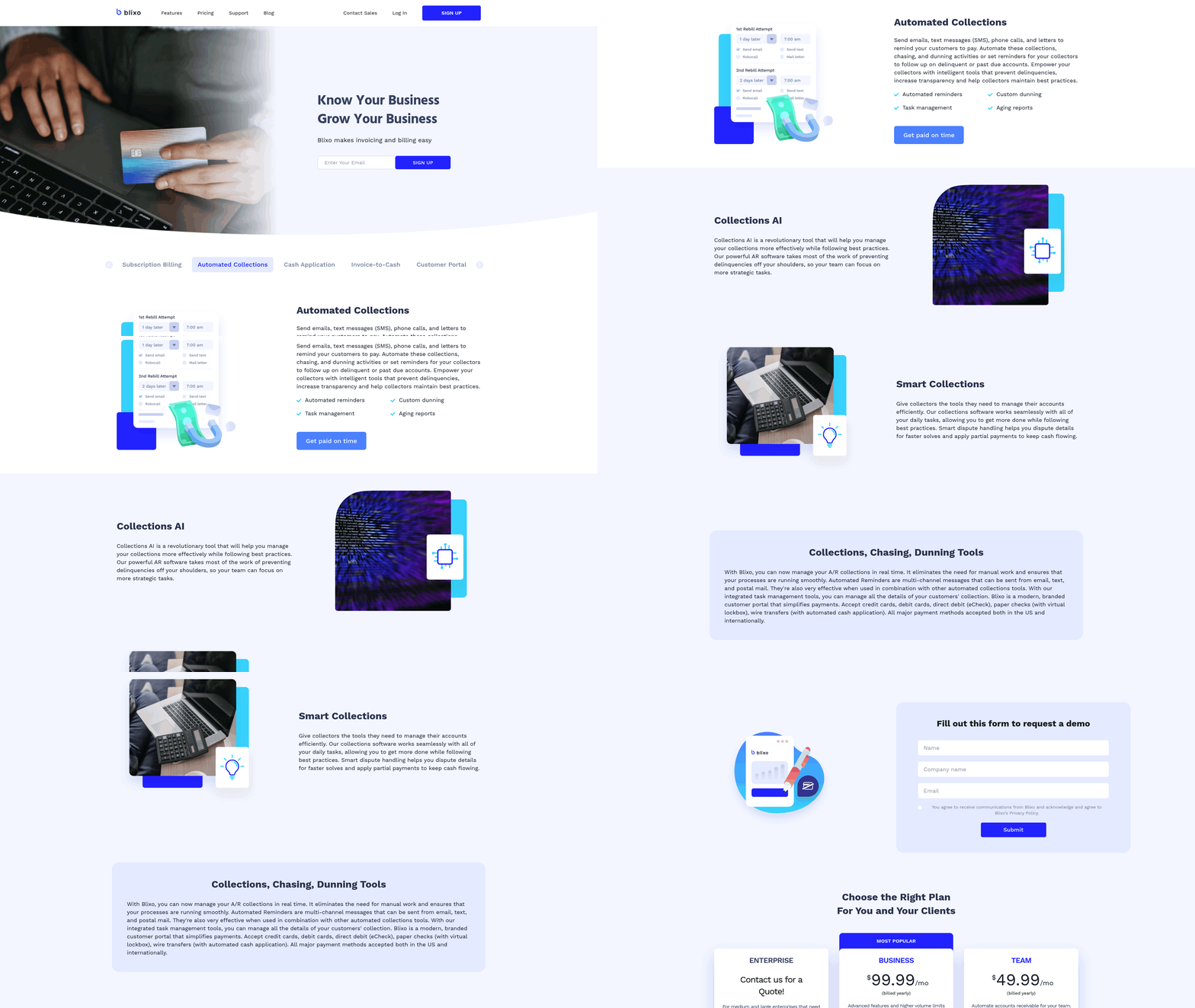
Setting up automated billing with Blixo begins with connecting your accounting systems and configuring workflows tailored to your business needs. The process is designed to reduce manual tasks, streamline invoicing, and improve cash flow visibility. Below is a structured guide to help you implement and optimize automated billing with Blixo.
What Are the Key Steps to Set Up Automated Billing in Blixo?
-
Connect Accounting Systems. Blixo integrates seamlessly with major platforms like QuickBooks, NetSuite, and Xero. Begin by linking your accounting software to Blixo through its cloud-based interface. This ensures real-time synchronization of customer data, invoices, and payment records. For detailed steps, refer to the Cloud Based Invoice Processing Checklist for Blixo.
-
Configure Billing Templates. Create customizable invoice templates that align with your brand. You can set default terms, payment due dates, and late fee rules. For recurring billing, define schedules (e.g., monthly, quarterly) and add automated reminders for overdue payments. As mentioned in the Core Features of Blixo section, these templates are part of Blixo’s broader suite of AR automation tools.
-
Set Up Payment Gateways. Link Blixo to your preferred payment processors (e.g., Stripe, PayPal) to enable instant payment collection. Configure settings to accept multiple currencies and automate reconciliation processes.
-
Test and Validate. Run test transactions to ensure all integrations function correctly. Blixo’s sandbox environment allows you to simulate scenarios like failed payments or late fee triggers without affecting live data.
How Can You Customize Blixo’s Billing Workflows?
Blixo’s flexibility lets businesses adapt workflows to specific needs. For example:
- Dunning Management: Design tiered dunning schedules (e.g., email reminders, SMS alerts) for delinquent accounts. One company reduced days sales outstanding by 32% using automated dunning, according to industry reports.
- Multi-Currency Support: If you operate internationally, set up automatic currency conversion based on real-time exchange rates. Building on concepts from the Real-Time Accounts Receivable Reporting in Blixo section, this feature aligns with Blixo’s broader real-time financial tracking capabilities.
- Custom Fields: Add unique fields to invoices, such as project codes or client-specific notes, to align with internal accounting practices.
For a deeper dive into customization, check out Automate Cloud Based Invoice Processing with Blixo.
What Are Common Challenges in Automated Billing and How to Solve Them?
Automated billing systems like Blixo simplify processes but may encounter issues:
- Failed Payments: Verify payment gateway configurations and ensure customer payment details are up to date. Use Blixo’s reporting tools to identify recurring failure patterns.
- Integration Errors: If syncs with accounting software fail, check API connection statuses and validate data formats. Blixo’s support team provides troubleshooting guides for common integration issues.
- Incorrect Invoicing: Review billing templates for typos or misconfigured rules. Enable a review step for first-time invoices to catch errors early.
Industry experts note that finance teams using automated tools save up to 80% of manual effort-reducing weekly AR tasks from 5 hours to just 1 hour in some cases.
How Does Blixo Support Reporting and Analytics for Billing?
Blixo’s analytics tools provide actionable insights into cash flow, collections, and customer behavior:
- DSO (Days Sales Outstanding): Track how quickly invoices are paid. One business improved its DSO by 89% after implementing automated reporting.
- AR Aging Reports: Identify overdue invoices and prioritize collections.
- Cash Flow Dashboards: Visualize real-time revenue trends and forecast future inflows.
These features help finance teams reduce manual reporting time and focus on strategic decisions.
What Best Practices Optimize Automated Billing with Blixo?
- Regular Audits: Schedule monthly reviews of billing workflows to spot inefficiencies or errors. As outlined in the Best Practices for Maximizing Blixo ROI section, consistent audits are critical for sustaining long-term efficiency gains.
- Automate Alerts: Set up notifications for late payments, failed transactions, or low-cash reserves.
- Train Your Team: Ensure finance staff understand Blixo’s tools for reporting, troubleshooting, and customization.
- Use Templates: Save frequently used invoice configurations to speed up onboarding for new clients.
By adopting these practices, businesses can maximize efficiency and reduce billing errors.
Blixo’s automated billing system empowers finance teams to focus on growth while ensuring timely payments. With its integration capabilities, customization options, and strong analytics, Blixo streamlines AR processes for businesses of all sizes. For further guidance, explore Blixo’s documentation or reach out to their support team.
Real-Time Accounts Receivable Reporting in Blixo
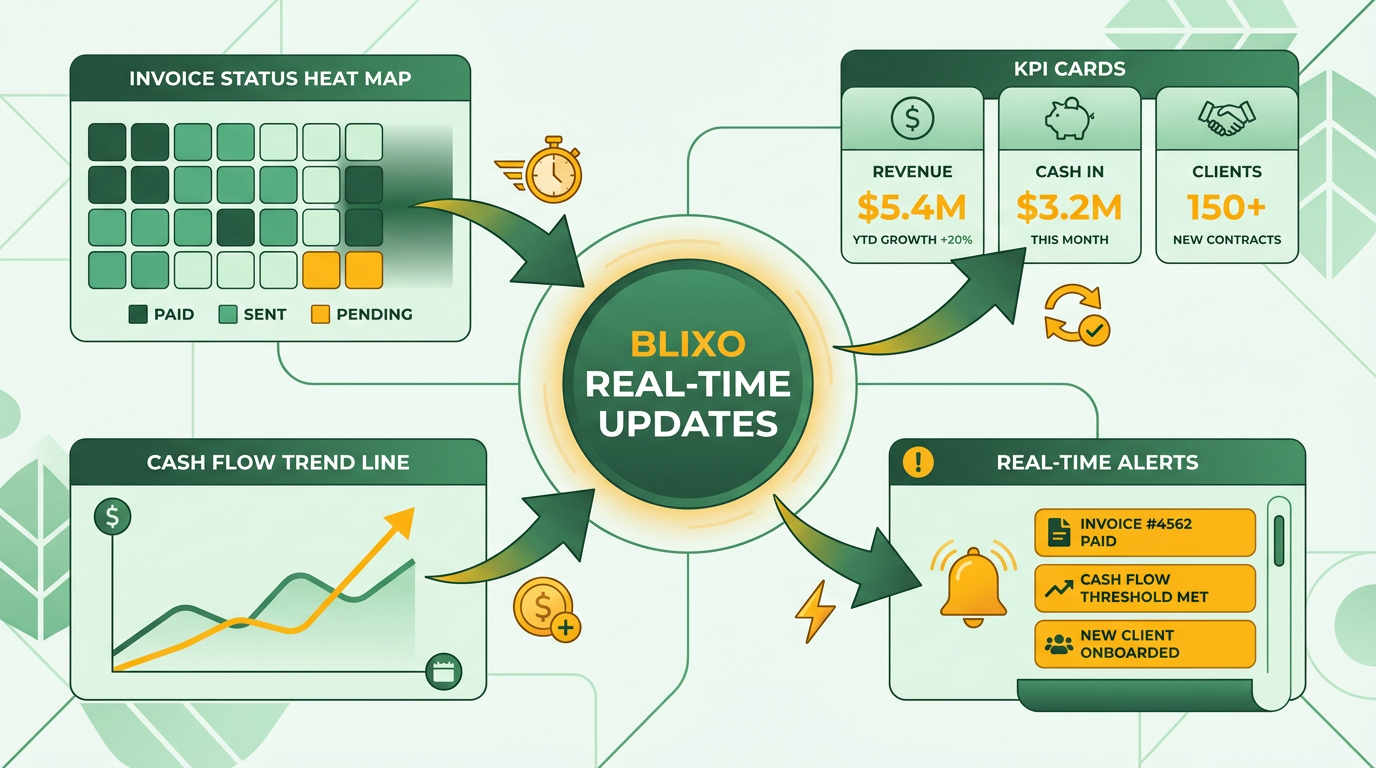
Blixo’s real-time accounts receivable reporting provides businesses with instant visibility into their financial health through dynamic dashboards, performance analytics, and actionable insights. These tools update automatically as transactions occur, ensuring teams always access the most current data. For example, a finance manager can track the status of every invoice in real time, from pending to paid, while identifying bottlenecks in the payment cycle. As mentioned in the Core Features of Blixo section, these tools are part of Blixo’s broader suite designed to streamline accounts receivable processes.
Key features include interactive dashboards that display metrics like days sales outstanding (DSO), total outstanding balances, and customer payment trends. Analytics tools break down data by customer segment, invoice type, or payment method, helping teams uncover patterns such as recurring late payments or seasonal fluctuations. Users can also generate custom reports to evaluate specific aspects of their receivables, such as aging reports or payment history comparisons. These reports integrate with automation workflows, reducing manual effort and improving accuracy. Learn how real-time reporting aligns with cloud-based invoice automation to streamline operations.
How to Customize Reports for Your Business
Blixo’s reporting tools are designed to adapt to your business’s unique needs. Users can apply filters to focus on specific metrics, such as customer groups, payment terms, or invoice statuses. For instance, a sales team might create a report that highlights payment trends among high-value clients to refine credit strategies. Building on concepts from the Automating Billing Processes with Blixo section, customization extends to report formatting and delivery. Teams can adjust layouts to prioritize key KPIs, set recurrence schedules for automated report distribution, or export data to external systems for deeper analysis. A procurement manager, for example, might configure a weekly report on vendor payment compliance to ensure timely supplier settlements. These adjustments ensure reports align with departmental goals while maintaining data consistency. Automate report generation and delivery to reduce administrative overhead.
Best Practices for Using Blixo’s Reporting Tools
To extract maximum value from Blixo’s reporting capabilities, businesses should adopt structured review processes. Start by scheduling regular checks of dashboards to monitor DSO, track overdue invoices, and compare payment performance against benchmarks. For example, identifying a sudden increase in late payments could signal the need to revise credit policies or engage in collections outreach. Building on concepts from the AI-Powered Cash Application and Intelligent Matching Engine section, teams should also use historical data to forecast cash flow and plan for seasonal demand. A retail business might analyze year-over-year payment trends to adjust inventory purchasing or staffing. Combining real-time reporting with predictive analytics helps anticipate risks and opportunities.
“Blixo’s reporting lets us spot payment issues before they escalate. We’ve cut our DSO by 20% in six months using these tools.” – CFO, E-commerce Business
By integrating real-time reporting into daily workflows, businesses can maintain tighter control over their receivables and make data-driven decisions with confidence.
Streamlined Customer Invoicing and Dispute Management
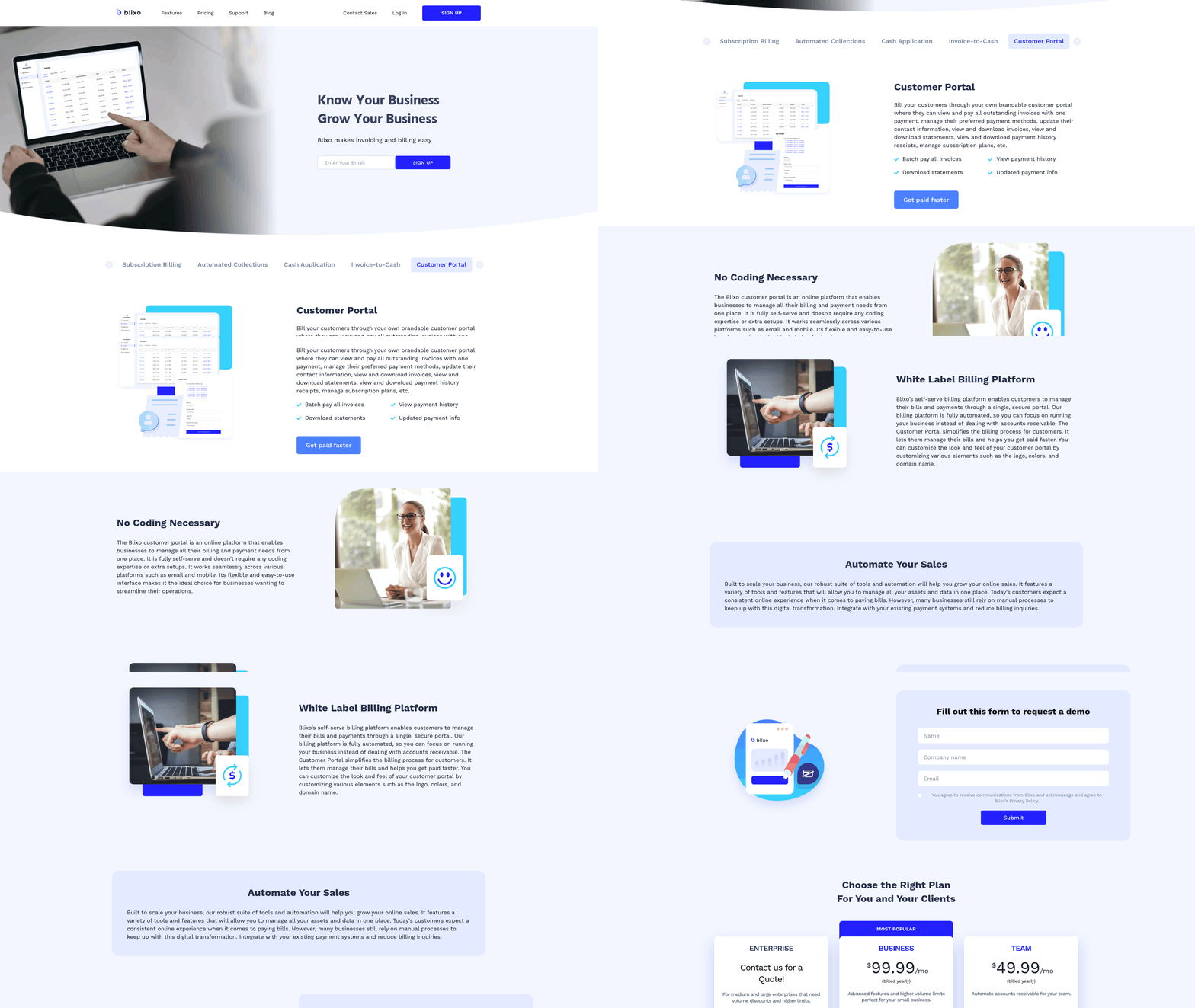
Blixo’s customer invoicing and dispute management tools streamline financial workflows while reducing errors and delays. By automating invoice generation, payment tracking, and dispute resolution, the platform helps businesses maintain consistent cash flow and minimize friction with clients. Below, we break down how these features operate, their customization options, and best practices for maximizing their impact..
How Does Automated Invoicing Work in Blixo?
Automated invoicing in Blixo eliminates manual tasks by generating, sending, and tracking invoices based on predefined triggers such as subscription renewals, project milestones, or sales transactions. The system supports recurring billing for subscription-based models and one-time invoicing for project-based work. As mentioned in the Core Features of Blixo section, this functionality aligns with Blixo’s broader design to streamline accounts receivable processes. For example, a SaaS business using Blixo can set up automatic monthly invoices tied to subscription plans. The platform tracks payment status in real time, marking invoices as “Paid,” “Overdue,” or “Failed” based on customer transactions. Users receive automated email reminders for overdue payments, reducing the need for manual follow-ups. This automation not only accelerates collections but also ensures consistent revenue visibility.
Blixo integrates with payment gateways to process transactions seamlessly. If a payment fails, the system logs the error and sends alerts to both the business and the customer, enabling quick resolution. This real-time tracking minimizes delays and keeps cash flow predictable..
What Features Does Blixo Offer for Dispute Management?
Dispute resolution in Blixo centers on transparency and speed. When a customer flags an invoice for discrepancies-such as incorrect charges or missing services-the platform creates a dispute record with timestamps, payment history, and communication logs. Building on concepts from the AI-Powered Cash Application and Intelligent Matching Engine section, Blixo use automation to expedite resolution by cross-referencing invoice data with payment records. Businesses can assign disputes to specific teams or stakeholders, who review the case using integrated tools like invoice snapshots, transaction records, and customer communication history. For instance, if a client claims an overcharge, the assigned team member can cross-reference the invoice with contract terms and past transactions to resolve the issue.
Blixo also automates parts of the resolution process. For example, if a dispute stems from a processing error, the system may initiate a refund or credit automatically after approval. This reduces resolution time and limits the risk of payment delays. Dispute statuses are updated in real time, allowing businesses to monitor progress and communicate updates to customers proactively..
How Can Businesses Customize Invoicing and Dispute Workflows?
Blixo’s flexibility allows businesses to tailor invoicing and dispute processes to their unique needs. Users can customize invoice templates with branding elements, adjust payment terms (e.g., net-30, net-60), and set rules for automated reminders. As highlighted in the Best Practices for Maximizing Blixo ROI section, aligning workflows with business goals ensures optimal efficiency. For dispute management, businesses define escalation paths based on dispute type or severity. A retail company, for example, might prioritize disputes involving high-value transactions, routing them to senior account managers for expedited resolution. Custom workflows can also include predefined response templates for common issues, ensuring consistency in customer communications.
Real-time revenue data reconciliation is another customizable feature. Businesses can choose how often Blixo syncs payment data with accounting software, ensuring financial records stay up to date without manual intervention..
How Do These Features Improve Customer Satisfaction?
By reducing manual errors and accelerating resolution times, Blixo minimizes the frustration often associated with billing disputes. For example, a business using Blixo reported a 40% reduction in customer complaints after implementing automated dispute alerts and resolution workflows.
Transparency also plays a role. Customers can check payment statuses and dispute progress through self-service dashboards, fostering trust. Automated reminders and clear communication prevent misunderstandings, while real-time updates keep clients informed about resolution timelines..
Best Practices for Using Blixo’s Features
- Set Clear Invoice Rules: Define recurring billing cycles, payment terms, and late fees in advance to avoid disputes.
- Train Teams on Dispute Resolution: Ensure staff understands how to use Blixo’s tools to review and resolve disputes efficiently.
- use Real-Time Data: Monitor payment and dispute dashboards regularly to address issues before they escalate.
- Automate Proactively: Use Blixo’s automation for reminders, reconciliations, and dispute alerts to save time and reduce errors.
For more guidance, explore Blixo’s cloud-based invoice automation checklist to optimize your workflow setup.
By combining automation with customizable workflows, Blixo empowers businesses to manage invoicing and disputes with precision, ultimately improving financial health and customer relationships.
Reducing Operational Costs with Blixo Automation
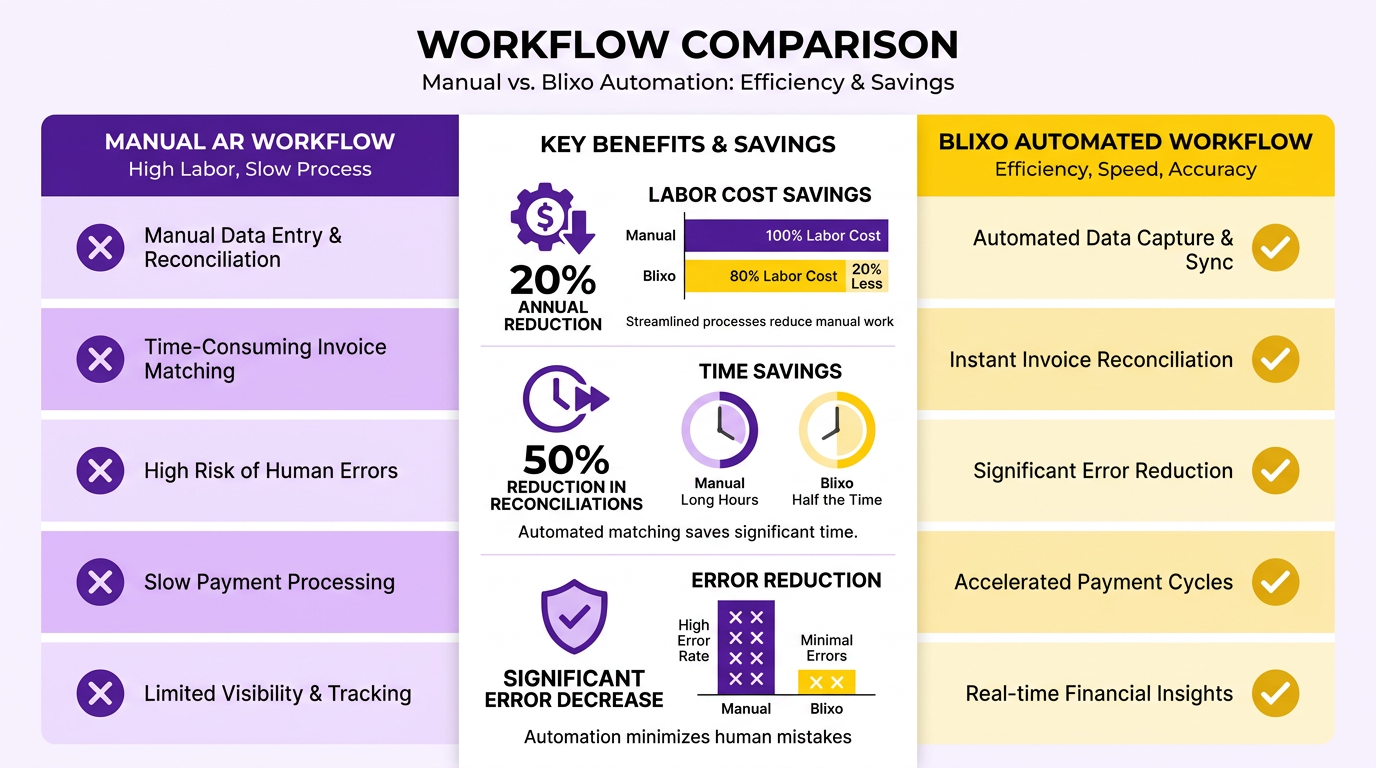
Blixo’s automation eliminates repetitive tasks like manual invoicing, payment tracking, and collections follow-ups, reducing labor costs by up to 20% annually. By automating workflows, teams spend less time on administrative work and more on strategic priorities. For instance, automated task scheduling reduces the time required for daily reconciliations by up to 50%, allowing staff to focus on higher-value activities. As mentioned in the Core Features of Blixo section, these efficiencies stem from built-in tools designed to minimize manual intervention.
Automation also minimizes errors that require rework. Mid-sized businesses often lose $4 million monthly due to unpaid invoices and delayed collections, but Blixo’s AI-driven cash application and real-time reconciliation cut manual processing errors by 76%. Features like role-based access controls and audit logs further reduce the need for manual oversight, ensuring compliance without extra labor.
What Payment Processing Fees Can Blixo Help Reduce?
Blixo lowers payment processing fees by minimizing late fees, chargebacks, and currency conversion errors. Since 50% of U.S. B2B invoices are paid late, businesses risk higher interest charges and strained vendor relationships. Blixo’s automated dunning workflows and multi-currency support reduce late payments by up to 70%, as seen in a case where RPC cut past-due invoices by 70% in six months. Building on concepts from the Automating Billing Processes with Blixo section, the platform’s integration with payment gateways optimizes transaction fees. For instance, its AI-driven cash application matches payments to invoices instantly, avoiding penalties for missed or delayed reconciliations.
The platform also integrates with payment gateways to optimize transaction fees. For instance, its AI-driven cash application matches payments to invoices instantly, avoiding penalties for missed or delayed reconciliations. By centralizing payment data, Blixo ensures businesses take full advantage of early-payment discounts and avoid overpaying for manual processing.
How Does Blixo Streamline Financial Operations?
Automation accelerates cash flow by shortening payment cycles and improving forecasting accuracy. Blixo’s real-time revenue data reconciliation cuts forecasting delays by 80%, enabling faster decision-making. As highlighted in the Real-Time Accounts Receivable Reporting in Blixo section, this transparency allows businesses to monitor cash flow dynamically. A SaaS company using Blixo reduced its days sales outstanding (DSO) by 32% and cut outstanding receivables in half, as highlighted in industry benchmarks.
The platform’s self-service portals and customizable dashboards further reduce operational friction. For example, Sharp Canada eliminated 200+ monthly customer calls by enabling clients to make payments and check balances independently, saving 8–10 hours per month. Blixo’s predictive analytics also flag potential payment risks early, allowing teams to address issues before they escalate.
Best Practices for Maximizing Cost Savings
To fully use Blixo’s automation, businesses should:
- Define pain points: Audit current AR processes to identify gaps in invoicing, collections, and reconciliation.
- Enable real-time monitoring: Use Blixo’s dashboards to track KPIs like DSO and payment error rates.
- use integrations: Connect Blixo with existing accounting systems (e.g., QuickBooks, NetSuite) for seamless data flow.
- Optimize dunning workflows: Customize automated reminders and escalation paths to match customer preferences.
By adopting these strategies, businesses can reduce AR operational costs by up to 40% while improving cash flow velocity. For implementation guidance, refer to Blixo’s cloud-based invoice processing checklist.
AI-Powered Cash Application and Intelligent Matching Engine
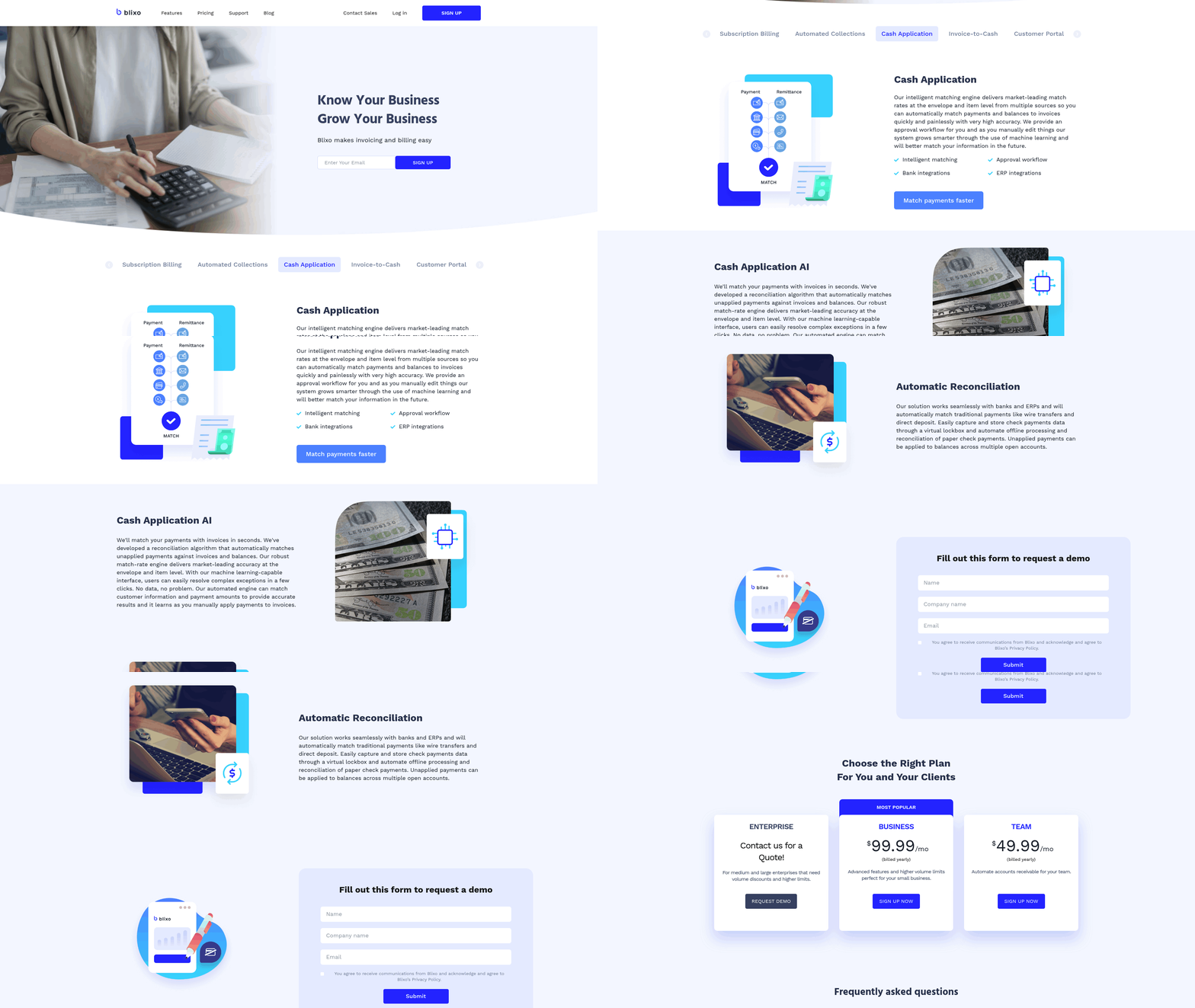
Blixo’s AI-powered cash application and intelligent matching engine streamline accounts receivable (AR) processes by automating payment tracking, invoice reconciliation, and data analysis. These tools use machine learning to reduce manual work, improve accuracy, and accelerate cash flow for businesses. Below is a deep dive into how they function and their benefits..
How Blixo’s AI-Powered Cash Application Works
Blixo automates the application of incoming payments to invoices using machine learning algorithms trained on historical payment patterns. The system analyzes payment data, customer transaction histories, and invoice details to determine the correct allocation of funds. For example, if a customer sends a partial payment covering multiple invoices, Blixo’s AI identifies the correct distribution without human intervention. This reduces the time spent on manual matching and minimizes errors.
The application also generates real-time revenue reports, updating financial records instantly. This ensures businesses have up-to-date visibility into cash inflows, which is critical for forecasting and budgeting. As mentioned in the Real-Time Accounts Receivable Reporting in Blixo section, these insights enable proactive financial management..
Intelligent Matching Engine: Payment Matching and Reconciliation
Blixo’s intelligent matching engine automates the reconciliation of payments to invoices using rule-based logic and AI-driven pattern recognition. When a payment is received, the engine cross-references it against open invoices, factoring in variables like payment amounts, dates, and customer identifiers. For ambiguous cases-such as payments that don’t fully cover an invoice-the system flags discrepancies for review, significantly reducing the risk of missed or misapplied funds.
Consider a scenario where a customer pays $500, but the invoice total is $550. The engine identifies the partial payment, allocates it to the correct invoice, and triggers automated dunning workflows to collect the remaining $50. This level of automation ensures faster reconciliation and fewer disputes..
Benefits for Businesses
Blixo’s tools improve cash flow, reduce payment disputes, and enhance accounting accuracy.
-
Faster Cash Flow. By automating payment application, businesses can access their revenue days or weeks earlier than with manual processes. For example, one company reported reducing its weekly AR management time from 5 hours to 1 hour after adopting similar automation (source: Maxio case study).
-
Fewer Disputes. The intelligent matching engine minimizes errors in payment allocation, which are a common source of customer disputes. Clear, auditable records of transactions also help resolve conflicts quickly when they arise.
-
Error Reduction. Manual data entry is prone to human errors, such as misapplied payments or duplicate entries. Blixo’s system eliminates these issues by enforcing consistency and validating data in real time..
Best Practices for Using Blixo’s Tools
To maximize efficiency, follow these steps when using Blixo’s AI-powered features:
-
Ensure Clean Data Inputs. Accurate invoice and payment records are critical for the AI to function correctly. As outlined in the Implementation Roadmap for Blixo section, preparing high-quality data before deployment is essential for optimal performance.
-
use Real-Time Alerts. Set up notifications for unmatched payments or reconciliation exceptions. This allows quick resolution of issues before they escalate.
-
Integrate with Existing Systems. Blixo works seamlessly with accounting platforms like QuickBooks and NetSuite. Ensure full integration to avoid siloed data.
-
Review Weekly Reports. Use Blixo’s dashboards to monitor cash flow trends and identify areas for improvement.
By implementing these practices, businesses can achieve near-perfect payment processing, turning AR from a reactive task into a strategic advantage.com/blog/en/post/automate-cloud-based-invoice-processing-with-blixo-d138/).
Implementation Roadmap for Blixo
Step 1: Prepare for Implementation
Setting up Blixo begins with assessing your current accounts receivable processes and defining clear goals. Identify pain points like manual data entry or delayed payments, and align them with Blixo’s automation features. Assign a project lead and assemble a cross-functional team, including finance staff and IT representatives. Ensure all stakeholders understand the timeline and expected outcomes.
Key Tasks
- Conduct a workflow audit to map existing AR processes.
- Define KPIs (e.g., reduce DSO by 30% in six months).
- Secure executive buy-in and allocate budget for training.
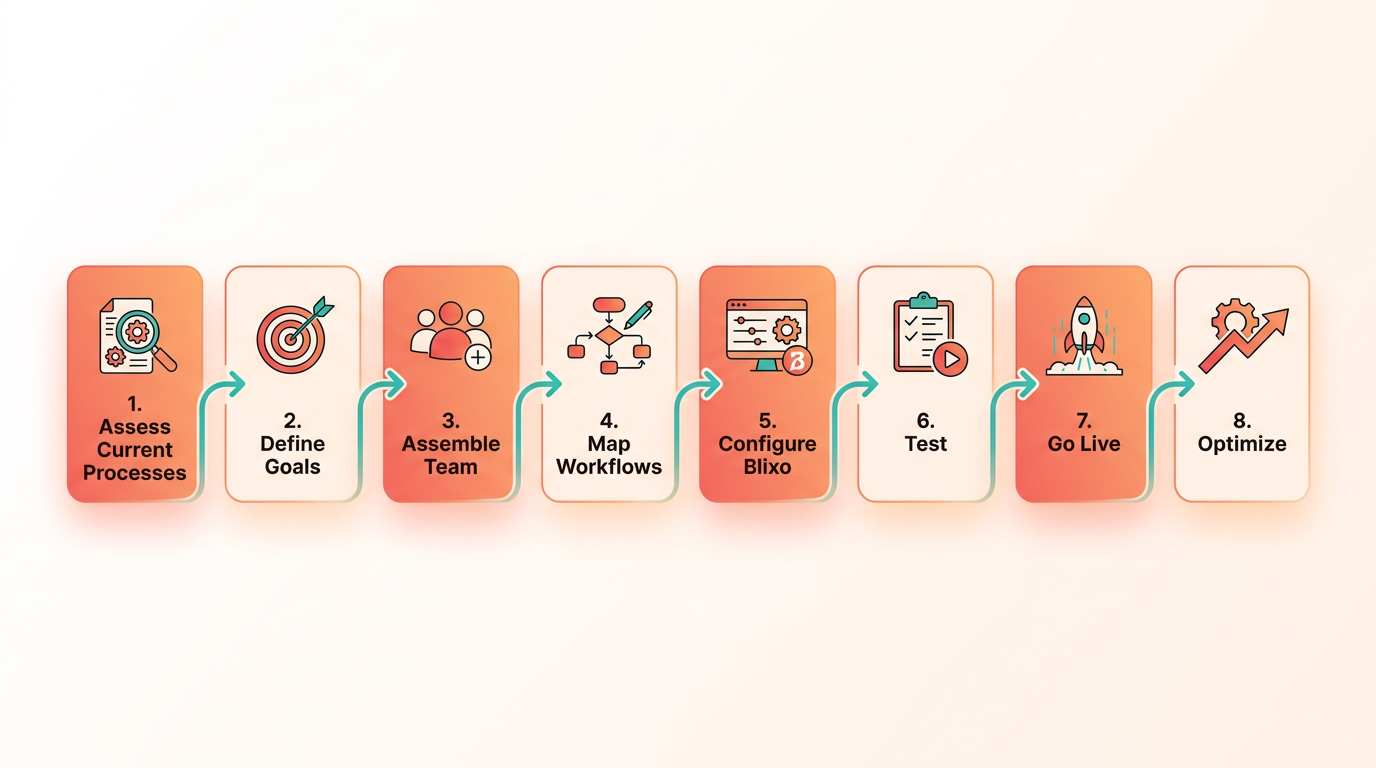
As mentioned in the Real-Time Accounts Receivable Reporting in Blixo section, tracking metrics like DSO is critical for measuring AR efficiency improvements.
Step 2: Setup and Configuration
Blixo’s setup involves creating an account, configuring user roles, and importing historical data. Start by logging into the Blixo dashboard and completing onboarding tutorials. Use the data migration tool to upload invoices, customer records, and payment terms in CSV or Excel format. Customize workflows by setting approval rules and automating reminders.
Example Configuration To automate payment reminders:
- manage to Settings > Workflow Automation.
- Select Payment Reminder Rules.
- Set triggers like “Send email 7 days after invoice due date.”.
- Assign templates for late fees or discounts.
Building on concepts from the Core Features of Blixo section, these workflows use Blixo’s automation capabilities to reduce manual follow-ups.
Step 3: Integration with Existing Systems
Blixo integrates with accounting software (e.g., QuickBooks, Xero) and payment gateways via API or pre-built connectors. For API integration, generate API keys in Blixo’s Developer Portal and follow the documentation to sync data. Use webhooks to ensure real-time updates between systems.
Integration Checklist
- Map fields between Blixo and your accounting software.
- Test API endpoints for data consistency.
- Enable two-way sync for invoices and payments.
Troubleshooting Tip If data sync fails, verify API permissions and check for duplicate entries in source systems.
Step 4: Training and Support
Blixo offers onboarding training via live webinars and self-paced video tutorials. Access the Knowledge Base for step-by-step guides on features like batch invoicing or dispute resolution. For urgent issues, use the 24/5 support chat or submit tickets through the Help Center.
Training Resources
- Cloud Based Invoice Processing Checklist for Blixo
- Automate Cloud Based Invoice Processing with Blixo
As highlighted in the Best Practices for Maximizing Blixo ROI section, consistent training ensures teams fully use Blixo’s capabilities.
Step 5: Monitor and Optimize
After launch, track KPIs like days sales outstanding (DSO) and payment error rates. Use Blixo’s analytics dashboard to identify bottlenecks. For example, if late payments spike, adjust reminder intervals or add early payment discounts. Regularly review system logs for integration errors.
Best Practices
- Conduct monthly audits to reconcile Blixo data with bank statements.
- Solicit user feedback to refine automation rules.
- Schedule quarterly check-ins with Blixo’s success team for updates.
Common Challenges and Solutions Challenge 1: Data Migration Errors Solution: Validate data formats before upload and use Blixo’s validation tool to catch duplicates.
Challenge 2: User Resistance Solution: Host hands-on training sessions and create a FAQ document addressing common concerns.
Challenge 3: API Connectivity Issues Solution: Ensure firewalls allow API traffic and regenerate keys if authentication fails.
By following this roadmap, businesses can streamline their AR processes and minimize disruptions during implementation. For deeper guidance, explore Blixo’s onboarding resources and use their dedicated support team to address unique scenarios.
Best Practices for Maximizing Blixo ROI
To maximize your return on investment with Blixo, focus on optimizing workflows, customizing features to align with business goals, and using analytics to refine operations. By combining automation with strategic oversight, businesses can reduce costs, accelerate cash flow, and turn accounts receivable into a competitive advantage. Below, we break down actionable steps to achieve this.
How Can You Optimize Blixo Workflows?
Start by automating repetitive tasks like invoice generation, payment reminders, and cash application. For example, enabling AI-driven cash application reduces manual reconciliation by 76%, as noted in Blixo’s case studies. Set up self-service portals for customers to view invoices and make payments, cutting down on administrative calls. A healthcare provider reduced payment disputes by 40% after implementing patient-focused portals with real-time payment tracking.
To structure this:
- Map current AR processes to identify bottlenecks (e.g., late payments, manual data entry).
- Enable automation for invoice delivery, payment tracking, and collections.
- Train teams to focus on high-value tasks like resolving disputes or negotiating payment terms.
Building on concepts from the AI-Powered Cash Application and Intelligent Matching Engine section, automation here directly impacts efficiency gains.
What Customizations Improve Efficiency?
Blixo’s custom workflows let you tailor the platform to your business size and industry needs. For instance, use role-based access controls to restrict sensitive data to authorized users, reducing compliance risks. If your business handles multi-currency transactions, activate multi-language support to streamline international payments.
As mentioned in the Core Features of Blixo section, these customizations are foundational to aligning the platform with specific operational demands. Customize dashboards to highlight key metrics like days sales outstanding (DSO) or payment error rates. One company reduced past-due invoices by 70% after configuring predictive analytics to flag high-risk accounts. For service-based businesses, simplify workflows by automating recurring invoicing for subscription models.
How Should You Monitor Blixo’s Performance?
Regularly review real-time dashboards and audit logs to track KPIs such as payment processing time, error rates, and cash flow velocity. Compare these metrics against pre-automation benchmarks to quantify improvements. For example, Blixo users report an average 50% reduction in late payments after implementing automated dispute resolution.
As detailed in the Real-Time Accounts Receivable Reporting in Blixo section, using these dashboards provides instant visibility into financial health. Use predictive analytics to forecast payment risks and adjust collection strategies. If reports show a spike in late payments from a specific client segment, tighten credit checks or adjust payment terms. Schedule monthly reviews of API integrations to ensure seamless data flow between Blixo and other tools like ERP or accounting software.
What Reporting Features Drive Better Decisions?
Blixo’s customizable reports provide insights into AR health, customer behavior, and operational efficiency. For instance, analyze cash flow forecasts to plan expenses or identify trends in payment delays. A retail business used these reports to extend early-payment discounts, reducing DSO by 20%.
Export data to identify patterns, such as which sales teams generate the most on-time payments or which products trigger frequent disputes. Share these insights with cross-functional teams to align sales, finance, and customer service strategies. For deeper analysis, integrate third-party BI tools via Blixo’s API access for custom visualizations.
Best Practices for Sustaining High ROI
- Train staff continuously: New features like end-to-end encryption or AI-driven fraud detection require periodic training to maximize utility.
- Scale with your business: Upgrade from basic automation to advanced workflows (e.g., robotic process automation) as transaction volume grows.
- Audit regularly: Monthly compliance checks prevent errors in role-based access controls or multi-currency calculations.
By embedding these practices, businesses not only recover costs from automation but also position AR as a strategic lever for growth. For step-by-step guidance on setting up workflows, refer to Blixo’s Cloud Based Invoice Processing Checklist.
“The platform’s intuitive design made training faster than expected,” says an Accounts Payable Manager, highlighting how quick onboarding accelerates ROI.
Ultimately, Blixo’s value depends on your ability to adapt its tools to evolving business needs. Prioritize flexibility, data-driven decisions, and team alignment to ensure long-term success.
Frequently Asked Questions
1. How much can businesses save by automating accounts receivable?
Automating AR can save companies up to 20% annually in late payments and errors, with mid-sized firms recovering $4 million monthly in lost revenue. Manual processes cost 50% of U.S. B2B invoices to be paid late.
2. How does Blixo reduce errors in accounts receivable?
Blixo’s AI-powered cash application cuts manual processing errors by 76% by instantly allocating payments and reducing corrections. This accelerates cash availability and improves reconciliation accuracy.
3. What are the benefits of cloud-based AR software?
Cloud solutions centralize data, automate tasks like reminders and invoicing, and provide real-time financial visibility. They reduce reconciliation time and cut hours spent chasing payments weekly.
4. Can automation improve customer payment timeliness?
Yes. A construction company saw 90% of customer payments become timely after using digital invoicing and automated reminders, proving automation enhances payment adherence and cash flow.
5. How quickly do businesses see results with AR automation?
Measurable improvements in efficiency and revenue appear within weeks. For example, delayed collections and reconciliation errors decrease rapidly, with full benefits realized in 3-6 months of consistent use.
6. Why is manual accounts receivable problematic?
Manual AR causes 77% of teams to struggle with delayed collections and reconciliation errors, leading to cash flow gaps. It costs businesses 20% in late payments annually and wastes hours chasing payments.
7. How does Blixo compare to traditional AR methods?
Blixo’s cloud-based platform reduces manual errors by 76% and accelerates payment allocation, while traditional methods risk 50% late B2B payments. It also provides real-time visibility absent in paper-based systems.