

Automate Cloud Based Invoice Processing with Blixo

Key Takeaways
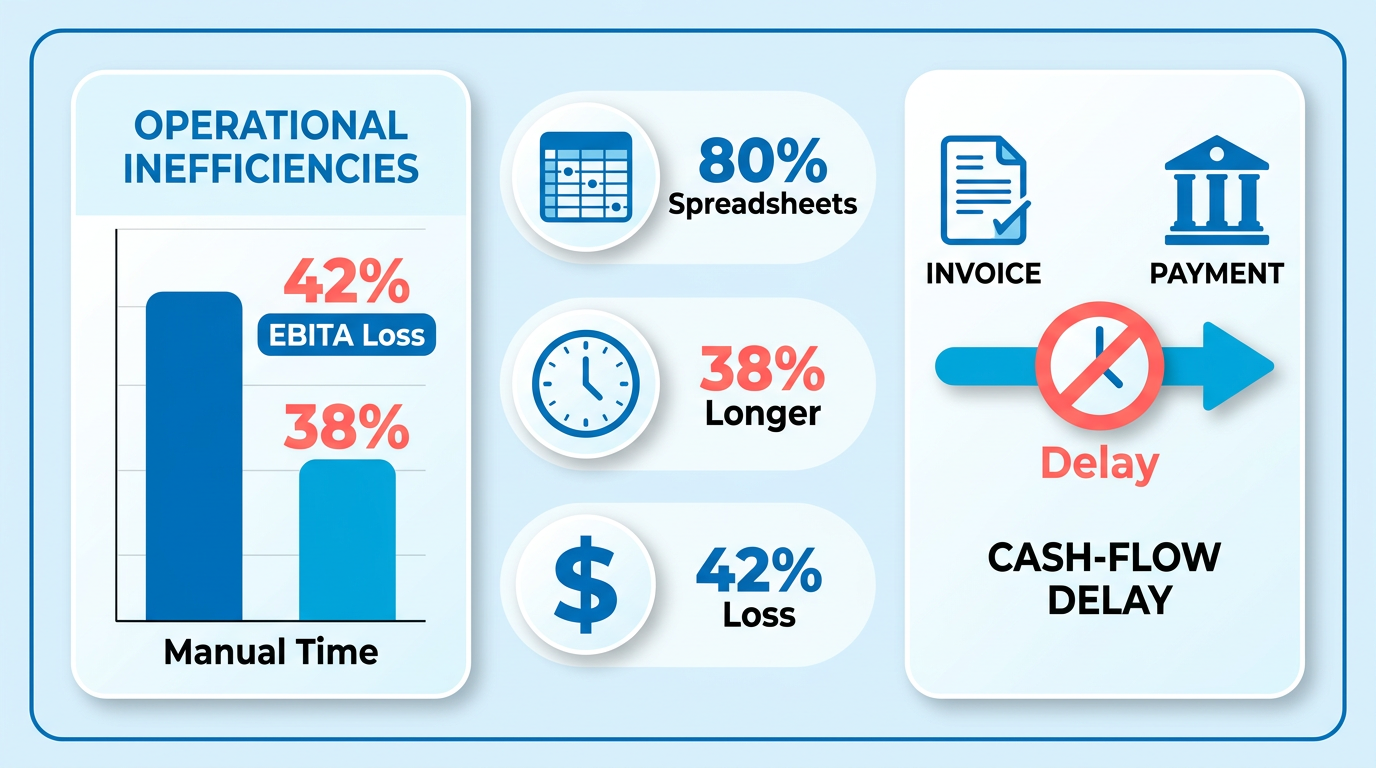
- Manual invoicing errors cost 42% of companies 1% to 5% of their EBITA annually.
- Manual reconciliation takes 38% longer compared to automated cloud-based workflows.
- 80% of companies rely on spreadsheets or fragmented tools, causing data inconsistencies.
- Automation reduces invoice processing errors by 40–60% using cloud-based platforms like Blixo.
- Manual errors trigger disputes, forcing teams to spend hours resolving avoidable issues.
- Delayed payments from manual processes create cash flow gaps, straining small business operations.
- Automating invoicing accelerates collections and ensures consistent, predictable revenue streams.
Why Cloud-Based Invoice Processing Matters
Cloud-based invoice processing is no longer a luxury-it’s a necessity. Manual invoicing errors and delays cost businesses time, money, and customer trust. For example, 42% of companies lose 1% to 5% of their EBITA due to poor payment follow-up processes, while manual reconciliation takes 38% longer without automation. These inefficiencies directly impact cash flow, as delayed or lost payments can stall operations, strain vendor relationships, and reduce profitability. By automating this process, businesses eliminate human errors, speed up collections, and ensure consistent revenue streams.
What Challenges Does Manual Invoice Processing Create?
Manual invoicing is error-prone and time-consuming. 80% of companies still rely on spreadsheets or fragmented tools, leading to data inconsistencies and reconciliation hurdles. For instance, manual errors can cause disputes with clients, forcing teams to spend hours resolving issues that automated systems would flag instantly. Additionally, delayed payments-common in manual workflows-create cash flow gaps. A single lost payment can disrupt payroll or inventory orders, especially for small businesses with limited financial buffers. These challenges compound as transaction volumes grow, making scalability a major concern for enterprises and startups alike.
How Does Automation Improve Efficiency and Accuracy?
Automating invoice processing with cloud-based tools like Blixo reduces errors by 40–60% and cuts processing time dramatically. One company using Blixo’s SaaS service reduced billing errors by 30% and improved cash flow by 25% within months. Automated systems streamline tasks like invoice generation, payment tracking, and reconciliation, freeing teams to focus on strategic work. For example, as detailed in the Core Features of Blixo for Automated Invoice Processing section, Blixo’s integration with QuickBooks and Stripe allows businesses to auto-generate invoices, send payment reminders, and reconcile accounts in real time. These capabilities are critical for companies handling recurring billing or high-volume transactions, where even small efficiency gains translate to significant savings.
Who Benefits Most from Automated Invoice Processing?
Both small businesses and enterprises reap measurable benefits from automation. Small businesses, often lacking dedicated finance teams, can save up to 35% on administrative costs by adopting SaaS providers like Blixo. Features like unlimited customer support, automated follow-ups, and multi-payment options (ACH, credit cards, etc.) help them compete with larger firms. Enterprises, meanwhile, benefit from scalability and compliance support-as outlined in the Seamless Integration with Accounting and ERP Systems section, Blixo’s cloud infrastructure integrates seamlessly with ERP and CRM systems, ensuring data accuracy across teams. A mid-sized firm using Blixo cut administrative overhead by 35%, reallocating staff to high-value tasks like client acquisition.
Real-World Impact: Case Studies and Results
The financial impact of automation is clear. One SaaS company automated its order-to-cash (O2C) process with Blixo and reported 30% fewer billing errors alongside a 25% increase in cash flow. Another subscription-based service saw 40% higher customer satisfaction after implementing automated invoicing and self-service portals, a feature highlighted in the Custom Customer Portals for Self-Service Billing section. These results align with industry benchmarks: automating repetitive tasks can save 50% of accounting time, while cloud-based systems reduce revenue leakage by ensuring timely collections. For businesses in high-turnover industries like SaaS or e-commerce, these improvements mean sustained growth and stronger client relationships.
Why Cloud-Based Solutions Are the Future
Cloud-based automation isn’t just about convenience-it’s a strategic move to future-proof financial operations. Unlike fragmented tools or on-premise software, cloud platforms offer real-time visibility, scalability, and 256-bit data encryption (as offered by Blixo). This adaptability is crucial for businesses managing shifting market demands. For instance, Blixo’s support for customizable payment terms, tax calculations, and multi-currency invoicing helps companies expand globally without overhauling their accounting systems. As automation becomes standard, businesses that delay adoption risk falling behind competitors who use these tools to optimize efficiency and customer experience.
By addressing manual bottlenecks and reducing human error, cloud-based invoice processing transforms how companies manage finances. The result? Faster payments, stronger cash flow, and the ability to scale without proportional increases in administrative costs. For any business looking to streamline operations and focus on growth, automation is no longer optional-it’s the foundation of modern financial management.
Core Features of Blixo for Automated Invoice Processing
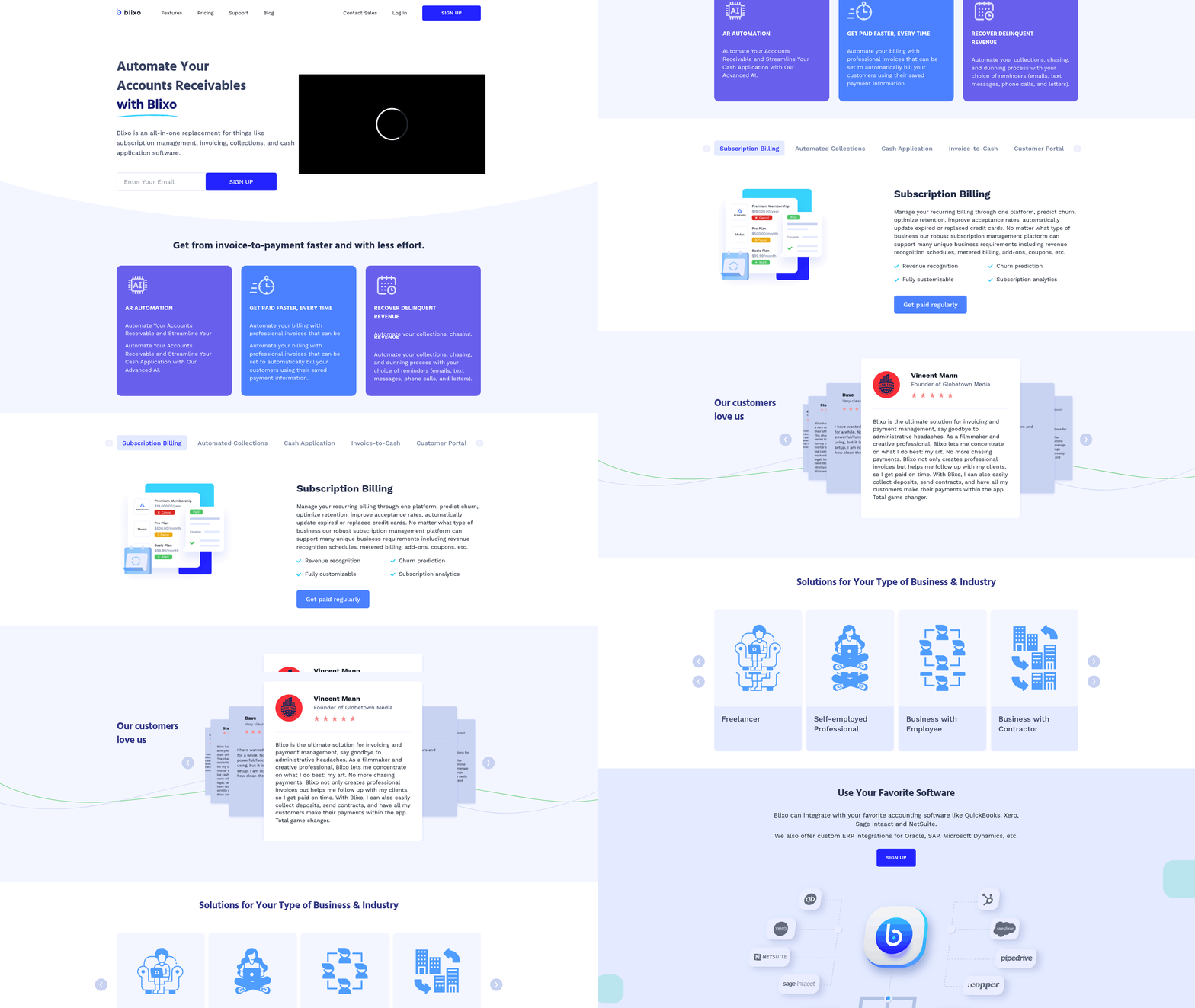
Blixo streamlines invoice processing through smart automation, reducing manual effort and improving financial accuracy. Its core features include AI-driven cash application, subscription management, and seamless integration with existing systems. By automating repetitive tasks like invoice generation and payment matching, Blixo helps businesses save time and improve cash flow. Let’s explore how these features work in practice.
How Does Blixo Automate Invoicing and Collections?
Blixo generates and sends invoices automatically based on pre-populated customer and item data. This eliminates manual data entry and reduces errors. For recurring invoices-common in subscription-based models-the platform schedules and sends bills at set intervals, ensuring consistent revenue streams. Integration with payment gateways like Stripe and QuickBooks, as detailed in the Seamless Integration with Accounting and ERP Systems section, allows customers to pay via credit cards, ACH, or other methods, speeding up collections.
For example, a SaaS company using Blixo reported a 30% drop in billing errors and a 25% increase in cash flow after automating their invoicing. The platform also tracks invoice views and sends automated follow-ups for overdue payments, a strategy expanded on in the Automated Collections and Dunning Strategies with Blixo section, reducing the need for manual chasing. This combination of automation and real-time tracking ensures faster payments and fewer late fees.
What Makes Blixo’s AI-Powered Cash Application Unique?
Blixo uses machine learning to match incoming payments with the correct invoices, a process known as cash application. This reduces reconciliation time by 40–60%, as noted in technical details from Blixo’s documentation. The system identifies discrepancies, such as partial payments or overpayments, and flags them for review.
Manual reconciliation often takes 38% longer without automation, according to industry data. Blixo’s AI streamlines this by analyzing historical payment patterns and applying rules like tax calculations or discounts. One case study showed a mid-sized firm cutting administrative overhead by 35%, allowing staff to focus on strategic tasks. Unlike generic providers, Blixo offers transparent, rule-based matching that adapts to complex billing scenarios.
How Does Blixo Handle Subscription Management?
Subscription management is a key strength for businesses with recurring revenue. Blixo automates billing cycles, sends renewal notices, and adjusts charges based on plan changes or discounts. For instance, a subscription box service improved customer satisfaction by 40% using Blixo’s automated notifications and flexible billing terms.
The platform also supports prorated charges, dunning management, and revenue recognition, ensuring compliance with accounting standards. By integrating with CRM and ERP systems, as outlined in the Seamless Integration with Accounting and ERP Systems section, Blixo keeps customer data synchronized across platforms. This reduces administrative workload, as businesses no longer need to manually update records or reconcile subscription data.
What Are the Real-World Benefits of Blixo’s Features?
Blixo’s automation directly impacts cash flow and operational efficiency. One company saved 50% of its accounting time after implementing Blixo, while another reduced invoice processing time from 48 hours to 4 hours. These gains come from eliminating manual tasks like spreadsheet reconciliation or chasing down payment details.
For businesses using QuickBooks or other accounting tools, Blixo’s integration cuts costs by removing the need for third-party add-ons. The platform’s 256-bit encryption also ensures data security, giving users peace of mind. By centralizing invoicing, payments, and collections, Blixo provides a single source of truth for financial operations-reducing errors and improving decision-making.
Why Choose Blixo Over Alternative Solutions?
While many platforms offer basic invoicing tools, Blixo stands out for its depth of automation and adaptability. Its AI-powered cash application handles nuanced payment scenarios, and its subscription management features are tailored for scalability. Unlike generic providers, Blixo supports unlimited customers and integrates with systems like Stripe and QuickBooks without requiring software installations.
A firm using Blixo’s order-to-cash automation reported 30% lower operational costs compared to their previous solution. This is largely due to the platform’s ability to unify billing, collections, and reconciliation under one interface. For businesses seeking to scale without increasing administrative overhead, Blixo’s combination of AI-driven tools and flexible integrations offers a clear advantage.
By automating repetitive tasks and providing actionable insights, Blixo transforms invoice processing from a time-consuming chore into a strategic asset. Its features not only improve efficiency but also enhance customer experiences through faster, more accurate billing.
Automated Collections and Dunning Strategies with Blixo
By integrating Blixo’s automated collections and dunning tools, companies can transform their invoicing processes from reactive to proactive-ensuring faster payments, lower costs, and stronger financial health.
How Does Blixo Automate Collections?
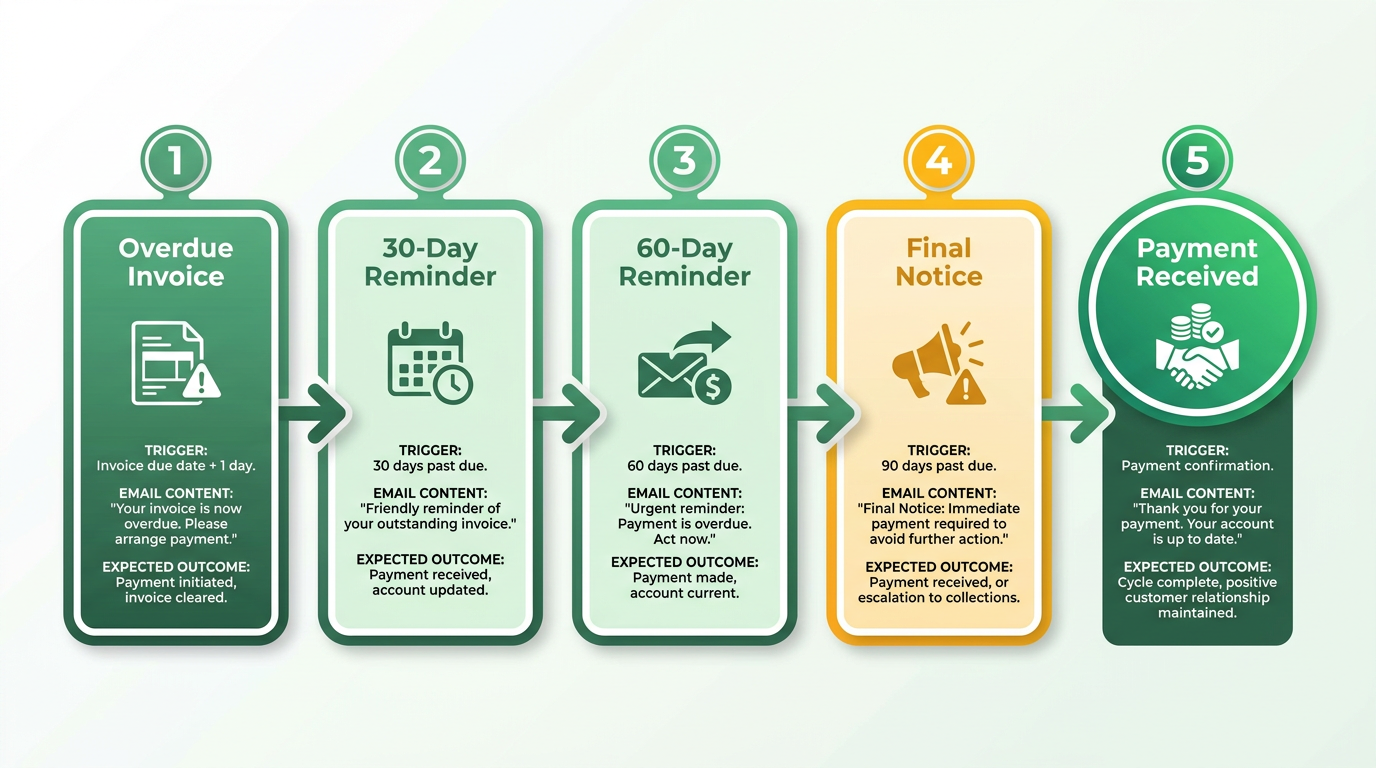
Blixo automates chasing overdue invoices through pre-set workflows that trigger reminders based on payment terms. For example, if a customer hasn’t paid within 30 days, the platform sends a personalized email reminder. If no response is received, it escalates with a follow-up message and, if needed, a final notice. This reduces the need for manual follow-ups. The system also tracks invoice views using web-based tracking, alerting businesses if an invoice has been opened but not paid, enabling proactive outreach.
Blixo supports auto-billing for recurring invoices, ensuring consistent revenue streams without requiring repeated manual actions. It also offers multiple payment methods, including ACH, credit cards, and wire transfers, giving customers flexibility to pay quickly. As mentioned in the Seamless Integration with Accounting and ERP Systems section, Blixo eliminates data silos by connecting directly to platforms like QuickBooks and Stripe, allowing businesses to reconcile payments instantly. One company using Blixo reported saving 35% on factoring and collections costs by automating these tasks.
What Role Does AI Play in Cash Application?
Blixo’s AI-powered cash application simplifies matching payments to invoices, reducing errors and accelerating reconciliation. Building on concepts from the Core Features of Blixo for Automated Invoice Processing section, the system automatically applies incoming funds to the correct invoice, even if the payment amount differs slightly due to discounts or late fees. This speeds up accounting workflows and ensures accurate financial reporting.
The AI also identifies patterns in customer payment behavior. For instance, if a client frequently pays late, Blixo flags the account for closer monitoring and adjusts dunning strategies accordingly. This proactive approach helps businesses recover payments sooner. Additionally, 256-bit encryption secures all transactions, giving customers confidence in the payment process.
How Can Businesses Customize Dunning Strategies?
Dunning templates in Blixo are fully customizable to match a company’s tone and brand. As outlined in the Best Practices for Implementing Dunning with Blixo section, businesses should set clear payment terms upfront, such as defining due dates and late fees, to avoid confusion. For example, a business might create a template with a friendly reminder message for first-time delays and a stricter notice for repeat offenders. These templates can include personalized messages, payment links, and even late fee calculations.
The platform allows businesses to set customizable payment terms and apply early payment discounts to encourage faster settlements. For instance, a business could offer a 2% discount for payments received within 10 days. Blixo also supports multi-tiered dunning workflows, where reminders escalate from gentle nudges to formal legal notices based on predefined rules. This flexibility ensures that dunning aligns with customer relationships while prioritizing cash flow.
What Real-World Impact Does Blixo Deliver?
One business using Blixo automated collections for a subscription-based service saw faster payment cycles and reduced operational costs by 20%. By automating recurring invoices and tracking payment behavior, the company improved its cash flow predictability. Another example is a consulting firm that reduced its accounts receivable days from 45 to 22 by using Blixo’s dunning templates and auto-billing features.
These improvements stem from Blixo’s ability to eliminate manual tasks. For instance, instead of an accountant spending hours chasing invoices, the system handles 80% of follow-ups automatically. This not only saves time but also reduces the risk of strained client relationships during collections.
Best Practices for Implementing Dunning with Blixo
To maximize results, businesses should:
- Set clear payment terms upfront: Define due dates, late fees, and discount policies in invoices to avoid confusion.
- Test dunning templates: Use Blixo’s drag-and-drop editor to create multiple templates and refine them based on customer responses.
- use automation thresholds: Configure workflows to trigger reminders at specific intervals (e.g., 7 days post-due date).
- Monitor performance: Use Blixo’s dashboards to track recovery rates and adjust strategies as needed.
Danilo, CEO of Blixo, emphasizes the importance of a unified revenue view: “By automating manual accounting processes, businesses gain control over their cash flow and reduce the risk of errors,” he notes. This aligns with Blixo’s design philosophy of combining scalability for large enterprises with affordability for small businesses.
Seamless Integration with Accounting and ERP Systems
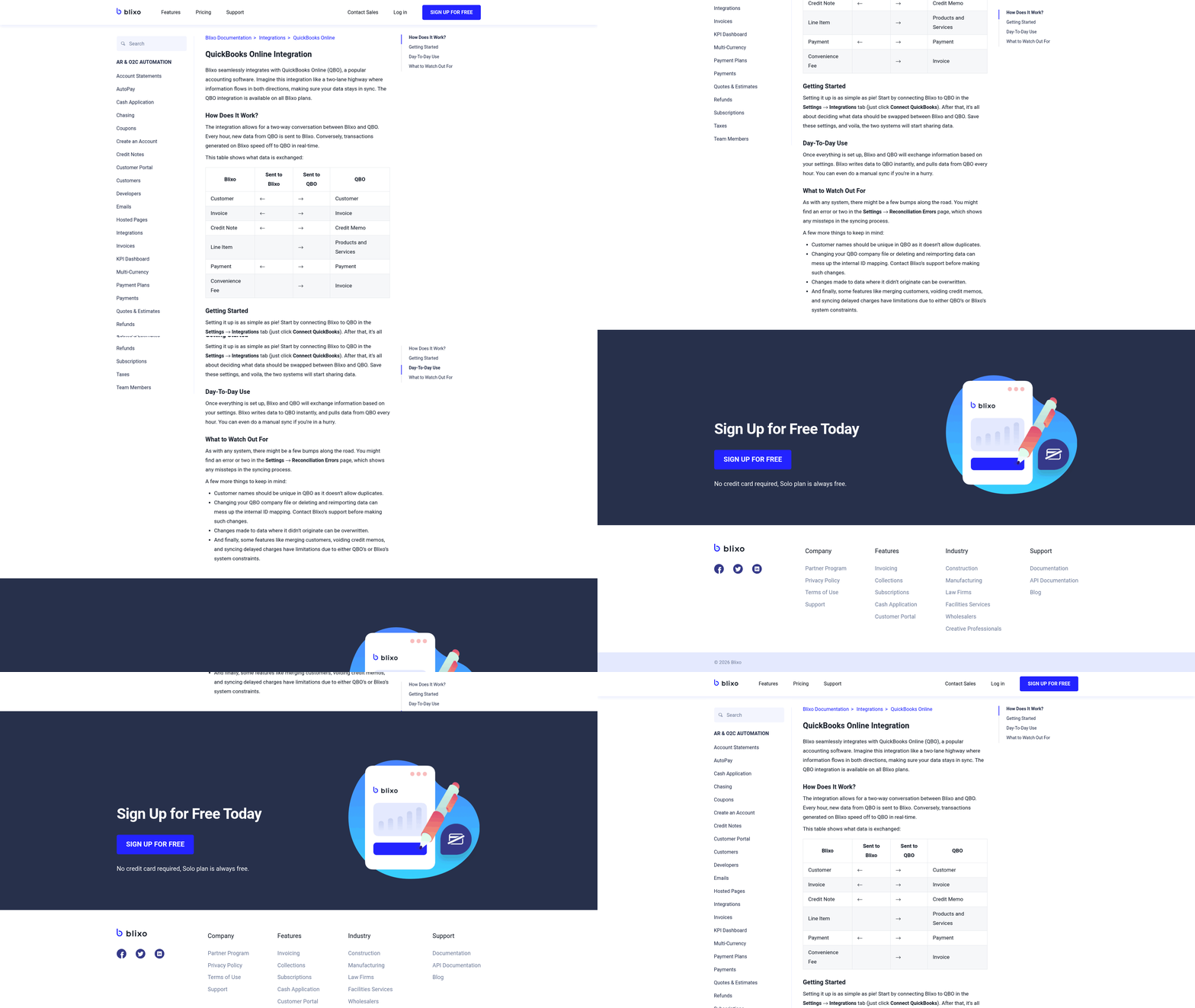
Blixo connects directly with accounting and ERP systems to eliminate manual data entry and streamline financial workflows. By syncing invoice data in real time, businesses reduce errors and save hours spent on reconciliation. The integration works with major platforms like QuickBooks, Xero, SAP, and Oracle, ensuring compatibility with existing financial ecosystems. As mentioned in the Core Features of Blixo for Automated Invoice Processing section, this real-time sync enhances accuracy in cash application and subscription management workflows.
How Does Blixo’s API Work for Custom Integrations?
Blixo’s API uses RESTful architecture with OAuth 2.0 authentication to securely exchange data. Developers can access endpoints for invoices, payments, and vendor records to build tailored workflows. Webhooks notify ERP systems of updates, ensuring records stay aligned without manual checks. For example, when a payment is processed in Blixo, the ERP system automatically updates the accounts receivable ledger. This prevents discrepancies and speeds up month-end closing.
What Are the Key Benefits of Integration?
Businesses gain real-time visibility into cash flow by linking Blixo to their accounting tools. Automated data sync reduces manual entry by up to 70%, according to internal benchmarks. Building on concepts from the Automated Collections and Dunning Strategies with Blixo section, integration enforces compliance by aligning payment terms and dunning rules directly within accounting software. For instance, one company using Blixo with their ERP system cut invoice processing time from three days to under two hours.
Can You Share Real-World Examples?
A mid-sized manufacturing firm integrated Blixo with their ERP system to handle 500+ monthly invoices. Before, their team spent 40+ hours monthly on data entry and reconciliation. After automation, the same process took 8 hours, freeing staff to focus on strategic tasks. Another business reduced invoice disputes by 60% by aligning Blixo’s payment terms with their accounting software’s rules. These results highlight how integration minimizes friction in financial operations.
What Are Best Practices for Implementation?
Start by mapping invoice fields in Blixo to corresponding fields in your ERP system. Use Blixo’s sandbox environment to test data flows before going live, as outlined in the Implementation Roadmap: From Onboarding to Full Automation section. Enable audit logs to track sync history and resolve conflicts quickly. For example, if an invoice fails to post, the logs show whether the issue stems from a missing tax code or a mismatched vendor ID. Regularly review sync intervals-some businesses opt for real-time updates, while others batch-process data nightly to reduce system load.
By prioritizing these steps, teams ensure a smooth transition and maximize the value of their accounting tools.
Custom Customer Portals for Self-Service Billing
Blixo’s custom customer portals streamline self-service billing by giving users direct access to invoices, payment history, and account details. These portals automate tasks like invoice generation, payment reminders, and reconciliation, reducing manual work for businesses and their customers. With support for unlimited customers and integrations with platforms like QuickBooks and Stripe, the system scales easily for small businesses and large enterprises alike. As mentioned in the Seamless Integration with Accounting and ERP Systems section, these integrations eliminate manual data entry and ensure real-time synchronization across platforms.
How Do Custom Portals Improve Customer Satisfaction?
Self-service billing empowers customers to manage their payments independently, cutting down on wait times and reducing frustration. For example, users can view real-time balances, download invoices, or update payment methods without contacting support. This transparency builds trust and minimizes billing disputes. A unified view of financial data, as emphasized by Blixo’s CEO Danilo, ensures customers and businesses share the same source of truth, avoiding confusion from fragmented systems. Building on concepts from the Core Features of Blixo for Automated Invoice Processing section, this unified view is powered by AI-driven cash application and subscription management tools.
Portals also reduce the need for repetitive customer service requests. Instead of waiting for a response to a payment inquiry, users resolve issues instantly through the portal. One company reported saving 50% of time previously spent on billing-related support after implementing Blixo’s tools, allowing teams to focus on growth.
What Are the Key Benefits of Real-Time Billing Data?
Real-time access to billing information helps customers track usage and avoid unexpected charges. For instance, businesses with variable pricing models can monitor costs as transactions occur, adjusting budgets proactively. Automated alerts for low balances or upcoming renewals further prevent payment failures, improving cash flow for both parties. As highlighted in the Automated Collections and Dunning Strategies with Blixo section, these alerts align with dunning strategies that reduce late payments through configured follow-ups and reminders.
Blixo’s system supports multiple payment methods-credit cards, wire transfers, and more-giving users flexibility. The platform also automates follow-ups, sending reminders at configured intervals to reduce late payments. These features align with businesses that want to cut costs: one analysis found automated tools like Blixo can save up to 35% on factoring, collections, and subscription fees.
Can You See Real-World Success Stories?
A service-based business with recurring invoices used Blixo’s portal to let clients view and pay bills instantly. Before this, the company spent hours on manual invoicing and chasing payments. Post-implementation, customers praised the ease of access, and the business saw a 20% increase in on-time payments. Another client, a SaaS provider, reduced billing errors by 40% by centralizing subscription management through the portal.
These examples highlight how Blixo’s tools simplify workflows for both teams and their clients. By eliminating disjointed systems, businesses avoid the frequent software switches that complicate scaling-a core issue Blixo was designed to solve.
How to Implement Custom Portals Effectively
Start by integrating the portal with existing systems like accounting software or payment gateways. Blixo’s documentation provides setup guides for platforms such as QuickBooks and Stripe, ensuring seamless data flow. Next, customize the portal’s interface to match your brand’s identity, making it intuitive for users.
Train your team to use the administrative dashboard for tracking metrics like payment success rates or customer activity. Monitor feedback to refine features-for example, adding a FAQ section if users frequently ask about discounts. Finally, promote the portal through email or onboarding tutorials to encourage adoption.
By prioritizing clarity and automation, Blixo’s custom portals turn billing from a chore into a service that delights customers. Businesses benefit from faster payments, fewer disputes, and a reputation for reliability-key advantages in competitive markets.
Implementation Roadmap: From Onboarding to Full Automation
Implementing Blixo for automated invoice processing follows a structured path that balances technical setup with strategic planning. By breaking the process into clear phases-onboarding, configuration, testing, and full automation-businesses can minimize disruption while maximizing efficiency. Below is a step-by-step roadmap to guide your transition from manual workflows to a fully automated system.
What Happens During the Onboarding Process?
Blixo’s onboarding begins with account setup and integration with your existing systems. Your team will connect Blixo to your ERP, accounting software, or cloud storage platforms using pre-built APIs or custom integrations. This step ensures seamless data flow between systems, eliminating manual entry. As mentioned in the Seamless Integration with Accounting and ERP Systems section, real-time syncing reduces errors and saves hours of manual work. For example, if you use QuickBooks Online, Blixo documentation outlines specific steps to map invoice fields and sync payment schedules.
Next, you’ll define initial settings, such as invoice categorization rules and approval hierarchies. A dedicated onboarding specialist from Blixo walks you through these configurations, ensuring alignment with your financial workflows. This phase typically takes 3–7 business days, depending on the complexity of your existing systems.
How Do You Configure Blixo for Automation?
After onboarding, the focus shifts to configuring automation. Start by uploading invoice templates to Blixo’s system. The platform uses AI to extract key data points like vendor names, line items, and due dates. Building on concepts from the Core Features of Blixo for Automated Invoice Processing section, this AI-driven approach improves accuracy by learning from validated data. You’ll train the system by reviewing and validating extracted data, which improves accuracy over time.
Next, set up automated workflows:
- Approval Rules: Define who approves invoices based on amount or vendor type. For instance, invoices over $5,000 might require a CFO’s approval.
- Payment Schedules: Automate payment timing to avoid late fees while optimizing cash flow. Blixo’s documentation highlights how to sync these schedules with your accounting calendar.
- Vendor Matching: Configure rules to flag discrepancies between purchase orders and received invoices, reducing overpayments.
This phase requires collaboration between finance teams and Blixo’s support staff to fine-tune settings. Regular test runs with sample invoices help identify gaps before full deployment.
Why Should You Prioritize Gradual Implementation?
Jumping straight to full automation risks overlooked errors. A phased rollout lets you test each component-data extraction, approvals, and payments-in isolation. For example, one company saved 50% on processing costs by first automating vendor matching before expanding to payment scheduling. As mentioned in the Cost-Benefit Analysis: Total Cost of Ownership vs. Manual Processes section, gradual adoption minimizes disruptions while demonstrating ROI early.
During gradual implementation, monitor KPIs like error rates, processing time, and user adoption. Blixo’s analytics dashboard provides real-time visibility into these metrics, helping you pinpoint bottlenecks. A common pitfall is skipping this testing phase; one finance manager shared on Reddit, “Trying to automate everything at once led to chaos-start small and scale.”.
What Mistakes Should You Avoid During Setup?
Several missteps can derail implementation. First, skipping integration testing: A business lost two weeks of productivity when their custom API failed to sync invoice totals. Second, underestimating user training: Teams that skipped Blixo’s onboarding workshops reported higher error rates initially. Third, neglecting to review AI extraction rules-vendors with non-standard formats often need manual rule adjustments.
To avoid these, follow these best practices:
- Test with real invoices before going live.
- Train all stakeholders, from accounts payable staff to approvers.
- Schedule monthly reviews to update workflows as business needs evolve.
How Do You Achieve Full Automation?
Full automation requires refining workflows based on performance data. For example, if Blixo’s AI misclassifies 5% of invoices, add exceptions to its rules engine. Use the platform’s audit logs to trace errors and adjust training data.
Once workflows are stable, expand automation to adjacent processes like expense reporting or subscription management. Blixo’s technical details emphasize that cloud-based systems scale easily, making it simple to add new features as your business grows.
Finally, embed automation into your financial culture. Encourage teams to rely on Blixo’s real-time dashboards for decision-making and celebrate efficiency gains-like reduced processing time or fewer manual audits-to reinforce the value of automation.
By following this roadmap, businesses transition smoothly from manual invoice processing to a streamlined, error-resistant system. The result? Lower costs, faster payments, and more time for strategic work.
Cost-Benefit Analysis: Total Cost of Ownership vs. Manual Processes
Blixo’s Total Cost of Ownership (TCO) includes an upfront investment in automation software and integration with existing systems like ERP or CRM platforms, as outlined in the Seamless Integration with Accounting and ERP Systems section. While initial setup costs vary based on business size and workflow complexity, the long-term savings outweigh these expenses. Blixo’s automation eliminates manual tasks such as data entry, error-checking, and reconciliation, which account for 30–50% of accounting teams’ time. For example, one company saved 27 hours monthly by automating invoice generation alone. Additionally, Blixo’s transparent pricing model avoids hidden fees, unlike manual processes that incur recurring costs for labor, training, and error correction.
Manual invoice processing involves far more than hourly wages. A mid-sized firm using spreadsheets and fragmented tools spends 38% longer on reconciliation compared to automated systems, a challenge addressed by Blixo’s Core Features of Blixo for Automated Invoice Processing. Errors-common in manual workflows-cost businesses 40–60% more in corrections and late fees. For instance, a SaaS company reported 30% fewer billing errors after switching to Blixo, avoiding potential revenue losses. Manual processes also tie up staff in repetitive tasks, limiting their ability to focus on strategic work. Another provider in this space found that 80% of accounting teams still rely on inefficient tools, leading to higher administrative overhead and slower cash flow cycles.
Blixo’s automation directly improves cash flow and reduces administrative burdens. By automating invoicing, payments, and collections-key components of Blixo’s Automated Collections and Dunning Strategies with Blixo-businesses experience 25–40% faster revenue cycles. A subscription box service using Blixo increased customer satisfaction scores by 40%, reducing churn and boosting retention revenue. Additionally, automation cuts invoice processing time from 48 hours to 4 hours, as seen in one case study. The software also reallocates staff to high-value tasks: one firm reduced administrative overhead by 35%, redirecting resources to growth initiatives. Over time, these efficiencies translate to 50% savings in accounting time and a 25% increase in operational throughput.
Frequently Asked Questions
1. What are the financial impacts of manual invoice errors?
Manual errors cost 42% of companies 1-5% of their EBITA annually due to disputes and delayed payments. Blixo reduces these errors by 40-60%, improving cash flow and profitability.
2. How does automation speed up invoice processing?
Automated cloud workflows cut processing time by eliminating manual reconciliation. Blixo’s system accelerates collections, reducing delays that cause 38% longer reconciliation times in manual processes.
3. What challenges do spreadsheets pose for invoicing?
80% of companies using spreadsheets face data inconsistencies and errors. This leads to disputes and reconciliation hurdles, which automation resolves by ensuring data accuracy and consistency.
4. How does Blixo improve cash flow for businesses?
Blixo automates invoice generation and payments, reducing errors by 30-60%. One company improved cash flow by 25% within months, minimizing delays that strain small business operations.
5. What are the benefits of cloud-based invoice automation?
Cloud-based systems eliminate manual errors (40-60% reduction), speed up collections, and ensure predictable revenue. Blixo integrates seamlessly, freeing teams to focus on strategic tasks.
6. Why do manual invoice processes create cash flow gaps?
Manual delays and errors cause 38% longer reconciliation times, leading to delayed payments. These gaps disrupt payroll and inventory, especially for small businesses with limited financial buffers.
7. How does Blixo compare to traditional invoicing tools?
Unlike fragmented tools, Blixo centralizes invoice processing, reducing errors by 40-60% and improving accuracy. Its cloud platform streamlines workflows, cutting time spent on disputes and reconciliation.