

Automate Accounts Receivable: Wire Into Billing and ERP Without Breaking Workflows

Why Wiring AR Into Billing and Your ERP Pays Off Only If Someone Watches It
In short: connecting accounts receivable to billing and your ERP is worth it, but the payoff depends on the connection, not the tool. Push billing events as they happen, gate every dunning run on a sync check, and map every billing line to a GL account before go-live. An unmonitored sync doesn’t remove mistakes. It just makes them faster.
Start with the money. Late customer payments tie up working capital you could spend on hiring, inventory or growth, and the drag gets worse as invoice volume climbs. When you automate accounts receivable across the order-to-cash cycle, invoices, reminders, cash application and postings move without someone passing a spreadsheet down the hall. Cash spends less time sitting in your customer’s bank account.
Exception handling decides whether any of that holds up. A tool that auto-matches the easy payments and dumps the rest into an unstructured queue leaves your team doing the hardest matching by hand, which is the opposite of what you paid for. Ask every vendor how mismatches get routed. And capture remittance data before you try to match anything.
What Breaks When You Automate AR Across Systems?
Integrations fail quietly. A billing schema changes, or an ERP release shifts a field structure. A mapping that worked last quarter now posts journal entries to the wrong GL account, and nothing raises an alert. Errors build for months before someone in finance traces a weird variance back to the integration.
Automated dunning is where those failures go public. If a payment never syncs back to AR, a customer who already paid looks overdue and gets a reminder for a settled invoice. That’s an awkward email for your account manager to explain. My rule is simple: a sync health check runs before every dunning batch.
Layering automation on top of an ERP still makes sense when the ERP’s own AR module is the bottleneck. Blixo’s public materials describe what a layered cash application tool can add:
- A matching engine that pairs payments with invoices from multiple sources.
- An approval workflow, so a person can review a match before it posts.
- Machine learning that’s described as improving future matches as your team corrects entries by hand.
- Bank and ERP integrations, including QuickBooks, Xero, Sage Intacct and NetSuite.
That list comes from published materials, not a hands-on test. Confirm each item in a live demo, and keep in mind that a capability missing from the docs isn’t proof it’s missing from the product.
Which Sync Pattern Should You Choose?
Event-driven sync is the default. A payment lands or a contract changes, and the record updates right away. A scheduled sync every 15 to 30 minutes is an acceptable fallback.
Nightly CSV export doesn’t count as integration. It can succeed most nights and fail on others without a peep. A contract amended late on the last day of the month misses the billing run, and you find out when a customer asks where their invoice went.
Timed triggers aren’t the real problem, though. Monitoring is. Short intervals with failure alerts hold up. Long, unwatched batches don’t.
Seven Rules for the Integration Layer
- Integration monitoring is part of AR automation. It isn’t an IT task that ends at implementation.
- An exception queue needs an owner, context and priority. Without those, automation just concentrates the hardest work in one pile.
- Dunning waits on a successful payment-feed check.
- Event-driven updates first. Monitored scheduling when immediate delivery isn’t practical.
- Every billing event gets a unique ID, so a resent message can’t create a duplicate journal entry.
- Failed postings go to a retry queue with an audit trail. They never get discarded.
- Any vendor’s published feature list, Blixo’s included, gets tested against your own payment files and ERP workflows before you sign.
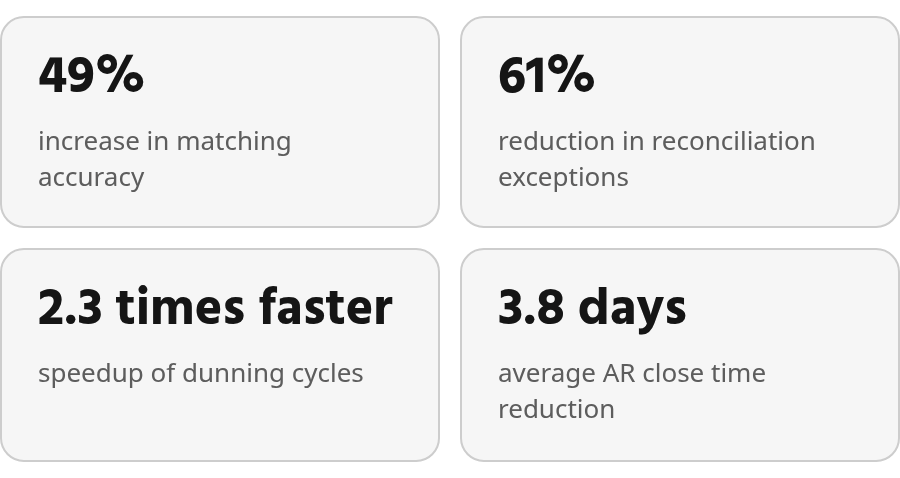
Step-by-Step: Connecting Blixo to Your Billing and ERP Stack
Configuring a billing platform is finite and testable. You can click through it, run a test invoice, and know it works. The connections between systems are a different story, and that’s where the effort belongs.
How Do You Make Billing-to-AR Sync Safe to Retry?
When an invoice goes out, a payment lands or a credit is applied, that event should reach AR and the ERP right away. Give each event a unique ID so the receiving system can discard duplicates when a message gets resent. Networks hiccup. Webhooks fire twice. Without an ID, your ledger finds out the hard way.
Events that fail to post go into a retry queue, not the void. Keep a record of each attempt so someone can trace what happened to a missing entry without opening a ticket with three vendors.
Then set cadence by transaction type. Payments, invoices and adjustments sync in real time. Revenue recognition can batch.
How Do You Map Billing Events to the ERP Chart of Accounts?
Build a translation layer that turns each billing line item into a journal entry against a specific GL code. Finance decides the account. IT decides how it posts. Work through the mapping together before go-live, or entries can land in the wrong accounts for months while everyone assumes the other team checked.
Validate with test postings for every line type, including credits, refunds and partial payments. Partial payments are where most mappings quietly fall apart. After launch, review failed postings daily and retest after every upstream release, since a field mapping can break after something as routine as a CRM update.
Whatever public materials say about a vendor’s ERP connectors or webhooks, verify them in a live demo with your own data. Documentation that doesn’t mention a feature doesn’t prove it’s absent, and documentation that does mention one doesn’t prove it handles your edge cases. For the questions to settle before any of this, work through these five checks on whether automation beats a manual AR desk.
AI-Powered Cash Application and Automatic Reconciliation in Action
Judge cash application on four measures: matching accuracy, exception volume, processing speed, and how leftover exceptions get resolved. A vendor who quotes only a match rate has told you half the story.
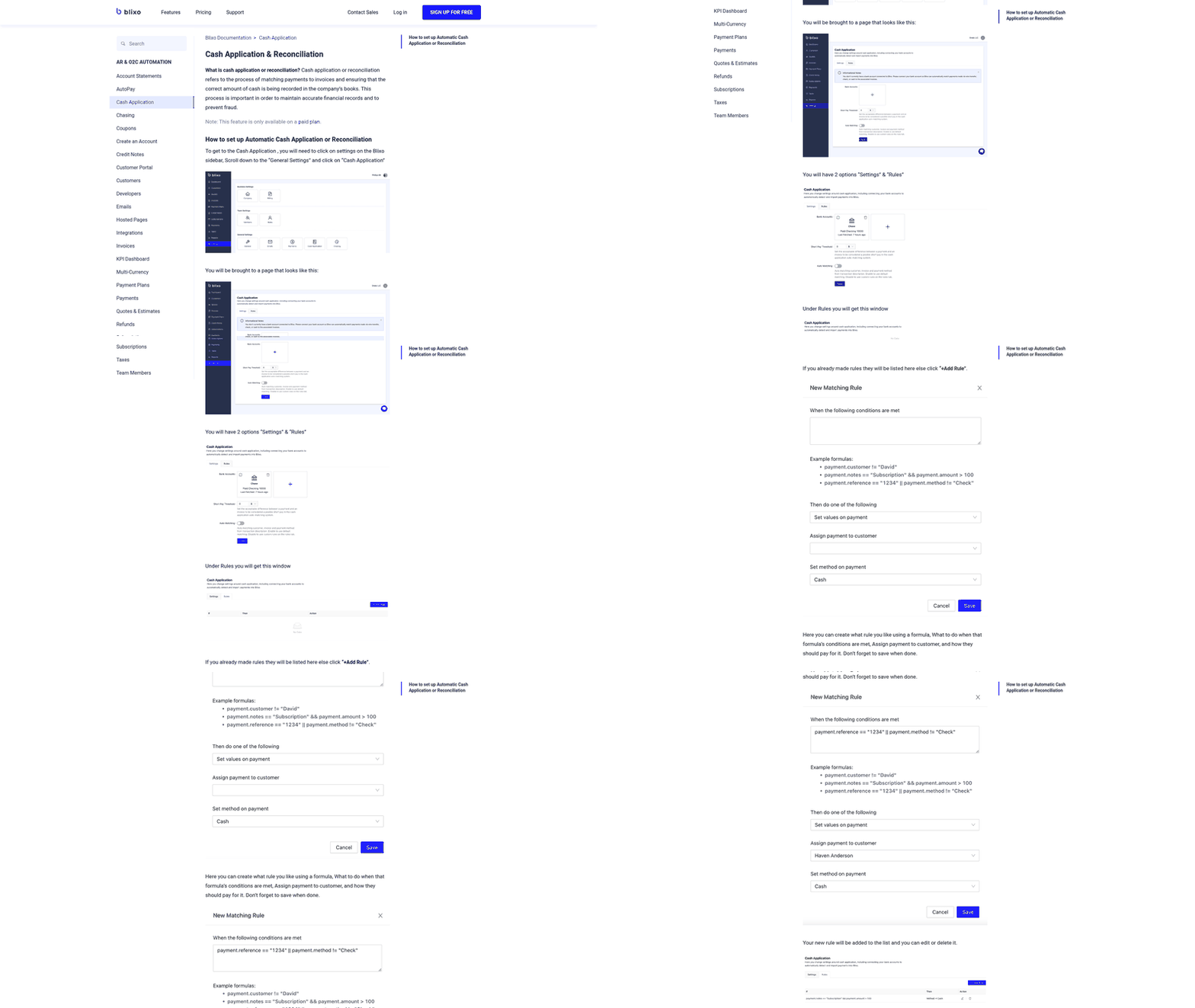
The most detailed public evidence on automating accounts receivable inside an ERP comes from a simulation, not a live rollout. Researchers ran rule-triggered RPA bots against more than 50,000 simulated AR documents in a large ERP’s receivables module. The documents spanned a range of customers, payment and invoice classes, and regional compliance rules. Read the results as a controlled test, not a forecast for your books. (If you want background on how these bots differ from other automation, there’s an explainer on RPA in accounts receivable automation.)
Match Rate and Exception Count Move Separately
The simulation reported higher matching accuracy and fewer reconciliation exceptions. Two separate results, moving by different amounts. A higher match rate doesn’t automatically shrink the pile your team clears by hand.
Ask for both numbers in any demo. Then ask what happens to each mismatch. Who receives it? What comes attached: the remittance, the candidate invoices, the customer’s payment history? An exception that arrives with the payment and likely invoices takes minutes. One that arrives as a bare dollar amount can eat an afternoon.
My advice is to weigh exception queue design above a few points of match rate. Public materials rarely describe queue design, and a feature missing from a brochure may still exist in the product. Test it in a live demo with your messiest payments. The short-pays, the bundled remittances, the customer who pays three invoices with one wire and no memo.
Speed Numbers Worth Testing
In the same study, dunning cycles for high-value overdue accounts finished faster. Average AR close time dropped per cycle. You can baseline both today. Count the days from period end to close, and the days from first overdue notice to resolution on your largest accounts.
Handle the dunning result with care. For your most valuable relationships, faster isn’t always better. Nobody wants the agency’s biggest retainer client getting a third automated nudge while the account lead is mid-renewal. Let automation handle detection, sequencing and credit-hold flags for those customers, and have a person own the outbound message before anything escalates.
What I’d Track Before Trusting the Sync
Measure the integration, not just the tool. A quiet sync is suspect until you’ve proved it healthy.
You need a reference point first. The simulation offers useful benchmarks for testing, but it doesn’t predict results in a live environment. Your own baseline should cover data quality, posting failures, manual touches and the time it takes to resolve exceptions.
The Metrics That Matter When You Automate AR
Track these weekly, starting before go-live so you have something to compare against:
- Matching accuracy: the share of payments applied correctly, not just applied.
- Reconciliation-exception rate: how many items need a human, and whether that number falls over time.
- Exception queue structure: whether exceptions get sorted by reason, owner and age, or just pile up.
- Dunning completion time: measured separately for high-value accounts.
- AR close time: days from period end to a closed ledger.
- Failed postings and sync frequency: how often entries miss the ERP, and how fresh each feed is.
Keep sync frequency right next to matching accuracy on the dashboard. Cash application can only be as current as its slowest feed. A matching engine reading a stale bank or invoice feed will miss matches no matter how good the model is.
Three Controls That Catch Silent Failures
Schema changes cause most of the quiet breaks, and nothing errors out when they happen. Three controls do most of the work:
- A translation layer that maps every billing event to an ERP account, owned jointly by finance and IT.
- Re-validated mappings after every release on either side, with the payment-to-AR path in each regression test.
- Alerts on failed postings before the next sync cycle runs, plus the sync-health check that gates dunning.
Some ERP vendors argue AR should run natively to avoid sync risk entirely. That holds when your ERP’s AR module is capable and your customer data is clean. The simulation points the other way when the native module is the bottleneck, with batch processing and manual validation slowing everything down. In that case a layered tool makes sense, and these controls are what keep it honest. If your ERP already handles AR well, skip the extra layer and spend the budget elsewhere.
Frequently Asked Questions
1. Do I need a separate AR tool if my ERP already has an AR module?
A separate tool earns its place only when the native process cannot keep up with the business. Review the causes of delay rather than adding software automatically: batch processing, manual validation, poor customer data or limited exception controls. If those weaknesses are absent, keeping AR inside the ERP avoids an unnecessary integration layer.
2. Is a scheduled sync just as risky as a nightly CSV export?
Not necessarily. The important distinction is recoverability. A monitored scheduled process can report failures and preserve the affected records for replay; an unattended export may leave the team unaware that data was skipped. Ask to see the alert, audit trail and recovery procedure before approving either pattern.
3. Which ERPs does Blixo connect to, and can someone review matches before they post?
Blixo’s public materials describe ERP connectivity and a review step before posting. Confirm the specific connector, supported transaction types and approval permissions in a live demo. Test the workflow with partial payments, credits and ambiguous remittances rather than relying on a feature list.
4. Should automated dunning run the same way for my largest customers?
Your highest-value accounts need a person in the loop, even when automation runs the process. A faster cycle isn’t always better where the relationship matters most. Let automation handle detection, sequencing and credit-hold flags. Then have someone on your team own the outbound message before anything escalates, and track dunning completion time for these accounts separately.