

Write an AR Executive Summary That Triggers Collections Decisions in Minutes

Key Takeaways
- An AR executive summary compresses weeks of receivables data into one decision-ready page. It answers how much cash is at risk and what to do about it.
- U.S. companies have $1.76 trillion in working capital trapped in inefficient receivables. Data sitting unread keeps cash frozen.
- Middle-market firms lose roughly 3.1% of revenue to collection problems, about $14 million a year.
- Standardized AR workflows cut DSO by an average of three days and improve dispute resolution.
- A 2025 SSON report found centralizing AR processes cut aged debt by 75% while lowering DSO by three days.
- McKinsey found standardizing AR procedures can improve working capital by up to 30% within weeks.
- The summary’s real job is prioritization, not information. It forces leaders to rank which accounts need action first.
Why the summary is a trigger, not a report
An AR executive summary takes weeks of receivables data and boils it down to one page a finance leader can act on in minutes. It answers three things fast: how much cash is at risk, why it’s stuck, and what to do next. Built right, it stops being a passive report and starts being a trigger for collections decisions.
Why does that matter? Because cash locked in unpaid invoices directly caps your operational flexibility. When receivables sit uncollected, you lean on credit lines or push out investments you’d rather make now. Every day the data sits unread in a static spreadsheet is another day your liquidity stays frozen.
What a fast summary actually saves you
A tight executive summary report goes straight at collection latency. Most companies aim to collect within 30 to 90 days, so the speed of your decision is the whole game. The faster you catch a deteriorating balance, the faster you can act.
The payoff of fixing this process is direct. Standardizing your workflows and centralizing receivables speeds up cash flow. Swap manual tracking for structured procedures, and teams resolve disputes faster. They also chip away at aged debt more systematically. These aren’t marginal gains. They change how quickly working capital comes loose.
Our take: the summary’s real job is to drive action now. Wading through a 40-page aging report leads to paralysis. A single-page view forces your team onto the accounts that need intervention today.
How a summary becomes a collections trigger
The trick is fusing three data points most reports keep in separate columns. Combine them and you get a real-time risk score that dictates the action, not just the priority.
- Aging bucket tells you how old the debt is: current, 31–60, 61–90, or 90+ days overdue.
- Technical vs. commercial tells you why it’s late. Many overdue invoices are technical, meaning the invoice was unclear or wrong, not that the customer refused to pay.
- DSO-to-terms ratio tells you whether the account is drifting past your credit policy.
Here’s the payoff. A 90+ day balance flagged technical needs a re-invoice, not a phone call. The same balance flagged commercial needs escalation. The score routes the work. This is where putting First-Time Invoice Accuracy next to overdue totals earns its place. It lets you tell a collections problem from an invoicing problem in seconds, so you never chase a customer who was never billed correctly.
One warning before you trust the numbers
A gorgeous dashboard built on bad data is worse than no dashboard. Automating invoicing, reminders, and cash application makes you faster, but it amplifies bad data exactly as fast as good data. Validate the ledger before you build the minute-long decision layer on top.
Watch one data-hygiene nuance. A deleted client’s invoices still show in your aging summary as long as the invoices themselves are active, but a deleted invoice vanishes immediately. That gap can quietly distort a real-time summary. Reconcile first, then decide. Treat data validation as a gate the summary passes through, not a cleanup you promise yourself later.
The four blocks of a summary worth reading
A high-impact AR summary rests on four blocks: a risk-rated invoice list, a KPI snapshot, trend insights, and next-step recommendations. Each block feeds the next. The list tells you where cash is stuck, the KPIs tell you how bad it is, the trends tell you which way it’s moving, and the recommendations tell your team exactly what to do about it.
The line between a good summary and a useless one comes down to operational relevance: every metric has to guide a specific decision. Sequence these four blocks and the summary works as one roadmap for collections instead of four disconnected charts.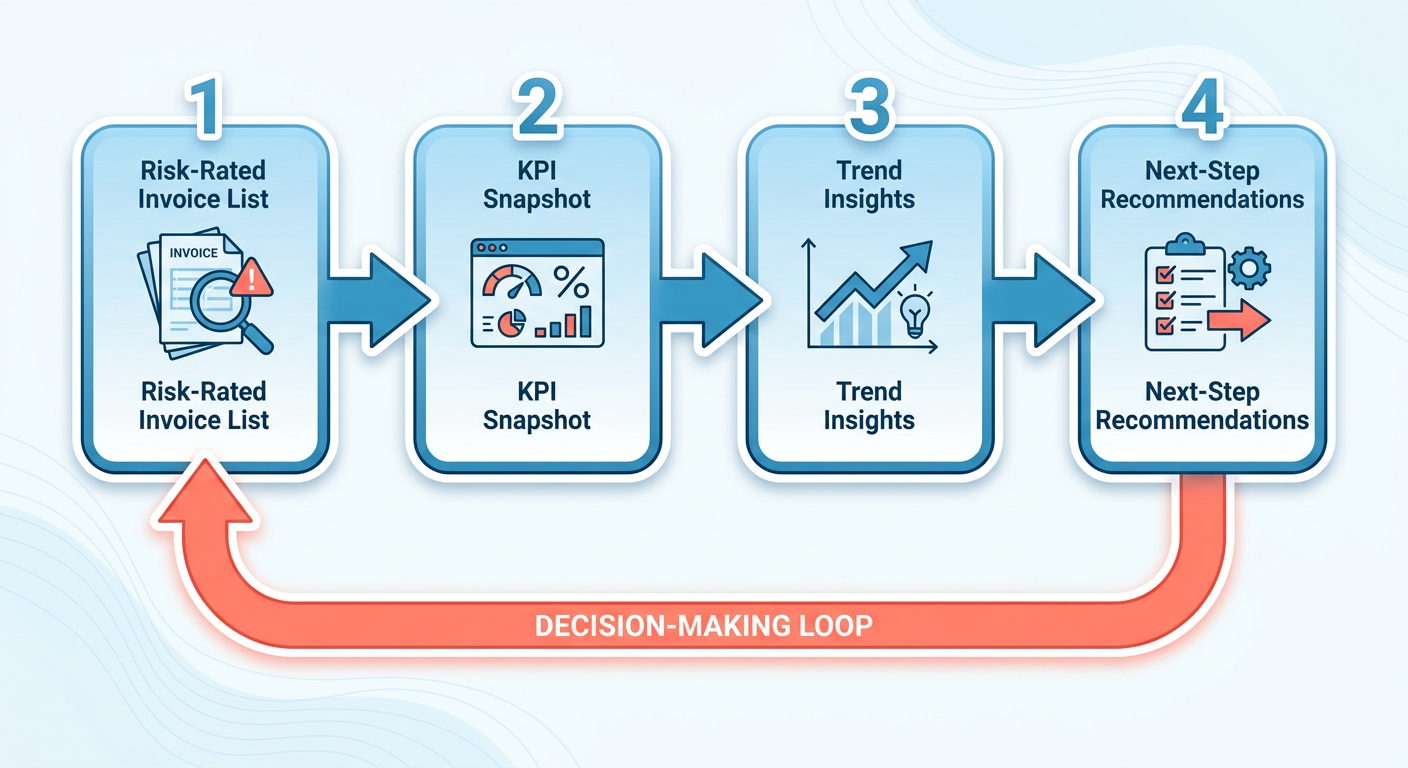
Which 5–7 KPIs belong in the snapshot
The KPI snapshot is the vitals check: five to seven metrics a finance leader scans in seconds. Lead with the ones that trigger decisions, not the ones that fill space.
- DSO (Days Sales Outstanding): average days to collect. A rising DSO is your earliest warning something’s slipping.
- Aging buckets: current, 31–60, 61–90, and over 90 days overdue. Canopy’s example splits an $11,000 balance into $5,000 current, $3,000 at 31–60, $2,000 at 61–90, and $1,000 past 90.
- Collection Effectiveness Index (CEI): how much of what’s collectible you actually collected.
- Bad Debt Ratio: the share of receivables you don’t expect to recover.
- First-Time Invoice Accuracy: the one most summaries skip, and shouldn’t.
That last metric matters more than it looks. Most payment reminders are technical, not commercial. Most late invoices aren’t about customers refusing to pay. They’re about unclear or wrong invoices.
Our take: surfacing invoice accuracy exposes systemic billing errors before they damage customer relationships. When billing teams see this metric drop, they can audit their templates and data entry instead of leaving collections agents to clean up the fallout.
How to turn KPIs into a real-time risk score
An effective risk score needs a dynamic weighting system. Instead of treating every overdue invoice with equal urgency, your scoring should weigh the severity of the delay against the customer’s payment history.
Give higher immediate priority to accounts where the fix is straightforward. A minor error on a fresh invoice can be corrected in minutes, unlocking cash right away, while a chronic late payer needs a different, heavier escalation path. Using the ratio of actual days outstanding to agreed terms as a multiplier surfaces accounts drifting away from their own norms.
What makes a recommendations block actually trigger action
Every risk tier maps to one specific tactic with an owner, a deadline, and a success metric. Vague advice like “follow up on overdue accounts” gets ignored. Precise instructions get executed.
Use directive verbs and tie each tier to a move:
- Tier 1 (current, on-track): Auto-send reminder #1 at day 3. Owner: system. Metric: paid by terms.
- Tier 2 (31–60, technical flag): Re-issue corrected invoice within 24 hrs. Owner: billing.
- Tier 3 (61–90, commercial): Escalate to account manager. Owner: named rep. Deadline: 48 hrs.
Welcome to the Jungle cut DSO 18% by automating payment reminders. Blixo can run this in practice, with automated chasing cadences that escalate to a named person or trigger email notices, plus automatic cash application that keeps your matching engine tuned.
To make sure recommendations get done, wire them into your team’s daily task manager. When a recommendation is generated, it should auto-assign to the responsible person, so accountability is built in and high-risk accounts don’t slip.
Data collection and metric selection
A real-time collections risk score lives or dies on the data underneath it. Pull clean numbers from your ERP, billing, and payment systems first, then pick the metrics that actually predict who pays. Get this wrong and your executive summary report becomes a fast route to the wrong decision.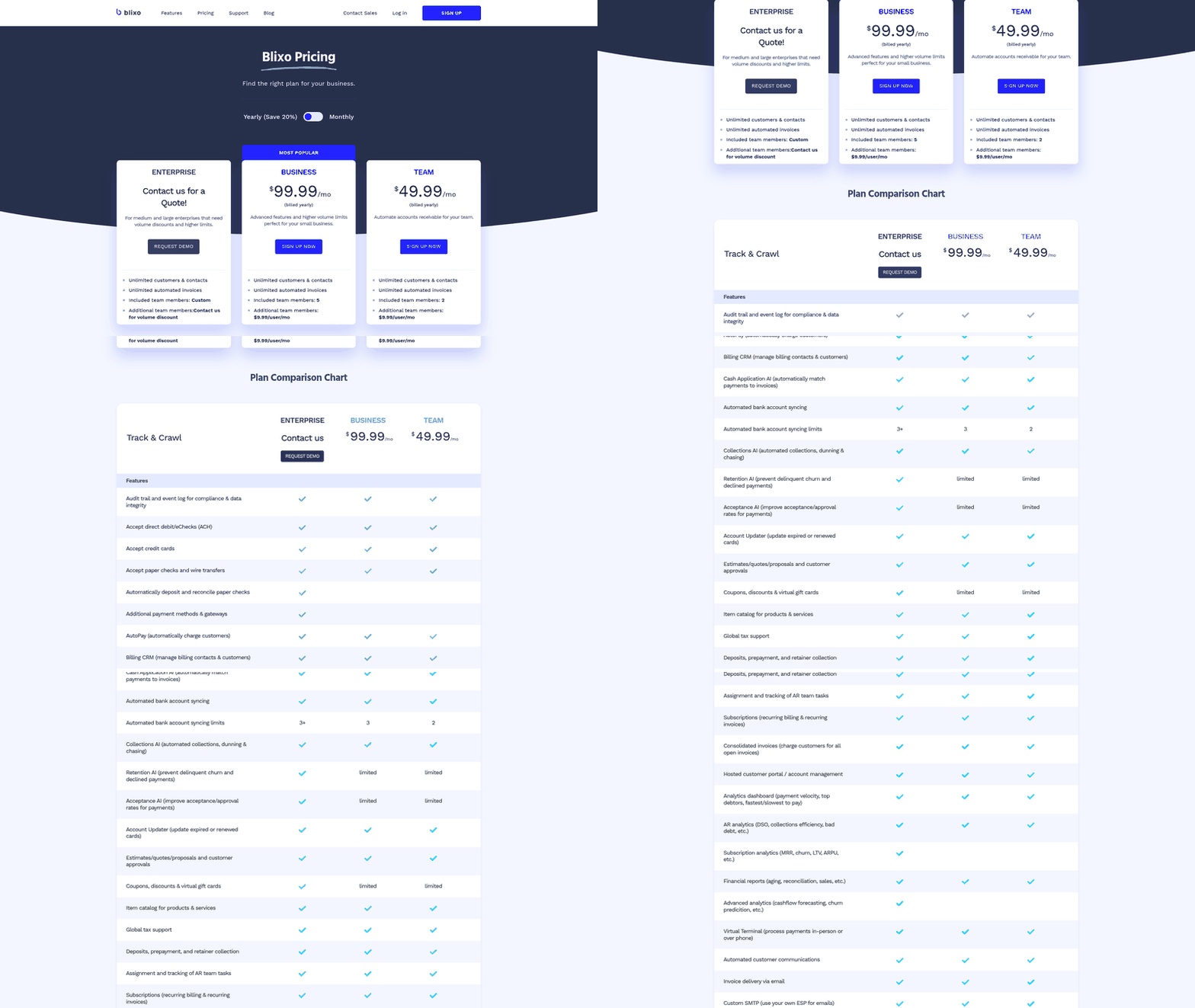
The main obstacle here is integration. If your billing software, CRM, and bank feeds don’t sync cleanly, your risk scores lag. Solid API connections between these platforms keep your summary tied to actual bank balances, not stale ledger entries.
How to extract and clean AR data
Start with three feeds: open invoices with dates and terms from billing, payment receipts from your processor, and customer records from your ERP or CRM. Reconcile them against each other before anything reaches the summary. Mismatches here are what produce phantom overdue balances.
Unapplied cash is another common trap. When payments come in but aren’t matched to specific invoices, your aging report shows inflated overdue balances even though the cash is already in your account. Your pipeline needs an automated matching step to clear these floating payments before you compile the summary.
The other frequent defect is mismatched invoice ages. Aging runs from invoice date and payment terms against today’s date, sorting balances into current, 31–60 days, 61–90 days, and over 90 days. If terms are entered inconsistently across systems, the same invoice lands in two different buckets. Reconcile your cash first. Your summary is only as accurate as the cash you’ve applied, which is why Blixo’s matching engine handles cash application and reconciliation automatically before the numbers ever hit your summary.
Which metrics actually predict collection success
The most predictive metrics blend aging with behavior, not aging alone. Track DSO against payment terms, invoice accuracy, and whether each delay is technical or commercial. A rising DSO is one of the earliest signs collection is slowing.
Past the technical-commercial split, historical payment patterns carry real predictive weight. If a customer usually pays 10 days late, a 5-day delay is normal; if a reliably prompt payer is 5 days late, that’s an immediate signal. Tracking these deviations flags risk long before an invoice hits the 90-day bucket.
Our take: stacking these behavioral metrics gives you a genuinely usable cash flow forecast. Once you understand the probability of collection for each risk tier, you can project incoming cash with far more confidence, turning a backward-looking aging report into a planning tool.
Keeping the feed live and handling exceptions
Wire the summary to a live data source so numbers update from the ERP automatically, not from a spreadsheet someone exports every Friday. Generating AR reports from live data is more reliable than manual methods, and it gives finance leaders real-time insight into cash flow and working capital.
Exceptions need explicit rules or they silently corrupt the score. Partial payments should reduce the open balance and re-age the remainder. Disputed invoices need a flag that pulls them out of the collections queue until they’re resolved. Cross-currency amounts should convert to one reporting currency at a fixed daily rate, so your at-risk total isn’t a moving target. Set these rules once, and the summary stays decision-ready every time you open it.
Wiring the summary into your collections workflow
A summary nobody reads on a schedule is just a prettier spreadsheet. The point of an executive summary report is to force a decision, so it has to live inside your collection cycles, not next to them. We embed it at three cadences: daily triage, a weekly huddle, and a monthly review. Each one triggers a different class of action.
The trigger logic is what makes this work. When an invoice crosses a threshold, the summary should regenerate itself and flag the new risk. Set clear operational boundaries and your team pivots from passive monitoring to active outreach without waiting on manual approvals.
When should the summary auto-regenerate
Tie regeneration to aging thresholds, not calendar dates. The moment a balance hits 30 days past due the summary should add a risk-scored row and push an alert. Don’t wait for the Monday report. An invoice that slid into the 31–60 day bucket overnight is a decision you can make today.
Route those alerts where your team already works: a Slack or Teams channel, or an email digest. The notification should carry the aging bucket, the risk score, and the recommended action already attached. That way the team can start escalation the moment an account drifts past its credit window.
To keep those automated alerts trustworthy, keep a strict audit trail for ledger adjustments. Any manual change to an invoice status or client profile should be logged and verified, so your triggers are always reacting to verified financial events.
How to run a collection huddle from one page
Make the summary the only agenda item. A 15-minute huddle where the top five risk-scored accounts drive the conversation beats an hour of status updates. Working from a live view instead of stale exports keeps the conversation on decisions, not data cleanup.
Assign clear ownership for each flagged account. If an invoice needs billing corrections, it goes to operations; if it needs direct negotiation, it goes to the account manager. Every high-risk balance ends up with one owner driving it to resolution.
Over time this builds a feedback loop. Track which actions actually resolve balances and you can keep refining your credit policies and workflows, steadily shortening the collection cycle.
Skip the full three-cadence setup if you invoice fewer than a handful of clients a month. At that volume, a weekly glance does the job. The machinery earns its keep once your open-invoice count outruns what one person can track by memory.
A sample summary that triggers collections in minutes
Here’s what an AR executive summary looks like when it’s built to trigger action, not just describe status. We anonymized the numbers, kept the structure, and marked every spot where you’d drop in your own data. Copy it, adapt the placeholders, and you’ve got a decision-ready page in front of your finance lead.
The gap between a theoretical template and a ready-to-use one comes down to one rule finance people repeat: every line has to point to a decision. A summary that shows “total outstanding” invites a shrug. A summary that shows expected collectible cash forces a call.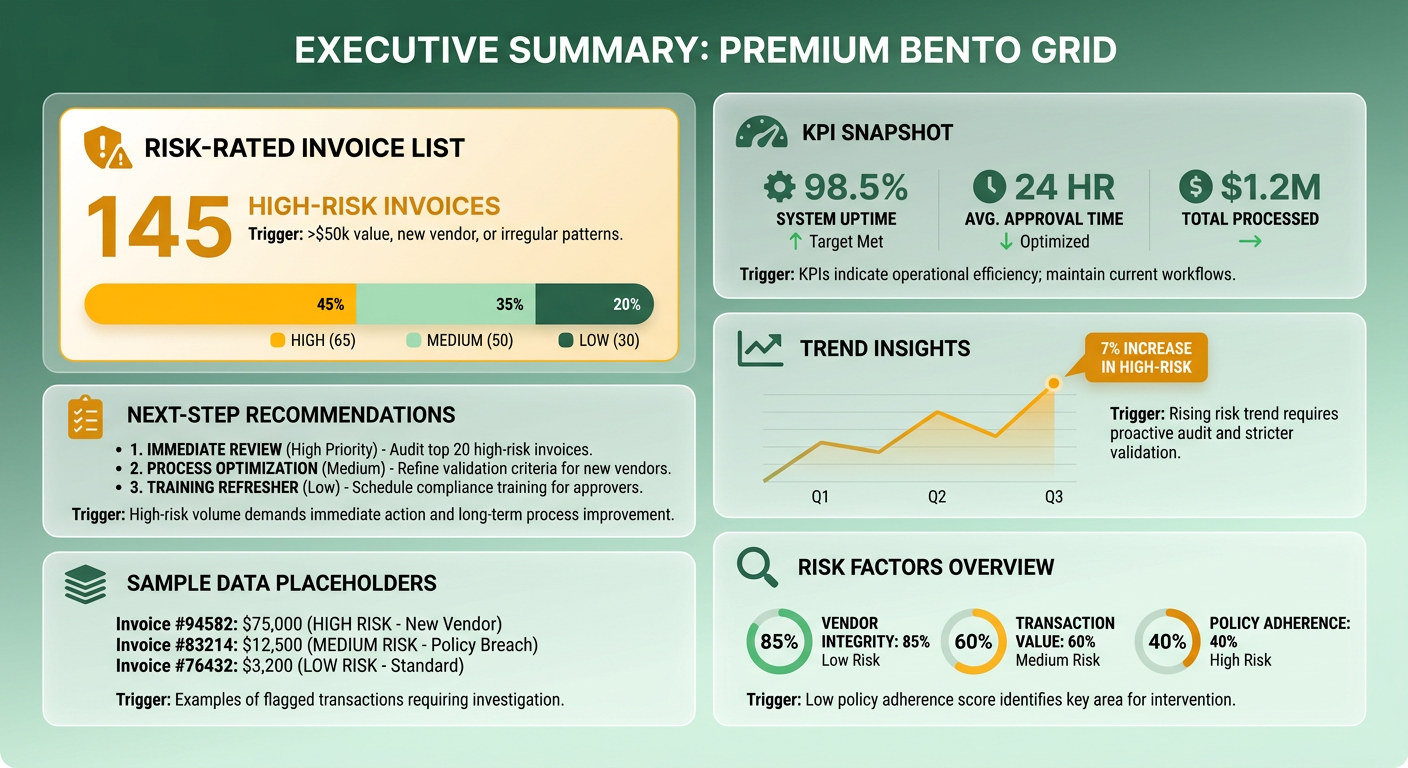
What the filled-in summary looks like
Here’s the skeleton, with sample figures and [bracketed placeholders] where your data goes:
AR Executive Summary. [Company Name], [Reporting Period]
- Total outstanding:
$[X]across[N]open invoices - Expected collectible:
$[Y]after risk-weighting (see aging below) - DSO:
[Z] daysvs.[target] days - At-risk balance (90+ days):
$[A], flagged for escalation
Aging, risk-weighted:
| Bucket | Balance | Collection probability | Expected cash |
|---|---|---|---|
| Current | $[X1] |
[P1]% |
$[X1×P1] |
| 31–60 days | $[X2] |
[P2]% |
$[X2×P2] |
| 61–90 days | $[X3] |
[P3]% |
$[X3×P3] |
| 90+ days | $[X4] |
[P4]% |
$[X4×P4] |
That last row matters. Long-aged balances are far more likely to go uncollectible, so counting the 90+ bucket at face value inflates your forecast. Weight it down using your own historical collection rates for each bucket. The gap between “total outstanding” and “expected collectible” is the number that starts a real conversation.
Top 3 recommended actions:
- Escalate
[Customer A]’s$[amount]invoice to a call this week. - Offer a payment plan on
[Customer B]’s[X]-daybalance. - Auto-send a second reminder on
[N]invoices crossing 30 days.
Where the placeholders get auto-populated
Every [bracket] is a field an automated AR system fills from live data, so nobody rebuilds this page by hand each morning. Automated collections software watches payment history, predicts payment capability, and pulls real-time account balances. That’s exactly what the risk-weighting column needs.
The KPI snapshot pulls from your billing feed. The aging table draws from open-invoice dates. The probability column comes from each customer’s payment history. The action block ranks the highest expected-loss accounts first. If you want the full walkthrough on tightening this to a two-minute read, we cover it in Write an AR Summary Your CFO Reads in Two Minutes.
The compliance line that belongs at the bottom
Add one line covering data handling: “Customer balances shown are internal financial records; distribution limited to authorized finance staff.” Data security is a top selection criterion for any automated AR tool, and your summary carries live customer financial data.
Skip the disclaimer bloat. One clear access-restriction line is enough for an internal executive summary report. If you send it externally to auditors or lenders, add a confidentiality footer and a “figures unaudited as of [date]” tag.
Frequently Asked Questions
1. How is a technical delay different from a commercial delay in AR collections?
A technical delay is resolved by correcting administrative errors, such as updating billing addresses, fixing line-item discrepancies, or resending missing documentation. A commercial delay, however, requires direct communication with the client’s accounts payable department or account manager to address cash flow constraints, payment terms, or disputes. Identifying this distinction early ensures your team applies the correct operational remedy immediately.
2. What happens if my team deletes a client record instead of the invoices?
When a client record is deleted without removing the associated open invoices, those outstanding balances remain active in your database and continue to skew your aging metrics. To prevent this data distortion, establish a standard operating procedure where accounts are fully reconciled and all open invoices are formally written off or voided before any client profile is archived or deleted.
3. Do I need the full three-cadence workflow if I only invoice a few clients monthly?
For low-volume invoicing, a simplified weekly review is typically sufficient to maintain control over receivables. However, as your customer base expands and manual tracking becomes unmanageable, transitioning to a structured, multi-cadence workflow ensures that no overdue accounts are overlooked and collections remain predictable.
4. Why weight the aging buckets instead of using total outstanding?
Using total outstanding receivables for financial planning creates an overly optimistic view of your cash position, as older debts carry a significantly higher risk of default. Weighting your aging buckets based on historical recovery rates provides a realistic, risk-adjusted cash forecast, allowing finance leaders to make more accurate budgeting and investment decisions.
5. How should partial payments and disputed invoices be handled in the summary?
To handle ledger exceptions without disrupting your reporting, establish automated rules within your AR system. For partial payments, ensure the remaining balance is automatically recalculated and tracked under its original terms. For disputes, apply a temporary hold flag that pauses automated dunning messages, allowing your team to resolve the issue without damaging the customer relationship.
6. Why prioritize a 20-day technical balance over a 45-day commercial one?
Prioritizing a fresh technical delay over an older commercial dispute is based on maximizing cash velocity. Correcting a minor administrative error on a recent invoice represents a quick win that immediately brings cash into the business. In contrast, older commercial disputes often require prolonged negotiation, making them less viable for immediate liquidity needs.
7. Does automating AR collections fix bad underlying data?
Automation does not clean your data; it merely accelerates your existing processes. If your underlying ledger contains errors, automated systems will simply distribute incorrect invoices and reminders faster. To succeed, automation must be paired with continuous data hygiene practices, ensuring that your financial records are fully reconciled before any automated workflows are triggered.