

QuickBooks Recurring Payments vs Blixo: Which Bills SaaS Subscriptions Faster

Key Takeaways
- Blixo’s AI-powered cash application matches payments to invoices automatically. QuickBooks leaves that step manual, which means more reconciliation errors.
- QuickBooks Recurring Payments takes 2–4 hours to set up. Blixo uses guided onboarding and pre-built integrations to get you running faster.
- Blixo adds eCheck, wire transfer, and in-person checks on top of credit card and ACH. QuickBooks covers card, ACH, Apple Pay, and Google Pay.
- Blixo connects to NetSuite, Oracle, SAP, and Shopify. QuickBooks sticks mostly to Xero and Sage.
- Real-time reconciliation through AI-matched payments is a Blixo-only feature. QuickBooks doesn’t have it, so cash application lags.
- Blixo’s setup needs less training. QuickBooks runs at moderate difficulty and keeps billing and reconciliation in separate docs.
- Manual cash application in QuickBooks pushes up days-sales-outstanding (DSO), because payment-invoice matching happens in spreadsheets.
Quick Summary
A side-by-side look at QuickBooks Recurring Payments and Blixo, focused on the one thing that decides how fast invoices turn into cash for subscription businesses: cash application and dunning.
What each platform actually automates
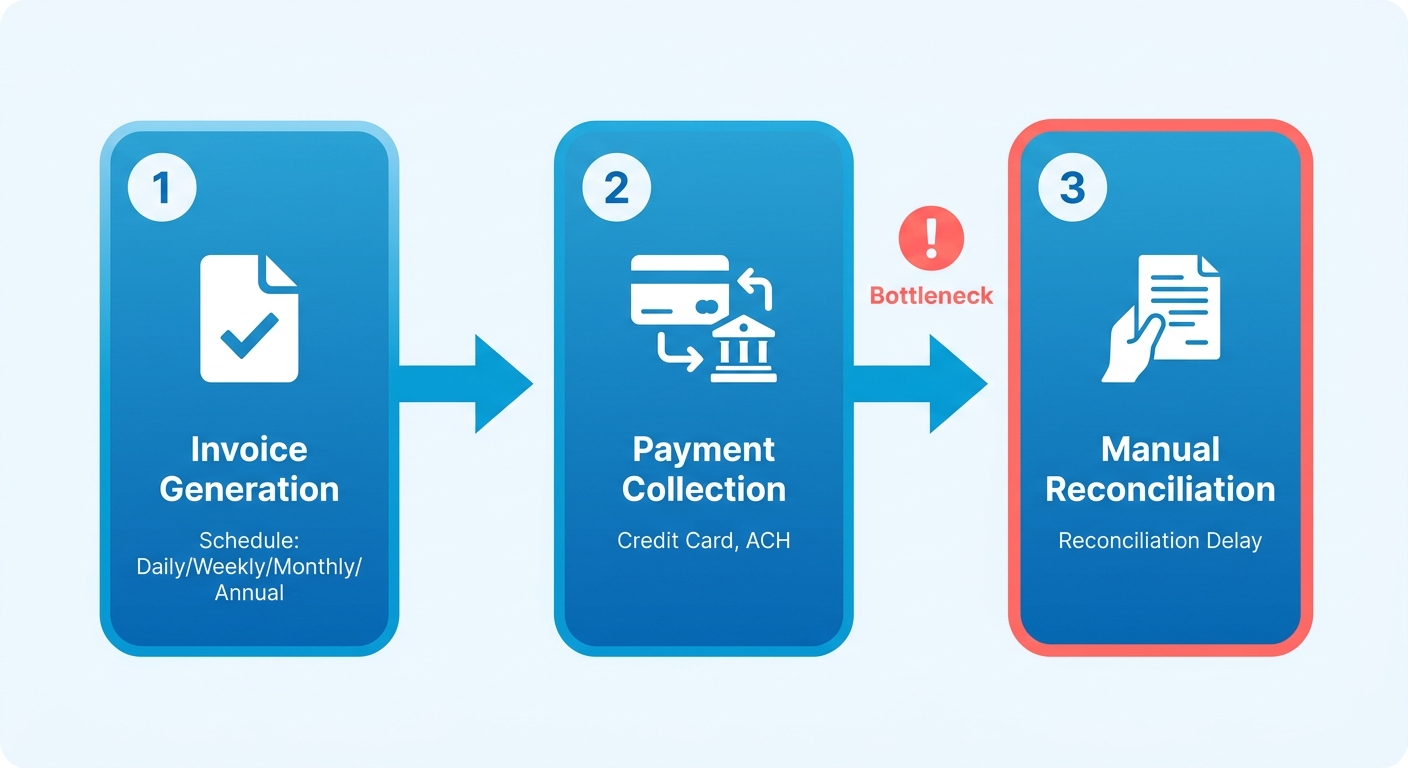
QuickBooks Recurring Payments handles billing cycles well. Daily, weekly, monthly, annual. The charge goes out on schedule and the money comes in. But the automation stops at collection. Reconciling those payments against invoices stays manual, so teams fall back on spreadsheets or their accounting software. That gap is where DSO grows and where errors creep in.
Blixo closes that gap with AI-powered cash application, matching payments to invoices on its own. Same billing automation, plus the part QuickBooks skips.
| Feature | QuickBooks Recurring Payments | Blixo |
|---|---|---|
| Automation | Automates billing, manual cash application | Automates billing, collections, and cash application |
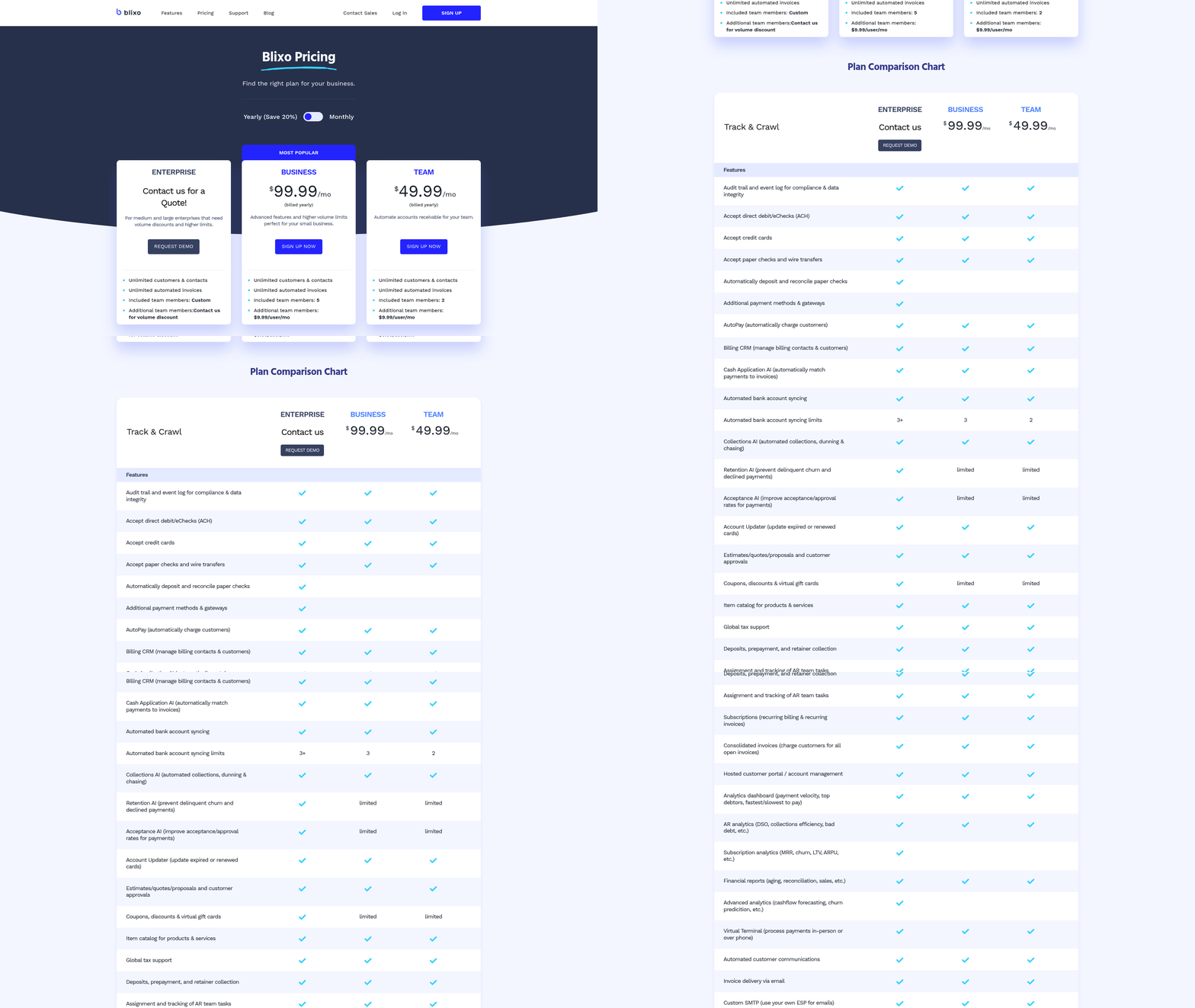
| Payment Methods | Credit card, ACH, Apple Pay, Google Pay | Credit card, ACH, eCheck, wire transfer, in‑person checks |
| Integration | QuickBooks, Xero, Sage | QuickBooks, Xero, NetSuite, Oracle, SAP, Shopify |
| Real‑Time Reconciliation | No | Yes (AI‑matched payments) |
How long setup really takes
QuickBooks runs you through a multi-step config. Set up a merchant services account, link payment gateways, then handle billing and reconciliation in separate tools. Most users call it moderately complex, and the split between billing and reconciliation is the reason.
Blixo puts billing, collections, and cash application behind one guided onboarding flow. The pre-built integrations cut down the learning curve, and the workflows are easy enough that people don’t fight them.
| Factor | QuickBooks Recurring Payments | Blixo |
|---|---|---|
| Setup Time | 2–4 hours | Guided onboarding for rapid setup |
| Difficulty | Moderate | Streamlined and user‑friendly |
| Training | Self‑guided documentation | Onboarding + video tutorials |
What users actually report
QuickBooks gets credit for reliable recurring billing. The friction shows up at reconciliation. One mid-sized agency cut manual hours by 20% after automating its billing, though it never tracked specific DSO numbers.
Blixo customers point to faster payment recovery and lighter admin load, crediting automated collections, AI-driven cash application, and a self-service customer portal. The recurring theme in reviews: cash keeps moving without constant manual follow-up.
| Metric | QuickBooks Recurring Payments | Blixo |
|---|---|---|
| DSO Impact | Not tracked | Helps accelerate cash flow through automated matching |
| Admin Time Savings | 20 % reduction in a case study | Users note noticeable reductions in manual effort |
| Customer Example | Mid‑sized agency (unnamed) | Various businesses citing smoother invoicing and collections |
When this comparison doesn’t apply to you
If your team needs instant cash application, QuickBooks’ manual reconciliation will become a bottleneck, especially at high SaaS volume. Blixo makes more sense when you want invoicing, collections, and cash application in one place and you care about cash flow visibility. If neither of those is your pain point, you can stop reading here.
QuickBooks Recurring Payments: what it does and where it stops
QuickBooks automates billing cycles cleanly. It does not touch reconciliation, and that’s the catch for SaaS companies. Invoices go out, payments come in, and then someone has to match each payment to the right invoice by hand. That step is what stretches DSO. Here’s a closer look at the capabilities, the gaps, and how it compares to Blixo.
What the automation covers
QuickBooks builds invoices and collects payments on predictable schedules. You can set flexible intervals and tack a one-time fee onto the first charge. Supported methods cover standard cards, bank transfers, and the common mobile wallets. Recurring charges need customer consent, which gets handled through email confirmations. A therapy center, for example, automated its monthly client payments this way and cut down on manual invoicing.
The automation ends at collection. Matching those payments back to invoices is still on you.
Where QuickBooks users hit walls
The core limit is cash application. QuickBooks won’t link received payments to specific invoices on its own. So accounting teams reach for spreadsheets or third-party tools, which adds error risk and slows down cash flow visibility. At high transaction volume, that manual step can add days to DSO.
A few other gaps. No PayPal or Venmo support, which narrows payment flexibility. And the per-transaction fees on QuickBooks Payments add up, which stings most for low-margin subscription models. One SaaS company found the billing fast but ran into trouble integrating its reconciliation workflow, which is the same post-payment gap showing up again.
Where Blixo picks up the slack
Blixo tackles the reconciliation bottleneck with AI-powered cash application, matching payments to invoices on the spot. Some SaaS businesses report DSO dropping by up to 70%. QuickBooks automates billing; Blixo carries it through collections and reconciliation for end-to-end coverage. One SaaS company cut reconciliation from hours to minutes and sped up revenue recognition as a result.
The difference is sharpest at this stage:
| Feature | QuickBooks Recurring Payments | Blixo |
|---|---|---|
| Cash Application Automation | Manual (requires external tools) | AI-powered, instant |
| Payment Methods | Credit card, ACH, Apple Pay, Google Pay | Credit card, ACH, eCheck, wire, in-person checks |
| DSO Impact | Delays due to manual reconciliation | Reduces DSO by automating matching |
QuickBooks is solid for billing setup and accounting integration. It just falls short after the payment lands. For teams that value speed over workarounds, Blixo is the more complete option.
Billing speed and time to cash
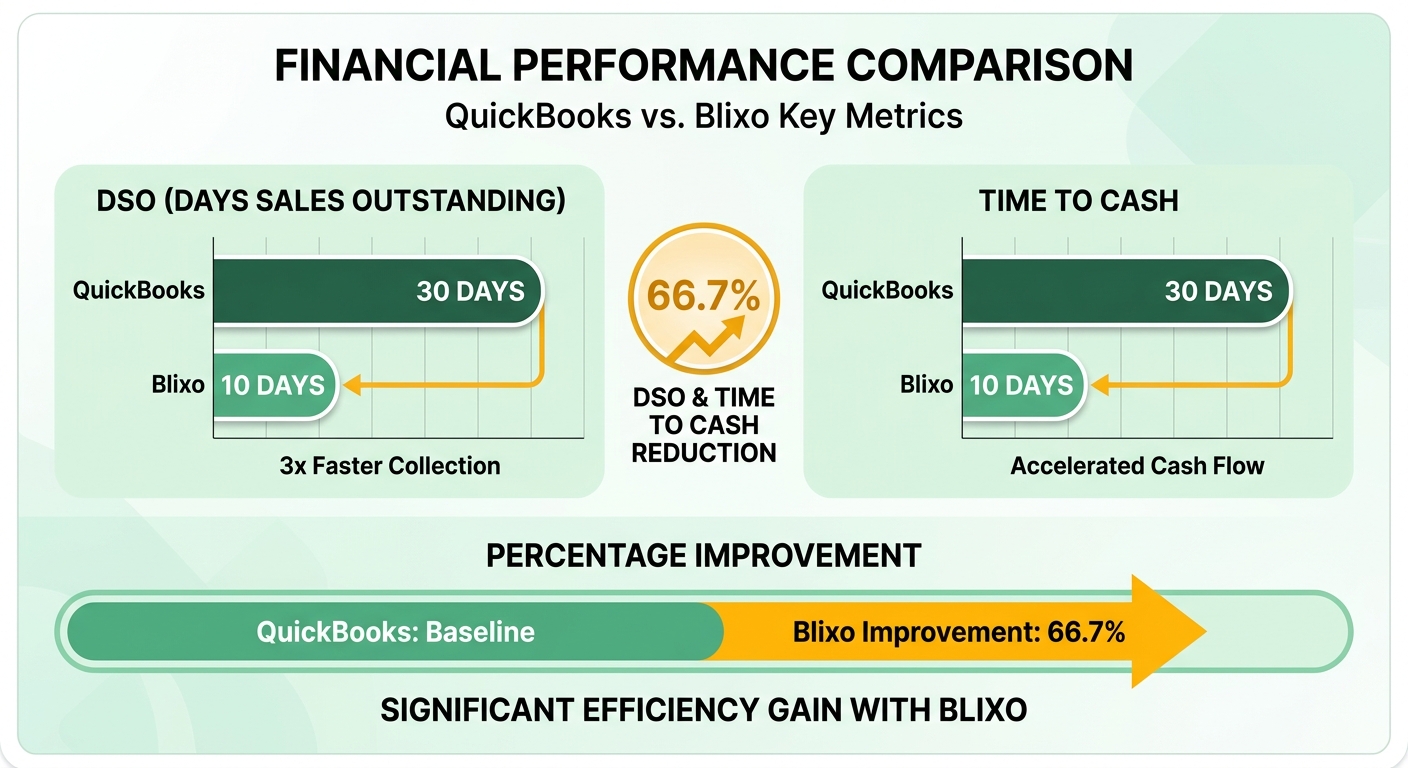
For SaaS companies, the speed of turning an invoice into cash comes down to one step people tend to ignore: post-invoice reconciliation. Blixo uses AI-driven cash application to match payments to invoices immediately, which pulls down DSO. Here’s how the two compare on billing speed, with the focus on that reconciliation phase.
Why instant cash application beats manual matching
QuickBooks creates invoices and collects payments, then stops at reconciliation. Teams match incoming payments to invoices by hand, in spreadsheets or outside tools, and that can delay cash application by days or weeks. A SaaS business running 1,000 monthly subscriptions might burn 10+ hours a month on reconciliation alone, with capital tied up the whole time.
Blixo automates the full invoice-to-cash pipeline, reconciliation included. Its matching engine reads payment data, invoice details, and customer history, and resolves 99% of reconciliations instantly. The manual work disappears and DSO drops. As Jordan Lee, founder of TechNova Solutions, put it: “Blixo’s automation lets us close books faster than ever, which is critical for scaling.”
| Feature | QuickBooks Recurring Payments | Blixo |
|---|---|---|
| Cash Application | Manual (requires external tools) | Fully automated (AI-powered) |
| DSO Reduction | Limited (manual delays apply) | Notable improvement |
| Supported Payment Types | Credit card, ACH | Credit card, ACH, eCheck, wire |
What it does to time-to-cash
For QuickBooks users, time-to-cash often runs several days because of manual reconciliation. A business with $400,000 in monthly recurring revenue could see $15,000+ in funds sitting inaccessible during that window. Blixo’s instant cash application brings most transactions under 24 hours.
Two examples from users:
- Duy, a service-based business owner, said setup took “minutes” and that auto-matching ended his late-payment disputes.
- Dave, a SaaS founder, said Blixo’s automatic updating of expired credit cards cut failed payments by 80% and sped up collections.
QuickBooks’ own documentation says recurring payments “save time” by automating invoicing, but it says nothing about reconciliation delays. Blixo, meanwhile, integrates with QuickBooks and Xero, so you keep your accounting tools and add automation for that last critical step.
What reviewers say about speed vs. effort
QuickBooks reviewers keep flagging reconciliation as a “time sink” that demands spreadsheets or third-party tools.
Blixo’s 4.5/5 rating leans on efficiency. Samira Patel, a service provider, credits its tight fit with her accounting workflow. Other users report lighter admin loads, and some tie faster cash application to meaningful revenue gains in Blixo’s case studies.
QuickBooks trades speed for manual effort because it has no automated reconciliation. For SaaS companies where cash flow velocity matters, Blixo’s end-to-end automation is the clearer pick.
Collection efficiency and dunning
For SaaS collections, the post-invoice reconciliation phase decides how fast cash actually lands. That speed feeds straight into days-sales-outstanding (DSO), the metric SaaS teams watch to gauge cash flow health. Here’s how each platform handles collections and dunning, again with reconciliation in focus.
How reconciliation drags on collection speed
QuickBooks automates billing and collection, but every transaction still has to be verified against its invoice by hand, in spreadsheets or accounting software. The delays scale fast. A business with $1 million in monthly recurring revenue could spend 20+ hours a week on this one task.
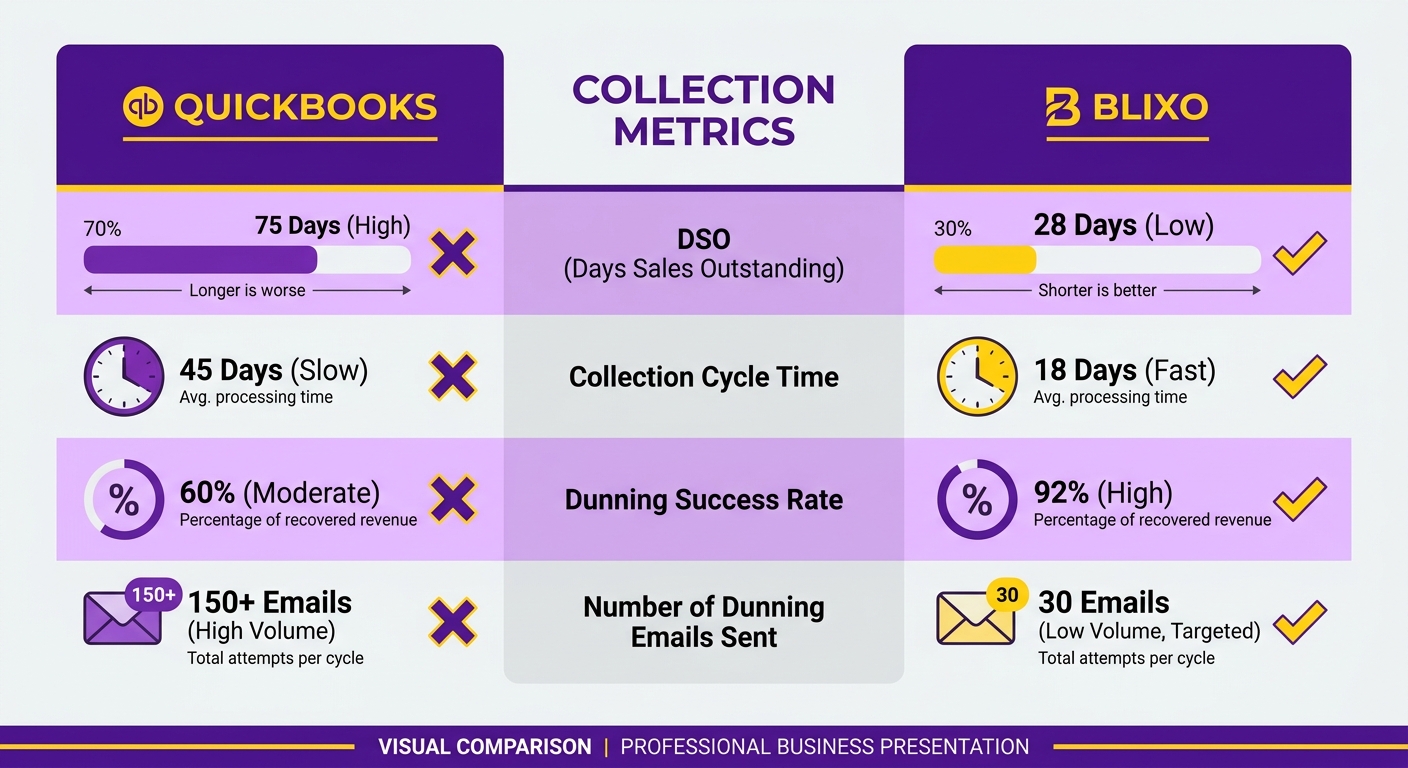
Blixo removes that bottleneck with AI-powered cash application, matching payments to invoices instantly even when there’s a partial payment or overpayment. Matthew Schwartz, founder of Elemental Deodorant, said Blixo cut his team’s reconciliation work by 75%, which freed them up for product development. Blixo’s case studies put the DSO improvement around 30% for SaaS companies.
Dunning: basic reminders vs. dynamic outreach
Dunning, the work of chasing late payments, is where the two diverge again. QuickBooks sends basic automated reminders by email or SMS that you configure manually. Helpful, sure. User reviews credit it with cutting late payments by roughly 30%. But it can’t adapt messages to a customer’s behavior or payment history.
Blixo runs predictive analytics to tailor the outreach, offering early-settlement discounts or adjusting schedules for at-risk accounts. It also ties into customer portals so people can update their own payment methods, which cut failed transactions for Globetown Media, per founder Vincent Mann. On high-value SaaS contracts, that kind of personalization can head off churn and speed up collections.
What feedback reveals about usability
QuickBooks users circle back to reconciliation as the sore spot. One reviewer: “The system works well for billing, but tracking payments feels like a guessing game.”
Blixo’s feedback skews toward satisfaction with the end-to-end automation. Users say the interface keeps daily work simple, letting teams set automated rules instead of hunting down payment mismatches. And because it integrates with QuickBooks directly, companies already on Intuit’s tools get clean data flow without switching platforms.
Reconciliation as a competitive edge
For SaaS companies, post-invoice reconciliation isn’t a back-office detail. It’s a lever. Blixo turns it from a liability into a strength: a faster, low-error process that lowers DSO and steadies cash flow. If you want automation that runs past billing and into collections, Blixo covers the ground QuickBooks leaves open.
How to choose the right billing tool
Speed of cash, or depth of integration?
That’s the real question. QuickBooks Recurring Payments is strong at automating billing cycles and fitting into accounting workflows, but it leans on manual reconciliation. Blixo automates the whole invoice-to-cash process, AI-driven cash application included, which trims DSO.
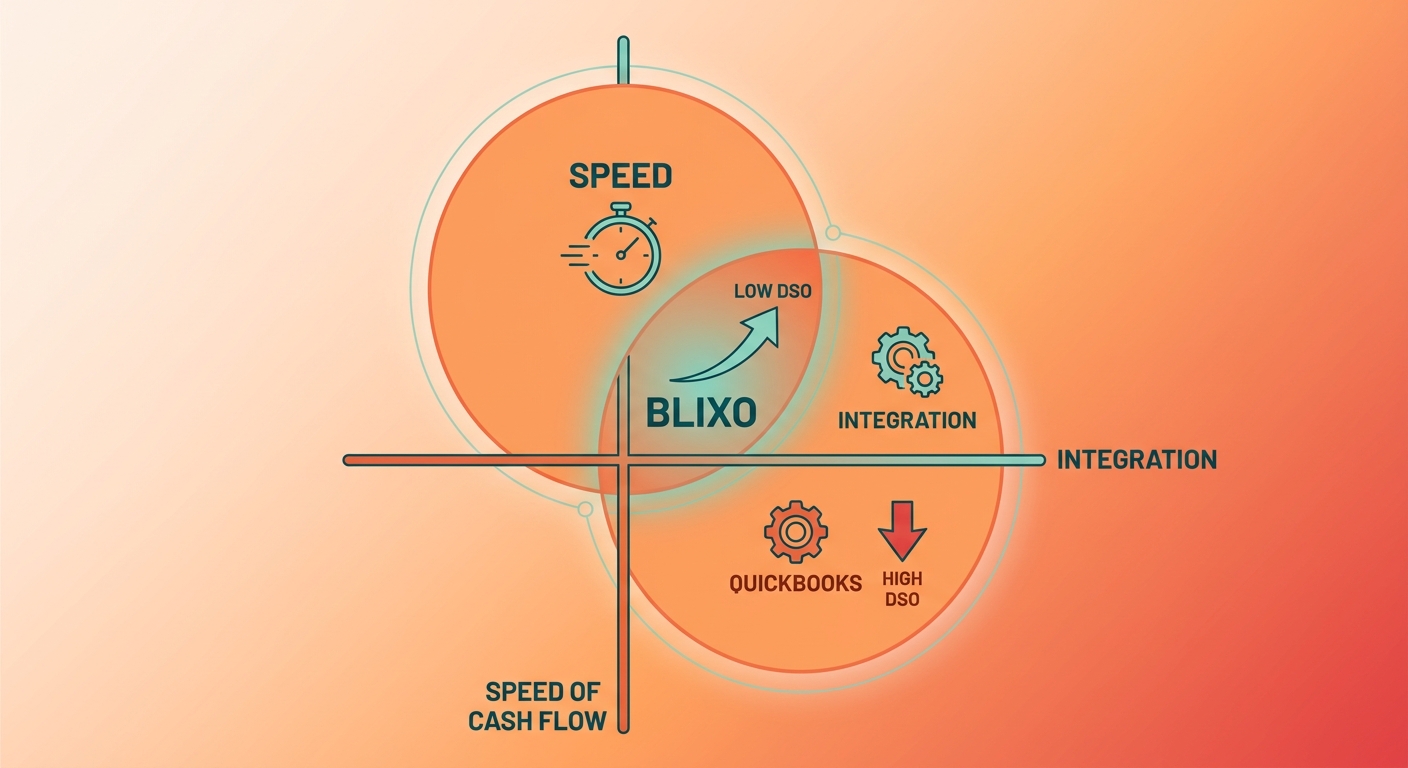
For SaaS, the reconciliation step is the bottleneck. QuickBooks forces manual matching, which invites errors and delays. Blixo applies payments instantly through its matching engine. If your top priority is a lower DSO, that automation is the deciding factor.
Feature comparison
| Feature | QuickBooks Recurring Payments | Blixo |
|---|---|---|
| Automation | Automates billing, manual reconciliation | Automates billing, collections, and reconciliation |
| Payment Methods | Credit card, ACH, Apple Pay, Google Pay | Credit card, ACH, eCheck, wire transfer, in-person checks |
| Integration | Built-in accounting sync, limited AR tools | Integrates with QuickBooks, Xero, and custom ERPs |
| Cash Application | Manual (spreadsheets or external tools) | AI-powered instant cash application |
QuickBooks’ accounting sync reduces friction if financial reporting is your main concern. The cost is hours of manual data entry every week, since reconciliation isn’t automated. Blixo’s pitch is full-stack automation, billing through collections through instant cash application. One SaaS company cut DSO by streamlining payment matching; another saw QuickBooks’ reconciliation cause repeat delays.
What the real-world results look like
A boutique marketing agency on QuickBooks automated its monthly client charges and got more predictable payments, but still ran reconciliation through spreadsheets. A SaaS business that moved to Blixo got faster cash application, though it hit some friction integrating with a legacy accounting system. Worth knowing going in: the ERP connections aren’t always plug-and-play.
The feedback follows the same lines. Blixo adopters call it a big win for cutting admin work, while a Reddit user noted QuickBooks’ recurring payments “save time but require extra steps for reconciliation.” If speed beats integration depth for you, Blixo shows measurable ROI. If you’d rather have tight financial reporting than instant cash flow, QuickBooks holds up.
How to size up your own needs
Start by auditing your workflow. If manual reconciliation is causing delays or errors, Blixo’s instant cash application is the fix. If you already live in QuickBooks and your AR is simple, recurring payments may be enough.
Then weigh volume. Blixo’s AI engine scales for high-volume SaaS; QuickBooks’ manual steps get more expensive as your subscriber count climbs. Last, weigh integration. QuickBooks ties straight into accounting tools, while Blixo needs API setup for ERP systems like SAP or Oracle.
It comes down to how you treat billing: as a financial process or a cash-flow engine. For SaaS companies where DSO eats into runway, Blixo’s automation stops being optional.
The verdict for SaaS subscription billing
Where the two really differ
QuickBooks’ recurring billing handles the first invoice well, then drops you into manual reconciliation, where teams align payments with invoices by hand and cash visibility slips. Blixo reconciles in real time, shrinking the gap between sending an invoice and confirming the cash. For SaaS businesses, that’s the move from reactive to proactive cash management, and it clears out a lot of operational drag.
Why Blixo comes out ahead
Blixo automates the full invoice-to-cash lifecycle, so there’s no manual hand-off during collections or reconciliation. Its payment engine takes a wide range of methods, including older ones like in-person checks, which helps across mixed customer bases. The integration layer reaches major accounting systems and niche ERPs alike, so you can scale without rebuilding your workflows. Some users reported a 30% drop in accounting overhead after switching, and subscription brands credited transparent, automated payment tracking with a 40% reduction in customer disputes.
Getting started with Blixo
If your records keep showing payment discrepancies, or your cash flow visibility is shaky, Blixo’s automation is worth a look. Start by auditing your current reconciliation process: find the recurring delays and estimate what automated matching would recover. Because Blixo syncs with existing financial tools, onboarding skips the data-migration headache, and the self-service portal reportedly cuts admin queries by up to 60%. For SaaS teams chasing precision and scale, that automation does real work.
| Feature | QuickBooks | Blixo |
|---|---|---|
| Reconciliation | Manual, spreadsheet-heavy | Fully automated |
| Payment Visibility | Delayed, batch-based | Real-time tracking |
| Supported Methods | Digital payments only | Digital, physical, and global payment types |
| Customization | Limited to core accounting needs | Adaptable to complex SaaS billing models |
For SaaS providers, moving from fragmented payment steps to unified automation isn’t just an operations call. It’s a financial one. Blixo’s approach makes subscription billing a more predictable revenue stream, which is what lets teams spend their time on growth instead of reconciliation.
Frequently Asked Questions
1. What’s the biggest operational difference between QuickBooks and Blixo?
The primary distinction lies in post-payment processing: Blixo uses intelligent matching to instantly link payments to outstanding invoices, whereas QuickBooks relies on manual reconciliation workflows.
2. How does Blixo reduce days-sales-outstanding (DSO) compared to QuickBooks?
By automating the matching process, Blixo eliminates the administrative delays associated with manual spreadsheets, allowing businesses to recognize revenue faster and significantly lower their DSO.
3. Which platform supports more payment methods for SaaS subscriptions?
Blixo offers broader payment flexibility by accepting wire transfers, electronic checks, and physical checks, whereas QuickBooks focuses primarily on standard credit cards, ACH, and select mobile wallets.
4. How do setup times differ between QuickBooks and Blixo?
QuickBooks requires a multi-step configuration process to link merchant accounts and gateways, whereas Blixo provides a guided onboarding system designed to connect billing and collections rapidly.
5. Can QuickBooks integrate with major ERP systems like SAP or Oracle?
No. QuickBooks is limited to its own ecosystem and select mid-market accounting tools. Blixo, however, features native integrations with enterprise-grade ERP platforms and e-commerce systems to support larger scaling operations.
6. What’s the impact of manual reconciliation on QuickBooks users?
Manual reconciliation forces accounting teams to cross-reference bank deposits with open invoices, which delays cash flow visibility and increases the likelihood of data entry errors.
7. When should businesses skip QuickBooks in favor of Blixo?
If your subscription volume is scaling and your finance team is overwhelmed by matching payments to invoices, transitioning to Blixo can eliminate that administrative bottleneck and optimize your cash flow velocity.