

Why Most ERP Systems Skip Dunning and How to Fill the Gap

The Short Version
In short: ERP dunning sends reminders, but it doesn’t listen. Here are the facts the rest of this piece builds on.
- ERP dunning is outbound-only. It fires on aging rules and misses PO-number requests, open support tickets, and payments that haven’t cleared yet.
- None of the reviewed ERP documentation showed a native way to pause reminders for in-transit payments or open disputes.
- Some subscription churn is involuntary. Expired cards and failed payments cause it, not a customer’s decision to leave.
- None of the five capabilities compared below, from reminder sequences to payment matching, has a published benchmark for effort saved.
- Five metrics cover most dunning performance: DSO, share of invoices overdue, past-due balances, bad-debt write-offs, and manual follow-up hours.
- In a typical staged setup, credit analysts send early reminders, credit managers can impose credit holds, and credit directors issue demand letters and referrals.
Your ERP Knows How to Start Dunning, Not When to Stop
My advice is simple. Keep the ERP as your system of record, and add a dunning layer that reacts to payment and dispute events. The pressure point is subscription renewal, where reminders, settlement delays, and disputes all pile onto the same accounts in the same week.
Here’s the reasoning. Reviewed documentation suggests ERPs handle GL posting, basic invoicing, and aging reports well. Their reminder logic is another story. It generally starts with invoice age and keeps going, with no idea whether the customer replied, opened a support ticket, or already sent the money. Over a few cycles, the schedule drifts away from what’s actually happening on the account.
| Capability | ERP default | Typical manual workaround | Automated alternative | Rough effort saved |
|---|---|---|---|---|
| Reminder sequence | Aging-rule letters, sometimes a paid add-on | Calendar alerts, ad-hoc emails | Fixed stage thresholds, with the channel adapting to customer behavior | Not published |
| Pause when payment is in transit or disputed | Not native in reviewed docs | Checking bank and inbox before each send | Suppression triggered by the payment or dispute event | Not published |
| Pre-renewal payment-method check | Rarely configured | Account manager emails | Reminder ahead of the due date | Not published |
| Inbound replies (PO requests, disputes) | Not handled | Shared-inbox triage | Classification and routing to an owner | Not published |
| Payment matching | Manual cash application | Spreadsheet reconciliation | Automated matching from remittance data | Not published |
That last column is blank for a reason. Nobody publishes a credible number. And a missing benchmark isn’t a missing feature, so verify each row in a live demo rather than reading too much into the docs.
Which dunning metrics should you track?
Track whether the process recovers cash, not whether it generates messages. Capture your baseline before you change anything, then measure the same things afterward.
- DSO: Treat any published improvement range as illustrative, not a promise. Your own before-and-after numbers are the ones that count.
- Percentage overdue: Pull it from your aging reports monthly to see whether early reminders are actually moving accounts out of past-due.
- Write-offs and past-due balances: Vendor case studies claim gains here. They stay claims until your data agrees.
- Follow-up hours: Log the time your team spends chasing, before and after.
Automate the early, high-volume stages. Give late-stage, high-value accounts a named human owner. And if you invoice a handful of clients a month and talk to each of them directly, extra tooling may add little. At that scale, the ERP’s letters are enough.
Why Your Collections Cadence Decides How Much Cash You Hold
Overdue invoices come with the territory when you sell B2B on credit, and some long-outstanding balances end up written off. Part of your revenue is always past due. So the consistency of your follow-up, more than anything clever, determines how much working capital you actually have on hand.
Renewals raise the stakes. That involuntary churn from the top of this piece shows up here: a card expires, a payment fails, and the account lapses without anyone deciding to cancel. When you automate accounts receivable around renewal dates, a prompt to update the payment method can protect retention as well as cash flow.
What does automated dunning actually return?
Vendor materials show what’s possible. They also show the vendor’s best customers, which is how marketing works. Public materials and reviews for purpose-built AR platforms point to outcomes like:
- Lower DSO and better working-capital positions, which reviewers often mention for platforms like Esker
- Less manual collections work, since reminders and follow-ups run on their own
Blixo’s public materials, for example, describe automated collections, chasing, and dunning across email, text, phone calls, and letters, alongside intelligent payment matching. Treat that like any vendor claim. Confirm it in a live demo and test it against your own records.
Where gains do show up, they usually come from consistency, not copywriting. Uneven follow-up teaches customers which invoices they can safely sit on. A defined sequence gives every account the same attention before a person decides whether it deserves an exception.
How do you escalate without losing the customer?
Staged dunning gives every account a clear owner at each step. In a typical setup, a credit analyst handles early reminders. A credit manager takes over later and can place a credit hold. A credit director sends the demand letter and handles the referral once the balance is seriously past due.
Start polite. Assume the customer simply missed the invoice, because most of the time they did. Put a payment link and a dispute path in every message, and hand the account to a person from the later stages on.
Guidance differs on how rigid the schedule should be, and that debate gets its own section below. One exception holds either way. For small invoices from customers with a long record of paying on time, a lighter touch may avoid more friction than it creates.
What NetSuite Dunning Covers, and Where It Leaves You Exposed
NetSuite shows you aging out of the box. Scheduled dunning is a separate piece. The Dunning Letters SuiteApp isn’t enabled by default, and implementation partners describe setup and production testing as a project in its own right.
Some partners still call this native dunning, since Oracle supplies the bundle. Fair enough. Both readings hold up. Once it’s configured, the sending side works. If you plan to automate accounts receivable around renewals, the stopping side is where you’re exposed.
What should a renewal dunning workflow look like?
A renewal workflow needs enough lead time to catch a payment-method problem before service or access is affected. Public schedules tend to follow a similar progression:
- Before due: courtesy reminder. For renewals, ask the customer to confirm the card on file.
- Shortly after due: friendly reminder, fully automated.
- Later past due: firmer tone, payment options included, still automated.
- Escalation stage: formal notice from a named person with a direct phone number and email. A generic AR inbox doesn’t belong here.
- Final stage: final warning that states the consequence, whether that’s a credit hold, demand letter, collections referral, or service suspension.
The stages stay put. The channel shouldn’t. An account that keeps opening your emails without paying probably needs a phone call, not another email.

Why does automated accounts receivable chase customers who already paid?
Settlement timing. Card payouts and ACH transfers don’t clear instantly, and the delay varies by payment type. During that window the invoice stays open in NetSuite, so the dunning run treats it as unpaid. Job order can make it worse. If dunning runs before cash application, customers whose payments cleared overnight can get a reminder even though both systems hold correct data.
Partial payments are a separate headache. NetSuite assigns dunning procedures at the customer level, so a customer who paid most of a balance can still receive a letter citing the full overdue amount. Implementation guides recommend that consolidated customer-level letter as the standard setup. For renewal customers who pay in parts, or short-pay without remittance detail, the letter can be flat-out misleading. Unapplied cash needs remittance captured before matching.
Reviewed documentation suggests ERP dunning covers outbound reminders triggered by aging, and that’s about it. Public materials for AR platforms add delivery tracking, payment links, dispute handling, cash application, prioritized worklists, and ERP sync. Confirm each one in a live demo. A feature missing from a vendor’s website may still exist in the product, and a feature on the website may work differently than you’d expect.
How to Build a Dunning Workflow That Knows When to Stop
A workable design connects three decisions: when an account changes stage, who owns the next action, and which account events suppress a message. Get the third one wrong and a reminder based only on invoice age will keep landing on customers who already acted.
Fixed Stages, Adaptive Channels
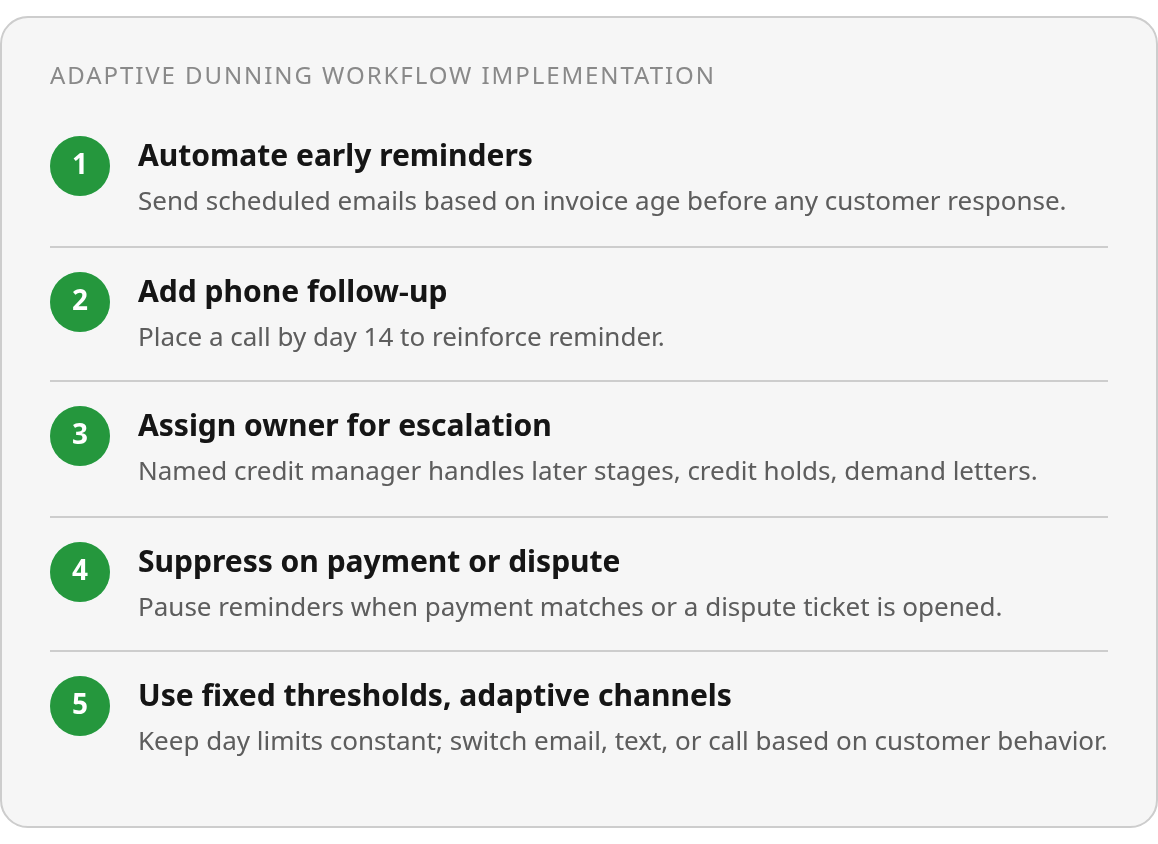
One camp says predictability wins. If every overdue invoice follows the same path, no customer learns which invoices can wait. The other camp says fixed intervals get tuned out, so persistent silence should trigger a call. You don’t have to pick. Keep the day thresholds fixed so coverage doesn’t slip, and let the channel within each stage respond to how the customer behaves.
Weight escalation by risk, not just age. A $500 invoice from a customer with ten years of clean payments deserves more patience than a $50,000 first order from a new account. Set rules for overdue amount, payment history, and account risk, then use them to sort a daily worklist so the team calls the right accounts first. Vendor materials describe auto-prioritized worklists. Verify the weighting logic in a live demo before you trust it with your biggest accounts.
Automate the early reminders, and add a phone call in the later stages. From the firm-notice stage on, a named person with a direct number owns the account. That person decides on the credit hold, the demand letter, and the collections referral. Disputed invoices leave the sequence entirely and move to a separate resolution track. Sales can request one short pause, with approval. No verbal holds.
Payment Status Has to Stop the Reminder
Bank payments such as ACH don’t always settle and post when the customer sends them. If dunning runs at 6am and cash application runs at 8am, a payment that cleared overnight can still trigger a reminder before it’s applied. Rearranging the schedule helps a little. Making suppression event-driven fixes it: a payment match, an open ticket, or a dispute flag should pause the send.
Short-paid renewals are where customer-level dunning, the standard NetSuite setup, really struggles. A customer pays $42,000 on a $50,000 renewal and sends no remittance detail. The cash sits unapplied, and the customer gets a letter for the full $50,000. That’s an awkward call for your account manager to field during a renewal conversation. It’s also why remittance capture comes before matching. Before each run, settlement status, ledger updates, and aging all need to reach the dunning layer.
None of this is mandatory for everyone. If your customers pay each invoice in full by card, the extra control may not be worth it, and the ERP’s native schedule can be sufficient. If you do run renewals with ACH, partial payments, or disputes in the mix, start this week with two checks: pull your current DSO and overdue share as a baseline, and find out whether your dunning batch runs before or after cash application. Those two answers will tell you how much the stopping problem is costing you before you sit through a single demo.
Questions People Ask
1. When is your ERP’s native dunning good enough on its own?
Native ERP dunning is enough when you invoice a handful of clients a month and speak with each directly, or when customers pay every invoice in full by card. Partial payments, settlement delays, and disputes are the conditions that make aging-only schedules unreliable. Without those complications, the ERP’s letters may cover the requirement.
2. What should happen to a disputed invoice or a sales request to hold reminders?
A disputed invoice should exit the reminder sequence and move to a separate resolution track, so the customer is not chased while the underlying issue remains open. Sales holds require more control: allow one short pause, require approval, and accept no verbal holds. This keeps exceptions visible instead of quietly stalling collections.
3. How should you test an AR platform like Blixo before buying?
Run it against your own invoices in a live demo. Blixo’s public materials describe automated dunning, multichannel reminders, and payment matching. Confirm event-based suppression, reply routing, and worklist weighting yourself. A feature absent from public documentation may still exist, so test the actual workflow rather than relying on the feature list.