

What AR Automation Actually Does: Invoice to Cash in 6 Steps

The Short Version
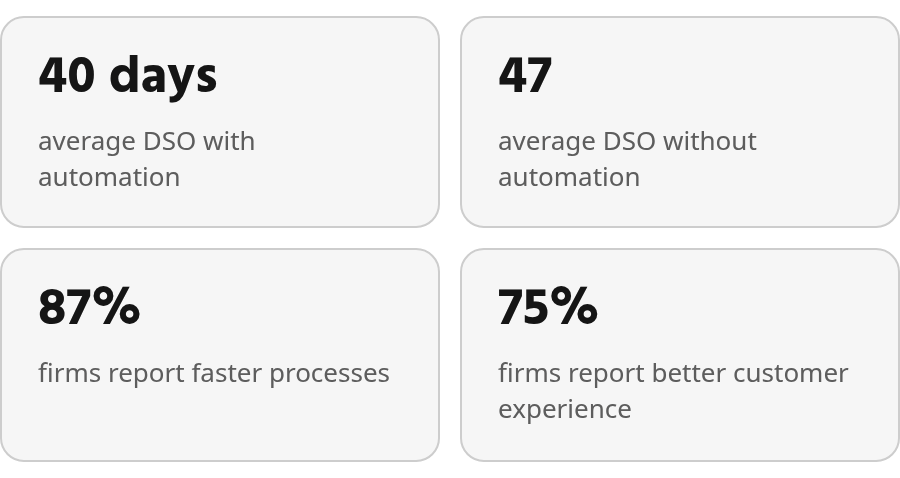
- Firms with automated receivables average about 40 days sales outstanding (DSO). Firms without automation average 47. That gap is roughly a week of cash.
- In PYMNTS survey data, 87% of firms with automated AR reported faster overall processes, and 75% reported better customer experience.
- Inaccurate payment matching sends collectors after customers who have already paid. Recurring-billing clients notice this quickly, because they hear from you every cycle.
- Manual remittance handling breaks in three recurring ways: retyping errors, payments that arrive without remittance details, and incorrect matches that leave paid invoices open.
- The World Bank’s 6.49% average remittance cost measures person-to-person transfers. It gives you no reliable basis for estimating B2B receivables costs.
Should you automate accounts receivable?
In short: yes, if you bill on a recurring cycle or your team sends more invoices than it can track by hand. Teams that automate report faster processes, lower DSO, and fewer errors. If you send a handful of simple invoices a month, manual work may still hold up.
AR automation means using the data already in your financial systems to generate invoices, send them, follow up with reminders, and match incoming payments to the right invoice. It covers the whole invoice-to-cash loop, from the first invoice to the reconciled payment.
What actually changes when you automate
Speed to cash changes first. Benchmark data shows a meaningful DSO gap between automated and manual AR teams, and the survey results point the same way. Teams that automate tend to move invoices through the process faster.
Late cash hits operations. Manual invoicing gets bills to customers later, and mistakes in invoices or payment details create delays of their own. Automation sends invoices sooner and fires reminders without anyone having to remember. Collections become more consistent, so cash flow is easier to forecast.
Errors follow the same pattern. Manual processing is prone to mistakes that delay payment, frustrate customers, and create rework. Automation reduces those mistakes. Customers also tend to have a better experience when invoices are accurate, payment options are clear, and unnecessary follow-ups stop. One caveat: these surveys show an association, not proof of cause. Test the results against your own numbers.
The step to watch most closely is cash application. When payments aren’t matched accurately, the ledger stops reflecting reality. Collections, reporting, and customer support then work from stale information. That step gets its own treatment in this guide to capturing remittance before matching.
Who should hold off?
Low-volume businesses with simple terms can stay manual. If one person tracks every invoice, sends reminders on schedule, and reconciles without a backlog, automation adds cost before it adds value. The test is whether your current process keeps up, accurately and on time.
Company size is a poor guide. One view sets the threshold by invoice volume. Another sets it by staff capacity. A five-person agency billing dozens of retainers a month meets both conditions early. Small team, high volume: automate.
Steps 3–4: Taking payments with the remittance attached
Payment acceptance and remittance capture account for much of the manual effort in AR, and mistakes here can reach your customer directly. If you plan to automate AR at all, give early attention to the step that turns a payment into usable, invoice-level information.
These two steps move your team away from keying in payments by hand. You accept payments digitally and capture the remittance details alongside them. When the remittance arrives with the payment, cash application can post it to the right invoices the same day. Nobody has to email the customer for a breakdown and then wait.
Where manual remittance breaks
Remittance work fails in predictable ways. Data gets mistyped. Payment context goes missing. Or the applied cash doesn’t line up with the invoices the customer intended to pay. Any of those problems can leave the AR ledger out of sync with the bank.
The most visible damage is operational. Collectors lose time sorting through balances that should already be resolved, while finance untangles which payments belong to which invoices. The cleaner the remittance data is at the point of payment, the less cleanup gets pushed downstream.
Automation helps here. AFP’s overview of AR automation says it reduces or eliminates human errors, and that exceptions needing a person become rarer as automation rates improve. Blixo’s public materials describe an intelligent matching engine for payments and automatic cash application. How well it handles payments with missing remittance details is something to verify in a live demo.
What remittance capture costs, and what it saves
Be careful with cost figures. Consumer money-transfer benchmarks sometimes get cited in remittance discussions, but they are not a sound proxy for B2B invoice payments. The savings you can count on come from labor. Your team retypes less, handles fewer exceptions, and has more time for the exceptions that remain.
Skip heavy automation here if most customers pay one invoice at a time with a clean reference. At that volume, manual matching is fine.
A practical starting point is remittance capture on its own, using tools that can connect to invoicing and cash application later. A small first step is easier to get approved internally. The full value arrives once the steps run as one loop.
Steps 5–6: Cash application and reconciliation
Cash application is where an invoice finally closes. Reconciliation proves it closed correctly. If you automate everything else but leave matching manual, your collectors still work from a ledger that lags behind the bank.
Cash application takes each incoming payment and its remittance details, finds the open invoices they cover, and applies the cash to them. Reconciliation then confirms that the money in the bank agrees with what the AR ledger shows as paid. Automated AR runs both as rules. Clean matches post on their own. Anything that doesn’t match goes to a person as an exception.
A bad match becomes your customer’s problem
A misapplied payment rarely stays internal. The invoice it should have closed stays open. It ages, triggers reminders, and lands on a collector’s call list. Your customer paid, and you chased them anyway.
So accuracy matters more than speed at this step. Industry guides, including Thomson Reuters’ overview of AR automation, list fewer errors and higher accuracy as core benefits of automating invoicing, payment handling, and reconciliation. Accurate matching keeps collections contact limited to customers who actually owe you money.
Faster matching doesn’t tell you who to call
Automation pushes every payment through the same process faster. It doesn’t decide which overdue accounts deserve a human call. That decision needs a separate predictive layer that estimates how likely each customer is to pay. Treat clean matching as the baseline, and add prioritization once the ledger is reliable.
Tools also differ on the hard cases: partial payments, short pays, and one payment covering several invoices. Public materials rarely say how a product handles these, so bring your own messy remittances to a live demo. A behavior missing from the documentation may still exist. Absence of evidence isn’t absence of the feature, so ask the vendor to show it.
Skip this step for now if you receive a few payments a month and each one references a single invoice number. Automation earns its place once payments arrive combined, partial, or without references. That’s especially true once you bill across multiple entities.
What to measure once AR is automated
The measurable gains fall into four areas. Cash arrives sooner, fewer invoices go out wrong, less money sits overdue, and customers have an easier time paying. Survey data supports all four. You won’t see any of them unless you record a baseline before you switch.
Start with DSO, because it ties every step of the loop together. Use your own pre-launch DSO as the reference point and compare against it after automation. Automated remittance matching also cuts the errors common to manual processes, which often delay payment. Those two results move together. A correct invoice gets paid on the first pass, while a wrong one comes back as a dispute.
The numbers to pull before launch
Pull each of these from your system for the quarter before launch, then compare quarter by quarter:
- DSO. Your headline number. It reflects invoicing, reminders, and cash application at once, so a drop here means the whole loop is working.
- Process speed. Measure elapsed time from issuing an invoice to closing it, and use it in place of hours saved. Most teams can’t measure hours saved honestly, but they can measure cycle time. Report the median rather than the average, so a few long-running disputes don’t hide faster closes on everything else.
- Overdue share and value. Track the share of monthly invoiced sales that is past due, plus the dollar total. Slow payments show up here as real money. With automation, the rate of uncollectible accounts should fall, because invoices are more accurate and reach customers faster.
- Exception rate. Count the payments that fail to match and need a person. Watch whether this number trends down instead of chasing a fixed target. No universal benchmark exists for what “good” looks like, so your own trend matters more than another percentage.
- Customer experience. Measure it through dispute volume, collection contacts made with customers who had already paid, and the share of payments completed through a self-service portal without contacting your team. A reminder sent to a customer who already paid usually means cash application is running behind collections.
Your next move: get a baseline this quarter
If you send a small number of simple invoices, the before-and-after gap may be too small to read. At that volume, manual work still holds up, and the metrics above won’t tell you much.
Recurring billing is a different story. A small team billing every cycle reaches high invoice volume early, so its numbers move quickly. Pull last quarter’s DSO and exception count now, before anything changes. Then look at remittance capture first, since that is where most exceptions start.
Frequently Asked Questions
Does company size decide whether you should automate accounts receivable?
No. Headcount is less useful than workload. Look at how many invoices, reminders, payment records, and reconciliation items your team handles in a normal cycle. If accuracy or timing is slipping, automation is worth evaluating even for a small company.
Will AR automation tell your collectors which overdue customers to call first?
Not by default. Standard AR automation cleans up the invoice-to-cash workflow; collections prioritization is a different capability. Build that on top of reliable ledger data, not before it.