

PayPal Invoicing for Retainers and Memberships: Good for Recurring Invoices, Thin for AR Automation

The Short Version
PayPal’s Recurring Series supports weekly, monthly, quarterly, yearly, and custom intervals. Reviewed documentation shows it generating and sending each invoice automatically on the chosen schedule. Auto reminders are on by default for due and overdue invoices. That same documentation shows no tiered dunning, no tone escalation, and no handoff to a human.
Accounting Sync pushes invoice, payment, and transaction records into two named systems: QuickBooks and Xero. No NetSuite or ERP connection is listed. Paid invoices settle to your PayPal balance, not your bank account. No automatic matching is documented when you transfer those funds out.
Setting Up Recurring Retainer Bills in PayPal Invoicing
My advice is simple. If you bill a handful of reliable retainer clients, PayPal Invoicing should do the job. Public materials suggest it can build a repeating invoice series, send each invoice without you rebuilding it every cycle, and fire payment reminders from the invoice settings. Consultants, agencies, coaches, and fractional operators billing on a fixed rhythm fit that profile well.
The limit is scope. PayPal describes invoice scheduling and reminder controls. It does not describe a full accounts receivable operation. Absence of evidence isn’t absence of a feature, so anything you depend on should be verified in a live account before you build a process around it.
How do recurring retainer invoices work in PayPal?
You create a Recurring Series from your Invoices dashboard. Ideally you build it on top of a saved template, so customer details, line items, taxes, notes, and terms carry over instead of being retyped every month. Once the series is configured, reviewed documentation indicates PayPal handles creation and delivery at whatever cadence you pick.
One timing detail matters. When you start a series, your client gets the first invoice immediately unless you set a future start date. Say your retainer cycle starts on the 1st, and you set up the series on the 18th. Schedule the start date, or your client gets a bill two weeks early.
| Capability | What PayPal’s materials document | What to verify yourself |
|---|---|---|
| Recurrence intervals | Weekly, monthly, quarterly, yearly, custom | Cycle or end-date limits |
| Auto-send | Each invoice created and sent on schedule | Mid-series price changes |
| Auto reminders | On by default, due and overdue | Pre-due timing options |
| Manual reminders | Not detailed in the sources reviewed | Whether limits fit your follow-up cadence |
Do PayPal reminders run on their own, or do you chase payments yourself?
Both, depending on the client. PayPal can send automated reminders, and you adjust them under Invoice Settings > Auto Reminders. For clients who pay reliably and just need a nudge, that’s a perfectly good polite-reminder system.
Reminders and collections are different jobs, though. A reminder tells the customer an invoice is due. A collections workflow decides what happens when they still don’t pay after the third email. The material reviewed doesn’t define a stepped sequence for accounts that keep sliding later, or a route from automated messages to a person on your team.
So use PayPal reminders for a small book of reliable retainers. If a few late payers decide whether you make payroll, compare how PayPal automatic payments and recurring invoices differ before you commit.
Where PayPal’s Automation Stops Short of Full AR
Based on public materials, PayPal automates the front end of retainer billing better than the back end of receivables. It keeps invoices moving and pings customers around due dates. What the reviewed materials don’t show is the layer a finance team reaches for once an invoice goes late: escalation, ownership, exception handling, and bank-side reconciliation.
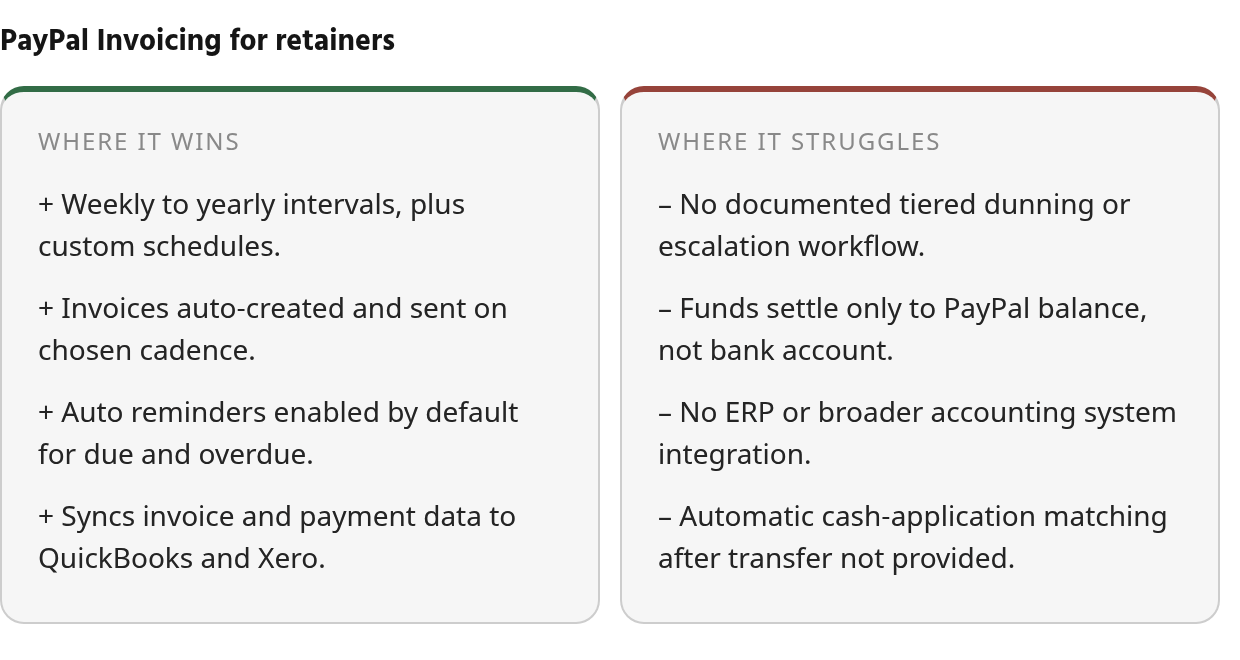
The billing loop works for many subscription-style service businesses. The AR loop is thinner.
Reminders run on a schedule. Escalation isn’t documented.
The reminder controls are useful, but they appear to stay tied to the invoice itself. PayPal’s own content pitches reminders before, on, and after the due date as a way to reduce DSO. It publishes no figures in the reviewed material to back that up. Plausible, sure. Unquantified, also sure.
Manual follow-up is murkier. The sources reviewed don’t explain how manual reminders interact with the automated schedule. In practice, your escalation path may end up being PayPal’s reminder settings plus whatever emails, calls, and account-manager check-ins your team sends from outside the platform. Test the exact reminder behavior in a live account before you design a collections process on top of it.
Cash lands in PayPal, and sync stops at two ledgers
Accounting Sync earns its keep if your stack matches PayPal’s supported targets. It can move invoicing details, payment updates, and transaction records into the named bookkeeping systems. That cuts duplicate entry and gives your accountant a cleaner trail than copying payment activity by hand.
“With the PayPal integration with QuickBooks, payments and fees sync automatically; it’s one less entry for our accountants.” - Customer quote featured in PayPal’s invoicing automation article
A real gain, though the evidence is qualitative. The sync records the payment as it happened inside PayPal. Nothing reviewed shows automatic matching when you later sweep that balance to your bank. That reconciliation step stays on your desk, or your bookkeeper’s.
| AR task | Reviewed documentation | Status |
|---|---|---|
| Recurring invoices | Weekly, monthly, quarterly, custom | Documented |
| Due/overdue reminders | Default on, customizable | Documented |
| Escalation / dunning tiers | Not described | Not found |
| Accounting sync | QuickBooks, Xero | Documented |
| ERP integration | None named | Not found |
| Cash-application matching | Not described | Not found |
| Settlement | PayPal balance | Documented |
If your retainer book is manageable and your accounting already runs on QuickBooks or Xero, this setup may be all you need. If collections are the actual bottleneck, the “Not found” rows are where your demo questions should start.
Head‑to‑Head Feature Grid: PayPal vs. Blixo
PayPal’s column covers basic retainer billing. Blixo’s column stays pending. This research included no official Blixo sources or verified demos, and a grid full of unsourced claims is just marketing. The fair comparison is documented PayPal capability against unassessed Blixo capability.
The grid separates what is evidenced from what you would want in an AR workflow. That split matters when you pick a tool for recurring service revenue.
Where does each AR function land?
| AR function | PayPal (reviewed documentation) | Strength tag | Blixo |
|---|---|---|---|
| Recurrence setup | Recurring Series built from the Invoices dashboard, optionally from a saved template | Strong (basic) | Not assessed* |
| Billing intervals | Weekly, monthly, quarterly, yearly, or custom | Strong (basic) | Not assessed* |
| Scheduled sending | Creates and sends each invoice automatically on schedule | Strong (basic) | Not assessed* |
| Auto reminders | On by default for due and overdue invoices; frequency adjustable | Supported | Not assessed* |
| Reminder templates or escalation | Not documented | Not evidenced | Not assessed* |
| Manual reminders | Limits not documented in reviewed materials | Not evidenced | Not assessed* |
| Accounting sync | QuickBooks and Xero only; sync frequency not stated | Limited | Not assessed* |
| Payment-status sync | Invoicing details, payment updates, transaction records | Supported (two systems) | Not assessed* |
| Settlement destination | Paid funds land in your PayPal balance | Note for treasury | Not assessed* |
| Cash application, churn reporting, ERP coverage | Not documented | Not evidenced | Not assessed* |
| Pricing | Not covered in reviewed materials | Not evidenced | Not assessed* |
What the gaps mean for a retainer book
Start with setup discipline. Retainer businesses often bill on a fixed monthly rhythm, so the series start date isn’t a throwaway field. If you create a series mid-cycle, confirm the launch timing before a client gets an invoice they weren’t expecting yet.
Then look at fit. A small service firm with predictable clients mostly wants invoices out on time and less repetitive admin. A finance-led operation wants exception queues, aging visibility, payment matching, and a clear owner for every late account. Reviewed PayPal materials speak to the first list far more than the second.
*Cells use hedged language because the current research contains PayPal excerpts only, with no Blixo official sources or verified demos. Verify any cell you rely on in a live account or demo.
Your Next Move: Pressure-Test PayPal Against Your Own Retainer Book
The question was whether PayPal invoicing can handle recurring invoices and automated payment reminders for a subscription-based service business. Reviewed documentation says yes, with conditions. The answer holds while scheduled sends, due and overdue reminders, and QuickBooks or Xero sync cover what you need.
Past that line, the evidence goes quiet in both directions. PayPal’s public materials don’t show advanced dunning, AI cash application, ERP connectors, or churn reporting. No sourced material in this research verifies those features for a dedicated AR tool either. Neither silence proves anything. Treat every unverified item as a demo question, not an assumption.
What PayPal’s documented feature set covers
| Capability | PayPal (reviewed documentation) |
|---|---|
| Recurrence schedules | Weekly, monthly, quarterly, yearly, or custom |
| Automatic sending | Creates and sends each invoice on schedule. The first one goes out immediately unless you set a future start |
| Auto reminders | On by default for due and overdue invoices |
| Accounting Sync | QuickBooks and Xero (the only two named) |
| Synced data | Invoice details, payment updates, transaction records |
| Settlement | Paid funds land in your PayPal balance |
| Invoice count, currency, API limits | No sourced limits found |
Whether PayPal can issue repeat invoices was never in doubt. The harder question is where your receivables process ends. Does it stop at invoice delivery, or continue into collections, matching, reporting, and exception handling? PayPal’s reusable templates save customer details, line items, and terms. They do nothing for the client who is 45 days past due.
Is PayPal enough for your retainer book?
Run through these before you decide:
- Volume: How many open retainer invoices do you carry each month?
- Dunning: Do you need custom escalation beyond due and overdue reminders?
- Cash application: Do payments need automatic matching to invoices?
- Accounting system: Do you run QuickBooks, Xero, or something else?
- Settlement: Can you accept funds sitting in a PayPal balance first?
- Reporting: Do you need aging or churn views?
- Sync depth: Is QuickBooks/Xero sync enough?
If every answer points to basic needs, PayPal is a reasonable choice and you can stop shopping. If two or more point toward complexity, book a live demo with a dedicated AR tool this week and bring your own invoices: last month’s retainers, your worst late payer, and a sample bank transfer to reconcile. A demo run on your real data will settle more than any feature grid can.
Common Questions
1. Does PayPal Invoicing connect to NetSuite or another ERP?
The reviewed materials do not list an ERP path beyond the accounting connections already discussed above. If your ledger runs elsewhere, make that a proof point in testing rather than assuming the integration exists.
2. If PayPal syncs payments to QuickBooks, is reconciliation fully handled?
No. Syncing moves PayPal-side activity into the accounting workflow; reconciliation is the later step of tying that activity to actual bank movement. Based on the reviewed documentation, you should expect to own that final matching process unless your live setup proves otherwise.
3. Can you change a retainer’s price partway through a PayPal Recurring Series?
Reviewed documentation doesn’t say how mid-series price changes work, and it doesn’t state limits on cycles or end dates either. Test a rate change in a live account before the next client invoice is scheduled, especially if your retainers renew with annual increases or scope adjustments.