

Invoiced’s New Reconciliation Feature: Fix the Cloud Invoice Process After Payment Lands

The Short Version
In short, Invoiced’s new reconciliation feature is worth a serious look if your team still matches payments manually after the gateway says money landed. Invoiced positions the feature around the post-payment gap most cloud invoice process discussions skip: the hours between “paid” and “booked.” The feature looks most useful for finance teams running recurring billing across multiple gateways.
Before you book a demo, five facts matter:
- Invoiced’s reconciliation tool is positioned around the post-payment gap between gateway confirmation and booked invoice, where manual cash application work concentrates.
- According to Invoiced’s published feature materials, the tool automates cash application and matching workflows; partial-payment and gateway-fee handling are not confirmed.
- Invoiced’s published materials do not disclose setup hours or ROI figures, so finance teams should confirm those numbers in a live demo.
- For example, a 2% payment exception rate on 400 monthly invoices would create eight manual reconciliation investigations per month.
- Subscription billing can intensify matching errors because payments may cover multiple invoices, taxes, credits, and proration instead of one exact invoice amount.
Invoiced’s published materials describe automated cash application and matching workflows, but they do not disclose exact setup times or ROI figures. Absence of evidence isn’t absence of feature; some deeper ERP and gateway connections may only surface during implementation.
The metrics decision-makers ask about first
Finance leads tend to ask the same five questions: setup time, automation depth, integrations, ROI, and difficulty. Invoiced’s published materials answer automation depth and integrations best; setup hours and ROI still require a demo call.
| Metric | What Invoiced’s Published Materials Describe | What to Verify in a Demo |
|---|---|---|
| Setup time | Described as guided setup with low to moderate complexity | Actual hours from kickoff to first auto-match |
| Automation depth | Automated cash application and matching; exception review for unmatched items | How partial payments and gateway fees are handled |
| Integration points | Payment gateways plus accounting and ERP connectors | Which specific connectors you use are live, not just listed |
| Expected ROI | No public ROI estimate disclosed | Time saved per reconciliation batch and error reduction |
| Difficulty rating | Described as low-to-moderate for a finance tool | Moderate if custom ERP field mapping is required |
Where the cloud invoice process actually breaks
The break happens after the payment gateway says money landed. Your team still has to match that payment to an open invoice, handle partial payments, and record gateway fees. Invoiced’s published feature materials position the feature around this post-payment stage.
For subscription SaaS, the gap compounds quickly. A single batch of failed or partial payments can mean hours of manual cash application work. Invoiced says the feature is designed to shrink that window by matching incoming payments to invoices before your team opens the spreadsheet.
Skip this feature if your volume is low
Skip this feature if your team handles a few hundred invoices a month and already reconciles without a backlog. The setup effort pays off at higher volume or multi-gateway complexity. My advice is simple: if reconciliation takes more than a few hours each week, put this on your demo list.
If your process is already clean and your payment mix is simple, the new feature may add another system to learn without a clear time payback. Watch for deeper integrations in the partner documentation before committing.
Why Reconciliation Matters in Modern Cloud Billing
Reconciliation is where the cloud invoice process either closes cleanly or starts leaking. A payment clearing your gateway is not the finish line. The invoice stays open until that amount matches a specific receivable in your billing system. That gap between paid and booked creates most of the manual work finance teams hate.
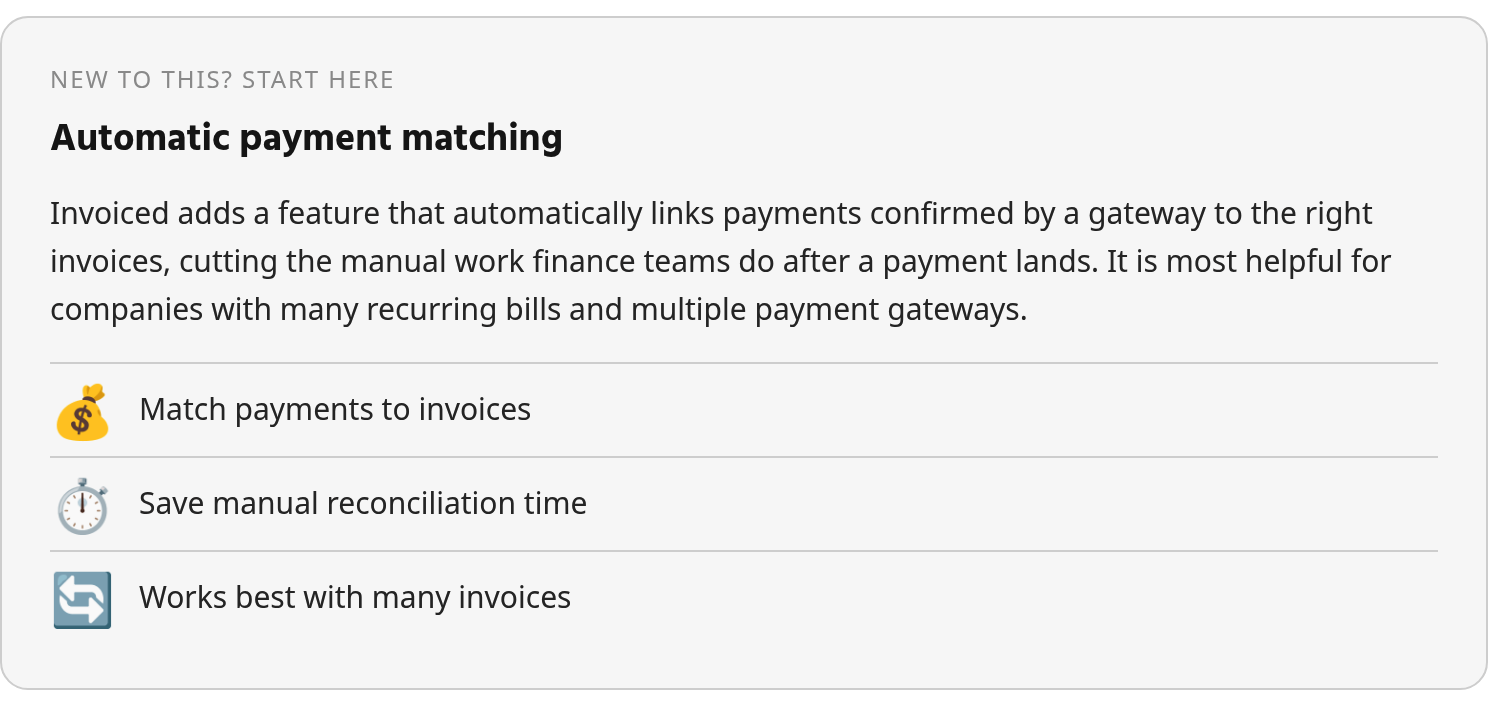
The danger is quiet. Reconciliation errors don’t announce themselves. They show up as a customer who already paid getting another dunning email, or a deposit sitting in unapplied cash for weeks, or a write-off you shouldn’t have needed.
The cloud invoice process breaks after approval, not before
Most billing software handles invoice creation and sending well. The failure point sits after payment. When a customer pays through a portal or gateway, the charge clears in seconds. The invoice in your ERP or accounting tool can sit unmatched for days. That mismatch is where revenue teams lose control.
This gap is familiar enough that a separate breakdown of AR software that sends invoices but doesn’t reconcile payments maps it in detail.
Reconciliation errors compound into working capital gaps
Delayed matching warps cash flow visibility. If you don’t apply payments to invoices, your accounts receivable aging reports overstate what customers actually owe. You might call a customer about a past-due balance that doesn’t exist. Or you might not call because the system shows paid when it isn’t.
Duplicate posting is the other failure. A single payment applied twice creates phantom revenue. Finance teams then spend days unwinding entries during month-end close. Revenue recognition standards don’t forgive that noise; auditors ask questions when cash and invoices disagree.
Subscription billing creates the hardest matching problem
SaaS and usage-based billing add extra failure modes. Payment amounts rarely match invoice amounts exactly. A customer might pay for three invoices in one transfer, or pay an amount that includes taxes, credits, and proration. Manual matching against a gateway batch becomes a guessing game.
Professional services and wholesale firms face the same issue on fewer, larger invoices. One wrong application can skew a project’s profitability or a customer’s credit limit. Skip this fight for one-off retail payments where the amount always equals the invoice. For recurring, variable, or multi-invoice payments, automation is the only honest way to close the loop.
How Invoiced’s New Reconciliation Feature Works
The feature picks up where most cloud invoice process workflows stop. After a payment clears the gateway, the invoice status should flip to paid. Invoiced’s published feature materials describe an intelligent matching engine built to automate that work, with an approval workflow for items you review. Exact configuration options and any AI components aren’t fully documented publicly, so verify what you’ll actually use in a live demo.
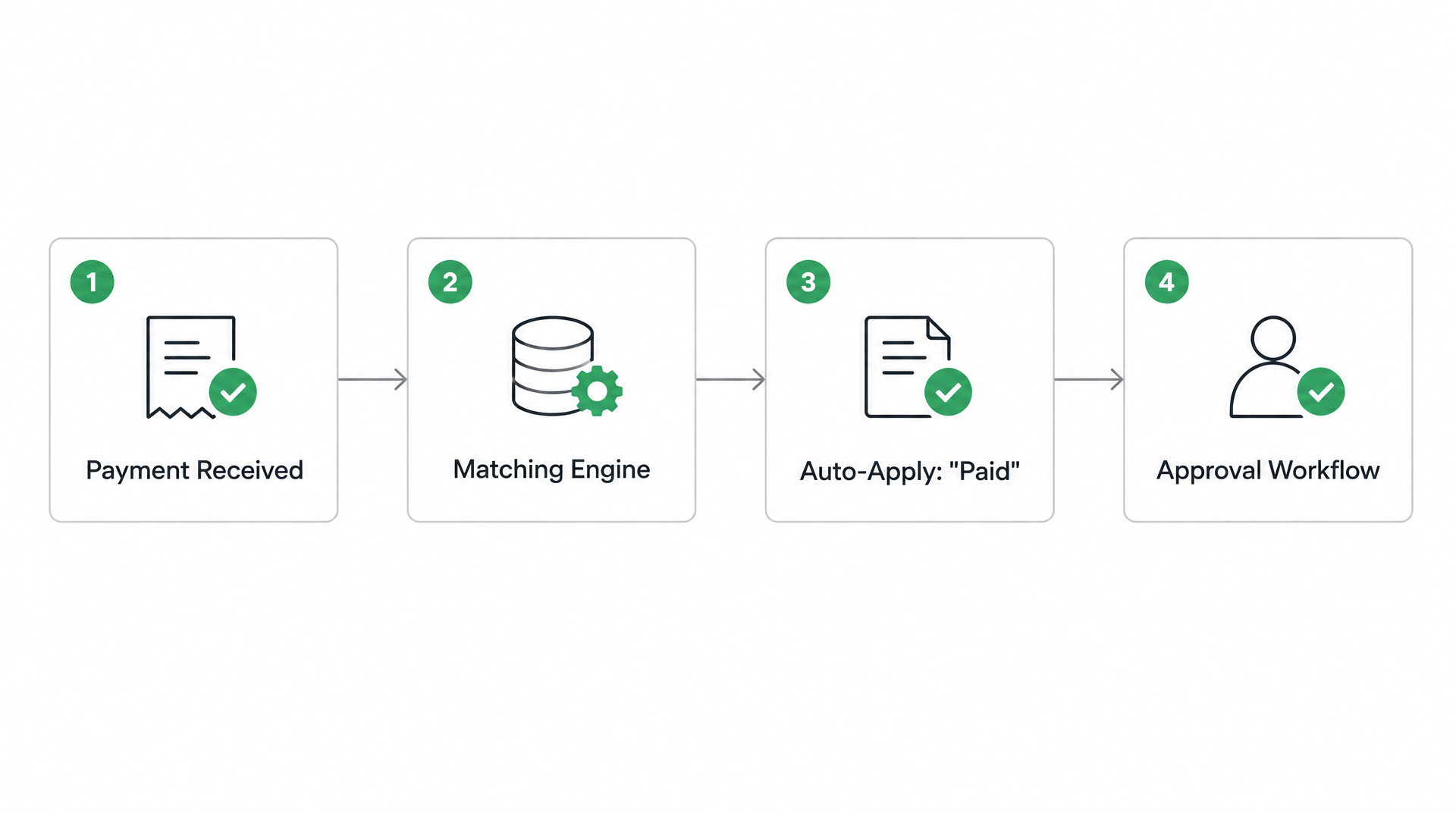
According to Invoiced’s feature documentation, you get a payment notification from your gateway. In the cash application flow, the matching engine uses available payment data—transaction amount, customer identity, reference number—to find an open invoice. If the amount and customer match, Invoiced says the payment can apply and the invoice status can update to paid without manual entry. That gap between gateway success and booked receivable is the exact part of the cloud invoice process this feature targets.
What happens after the gateway says paid?
Invoiced’s published material says its intelligent matching engine delivers market-leading match rates at the envelope and item level from multiple sources. Exact matches can auto-apply. Items that need manual review feed into an approval workflow, and as you edit those items Invoiced says the system grows smarter through machine learning. Public documentation doesn’t disclose the scoring logic or whether machine-learning suggestions run by default. You’ll need a demo to see how aggressively it matches.
How do you configure cash application rules?
Invoiced’s documentation shows a Rules area where you can create formulas that decide how payments should be handled. The documentation shows you can add a rule, define what happens when the rule’s conditions are met, assign the payment to a customer, and set how they should pay. You also get Settings and Rules as two separate configuration paths. Public screenshots don’t expose a specific tolerance field or a multi-currency variance setting, so confirm what your implementation includes. Invoiced indicates cash application is available on a paid plan, so verify in a trial or demo.
What does the approval workflow show you?
When a payment can’t auto-match, Invoiced’s documented workflow points you toward manual approval edits rather than a purely silent exception queue. The cash application rule list shows existing rules that you can edit or delete, so you can see which conditions are in play. Invoiced’s public materials don’t publish a separate dashboard view with match rate, aging, or variance widgets. If those matter to you, ask for a live walkthrough. Invoiced’s site mentions advanced AI for cash application, but the underlying model details are not described. Treat that as a claim to test with your own payment data and reconciliation scenarios.
Implementing the Feature in Your Existing Stack
Implementation inside an existing cloud invoice process succeeds or fails on data quality, not integration complexity. Anyone who has replaced a manual cash application workflow with gateway-integrated matching will tell you the rollout order mattered more than the feature list. Most rollout problems trace back to duplicate customer records, missing invoice references, or payment notes that don’t carry a stable identifier.
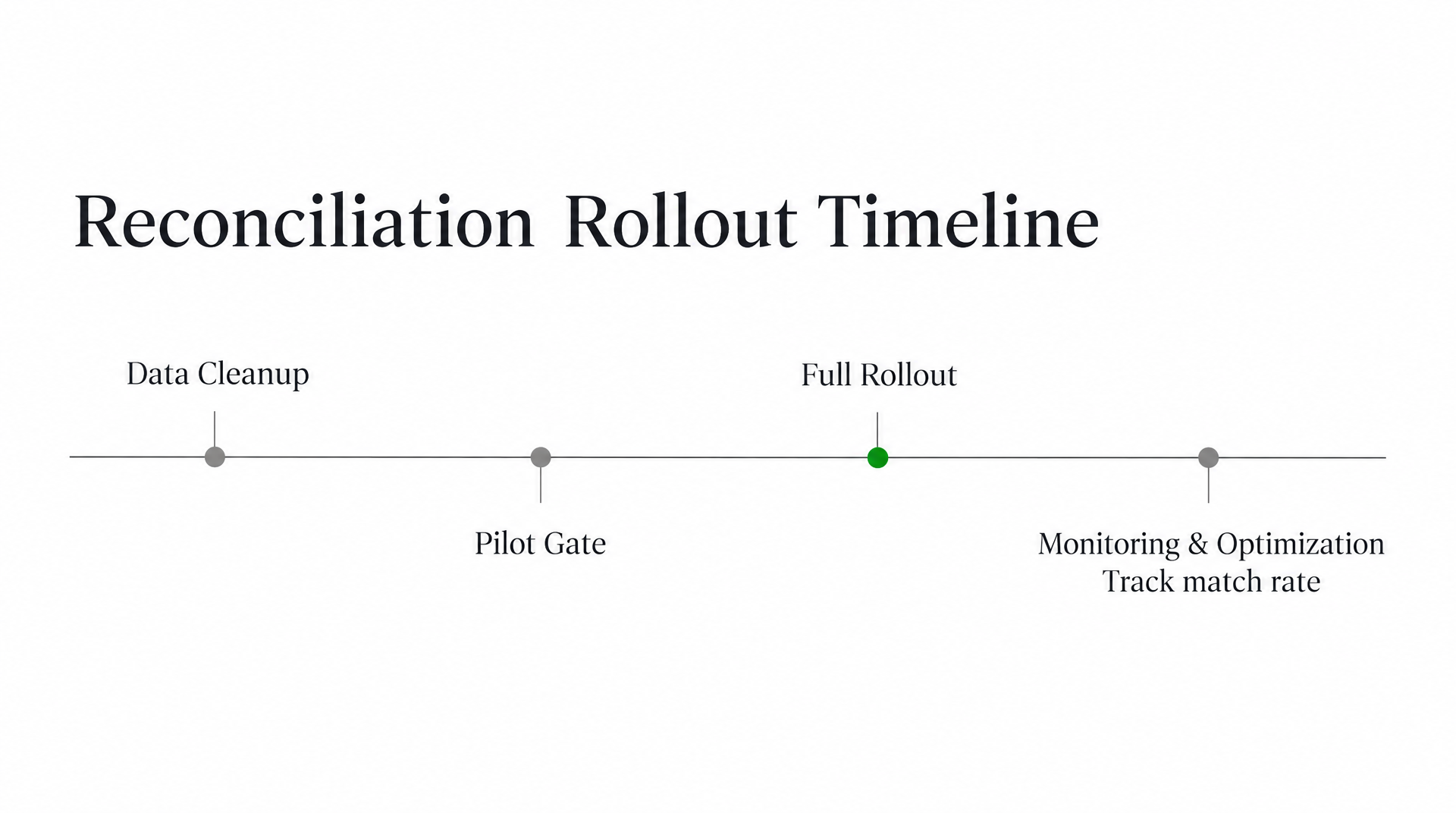
Start with a data-cleanup pass, then pilot one gateway before touching the full ledger. Invoiced’s public materials don’t document exact field mappings for every ERP, so verify the specific trigger conditions in a live demo. Absence of documentation isn’t absence of support; deeper ERP connections often surface only when you start configuring. If your monthly payment volume is low, skip the full integration. Manual matching may be faster and cheaper than maintaining another rule set.
The cloud invoice process fails on dirty customer records
Before you configure matching rules, audit the fields your billing system and gateway share. Three checks come first: duplicate customer accounts under different names, invoices without a payment reference that travels through the gateway, and unapplied cash sitting on the ledger. These create exceptions no matching engine can reliably resolve.
Create one customer profile per billing entity. If one client exists as “Acme Inc.” in the ERP and “ACME” in the gateway, every payment needs manual review. Standardize the remittance format too. Ask customers to include the invoice number or an agreed reference on every payment note. The cleaner the input, the fewer exceptions your team reviews. The broader checklist in the guide to accounts receivable software features covers this data hygiene work.
Three fields matter most:
- Customer identifier: same unique value in gateway and ledger.
- Payment reference: invoice number or PO that survives the gateway callback.
- Amount tolerance: define when a partial payment should auto-match or queue for review.
Pilot with one gateway before full rollout
Rollout order should be gateway-first, not rule-first. Pick one payment method or gateway where your team already sees predictable payment data. Configure the matching rules there and let the exception queue fill up. Review every exception for a week before you expand.
During the pilot, categorize each exception: wrong customer, amount mismatch, missing reference, duplicate payment. Tracking categories tells you which matching rule needs adjustment versus which data field needs cleanup. If most exceptions are amount mismatches, set a tolerance band. If most are missing references, fix the checkout flow or remittance instructions.
Then expand to file-based or API connections to your ERP, whichever your platform and accounting team support. Do not start with the most complex integration. Start where the data is already clean.
Match rate and exception age are your monitoring metrics
After go-live, track two numbers every week: match rate and exception age. Match rate is the percentage of payments that apply to an invoice without manual review. Exception age is how long an unmatched payment sits before a person handles it. These two metrics tell you whether the system is working or whether your team just changed where the manual work happens.
If match rate plateaus below what you expected, go back to the data fields. The answer is rarely another matching rule. It’s usually a missing reference or a duplicate profile. If exception age stays high, the approval workflow needs attention. Review queue design matters as much as the matching engine.
Best Practices & Common Pitfalls
Most reconciliation pain after automation comes from rule sprawl, ignored exception patterns, and one person holding all the matching logic.
Your cloud invoice process can survive a mediocre invoicing tool. It cannot survive bad governance once payment matching goes live. The pitfalls below are the ones I see create the most manual review.
What rule-configuration pitfalls should you avoid?
The first mistake is over-customizing match rules. Teams add a new rule for every edge case, and within two quarters the engine flags more transactions than it auto-clears. For example, separate rules for partial payments under $5, duplicate reference formats from a second gateway, and any invoice tied to a non-U.S. Tax ID could mean a legitimate $4.50 short pay from a Canadian customer triggers all three at once and sits in review for days. Keep the rule count low. Broader rules with a clear exception owner beat dozens of narrow conditions.
Under-training staff is the second pitfall. If only one analyst understands why a payment didn’t match, every sick day becomes a cash-application freeze. Pair every rule change with a plain-language note explaining the reason, not just the logic.
Should you track exception trends instead of just clearing them?
Ignoring exception trends is the quiet money leak. Clearing one-off exceptions keeps the queue moving but never reduces the queue. If you see the same small gateway-fee mismatch every morning, the rule should absorb that tolerance instead of staff approving each one.
Build a triage workflow around reason codes. Classify exceptions before touching them: amount mismatch under a set variance, duplicate payment, missing reference. Route each category to its own queue. Amount mismatches under a configured variance threshold can auto-apply. Duplicate payments go to refund review. Missing references go to a document upload queue. Track the weekly count by reason. A spike in unapplied cash usually means a portal or reference format changed, and that is a single fix, not dozens of manual entries.
What ongoing governance prevents drift?
Quarterly rule audits keep automation honest. List every active rule and kill anything that hasn’t fired in 90 days. Stale rules slow the matching engine and confuse reviewers.
Stakeholder sign-off matters more than people expect. No rule changes without finance and support agreeing on the behavior. That prevents someone adding a temporary exception in October that quietly becomes permanent by January. Finally, document the reason behind each rule in plain language. Staff need to know why a rule exists, not just the conditions. For a fuller picture of how a connected billing and reconciliation flow should behave, review the guide to recurring billing software that actually reconciles payments automatically.
The bottom line on reconciliation measurement
Your cloud invoice process has a post-payment accounting gap, and the feature’s value shows up in three numbers: match rate, days sales outstanding, and manual effort per 1,000 invoices. Invoiced’s public materials don’t publish a ready-made ROI template, so build a baseline before you evaluate the feature.
Match rate exposes the real post-payment breakage
Match rate is the share of gateway transactions that land on the correct open invoice without a person stepping in. Most finance teams never measure this before automation because the manual work hides it. A payment clears the gateway, an invoice stays open, and someone eventually clicks through to match the two records.
Pull a two-week sample before go-live. Count every payment that needed manual mapping and divide by total gateway payments. That’s your true baseline. After go-live, rerun the same report weekly. Don’t chase 100 percent. In my experience, the last few percentage points are edge cases that cost more to automate than to review by hand.
DSO is the lagging signal. It moves only when cash application actually speeds up. If your team still books entries in a weekly batch, DSO won’t shift even if matching gets faster. Track DSO monthly, but don’t treat it as the primary signal in the first 60 days.
Build the ROI around labor hours, not software cost
The business case lives in hours. Estimate the time your team spends per unmatched payment: identifying the customer, finding the invoice, applying cash, recording the adjustment. A team processing 1,000 invoices monthly can burn hours of exception handling every cycle, but the exact number depends on your customer mix, payment methods, and current tools. That’s a baseline to measure, not an industry benchmark. Measure your actual time before you trust any vendor figure.
The calculation is simple. Multiply your hours per 1,000 invoices by the fully loaded hourly cost of the person doing reconciliation. That’s your pre-rollout cost. Then project the same number with a conservative match-rate lift for the payment types you actually process. Recurring card-on-file transactions may clear differently than one-off ACH or check payments. If the labor savings exceed the feature’s cost, the ROI is clear.
Skip this if your current AR software already reconciles payments automatically and your exception queue is tiny. If you’re not sure whether it actually closes the loop, check that gap. The strongest case is a team still doing manual double-entry after the gateway says paid.
Review the dashboard monthly, and ignore daily noise
Invoiced’s public materials don’t fully document the feature’s reporting views, so confirm in a demo that you can see match-rate trends by gateway, customer, and exception reason. A weekly dashboard is the right cadence for operations. A monthly review is enough for finance leadership.
Look at the rolling four-week match rate, not a single day. A bad day can be one customer paying from a new card. A four-week dip is a pattern. Review DSO quarterly. If match rate rises but DSO stays flat, the delay sits elsewhere: dunning timing, collection outreach, or batch journal entries.
FAQ
Does Invoiced’s reconciliation feature automatically handle partial payments and gateway fees?
Partial-payment and gateway-fee handling is not confirmed in Invoiced’s published feature materials. Invoiced describes automated cash application and matching workflows with exception review for unmatched items, but you should confirm how short pays, overpays, and fees are applied in a live demo before rollout.
What invoice volume makes Invoiced’s reconciliation feature worth evaluating?
The feature pays off at higher volume or multi-gateway complexity. If reconciliation already takes more than a few hours each week, put it on your demo list. Simple payment mixes with a few hundred invoices monthly may not justify learning another system.
Which data quality problems usually cause reconciliation exceptions after implementation?
Duplicate customer records across the gateway and ledger, missing payment references, and payment notes without a stable identifier create most exceptions. Clean these fields before configuring rules, because no matching engine can reliably resolve ambiguous customer identity or absent invoice references.
Should I track match rate or days sales outstanding to measure this feature’s impact?
Track match rate first. It shows the share of payments applied without manual intervention, while DSO is a lagging signal that shifts only after cash application actually speeds up. Use a two-week baseline before go-live, then monitor match rate weekly; review DSO monthly or quarterly.
What should I ask for in a live demo that public materials don’t disclose?
Request exact setup hours from kickoff to first auto-match, how partial payments and gateway fees behave, which ERP and gateway connectors are live for your stack, and reporting views by exception reason. Invoiced’s public materials answer automation depth better than setup time or ROI.
Is Invoiced’s matching engine rule-based, AI-driven, or both?
Invoiced’s public materials show a rules area where you create formulas that decide payment handling, plus claims of machine learning and advanced AI. The scoring logic and whether AI suggestions run by default are not documented, so verify how much manual rule configuration you’ll own.
Does the reconciliation feature remove manual review entirely?
Manual review remains for unmatched or exception payments. Invoiced says exact matches can auto-apply, but cases like amount mismatches, duplicate payments, and missing references still enter an approval workflow. Monitor exception age and reason codes so your team triages outliers rather than clearing the same issue repeatedly.