

Recurring Billing Software That Actually Reconciles Payments Automatically

Key Takeaways
- Traditional billing software automates invoicing but stops before reconciliation, leaving finance teams manually matching payments across multiple gateways and bank statements.
- Days Sales Outstanding climbs higher when payment reconciliation relies on manual CSV exports and cross-referencing instead of intelligent automated matching systems.
- Modern reconciliation platforms compare incoming payments against outstanding invoices in real time across all channels, posting cash without human intervention or spreadsheet work.
- Cash application ranks among the most time-consuming activities in the order-to-cash cycle for subscription businesses managing multiple payment channels including crypto wallets.
- Intelligent matching engines learn customer payment behaviors over time and handle complex remittances that cause legacy billing systems to fail or flag exceptions.
- SaaS businesses lose strategic capacity when finance teams spend quarters chasing payment mismatches instead of working on growth initiatives and cash flow optimization.
- Real-time reconciliation closes the loop from invoice generation through payment matching to final cash posting across credit cards, ACH transfers, and digital wallets.
Why This Guide Matters
If you’re running a SaaS business with subscription billing, you already know the frustration: payments land across credit cards, ACH transfers, and increasingly crypto wallets, but your billing software treats reconciliation like an afterthought. You end up with a finance team chasing down mismatches, manually cross-referencing bank statements against invoices, and burning significant time on cash application alone—a notoriously labor-intensive phase of the billing cycle. Meanwhile, your outstanding receivables cycle creeps higher, cash flow stalls, and strategic work gets pushed to next quarter.
We built our platform to solve the problem most SaaS subscription billing tools ignore: real-time reconciliation across every payment channel you actually use. Traditional billing software automates the invoice; we automate the entire loop from invoice to payment matching to cash posting, using an intelligent matching engine that learns your customers’ payment behaviors and handles the complex remittances that break legacy systems. This guide walks you through how modern reconciliation works, why the old manual approach costs more than you think, and what to look for when your billing stack finally needs to close the loop automatically.
What Makes Automated Reconciliation Different from Basic Billing Software
Most recurring billing platforms generate invoices and collect payments—then stop. You’re left exporting CSVs, logging into multiple payment gateways, and matching transactions by hand. Automated reconciliation uses intelligent matching to compare incoming payments against outstanding invoices across all your systems in real time, flagging exceptions and posting cash without human intervention. The technology processes exceptions—cases where remittance data is incomplete, a customer references the wrong invoice number, or payment arrives through an unexpected channel—far faster than manual review.
The difference shows up in two places: speed and accuracy. AI-powered systems can handle dozens of exceptions per hour that traditional tools either fail to match or require a human to investigate. Systems that use machine learning learn from your unique invoice structures and customer behaviors, continuously improving match rates without IT intervention or additional programming costs. The compounding value matters more than month-one savings: as the system learns, your automation rate in month twelve looks very different from where you started.
Who This Guide Is For (and When to Skip It)
This guide is built for finance and ops leaders at SaaS companies, subscription-based services, and B2B businesses where recurring revenue depends on timely, accurate cash application. If you’re dealing with multiple payment channels—credit cards for most customers, ACH for enterprise deals, and the occasional crypto transaction from international clients—you’ll find the reconciliation strategies here directly applicable. We also cover compliance requirements like ASC 606 for high-volume businesses that need real-time revenue recognition and dynamic customer segmentation.
Skip this guide if you’re running a low-volume operation with fewer than 50 transactions per month and a single payment method. The ROI on automated reconciliation tilts heavily toward businesses processing hundreds or thousands of payments monthly, where manual matching becomes a bottleneck. If your finance team spends under two hours per week on cash application, the investment in intelligent reconciliation may not outweigh the setup cost—at least not yet. Focus instead on tightening your invoicing cadence and payment terms.
What You’ll Learn and How Long It Takes
This is a comprehensive guide, not a surface overview. You’ll walk away understanding how AI-powered cash application differs from rule-based automation (and why that distinction matters for match accuracy), how to evaluate reconciliation tools based on your remittance complexity rather than generic feature lists, and how to implement a system that improves over time without constant manual tuning. We cover the technical mechanics—data normalization, multi-channel ingestion, exception workflows—alongside the business outcomes: reducing manual processing work, lowering DSO, and improving working capital by accelerating cash posting to same-day turnaround.
Expect 12-15 minutes to read the full guide. We’ve structured it with question-based subsections so you can jump to the reconciliation challenges you’re facing right now—whether that’s handling partial payments, dealing with unstructured remittance emails, or choosing between platforms that claim identical automation rates but deliver very different exception-handling capabilities. Each section includes data from real implementations, not vendor promises, so you can benchmark your current performance against what’s actually achievable. If you’re evaluating billing software and reconciliation has been treated as a “nice-to-have” feature, this guide reframes it as the operational advantage that separates scalable SaaS finance operations from teams perpetually one quarter behind.
Fundamentals
SaaS subscription billing used to mean charging a credit card on the same day each month and calling it done. That worked when your customer paid with one Visa, your invoices were simple, and reconciliation meant matching a monthly CSV from Stripe to your accounting ledger. But as your business scales, payments fragment across channels—ACH transfers settle in three days, enterprise customers split one invoice across two wire transfers, and remittance data arrives incomplete or ambiguous. Your billing software still generates invoices and processes charges, but it leaves your finance team manually hunting for which payment matches which invoice. Manual cash application creates a bottleneck that automated reconciliation was built to eliminate.
What Automated Reconciliation Actually Does
Automated reconciliation software matches incoming payments to open invoices without human intervention. When a payment lands in your bank account, the system scans transaction metadata—customer name, invoice number, amount, payment method—and cross-references it against your AR ledger. If the match is clear, the software applies the payment and updates your books in real time. AI-powered tools can handle thousands of transactions per minute, and the best systems process up to 40 exceptions per hour when remittance data is incomplete or ambiguous. The core value isn’t just speed; it’s that your finance team stops being a data-entry department and starts focusing on strategic analysis, customer escalations, and cash flow forecasting.
The architecture matters more than most vendors admit. Traditional automation relies on rule-based matching: if the invoice number appears in the bank memo field, apply the payment. That works for roughly 80% of well-formatted remittances. AI-driven reconciliation goes further by using machine learning models that learn your invoice structures, customer payment behaviors, and naming variations over time. One provider’s system improved matching accuracy month-over-month without requiring manual rule updates or developer resources—meaning your first-month ROI understates the true twelve-month benefit as the model adapts to your data patterns. That continuous learning is what separates tools that save time from tools that compound value.
The Multi-Channel Problem Most Platforms Ignore
Here’s where most SaaS subscription billing tools fall short: they optimize for the 80% of payments that already auto-match, but the competitive moat sits in the messy 15–20% that defeat traditional automation. A credit card payment includes a transaction ID and customer email, so matching is trivial. An ACH transfer might arrive with a truncated company name and no invoice reference. Your enterprise customer wires $47,000 for three separate invoices but the bank memo says “Q2 services.” These are the exceptions that burn hours, delay payment cycles, and create the manual back-and-forth your current tools can’t resolve.
Blixo’s intelligent matching engine handles credit cards, ACH, paper checks, and wire transfers in one workflow. When a partial payment arrives, the system flags it, suggests likely invoice matches based on amount and customer history, and lets your team resolve it in seconds instead of digging through bank statements. When remittance data is sparse, machine learning fills the gaps by cross-referencing payment timing, customer segments, and past transaction patterns. The result is same-day posting for the majority of transactions and a centralized exception queue for the rest—no more spreadsheet reconciliation at month-end.
Speed Gains and Cost Savings You Can Measure
The documented improvements are substantial. Automated reconciliation accelerates the overall process by 30%, and bank reconciliation alone speeds up by 75% compared to manual workflows. Some deployments report cutting manual processing time by over 90%, and organizations see cost reductions exceeding 50% once automation is fully deployed. One chemicals manufacturer achieved 80% cash application automation after their ERP migration; another company hit 98% automation rates using AI-powered matching. These aren’t aspirational figures—they’re live production outcomes from businesses handling high transaction volumes across multiple payment rails.
The broader financial impact shows up in working capital and collection timelines. Faster reconciliation means you recognize revenue sooner, which frees up 8–12% in working capital that would otherwise sit in unapplied cash or disputed accounts. Outstanding receivables drop significantly when payments post immediately upon arrival, because your AR aging reports reflect actual cash position instead of lagging by days or weeks. For SaaS teams juggling recurring subscriptions, usage-based billing, and enterprise contracts, that visibility is what lets you forecast accurately and make confident decisions about hiring, infrastructure spend, and growth investments.
Getting Started
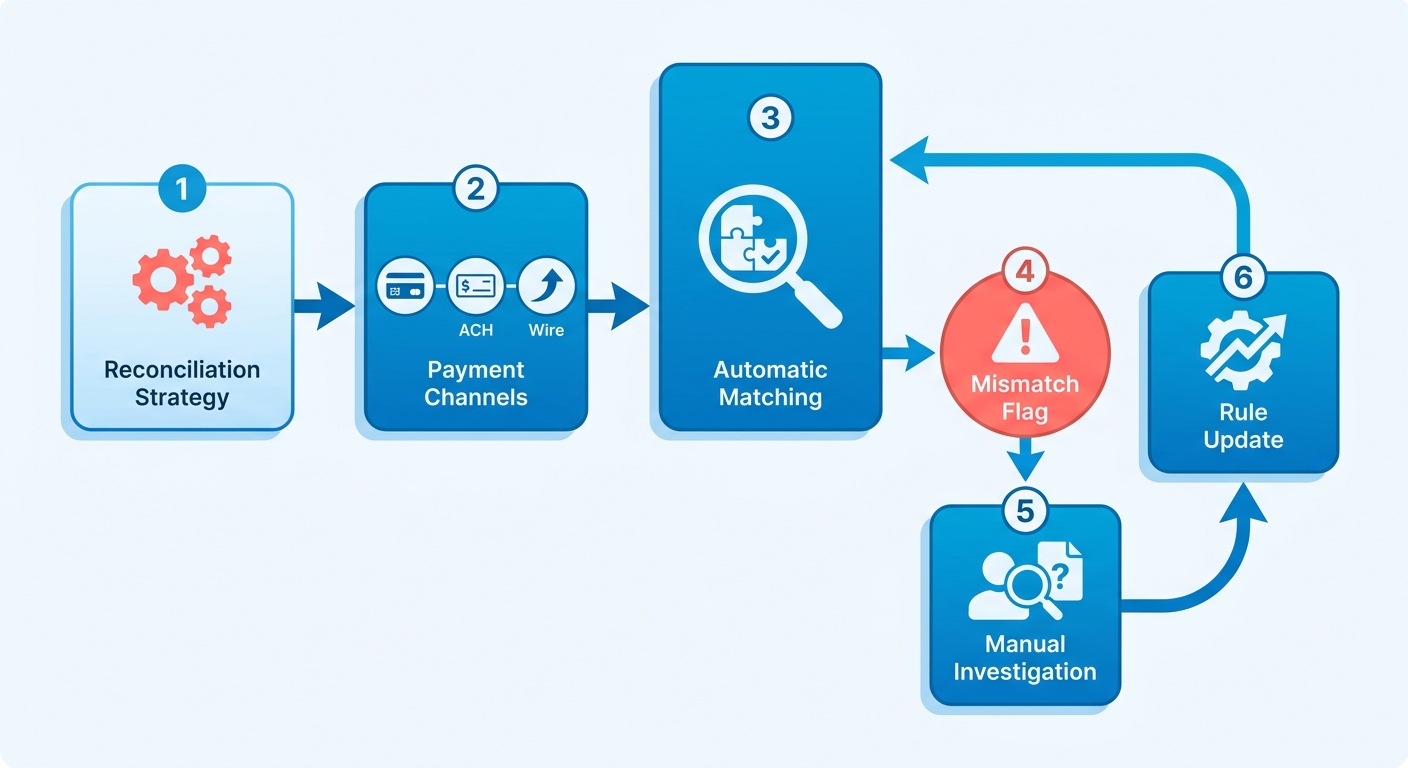
Platforms ask you to pick one reconciliation strategy—either their built-in matching rules or a third-party service—and hope it works across all your payment channels. That approach fails the moment a customer splits an invoice across two ACH transfers or your finance team receives a wire with ambiguous reference numbers. We see these multi-channel mismatches stall reconciliation for days, forcing manual investigation that accounts receivable teams consistently struggle to manage.
An intelligent system analyzes historical patterns and invoice layouts, resolving complex discrepancies while continuously refining its matching logic as new data flows in. That compounding improvement over time means your month-twelve match rate will exceed your month-one baseline by double digits, even as payment complexity increases. Teams that move from manual reconciliation to AI-assisted matching report freeing up 12–15 hours per week in AR capacity—time previously spent chasing down remittance details and cross-referencing bank statements against invoice logs.
What You Need Before Setup
You’ll connect three core systems during the initial configuration: your accounting software (QuickBooks, Xero, NetSuite, or a custom ERP), your payment processors (ACH bank accounts, credit cards through supported gateways), and your bank feeds for real-time transaction syncing. Gather API credentials and admin access for each before starting—most implementations stall because teams find mid-setup that they lack the right permissions to authorize integrations.
Check whether your ERP supports real-time webhooks or relies on batch file exports. Real-time sync means payments reconcile within minutes of clearing; batch exports create a delay where your cash application dashboard shows outdated balances. If you’re on a legacy system that only offers nightly batch reconciliation, you’ll need to decide whether the operational lag is acceptable or whether you want to push your vendor for API access.
Initial Configuration Steps
Start by importing your customer and invoice data from your existing billing system. Most platforms let you upload a CSV or sync directly through an API connection, but verify that customer identifiers match across systems—mismatched customer IDs are the leading cause of failed payment matching during the first reconciliation cycle. If you’ve been using one system for invoicing and a separate tool for collections, you’ll need to merge duplicate customer records before the AI can learn payment patterns reliably.
Configure your payment channels next, linking each processor with the corresponding bank account. For ACH transfers, enable remittance data capture from bank files. Credit card processors typically pass transaction metadata automatically, and you’ll need to ensure all payment methods are properly mapped to customer records so the system can attribute incoming transactions to open invoices.
Set your matching thresholds based on how much manual review your team can handle. A conservative threshold (95% confidence required for auto-match) means fewer errors but more exceptions routed to your AR team; an aggressive threshold (85% confidence) auto-applies more payments but increases the risk of mismatches that you’ll need to reverse later. We recommend starting conservative for the first billing cycle, then relaxing thresholds as the AI’s match rate improves and your team builds confidence in its accuracy.
First Reconciliation Cycle
Run a test reconciliation on a small batch of recent payments before processing your full backlog. Choose 20–30 transactions that include a mix of clean matches (same invoice number, exact amount) and messy cases (partial payments, multi-invoice settlements, ambiguous remittance data). This test reveals whether your matching rules and AI models are calibrated correctly for your specific invoice structures and customer behaviors.
Review the exception queue after the test run. Payments flagged for manual review typically fall into three categories: missing remittance data, amount mismatches (customer paid $950 against a $1,000 invoice), and multi-invoice allocations (one payment covering three separate bills). For each exception, verify whether the system’s suggested match is correct—approving accurate suggestions teaches the AI which patterns to trust; correcting errors helps it avoid similar mistakes in future cycles.
Once the test batch reconciles cleanly, process your full payment backlog. Watch for patterns in flagged exceptions rather than treating each as an isolated incident—if the system consistently misidentifies payments from a specific customer segment or struggles with a particular invoice format, adjust your matching rules or enrich the underlying customer data before scaling to full production volume. Most teams find that resolving three to five systemic issues during the pilot phase eliminates the majority of recurring exceptions in subsequent cycles.
Core Features

Our reconciliation engine automatically captures and matches payments the moment they hit your bank account—whether a customer paid by credit card, ACH, or wire. Traditional SaaS subscription billing platforms treat reconciliation as a post-processing step, forcing your team to manually match transactions days after they settle. We built our system to reconcile in real time because waiting 48 hours for an ACH payment to “clear” before posting it creates a gap where disputes, chargebacks, and customer confusion breed.
The core difference shows up in how the system handles partial payments and split remittances. When an enterprise customer splits one $10,000 invoice across two ACH transfers—$6,000 from their main account and $4,000 from a subsidiary—rule-based tools flag both as exceptions. Our intelligent matching engine recognizes the invoice reference in both transfers, matches them to the same bill, and posts them within minutes. Research from the Institute of Finance & Management found that intelligent matching systems resolve exceptions 15× faster than manual review processes, turning what used to be a three-day manual investigation into same-hour resolution.
Multi-Channel Payment Capture Without Manual Data Entry
Most billing platforms excel at processing credit card payments because Stripe and PayPal send clean remittance data—invoice number, customer ID, and amount all arrive in structured fields. ACH transfers and wire payments arrive with ambiguous reference numbers, incomplete customer identifiers, or remittance details buried in email attachments. Our intelligent matching engine processes payment data from bank files and multiple sources, then normalizes that messy data into structured fields your accounting system can match.
The system learns from your unique invoice formats and customer payment behaviors without demanding custom development or ongoing maintenance. If Customer A always includes their account number in the wire reference field but Customer B writes their company name, the machine learning model adapts to both patterns. A mid-market software company processing 2,000 monthly transactions reported that adaptive matching reduced unmatched items from 340 per month to fewer than 25, eliminating the backlog that previously required two full-time staff members to clear each quarter.
Same-Day Posting and Working Capital Impact
Real-time posting eliminates the lag between when cash arrives and when your systems recognize it as available funds. That speed matters because every day a payment sits unapplied is a day your collections team might send a redundant reminder, your customer service team fields a “why am I past due” call, or your treasury team underestimates available cash for payroll or vendor payments. A regional healthcare billing provider found that same-day posting cut payment-related support tickets by 43% within the first quarter of implementation.
The straight-through processing rate matters more than the automation percentage. A system that only handles standard, perfectly formatted transactions but fails on every partial payment or early settlement discount isn’t truly automated for your SaaS subscription billing workflow. Our intelligent matching engine delivers market-leading match rates at both the envelope and item level, and we provide an approval workflow for exceptions so your team can resolve them quickly with full context.
Real-Time Visibility and Exception Handling
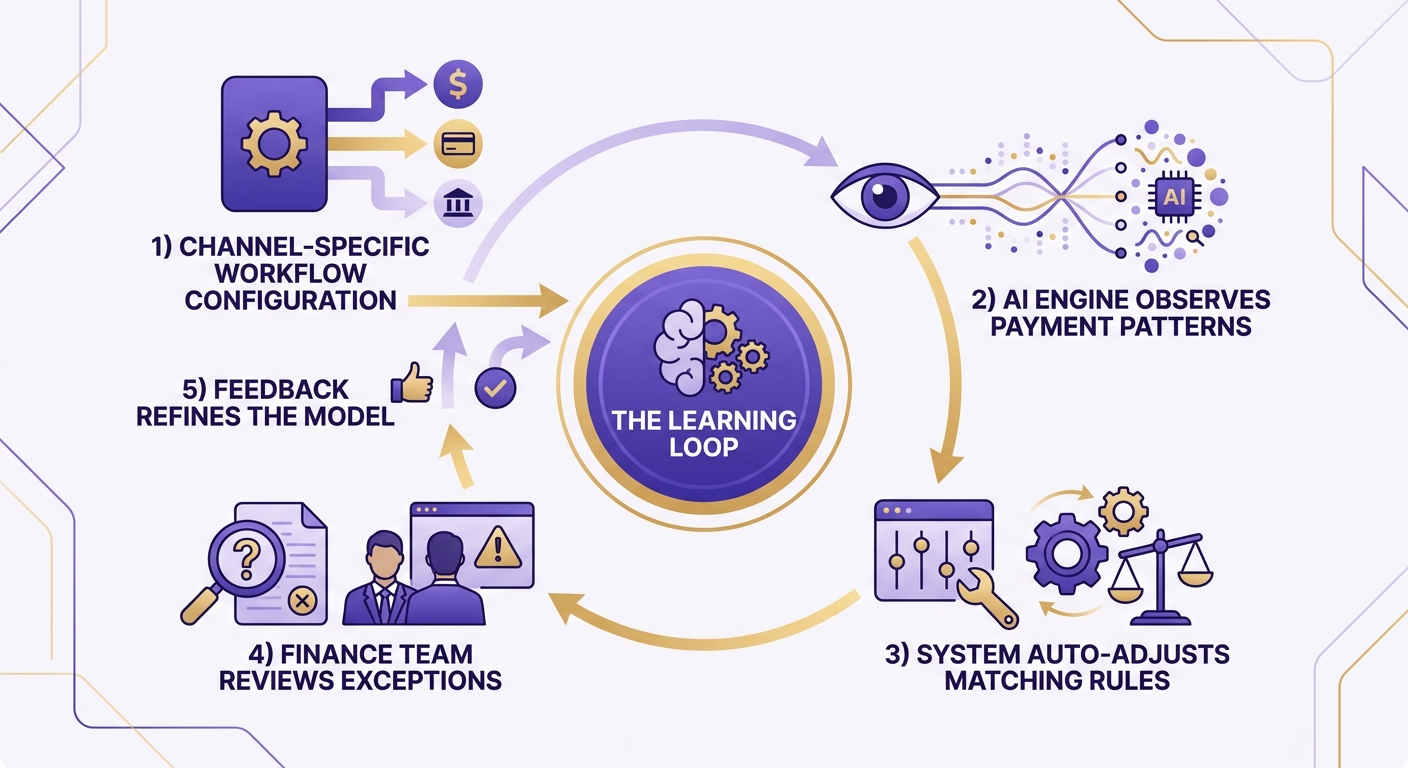
When a payment doesn’t auto-match, the system surfaces it with enriched context—customer payment history, similar invoice amounts from the past 90 days, and flagged discrepancies like a $5 variance that might be a wire transfer fee. Intelligent matching platforms process high transaction volumes with precision, and the compounding value comes from continuous learning. As you manually resolve exceptions in our approval workflow, the system grows smarter through machine learning and will better match your information in the future—learning which customers habitually pay early with partial amounts and which ones consolidate multiple invoices into one wire.
The system integrates seamlessly with your existing ERP and accounting software, so posted payments flow directly into your general ledger without manual export-import cycles. Finance teams using real-time reconciliation report that they close monthly books 2–3 days faster because there’s no end-of-period scramble to clear unapplied cash. Real-time visibility into payment trends and receivables gives your CFO the data to make credit decisions and cash flow forecasts based on actual cleared funds, not stale reports from last week’s reconciliation batch.
Advanced Topics
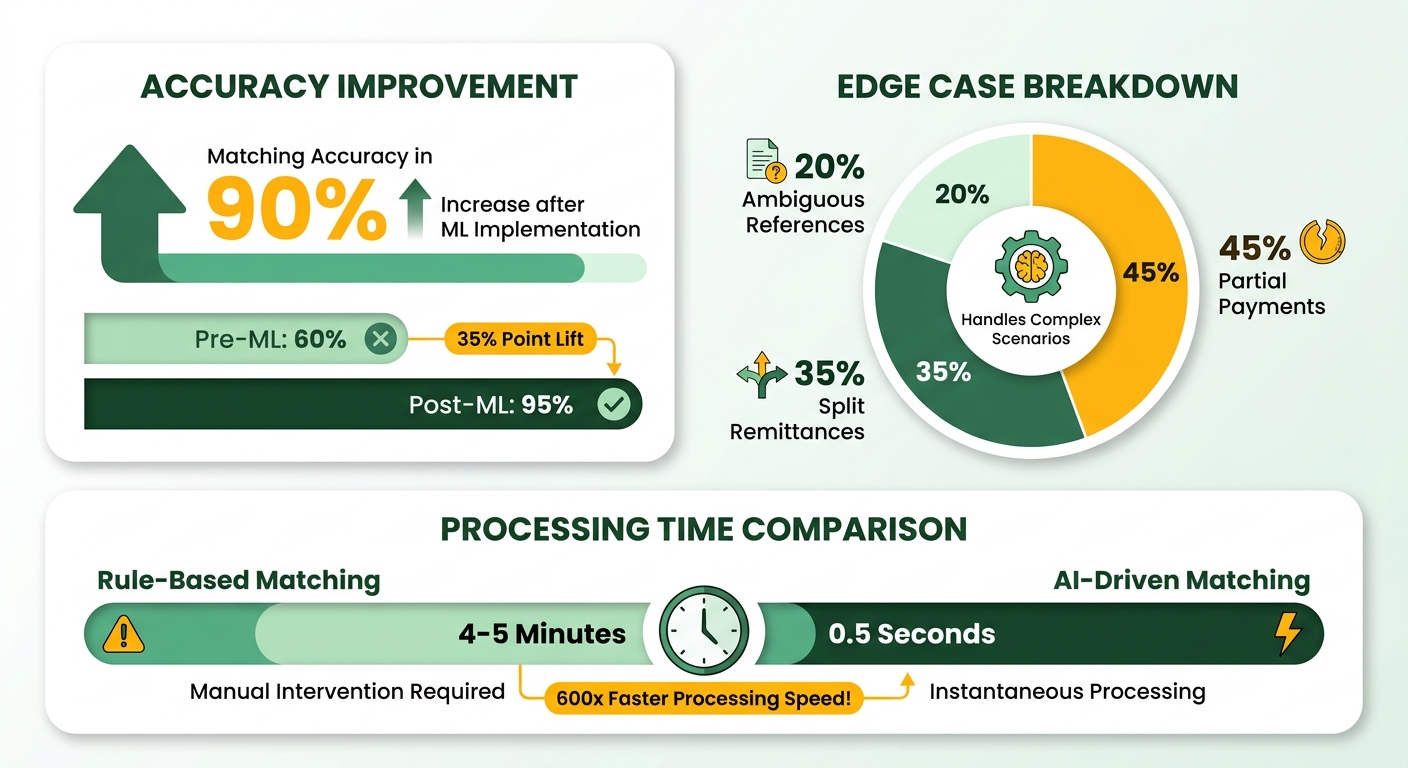
Our reconciliation engine scales beyond the basics covered so far by applying machine learning models that improve matching accuracy without IT rewrites or manual rule updates. While many claim automation, the difference shows up in how the system handles the edge cases—partial payments, split remittances, ambiguous reference numbers—that rule-based tools flag as exceptions. Our intelligent matching engine continuously processes transactions across credit, ACH, and wire channels, delivering market-leading match rates at both the envelope and item level.
How Machine Learning Adapts to Your Invoice Patterns
Traditional automation relies on static matching rules: invoice number matches payment reference, amount matches exactly, done. AI-powered reconciliation learns from your unique payment behaviors over time, so the system gets smarter with every transaction it processes. Our cash application system uses machine learning to understand which customers routinely split invoices, which subsidiaries pay from alternate bank accounts, and which reference formats signal partial payments. The system continuously improves without requiring manual adjustments or engineering support, because the system refines its internal models based on how your team resolves edge cases, ensuring future transactions from the same customer are handled automatically.
The compounding value of this approach is easy to miss if you only measure month-one ROI. A static rule-based tool saves you time upfront but plateaus at whatever match rate it achieved in the first week. Machine learning delivers incremental gains month over month as it ingests more payment data and refines its matching logic. Over time, the system handles the vast majority of transactions automatically and flags only the genuinely ambiguous cases—a wire from a new subsidiary with no remittance data, a customer who changed bank accounts mid-cycle—that require human judgment.
Reducing DSO Through Faster, Smarter Matching
The shift to lower outstanding receivables isn’t just about faster matching. It’s the cascading effect of automated reconciliation enabling better cash flow forecasting, which then enables proactive collection strategies rather than reactive follow-up. When you know in real time which invoices have been paid, which are partially settled, and which are overdue, your AR team can prioritize outreach to customers who actually owe money instead of chasing down payments that already cleared but haven’t been reconciled yet.
Our automated AR system accelerates the time between payment receipt and ledger posting, turning immediate cash application from aspirational to standard. The system matches and applies cash within hours of bank settlement instead of waiting for end-of-day batch processing. Automated bank account syncing and intelligent matching work together to streamline cash application, reducing manual processing and freeing your team to focus on higher-value tasks.
When High Match Rates Don’t Tell the Full Story
Here’s where vendor claims diverge from operational reality. A provider that touts 99% automation rates may be counting every transaction it auto-posts, regardless of whether the match was correct. Match rate percentages are misleading if the system prioritizes speed over accuracy, because incorrect automated matches damage customer relationships and create cleanup work downstream. Rushing to automate without accuracy safeguards can result in payments applied to the wrong invoices, forcing teams to issue credits and reapply cash manually.
The better metric is exception handling accuracy: how often does the system correctly flag ambiguous transactions for review, and how often does it confidently match complex payments without human intervention? If you’re a high-volume enterprise with standardized remittance formats, speed wins—clearing the majority of transactions same-day is worth the occasional false positive. If you’re a mid-sized B2B with complex customer relationships and frequent invoice adjustments, conservative accuracy wins—you’d rather review a portion of transactions manually than risk auto-posting a large payment to the wrong account and spending a week untangling the mess with an angry customer.
Skip high-match automation if your customer base frequently disputes invoices or requests credits before paying. The time savings evaporate when the system auto-applies a payment that should have been held for dispute resolution, and your AR team has to reverse the transaction, issue a credit memo, and reconcile the corrected payment manually. In those cases, a lower automation rate with higher human oversight prevents downstream chaos.
Best Practices
Your reconciliation logic should reflect how your customers actually pay. Teams often build elaborate invoice-number matching rules, then find their largest enterprise accounts pay via wire with only a PO number in the reference field. Our intelligent matching engine learns these patterns automatically, but even rule-based tools perform better when you configure channel-specific workflows first. Credit card payments typically carry full remittance data and match cleanly; ACH transfers settle slower and often arrive with abbreviated references; wires from large organizations may split across subsidiaries or include only partial identifiers.
One approach that consistently improves match rates: configure your system to flag partial payments as “pending review” rather than “exception.” When a client pays an annual subscription upfront but requests a customized billing schedule across multiple regional entities, a rigid system flags the incoming funds as an error. A pending-review queue lets your AR team monitor the account, and when the second payment lands 48 hours later, the system reconciles both automatically. This distinction matters when you’re processing dozens of transactions daily—true exceptions need immediate attention, while pending items often resolve themselves as additional payments arrive.
Build Tolerance for Remittance Data Variability
Real-world remittance data arrives messy—leading zeros dropped, hyphens removed, invoice prefixes truncated by bank character limits. Our platform adapts to your unique invoice structures without manual rule updates, but if you’re working with static automation, configure fuzzy matching thresholds before go-live. Consider a customer whose ERP system sends “PO-2024-Q1-0156” but whose bank truncates wire references at 18 characters—you’ll receive “PO-2024-Q1-015” in your reconciliation file. Systems configured for exact matches treat this as an exception requiring manual review; flexible matching rules recognize it as the same transaction.
The system processes remittance data from emails, bank files, and OCR-scanned checks and normalizes formats automatically. The system identifies which customers habitually truncate references, which subsidiaries pay from alternate accounts, and which payment terms correlate with split remittances. This continuous improvement happens automatically, avoiding the developer overhead associated with legacy tools.
Monitor Unapplied Cash as Your Primary Warning Signal
The second metric worth monitoring: unapplied cash balances. When payments land but can’t be matched to invoices, they sit as unapplied cash on your balance sheet, distorting receivables aging and creating reconciliation work later. Our intelligent matching delivers high straight-through processing rates, but the real test is how quickly your AR team clears the remaining exceptions. A healthy reconciliation system keeps unapplied cash below 3% of monthly revenue—anything higher suggests your matching rules need refinement or your customers need clearer remittance instructions.
Watch for patterns in what lands as unapplied. If international payments consistently fail to match, your customers may be using translated invoice numbers or alternate entity names. If month-end spikes occur, clients might be batching payments without detailed remittance data. Each pattern points to a specific fix: better payment instructions, customer-specific matching rules, or proactive outreach to high-value accounts. The goal isn’t zero exceptions—it’s predictable exceptions that your team can resolve in minutes rather than hours.
Comparison with Alternatives
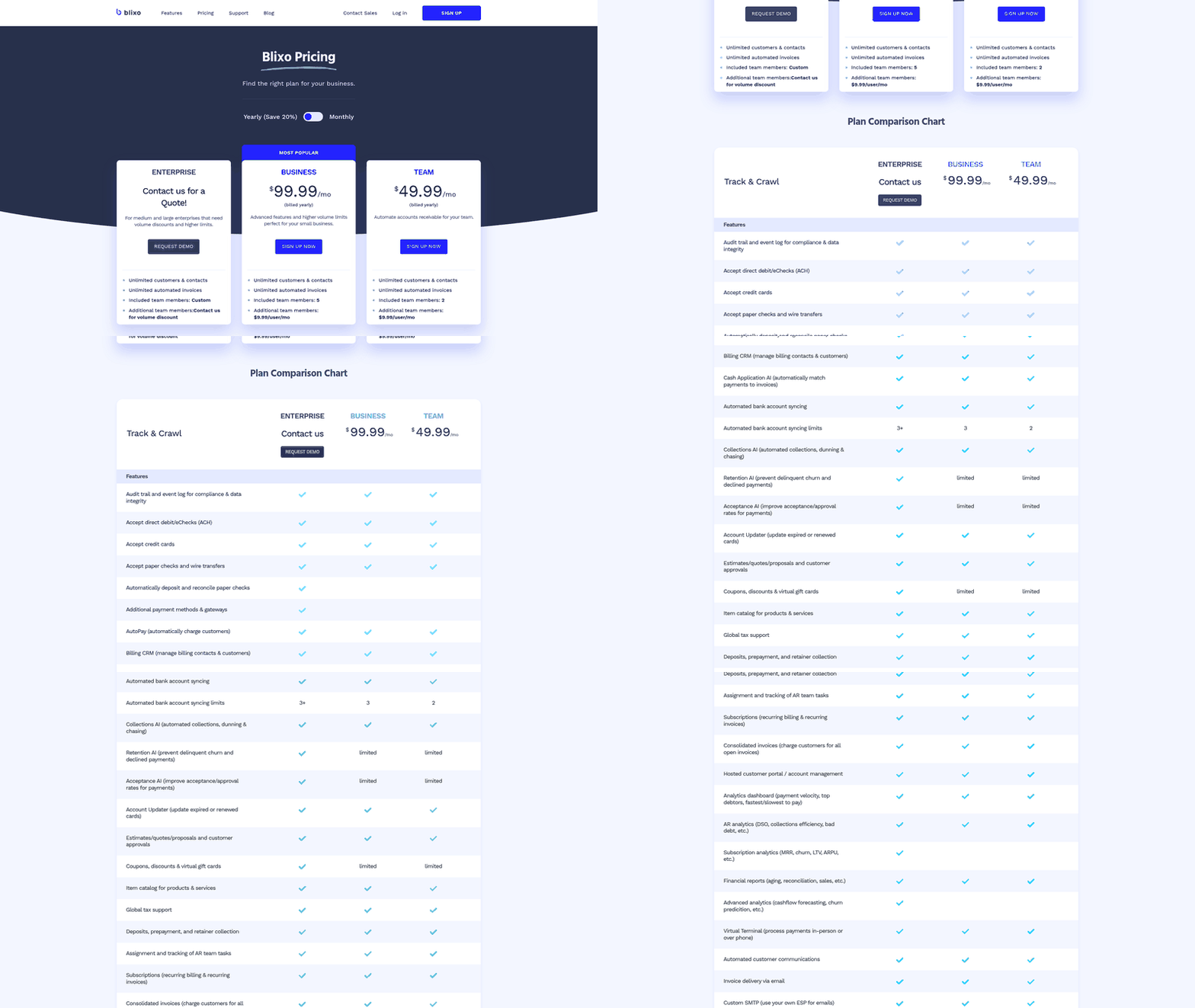
Most SaaS subscription billing platforms advertise automation, but the real test is what happens when a customer pays $8,500 via ACH with a reference number that doesn’t match your invoice format, or when a client consolidates five monthly subscription renewals into a single bulk wire transfer without attaching an itemized breakdown. Rule-based reconciliation tools flag these as exceptions and push them back to your finance team. AI-powered platforms that learn from your invoice patterns handle them automatically—saving hours per week your AR team currently burns on manual cash application.
Traditional Billing Platforms That Bolt On Reconciliation
Many established billing solutions treat reconciliation as a post-processing step rather than a core feature. They excel at generating invoices and charging credit cards on schedule, but when payments arrive through ACH or wire—especially with partial amounts or unclear remittance data—the matching logic stalls. One provider designed for high-volume businesses automates revenue processes to meet complex revenue recognition standards and offers real-time analytics, but requires your team to configure matching rules channel by channel. Another solution built for large enterprises with SAP environments can process thousands of transactions per minute, yet demands significant IT resources just to deploy and maintain the system.
These platforms work well if your customers pay predictably: same amount, same day, same payment method. The moment remittance patterns diversify—a customer switches from credit to ACH mid-contract, or your enterprise accounts start using their own payment reference formats—your finance team is back to manual spreadsheet reconciliation. The automation exists, but it’s brittle. Companies running these systems report that AR staff still spend significant portions of their workweek resolving payment exceptions that fall outside the configured rules.
Standalone Cash Application Tools With High Match Rates
Specialized reconciliation software focuses exclusively on payment matching rather than trying to be an all-in-one billing suite. These tools excel at ingesting remittance data from multiple sources—EDI 820 files, lockbox reports, email remittance PDFs—and converting them into a standard format your accounting system can process. One mid-market distributor reduced their average payment posting time from 72 hours to same-day by implementing a dedicated cash application tool that normalized remittance formats across seven different bank accounts.
The challenge emerges when customers deviate from standard payment behavior. A construction company client might send a check for $47,230 with a handwritten note referencing three project numbers instead of invoice numbers. A retail chain might deduct promotional allowances from their payment without advance notice. Tools that rely purely on exact-match logic or fixed tolerance thresholds struggle with these scenarios. Your team ends up manually researching each exception, which defeats the purpose of automation. The question isn’t just how many payments the system matches—it’s how intelligently it handles the ones that don’t fit the template.
Multi-Channel Platforms Built Around AI-Driven Matching
The most useful reconciliation happens at the point where your payment channels diverge. When you accept credit cards through one processor, ACH through your bank, and occasional crypto payments from international clients, a platform that reconciles all three in real time—using machine learning models that adapt to each channel’s quirks—eliminates the bottleneck entirely. These systems process remittance data from bank files, customer emails, and even scanned paper checks via OCR, then normalize the data so partial payments, split invoices, and ambiguous references get matched without manual intervention.
The compounding benefit shows up after the first 60 days. Rule-based tools deliver the same performance in month six as they did in week one. AI-powered platforms improve matching accuracy over time because they learn your payment behaviors without requiring manual script updates. If a customer consistently references their internal PO number instead of your invoice number, the system picks up that pattern and auto-matches future payments from that account. Your AR team spends less time resolving exceptions each month, not the same amount indefinitely. One SaaS company saw their unresolved payment queue drop from 140 items to 22 items within four months of switching to an adaptive matching platform.
The clearest benefit of automated reconciliation is speed: payments posted immediately upon arrival instead of sitting for 48–72 hours while your team hunts down matching invoices. Faster posting means improved cash flow and freed working capital—money you can reinvest in growth rather than watching it accumulate in an unapplied cash account.
When to Skip Advanced Reconciliation
If your business processes fewer than 200 transactions per month and your customers pay exclusively by credit card with clear invoice references, investing in AI-powered reconciliation is overkill. A basic billing platform with Stripe integration will handle your needs for years. The breaking point arrives when payment channels multiply—when you add ACH to accommodate enterprise clients who refuse to pay card processing fees, or when international customers request wire transfers. At that stage, manual reconciliation becomes the bottleneck that stalls cash flow and burns your finance team’s capacity for strategic work.
Skip multi-channel reconciliation if your customer base is 100% self-serve SMB accounts paying by credit card. Adopt it the moment your first enterprise deal introduces wire transfers, split payments, or custom remittance formats that your current system can’t auto-match.
Resources and Tools
We’ve built our reconciliation engine to handle the specific workflows SaaS teams actually need—and that means giving you tools that adapt to your payment channels, customer behaviors, and edge cases without forcing you into a vendor’s rigid rulebook. After deploying AI-driven matching across credit and ACH channels, we see teams run into three recurring questions: how to audit matches the system flags as uncertain, how to train their finance staff on exception workflows, and how to measure ROI beyond raw time savings. This section walks through the resources that answer those questions and the debugging patterns that separate smooth automation from finance-team frustration.
Auditing Match Confidence Without Rebuilding Business Logic
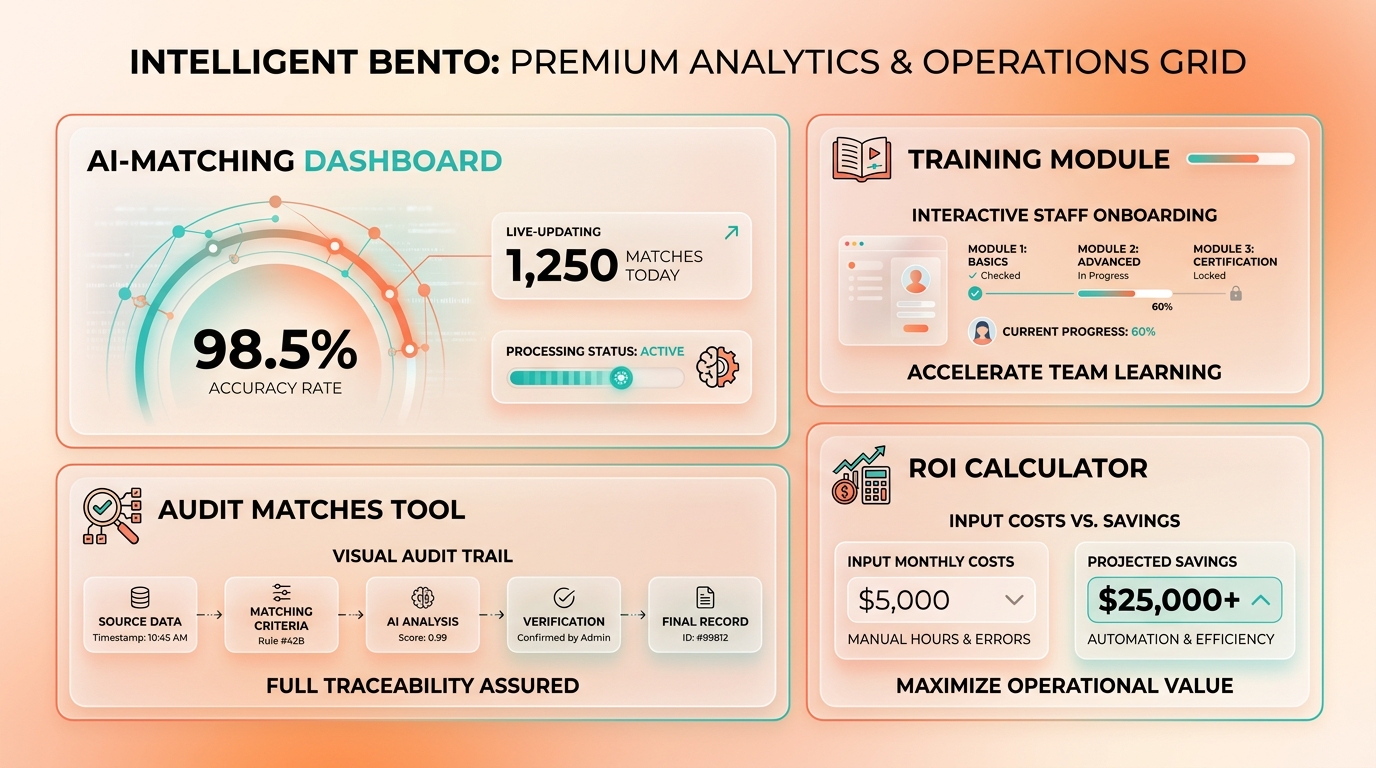
Your reconciliation system should surface match confidence scores before it auto-applies a payment, not after your customer service team receives a confused email about a duplicate charge. Our intelligent matching engine delivers market-leading match rates at the envelope and item level from multiple sources so you can automatically match payments and balances to invoices quickly and painlessly with very high accuracy. The platform provides a streamlined interface where your team can review suggested matches, ensuring that even complex transactions are verified with minimal effort. The lesson: high automation rates mean nothing if you can’t quickly verify uncertain matches.
When a client pays a combined invoice that includes both a fixed SaaS subscription and variable usage fees, but the payment amount differs slightly due to currency conversion rates, your team needs a single dashboard that shows both pending payments, suggests the match, and lets them approve it in one click. We see teams waste hours toggling between their ERP, banking portal, and reconciliation tool to resolve a single ambiguous remittance. The right setup consolidates all three views into one exception queue, sorted by aging and dollar value so your AR team tackles high-impact mismatches first.
Training Finance Teams on AI-Powered Workflows
Your finance staff will resist automation if you position it as a replacement rather than an augmentation. Our comprehensive onboarding and training help your team understand where the AI matches correctly and where it flags edge cases for human review. That hands-on approach builds confidence faster than any vendor demo because your team sees exactly how the approval workflow handles both automatic matches and exceptions that require judgment.
The documentation that actually helps isn’t a 47-page PDF explaining machine learning theory—it’s a one-page decision tree your team can print and tape to their monitor. If the payment amount matches within 2% and the invoice number appears in the remittance data, auto-apply. If the customer has a history of partial payments and the amount is 40-60% of the invoice total, flag for review. If the remittance data is missing entirely but the customer only has one open invoice, apply with a confidence tag. Simple, concrete rules that mirror how your team already thinks eliminate the “black box” anxiety that kills adoption.
Measuring ROI Beyond Time Savings
The metrics that matter aren’t processing speed alone—they’re outcomes that affect cash position and customer experience. We track three indicators that reveal true ROI: receivables reduction, unapplied cash aging (how long does cash sit unmatched before someone investigates?), and customer dispute frequency (are misapplied payments creating support tickets?). One mid-market company found their unapplied cash aging dropped from 11 days to under 3 after implementing structured exception routing, which freed up $240K in working capital without changing their payment terms.
The compounding value shows up over time, when the AI starts recognizing your specific invoice patterns without IT intervention. The system learns that Customer A always abbreviates invoice numbers in wire references, while Customer B splits payments every quarter—without anyone writing new matching rules or updating configurations.
Common Debugging Scenarios and Fixes
When payments aren’t matching, start by checking remittance data completeness before you blame the algorithm. We see teams spend hours tweaking matching thresholds when the root cause is that their ACH processor truncates reference fields to 18 characters, cutting off the invoice number. The fix isn’t smarter AI—it’s working with your bank to include full remittance details in the BAI2 file or switching to a processor that supports ISO 20022 message formats with extended reference fields.
Partial payment loops are another silent killer: A customer pays for a high-tier subscription but deducts a disputed service fee from the total, leaving a small outstanding balance that prevents the invoice from closing automatically. The solution is configuring your reconciliation tool to leave invoices partially matched rather than closing them immediately, so subsequent payments auto-apply to the same invoice. That workflow change can significantly reduce exception-queue volume for B2B SaaS companies processing split remittances from enterprise customers.
If you’re ready to move beyond rule-based matching and adopt AI-driven reconciliation that learns your payment patterns, start by auditing your current exception rate and remittance data quality. Those two baselines will tell you whether you need smarter automation or cleaner data pipelines—and skipping that diagnostic step is how teams end up with powerful software that still requires manual intervention on every third transaction.
Frequently Asked Questions
1. Does automated reconciliation work if my customers pay through crypto wallets or other non-traditional payment methods?
Modern reconciliation platforms ingest transaction data from credit cards, ACH, wire transfers, and increasingly crypto wallets, normalizing payment metadata across all channels. The intelligent matching engine learns each customer’s payment behavior regardless of method, so a crypto payment with a transaction hash gets matched the same way an ACH transfer with sparse remittance data does.
2. What happens when a customer accidentally pays the wrong amount or references the wrong invoice number?
AI-powered systems flag amount mismatches and ambiguous references as exceptions, then surface them with enriched context—customer payment history, similar invoice amounts from the past 90 days, and likely matches based on timing. Your team resolves these in seconds through an approval workflow, and the system learns from each correction to handle similar cases automatically in future cycles.
3. How long does it take for the AI to stop flagging exceptions and start auto-matching most of my payments?
The system begins auto-matching clean transactions immediately, but continuous learning means month-twelve match rates significantly exceed month-one baselines. As you manually resolve exceptions during early cycles, the machine learning model adapts to your invoice structures and customer naming variations, compounding accuracy without manual rule updates or developer overhead.
4. If I’m only processing a low volume of transactions per month, is automated reconciliation overkill for my business?
ROI tilts heavily toward businesses processing hundreds or thousands of monthly payments where manual matching becomes a bottleneck. If your finance team spends under two hours weekly on cash application, the investment may not outweigh setup costs yet. The value multiplies when payment complexity—not just volume—creates