

How to integrate accounts receivable cloud with Versapay payments

Why Connecting Cloud AR to Versapay Payments Actually Pays Off
Wire your accounts receivable cloud software into a payment platform built for AR, and billing and collection can stop being two separate jobs. Invoices can go out, payments can come in, and the two can be matched automatically instead of by hand. For subscription SaaS teams running recurring charges, that sync is often the difference between knowing your cash position today and rebuilding it from spreadsheets next week.
The problem it solves is stubborn. Plenty of accounting teams still match payments and remittance data by hand, reconciling line by line. That manual work is exactly what falls apart when your billing engine fires hundreds of recurring charges a month. Connecting a cloud AR system to integrated payments closes the gap, so cash keeps moving and finance reconciles without the usual friction.
Auto-reconciliation and churn reduction are the same wire
For recurring billing, cutting churn and reconciling cash aren’t two projects. They can run on one mechanism. Versapay’s cash application can be configured to match incoming payments to the right invoices across different remittance channels, while its collections tools can automate dunning and re-collect failed charges.
Put those together and a late or failed subscription payment can be chased and re-collected before it quietly ages into an involuntary cancellation. The dunning that saves the customer can also clear the open invoice off your books. You configure it once and get both.
That matters because most SaaS churn is silent. A card expires, a charge fails, nobody notices for a billing cycle, and the account lapses. Automated retries plus automated matching can turn that into a self-healing loop instead of a monthly fire drill.
Cloud is the default for SaaS, with one real exception
Cloud AR wins for subscription businesses because it puts finance, invoices, and payment data in one shared environment your team can reach from anywhere. Full control, faster cash flow, less guesswork. If you already run a cloud billing engine, an on-premise AR tool just fights it.
The exception is worth naming, so skip the cloud-first pitch if it applies to you. Organizations handling extremely sensitive data with near-zero breach tolerance, some government agencies for instance, sometimes need the architectural control of on-premise systems. That’s not most SaaS companies. If it isn’t you, cloud is the correct default.
The prerequisites that decide whether launch goes smoothly
Before you connect anything, three conditions should be in place: a working cloud AR system, an active Versapay account with payment processing enabled, and API or connector access to move data both ways. Native connectors may exist for some major ERPs, but their absence is not necessarily a blocker. Open APIs and flat-file exchange can handle the rest, which reframes a custom recurring-billing integration as an engineering task, not a wait for vendor support.
One data-hygiene trap deserves attention up front. Some payment platforms treat each email address as a unique record, and many billing systems do not. If your SaaS org accounts share one email across several contacts, payments may misassociate silently. Clean that field first. It’s a prerequisite, not post-launch cleanup, and it’s covered in 5 things to fix before you automate accounts receivable.
Key Takeaways
- A configured Versapay integration can match outgoing invoices to incoming payments automatically, reducing manual line-by-line reconciliation.
- Cash application and dunning automation can run on one mechanism, so re-collecting a failed charge can simultaneously clear the open invoice off the books.
- Cloud AR is the default fit for most subscription SaaS teams, while on-premise AR is a narrow exception for organizations that need unusually strict architectural control.
- Shared billing emails should be cleaned before launch, because some payment platforms treat each email address as a unique record.
- Connector options vary by ERP, but a missing native app does not automatically stop the project.
- API access, object permissions, and field-write support should be confirmed before integration work begins.
Assessing and Preparing Your Cloud AR Platform
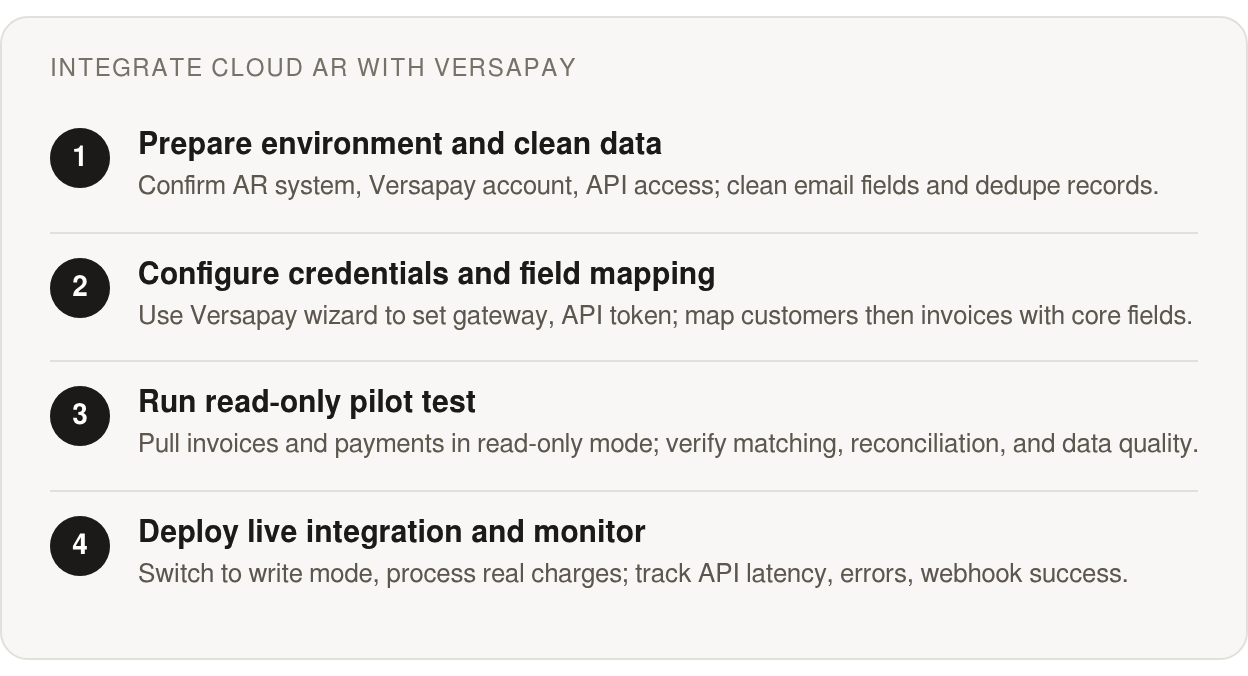
Before you write a single line of integration code, the work that actually determines success is boring: checking what your AR system can expose, and whether your data is clean enough to trust. Skip this and you’ll spend the integration debugging your own records instead of the connection.
The first question is whether your platform can even talk to a payments layer. The API surface you need is narrow but specific: invoices, payments, and credit memos have to move both directions. Some major ERPs ship certified bi-directional connectors that sync invoices, payments, and journal entries natively. Others connect through open APIs and flat-file exchange rather than a dedicated native app.
That distinction matters more than it looks. No native connector is not a blocker. If you run a custom recurring-billing engine, integration is an API exercise, not a wait-for-the-vendor problem.
Native connectors win, but API paths aren’t a downgrade
A native connector is often the shortest road when one exists for your stack. It handles the mapping and the sync mechanics for you. For a custom billing engine, you build against the same invoice, payment, and credit-memo endpoints and can get the same result.
So audit your platform without flattering it. Confirm which objects your API publishes, whether writes are supported or read-only, and what add-on licensing enables API access. On some systems, API tiers sit behind a higher plan, and finding that out mid-build is an expensive surprise.
The email field will silently break your matching
Email cleanup is where preparation gets very practical. In a subscription business, org accounts routinely share one billing contact across several users, while finance systems may also carry duplicate customer records, stale invoice statuses, or inconsistent currency values. Any one of those can turn a clean payment sync into a reconciliation problem.
Clean the customer email field before launch, not after. While you’re in there, resolve duplicate customer records, close stale invoice statuses, and enforce currency consistency across the ledger.
The cost of skipping this can show up in matching quality. Some cash application tools use machine-learning matching to associate checks and ACH with the right invoices, and that accuracy assumes your master data is sound. Feed it duplicates and you can drag the match rate down yourself. Blixo’s own intelligent matching engine is built to learn from edits and approvals, which is why clean records upfront pay off downstream.
Run a read-only pilot before you trust the sync
Prove the data quality before you let anything write back. Point the integration at your records in read-only mode first, pull invoices and payments across, and compare against your ledger. You catch the misassociations while they’re harmless.
Pair that pilot with light governance. Name a data steward who owns the customer master, and put a change-control step around API credentials and field mappings. The goal is to retire manual cleanup, not automate a mess. Governance is what keeps the clean state clean.
Building the Connection: API Setup, Credentials, and Data Mapping
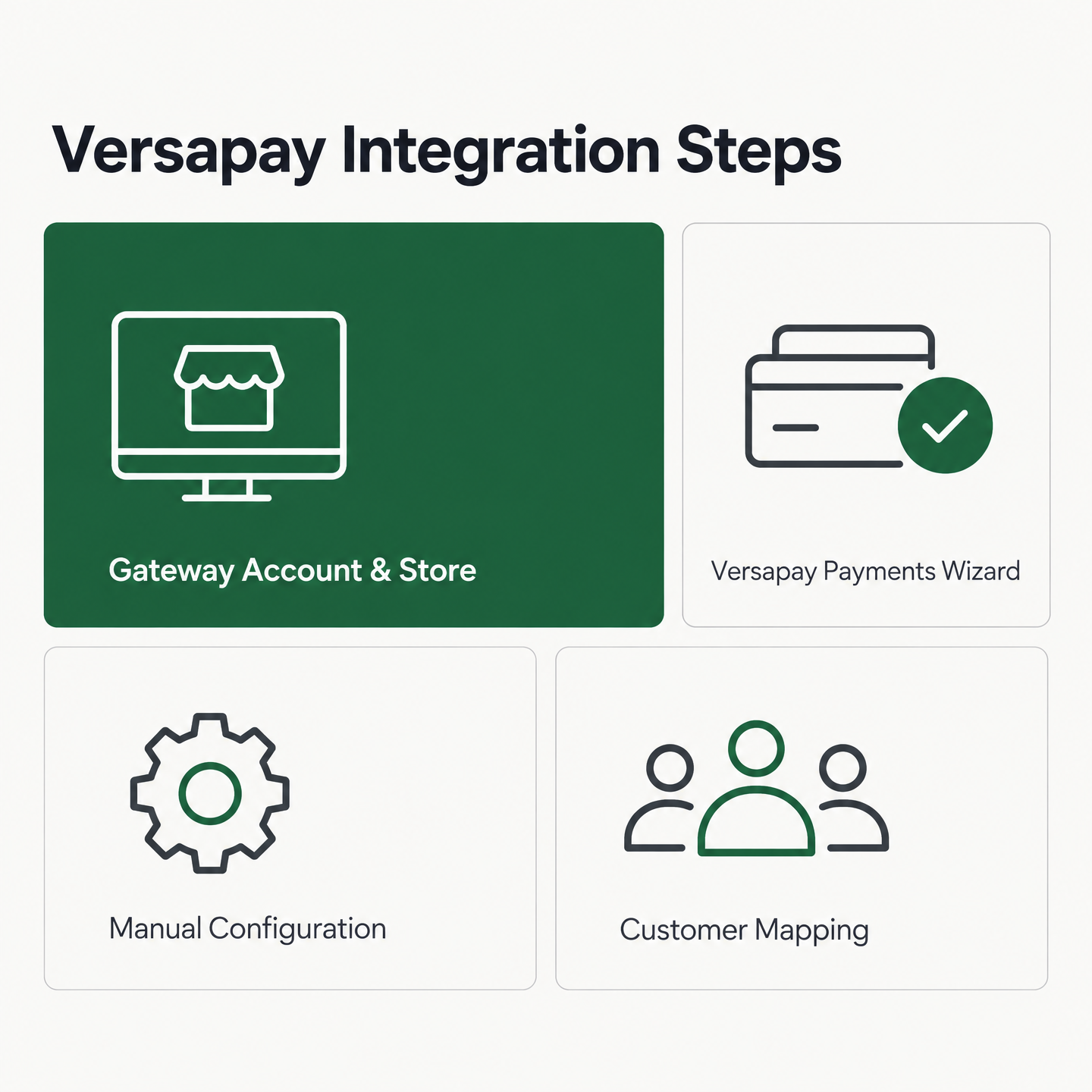
The credentials come first. On the payments side, you typically start by creating a gateway account and a related store. Where available, the Versapay Payments Setup Wizard can be the fastest path: you enter your API token and API key directly during configuration. For new implementations, a wizard-driven setup helps avoid manual gaps.
Configure the connection manually and you may inherit more surface area. Depending on the integration, you may need to set up the gateway, gateway account, synchronization setups, store, terminals, and terminal account IDs by hand, and any one of those left half-finished can stall the connection. The wizard, when available, exists precisely to keep you from missing a step.
How do you set up the sandbox and credentials?
Treat the sandbox as the place where your token exchange either works or exposes a gap. Once payments are configured, enabling the connection may surface new activities inside your ERP role centers, such as accounts receivable administrator and credit and collections manager views. That can be your signal the handshake landed.
Configure your integration job queue next. In some setups, the relevant fields for the Versapay integration codeunit are pre-populated, so you’re not guessing at parameters. Run a handful of test invoices through before you trust it with live recurring charges.
Which invoice fields must you map first?
Order matters more than field count. In many payment integrations, the customer record has to exist before any invoice, credit memo, or wallet entry can attach to it. Push customers first, then transactions. Reverse that and the payment may have nothing to post against.
For the invoice payload itself, keep the mapping tight: invoice ID, amount, due date, and a customer reference are the core. If your setup allows reference fields, that’s where your recurring-billing metadata belongs. Map your subscription ID or plan code into a reference slot so reconciliation can tie a payment back to the exact billing cycle.
Division mapping deserves attention if your instance requires it. You can send a static preset value or pull from a dimension field, and invoices and credit memos may need it populated to sync at all.
What silently breaks payment association?
A payment association problem usually looks less dramatic than a failed API call. The sync runs, the cash posts somewhere, and the error only becomes obvious when a customer balance stops making sense. That’s why shared inboxes, billing aliases, and duplicate contact records need to be tested against the matching rules before go-live.
SaaS billing engines often permit account-level aliases because they’re convenient for customers. In the payment workflow, that same convenience can blur ownership unless the customer reference, invoice reference, and contact data all point to the same account. Treat it as launch-blocking hygiene, and fold it into any pre-automation fix list.
One more limit shapes your data load. Mass create may be suitable for smaller batches; as record counts climb, the upload can time out, so batch your historical migration through bulk upload instead. And if you run email invoicing, think twice before pushing historical open invoices at all. Depending on your notification settings, each one can trigger a customer-facing email.
Automating Payment Matching, Cash Application, and Reconciliation
The point where automation usually pays off is matching. Once the integration is live, incoming payments can stop landing in a holding account and start applying themselves against open invoices. Some cash-application tools ingest remittance that arrives detached from the payment itself—from email, PDFs, AP portals, and data files—and reconcile it to invoices before posting back to your ERP.
For a subscription SaaS team, that same connection can do double duty. Versapay can be configured to pair its matching engine with dunning tied to customer, invoice, payment, and payment-method events. Failed or late recurring charges can then be retried and communicated automatically instead of quietly aging in your ledger. So auto-reconciliation and churn reduction can be the same mechanism, not two separate projects.
Rule-based matching lives or dies on your reference fields
Matching accuracy often depends on the identifiers you feed it. If your payment platform lets you attach reference fields to each record, that’s where your recurring-billing engine should push invoice numbers, subscription IDs, or contract references. Populate those consistently and amount-plus-reference matching can run clean. Leave them sparse and the engine may fall back to fuzzier logic.
This is also where your billing design matters. If your subscription platform has separate IDs for account, plan, invoice, and renewal cycle, decide which one belongs in the payment reference before the first production sync. A consistent reference strategy can give the matching engine something precise to work with, and give your finance team a cleaner audit trail when an exception needs review.
Partial payments and exceptions need a named home
Not every payment matches on the first pass. Overpayments, short pays, and lockbox deposits with no customer indicated may surface as exceptions. Some payment platforms have a Non-Designated Customer setting—a fallback account that catches payments arriving without a clear customer reference so nothing gets lost while your team resolves it.
If the platform offers it, set that fallback not to sync so exception traffic doesn’t trigger stray customer notifications. Build a review queue around it and route unmatched items to a person, not a black hole. The goal is a short, visible exception list at close, not a pile of unapplied cash.
Reporting that feeds back into the ledger
The payoff can show up at reconciliation. Straight-through processing can post matched payments to the ERP as they clear, which narrows the gap between cash received and cash recorded.
One economics check matters before you scale. Model the Versapay subscription cost as a fixed line, then add the payment-flow margin on expected transaction volume. In some subscription SaaS models, interchange optimization or surcharge settings can change the net cost enough to matter; in others, the fixed subscription is the smaller line and the real payoff is labor saved in reconciliation. Treat that as a model to run with your own rates, not a universal result.
Scope the platform for what it’s good at. Do not assume a cash-application tool will also run your credit decisions. Cash application and credit management are related finance processes, but they are not the same implementation problem.
Testing, Deployment, and Ongoing Optimization
Before you flip the switch, test the connection between your AR cloud and Versapay against real billing behavior, not just happy-path assumptions. The failures that bite subscription teams show up in the seams: an invoice that syncs but never triggers a payment record, a match that posts to the wrong customer, a reconciliation cycle that silently drops a batch. Catch those in a sandbox, not in your ledger.
The goal is a clean loop you can run end to end and trust. Build your test plan around the four events that make up that loop, then wire monitoring so the loop stays healthy after go-live.
What should your test plan actually cover?
Start with the four core cycles and test each in isolation before chaining them. Invoice creation, payment receipt, payment matching, and reconciliation each have their own failure modes, and a green result on one tells you nothing about the next.
- Invoice creation: confirm a new recurring charge syncs with the right amount, customer, and due date.
- Payment receipt: verify a captured payment posts back and lands against the correct open invoice.
- Matching: feed in detached remittance and check the cash application resolves it, not just exact-match cases.
- Reconciliation: run a full cycle and confirm the ledger balances with no orphaned holding-account entries.
For the API layer itself, a Postman collection can give you a fast way to hit Versapay endpoints, inspect responses, and save request examples your whole team can rerun. Fold those calls into a CI pipeline so every code change replays the same suite automatically. Clean, well-structured customer and invoice data is what keeps these tests meaningful, so get your reusable items and customer records in order before you start.
How do you deploy without spamming your subscribers?
Customer communication is part of deployment, not an afterthought. Sending historical open invoices at go-live can trigger customer-facing email notifications depending on your settings, so backfilling your whole book at once may mean subscribers receive a fresh payment request. Large one-shot backfills can also stall or partially fail, which leaves you reconciling a messy import on top of the notification problem.
The safe pattern is to cut over on new billing cycles rather than backfilling everything. When the option is available, use bulk upload for historical invoices with notifications suppressed, then let the live integration carry the next cycle forward. Your subscribers see a clean transition, not a flood of duplicate reminders.
Which metrics tell you the integration is healthy?
Post-launch, watch three signals: API latency, error rate, and webhook delivery success. A creeping error rate or a dip in webhook delivery usually means a match is failing quietly, and quiet failures are the ones that age into churn. Alert on those thresholds so a human hears about it before a customer does.
As transaction volume climbs, tune for it. Batch your syncs instead of firing one call per invoice, and throttle webhooks so a spike in recurring charges doesn’t overwhelm your endpoint. When an API version change is available, test the new version against your saved collection in staging first to confirm backward compatibility before you promote it.
How Blixo Integrated Its AR Cloud with Versapay
When you connect an accounts receivable cloud to a payments platform like Versapay, the real starting point is the recurring billing engine, not the connector. For a subscription business like Blixo, any connection has to survive real volume, not a single clean demo invoice.
The first stretch is preparation, and it matters more than the code. Audit what your AR system exposes and clean up customer records before wiring anything. Every duplicate contact and stale payment method left in place can become a mismatched payment later, so fix the data first.
The messy records came before the code
Treat the early weeks as a data project, not an API project. Open invoices, credit memos, and payment records all need to reconcile cleanly, and that only works when the underlying records agree.
Map each field to its counterpart, then run a small batch of live subscriptions through before scaling. Catching a handful of mapping errors on ten accounts is cheap. Finding them across a full billing run is not.
What Blixo’s billing engine handles
Within Blixo, the relevant capabilities for this loop include smart invoicing and automated chasing. Invoices can be tracked when they’re opened, customers can pay through a brandable portal, and a matching engine can reconcile the cash. Automated chasing can run reminders across email, text, phone, or letters, and subscription workflows can update expired or replaced cards. A settled invoice can stop the sequence, so nobody gets chased for money they already paid.
That distinction is what protects subscription revenue. A failed charge isn’t always a lost customer, but it becomes one faster when nobody sees it, retries it, or gives the customer an easy path to fix it. Close that gap and aging receivables stop turning into cancelled accounts.
The numbers we watch after go-live
We measure this integration against our own internal reporting rather than borrowed benchmark figures. Days sales outstanding, match rate at the invoice level, and the share of recurring charges that reconcile without a human touch are the three we watch weekly. If you build the same loop, pull your real before-and-after numbers from your own ledger; they carry more weight than any industry average.
One caveat worth stating plainly. If your billing is low-volume or one-off rather than recurring, this depth of integration can be more machinery than you need. The payoff scales with charge volume. A team firing a few invoices a month may not see the reconciliation savings that make the setup worth it.
For teams running hundreds of recurring charges, the story is different. The loop may pay for itself in reclaimed hours and cash that lands on time. If you want a closer look at which capabilities move the needle first, our breakdown of what accounts receivable software features matter most is a good next read.
Quick Questions, Straight Answers
1. Is this integration worth it if I only send a handful of invoices a month?
Usually not. If your AR workload is small, focus first on clean invoices, easy payment links, and basic follow-up. A full Versapay integration makes the most sense once recurring volume is high enough that manual matching, retries, and close work are consuming real finance time.
2. What happens if my ERP has no certified Versapay connector?
Start by confirming that your AR platform can expose and accept the required objects: customers, invoices, payments, credit memos, and any reference fields your reconciliation process depends on. From there, the project becomes a mapping, authentication, and testing exercise rather than a reason to abandon the integration.
3. Can Versapay handle my credit decisions along with cash application?
Use Versapay for the payment and reconciliation path, then keep credit policy where it belongs if your business needs dedicated underwriting, risk scoring, or credit-limit workflows. Cash application and credit management are related finance processes, but they are not the same implementation problem.
4. When does on-premise AR make more sense than cloud for this setup?
Choose on-premise only when infrastructure control is a hard requirement rather than a preference. For most SaaS teams, the practical concern is not whether cloud AR is viable; it is whether the cloud system has the right API access, field controls, and governance to support a reliable payment sync.