

5 Things to Fix Before You Automate Accounts Receivable

Key Takeaways
- Companies automating over half their AR processes saw DSO drop. Among CFOs, 85% reported improvements, while 62% of businesses gained ground.
- Businesses commonly collect payments up to twice as fast. This happens after automating collections and cash application.
- Mapping and standardizing AR processes can improve receivables-related working capital by up to 30% within weeks.
- Automation success depends on upstream readiness, not software alone. The same tools produce opposite outcomes across firms.
- About 65% of CFOs lack confidence in realizing AI program value. Only 27% say their technology strategy aligns with business goals.
- Automating broken workflows spreads errors faster. It also floods support queues and wastes budget.
- Cost is the top adoption barrier for 38% of mid-sized firms. Another 23% cite implementation as the main challenge.
Why Automating AR Pays Off — But Only If You’re Ready
Automating accounts receivable pays off when processes are ready. Standardized collections and cash application accelerate billing cycles. Outstanding invoices then convert to cash more predictably. Finance teams can manage cash flow instead of chasing payments.
The gains belong to firms that fix workflows first. Many finance leaders struggle to realize advanced software’s promised value. Their technology strategies remain disconnected from broader business objectives. Software deployed on fragmented processes often fails to deliver. Upstream readiness separates successful implementations from unsuccessful ones.
Why clean processes matter more than the software
Mapping and standardizing AR processes reveals hidden bottlenecks. It also exposes redundant steps and communication gaps. This work streamlines collections before automation begins. It can improve working capital on its own. Clean, structured data supports effective AI in AR.
If invoicing is inconsistent, fix it first. The same applies when customer data spans three spreadsheets. Broken workflows spread errors faster after automation. They also flood support queues and consume budget. Licensing fees may seem like the main hurdle. In practice, deployment often creates more friction.
- Standardize invoice and dispute workflows before evaluating platforms. This alone can lift working capital 30%.
- Clean and structure customer and billing data. AI-driven cash application depends on it.
- Separate routine AR tasks from tasks needing human review.
Where churn risk hides in AR automation
A key decision concerns automated reminders and personal outreach. Nearly 90% of businesses report that 30% of invoices are paid late. Firms extending payments beyond 30 days lose an average of 4.6% of revenue. Recover that revenue without overwhelming good customers with dunning emails.
A blanket collection policy treats every account alike. That includes new accounts and high-value strategic clients. It also includes reliable recurring subscribers. This approach can churn valuable customers. Reserve automation for routine, low-risk accounts. Keep humans involved with sensitive or at-risk relationships.
- Segment customers by lifecycle stage. Match reminder cadence to the relationship, not invoice age.
- Route strategic and at-risk accounts to human outreach. Avoid automated dunning sequences for these customers.
- Set escalation triggers that hand off accounts to people. Do this before automated chasing damages key relationships.
Successful AR automation depends on clean data. It also requires standardized processes and clear collection triggers. Map those triggers to each customer relationship. DSO gains follow when those conditions are in place.
Fix #1 – Clean Up Invoice Data & Resolve Discrepancies
“Garbage in, garbage out” applies strongly to AR automation. Invoice data must be clean before reminders trigger. It must also be accurate before payments are matched. Otherwise, teams automate existing disputes at scale.
What a pre-automation invoice audit actually covers
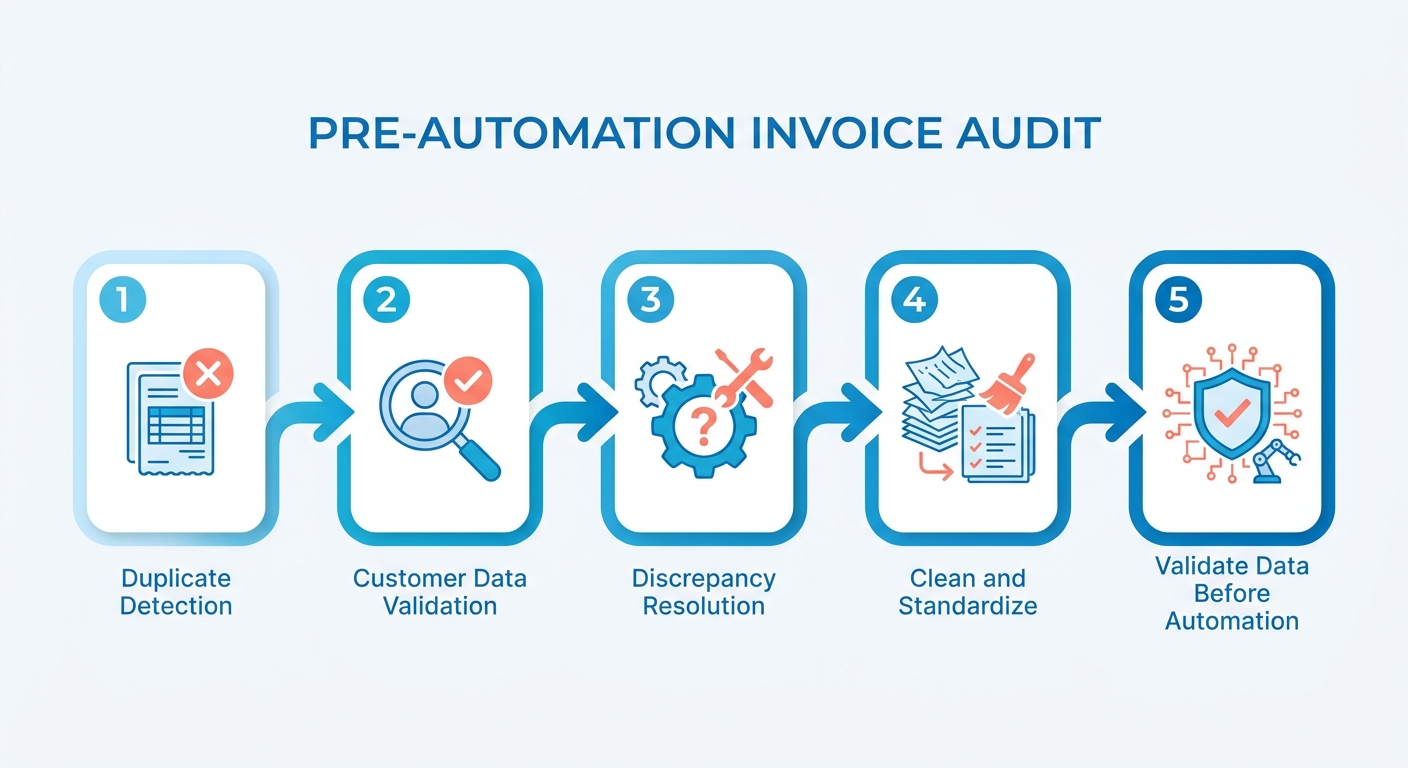
An AR audit is more than one-time cleanup. It establishes whether automation uses facts or noise.
- Flag mismatched line-item totals. Compare invoice items with the original quote or contract. AR audit data consistently shows 12–18% of invoices contain mismatched totals or incorrect tax codes. Each issue can create a dispute when reminders begin.
- Resolve duplicate invoice numbers. Use a pivot table or SQL
GROUP BYon invoice IDs. Flag any ID appearing more than once. One consulting firm cited in audit literature found 3% of invoices were duplicates. Resolving them reduced collection disputes 22% after automation. - Standardize customer IDs. One client should not appear as “Acme Corp,” “ACME,” and “Acme Corporation.” Inconsistent IDs break payment matching. They can also send reminders to the wrong contact.
- Verify PO numbers are present and correct. Missing PO numbers are the most common reason enterprise clients delay payment. An invoice without a valid PO reference still needs correction. No reminder cadence can fix that issue.
- Confirm tax codes match customer location and contract terms. Incorrect tax codes create disputes and stall collections. Validate them against CRM or contract records before automation begins.
How clean data changes what automation can actually do
AI-driven payment matching accuracy sits around 78% with messy data. Clean, standardized records push accuracy above 95%. That difference affects manual review volume. Clean data lets systems handle more exceptions automatically.
Successful AR automation requires accurate billing data. It also needs clear workflow rules and human exception review. Clean data does not remove human judgment from sensitive accounts. It focuses that attention where it matters.
Organizations often underestimate legacy data preparation. Aligning old structures with modern automation engines takes work. Teams that cleanse data first report smoother rollouts. They also require fewer post-launch adjustments.
Who owns the data after you clean it?
A one-time audit quickly loses value without ownership. Assign a named owner for invoice records. That person approves changes to customer IDs, tax codes, and PO requirements. Add quarterly cleanup and track three metrics:
- Percentage of invoices flagged per cycle
- Time spent on each cleanup
- Error rate after automation
Without ownership, datasets become messy within two quarters. With ownership, cleanup cycles become shorter. Automation logic also stays aligned with the customer base.
High-volume or complex billing requires more validation. That work connects to customer-specific automation triggers. Blixo’s automated chasing cadences assign collection sequences by customer conditions. Data-cleanup rules can therefore guide post-launch workflow logic.
Fix #2 – Standardize Payment Terms & Pricing Structures
Inconsistent payment terms undermine automation logic. Some clients may use Net 30 and others Net 45. Early-pay discounts may also vary by deal. Without standard fields, automation cannot use one reliable trigger. It must interpret inconsistent terms.
Software engines need standardized database fields. These fields support conditional logic. Customized contract terms prevent reliable overdue calculations. Dunning sequences also struggle with aging buckets. This happens when payment terms use inconsistent text.
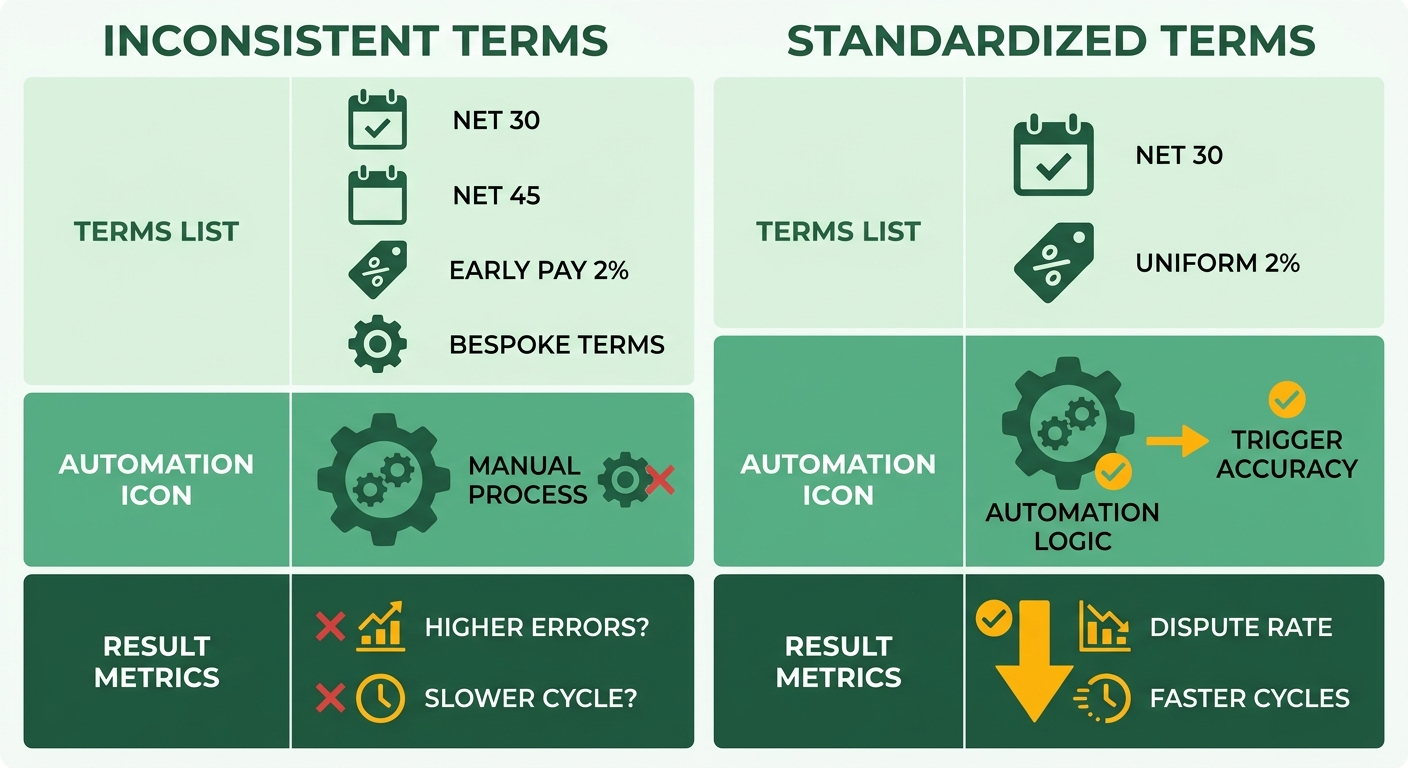
Why fragmented terms break AR automation
Rule-based sequences depend on consistent trigger fields. Ad-hoc terms prevent accurate invoice classification. The system may then contact good customers too soon. It may also overlook genuinely overdue accounts.
Standardization helps before automation begins. It aligns sales and finance during negotiations. An approved term menu limits downstream billing complexity.
- Build a term matrix. Map each segment to one term, such as Net 30 with a 2% early-pay discount. Keep one rule per segment.
- Consolidate pricing into a central price book. Replace scattered spreadsheets with one subscription-management module. Connect it directly to the automation engine.
- Retire orphan terms. Justify or migrate every Net 45 or Net 60 outlier. These terms can disrupt dunning logic.
How to segment terms without losing customers
Segment terms by credit risk, not sales history. Credit limits and payment windows should reflect financial reliability. Strategic partners can still receive specialized handling. This approach protects cash flow while preserving flexibility.
Standardized term catalogs reduce dispute cycles. Automation can then use a clean field. Blixo’s automated chasing cadences support multiple sequences. Apply each sequence under specific conditions. Customers with specialized terms receive matching communication paths.
- Map each segment to its own cadence. New, high-value, at-risk, and reliable recurring customers need different escalation paths.
- Communicate new terms before they go live. Use templated emails and portal notices. Customers should understand rule changes beforehand.
- Track three KPIs. Monitor average term length, discount use rate, and term-related dispute frequency.
A single term catalog reduces human exceptions. It also gives automation a reliable field.
Fix #3 – Consolidate & Integrate Legacy Systems
Fragmented data often causes incorrect automation triggers. Many finance teams use separate invoicing, ERP, and CRM systems. These systems may not communicate reliably. Automation then combines outdated payment and customer information. Reminders can reach customers who already paid.
More than 50% of businesses spend 4 to 13 hours weekly on manual AR tasks. Much of that time goes toward reconciling separate tools. A single source of truth reduces this overhead. It also keeps payment and customer records synchronized.
Why data silos break lifecycle-aware collections
Silos create delays between systems. ERP payment data may take days to reach communication tools. Automation then uses stale information. It may send payment demands after customers settle balances. This damages trust and creates support tickets.
A customer record may exist across three or more tools. Every synchronization gap creates another outdated trigger. Companies with disconnected AR stacks report reconciliation errors in 1 in 5 records at month-end. Real-time synchronization closes that gap.
What belongs on your integration checklist
Map field ownership before connecting systems. Define what the same customer means everywhere. Teams that standardize fields before deployment cut post-launch sync failures by roughly half.
- Identify data owners for each system. Assign ownership for invoicing, ERP, and CRM records. Conflicts then have a clear decision-maker.
- Map core fields across tools. Align invoice number, customer ID, lifecycle stage, and payment status. A “paid” flag should update every system in real time.
- Choose middleware or native APIs for real-time sync. Batch imports create stale data. Real-time connections reduce incorrect payment reminders.
- Enforce encryption, role-based access, and audit logs. Integrations handle customer financial data. Restrict access and record every synchronization during setup.
- Track automation rate as the success metric. Measure invoices processed automatically versus manually uploaded. Monitor this rate after integration.
Automation inherits the data quality of connected systems. Data drift becomes more visible as workflows expand. Blixo’s automatic reconciliation and intelligent matching engine provide a single source of truth for real-time revenue data. Collections cadences can then use current payment status.
If you use one billing tool without a separate ERP, simplify. Native API syncing with your CRM may be enough. Avoid building middleware for a two-system stack.
Fix #4 – Establish Clear Collection Policies & Customer Communication
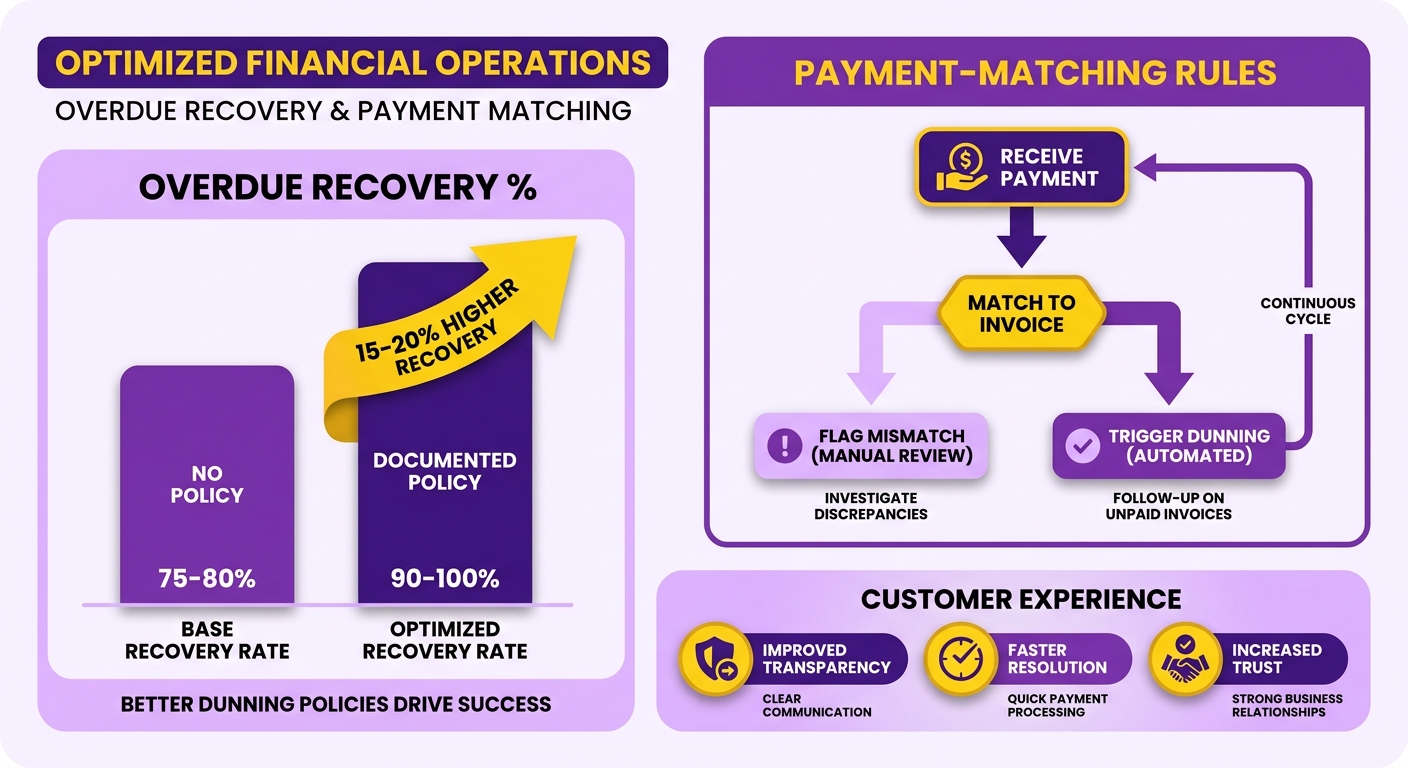
A collection policy defines who automation contacts, when, and how. Without one, every overdue account receives the same sequence. That can harm good customers after one late invoice. Companies with documented dunning policies recover 15–20% more overdue amounts, according to Atradius.
A written policy sets operational boundaries. It defines when automated communication is allowed. It also flags complex accounts for manual review.
Why dunning tone should match the customer, not the invoice
Customer segments respond to different channels and styles. Some prefer direct SMS payment alerts. Others require formal PDF letters through accounts payable portals. Matching communication to customer preferences can improve response rates. It also reduces friction.
Define policy stages before writing messages. Then match the tone to each stage.
- Stage 1 – Gentle reminder. Send a friendly notice before or on the due date. Reliable recurring customers may need only this message.
- Stage 2 – Firm notice. Send a direct follow-up after the invoice becomes overdue. Keep the language factual and non-accusatory.
- Stage 3 – Escalation. Send a final notice before agency referral or human ownership. Use this stage for accounts ignoring earlier notices.
High-value and new accounts should avoid automated Stage 3. Flag them for personal outreach when they become overdue. A payment issue should not become a relationship issue.
What belongs in your template library
A tone-matched library supports lifecycle-aware collections. Write scripts once and assign them to segments. Blixo’s chasing cadences support multi-step schedules and reusable email templates. Conditions determine which customers receive each cadence.
- Tone-matched email and SMS scripts for every stage and segment. Use warmer language for loyal accounts and firmer language for repeat offenders.
- Embedded self-service portal links in every message. Give customers one clear action: click, view, and pay.
- A defined “next action” in every notice. State what happens next and when.
Compliance and metrics you can’t skip
Confirm regional compliance before sending automated notices. Also confirm that each notice can be measured. Otherwise, automation can increase legal exposure.
- Verify regional compliance. Notices must follow rules such as GDPR for customer data and the Fair Debt Collection Practices Act for collections language.
- Track collection rate per dunning stage. This shows which messages recover money and which only create frustration.
- Monitor average days between notices and customer satisfaction. If satisfaction falls as recovery rises, the tone may be too aggressive.
Fix #5 – Build Accurate Cash‑Application & Payment‑Matching Rules
Cash application can improve efficiency or damage customer relationships. A wrong invoice match may trigger reminders after payment. That mistake can quickly harm a good account.
Matching rules support ledger accuracy. Misapplied payments make financial reporting unreliable. They also create manual corrections. These corrections delay month-end close and complicate audit trails.
What causes payment-matching errors in the first place
Most mismatches have three causes: missing references, partial payments, and currency conversions. A customer may omit an invoice number. They may pay 80% of the balance. Currency rounding may also change the received amount. Each situation can defeat basic matching.
Start with rule-based matching before adding AI. Define primary keys and tolerances first.
- Match on invoice number, PO, and amount as primary keys. These signals should resolve most clean payments automatically.
- Set an amount tolerance and date window. Allow small rounding variances and short-pays. A $9,998 payment can then match a $10,000 invoice instead of entering exceptions.
- Layer AI matching on top of the rules. AI-enabled automation can match invoices and post payments after historical data trains it. It can handle cases that rules miss.
How to route exceptions without triggering wrongful dunning
Create a reconciliation loop for matched payments. Post those payments directly to the general ledger. Send only exceptions for human review. Assign each exception to an AR analyst with a clear SLA.
Direct Debit and card failures are climbing. Many failures occur outside the customer’s control. Sending these accounts into automated dunning can punish loyal customers. A human review process reduces that churn risk.
- Assign exceptions to a named analyst with a 24-hour SLA. Ownership and deadlines prevent mismatches from aging into overdue status.
- Pause automated collections on flagged accounts. Hold dunning until a human confirms the payment failed. Apply this especially to high-value or long-tenured customers.
Which KPIs tell you the rules are working
Track four numbers: match rate, exception volume, resolution time, and cash-flow visibility. A rising match rate and smaller exception queue indicate better pattern recognition. Flat exception volume suggests rule or data problems.
The benefits accumulate over time. Less manual cash application frees finance teams for higher-value work. That includes credit risk analysis and working capital optimization. Accurate ledgers also support real-time cash-flow forecasting.
Frequently Asked Questions
1. How long does it take to fix AR processes before automating?
Process fixes can deliver returns within weeks, not months. Mapping workflows identifies bottlenecks quickly. Standardizing procedures and cleaning customer records provide fast improvements. These steps create a stable foundation for software deployment.
2. Should a small business with one billing tool build full system integration?
Small operations rarely need complex integration. A single billing platform may provide native CRM connectors. These connectors usually keep customer details and payment statuses aligned. They also avoid custom development overhead.
3. What happens if I automate collections without cleaning invoice data first?
Messy data spreads existing disputes at scale. The system generates more exceptions and incorrect collection actions. Teams then spend more time correcting errors. Customer complaints may also increase.
4. How do I prevent automated reminders from damaging valuable customer relationships?
Use threshold-based rules within the system. Flag high-value or sensitive accounts for manual review. Do this before sending dunning messages. Key clients then receive personal attention while routine accounts remain automated.
5. Why do failed payments require human review instead of automatic dunning?
Failed transactions may result from network issues or expired cards. They do not always indicate insufficient funds. Treating technical failures as delinquency can alienate long-term clients. A brief grace period and automated retries can resolve some issues quietly.
6. What keeps cleaned AR data from becoming messy again?
Use validation rules at the point of entry. Require complete PO numbers and standardized tax codes. Also require unique customer identifiers before invoice generation. These controls prevent bad data from entering the system.
7. Is cost really the main barrier to AR automation success?
Budget is often cited as the primary obstacle. Change management and process alignment can create larger challenges. Projects may struggle because workflows are not ready. Preparing processes before buying software supports a higher return on investment.