

How to integrate accounts receivable cloud with Microsoft Dynamics 365 Finance

TL;DR
- Connecting an accounts receivable cloud to Dynamics 365 Finance can close the Order-to-Cash loop by applying cash as it lands instead of after someone keys it in.
- A hybrid sync pattern is common in Dynamics environments: OData for small real-time events, and the batch data API for bulk reconciliation and mass cash-application loads.
- Some Dynamics 365 AR configuration pages may remain locked until prerequisite parameters are in place, so setup order is worth planning rather than discovering.
- In a typical Dynamics data model, customer records may map to CustTable, invoices to invoice journal tables such as CustInvoiceJour, and applied payments/open balances to customer transaction tables such as CustTrans.
Why bother connecting an AR cloud to Dynamics 365 Finance
Integrate an accounts receivable cloud with Microsoft Dynamics 365 Finance and you can close the Order-to-Cash loop many SaaS firms leave half-open. Invoices, payments, and collection actions can stop living in separate systems. Cash can apply when it lands, and the ledger can reflect current reality instead of last week’s export.
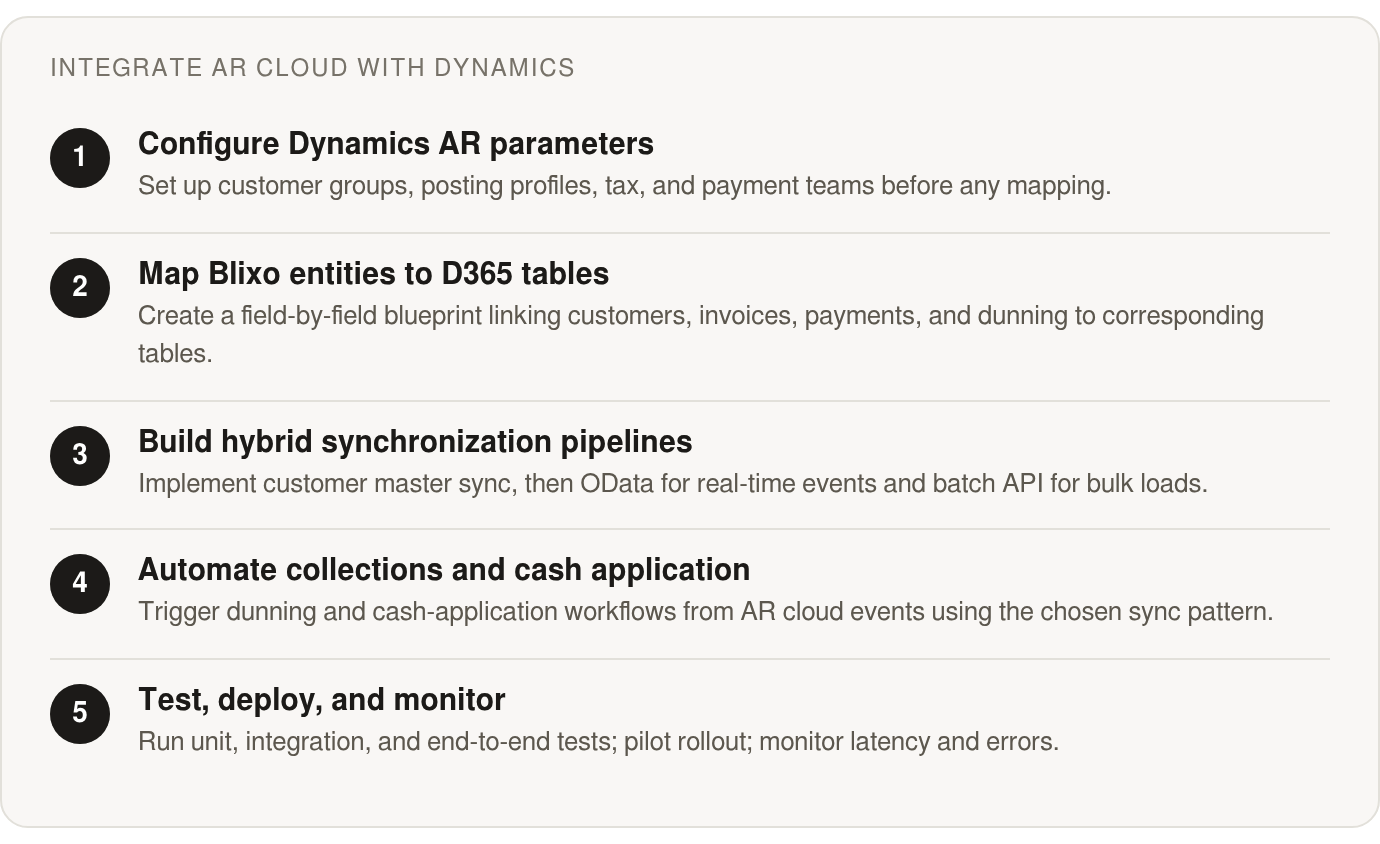
The half-open loop is common. Across Dynamics 365 environments, many teams still run on disconnected payment providers, manual reconciliation, and reactive collections. Finance leads often admit their AR data is only accurate after someone burns a morning keying it in. An integrated AR-ERP stack can reduce that manual work.
Manual reconciliation is a quiet tax on subscription revenue
Manual AR work consumes hours and can introduce errors that surface at the worst possible time: month-end close. When you bill large customer sets, every unreconciled payment can make forecasts harder to trust and lead to collection emails going to customers who already paid.
Applying cash to the invoice at the source can reduce that risk. Some AR platforms offer matching engines that pair payments to invoices at the envelope and item level, then sync status to Dynamics 365. Collections logic, if configured to run from that status, can target only accounts that are genuinely overdue. That can mean fewer chases for accounts that are already paid.
The right sync isn’t one pattern, it’s two
In Dynamics integrations, OData and batch data APIs are common integration patterns. OData is often used for real-time, low-volume events. The batch data API is often used for bulk loads. As volume climbs, high-throughput work generally fits the batch API better than synchronous OData calls.
A subscription-billing AR cloud can produce both kinds of traffic at once. A single payment applied or one invoice status change is a small, real-time event. OData can handle that. A monthly reconciliation load or a mass cash-application run crosses into bulk territory, and that may belong on the batch API.
So a hybrid approach is common: OData for live events, batch for larger jobs. The synchronous or asynchronous label describes intent, not a guarantee. OData calls can be configured to run asynchronously, and batch imports can sometimes be invoked synchronously. Design sync jobs around actual execution behavior, not just the label.
Configuration order decides whether any of it works
Some Dynamics 365 AR configuration pages depend on each other, and some may stay locked until prerequisite parameters are entered. You may not be able to map the AR cloud’s entities to pages that aren’t accessible yet. Setup sequence therefore becomes something you plan for, not a footnote you trip over.
Practically, it can help to stand up the Dynamics 365-side configuration before mapping anything across. Customer, invoice, payment, dunning, and subscription-plan mappings are easier to manage once the target pages exist. Get the order wrong and the project can stall on rework.
Billing a handful of clients on flat annual terms? This integration may be overkill. The payoff is more likely when volume, recurring cycles, and real-time cash visibility all matter at the same time. For a wider look at connecting AR automation to your ERP, see our guide on integrating accounts receivable automation with your existing ERP system.
Map the data model: lining up Blixo AR entities with Dynamics 365 Finance
A data-mapping blueprint is where most integrations quietly succeed or fail. Before connecting the two systems, you need a record of what each AR object means and where it lands in the ERP. Skip it, and you may spend go-live week chasing mismatched customer IDs and orphaned payments.
Start by listing the AR objects and their attributes: customers, contacts, subscriptions, invoices, payments, and dunning events. Then compare them against Dynamics. In a typical Dynamics data model, customer records may correspond to CustTable. Invoices may map to invoice journal tables such as CustInvoiceJour. Applied payments and open balances may live in customer transaction tables such as CustTrans. Contacts may attach to the customer’s address book. Once the schemas sit side by side, transformation work becomes more predictable.
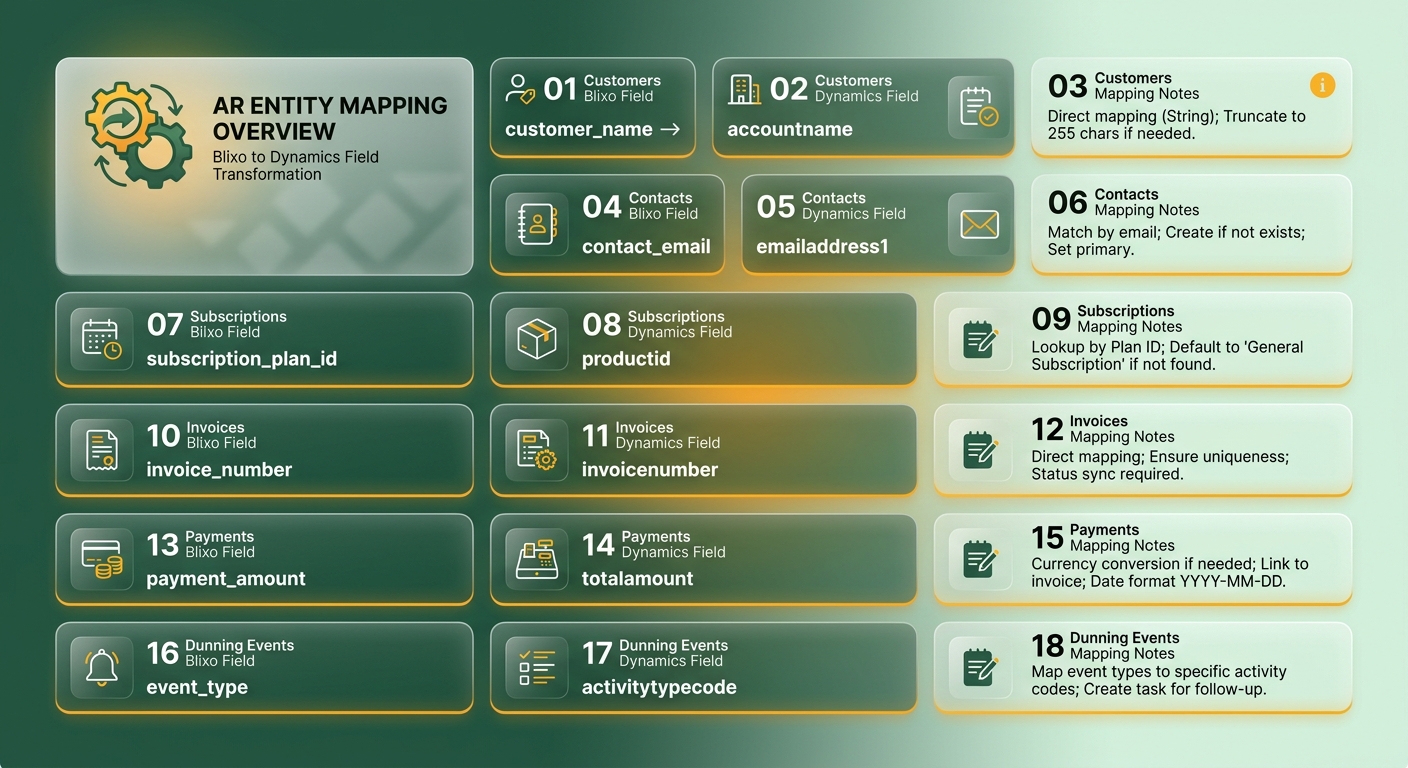
Where the schemas don’t line up cleanly
Some fields cross straight over. Others need work. Currency and tax codes are frequent friction points. Dynamics 365 Finance can drive tax through sales tax groups and item tax groups, and can validate currency against the legal entity’s configured exchange rates. If the AR cloud supports global tax across invoices and subscriptions, each item should map to the appropriate Dynamics tax group or the invoice may post against the wrong ledger account.
Customer posting profiles can also need attention. Those profiles can control how customer transactions hit the general ledger, so every customer you sync may need a valid group and profile assignment, or the invoice may not post. Setting a sensible default in the mapping can help records that arrive without one.
Subscription data may have no native home. Renewal dates, billing schedule references, and usage metrics may not fit standard AR tables. Dynamics can expose custom field extensibility entities for this kind of data, so custom fields for renewal date and usage counters can be defined early. They may gate reporting later.
If multiple legal entities are in play, consider adding a legal-entity key to mapped records. Dynamics can record payments centrally in one entity on behalf of others, but only if the data carries the right company code. Miss it and cash may land in the wrong books.
Sequence the Dynamics setup before you map
A detail that can be easy to miss: many AR configuration pages stay locked until you enter prerequisite parameters elsewhere. You may not be able to map an entity to a page that isn’t accessible yet. That makes configuration order a meaningful success factor. Setting up customer groups, posting profiles, terms of payment, and tax configuration before mapping may help.
One Dynamics behavior worth knowing: if no collections team exists, the system may automatically create one called Collections in the AR parameters. Account for that when mapping dunning events so escalation actions land in the intended queue.
Match the sync pattern to the data type
Don’t pick one integration pattern for everything. Real-time, low-volume events such as a single payment applied or an invoice status change may fit the OData pattern. High-volume cash-application and reconciliation loads often belong on the batch data API.
The classification is about intent, not runtime. OData calls can be configured to run asynchronously, and batch imports can be invoked synchronously. A subscription-billing AR cloud may produce both event types all day, so a layered design often beats forcing one pattern.
Build the core synchronization processes
Three pipelines can carry the weight of an AR sync. Get them right and cash application, invoice status, and customer records stay aligned between the AR cloud and Dynamics 365 Finance. Get them wrong and you may spend go-live week reconciling by hand.
The order you build them in can matter more than it looks. You’re writing into a module whose pages depend on prerequisites. Some Dynamics AR pages may stay locked until required parameters exist, and you may not be able to map an entity to a page that isn’t accessible yet. Completing Dynamics-side AR parameters, customer groups, and posting profiles before pointing sync jobs at them can reduce rework.
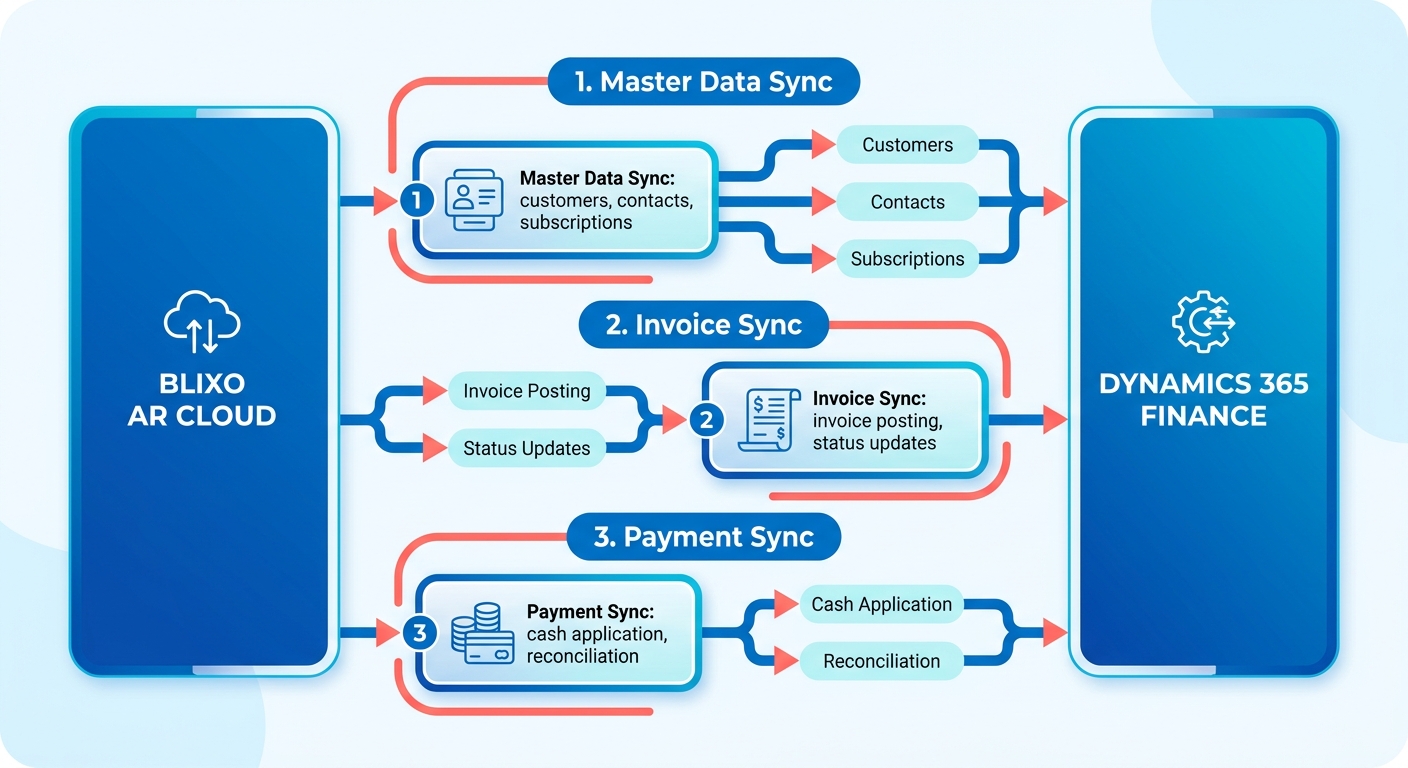
Customer master data comes first
The customer pipeline is the anchor. Downstream invoices and payments reference a customer record, so this sync should run clean before the other two touch anything.
Some AR platforms offer accounting software and ERP integrations, including Microsoft Dynamics, so customer creates and updates can flow into Dynamics instead of getting keyed in twice. Duplicate detection is a common trap. If a customer already exists in Dynamics, a blind create can duplicate the record and orphan future payments.
Build the customer write idempotently. Key each customer on a stable external ID, check for it in Dynamics before writing, then create or update based on what you find. That one guard can prevent much of the reconciliation pain that surfaces later.
Two sync patterns, layered by data type
This is where teams often oversimplify. In Dynamics integrations, OData-style synchronous access and asynchronous batch data patterns are common options. The larger the volume, the stronger the case for batch over record-by-record writes.
But those labels describe intent, not a runtime guarantee. OData calls can run synchronously or asynchronously depending on configuration. Batch imports can be triggered synchronously in some setups. Read the classification as design guidance, then decide execution behavior per job.
For a subscription-billing AR cloud, both patterns can be useful at once, split by data flow:
- OData for real-time, low-volume events: a single payment applied, one invoice flipping to paid, a plan change. These unplanned events can fit a pattern where each record lands promptly and on its own.
- Batch data API for bulk work: month-end cash-application loads or full reconciliation runs that cross the volume threshold where OData may start to strain.
A SaaS billing engine can produce both streams continuously, so choose per job, not per integration. If you’re feeding Power BI reports from this data, the entity store may be a better fit than OData.
Recurring templates and idempotent posting
Recurring invoices are where subscription billing meets Dynamics. Dynamics 365 Finance can support recurring invoices and billing schedules for subscription revenue. Many AR platforms also support recurring billing and recurring invoices, so you may be able to map each subscription plan to a recurring invoice template and generate a consistent line every cycle.
The payment pipeline needs the same idempotency discipline as customers. Key each posting on a stable reference and check before writing, so a retried webhook or duplicated batch record settles once, not twice. That can help keep the ledger honest when the network hiccups.
Automate collections, dunning, and cash-application workflows
The moment an invoice posts in Dynamics 365 Finance, the clock starts. Every day past due is cash you’ve earned but can’t spend. This is where work moves past master data and into post-invoice actions that actually move money: collection letters, dunning notices, cash application, and free-text invoice reconciliation.
Dynamics 365 Finance can provide the scaffolding. Collections information can live on a central Collections page, where credit and collections managers may work from predefined customer lists or start from the Customers page. Collection letters, interest notes, and aging periods can be configurable inside Accounts receivable parameters. The gap is often triggering and enriching those actions with real-time subscription data. That part can be automated.
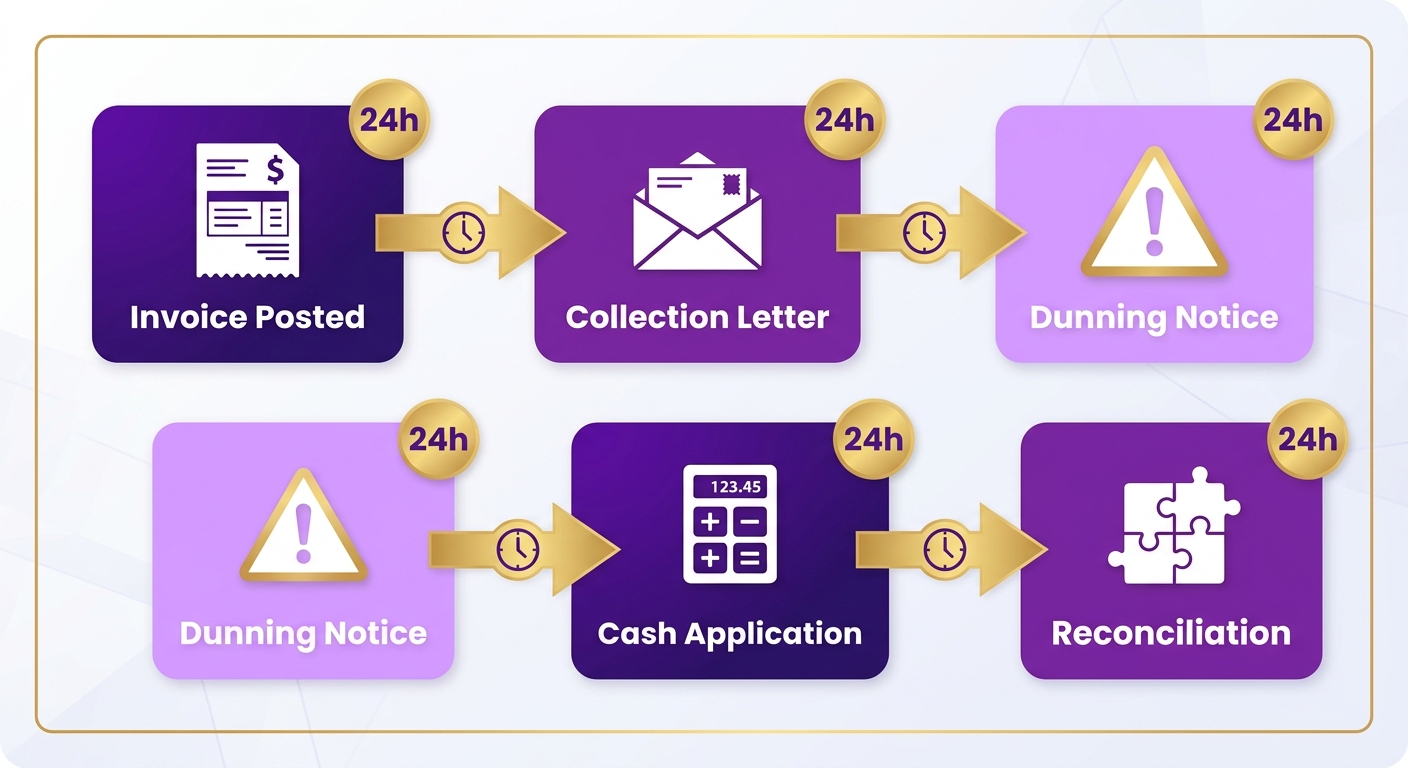
How do you trigger dunning steps automatically?
Dunning works best if escalation logic is unambiguous. Some AR platforms include collections automation that can manage reminders, letters, and interest notes according to a defined escalation sequence. You may be able to choose channels such as email, text, phone, or letter.
One Dynamics detail can catch teams off guard: if no collections team exists, the system may automatically create one called Collections in Accounts receivable parameters. Know that before wiring triggers, or follow-up actions may land with a team you never meant to use.
A collections engine can watch subscription status and payment behavior, then trigger a matching collection action. A failed card retry can become a dunning email. Custom dunning and task management can keep collectors focused on accounts that need attention. Template management in one place can apply copy changes across letters at once.
How do you post cash application back into Dynamics?
Cash application is where much reconciliation friction hides. When a payment lands in the AR cloud, an AR platform’s matching engine can pair it to an open invoice. Some platforms report high match rates at the envelope and item level. If manual corrections are allowed, the system may learn from them over time.
Free-text invoices need the same care. Many SaaS charges aren’t tied to a sales order, and Dynamics may treat those as free-text invoices with their own accounting distributions and subledger entries. Approval workflows and automatic reconciliation in the AR platform can help keep applied payments in step with the books.
Match the transport to the job. OData can work for single, real-time events such as one payment applied or an invoice status change. Batch data API can handle bulk cash-application or month-end reconciliation. A subscription business may generate both streams every day, so building for both from the start can help.
Surfacing status back for reporting
Automation is only trustworthy if finance can see it. Some AR platforms integrate with accounting software such as QuickBooks, Xero, Sage Intacct, and NetSuite, and offer custom ERP integrations for Oracle, SAP, and Microsoft Dynamics. That can bring AR-cloud activity and ERP balances together. A reconciliation dashboard may then blend collections activity, applied payments, and metrics like DSO and collections efficiency.
Invoicing a few dozen customers a month? The heavier batch architecture may be unnecessary. OData writes may keep pace, and the batch layer can be overhead you don’t need yet. Reserve it for the volume that justifies it.
Test, deploy, and monitor the integration
A working sync in your sandbox may tell you little about how it behaves under real subscription load. That gap is where many teams get burned. Before pushing into a live Dynamics 365 Finance tenant, you need a test plan that covers each pattern the integration uses.
One trap: OData looks synchronous, so people may test it as if the caller always blocks and waits. It does not have to. OData calls can run asynchronously, and batch imports can be invoked synchronously in some setups. Test the execution behavior you configured, not the label.
What should your test suite actually cover?
Split testing into three layers. Unit tests can confirm each field transformation maps cleanly, so a customer ID or applied payment lands where the data model says it should. Integration tests can verify sync jobs write into Dynamics AR pages without hitting a locked parameter. End-to-end tests can run a full order-to-cash cycle: invoice posts, payment applies, dunning event fires.
Build these into a repeatable automated suite so you can rerun them on every release. Cover both data flows separately. Real-time, low-volume events such as a single payment application may use OData. Bulk reconciliation loads often belong on the batch data API, which is designed for asynchronous, high-volume processing. Test each path against its own volume profile because a job tuned for a steady trickle may behave differently under a mass load.
How do you roll out without breaking live AR?
In sandbox, you prove the mechanics. In pilot, you route a small slice of real customers through the integration and watch cash application against the ledger for a full billing cycle. Only then do you move to production.
Sequence matters on the Dynamics side too. Some AR pages may stay locked until prerequisite parameters exist, so confirm posting profiles and customer groups are live before pointing sync jobs at them. A pilot can catch mismatches a sandbox hides because sandbox data is often clean and real subscriber data is not.
What should you monitor after go-live?
Latency creep on OData calls can warn you before real-time payment application starts lagging. Rising error rates can flag transformation drift. Sync gaps, where records exist on one side but not the other, can quietly corrupt aging reports.
Route these into a monitoring service such as Azure Monitor or Application Insights, with alerts that notify someone when a sync job fails rather than at the next reconciliation. Pair that with a support runbook: name the on-call owner, list the escalation path for sync failures, and document how to replay a failed batch.
One maintenance item people skip: both sides may ship API version changes on their own schedule. A recurring calendar check on version release notes and retesting against any breaking change before production can help.
A hypothetical implementation: Blixo + Dynamics 365 Finance
The following is a hypothetical scenario, not a named customer case study. Consider a mid-size SaaS company running usage-based billing on Dynamics 365 Finance. In this example, the ERP already handles GL, tax, and reporting well. The weak spot sits upstream: subscription invoices, payment matching, and collections live in scattered tools. The goal could be to apply cash automatically, trigger collections from real subscription data, and reduce the morning-after reconciliation ritual.
This pattern is common with recurring-revenue teams. The ERP may be fine; the order-to-cash edges are where cash leaks.
What might the rollout look like?
A small team could work: one finance lead owns AR parameters and posting profiles inside Dynamics; one integration engineer wires the OData and batch data pipelines; one collections manager defines the dunning logic.
Sequencing can do heavy lifting. Dynamics-side AR parameters, customer groups, and posting profiles may need to be in place before the AR cloud sync connects to Dynamics customer and transaction data. Customer master could go live first, invoice status second, cash application last. Reversing that order may create orphaned payments.
A first win could show up in cash application. In this hypothetical setup, an AR platform’s matching engine might pull payments from bank feeds and pair them to open Dynamics invoices at the envelope and item level. Where a match is ambiguous, an approval workflow might flag it for a human. Manual corrections could help the matching model improve over time.
Where might Blixo add value inside the Dynamics stack?
The subscription engine may be the piece Dynamics does not handle natively for this kind of billing. Recurring invoices can generate on schedule and charge saved payment methods, then feed reconciled data back to the ERP. Metered usage, add-ons, and coupons may flow through without a spreadsheet in the middle.
Collections can also be automated through workflows that run on subscription status and payment behavior.
Frequently Asked Questions
Can I use just OData and skip the batch data API entirely?
For low volume, yes in many cases. If you invoice a few dozen customers a month, OData writes may keep pace and the batch layer may be overhead you don’t need yet. Reserve batch for month-end reconciliation and mass cash-application loads that cross into bulk territory.
What happens if a customer already exists in Dynamics when the sync runs?
A blind create can duplicate the record and orphan future payments. An idempotent customer write can help: key each customer on a stable external ID, check for it in Dynamics before writing, then create or update based on the result. That single guard can prevent much later reconciliation pain.
Why do subscription fields like renewal dates fail to sync?
Subscription-specific data may not have a native home in standard AR tables. Renewal dates, billing schedule references, and usage metrics may not fit. Dynamics can expose custom field extensibility entities for this kind of data, so custom fields for renewal date and usage counters can be defined early.
How should multiple legal entities be handled during mapping?
Add a legal-entity key to mapped records. Without it, payments may land in the wrong books and corrupt the close.
Is testing OData the same as testing the batch API?
Test the execution behavior you configured, not the label. OData can look synchronous but may run asynchronously depending on configuration, and batch imports can be triggered synchronously in some setups. Test each data path against its own volume profile.
What is the safest way to go live without disrupting active AR?
Run a pilot before production. Route a small slice of real customers through the integration and watch cash application against your ledger for a full billing cycle. Sandbox data is often clean; real subscriber data is not, so a pilot can catch mismatches a sandbox hides.
What is the difference between chasing a customer and fixing a payment issue?
A declined payment often means a stale card, not a deadbeat. Some AR platforms offer account updater features that refresh expired card details and retention workflows that address declined payments before they become churn. Reading live subscription context can help collections target genuine overdue accounts rather than customers whose card simply expired.