

Integrating Accounts Receivable Automation with Your Existing ERP System

Key Takeaways
- Companies automating more than half their AR processes reported a 32% drop in Days Sales Outstanding.
- No-code AR plug-ins add a data layer on top of a legacy ERP without a full replacement or heavy IT lift.
- AR automation can shave more than 20 days off DSO and cut average collection periods by up to 30%.
- Coca-Cola Bottlers recovered $33.4 million through deductions management, clearing disputes in an average of 34 days.
- Clorox automated 80% of its cash posting with an integrated cash application setup built for high invoice volumes.
- Collections, dunning, and recurring invoicing are the easiest pieces to integrate, with payback in days to weeks.
- Roughly 85% of CFOs at companies automating AR saw a measurable DSO decline.
Quick Summary
If you run a small SaaS on a legacy ERP, here’s the short version: accounts receivable automation integrations bolt onto what you already have and fix cash flow without ripping anything out. Connect the two systems directly, streamline collections, and you’ll see faster payments within months.
The headline numbers hold up. Modernize your collections workflow and cash flow gets healthier, working capital gets more predictable. Drop the manual tracking and your finance team gets hours back.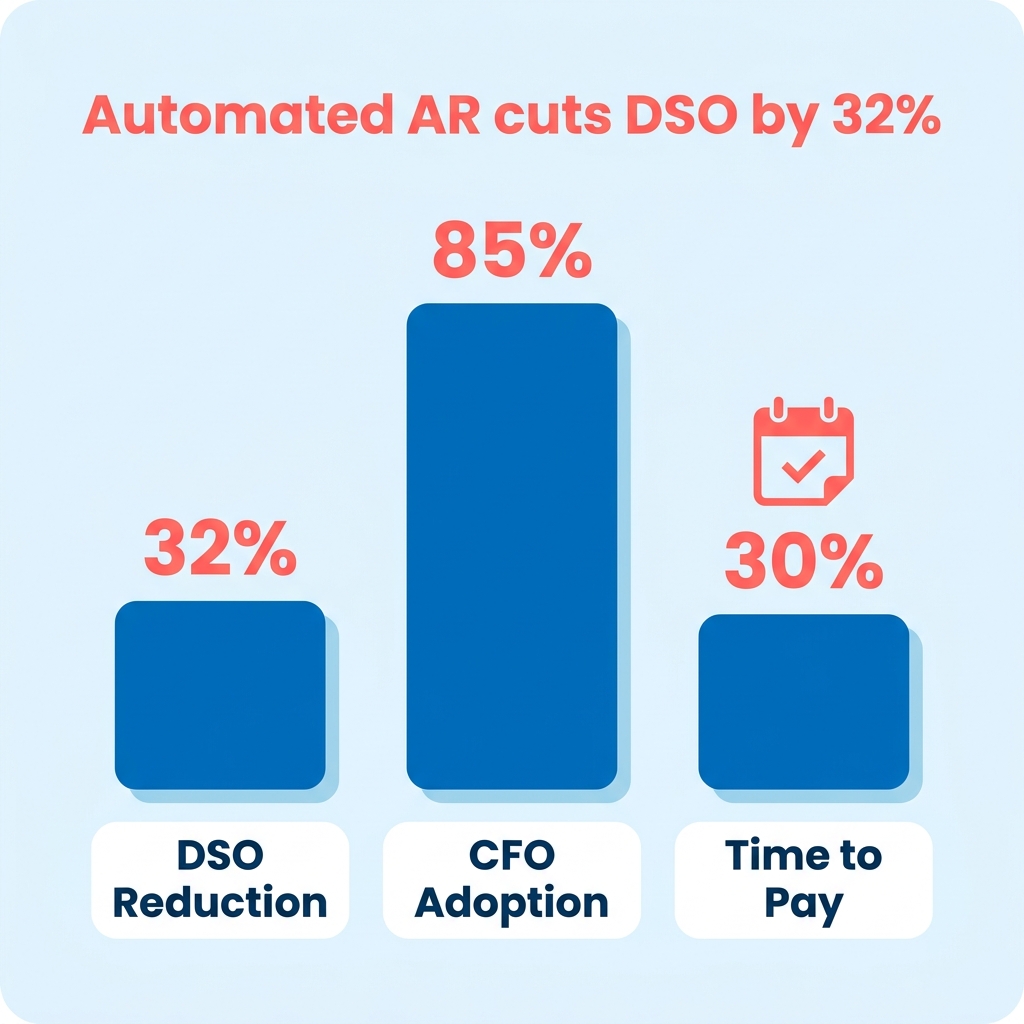
What an ERP-integrated AR setup actually delivers
The table below maps effort against payoff for each piece you’ll integrate. The estimates come from real enterprise deployments, so treat them as a ceiling. A solo founder skipping the heavy IT lift moves faster.
| Integration Piece | Difficulty | Time to Value | Reported Result | Best For |
|---|---|---|---|---|
| Two-way ERP sync | Medium | Weeks to months | Custom ERP integrations for Oracle, SAP, Microsoft Dynamics | Any legacy ERP user |
| Automated cash application | Medium-High | 1-3 months | High-volume automated cash posting | High invoice volume |
| Collections & dunning | Low | Days to weeks | Automated reminders, chasing, and dunning | Slow-paying customers |
| Recurring invoicing | Low | Days | Auto-send and auto-charge recurring invoices | Subscription/usage billing |
| Deductions management | High | 3-6 months | Multi-million dollar recovery and accelerated dispute resolution | Enterprise B2B |
Big vendors lead with 40 to 50-plus prebuilt ERP connectors. Cintas saved over $1 million a year by integrating AR automation with their ERP, freeing up productivity equal to 14 full-time staff.
Connector count is the wrong metric for founders
Ignore the connector catalog. What matters is integration depth on your specific ERP, not breadth across 50 you’ll never touch.
Vendors sell breadth. But shallow plug-ins with weak two-way sync never deliver the tight data flow those enterprise case studies run on. A native connector is the fastest path in. A generic API link gives you flexibility but wants more upkeep.
So qualify every tool with one question: how deep does it go on your legacy ERP? One solid native connection beats a directory of 50 half-baked ones. That single deep link is what turns advertised efficiency into money actually landing in your account.
When to skip this
If you send fewer than a handful of invoices a month, skip the full integration. The setup won’t pay for itself. Manual follow-up is fine at that scale.
For everyone else on recurring or usage-based billing running a clunky legacy system, integration is the cheapest lever you have on cash flow. 62% of organizations recently planned to upgrade their AR technology, which tells you where the market’s going. The rest of this guide walks through how to connect it.
Why this matters more for you than for the enterprises it was built for
If you run a growing B2B distributor on a legacy ERP, accounts receivable automation integrations matter more for you than for the enterprises these tools were designed around. Your ERP tracks transactions well. It falls short on the AR-specific visibility that actually gets you paid faster. The integration bridges that exact gap.
Cash-flow management is a data integration problem, not just an accounting task. Your ERP was never built to surface who’s late, why, and what to do about it. An AR-specific tool adds that dedicated layer without forcing a system overhaul.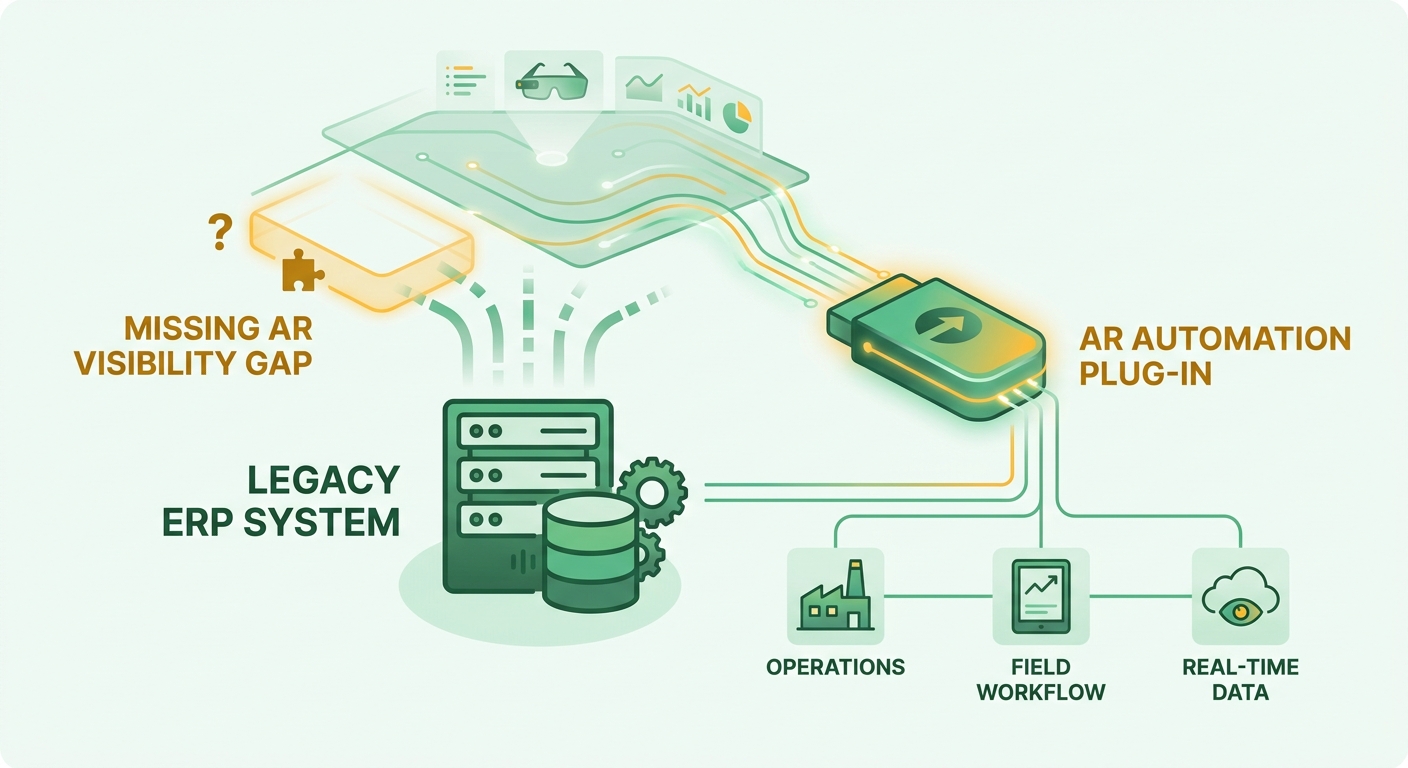
Why ERPs alone underperform on receivables
ERPs are great at recording transactions. They’re missing the AR-specific tools for collections, dispute tracking, and payment visibility. AR automation complements the ERP instead of replacing it, adding the workflows your system was never designed to run.
Manual AR is where the money leaks. Hand-keyed data entry and remittance matching introduce errors that delay cash application. Every mismatched payment sits in limbo while someone reconciles it by hand.
Fixing this pays off in ways you can measure. Teams that automate cash application typically cut reconciliation labor in half and shrink the unapplied cash parked in suspense accounts. For a founder watching runway, that’s fewer hours lost to matching and cleaner books at month-end close.
Who gets the most out of it
High invoice volumes plus recurring or usage-based billing is where the gains are biggest. That’s where manual handoffs multiply and small errors compound fast.
The enterprise case studies show the ceiling. A logistics provider cut its dispute backlog by tracking every deduction in one place instead of scattered spreadsheets. A software vendor moving to automated cash posting reclaimed several finance hires’ worth of weekly effort and pointed that time at forecasting instead of data entry.
You won’t hit those numbers at your scale. But the mechanism is identical: tight two-way sync between ERP and AR turns manual chasing into automated workflows. Automated reminders and payment confirmations also make the customer side smoother, which is why integrated setups tend to report strong retention.
Speed vs. depth: what founders should actually evaluate
Vendors sell speed and connector count. What determines your results is integration depth. Not the same thing.
Some advertise basic integration in four to six weeks and ROI in three to six months. That’s true for standard SaaS stacks on common platforms. But a 2026 analysis flagged ERP integration as one of the toughest hurdles in automation, and shallow integration is the top reason these projects underdeliver.
On a legacy ERP, look past the broad marketing. One deep, genuinely two-way native connector for your system beats a catalog of shallow ones. When both systems read from the same reconciled data, reminders fire on accurate balances and disputes reference real invoice history. That’s where the DSO improvement actually comes from.
Skip the speed-first pitch if you’re on a customized legacy setup. Qualify vendors on depth for your specific ERP instead. That single question separates the founders who see faster payments from the ones still reconciling by hand six months later.
Blixo integrates with accounting software like QuickBooks, Xero, Sage Intacct, and NetSuite, plus custom ERP integrations for Oracle, SAP, and Microsoft Dynamics. So the same reconciled revenue data lives across your systems in real time.
What “seamless ERP integration” really rides on
For a subscription-based digital agency on a legacy ERP, the one variable that decides everything is depth, not connector count. A big number of advertised connectors tells you almost nothing about whether the plug-in will sync cleanly with your specific setup.
Real integration moves data automatically and both directions between your ERP and AR system, no manual touch. Shallow integration looks connected on the surface but still leaves you re-keying data, waiting on lagged reports, and untangling broken audit trails. That gap is why so many automation projects miss expectations.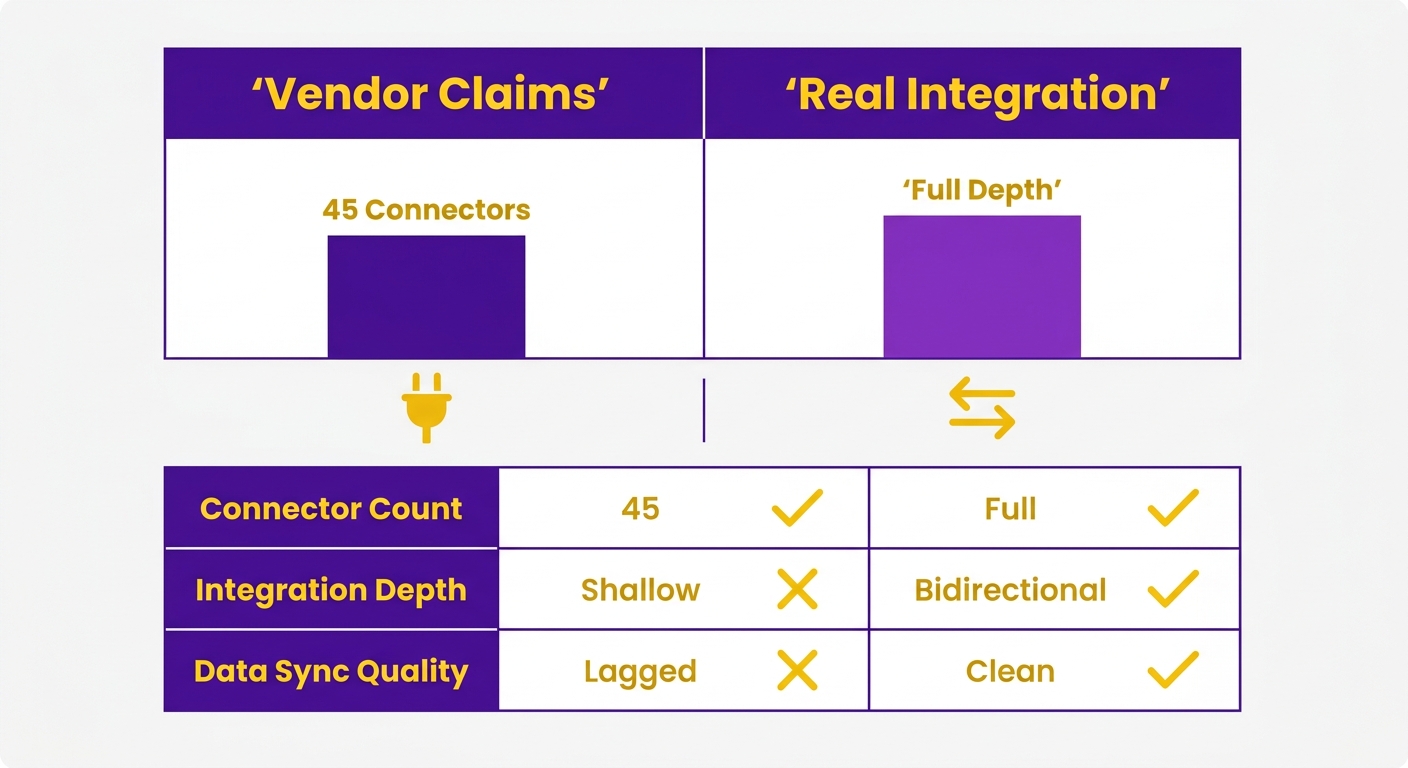
What real-time sync actually delivers
Real-time sync means customer records, invoices, and payment postings update on both systems the moment anything changes. Data flows from your ERP into the AR layer for invoices and customer records, then back for payment postings and credit updates. No overnight batch. No stale dashboards.
That two-way flow is what makes the AR data layer worth having. With a continuous feedback loop, finance can watch invoice status and payment timelines as they happen instead of waiting on manual updates.
The payoff shows up in the numbers. Tightly integrated setups have hit a 33-day average reduction in DSO, a threefold jump in collections productivity, and a 98 percent retention rate. One case study reported a 77% reduction in receivables at risk and a 60% cut in overdue invoices.
How long integration really takes on a legacy ERP
Timelines vary with system complexity. Standard cloud setups connect relatively quickly. Customized legacy environments need a more measured approach to protect data integrity and avoid sync errors.
The fastest timelines describe native-connector setups on common cloud stacks like NetSuite, Sage Intacct, or QuickBooks Online. On a customized or older ERP, deep integration takes longer and carries more risk. Judge a vendor by how well it syncs with your system, not by how many logos are in the brochure.
Depth of sync is what determines whether you ever see the promised returns. Watch for warning signs early: connectors that only support a subset of your ERP’s custom fields, mappings that fail on non-standard invoice formats, or vendors who quote timelines without auditing your schema first. A pre-integration data audit usually surfaces 15 to 20 percent of records needing cleanup before they can sync reliably. Budget for that work upfront. A shallow plug-in that only pulls invoices one direction won’t reproduce enterprise-grade gains, whatever the marketing promises.
Avoiding the common integration pitfalls
Before you connect anything, define clear objectives and get buy-in from everyone who touches the credit-to-cash flow. Integration needs company-wide support or friction shows up later. Document and test the data mapping properly. Skipping that is exactly where accuracy breaks down.
A few practical guardrails:
- Confirm two-way sync, not one-directional pulls, on your exact ERP version.
- Check security protocols: APIs over HTTPS for real-time exchange, SFTP for batch transfers.
- Monitor post-launch for discrepancies and fix them fast.
- Retrain users as workflows shift, and revisit rules as your billing evolves.
Native connectors are the fastest path in. API integrations give flexibility but need more upkeep. Pick based on your team’s capacity to maintain it.
Implementation steps for ERP integration
The fastest way to wreck an ERP integration is to skip the assessment and start connecting things. For a finance director at a scaling manufacturer, the sequence matters: map your data first, test the sync in a sandbox, then deploy in phases. Get that order right and the AR automation integration goes live cleanly instead of breaking your books.
Standard cloud platforms deploy fast. Legacy or customized ERPs need extra time for field-mapping edge cases and custom schema quirks that standard connectors won’t cover out of the box.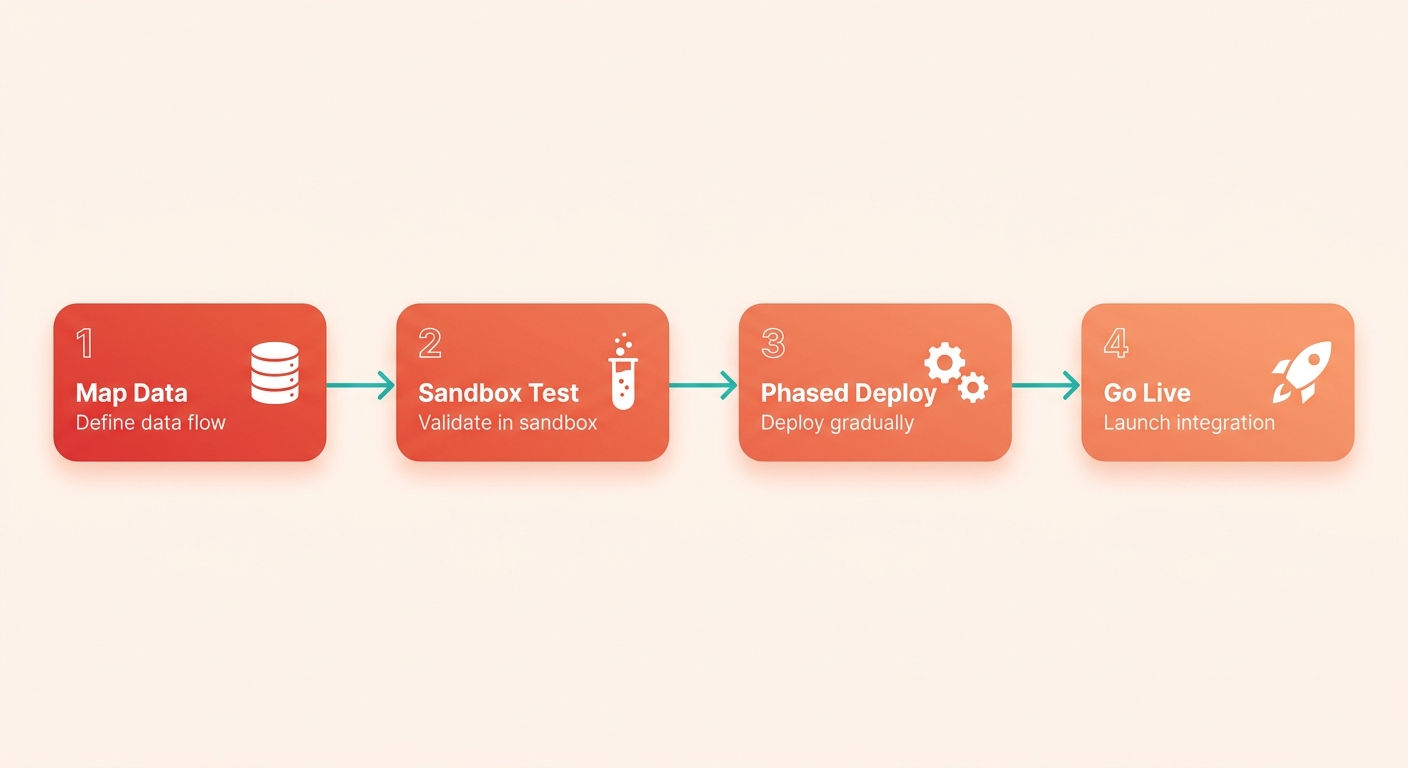
Plan and assess before you connect anything
Start by defining what data flows where. List every field you need synced: customer records, invoice details, payment histories, credit notes. Then decide who owns each direction. Your ERP feeds customer and invoice data out; payment postings and credit updates flow back in.
Get stakeholder buy-in before anything technical happens. Two-way sync only works when both sides agree on which system is the source of truth for each field. Skip this and you’ll spend deployment week arguing about whose number is right.
This is also where you qualify the vendor on technical fit. A broad list of supported systems means nothing if the integration can’t handle your specific database structure. Ask how the native connector handles your exact ERP version.
Test the integration before it touches live data
Test in a sandbox first. Run customer records, invoices, and payment postings through the sync and check that both systems match. Proper documentation and testing is what separates a reliable integration from one that quietly corrupts your audit trail.
Validate the two-way flow specifically. Push an invoice from your ERP, confirm it lands in the AR layer, then post a payment back and confirm your ledger updates. Check multi-currency handling here if you bill internationally.
Tight testing pays off. Proper SAP integration with automation cut one company’s invoice cycle time from 18 days to 6 and dropped disputes by more than half. That result depends entirely on the sync being clean, not just connected.
Deploy in phases and bring your team along
Deploy in phases, starting with high-volume repetitive tasks. Automate invoice tracking and payment reminders first, then expand to reconciliation and cash application. A phased rollout limits your blast radius if something breaks.
Change management is where small teams underinvest. Real-time ERP integration lets your team monitor invoice status and payment timelines from one place, but only if they actually use it. Walk them through the new workflow before go-live, not after.
Then monitor and optimize continuously. Set alerts for sync failures and reconciliation mismatches so a broken field surfaces the same day, not at month-end close. Teams that review their integration dashboards weekly catch schema drift and posting errors before they compound into a tangled audit trail. Those gains come from watching the dashboards and fixing discrepancies fast, not from set-it-and-forget-it.
The teams that succeed treat integration as a foundational process, not a one-time feature. Evaluate depth on your legacy ERP up front, test the bidirectional sync thoroughly, and the cash-flow gains follow.
Frequently Asked Questions
1. What’s the difference between a native connector and a generic API integration for AR automation?
A native connector is pre-configured to align with your ERP’s standard database schema, reducing the need for custom development. In contrast, a generic API integration acts as an open gateway, allowing you to build custom data flows but requiring dedicated developer resources to establish and maintain the connection.
2. How much does data cleanup add to an AR integration project?
Data cleanup can add several days or weeks to your timeline depending on the state of your legacy database. Common issues include duplicate customer profiles, incomplete billing addresses, and inconsistent tax IDs. Addressing these discrepancies before connecting your systems prevents sync errors and ensures automated communications reach the correct contacts.
3. Can AR automation handle international billing and multiple currencies?
Yes, but successful multi-currency automation requires your AR tool to sync exchange rates accurately with your ERP’s general ledger. During setup, verify how the system handles realized gains or losses from currency fluctuations and ensure that tax calculations comply with local regulations in each active market.
4. What security protocols should AR integrations use?
In addition to encrypted data transit, look for SOC 1 and SOC 2 Type II certifications to ensure the vendor adheres to strict security standards. Implement role-based access controls (RBAC) within the integrated platform so that only authorized finance personnel can modify payment terms or approve write-offs.
5. Which AR processes should I automate first during a phased rollout?
Focus first on customer-facing communications that do not write directly back to your general ledger, such as automated dunning emails. Once your team is comfortable with the system’s communication cadence, you can safely enable automated cash application and ledger-writing features to streamline reconciliation.
6. How do I know if my ERP integration is shallow rather than genuine?
A shallow integration often requires manual CSV uploads or batch syncs to keep systems aligned, resulting in data lags. If your team still has to manually reconcile payments at the end of the day or if customer status updates take hours to reflect in your ERP, the integration is likely operating on a basic, one-way pull.
7. What accounting systems and ERPs does Blixo support?
Blixo supports a wide range of financial ecosystems, from standard cloud-based accounting platforms to highly customized enterprise resource planning systems. This ensures that your billing workflows, ledger entries, and customer communication history remain synchronized across your entire financial tech stack.