

How to Automate SaaS Billing: Auto-Invoicing, Retry Logic, Payment Matching

Key Takeaways
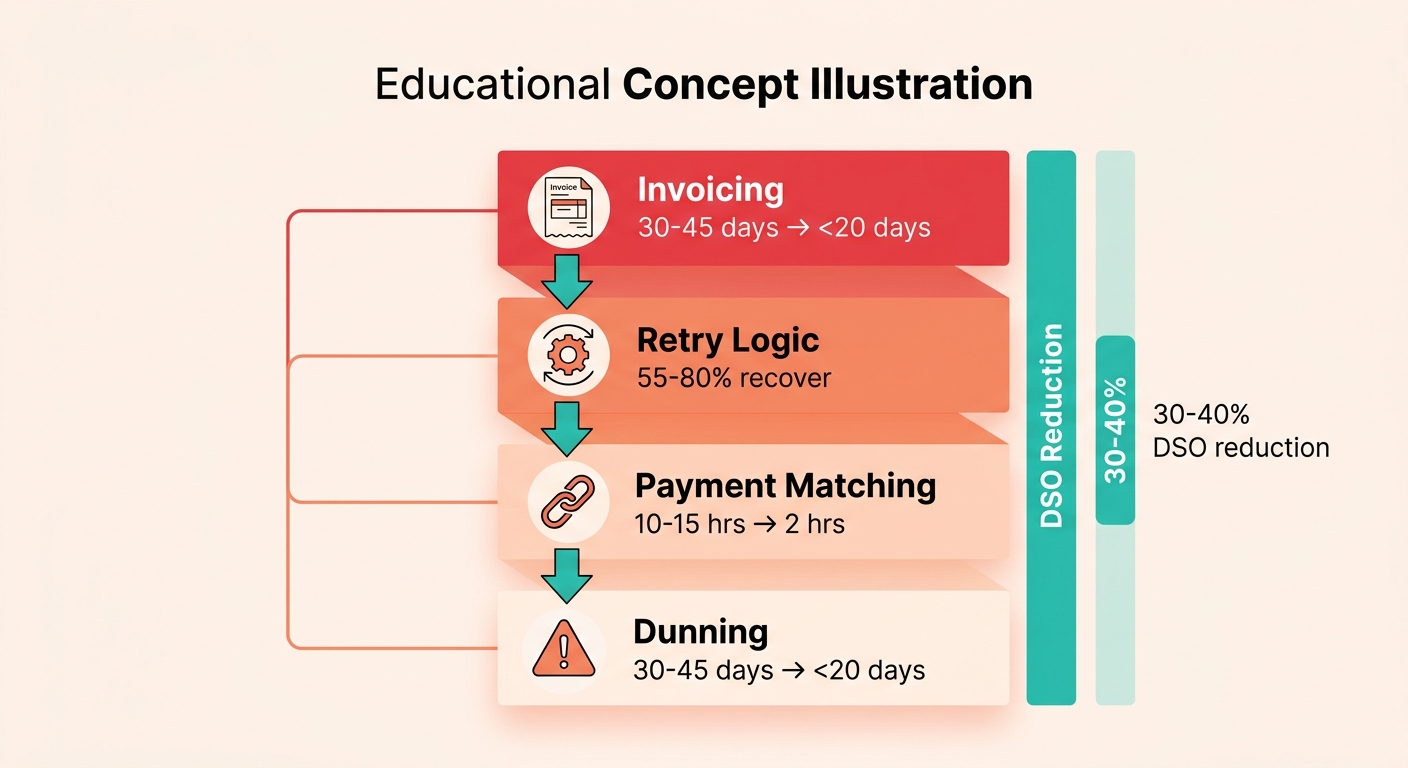
- Combining automated invoicing, retry logic, payment matching, and dunning compresses collections cycles from 30–45 days to under 20 for mid-size firms.
- Full billing automation delivers a 30–40% reduction in Days Sales Outstanding, freeing finance teams from spreadsheet chasing for higher-value analysis.
- Smart retry logic using machine learning and decline-code analysis recovers 55–80% of failed payments, versus 15–25% for fixed schedules.
- Automated envelope-level and item-level reconciliation cuts payment matching from 10–15 hours weekly per analyst to under two hours.
- Auto-invoicing reduces invoice error rates from 8–12% down to under 2% while cutting generation time from hours to minutes.
- Auto-invoicing implementation takes just one to three days on most platforms and saves each finance staffer four to eight hours weekly.
- Bad data at invoice creation triggers downstream payment failures, making accurate auto-invoicing the foundation for the entire recovery stack.
Quick Summary
A fully automated SaaS billing workflow stacks multiple recovery layers—and the cumulative effect on Days Sales Outstanding matters more than any single pillar in isolation. When you automate invoicing, retry logic, payment matching, and dunning together, you’re accelerating cash flow and unlocking freed finance capacity that stops chasing spreadsheets and starts analyzing revenue drivers.
Instead of relying on rigid, manual processes, modern systems dynamically adapt to transaction failures and bank deposits. The primary benefit of this shift is not merely administrative relief, but rather the strategic reallocation of your team’s focus toward growth and revenue optimization once manual busywork disappears.
What Each Automation Pillar Actually Delivers
Auto-invoicing streamlines the creation and delivery of recurring bills. By standardizing customer billing profiles and tax rules, the system ensures that every invoice generated is structurally sound and compliant with local regulations. This foundational accuracy prevents billing disputes before they can delay payments. Setup is straightforward, typically involving template configuration and basic data mapping, making it an easy first step for teams transitioning away from manual billing.
Retry logic targets the technical and temporary issues that cause card transactions to fail. Rather than treating every decline as a permanent loss, intelligent systems evaluate the specific reason for the failure—such as temporary network timeouts or card limits—and schedule reattempts when they are most likely to succeed. This targeted approach significantly reduces involuntary churn and shortens the average recovery window. Implementation requires connecting your payment gateway and mapping decline codes to automated actions.
Payment matching automates the reconciliation of incoming bank deposits with outstanding invoices. By parsing transaction metadata and applying rule-based logic, the system pairs payments with their corresponding accounts, leaving only complex exceptions for manual review. This drastically reduces the time required to close the books each month. The primary implementation challenges involve establishing clean bank feeds and integrating with your existing ledger.
The Benchmark Reality and ROI Timeline
Industry benchmarks indicate that payment failures represent a significant leak in recurring revenue, much of which can be reclaimed through systematic recovery. Organizations adopting these automated workflows generally observe a noticeable improvement in cash flow and a decrease in outstanding receivables within the first quarter of deployment.
The financial return on this investment is driven by the acceleration of outstanding balances into cash on hand. For mid-sized firms, the capital unlocked by shortening the collection cycle quickly offsets the initial setup and software costs. Beyond the immediate cash-flow benefits, the transition permanently reduces administrative overhead, allowing finance teams to shift their focus from repetitive data entry to strategic financial planning.
Risk levels vary by pillar. Data migration for payment matching and reconciliation carries medium-high risk if your legacy system has poor data hygiene; plan for a two-week cleanup sprint before go-live. Compliance risk is low for auto-invoicing and retry logic as long as you respect hard-decline codes (never retry fraud flags or closed accounts). Integration complexity peaks with ERP and bank-feed connections—expect four to six weeks of back-and-forth with IT if you’re connecting to Oracle or SAP.
Why Automating SaaS Billing Matters
Manual SaaS subscription billing introduces friction that actively drains revenue. When finance teams manually generate invoices, chase failed payments, and reconcile incoming deposits, they face a compounding delay: invoice errors stall the payment cycle, failed transactions go unrecovered, and mismatched payments lock working capital in a reconciliation backlog. Automating these layers simultaneously accelerates cash availability, returning a meaningful percentage of annual revenue to active cash on hand by eliminating the billing-to-bank float.
The Revenue Cost Hidden in Your Current Workflow
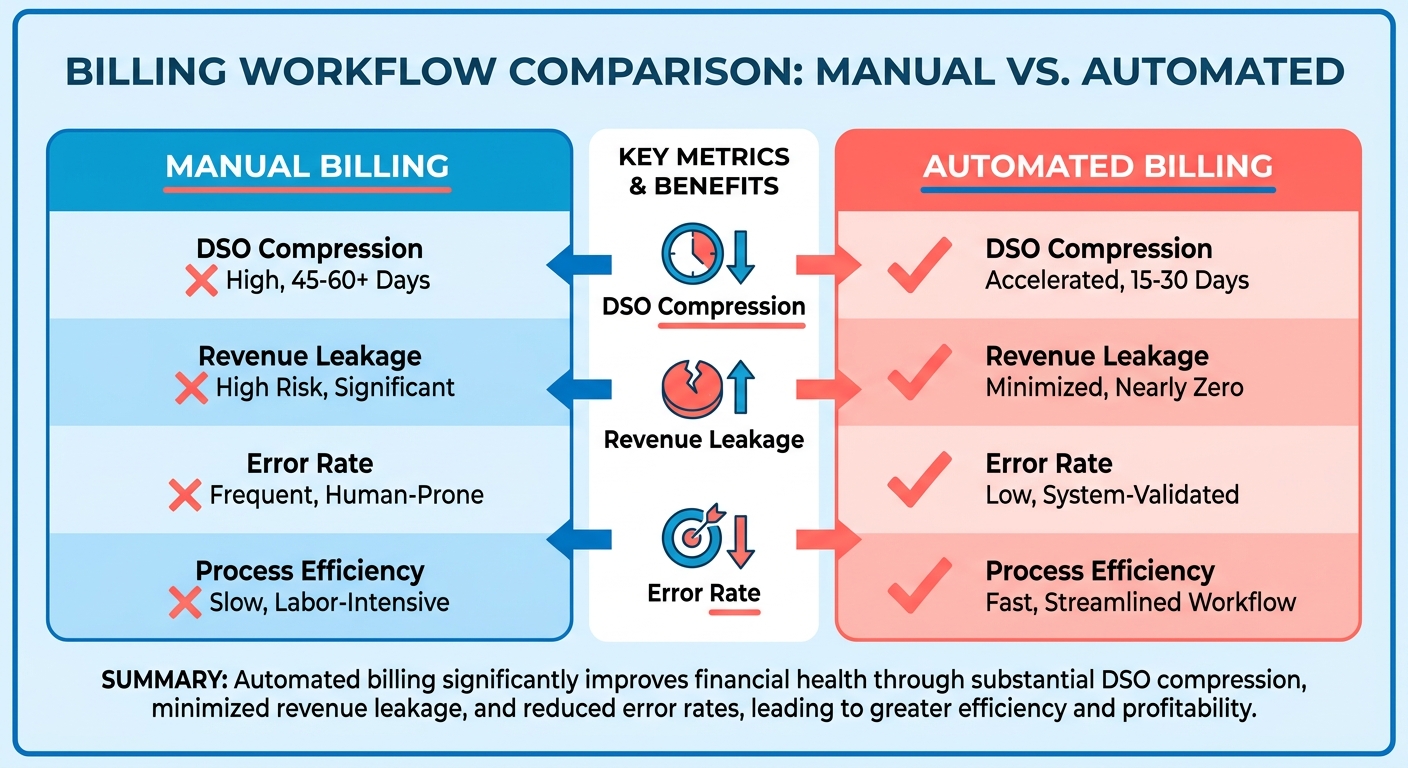
Manual invoice generation creates bottlenecks that compound across your entire revenue cycle. Automated systems cut invoice processing costs significantly, and the time savings compound across every billing cycle. One development lead at a growing analytics SaaS reported that maintaining a homegrown billing system consumed 3–4 hours weekly per developer—time that could have shipped product features instead of debugging invoice logic. When you measure the opportunity cost of engineering time spent on billing infrastructure versus feature development, the gap becomes stark: every sprint devoted to invoice edge cases is a sprint that didn’t ship customer-facing improvements.
Payment recovery without automation means writing off revenue that should be yours. Subscription businesses leak recurring income through silent churn—customers whose cards fail but who never receive systematic recovery outreach. The window for successful recovery narrows quickly: attempts made within 72 hours of decline see acceptance rates significantly higher than those made after a week. Without real-time decline notifications and orchestrated recovery sequences, you’re letting that window close by default.
Payment matching is where the third revenue leak occurs, particularly under variable pricing models. When billing amounts fluctuate, traditional fixed-amount matching rules fail. Analysts must manually trace every deposit back to the correct customer account and billing period. Automating cash application syncs usage tracking, billing state, and bank deposits in real time, resolving these discrepancies instantly and freeing working capital that was previously stuck in “unidentified payments” limbo.
Why Regulatory Compliance Demands Automation
PCI-DSS, PSD2, and ACH processing rules require secure, auditable payment handling at every step. Manual workflows introduce compliance gaps you can’t audit: spreadsheets with cardholder data, email threads containing payment details, and ad-hoc retry attempts that bypass fraud checks. Automated billing platforms log every transaction attempt, tokenize payment credentials, and enforce role-based access controls by default. When an auditor or a customer disputes a charge, you need a tamper-proof record of what happened—manual processes can’t deliver that.
Regulatory pressure isn’t just a risk-mitigation issue; it’s a scaling constraint. As you cross $5M ARR and add international customers, you’re subject to EU invoicing standards, VAT automation, and cross-border payment reporting. Building those capabilities into a homegrown system creates technical debt that will choke your engineering bandwidth within 18 months.
Who Gains the Most from Full-Stack Billing Automation
Fast-growing SaaS startups between $5M and $50M ARR see the sharpest ROI. You’re past the stage where manual invoicing “just works,” but you haven’t yet ossified around a legacy billing stack. Subscription-heavy enterprises with complex usage-based pricing—metered API calls, tiered storage buckets, per-seat licenses with mid-cycle upgrades—gain the most from real-time usage metering and automated proration. B2B platforms that bill hundreds of customers monthly can’t afford the error rate or the reconciliation lag that manual workflows introduce.
Blixo consolidates invoicing, retry logic, and payment matching into a single data source, so your finance team sees usage, billing state, and cash position in one view instead of reconciling three spreadsheets. That visibility shifts your team from manual reconciliation to strategic analysis. When you trace five customers through your current billing lifecycle—onboarding, plan changes, invoicing, payment, retry, renewal—you’ll quickly spot where manual handoffs are costing you days of DSO and hours of reconciliation labor. Automating those handoffs doesn’t just speed up collections; it gives you the financial clarity to forecast accurately and scale confidently.
Building an Auto‑Invoicing Engine
SaaS subscription billing demands automation the moment you hit complexity—whether that’s usage tiers, mid-cycle upgrades, or proration logic for customers who switch plans halfway through their billing period. The old approach of assembling invoices manually or relying on basic cron jobs breaks down fast. A properly engineered auto-invoicing system handles time-based triggers, event-driven changes, and edge cases without human intervention, freeing your finance team to focus on strategic work instead of chasing spreadsheet errors.
What Data Model Supports Automated Invoicing?
Your billing engine needs four foundational tables that map directly to how subscriptions actually behave. First, the subscription contract stores the customer, plan SKU, start date, and current state (active, paused, canceled). Second, the billing schedule defines when invoices generate—monthly on the anniversary date, quarterly in advance, or usage-based at month-end. Third, price rules encode your catalog: flat fees, per-seat charges, tiered usage brackets, and any promotional discounts. Fourth, tax zones link customer locations to jurisdiction-specific rates and VAT ID requirements.
The contract table is your source of truth. When a customer upgrades mid-cycle, you write a new contract row with a proration flag rather than mutating the existing record. That audit trail prevents the “we billed them twice” incidents that plague manual workflows. Your price rules table should store effective dates for each SKU version, so historical invoices reflect the pricing that was live at invoice time, not today’s catalog.
Link billing schedules to contract lifecycle events: trial-to-paid conversions trigger an immediate pro-rated invoice for the remaining days in the cycle, while downgrades defer to the next renewal unless your policy dictates instant credit memos. If you’re running usage-based pricing, your schedule needs a usage snapshot timestamp that locks consumption metrics before invoice generation begins.
How Do You Handle Proration Without Manual Calculation?
Proration logic fails when you hardcode it. The cleanest pattern separates proration into a dedicated service that consumes two inputs—old plan details and new plan details—and returns a delta amount plus line-item explanations. When a customer switches from an annual contract to a monthly plan mid-cycle, the engine calculates unused value on the annual plan and prorates the new monthly charge for the remaining billing period, presenting both adjustments as separate line items.
Trial-to-paid conversions need special handling. If your trial period is 14 days and the customer converts on day 10, most billing systems either charge the full monthly fee immediately (starting a new cycle) or prorate the remaining four trial days at the paid rate. The first approach is simpler and aligns renewal dates to conversion dates; the second is more customer-friendly but creates misaligned billing cycles unless you reset the anniversary.
Plan downgrades expose edge cases that break naive proration. If a customer on an annual contract downgrades six months in, you must decide whether to issue a credit for the unused portion or defer the downgrade to renewal. We see most SaaS firms defer downgrades to avoid negative invoice amounts, which confuse accounting systems and customers alike. Document your policy in the price rules table as a downgrade_behavior enum—defer_to_renewal, immediate_credit, or no_refund—so the engine enforces it consistently.
What Triggers Should Fire Invoice Generation?
Time-based triggers handle the bulk of recurring invoices. A nightly cron job queries all subscriptions with next_invoice_date <= today and generates invoices in batch. The job writes each invoice to a queue with an idempotency key (typically subscription_id + billing_period_start) to prevent duplicate generation if the job retries after a partial failure. Once the invoice is committed to your database, the job updates next_invoice_date to the next cycle and moves on.
Event-based triggers handle mid-cycle changes. When a customer upgrades via your product’s pricing page, the frontend emits a plan.changed webhook that your billing service consumes. The handler checks whether the change requires an immediate invoice (upgrades, seat additions) or defers to the next cycle (downgrades, feature removals). Immediate invoices go into the same queue as time-based ones, but with a priority: high flag that processes them ahead of the nightly batch.
Hybrid approaches combine both. Usage-based SaaS firms run time-based invoice generation at month-end, but also listen for usage.threshold_exceeded events that trigger overage invoices mid-cycle when a customer blows past their included quota. The key is ensuring every trigger writes to the same queue with the same idempotency guarantees, so you never bill twice for the same event.
How Do You Design Invoice Templates That Scale Across Regions?
Dynamic field mapping prevents template sprawl. Instead of maintaining separate templates for each currency and locale, define a single template with placeholders—{{amount}}, {{currency_symbol}}, {{tax_label}}—and populate them at render time based on the customer’s tax zone. A US customer sees “Sales Tax” and a dollar sign; a UK customer sees “VAT” and a pound symbol. Store the template as HTML with inline CSS (email clients strip external stylesheets) and render it server-side into a PDF using a headless browser or a library that respects your brand fonts.
Compliance footers are non-negotiable for cross-border invoicing. EU customers require your VAT registration number, full legal entity name, and invoice sequence number that increments without gaps. Brazilian customers need an NF-e (nota fiscal eletrônica) reference. Build a compliance_requirements table keyed by country code, and append the relevant footer block to every invoice targeting that jurisdiction. Missing a VAT ID on an invoice to a German enterprise customer can block payment for weeks while their AP team requests a corrected version.
Localized currency display goes beyond the symbol. Format amounts according to locale conventions: $1,234.56 for US customers, 1.234,56 € for German customers, ¥1,234 for Japanese customers. Use a library that handles this for you rather than rolling string formatting by hand—currency display rules have dozens of edge cases (negative signs, digit grouping, symbol placement) that will burn hours of debugging.
What Error Handling Keeps Your Engine Running When Integrations Fail?
Fallback queues catch invoice generation failures before they cascade into missed billing cycles. When the PDF renderer times out or the tax calculation API returns a 500 error, write the failed invoice to a retry queue with exponential backoff. The first retry happens after 5 minutes, the second after 25 minutes, the third after 2 hours. After three failures, move the invoice to a dead-letter queue that alerts your finance team for manual review. This prevents one flaky integration from blocking your entire nightly batch.
Idempotency keys prevent duplicate charges when retries succeed after the original request actually went through. Every invoice write includes a unique key derived from immutable subscription data—subscription_id + billing_period_start works for recurring invoices, subscription_id + event_id works for event-triggered ones. Your database enforces uniqueness on this key, so retries that arrive after the first write already succeeded return the existing invoice instead of creating a duplicate.
Audit logs capture every decision your engine makes. When an invoice generates, log the subscription state, the price rules that were active, the proration calculation inputs and outputs, and the tax zone that was applied. When a customer disputes a charge three months later, your support team can trace exactly why the system billed that amount instead of reverse-engineering it from incomplete records. We store audit logs as immutable append-only records in a separate table, never in the same transaction as the invoice write, so a failed invoice still leaves a trail.
How Do ERP Sync and Delivery Integrations Close the Loop?
Your billing engine generates invoices, but they don’t drive cash flow until they reach customers and sync to your financial systems. Most mid-size SaaS firms push invoices to NetSuite or QuickBooks via API immediately after generation, mapping line items to the appropriate revenue recognition accounts. The sync job includes retry logic and writes a sync_status flag (pending, synced, failed) on each invoice record. Failed syncs trigger alerts so your accounting team can intervene before month-end close.
Email delivery should include both a PDF attachment and an HTML summary in the body. Customers rarely open attachments on mobile, so the HTML version needs to show the amount due, due date, and a payment link without requiring a download. SMS delivery works for high-urgency scenarios—failed payment reminders, overdue notices—but requires explicit customer opt-in and should link to a hosted invoice page rather than embedding payment details in the message.
Portal access gives customers a self-service history of every invoice you’ve ever issued them. Build a simple /billing route in your product that lists invoices with download links, payment status, and a “Pay Now” button for unpaid balances. The portal should authenticate via your existing user session, not a separate login, so customers can access it immediately after signing into your product. Payment disputes drop noticeably when customers can verify their billing history themselves before contacting support.
Blixo automates proration for mid-cycle plan changes and syncs seamlessly with your financial ledger. Recurring payment automation becomes trivial once your invoicing foundation is solid, because the subscription data model you built to support automated invoicing already captures payment schedules, retry rules, and dunning triggers.
Designing Smart Retry Logic
Payment failures fall into distinct categories, and each requires a different recovery approach. Soft declines (temporary issues like insufficient funds or processor timeouts) represent the majority of all failed card-not-present payments and are recoverable with the right timing. Hard declines (fraud flags, closed accounts, expired cards) need customer outreach, not automated retries. When you classify decline codes and schedule attempts based on card network behavior, the difference shows up in recovered MRR—platforms that treat every decline the same typically recover one failed payment for every six that fail, while systems that route by decline type recover closer to three out of four.
How Do You Classify Decline Codes to Route Recovery Actions?
Decline codes tell you why a payment failed, and that “why” dictates whether you retry immediately, wait, switch payment methods, or trigger dunning. Card-issuer declines (insufficient funds, daily limit exceeded) are temporary—retry in 3–7 days when the customer’s account refills. Processor declines (network timeout, authentication error) are technical—retry within 24 hours. Fraud-signal declines (card reported stolen, account closed) require immediate customer contact; retrying these transactions flags your merchant account and tanks approval rates.
Effective automated collections systems classify declines before routing recovery actions. Soft declines tied to insufficient funds often get a multi-day retry cadence—this spacing aligns with payroll cycles and avoids the appearance of repeated fraud attempts. Processor errors typically get a 24-hour retry with a fallback to an alternate payment method if the second attempt fails. Hard declines bypass retry logic entirely and trigger an email asking the customer to update their payment method, often with a tokenized card updater service running in parallel to refresh expired credentials automatically.
Merchants using Account Updater see a meaningful lift in annual subscription revenue because expired cards get refreshed before the retry even runs. Network tokenization improves retention compared to standard bank tokenization, since tokens persist through card reissues and account migrations. The combination—decline classification, BIN-aware scheduling, and credential maintenance—creates a recovery layer that operates independently of your dunning workflow.
What Retry Cadence Works for Different Card Networks and Decline Types?
Visa and Mastercard soft declines respond best to retries spaced 3, 7, and 14 days apart, matching the rhythm of biweekly and monthly payroll deposits. Amex declines tied to spending limits often clear faster—a 48-hour retry followed by a 7-day attempt recovers more than a linear 3-day schedule. BIN-aware scheduling (BIN = Bank Identification Number, the first six digits of a card) lets you tailor retry timing to the issuer’s approval patterns. Corporate cards with daily spending caps clear overnight; consumer cards with insufficient funds need multi-day spacing.
Modern billing automation tools test retry cadences to find what works best for different customer segments. For most SaaS subscription billing scenarios, a fixed 3-7-14 schedule often outperforms exponential backoff because it syncs with real-world cash-flow cycles. Exponential backoff works better for high-transaction-volume environments where you’re optimizing for processor approval windows, not customer deposit timing.
ACH return codes (NACHA R01–R99) require different handling. R01 (insufficient funds) gets a next-business-day retry—ACH failures often clear within 24 hours. R02 (account closed) and R03 (no account) are hard stops; retrying these codes violates NACHA rules and risks your ACH origination privileges. R29 (corporate customer advises not authorized) needs immediate dunning with a request to re-authorize the mandate. Automating ACH return-code logic separately from card retry logic prevents compliance violations and keeps your payment rails clean.
When Should You Switch Payment Methods or Escalate to Dunning?
After three failed retry attempts, your platform should offer an alternate payment method before escalating to collections-tone dunning. If a customer’s card has failed three times over 14 days, the next email should include a one-click link to add a new card or switch to ACH, not a “your account will be suspended” warning. This sequence can recover at-risk accounts that would otherwise churn during aggressive dunning.
Tokenized card updater services run in the background during the retry window, pulling fresh expiration dates and card numbers from Visa and Mastercard networks. When a retry attempt would have failed due to an expired card, the updater refreshes the token first, and the charge succeeds without customer intervention. This silent recovery prevents the customer from ever entering a dunning workflow, which reduces involuntary churn for companies that implement it alongside smart retry logic.
Dunning escalation should trigger only after retry logic and payment-method prompts have both failed. That threshold varies by customer value—high-LTV enterprise accounts get manual outreach after the second failed attempt, while low-touch SMB accounts go through a four-email dunning sequence before suspension. The key is separating payment retry logic from customer communication; retrying a charge doesn’t mean the customer needs an email. Automated collections platforms send dunning messages only when retry attempts exhaust their schedule or when a hard decline requires immediate action. Deferring dunning emails until the third failed attempt gives soft declines time to clear without alarming customers, helping businesses reduce failed-payment churn.
Implementing Payment Matching & Real‑Time Cash Application
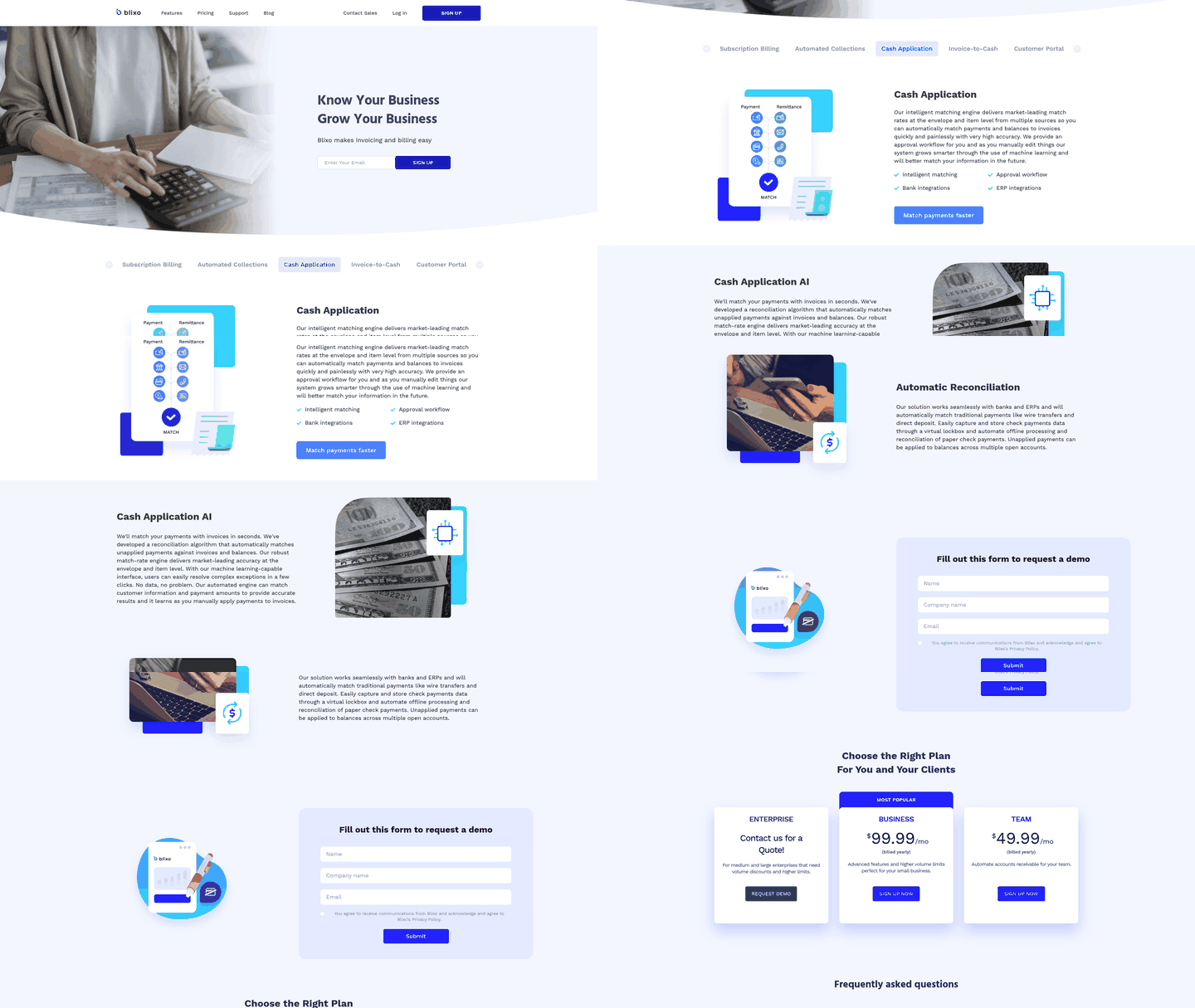
When incoming payments hit your bank account, they arrive as raw deposit records—account numbers, dates, amounts—with no built-in link to the invoices they’re supposed to settle. Your SaaS subscription billing platform generated those invoices weeks ago, each tied to a customer, a plan, and often a variable usage charge that fluctuated month-over-month. Now finance teams face the payment matching puzzle: which deposit pays which invoice? Manual reconciliation locks cash in a backlog that delays financial reporting and hides revenue leakage. Automated cash application flips that equation—routing deposits to the correct invoice in seconds, surfacing exceptions instantly, and turning raw bank data into real-time revenue insight.
What Reference Strategy Guarantees Clean Matching?
The first layer is embedding unique identifiers into every payment channel so deposits arrive pre-tagged. Invoice-level IDs are the gold standard: when a customer pays via hosted payment page or email link, the system appends the invoice number (INV-4729) to the transaction metadata, and your matching engine reads that field to route the payment automatically. Customer-level IDs work as a fallback—tagging payments with the customer UUID means the engine can match deposits to open invoices for that customer, though it still needs logic to allocate partial payments or multi-invoice settlements. Dynamic payment descriptors push this further: card networks let you customize the statement descriptor (the text a customer sees on their bank statement), and modern billing platforms reverse that same descriptor into an inbound reference when the payment clears, creating a two-way breadcrumb trail.
This complexity is particularly evident under variable billing structures, where customers see different totals each month. Traditional cash application rules that rely on matching fixed amounts fail here. Your automation must sync usage tracking, billing state, and payment reconciliation in real-time to prevent finance teams from having to manually match every variable invoice.
How Does Fuzzy Matching Recover Payments That Arrive Without Clean References?
Even with reference strategies, a meaningful share of payments arrive ambiguous: wire transfers with truncated memo fields, checks with no invoice number, ACH deposits tagged only with a partial company name. Fuzzy matching algorithms rescue these edge cases by calculating similarity scores between the deposit data and your invoice records. Levenshtein distance measures how many character edits it takes to transform one string into another—if a wire memo says “ACME Corp Feb” and you have an invoice for “Acme Corporation” due in February, the algorithm scores that as a high-confidence match and routes it automatically. Bayesian scoring layers multiple weak signals to produce a single confidence threshold: the system examines customer name overlap, deposit timing near the invoice due date, payment method consistency (if a customer always pays by wire, a wire deposit scores higher), and whether the amount sits within a tolerance band. When no single signal is definitive, the combined probability determines whether the match auto-posts or queues for review.
When fuzzy matching tags a deposit as uncertain rather than forcing a guess, the platform flags the transaction, surfaces the top three invoice candidates with confidence scores, and lets the finance team confirm the match in under 30 seconds—compared to the 8–12 minutes it takes to manually research the same payment from scratch. For example, one mid-market enterprise processing over a thousand payments monthly reported that after deploying rule-based fuzzy matching, their AR team’s reconciliation backlog dropped from 72 hours to just 6 hours per month, freeing two full-time equivalents to focus on dispute resolution and customer outreach instead of spreadsheet archaeology.
What Ingestion Method Delivers Real-Time Cash Visibility?
Your matching engine is only as fast as your bank feed integration. File-based ingestion—downloading BAI2 or CAMT.053 files from your bank’s portal and uploading them to your billing system—runs on a manual schedule, often once per day, which means you’re reconciling yesterday’s deposits against today’s invoices. That lag hides cash flow gaps and delays revenue recognition. API-based ingestion closes the loop in near real-time: platforms that connect via banking APIs poll your account regularly, pulling new transactions as they clear and posting them to open invoices within seconds. The difference compounds when you’re processing hundreds of payments per week—real-time posting surfaces failed ACH attempts or partial payments the same day, while batch posting buries them in the next reconciliation cycle.
Over-payments, under-payments, and multi-invoice settlements expose another automation hurdle. When a customer sends more than the invoice total, your system needs logic to allocate the surplus: apply it as a credit, flag it for refund, or route it to the next billing cycle. When a customer sends less than the invoice total, the platform must decide whether to mark the invoice partially paid and trigger a follow-up dunning email, or hold the deposit unmatched until the remaining balance arrives. Modern cash application platforms provide approval workflows that flag these exceptions and surface them for finance teams to review and resolve, reducing the manual work of reconstructing payment context from spreadsheets.
When you automate payment matching alongside subscription billing and collections, you’re compressing the window between deposit and recognition from days to minutes. That speed surfaces discrepancies—duplicate payments, misapplied credits, customer disputes—while they’re still easy to fix, rather than discovering them weeks later during month-end close. Finance teams gain real-time visibility into which customers paid, which invoices remain open, and where cash flow deviates from forecast, shifting their role from data entry to strategic analysis.
Automating Dunning, Collections, and Customer Communication
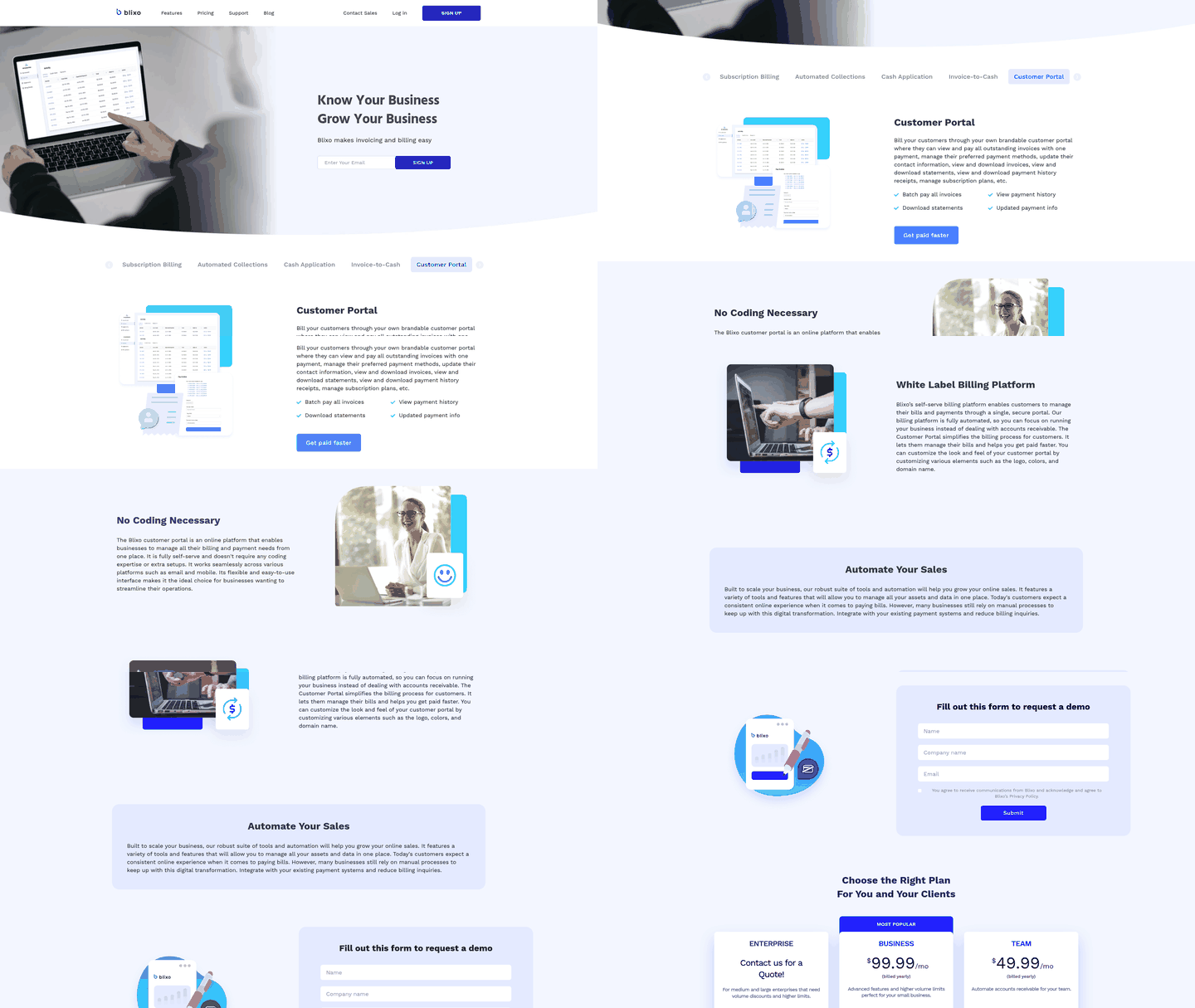
When a payment fails or an invoice stays unpaid, your automated billing system has already retried the transaction and logged the outcome. Now the dunning workflow begins—the structured sequence of reminders, notices, and escalations that recover revenue while preserving customer relationships. We’ve seen SaaS subscription billing platforms treat dunning as an afterthought, bolting on generic email templates that fire on fixed schedules regardless of the customer’s payment history or contract terms. That approach recovers some cash, but it leaves money on the table and often alienates customers who receive the same aggressive tone whether they’re a $50/month user with an expired card or a $50,000/year enterprise account disputing a usage overage.
A mature dunning system coordinates customer outreach in tandem with technical recovery. While your retry engine handles the backend reattempts based on decline codes and BIN data, the dunning workflow manages the human side: sending the right message, through the right channel, at the right time.
What Does a Five-Stage Dunning Workflow Look Like?
Start with detection: your billing system flags the failed payment and classifies the failure type. Soft declines—insufficient funds, processor timeouts—go into the retry queue with a gentle first reminder. Hard declines tied to fraud flags or closed accounts skip automated retries entirely and trigger immediate outreach, because retrying a fraudulent card wastes processor fees and risks account penalties.
Next comes the reminder stage. Your first message arrives 24 to 48 hours after the initial failure, written in a friendly, helpful tone. Use the customer’s name, reference their specific plan, and include a single-click payment link that routes them directly to a self-service portal where they can update their card on file. We phrase these reminders as service notifications, not demands: “We noticed your payment didn’t go through—here’s a quick link to update your billing details.” For high-value accounts, layer in usage context: “Your team processed 12,000 API calls last month; update your card to keep access uninterrupted.”
The late-fee notice follows seven to ten days later if the payment is still outstanding. At this stage, you can apply late fees if your contract and local regulations permit them. Automated fee calculation pulls the customer’s contract terms, checks regional compliance rules—GDPR in the EU, Fair Debt Collection Practices Act in the US—and adds the fee to the next invoice only when legally allowed. Some states cap late fees at a fixed percentage of the outstanding balance or a dollar threshold, whichever is lower; others prohibit them entirely for certain contract types. Your system should store these rules in a configuration layer tied to the customer’s billing address, not hardcode them.
Final demand arrives at the 14- to 21-day mark. The tone shifts from helpful to firm but still professional. We state the consequences clearly: “Your account will be suspended on [date] if payment isn’t received.” This message goes out via multiple channels—email, SMS if you have the customer’s mobile number, and in-app notifications if they’re still logging in.
If payment still hasn’t arrived by day 21 to 30, the escalation stage begins. For consumer accounts, this might mean handing the debt to a third-party collections agency. For B2B accounts, it often means routing the case to your finance team for direct outreach. The system logs every dunning touchpoint—dates, channels, responses—so your team has full context before picking up the phone. Some platforms pause dunning automatically when a customer replies to any message, preventing the awkward scenario where an account manager is negotiating a payment plan while the automated system fires off a final-demand email.
How Do You Personalize Dunning Messages Without Manual Work?
Your billing database already holds the data you need: customer name, plan details, payment history, usage metrics, and contract terms. Pull those fields into message templates dynamically. A customer who’s been with you for two years and missed their first payment gets a different tone than someone who’s on their third failed charge in six months. Some systems allow you to configure custom dunning workflows by account tier, adjusting reminder frequency and message tone based on customer value.
Channel mix matters as much as message content. Email works for the first reminder, but if it goes unanswered, escalate to SMS or in-app notifications. For enterprise accounts with net-30 or net-60 payment terms, postal mail still plays a role—certified letters with return receipts provide legal proof of delivery if the account eventually goes to collections. We’ve seen B2B SaaS firms save significant time on billing and collections work by automating channel selection based on account tier and failure stage.
Compliance constraints shape every message. CAN-SPAM in the US requires an unsubscribe link in commercial emails, but dunning notices for outstanding debts aren’t considered commercial messages under the law—they’re transactional. GDPR in the EU mandates that you document the legal basis for processing customer data; for dunning, that basis is typically “contract performance” or “legitimate interest.” Local debt-collection statutes vary widely: some jurisdictions prohibit contacting customers before 8 AM or after 9 PM, others ban repeated calls within a 24-hour window, and a few require specific language disclosures in every notice. Building compliance rules into your dunning configuration helps ensure outbound messages meet regional requirements.
What Metrics Tell You Whether Dunning Is Working?
Involuntary churn rate measures the percentage of customers who lose access because of failed payments, not active cancellations. Preventing involuntary churn is one of the highest-return initiatives in subscription revenue management, because you’re retaining customers who never intended to cancel in the first place. The gap between companies with basic dunning and those with optimized workflows can represent millions in retained annual recurring revenue.
Recovery rate by stage shows which dunning messages drive action. Analyze where in your workflow customers respond most frequently—if your second reminder at day seven sees the highest conversion, that’s your critical intervention point. Test different subject lines, call-to-action language, and payment link placement at each stage to improve response rates. One SaaS platform increased payment recovery by 23% simply by moving the payment button from the bottom of the reminder email to directly below the opening paragraph.
Time to recovery matters for cash flow. A system that brings in overdue revenue faster gives you more working capital to invest in product development, marketing, and customer acquisition. Companies with optimized dunning workflows typically see median recovery times between nine and twelve days, compared to 25 to 30 days for those relying on manual collections processes. Shaving two weeks off your collections cycle compounds quickly when you’re processing hundreds or thousands of transactions monthly.
Self-service resolution rates track how often customers fix the issue themselves versus requiring manual outreach. The goal is to make payment updates frictionless: one-click links that pre-populate the customer’s account information, mobile-optimized payment forms, and clear error messages when a new card fails validation. For instance, a subscription-based infrastructure provider reported that prioritizing self-service links and real-time card validation allowed them to resolve the vast majority of payment issues without any direct intervention from their billing staff.
Measuring Success & Continuous Optimization
Once you’ve deployed SaaS subscription billing automation across invoicing, retry logic, and payment matching, the next question isn’t “did it work?” but “where did the recoverable cash actually move?” Key performance indicators that tie directly to working capital include Days Sales Outstanding (the clock from invoice date to cash-in-bank), retry success rate (the percentage of initially failed payments that automated logic recovers), invoice error rate (the percentage of invoices that require correction or reissue), reconciliation backlog (the time from deposit to cash application), and involuntary churn rate (customers lost to payment failures rather than active cancellation).
The order of operations matters more than most teams realize. I’ve seen companies automate payment matching first, only to discover their invoice data was too messy for the matching engine to work with. I’ve also seen teams build sophisticated retry logic
Frequently Asked Questions
1. What’s the fastest way to identify which decline codes are costing me the most recoverable revenue?
Pull a 90-day report of all failed payments grouped by decline code, then calculate recovery rate for each code by tracking which ones eventually succeeded after retry. Sort by total failed dollar volume multiplied by recovery rate—that’s your priority list for optimizing retry timing and routing logic.
2. If I automate invoice generation but still manually reconcile payments, where does the bottleneck move?
The bottleneck shifts to payment matching, where your AR team must reconcile incoming deposits without automated assistance. Variable pricing models compound this issue because fluctuating monthly totals eliminate simple, fixed-amount matching rules, forcing a line-by-line manual review of every deposit to ensure accurate cash application.
3. How do you prevent Account Updater from refreshing a card the customer deliberately replaced after fraud?
Route hard-decline codes like “card reported stolen” or “fraud suspected” to bypass Account Updater entirely and trigger immediate dunning instead. The automation checks the decline reason before calling the card network—fraud signals need customer verification, not silent credential updates that could validate a compromised payment method.
4. What happens to DSO when you automate invoicing but leave retry logic on a fixed schedule?
DSO improves modestly from faster invoice delivery but stalls at the payment-failure stage, because rigid retry schedules fail to recover the majority of soft declines. Maximizing DSO compression requires intelligent retry logic that analyzes decline codes and adjusts timing based on issuer behavior patterns to capture payments when funds are most likely available.
5. Why does proration logic break when a customer downgrades mid-cycle on an annual contract?
Most billing systems can’t handle negative invoice amounts cleanly, and issuing a credit for six unused months on an annual plan creates accounting friction. The engine must decide between immediate credit (customer-friendly but messy) or deferring the downgrade to renewal (simpler but potentially retention-damaging), and that decision needs to be encoded as policy, not left to case-by-case judgment.
6. How do you ensure ERP sync failures don’t block the entire nightly invoice batch?
Write each invoice to a retry queue with exponential backoff after generation completes, so one failed NetSuite API call can’t halt 500 pending invoices. Failed syncs move to a dead-letter queue after three attempts and trigger finance alerts, while successfully generated invoices continue flowing to customers and payment processors immediately.
7. What’s the practical difference between envelope-level and item-level payment matching for SaaS?
Envelope-level matching links a bank deposit directly to the overall invoice total, which works well when the payment matches the expected amount exactly. Item-level matching breaks down payments by individual line items, allowing the system to handle partial payments, disputes, and multi-invoice deposits—a necessity for variable billing where customers may dispute specific usage charges while paying the rest of their balance.