

When BILL, Zoho Books, and FreshBooks Stop Being Enough for Invoice-to-Cash
When BILL, Zoho Books, and FreshBooks Stop Working

Key Takeaways
- BILL.com’s cash application breaks down when customers bundle multiple invoices into one ACH transfer or use unrecognized reference numbers.
- Zoho Books offers a free plan for businesses under $50,000 annual revenue but lacks multi-currency support and collection efficiency metrics.
- Automated cash application, matching bank deposits to invoices, separates tools built for one-off billing from those handling recurring revenue.
- SaaS firms with high-volume subscription renewals often outgrow BILL.com once payment volumes exceed a few hundred transactions per month.
- BILL.com started as an accounts payable platform and excels at vendor bill pay, but its AR features rely on exact invoice number matching.
- Zoho Books’ reporting layer doesn’t surface aging receivables or collection metrics finance teams need once revenue crosses seven figures.
- Most integrated invoice-to-cash platforms handle invoice creation and payment collection well but struggle with automated deposit reconciliation at scale.
Quick Comparison Summary
An invoice goes out. The customer pays. The payment lands in your bank. Your system matches that deposit to the right invoice. Most platforms handle the first two steps. The third step, automated cash application, is where things fall apart once you’re running recurring revenue.
What Sets These Tools Apart
BILL.com started as an AP automation platform and later added AR features. It excels at vendor bill pay and approval workflows, but its cash application relies on exact invoice number matching. A customer pays multiple invoices in one ACH transfer? Uses a reference number you don’t recognize? You’re back to manual reconciliation. The platform manages finances for thousands of mid-market companies, but SaaS firms with high-volume subscription renewals often hit a ceiling when payment volumes scale beyond a few hundred transactions per month.
Zoho Books offers a free plan for businesses under $50,000 in annual revenue. It includes invoicing, expense tracking, and bank reconciliation. Where it falters: multi-currency support remains limited, and the reporting layer doesn’t surface aging receivables or collection efficiency metrics finance teams need once revenue crosses seven figures. One user on G2 described setting up workflows that handle invoice creation to payment reminders without manual input, which works for service businesses with predictable monthly billing. Subscription companies with usage-based pricing or mid-cycle plan changes see more friction.
FreshBooks supports only 7 out of 32 tax compliance features, a 14.52% score compared to the market average of 46.18%. That gap matters less for domestic service firms than for SaaS companies operating across state or national tax jurisdictions. The platform focuses on invoicing and payment collection, which keeps the interface clean but leaves finance teams building spreadsheets to track dunning effectiveness, payment retry success rates, or churn tied to failed billing. QuickBooks Online, by comparison, manages finances for over 7 million businesses and pays over 18 million U.S. workers through its payroll arm, offering deeper financial control and automation depth.
Pricing and What You Actually Pay
Wave keeps entry costs low with a free plan and paid features starting at $19 per month. QuickBooks Online runs promotional pricing as low as $2.22 per month for the first six months, then scales from $20 to $275 monthly depending on the plan. Zoho Books starts at $20 per month for paid tiers, topping out at $70. FreshBooks and BILL.com both sit in the $20 to $200 range depending on user count and feature access.
The real cost shows up after you send the invoice. If your payment processor deposits funds daily but your accounting system requires manual matching, you’re paying an AR specialist to reconcile transactions that should run automatically. For teams processing fewer than 50 invoices per month, that overhead stays manageable. Once you cross 200 monthly transactions, common for SaaS firms with annual and monthly billing mixed together, manual cash application becomes a bottleneck that delays revenue recognition and clouds your cash position.
Teams outgrow these platforms when subscription revenue becomes the majority of their income and payment matching stops being a one-to-one problem. If your invoices reference plan IDs, usage tiers, or proration logic, the cash application engine needs to parse more than an invoice number. That’s where general-purpose accounting tools start requiring workarounds.
Why You’d Consider Alternatives
Evaluating alternative platforms typically comes down to one operational question: what happens after the payment arrives? For businesses running subscriptions or recurring invoices, the answer determines whether you can scale your accounts receivable or remain stuck manually reconciling deposits every week.
When Payment Matching Becomes the Bottleneck
The evaluation becomes urgent when the gap between bank deposits and ledger entries widens. Standard platforms assume a simple one-to-one relationship between an invoice and a payment. Any deviation from this pattern disrupts the sync. When customers pay out of sequence or use non-standard payment methods, the automated flow halts, forcing your team to manually verify each transaction against open balances.
The gap shows up most clearly in subscription models where billing cycles are continuous. Customers may pay early, late, or combine multiple outstanding balances into a single transfer. Even robust general ledger systems struggle with these variations, logging the total deposit but requiring manual intervention to distribute the funds across the correct line items.
Service businesses with retainers, agencies billing milestone-based projects, and consultancies managing recurring clients see this pattern repeat. The invoice goes out cleanly. The payment arrives on time. Then the finance team opens a spreadsheet to figure out what it covers.
Selection Factors That Matter for Recurring Revenue
Automated bank reconciliation separates tools built for one-off invoices from those designed for recurring billing. Look for platforms that match payments to invoices and streamline cash application without manual work. When a customer sends a single wire transfer to cover a monthly subscription, an overdue balance, and a one-time service fee, a specialized system parses the metadata to update all three records simultaneously, rather than flagging the transaction as an exception.
User access limits become a constraint faster than expected. Xero allows unlimited users on all plans, which matters when your billing team grows or when project managers need read-only access to invoice status. Zoho Books caps users by plan tier, and FreshBooks charges per additional seat. As teams scale from five to fifteen people, per-seat pricing can shift total cost of ownership by 40-60% compared to unlimited-user models.
Workflow automation depth determines whether invoice-to-cash runs on autopilot or requires constant manual intervention. Standard platforms can automate outbound reminders and invoice generation, but they often stop short of closing the loop when the payment returns.
| Feature | BILL | Zoho Books | FreshBooks | Blixo |
|---|---|---|---|---|
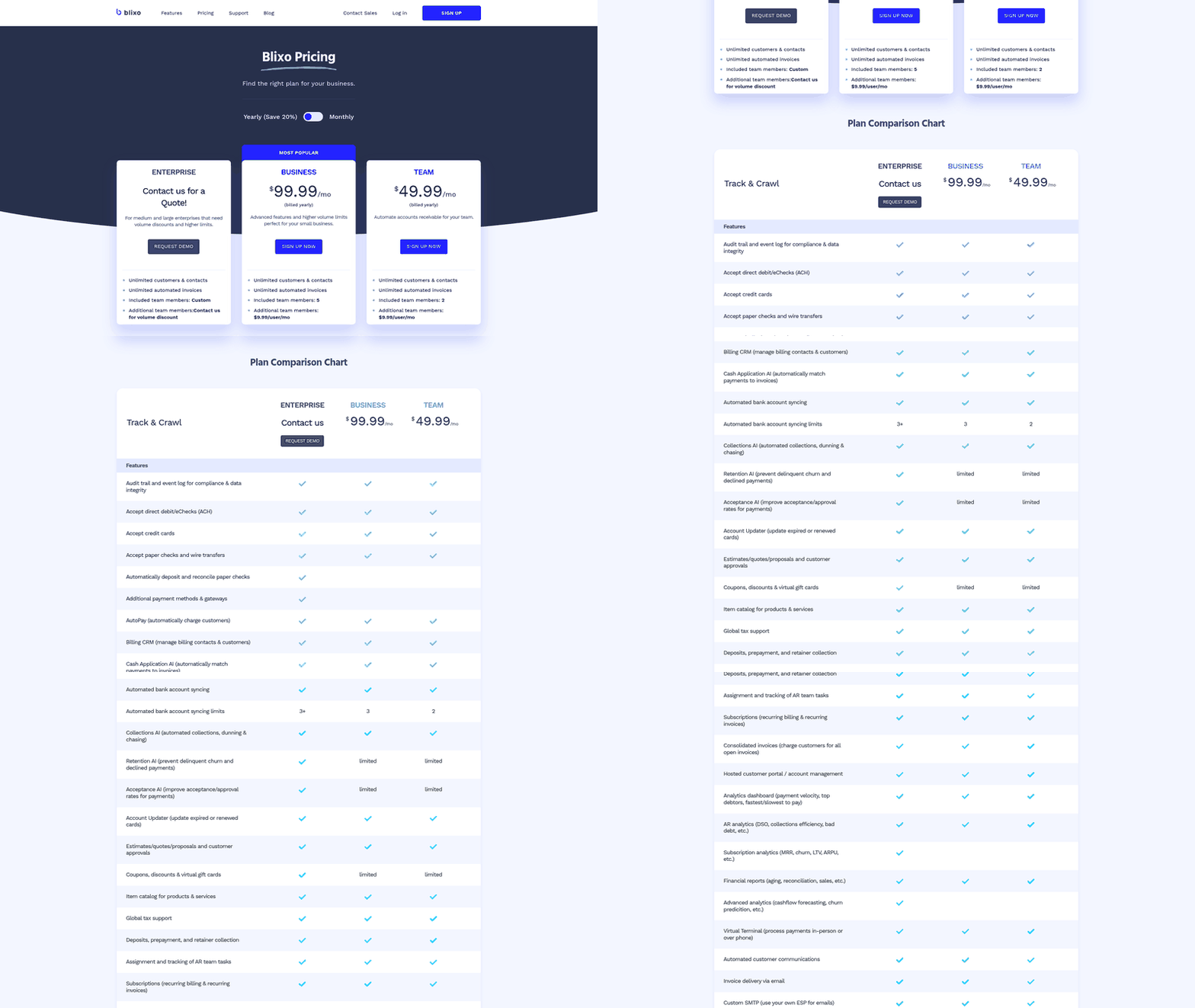
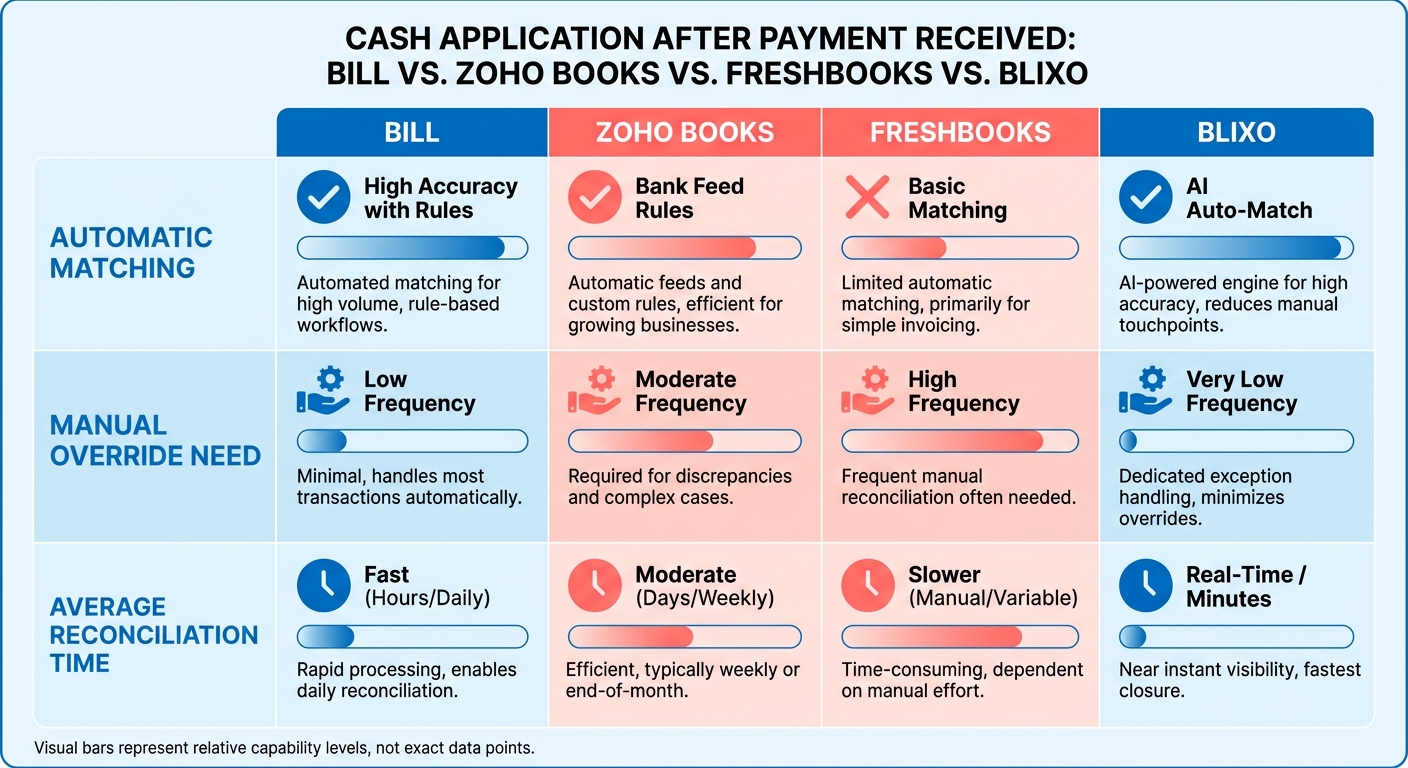
| Cash application automation | Invoice number matching only | Basic allocation | Invoice number matching only | AI-powered matching |
| User limits | Tiered by plan | Tiered by plan | Per-seat pricing | 3 (Team), 5 (Business), custom (Enterprise) |
| Recurring billing | Supported | Supported | Supported | Built for subscriptions |
| Multi-invoice payments | Manual reconciliation | Manual reconciliation | Manual reconciliation | Automated allocation |
Common Needs That Push Teams to Reevaluate
You’ll hit the ceiling when your accounting team starts treating the platform as a database instead of a workflow engine. That looks like exporting transaction lists to Excel, manually tagging payments by customer, or building side systems to track which deposits cover which invoices. These workarounds signal that the tool handles data storage but not business logic.
International operations expose another constraint. Businesses managing cross-border payments need platforms that handle multi-currency reconciliation without manual exchange rate adjustments. Oracle NetSuite handles complex international operations starting at $99 per user per month plus licensing fees, but that infrastructure is overkill for a 20-person agency. The gap between FreshBooks and NetSuite leaves most recurring-revenue businesses either underserved or overpaying.
Blixo’s intelligent matching engine automates the step where BILL, Zoho Books, and FreshBooks treat recurring revenue like one-off transactions. The platform applies payments automatically, eliminating the manual reconciliation work that bogs down finance teams managing subscriptions and recurring invoices.
Feature Comparison
When you’re evaluating integrated invoice-to-cash applications, most comparison charts focus on the features everyone already checks: invoicing templates, payment gateway integrations, expense tracking. The real differentiator shows up after a customer pays, specifically, how each platform handles cash application when deposits don’t arrive with perfect invoice references.
Businesses hit the reconciliation wall around the same point: when monthly recurring revenue crosses six figures or when payment volumes outpace the capacity of manual ledger updates. At that threshold, standard invoicing tools begin forcing administrative overhead back into your daily operations.
Payment Matching and Reconciliation Depth
BILL.com routes payments well but operates on an architecture designed primarily for accounts payable. The system’s underlying logic expects a clean, one-to-one match for incoming funds. When a customer uses their own purchase order reference or combines multiple balances, the system struggles to allocate the deposit, requiring manual intervention to reconcile the ledger.
FreshBooks handles basic invoicing efficiently, but it lacks the automation depth needed for recurring billing. One industry observer noted that it “can’t match” the financial control larger businesses require once invoice volume scales. The platform’s simplified tax structure requires manual adjustments for complex regional rules, and its per-seat pricing model adds overhead as you expand your administrative team.
Zoho Books provides a solid foundation for straightforward billing cycles. The challenge surfaces when managing cross-border transactions or complex reporting requirements. Users frequently note that the platform lacks the depth required for complex reconciliation scenarios, particularly when payments arrive through third-party processors that deduct fees before deposit, leaving partial amounts that must be matched manually.
Xero emphasizes bank feed integration and real-time reconciliation suggestions, which speeds up matching when transactions are simple. The system flags likely matches based on amount and date, but it struggles with the same bundled-payment scenarios that trip up other platforms. When a customer consolidates invoices from different billing periods into a single transfer, Xero’s suggestions become less reliable, and you’re back to manual review.
When Feature Gaps Force Workarounds
QuickBooks Online serves as a comprehensive financial hub, offering capabilities across payroll, inventory, and project tracking. However, its breadth doesn’t always translate to depth in cash application. When a business receives a consolidated ACH transfer covering several billing periods, the system still requires manual allocation across individual invoice records, limiting its utility for high-volume subscription models.
Blixo is built around the specific pain point that surfaces in subscription billing: payment arrives, it’s the right amount, but your system can’t automatically figure out which invoices it covers because the customer didn’t include your invoice numbers in the wire reference. That’s where fuzzy matching and AI-assisted reconciliation shift the workload from your finance team back to the software. The manual matching work that used to occupy Monday mornings turns into a quick review and approval workflow.
Oracle NetSuite sits at the enterprise end, designed for complex business structures and multi-entity operations. It’s built for mid-market companies with international subsidiaries, dedicated accounting teams, and the need for advanced revenue recognition rules. The decision isn’t whether NetSuite has more features, it’s whether you need the features it offers over simpler alternatives.
Automation That Matches Your Billing Model
Envoice focuses on AI-driven expense management at accessible entry pricing, while other budget-conscious options deliver strong value at their price points. Neither was designed for recurring revenue reconciliation. They handle invoicing well. They don’t handle the cash application bottleneck that emerges when you’re managing dozens of active subscriptions and customers pay through bank transfers instead of credit cards.
The shift from affordability to feature gaps happens quietly. You start with a low-cost tool, invoice your first group of customers without friction, then hit month six and realize you’re spending hours each week reconciling payments manually. That’s when advanced cash application stops being a nice-to-have and becomes the feature you should have evaluated from the start. The difference between platforms becomes visible not in their marketing pages but in how much time your finance lead spends each week fixing what should have been automated.
Performance Comparison
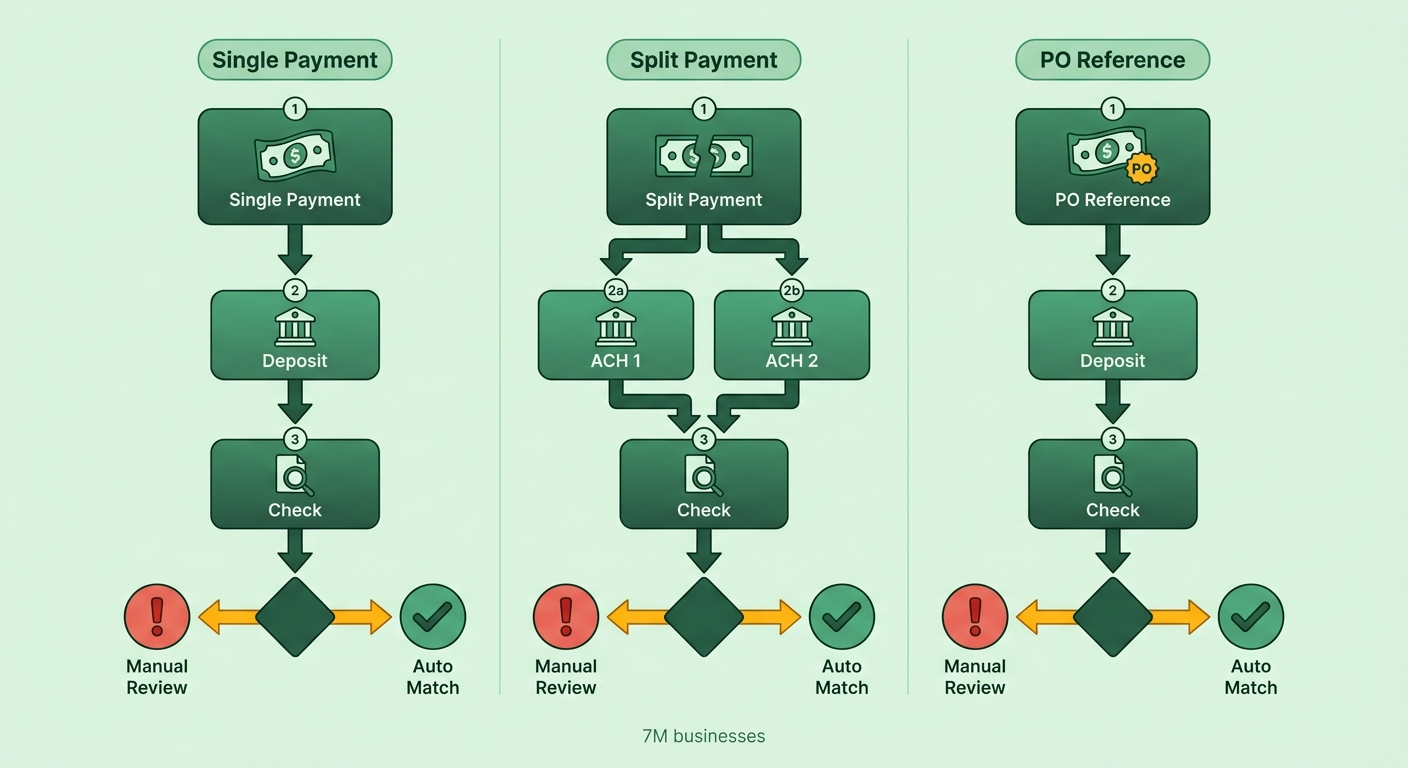
The difference between platforms built for one-time invoicing and those designed for recurring revenue shows up clearest when cash hits your bank account in ways your system didn’t anticipate. A customer pays three months at once. Another splits a yearly invoice across two ACH transfers. A third uses their own purchase order number as the payment reference. The platform that handles these scenarios automatically scales with your business instead of consuming your finance team’s calendar.
Processing Speed Under Recurring Billing Load
Major general-ledger platforms offer infrastructure capable of handling massive transaction volumes, but their scale advantage is optimized for standard batch processing rather than complex matching. When a customer consolidates multiple subscription payments under a custom reference code, the bottleneck is not system throughput, it is the underlying cash application logic that determines whether your team must manually reconcile the deposit.
FreshBooks scales well for project-based billing where each invoice is a discrete event. One G2 reviewer noted that its time tracking and expense workflows handle hundreds of client projects without slowdown. The performance gap shows up when you shift from project invoicing to subscription billing: a creative agency with 50 clients sending one invoice per project each month sees fast reconciliation, but a SaaS company with 50 customers on monthly auto-renew hits manual reconciliation on every customer who updates their payment method or pays multiple months at once.
Xero processes invoices quickly and supports collaborative workflows as your finance team expands. Raw transaction speed doesn’t reduce reconciliation hours when payments deviate from expected patterns. A batch of invoices might clear in seconds, yet if customers bundle payments or use custom reference codes, your team must still manually resolve those exceptions.
Resource Costs at Scale
The shift from one-time invoicing to recurring billing changes what “resource usage” means. It’s no longer about storage for invoice PDFs or API rate limits for payment gateway calls. The real resource drain is human time spent on reconciliation exceptions. Growing companies hit an inflection point where their accounts receivable clerk goes from part-time to full-time because deposit matching became a manual job.
Three cost categories matter when evaluating performance at scale:
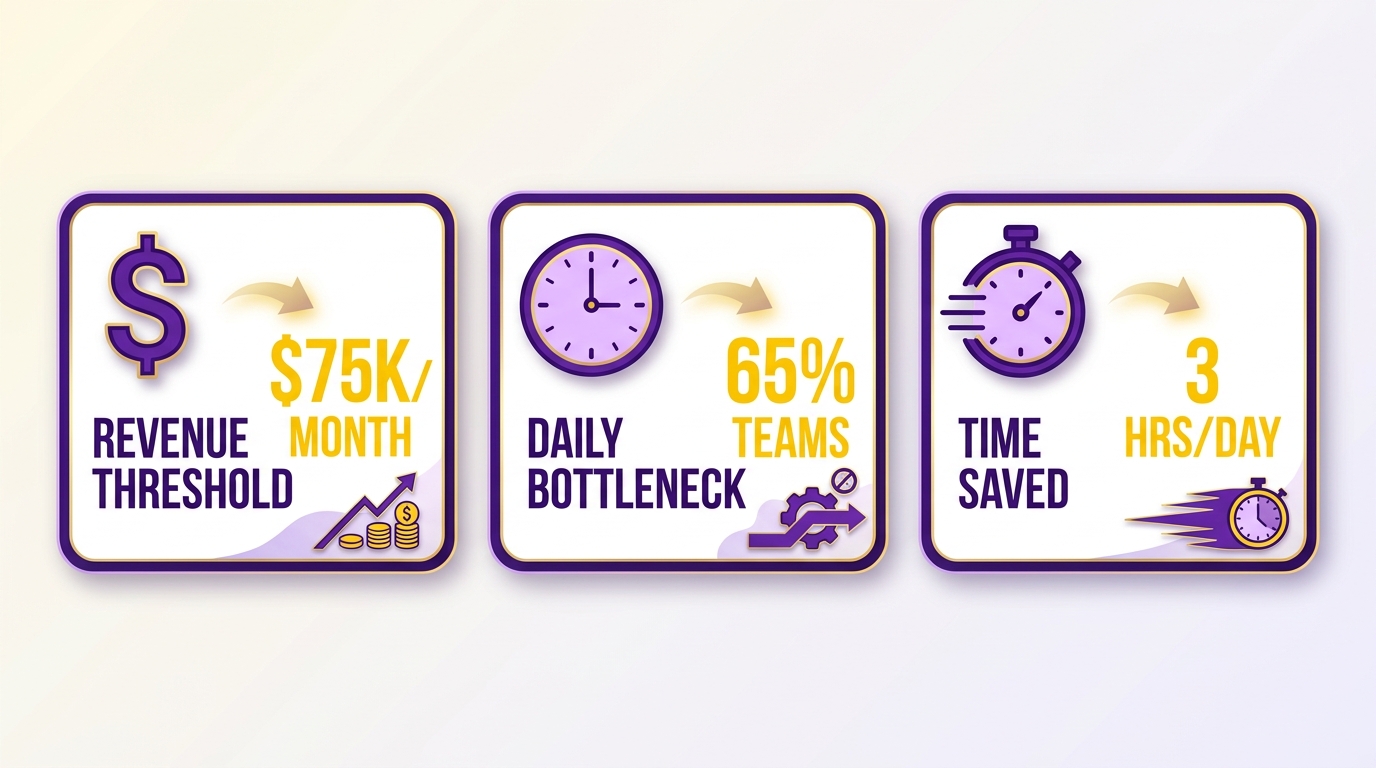
Manual reconciliation hours compound faster than revenue. A business at $75K MRR with 150 active subscriptions typically sees 10-15 reconciliation exceptions per week when using standard invoicing tools. That’s four to six hours of controller time. Triple the customer base to 450 subscriptions, and exception volume doesn’t triple, it quadruples or quintuples, because payment behavior becomes less predictable as your mix of customer types expands.
Failed payment retry logic creates a secondary performance tax. Zoho Books and FreshBooks both handle dunning emails, but neither automates the cash application step after a retry succeeds. When a subscription payment fails on the 1st, retries on the 5th, and clears on the 8th, you’re manually matching that deposit to an invoice that’s now a week old with a reference number the bank generated, not the one your system expected.
Integration overhead scales non-linearly. Connecting Stripe or Braintree to your accounting platform works smoothly until you need to reconcile platform fees, refunds, and partial captures in the same deposit batch. QuickBooks Online offers next-level financial control according to users who’ve migrated from simpler tools, but that control still assumes payments arrive as discrete, labeled transactions rather than as bundled settlement files.
Xero’s bank feed reconciliation handles high transaction volumes efficiently, but when payment processors batch-settle transactions, the platform still requires manual intervention to split a single deposit line into its component invoices. One finance director reported spending 90 minutes each week unwinding Stripe settlement batches that included 30-40 individual subscription payments, even though Xero’s raw processing speed was never the constraint.
The performance gap that matters most isn’t listed in any speed benchmarks. It’s the difference between a system that handles 95% of deposits automatically and one that handles 60%, because that 35-point gap translates directly to whether your finance team scales with revenue or becomes the constraint on growth.
Pros and Cons
Every integrated invoice-to-cash application looks capable on paper. The limitations only surface after you’ve onboarded your team, migrated your customer list, and started processing payments at scale. The same friction points emerge across BILL, Zoho Books, and FreshBooks once businesses cross the threshold where manual oversight of accounts receivable becomes a daily administrative burden.
Where BILL.com Excels and Where It Struggles
BILL.com handles vendor bill pay better than most alternatives. If your workflow involves approval routing for outgoing payments, BILL’s strength is in AP automation, making it a strong choice for businesses that prioritize outbound payment workflows.
The weakness shows up in cash application. The system expects exact invoice number references. Any deviation requires manual intervention. When a customer pays multiple balances at once or uses an unrecognized reference code, the automated reconciliation fails. This is manageable for businesses sending occasional project invoices. It becomes a bottleneck for SaaS companies processing high-volume recurring billing cycles.
The platform also struggles with multi-entity accounting. If you’re running separate legal entities or managing client trust accounts, BILL’s architecture forces you into separate logins and manual consolidation. QuickBooks Online handles multiple entities within a single workspace, which matters when you’re preparing consolidated reports.
Zoho Books: Free Until It Isn’t
Zoho Books offers a free plan for early-stage companies under the $50,000 annual revenue threshold, making it an accessible starting point. Its basic automation handles standard invoice generation, and its multi-currency support covers fundamental international billing needs like EUR and GBP invoicing.
The platform hits its ceiling when you need advanced reporting or deeper tax compliance. If you’re invoicing across multiple jurisdictions or dealing with complex VAT regulations, the lack of built-in compliance features means you’ll spend time exporting data to spreadsheets to generate the reports your accountant needs.
User access is another constraint. Zoho Books charges per additional user, a pricing model that works for solo consultants but becomes expensive as your team expands. By the time you add a third or fourth team member, the per-seat costs can significantly increase your monthly software spend compared to platforms with flat-rate pricing.
FreshBooks: Built for Simplicity, Not Scale
FreshBooks wins on ease of setup. You can start invoicing within minutes, and the interface assumes zero accounting knowledge. That simplicity is deliberate, FreshBooks targets freelancers and small service businesses that need basic invoicing without the complexity of double-entry bookkeeping.
The tradeoff is depth. FreshBooks lacks the workflow automation and ledger depth that subscription businesses need once they begin processing dozens of recurring invoices monthly. The platform is optimized for simple, single-payment transactions. It does not support automated matching for consolidated deposits, and its reporting remains too surface-level to track complex subscription metrics across multiple payment processors.
Tax compliance is another gap. FreshBooks covers basic sales tax calculation but lacks the depth for cross-border invoicing under VAT or GST regimes. If your customer base spans multiple countries, you’ll need to verify tax treatment manually or export to a more capable system. Companies with even modest international revenue, say 30% of transactions outside their home country, quickly outpace what FreshBooks can validate automatically.
The Real Deciding Factor
The decision point has shifted to what happens after adoption. All three platforms handle basic invoicing well. The differences emerge in payment reconciliation depth, user access constraints, and compliance coverage. As transaction volumes grow, the cumulative administrative burden of manual reconciliation scales rapidly, turning what should be automated tasks into a significant weekly time sink.
Businesses outgrow FreshBooks first, usually within six months of launching a subscription product. Zoho Books lasts longer but hits reporting and compliance limits around the $150K revenue mark. BILL.com works for companies with heavy AP workflows but forces manual reconciliation on the AR side unless every customer pays with perfect invoice references, which in practice means almost no one. The gap widens as transaction volume increases: at 500 monthly payments, the time difference between automated matching and manual reconciliation represents nearly a full-time employee.
Use Cases and Ideal Users
Integrated invoice-to-cash applications split cleanly along one fault line: how they handle the week after your customer pays. If your business sends one-off project invoices to a handful of clients, standard tools will suffice. The friction surfaces when your billing model shifts to recurring subscriptions, where the cash application bottleneck becomes the primary operational constraint.
When BILL.com Fits Your Workflow
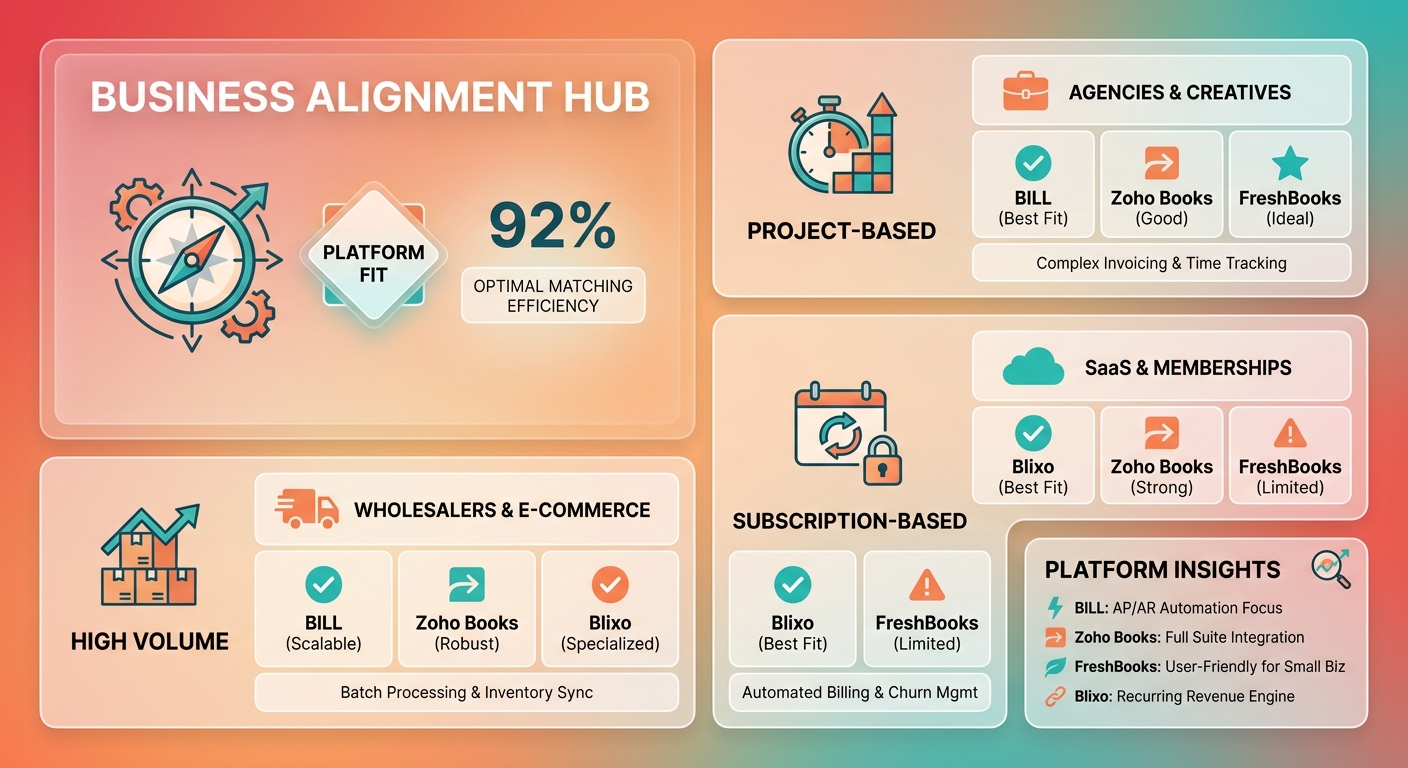
BILL.com handles vendor bill pay and approval routing better than most alternatives. If your AP team processes hundreds of outgoing payments each month and needs multi-level sign-off workflows, BILL’s core strength shows up in those outbound transactions. The platform works well for businesses where accounts payable volume exceeds accounts receivable complexity.
The weakness emerges in recurring billing reconciliation. When incoming deposits don’t map cleanly to individual invoices, the automated flow halts. One G2 reviewer noted this friction: while the system handles outbound vendor payments smoothly, managing incoming subscription deposits requires significant manual oversight to ensure payments are applied to the correct customer accounts.
Choose BILL when your primary pain point is managing vendor relationships and approval workflows, not when you’re scaling subscription renewals. The platform processes over 180 million transactions annually across its user base, but that volume tilts heavily toward outbound vendor payments rather than inbound subscription cash application.
Where FreshBooks and Zoho Books Hit Their Ceiling
FreshBooks focuses on invoicing and payment collection, it’s built for service businesses sending project-based invoices, not for recurring billing at scale. The platform serves over 30 million users globally, but that adoption concentrates in freelance and agency workflows where each invoice represents discrete project work. When your revenue model shifts to subscriptions, the invoice-centric architecture starts creating friction rather than reducing it.
Zoho Books automates VAT and GST calculations for regional requirements and integrates with 180+ Zoho applications, making it a natural fit if you’re already embedded in the Zoho ecosystem. When deposits arrive without standard references, the reconciliation work shifts back to your finance team. Users report spending 3-4 hours per week on manual cash application once they reach consistent subscription renewal volumes, highlighting the limits of its standard matching engine.
Skip both platforms once you’re processing recurring subscription renewals that customers pay in bundled deposits. The tools assume each payment maps to a single invoice. That assumption breaks down as your customer base grows and payment patterns become less predictable.
The Recurring Revenue Reconciliation Test
You’ll know it’s time to evaluate alternatives when your finance team starts dedicating Monday mornings to matching bank deposits against open invoices. Even with robust general ledger platforms, the system struggles when customers bundle payments. The constraint isn’t processing speed, it’s the cash application logic that assumes a simple one-to-one relationship between deposits and invoices.
Businesses adopt these platforms for invoicing and payment collection, then hit the reconciliation wall once recurring revenue scales. The tools work well until payment matching becomes the bottleneck. At that threshold, you need integrated invoice-to-cash applications designed for subscription billing, not project-based invoicing retrofitted with recurring invoice templates. Finance teams report that manual cash application errors increase by 23% when processing bundled subscription payments compared to single-invoice deposits, creating downstream revenue recognition issues that compound over quarters.
What to Actually Do
The decision between integrated invoice-to-cash applications comes down to one constraint: how much manual reconciliation you’re willing to absorb once monthly recurring revenue scales. Standard tools handle invoice generation and payment collection well enough. The bottleneck surfaces when payment matching fails to scale, forcing your team to spend valuable time on administrative tasks instead of strategic growth.
When Each Option Makes Sense
BILL.com fits workflows where approval routing matters more than AR automation. If your finance team processes hundreds of outgoing payments each month and needs multi-level approval workflows, BILL’s AP strength justifies the manual reconciliation work on the receivables side. If your business runs on subscriptions, the lack of automated AR matching will eventually create a scaling bottleneck.
Zoho Books works when you need regional tax automation built into the platform rather than bolted on through integrations. The mobile app earned a 4.3 rating from 8,200 reviews, making it one of the more reliable options for on-the-go invoice approval and expense capture. The reconciliation gap remains a challenge for subscription models, as the platform’s matching engine is not optimized for complex, multi-invoice deposits.
FreshBooks handles project-based invoicing for agencies and consultancies that send one-off invoices to a small client base. Time tracking integration means billable hours flow directly into invoices without spreadsheet exports or manual entry. If your workflow involves international payroll or complex tax compliance, FreshBooks won’t cover the gap, it’s built for service businesses that invoice on delivery rather than recurring billing models.
Price Is No Longer the Barrier
With entry-level pricing competitive across the industry, affordability is no longer the primary differentiator. The decision point has shifted to the operational gaps that emerge after adoption, specifically, how each platform handles cash application when deposits arrive without standard references.
The same pattern repeats across businesses that outgrow these tools: the finance team starts manually reconciling deposits, late payments start accumulating because no one caught the partial payment, and the AR aging report stops reflecting reality. At that point, the cost isn’t the monthly subscription fee. It’s the unmatched deposits sitting in your bank account while invoices stay open in your system.
Where the Category Falls Short
None of these platforms fully solve the subscription renewal cash-application bottleneck because they all rely on clean invoice references. When customers use custom reference codes or pay through intermediary processors that strip metadata, manual reconciliation becomes inevitable regardless of which standard tool you choose.
The right alternative depends on whether your constraint is AP workflow complexity, choose BILL, regional tax automation and mobile access, choose Zoho Books, or project-based time-to-invoice workflows, choose FreshBooks. If your constraint is recurring revenue reconciliation, all three will force manual work back into your workflow at scale. The decision comes down to understanding which bottleneck you’re solving for before you commit to a platform.
FAQ
Q: Can BILL.com handle multi-currency transactions for international clients?
BILL.com supports multi-currency payments, but its cash application engine still requires exact invoice number references. If an international client pays multiple invoices in one wire transfer or uses a custom reference code, you’ll face the same manual reconciliation bottleneck as domestic transactions.
Q: Does Zoho Books integrate with third-party payment processors like Stripe?
Yes, Zoho Books integrates with Stripe and other payment processors. The integration handles payment collection, but when Stripe batch-settles transactions or deducts fees before deposit, you’ll need to manually reconcile the net amount against gross invoice totals.
Q: How does FreshBooks compare to QuickBooks for small businesses?
FreshBooks prioritizes simplicity and ease of use, which works for freelancers and small service businesses. QuickBooks Online offers more comprehensive financial control, including payroll, inventory management, and multi-entity accounting. If you’re processing recurring subscriptions, neither platform fully automates cash application for bundled payments.
Q: What happens when a customer pays multiple invoices with one ACH transfer?
Most platforms flag the transaction as an exception. You’ll need to manually allocate the deposit across individual invoices. Platforms built specifically for recurring revenue use fuzzy matching to parse payment metadata and automate allocation.
Q: Is there a free alternative to these paid invoicing platforms?
Wave offers a free plan with basic invoicing and expense tracking. Zoho Books provides a free tier for businesses under $50,000 annual revenue. Both free options still require manual reconciliation for complex payment scenarios.
Q: How important is automated cash application for SaaS companies?
Automated cash application becomes a scaling bottleneck once you’re processing hundreds of recurring payments monthly. Manual reconciliation delays revenue recognition, creates accounting errors, and consumes finance team capacity that could be spent on growth analysis.
Q: Can I migrate from BILL.com to another platform without losing data?
Most platforms support CSV exports for customer data, invoices, and transaction history. The migration process typically involves exporting your data, mapping fields to the new system, and importing records. Historical reconciliation may require manual cleanup depending on how the new platform structures its ledger.