

How to Automate AR Cash Application When Payments Arrive as PDFs and Emails

TL;DR
- Manual cash application stays accurate when data is clean. The problem is that B2B customers bury payment details in unstructured PDFs, emails, and thin ACH or wire references.
- As ACH and wire volume grows, remittance data often gets thinner. A payment may carry only a short memo while the PDF remittance arrives separately, or never arrives.
- That creates the automation paradox. The payoff is not mainly fewer human errors. It is shrinking the gap between cash landing and an invoice being posted.
- Measure the dollar value of payments applied within 24 hours, not only the transaction match rate. That captures the working-capital effect more directly than a match percentage.
- Many organizations still run little to no AR automation, which forces analysts to chase fragmented payment data across channels before they can close an invoice.
- Some businesses still get paid late, partly because posting lags payment arrival when remittance shows up separately and unstructured.
- AI-driven platforms built on OCR, NLP, and machine learning can reach high matching accuracy when remittance data is reasonably complete, though that number should be verified in a live demo.
- Top performers push customers toward structured formats like EDI. Laggards receive more PDFs and loose data that slow reconciliation.
The Short Version
Yes, automating accounts receivable for PDF and email payments is worth it. Manual cash application can be very accurate when remittance data is clean. The problem is timing: customers send payment details in formats your team cannot process at scale, so cash lands before the invoice can be closed.
Automate it, and the payments that used to need careful cross-referencing move into instant or near-instant matching for clean cases. Exceptions still need judgment. The difference is they arrive pre-packaged with suggested invoices, payment details, and extracted remittance data. Your AR team keys fewer fields and spends more time resolving disputes, chasing short pays, and improving collections.
Blixo’s public materials describe a matching engine with an approval workflow. Clean payments can post automatically, and the system is said to improve as your team corrects exceptions. Match rates and ERP write-back behavior should be confirmed in a live demo against your own documents.

The format problem nobody prices in
Speed matters more here than accuracy, because B2B payment formats often carry little reference data. A customer consolidates five invoices into one wire with a vague memo, or mails a check with no remittance attached, and your team hits a dead end until someone digs through emailed PDFs and spreadsheets. OCR and NLP tools read those PDFs and pull out invoice numbers, amounts, and payment dates from formats a manual team cannot keep up with.
No public proof in the reviewed materials shows how the platform handles email-based remittance specifically. Any claim about structured extraction, match rates, or ERP posting should be confirmed in product documentation before you plan around it. Absence of a published number is not absence of the capability, but it is not proof either.

Why cash application quietly eats your month
Cash may land before you can post it. That gap changes what “paid” means operationally. The invoice stays open until someone can say which customer sent the money, which invoices it covers, and whether any discounts, deductions, or short pays are in play.
Finance teams get stuck in a daily matching ritual most executives never see on a report. Customers pay through their bank portal or ACH, then email a separate PDF remittance later, or leave it in a portal you have to check by hand. Without automation, analysts stitch together inbox messages, bank activity, customer portals, and ERP records before they can confidently close an invoice.
The cost compounds faster than the invoice count
Manual cash application turns every payment into a research project. Hunt down the remittance, cross-reference the bank feed, verify the invoice numbers, then post. Automation collapses the easy half: structured remittance posts quickly, and exceptions route straight to an analyst. The savings scale with volume, which frees your team for collections and disputes instead of data entry.
The format split drives the whole thing. Some customers send clean, structured remittance your systems can read with little friction. Others send scanned spreadsheets, vague wire notes, or attachments that show up after the bank transaction. When your largest accounts pay by wire but send the detail separately, you are not waiting on payment. You are waiting on the information that tells you which invoices to close.
Pulling DSO down frees working capital you can reinvest without touching a credit line. That is why the operational metric should include dollar value applied within 24 hours, not just the percentage of transactions matched.
Pulling payment data out of PDFs and emails
The extraction layer is where accounts receivable automation earns its keep or falls apart. Everything downstream depends on turning messy remittance into clean, structured fields.
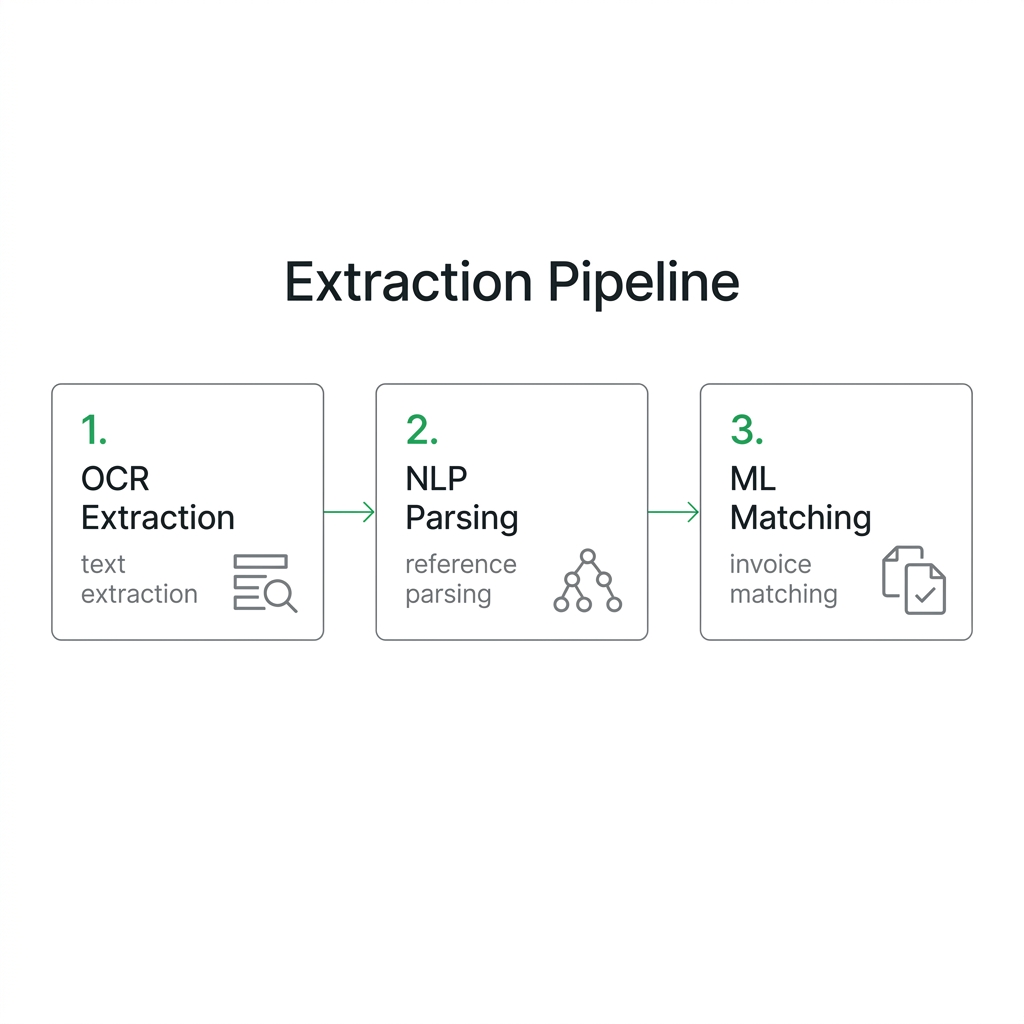
Modern cash application reads payment and remittance data with three technologies working together. OCR lifts text off scanned checks and image PDFs. NLP interprets free-text references and email bodies. Machine learning matches the extracted fields against your open invoices, then posts or stages the result for review in your ERP. Test that performance against your own documents in a live demo, not a canned sample.
How does an AR inbox workflow parse emails and PDFs?
Point the system at a dedicated AR inbox. It scans each message, separates the body from attachments, and runs extraction on both. A buyer who types invoice numbers in the body gets parsed the same as one who sends a PDF stub or an Excel sheet. That split matters, because remittance does not arrive in one tidy stream. The capture layer has to handle message text and attached files alike.
The format mix is the real problem. Plenty of AR teams still receive remittance as PDFs and image files, which resist clean capture. Electronic payments can be just as thin. A standard CCD+ ACH transfer carries only a short addenda record. Sparse reference data like that is exactly what NLP exists to stretch.
Structure the input where you can, then extract the rest. Here’s the capture-before-matching sequence.
Matching payments to open invoices
Matching is where accounts receivable automation either flows or stalls. You have an incoming payment and a stack of open invoices. Which invoices does this payment settle, and for how much?
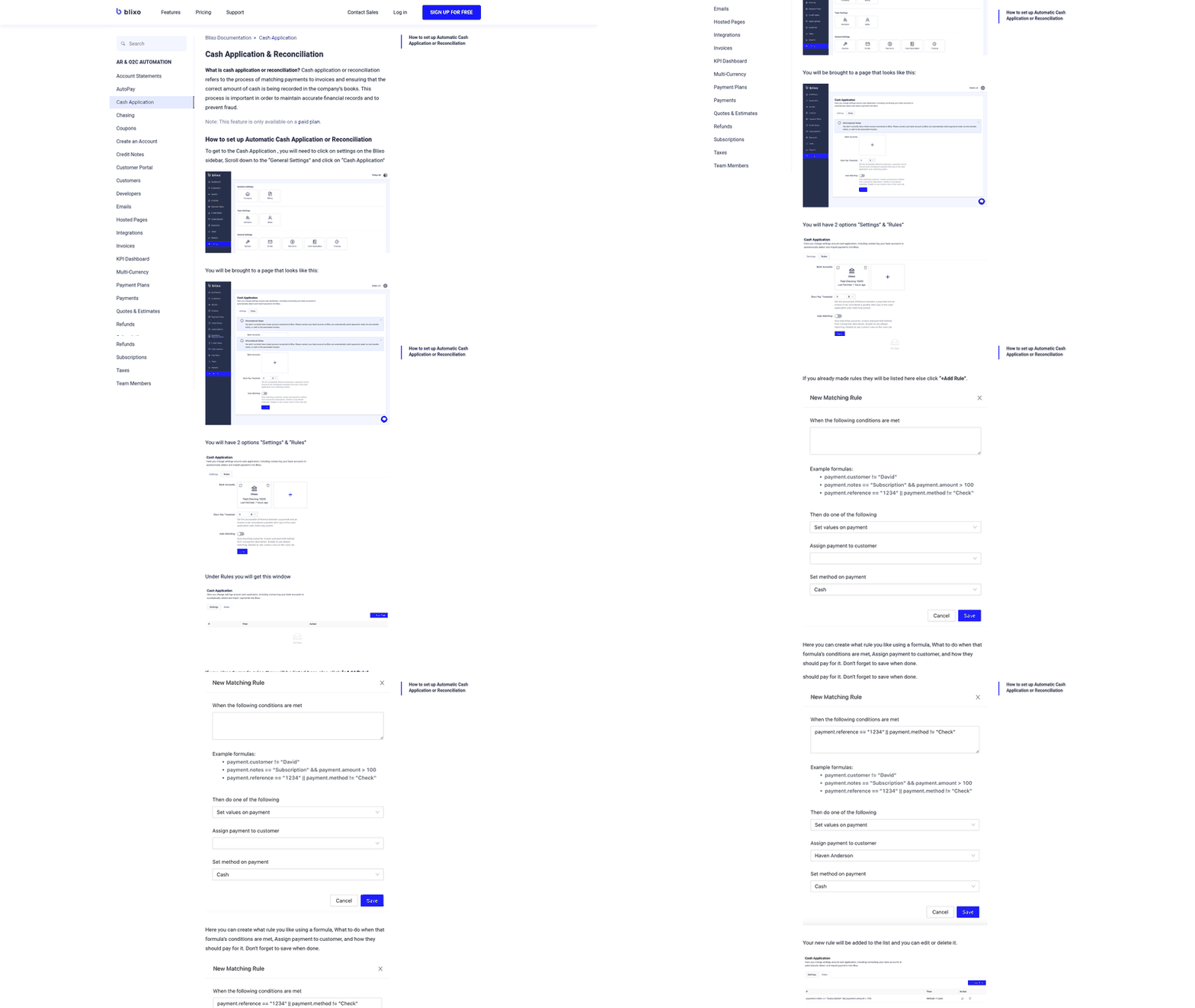
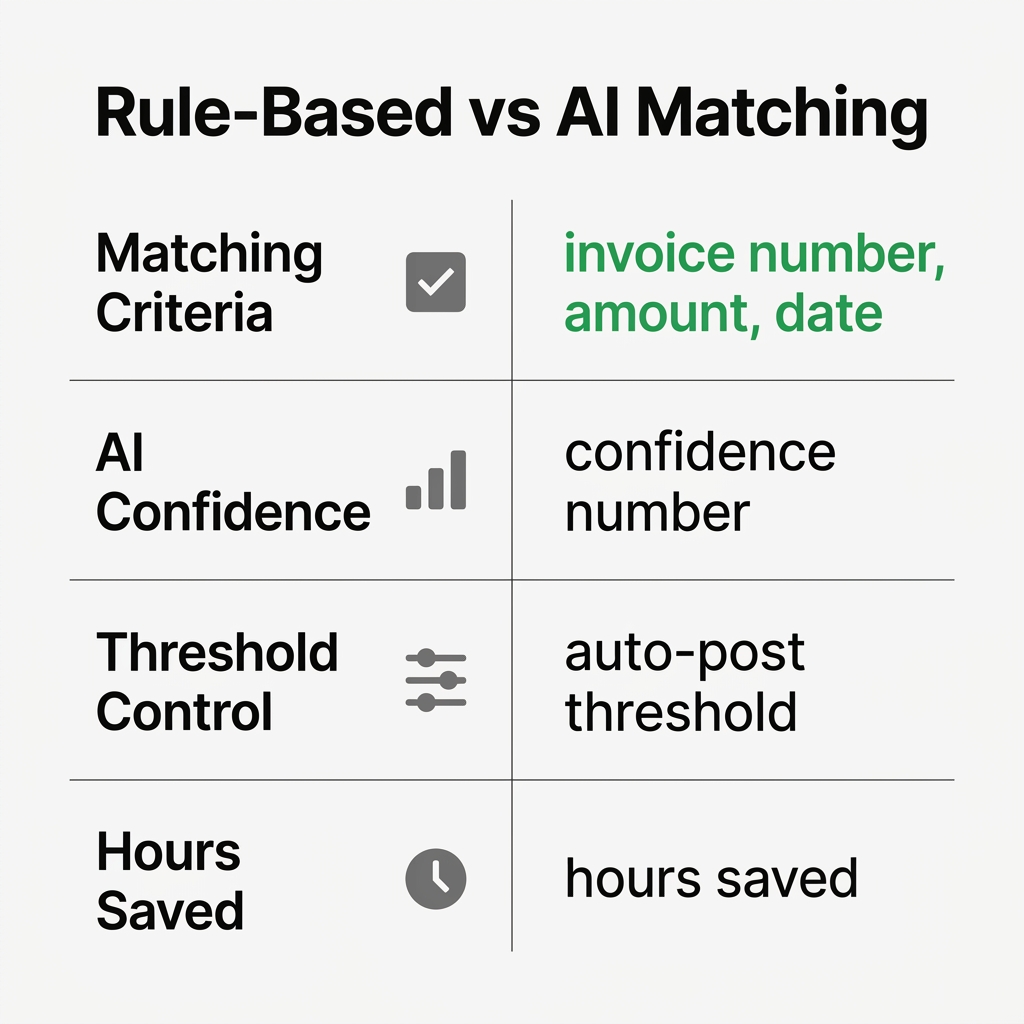
Rule-based matching answers with exact logic. Match the invoice number, the amount, and the date. When all three line up, it posts on its own. Clean payments sail through, and this is the slice of automated cash application most teams already handle fine.
The trouble starts with the messy payments. Take a short pay where the customer took a deduction, but the reason only appears in a remittance attachment. The bank amount no longer equals the invoice balance, and exact-match rules have no context for the adjustment. Without the extracted remittance detail, the item lands back on an analyst’s desk.
How do confidence scores change the outcome?
Probabilistic AI scores each candidate instead of demanding a perfect hit. It weighs the payer name, the reference text, the amount, and past payment behavior, then assigns a confidence number. High-confidence matches post straight to the ERP. Anything below your threshold routes to a person with the suggested match attached.
You set where that line sits. Raise the auto-post threshold and you review more but risk fewer bad postings. Lower it and more clears on its own. The point is not to automate data entry. It is to automate the decision while keeping human control over the cases that are not certain.
That split is what pulls the hours out of monthly matching, leaving your team only the genuine exceptions.
What happens when the match isn’t clean
Good exception handling is what keeps accounts receivable automation from posting wrong matches. When the AI cannot confidently match a payment, it should not guess. It routes the item to a human with the payment, remittance, and candidate invoices attached, so your analyst resolves it with context instead of from scratch.
That design choice decides whether automation actually improves anything. Clean payments can post automatically while your team resolves the rest, so the queue should shrink over time. The exception queue is where your team still earns its keep: validating deductions, confirming customer intent, and keeping bad postings off the ledger.
How do you build a review queue without a bottleneck?
Keep the loop lean. Route only low-confidence items, attach the suggested matches, and alert the right person fast through the review queue your team already watches. The pattern is consistent: the hours and the posting lag live in the hard payments, like short pays, consolidated payments, and parents paying for subsidiaries. Automating the easy matches gives analysts room to work the cases that actually need judgment.
Should you auto-post or stage human approval?
Staged approval: the system matches automatically but holds posting until an analyst confirms. Full auto-posting: matched cash flows straight into your ERP.
Start staged. Measure your auto-match rate against your own documents, then release auto-posting for the clean tiers once you trust it. Verify any ERP write-back in a live demo. The capture-before-matching guide walks through the full sequence if you want more detail.
What rollout actually takes, and what it returns
A working rollout follows six moves. Map your payment and remittance sources. Clean your customer and invoice records. Define matching rules and exception thresholds. Pilot on a payment subset. Measure match rate and time saved. Then scale.
Public materials from established vendors describe core cash-application workflows going live quickly and reaching high touchless posting. Verify any timeline and match rate against your own data in a live demo. Absence of a published number is not absence of the capability.
What’s the ROI actually look like?
Run the benchmark on your own volumes. Manual matching eats hours every month when a team keys payments against invoices by hand, and automation claws most of that time back to redeploy toward collections. Multiply the saved hours by your loaded finance cost for the hard-dollar figure.
The bigger prize is working capital. Faster matching can pull DSO down by reducing the gap between cash receipt and invoice posting. The hours removed from clean posting can shift toward dispute resolution and credit management, but the size of that shift depends on your payment mix and exception rate. Confirm match rates and time-to-post against your own data before planning around vendor claims.
Which pitfalls sink the pilot?
Thin references kill match rates. Remittance can arrive with no usable invoice number, no clean payer identifier, or no explanation for a deduction. Wires and ACH payments may not match cleanly on the first pass. Weak references and partial payments then risk incorrect open balances your team has to unwind later. Use an approval workflow with bank and ERP integrations to catch those exceptions, and verify any machine-learning behavior against your own data before you plan around it.
Frequently Asked Questions
What happens when a customer pays multiple invoices with one wire transfer but provides no remittance detail?
Rule-based matching fails because the payment amount will not match any single invoice. AI-powered systems can evaluate likely invoice combinations and send the best candidate to your analyst with the supporting details attached, turning the work from open-ended research into a targeted review.
Can automation handle payments that arrive before the remittance PDF shows up in email?
Yes. The payment can sit in an unmatched queue until the remittance arrives, then the system extracts the invoice details and completes or stages the match. The key is making sure your workflow connects the bank transaction, inbox capture, and ERP posting path instead of treating them as separate processes.
How do you prevent the system from posting a wrong match when confidence scores sit near the threshold?
Use staged approval for uncertain matches and reserve auto-posting for the cleanest tier. Blixo’s approval workflow lets your team confirm or correct each exception, and the machine learning layer improves future accuracy as you resolve them.
What’s the actual time difference between manual cash application and automation for a mid-sized AR team?
Manual matching forces analysts to search, compare, and key information across systems. Automation changes the workload profile: clean payments move through without hands-on work, while analysts spend their time on deductions, missing references, and customer-specific edge cases.
Should you push customers toward EDI or accept their preferred payment formats?
Use a two-tier strategy. Negotiate structured remittance for major customers where you have the leverage, and use AI extraction for the long tail of buyers who still send PDFs, emails, or sparse payment notes. The practical goal is not format purity; it is getting enough usable data to close invoices quickly and accurately.