

Executive Summary Report Checklist: 4 Tests That Separate Decisions From Status Updates

Key Takeaways
- Four tests (Forward, CFO, Calendar, Metric) act as one pass/fail gate. Fail any single one and the summary goes back to the author, not to the executive team.
- The Forward Test: a peer can forward it without narrating it, and the ask and owner stay obvious.
- The CFO Test: a CFO can price the decision because the summary maps to revenue, cost, risk, or time, with delay cost quantified per day.
- The Calendar Test: the summary names the deadline the decision has to beat, instead of floating with no date until the window closes.
- The Metric Test: the summary promises a number someone can measure next week, so value is verifiable rather than asserted.
- Review times assume a 250–500 word summary. That’s the range that holds up in practice.
Related Video
Watch: How to Write an Executive Summary Like a Boss by David Taylor
Quick Summary
Four tests separate a decision-ready summary from a status update: the Forward Test, the CFO Test, the Calendar Test, and the Metric Test. Treat them as a single pass/fail gate. Fail one, and the summary goes back to the author.
The table below collapses the whole checklist into what you can actually apply. Review times assume a 250 to 500 word summary.
The Four-Test Comparison Matrix
| Test | Decision-Oriented Looks Like | Status-Only Looks Like | Decision-Ready Flag |
|---|---|---|---|
| Forward Test | A peer can forward it without you in the room; the ask and owner are explicit | Reader has to ask “so what do you need from me?” | ✅ Passes when the ask survives without narration |
| CFO Test | Maps to revenue, cost, risk, or time; cost of delay quantified per day | Describes activity and effort with no financial translation | ✅ Passes when a CFO can price the decision |
| Calendar Test | Fits the decision window; names the deadline the decision must beat | Arrives after the window closes or floats with no date | ✅ Passes when the date forces the decision |
| Metric Test | Promises a number someone can measure next week | Claims outcomes with no measurement path | ✅ Passes when value is verifiable, not asserted |
The tests are quick to apply. A summary that fails one usually needs real revision work: tightening the ask, pricing the delay, naming the date.
Three Takeaways for Busy Leaders
- Lead with the recommendation, not the context. The first sentence should state the decision. A rewrite from “Implementation of the new customer service strategy” to a sentence that states what was implemented and what changed shows how much weight a single sentence carries.
- Quantify the cost of waiting. Vague summaries feed indecision. Put a dollar figure on delay per day so the status quo feels expensive.
- Segment by audience. CFOs want ROI and cost variance. Business leaders want capability delivery. Boards want risk and the required decision. One summary can’t serve all three, and trying is how detail crowds out the ask.
If your team writes only a handful of summaries a quarter, the full matrix may be more overhead than it’s worth.
Why Executive Summaries Matter
A weak executive summary costs more than a bad meeting. It stalls decisions your subscription business needed to make this quarter, and in cash-application terms, that delay shows up as extra days sales outstanding. When a summary describes features instead of quantifying the cost of waiting, finance teams can sit on a payment-platform recommendation for weeks. The fix isn’t better writing. It’s treating the summary as a decision instrument with a price tag attached.
What Does a Failed Executive Summary Actually Cost?
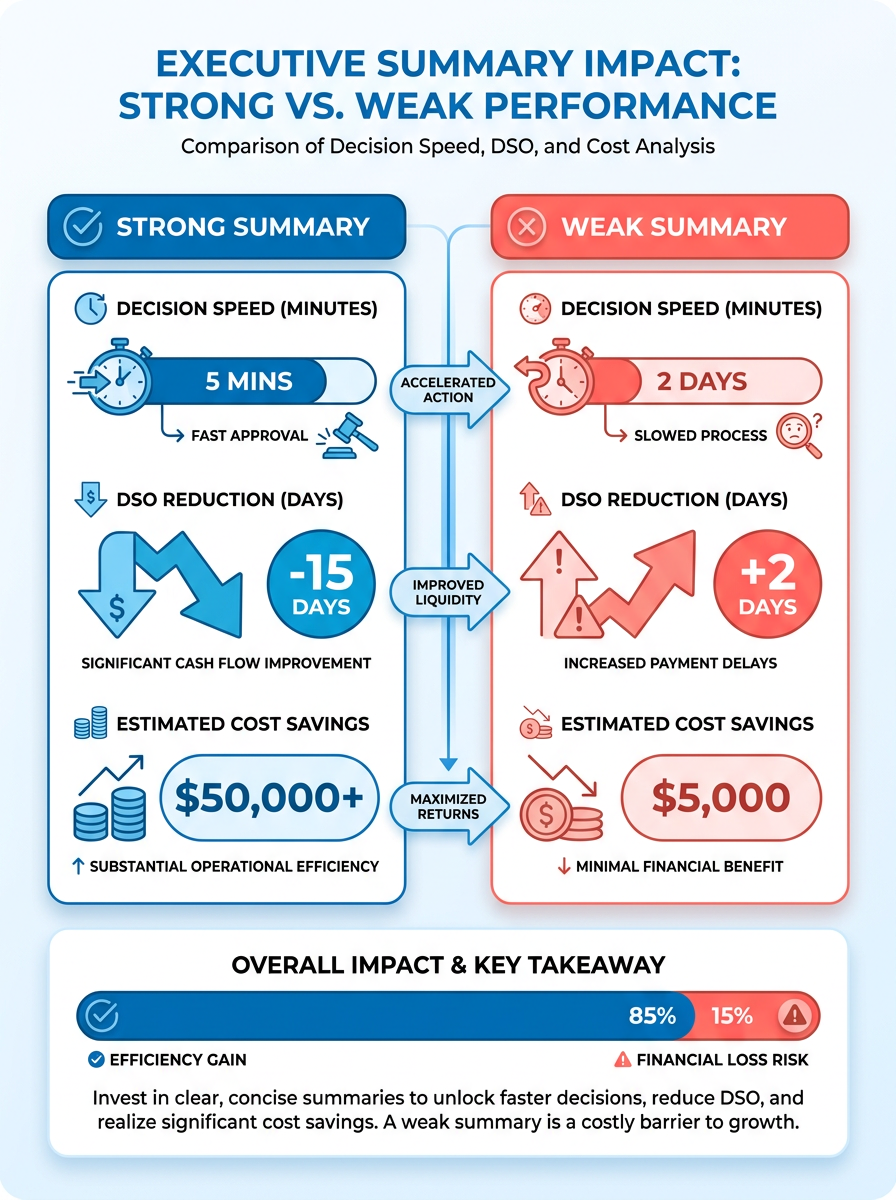
Answer first: A summary that explains instead of decides burns the one resource your CFO can’t recover: the decision window. Executives don’t read for detail. They read for three things. Where are we, what’s at risk, and what do you need from me. That reframing should change how you think about every internal proposal you write.
The mechanism is straightforward. Bury the recommendation under context and the reader has to reconstruct the ask themselves. That takes a meeting. Then another, because someone in the room read a different section. Meanwhile, your cash-application backlog keeps aging.
We see this most often in payment-platform evaluations. A summary that says “we reviewed three vendors and each has strengths” produces a follow-up meeting. A summary that says “we recommend option B; it cuts cash-application time by X days and pays back in six months; approve by Friday” produces a decision. Same underlying analysis, radically different outcome.
The practical test: could your summary be forwarded to someone who wasn’t in the room and they’d still know what to approve? If they’d have to ask “so what do you need from me?”, it’s a status update wearing a summary’s clothes.
Which Teams Depend Most on Decision-Ready Summaries?
Answer first: Finance and product leaders lean hardest on executive summaries, but they need different things from the same document. The Minto Pyramid approach (lead with the conclusion, follow with three or four reasons, then show the evidence) lets one summary serve three audiences with three framings of the same facts.
For subscription SaaS CFOs specifically, the finance lens dominates. You’re scanning for variance, risk, and consequence, not feature completeness. That means your payment-platform summary should lead with the metric that matters: how many days of DSO the change removes, and what that’s worth in working capital.
This is where a decision-oriented summary accelerates cash-flow improvement. Frame the recommendation as “faster cash application” and the CFO can calculate opportunity cost per day of delay. Frame it as “automated reconciliation features” and they can’t. The first framing gets funded. The second gets deferred.
Our take: the summary’s job is to convert a technical capability into a financial consequence. Anything that doesn’t serve that conversion is filler.
When Should You Skip the Full Checklist Treatment?
Not every payment-platform update needs the four-test gate. Reporting routine reconciliation status to a team that already approved the platform? A one-paragraph note is enough. Skip the formal structure for operational updates with no decision attached. The tests exist to protect decisions, not to bureaucratize reporting.
But the moment a summary carries an ask (funding, a vendor approval, a process change), run the full pass. Lead with the conclusion, keep it to a page, end with a clear “ask” section. That’s the structure that keeps recommendation cycles short.
If you want to see how the output side of this works, our breakdown of turning raw aging data into a one-page collections summary shows what a decision-ready cash report looks like when the underlying data is clean.
Test 1 – Does the Summary State a Clear Decision?
A decision-ready executive summary report contains exactly one thing the reader must do: approve, select, prioritize, or reject. Ask for two or more decisions and you’ve written a status update with a to-do list attached. In our experience reviewing payment-platform recommendations from finance and product teams, single-decision summaries move in one meeting. Multi-decision ones get tabled, rescheduled, then quietly dropped.
That pattern isn’t a writing problem. It’s a decision-design problem, and it’s the first thing we screen for.
What Counts as a Decision Statement?
A decision statement names the action, the owner, and the deadline in one sentence. Everything else in the summary exists to justify it.
Compare two openings for the same recommendation:
- Observation: “We evaluated several automated payment platforms and reviewed cash-application workflows.”
- Decision statement: “Approve the automated payment platform selection by end of quarter so cash application moves from manual matching to same-day posting.”
The first is a diary entry. The second gives the CFO something to say yes or no to. Notice the decision statement doesn’t explain the evaluation process. It states the ask, ties it to a cash outcome, and attaches a date.
A useful test: cover everything below the first sentence. Can a peer forward just that sentence and get a decision? If not, the summary fails Test 1 regardless of how good the rest is.
Which Phrasing Patterns Signal a Real Decision?
Watch for action verbs in the imperative or first-person plural: approve, select, prioritize, fund, defer, reject, adopt. These force a yes or no.
Softer constructions signal drift. “We recommend considering,” “it may be worth exploring,” and “there are several options to weigh” all push the decision back onto the reader without giving them a recommendation to react to. That’s analysis paralysis dressed as thoroughness.
The strongest pattern we see pairs the verb with a number and a date. A five-sentence structure that works well: the decision ask with dollar amount and timeline, the EBITDA or DSO impact, the cost of delay per day, the payback period, and the owner with a go-live date. Every element forces specificity.
Skip this framing for early-stage exploration memos where no recommendation exists yet. Forcing a decision statement onto a genuine discovery update produces fake precision, and executives spot it immediately.
How Many Decisions Can One Summary Hold?
One. Senior leaders process a single clear ask far more reliably than a menu, and summaries that stack three or four decisions tend to get postponed rather than resolved.
The reason is structural. Present multiple decisions and the reader can’t approve one without implicitly deprioritizing the others. That trade-off requires context the one-page format can’t carry. So the reader defers the whole document.
Three decisions? Split them into three summaries with a shared appendix. Our rule of thumb: if you can’t write the decision statement in under 25 words, you have more than one decision hiding in there.
The Test 1 Checklist
Run these before the summary leaves your desk.
- The first sentence contains an action verb (approve, select, prioritize, fund, defer) rather than a description of work performed
- The summary asks for exactly one decision, not a ranked list of options with no recommendation attached
- The decision statement names an owner and a date, so approval translates directly into an action
- The ask survives without narration. A peer can forward the opening sentence alone and the reader still knows what to do
- No hedging verbs (“consider,” “explore,” “weigh”) appear in the decision sentence itself
Clear all five and you’re ready for Test 2. Fail any one and it goes back to the author. Fixing the decision statement takes ten minutes; losing a quarter to a deferred platform decision costs considerably more.
Test 2 – Is Supporting Evidence Explicitly Presented?
Evidence earns its place in a summary only when it changes what the reader decides. If a number doesn’t move the approve/reject lever, it’s decoration. The summaries that get signed off in one meeting tend to carry a small handful of metrics, each tied to a specific claim in the decision statement. Everything else lives in the appendix.
That’s the whole test. Can a CFO read your executive summary report and see, without asking a follow-up, that the recommendation is backed by data they trust?
Which Metrics Actually Support a Decision?
Decision-supporting metrics are the ones a CFO already tracks: DSO, collection rate, cash-application time, and churn. Pick from that shortlist and you inherit instant credibility. Reach for platform-specific vanity numbers and you force the reader to learn a new measurement system mid-decision.
One carve-out. Skip the DSO trend line if your billing is seasonal. A single month showing three days faster reconciliation could be year-end volume, not platform capability. Show six months of consistent improvement instead, so the reader can separate seasonal variance from systematic change.
Same logic applies to churn. If you’re evaluating a payment platform for a subscription business, churn is a lagging indicator of payment friction, not a leading one. Pair it with involuntary-churn data or failed-payment recovery rates, or leave it out.
How Should You Present the Evidence?
Keep it on one page. An executive summary typically spans one to two pages, and shouldn’t exceed 10% of the full report’s length. If your evidence section is spilling onto a third page, you’re presenting analysis, not a decision.
- Use one table, not five. A single comparison table beats a scatter of mini-charts. Readers scan tables; they decode charts.
- Cap the data-to-text ratio at roughly 1:3. One number or short data clause per three sentences of prose. Denser and the narrative disappears; lighter and the evidence looks thin.
- Show trends, not snapshots. Six-month lines beat single data points every time, for the seasonal reason above.
- Cite the source inline, briefly. “Internal AR data, trailing six months” is enough. Long footnotes clutter the page and signal you don’t trust your own numbers.
- Label every column with its unit. “DSO (days)” not “DSO.” Ambiguous units are the fastest way to lose a CFO’s attention.
One documented example comes from a project portfolio reporting setup where a team connected its existing analytics stack to a project platform, letting it reuse skills it already had rather than learning a new reporting tool. The lesson transfers: use the data infrastructure your finance team already trusts, and the evidence reads as credible instead of promotional.
What Does Clean Evidence Look Like in Practice?
A clean evidence section looks like a single screen a CFO can read at a glance: the few metrics that matter, shown as trends rather than snapshots, with no drill-down required for the top-level read. If the reader has to open another document to understand whether the recommendation is supported, the section isn’t doing its job.
“An executive summary should be able to stand alone, providing all necessary context for stakeholders who may not be familiar with the project.”
That’s the bar. If your evidence section requires the reader to open another document, it fails Test 2. For a deeper look at how clean cash data feeds a one-page summary, see our breakdown of turning raw aging data into a single-page collections report.
The test in one line: a few key metrics, one page, six-month trends, sourced inline. If your evidence can’t clear that bar, the summary isn’t ready for the executive team.
Test 3 – Are Recommendations and Next Steps Clearly Articulated?
A recommendation without an owner and a date is a wish. Before anything else, we screen every payment-platform summary for one thing: can a reader tell who does what by when? If the next-steps block reads like a list of intentions rather than assignments, the summary fails this test regardless of how strong the decision statement is.
What Makes a Next Step Actionable?
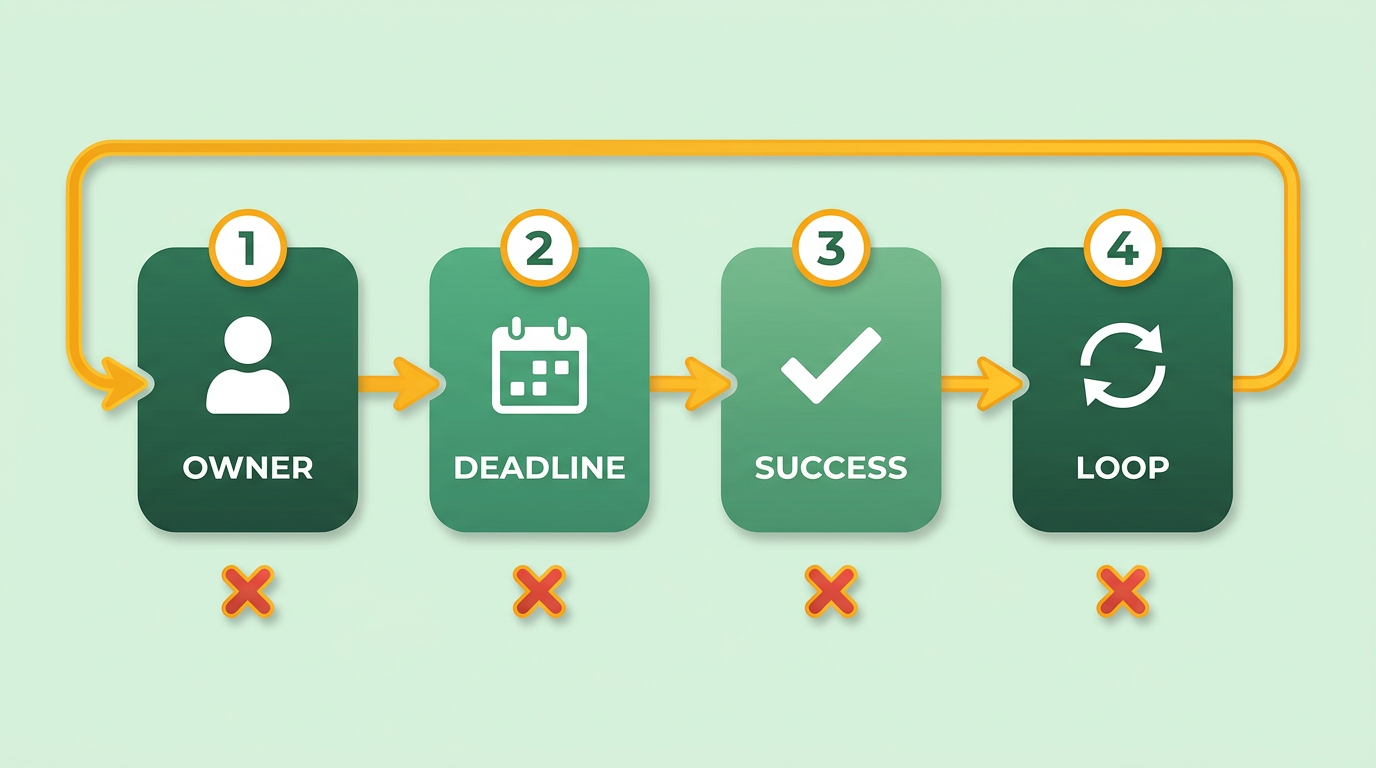
An actionable next step names a person, a deadline, and a success criterion in one line. Anything less is a note to self, not a plan.
The summaries that stall share a grammar problem. They lean on “we should consider,” “it may be worth exploring,” or “the team could evaluate.” Each phrase hands the decision back to the reader. Compare that to: “Priya’s team runs a 30-day pilot on the top two platforms, starting October 1, with cash-application time under 24 hours as the pass mark.”
The second version survives without narration. A CFO can forward it, and the work starts.
One practical framework: borrow the RACI structure for the next-steps table. Name who is Responsible for each action, who must Approve it, and who needs to be Informed. For payment-platform rollouts, that usually means finance owns the pilot, IT approves the integration, and the CFO gets a one-line status at the next review. Done well, this cuts the “who was supposed to do this?” round trip almost entirely.
The SMART filter is the second pass. Each next step should be Specific, Measurable, Achievable, Relevant, and Time-bound. “Improve collections” fails all five. “Cut DSO by four days within one quarter by routing invoices through the new platform” passes.
What Does a Strong Next-Steps Block Look Like?
It reads like a short table, not a paragraph. Three columns: Action, Owner, Deadline. Add a fourth for Success Metric when the action has a measurable outcome.
- Assign exactly one owner per action. Shared ownership is the fastest way to guarantee nothing happens.
- Set a deadline that lands before the next executive review, not after it. A deadline past the review window means the summary can’t be closed out.
- Define the success criterion in numbers your CFO already tracks, such as DSO, collection rate, or cash-application time.
- Keep the block to three to five actions. More than five and the reader stops treating them as commitments.
The pattern pays off directly. Replace a vague “explore automation options” line with a dated pilot plan and a named owner, and the improvement shows up in the next reporting cycle instead of the one after. The change isn’t the platform. It’s the assignment.
Which Phrases Should You Cut?
Vague language is the tell. Rewrite these on sight:
- “We should consider…” becomes “We will pilot X by [date], owned by [name].”
- “It may be worth exploring…” becomes “We are evaluating X and will report back by [date].”
- “The team could look into…” becomes “[Name]’s team will assess X and deliver findings by [date].”
- “Further discussion is needed” becomes “Decision required from [name] by [date] on X.”
Same pattern every time. Replace the modal verb with a commitment, the subject with a name, the open timeline with a date. If you can’t name the owner, you’re not ready to write the recommendation.
One carve-out: skip the full RACI treatment for low-stakes internal summaries where the same person writes and executes the plan. The structure earns its keep when work crosses teams, which is almost always true for payment-platform decisions.
Test 4 – Is the Summary Concise, Stand‑Alone, and Error‑Free?
A summary that needs a phone call to explain itself has already failed. The final test is simple: could a CFO who missed every meeting read your executive summary report cold, on one page, and still know what to approve? If the answer is no, the problem isn’t the analysis. It’s the editing.
Most payment-platform summaries fail this test for boring reasons. They run long. They lean on internal shorthand. They contradict an earlier number. None of that is a thinking failure, and all of it is fixable in one editing pass.
How Long Should an Executive Summary Actually Be?
Answer first: Aim for 250 to 500 words on a single page. That range is the practical ceiling for a decision-ready summary, and it holds whether you’re recommending a payment platform or reporting quarterly collections performance.
The math backs this up. A summary past two pages stops being a summary and becomes a second document the reader has to schedule time for. We test length against reading speed instead: the average executive reads roughly 200 words per minute, so a 400-word summary costs two minutes of attention, while an 800-word summary costs four. The second version rarely gets read on the first pass.
- Cap the summary at 250–500 words so a CFO can absorb it in one sitting without scrolling
- Test length against reading time and treat anything past a two-minute read as a signal to cut
- Cut anything that belongs in the appendix, including vendor feature matrices and implementation timelines
One structural standard we borrow from board reporting: the reader should get the full picture in under 30 seconds on the first pass, then spend up to four minutes on supporting detail. That split gives you a useful editing rule. Your first three sentences must carry the decision, the impact metric, and the ask. Everything after that is justification.
What Makes a Summary Stand Alone?
Answer first: A stand-alone summary carries all the context a reader needs without the source document. No acronyms left undefined, no “as discussed,” no references to slides the reader can’t see.
- Define every internal term on first use so no reader has to ask what “cash-app cycle” means in your context
- Replace jargon with business outcomes rather than technical labels
- Remove all cross-references to meetings, decks, or prior conversations the reader may not have attended
- Check for contradictions between the summary and the appendix before you send
That last item matters more than it sounds. A summary that says DSO dropped while the appendix shows it rose destroys trust in both documents. We’ve watched finance teams spend a full meeting resolving a discrepancy a five-minute read-through would have caught.
How Do You Proofread for Credibility?
Answer first: Read the summary aloud, then run a readability check. Errors and dense prose both cost you the reader’s confidence, and both surface fast under those two passes.
- Read it aloud to catch awkward phrasing, passive constructions, and sentences that run too long
- Run a readability score and target a grade level a busy executive can scan, not a technical paper
- Proofread for typos and number mismatches because a single wrong figure invites doubt about every other figure
- Have someone outside the project read it cold and flag anything they had to reread
A summary riddled with typos reads as a summary nobody checked. The content may be sound, but the credibility damage is done. We treat proofreading as part of the decision instrument, not a final formality.
When Should You Skip This Level of Polish?
If the summary is an internal working note for your own team, skip the full pass. The four-test gate is for documents that go to a CFO, a board, or an approval committee. For a routine update to peers who already have context, a tighter edit is enough.
Checklist – From Draft to Decision‑Ready Executive Summary
The four tests only work if someone actually runs them. In our experience, the gap between a checklist existing and a checklist being used comes down to one thing: where it lives in the workflow. A checklist stored in a wiki gets read once. A checklist embedded in the approval path gets applied every time.
Here’s how we run it, plus a printable version you can adapt.
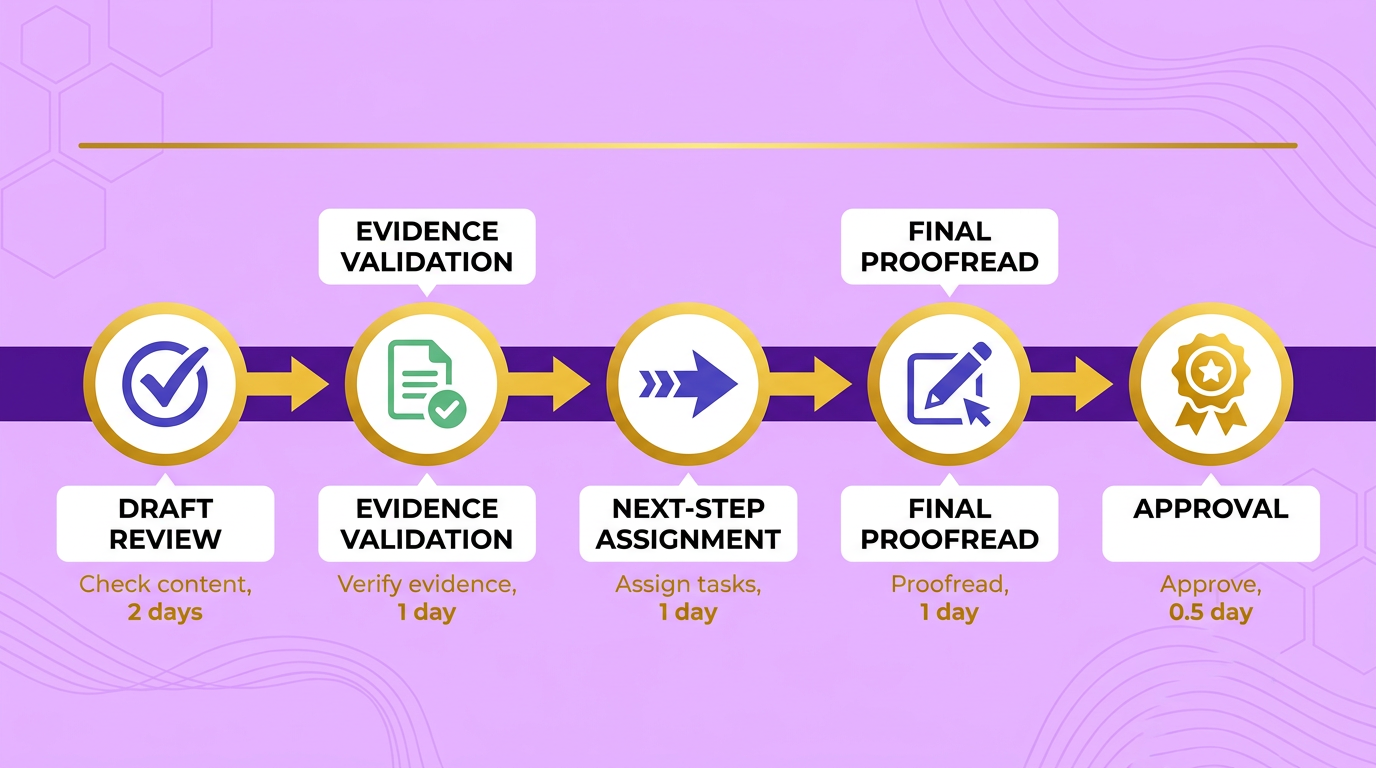
The Pre-Send Checklist
Run this against any executive summary report before it leaves your draft folder. Each item maps to one of the four tests. If an item fails, fix it before sending, not after the meeting.
- The decision statement names the action, owner, and deadline in one sentence. If a reader can’t tell what you want approved and by when, the summary isn’t ready.
- The ask survives without you in the room. Hand the draft to a peer who missed the analysis. If they can restate the request correctly, it passes the Forward Test.
- Every metric ties to a claim in the decision statement. Pull any number that doesn’t move the approve/reject lever and move it to the appendix.
- The metrics come from the CFO’s existing dashboard. DSO, collection rate, cash-application time, churn. Numbers a CFO already tracks inherit credibility; platform-specific figures don’t.
- Every next step names a person, a deadline, and a success criterion. “We should consider” is a fail. “Priya’s team runs a 30-day pilot by the 14th” is a pass.
- The summary runs 250 to 500 words on one page. That range holds whether you’re recommending a payment platform or reporting on churn.
- A reader who missed every meeting can act on it cold. No internal shorthand, no unexplained acronyms, no contradictions with earlier figures.
How Do You Rate the Draft Before It Ships?
Score each test from 1 to 3. A 1 means the test fails outright. A 2 means it passes but needs a rewrite. A 3 means it passes clean.
Add the four scores. Twelve is decision-ready. Nine to eleven goes back to the author with specific line edits. Eight or below means the summary is a status update wearing a recommendation’s clothing, and rewriting the prose won’t save it.
We find the rating scale matters more than the checklist itself. A binary pass/fail invites arguments about edge cases. A 1-to-3 scale forces the reviewer to say how far off the draft is, which is the feedback the author actually needs.
Where Should the Checklist Live in Your Workflow?
Answer first: Put the checklist inside the approval path, not beside it. If running the checklist is a separate step someone has to remember, it gets skipped under deadline pressure.
Three integration patterns work well. Pick one and commit.
Document-approval gates. Attach the checklist as a required field in your document-approval pipeline. The summary can’t advance to the executive reviewer until the author has ticked all seven items. This is the strongest pattern because it removes willpower from the equation.
Slack or chat reminders. A scheduled prompt in the channel where drafts get posted, timed to your weekly reporting cadence. Weaker than a hard gate, but useful for teams without a formal approval tool.
Peer review rotation. Assign one reviewer per cycle to run the checklist against every summary before it goes up. Peer review catches the “ask survives without you” failure better than any automated gate, because a human has to actually try to restate the request.
On the write-last question, the sources disagree, and it’s worth addressing head-on. One camp says write the summary last, after the analysis is complete. Another describes a five-phase process that starts with audience analysis. Both are right for different situations. Write last when you’re distilling finished analysis. Start with audience analysis when you’re proposing something new, because which metrics matter depends entirely on whether your reader is a CFO watching cost or a COO watching risk. For payment-platform evaluations, we default to the audience-first approach.
Does the Checklist Actually Work?
Measure it. After each executive review meeting, send a two-question survey: did the summary give you enough to decide, and did you need to ask a follow-up before acting? Track the follow-up rate over a quarter.
If follow-up questions drop, the checklist is doing its job. If they don’t, the problem is usually item three. Metrics that don’t tie to the decision statement are the most common reason a summary still generates questions after it passes every other test.
One honest carve-out: skip the full checklist for routine status summaries under 150 words. At that length there’s no room for a decision statement, and forcing one produces padding. The four tests are built for summaries that carry a recommendation, not for weekly updates that carry a pulse.
Common Pitfalls of Status‑Only Summaries (and How to Avoid Them)
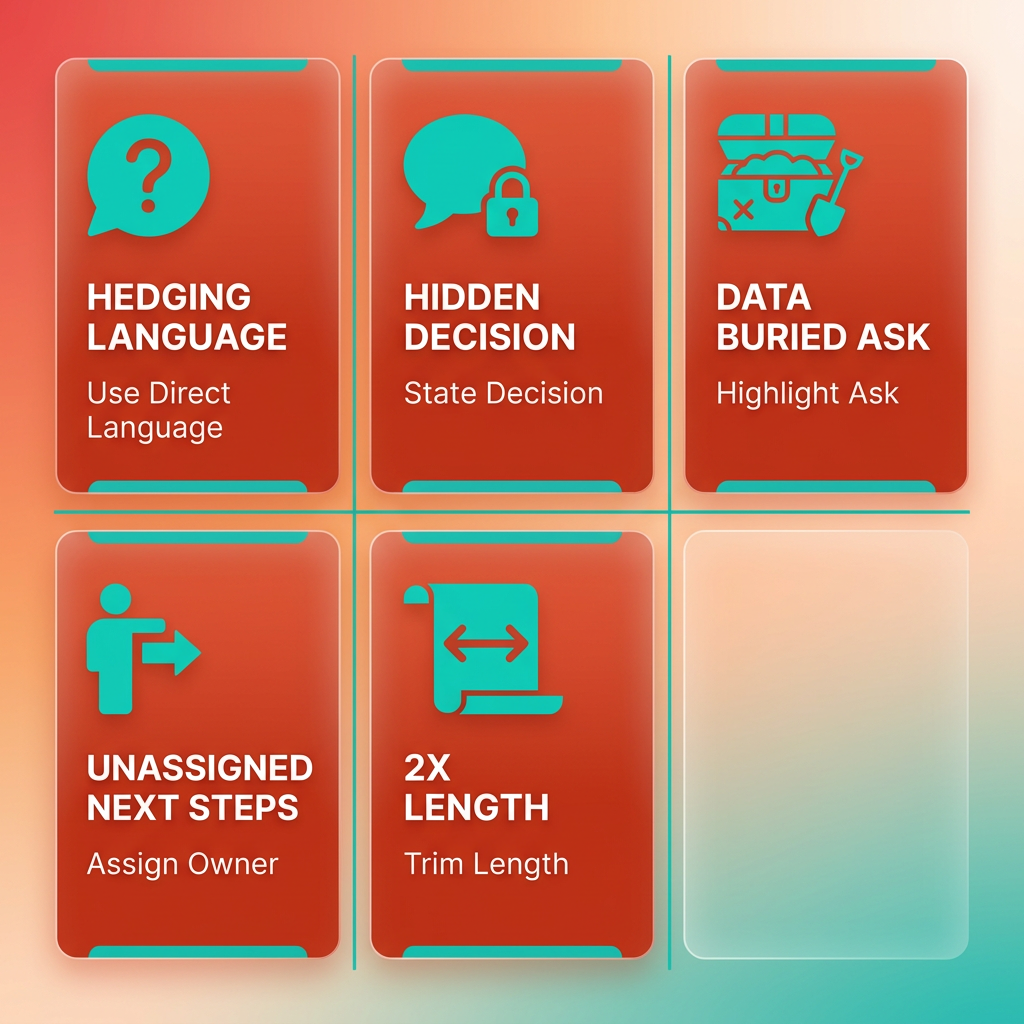
Most status-only summaries fail for five predictable reasons, and every one is fixable in a single editing pass. We see the same patterns repeatedly when finance teams send us payment-platform recommendations: the language hedges, the decision hides, the data buries the ask, the next steps float without owners, and the document runs twice as long as it should. None of these are analysis failures. They’re editing failures, and they cost decision windows.
Here’s what each pitfall looks like, why it stalls a CFO, and the quick fix we apply.
What Does Vague Language Actually Cost You?
Vague language forces the reader to do your thinking for you. When a summary says “we should consider evaluating options,” the CFO has to translate that into a decision, an owner, and a deadline before they can act. Most won’t. They table it.
The pattern is familiar to anyone who has watched a recommendation die in committee. A payment-platform recommendation that reads as a musing rather than a decision loses to the status quo by default. Not because a competitor won, but because nobody decided.
The fix is grammatical, not strategic. Replace “we should look at” with “we will.” Replace “it may be worth exploring” with “the team runs a 30-day pilot.” Replace “implementation of the new cash-application process” with a sentence that states what was implemented and what changed. The move is always the same: turn a vague implementation statement into a quantified result. It’s the single highest-use edit you can make.
- Hunt every hedge verb. Search the draft for “consider,” “explore,” “may,” “could,” and “should.” Each one hands the decision back to the reader. Rewrite as a declarative commitment or cut the sentence.
- Convert noun phrases into results. “Implementation of X” describes activity. “We implemented X and Y changed by Z” describes an outcome. CFOs fund outcomes.
- Name the cost of waiting. If the recommendation is delayed a quarter, what does that cost in DSO days? A number makes the status quo feel expensive instead of safe.
Where Do Overloaded Data and Buried Decisions Go Wrong?
A summary that leads with context instead of the conclusion gets skimmed and forgotten. The most common structural error we see is a summary that opens with three paragraphs of background before reaching the recommendation on page two. By then the CFO has stopped reading.
The fix is to flip the structure. Lead with the decision, follow with three or four reasons, then show the evidence. This is the conclusion-first logic experienced board presenters use, and it exists because executives read for three things only: where are we, what’s at risk, and what do you need from me.
On the data side, the failure is the opposite of too little. Teams dump every metric they collected because it feels rigorous. It isn’t. A summary carrying fifteen KPIs signals that nobody decided which five mattered. Pick the metrics a CFO already tracks, tie each one to a specific claim in your decision statement, and move the rest to the appendix.
- Move the recommendation to sentence one. If a reader has to reach paragraph three to learn what you want, the summary fails the forward test before it clears the first screen.
- Cap your headline metrics at three to five. Every additional number dilutes the ones that actually move the approve-or-reject lever.
- Cut any metric that doesn’t change the decision. If removing a chart wouldn’t change what the CFO does next, it belongs in the appendix, not the summary.
How Do You Fix Missing Next Steps and Excessive Length?
A next step without an owner and a date is a wish, and length is what happens when nobody edits. These two pitfalls travel together because both come from the same impulse: the writer is documenting rather than deciding.
We screen for this with one question: can a reader tell who does what by when? If the closing section reads like a list of intentions, the summary stalls regardless of how strong the opening was. The remedy is to name a person, a deadline, and a success criterion in one line for every action item.
Length is the easier fix. Keep the summary to a single page, and cut anything that doesn’t change the decision. The goal is a summary that stands alone, with the detailed financials and KPIs moved to an appendix for anyone who wants to dig deeper.
- Give every next step a name and a date. “Priya’s team runs a 30-day pilot on the top two platforms, decision by October 15” beats “the team should evaluate options.”
- Treat one page as the ceiling, then cut further. For CFO-facing summaries, shorter wins.
- Read it cold and time yourself. If a reader who missed every meeting can’t absorb the decision in under four minutes, the summary isn’t done.
Frequently Asked Questions
1. What should I do if my executive summary needs to ask for two decisions instead of one?
Split them into two separate summaries with a shared appendix. When a summary presents multiple decisions, the reader cannot approve one without implicitly deprioritizing the others, and that trade-off needs context a one-page format cannot carry. As a rule of thumb, if you cannot write the decision statement in under 25 words, more than one decision is hiding in there.
2. Can a summary pass the four tests if the underlying analysis is still incomplete?
No. The tests screen for decision-readiness, not analytical depth, and forcing a decision statement onto a genuine discovery update produces fake precision that executives spot immediately. Early-stage exploration memos where no recommendation exists yet should skip the full gate until a real recommendation is available to present.
3. How is the CFO Test different from just including financial numbers?
The CFO Test requires that a chief financial officer can actually price the decision, meaning the summary maps to revenue, cost, risk, or time with delay costs quantified per day. Simply including figures is not enough. Describing activity and effort with no financial translation fails the test even if the summary is full of data.
4. What is the difference between the Calendar Test and simply adding a deadline?
The Calendar Test passes only when the summary names the deadline the decision must beat, not just any date. A summary that arrives after the window closes or floats with no date fails. The date must force the decision, and next-step deadlines should land before the next executive review rather than after it.
5. Does every internal update need to go through all four tests?
No. Operational updates with no decision attached, such as routine reconciliation status for an already-approved platform, only need a one-paragraph note. The four-test gate exists to protect decisions, not to bureaucratize reporting, so run the full pass only when the summary carries an ask like funding, vendor approval, or a process change.
6. How can I tell whether my evidence section is too dense for an executive reader?
Cap the data-to-text ratio at roughly one number or short data clause per three sentences of prose. Use one comparison table instead of several mini-charts, show six-month trends rather than single snapshots, label every column with its unit, and cite sources briefly inline so the page reads as credible rather than promotional.
7. What is the fastest way to check whether a summary stands alone before sending it?
Read it aloud, run a readability check, and have someone outside the project read it cold. A stand-alone summary defines every internal term on first use, removes references to meetings or decks the reader may not have attended, and contains no contradictions between the summary and its appendix. A single wrong figure invites doubt about every other figure.