

cloud invoice processing

Key Takeaways
- Sales teams spend about 70% of their week on repetitive tasks.
- Cloud invoice processing reduces hardware limits and IT overhead.
- Vendors suggest piloting the system on a subset of invoices first.
- Lower upfront costs can mean faster ROI than on-premise deployments.
- The main AR automation outcomes are lower DSO, fewer labor hours, and faster turnaround.
Quick Summary
Cloud invoice processing moves billing work off local servers. It captures, matches, and routes invoices automatically. For subscription businesses, the payoff goes beyond faster data entry. It turns invoice processing into a cash-flow engine.
Manual billing still eats a huge chunk of your team’s week. Move to the cloud, and those hours return to finance. They can focus on cash-flow strategy instead of typing invoice numbers.
On-Premise vs. Cloud: What’s Worth Comparing
Cloud invoice processing wins on speed, scale, and upkeep. On-premise gives tighter physical control but a heavier IT load. Here’s how they stack up on the dimensions that matter most.
| Dimension | On-Premise | Cloud Invoice Processing |
|---|---|---|
| Deployment model | Local servers, manual installs | Hosted online, browser access |
| Scalability | Limited by hardware | Elastic, grows with invoice volume |
| Integration complexity | Custom middleware needed | Native CRM/ERP/API connectors |
| Security model | Your team owns patching | Vendor-managed, audit logs built in |
| Typical ROI period | Longer, high upfront cost | Faster, subscription pricing |
A phased rollout helps check integration stability. It also maps custom fields under real conditions. The gradual approach keeps disruption low while models learn your vendor layouts.
What Outcomes Should You Expect?
Teams that automate accounts receivable often see faster payment cycles. They also reduce administrative overhead. Wire your CRM into billing software, and you can generate clean invoices when a contract is signed. Small shops with automated recurring billing get steadier monthly cash without babysitting it.
The bigger shift is strategic. When automation creates one source of truth, your team stops second-guessing after the books close. Monthly close speeds up as reconciliation moves from manual review to instant validation.
Who Touches the System, and What’s Non-Negotiable
Five roles touch a cloud invoice processing system daily:
- AP/AR clerk: enters exceptions, reviews flagged items
- Finance manager: monitors DSO and approval queues
- IT admin: manages access, integrations, and security
- CFO: reads cash-flow forecasts and reconciliation reports
- Vendor/customer: pays and self-serves through a portal
Before you sign, confirm the system carries these:
- ✅ OCR/IDP data capture for line-item extraction
- ✅ AI-driven matching between payments and invoices
- ✅ Workflow approvals with role-based permissions
- ✅ API integrations to your accounting software and ERP
- ✅ Audit logs for compliance and data integrity
If you run recurring or usage-based billing, skip the heavy on-premise build. The subscription model rewards an elastic, integration-first approach.
Why Cloud Invoice Processing Matters
Moving to cloud infrastructure changes how financial documents move through your company. Manual touchpoints get replaced with automated, secure data pipelines. That’s the whole shift in one sentence.
End‑to‑End Cloud Invoice Processing Workflow
Cloud platforms move invoices through six stages: capture, extraction, validation, matching, approval, and reconciliation. Each stage feeds structured output into the next. That turns a messy inbox of PDFs, scanned images, and email attachments into clean ERP records. The workflow runs around the clock. Invoices arrive at any hour, and the system handles them until an exception appears.
Capturing Invoices From Every Channel
Your invoices don’t arrive in one tidy format. Cloud systems pull them from email attachments, FTP servers, supplier portals, and mobile uploads. One implementation we studied processes over 20 different supplier formats daily: PDFs with embedded text, scanned images with bad resolution, and multi-page statements mixing line items across currencies.
Optical Character Recognition (OCR) does the first pass on image-based files. Newer hybrid systems pair OCR with large language models to read context. When a field label says “Net Due” instead of “Total,” the AI recognizes both. Modern AI extraction reaches high accuracy across formats and processes documents in seconds instead of minutes. That speed matters when you’re handling thousands a month.
Validating and Matching Against Purchase Orders
After extraction, the system runs three-way matching: invoice line items against purchase orders and receiving records. Payment terms get checked against vendor agreements, catching early-payment discounts your team would otherwise miss. One financial controller noted that automated validation gave them a reliable ledger and cut most of the manual cross-referencing during month-end.
Exception handling is what separates the good systems from basic OCR. When an invoice tops the PO by more than your tolerance threshold, the system flags it and routes it to the right approver based on customizable workflows. Good matching engines minimize false exceptions, leaving only genuine discrepancies that need a human.
Routing Approvals and Posting to Your ERP
Approved invoices move to payment scheduling. The system connects to your ERP through pre-built connectors, so no custom API work is needed for most platforms. One finance team cut their monthly close from 11 days to 5 after switching to cloud processing, mostly because invoices post to the general ledger the same day they’re approved instead of waiting for a batch upload.
Real-time dashboards show every invoice’s status: which documents are stuck in approval, which vendors have outstanding balances, and where payment terms leave early-payment discounts on the table. Tie that visibility to cash-flow forecasting, and accounts payable stops being reactive. Knowing what you owe and when makes it easier to plan.
Reconciliation and the Collections Layer Most Systems Skip
Processing invoices fast only helps cash flow if customers actually pay. Most cloud platforms stop at posting and leave collections as a separate manual grind. That’s where AI-driven follow-up closes the loop for subscription businesses.
The system tracks due dates and fires automated reminders through the customer’s preferred channel: email, SMS, or in-app. When a payment fails, it retries the card on file and only escalates to a human after several automated attempts. Teams running high invoice volumes report that automated collections recover a substantial share of failed payments with no staff intervention. That turns would-be write-offs into collected revenue.
This stage also flags patterns: customers who always pay late, cards nearing expiration, and accounts creeping toward credit limits. Your finance team sees those signals in the same dashboard where they approve invoices. They can address cash-flow risk before it becomes a write-off. That closed loop makes cloud invoice processing a revenue operations tool, not just a faster way to key in data.
Core Technologies Powering Cloud Invoice Processing
Modern platforms run on four technology layers, and how they work together decides whether automation stops at data entry or reaches into collections. Optical character recognition pulls text from PDFs and scanned images. Machine learning models classify line items and match vendor records. Robotic process automation routes exceptions through approvals. API-first architectures sync everything with your ERP and payment rails in real time. The difference between a system that saves ten hours a week and one that speeds up cash flow lies in how these four fit together.
Good invoice automation needs speed and field-level accuracy at once. A hybrid setup pairing traditional OCR with large language models can reach high extraction accuracy across formats while processing each document in seconds. That speed matters less for the invoice itself than for what comes after. Clean data lands in your collections layer immediately instead of waiting on manual fixes. Reminders go out on schedule, and dispute resolution starts before customers forget the context.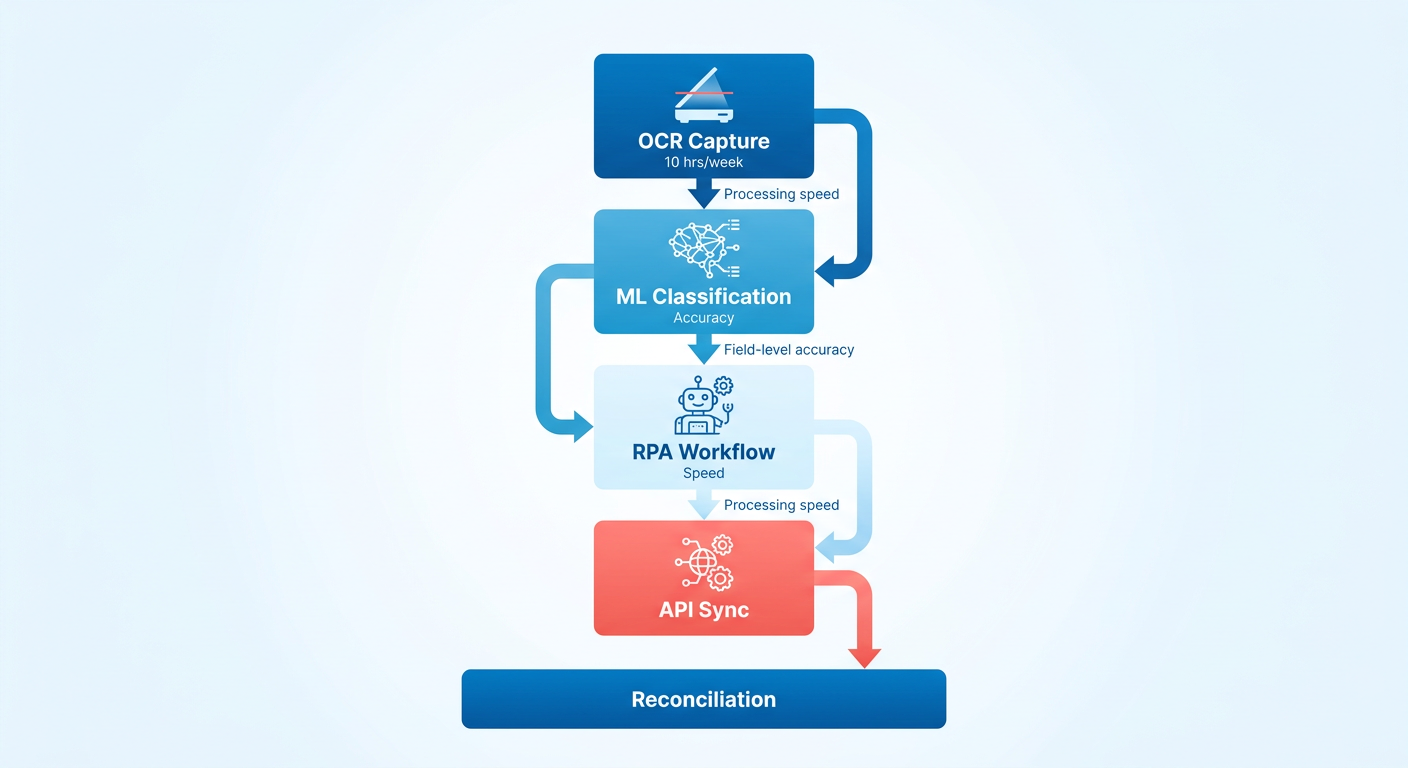
What Separates Modern IDP from Basic OCR?
Basic OCR reads characters. Intelligent document processing reads structure, learns vendor-specific layouts, and validates extracted data against business rules in one pass. Pure OCR treats every invoice as a generic text block, which limits accuracy. At high volume, even small error rates pile up into big exception queues that need human review. A finance team can’t chase that and still have room for strategic collections work.
Hybrid architectures pair OCR with machine learning models trained on invoice patterns. They know “Net 30” in the payment-terms field means something different than “Net 30” buried in a line-item description. They flag mismatches between extracted amounts and calculated totals before the invoice reaches your ERP. One organization processing thousands of supplier invoices daily cut exceptions so sharply that their AP team shifted from data validation to supplier negotiations and early-payment discount capture.
The accuracy gap compounds at scale. Lower accuracy means more exceptions per batch, and each one delays approval routing, payment scheduling, and collections triggers. You see it in close timelines. Teams that switched to AI-enhanced extraction report faster close periods, mostly because fewer invoices stall in validation and the finance team can finalize the ledger without the usual bottleneck.
Machine Learning Models That Drive Line-Item Intelligence
Classification models do more than sort invoices into buckets. They learn how line items map to GL codes, how vendor names vary across systems (ABC Corp vs ABC Corporation vs ABC Co), and which payment terms should trip cash-flow alerts. They improve with volume. A system on its first few hundred invoices from a new vendor might need manual coding for ambiguous line items. After a few thousand, it predicts the right code with high accuracy for that vendor’s typical patterns and routes real exceptions, like an unexpected service category, straight to the right approver.
That vendor-matching intelligence prevents duplicate payments and catches pricing discrepancies before you pay. An invoice arrives from “ABC Services LLC” but your vendor master lists “ABC Solutions.” The model flags the possible match and asks you once. After you confirm, it handles that variation on its own going forward. Teams using this level of automation report meaningful drops in processing errors, which shows up directly as fewer payment disputes and steadier vendor relationships.
The real use comes when these models feed collections. If line-item classification shows that most of your overdue invoices come from recurring customers with clean payment histories, your team can point collection calls at accounts with actual payment friction or credit risk. Clean data in, targeted action out. That’s what turns automation into a cash-flow engine instead of a filing system.
API-First Architecture: The Bridge to Real-Time Cash Flow
Cloud platforms built on REST and GraphQL APIs don’t just shuttle data between systems. They create bidirectional sync loops where invoice status, payment confirmations, and customer messages update across your ERP, payment processor, and CRM with no manual touchpoints. A customer pays, and that status change updates your accounting system and drops the invoice out of your collections queue in under a second. No batch processing, no overnight reconciliation jobs, no version conflict between what sales sees and what finance knows.
Real-time sync matters most for subscription businesses, where billing, payments, and service delivery run continuously. If an invoice fails payment on Tuesday, your collections layer needs to know Tuesday, not when someone runs Thursday’s reconciliation report. Leading platforms hit high sync rates, so disputed charges get flagged before they age into write-offs and payment failures trigger retry logic while the context is still fresh.
API-first design also decides how easily you can bolt on new tools as your stack grows. A platform with clean endpoints for invoice data, payment status, and customer records lets you plug in specialized collections software, cash-forecasting dashboards, or payment-plan tools without custom dev work. We see teams adopt serverless and container-based infrastructure to scale processing during peak periods, like quarter-end or seasonal billing, without paying for idle capacity the rest of the year. That elasticity keeps per-invoice costs low even when volume spikes.
The choice between monolithic platforms that bundle everything and composable systems that connect best-of-breed tools through APIs decides whether your invoice processing adapts to your business or forces you to adapt to the software. The teams with the lowest processing costs consistently pick API-native platforms that automate the repetitive work and save human judgment for the collections decisions that move cash.
What to Look For When Comparing Platforms
At high invoice volumes, small accuracy drops mean bigger validation burdens. High-accuracy extraction plus fast processing doesn’t just save clerical time. It also reduces downstream collections friction: wrong amounts coded to the wrong customers, payment terms misread, duplicate invoices sent because the first never closed cleanly.
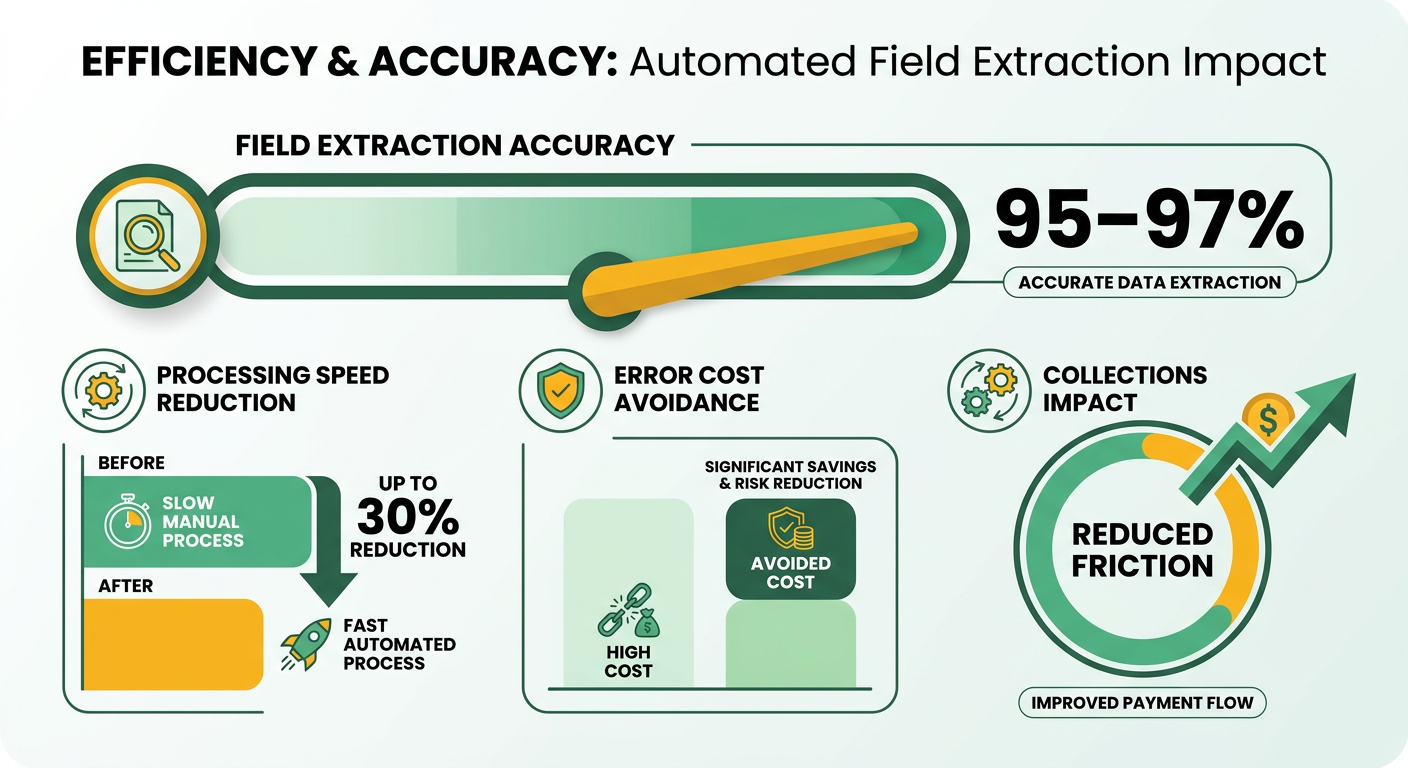
Most buyers anchor on data-capture accuracy and ERP integration depth, which makes sense for AP workflows. But subscription businesses need to push a layer deeper and ask whether the feature set supports intelligent collections, not just invoice creation.
What Separates a Processing Tool From a Cash-Flow Engine
The baseline features are well covered everywhere: OCR capture from email and FTP, three-way PO matching, multi-currency support, audit trails. Every serious contender has those. The differentiator is whether the platform routes invoice data into automated payment follow-up that adapts to how each customer actually pays.
Look for approval workflows that let you set customer-specific rules: net-30 for high-trust accounts, prepayment for new subscribers, automated reminders at day 15 for slow payers. Reminder sequences tied to invoice aging turn collections from reactive chasing into a systematic recovery process that pulls down days sales outstanding.
How Real-Time Dashboards Should Surface O2C Blockers
Generic reporting shows you invoice volume and approval cycle time. Order-to-cash visibility means surfacing which invoices are stuck in validation exceptions, which customers pay late, and which billing errors trigger the most disputes. Leading platforms flag exceptions before they cascade into payment delays, which drives processing costs per invoice well below manual workflows.
Prioritize dashboards that show aging by customer cohort and exception type, not just aggregate metrics. When a validation rule catches a mismatch between contracted terms and invoiced amounts, your collections team needs to see it in real time, not discover it when the customer disputes the charge three weeks later.
Understanding Total Cost Beyond Platform Fees
Here’s the pricing contradiction you’ll run into: some platforms advertise zero subscription fees but charge transaction percentages or FX spreads; others bill per-user seats but include unlimited invoice volume. A “free” platform processing thousands of invoices in seconds still costs you if it lacks the approval-routing intelligence that keeps your finance team from manually triaging hundreds of exceptions a day.
Model total cost of ownership by running your exception rate against the platform’s accuracy spec. Fewer processing errors mean fewer customer disputes and faster payment cycles. For subscription businesses where recurring billing compounds small errors across hundreds of cycles, that accuracy ROI outweighs modest fee differences.
When you’re sizing up vendor maturity, ask how the system handles multilingual invoices and irregular layouts without custom config. Press for specifics on sync reliability with your ERP; platforms with strong sync close the reconciliation gaps that delay cash application. Skip solutions that make you build those connections yourself, unless your team has dedicated integration resources.
Integration Strategies with ERP, Procurement, and Payment Systems
Cloud invoice processing only speeds up cash flow when it syncs cleanly with your existing financial systems. Too many implementations nail the extraction stage, then lose weeks chasing reconciliation errors because the integration layer treats the ERP as an afterthought. The bottleneck shifts from data entry to data mapping, and your team ends up hand-validating transactions that should have closed on their own.
At high volumes, small integration gaps produce steeply higher error counts. When your cloud platform and ERP speak different dialects for tax codes, cost centers, or GL accounts, each mismatch creates the collections delay your automation was supposed to kill.
What Native ERP Connectors Actually Deliver
Pre-built connectors for the major enterprise platforms handle the structural translation, mapping invoice fields to the chart-of-accounts logic your finance team already uses. One provider we studied keeps live integrations with over 250 ERP systems, which sounds exhaustive until you realize your procurement workflows probably touch systems that connector wasn’t built for. The question isn’t whether a vendor lists your ERP on their compatibility page. It’s whether the connector handles your customizations: the extra approval tiers you added for capital expenses, the department-level cost allocation your controller set up three years ago, the multi-entity consolidation that runs across subsidiaries.
At Blixo, our matching engine hits strong match rates at the envelope and item level from multiple sources, and it gets smarter over time as your team makes manual edits. That precision matters because it kills the manual reconciliation loops that eat finance-team hours. When an invoice lands with payment terms your system doesn’t recognize, or a vendor ID that doesn’t match your master file, someone has to step in. Scale that across a few thousand invoices a month and you’ve effectively hired a full-time reconciliation analyst. Blixo offers QuickBooks, Xero, Sage Intacct, and NetSuite integrations, plus custom ERP integrations for Oracle, SAP, and Microsoft Dynamics.
When Middleware Fills the Gap
iPaaS solutions bridge cloud invoice platforms to legacy systems that never expected to talk to outside automation. We work with subscription businesses running billing logic in one system, procurement approvals in another, and general-ledger updates in a third. Middleware stitches those workflows together without forcing a full replatform of your financial stack.
Teams running procurement through decades-old on-premise systems can cut processing time when a middleware layer transforms inbound invoices into the exact schema their legacy software expects. That time saved compounds when your team redirects those hours toward proactive collections instead of transaction processing.
The choice between lightweight API bridges and full middleware orchestration comes down to how many systems you’re connecting and how often your data schemas change. Lightweight bridges work when you’re syncing two stable systems. Full orchestration earns its complexity when invoices route through approval chains that span procurement, finance, and operations.
Idempotency and Duplicate Detection in Practice
Payment systems without idempotent API design create duplicate invoices when network timeouts trigger retry logic. Your cloud platform sends an invoice, the network hiccups, the platform assumes failure and resends, and your ERP processes both. Now you’ve billed a customer twice, and your collections team is fielding confused phone calls instead of closing overdue accounts.
Automating invoice processing can cut manual effort and errors, and duplicate detection at the API layer is a key safeguard. A well-designed system generates a unique fingerprint for each invoice (vendor ID + invoice number + date + amount) and rejects any submission that matches an existing one. Retries become safe because the ERP recognizes them as duplicates, not new transactions.
Blixo runs an approval workflow so nothing posts before you’ve confirmed it, and reconciles automatically as payments and balances match to invoices. That reconciliation discipline heads off the silent failures that surface weeks later, when month-end close turns up invoices your team thought had posted but your ERP never received.
Measuring ROI and Business Impact
ROI on cloud invoice processing comes down to four measurable buckets: labor hours reclaimed, days sales outstanding (DSO) reduced, error costs avoided, and compliance risk cut. What most finance teams miss is that these buckets compound. Faster processing feeds cleaner data, which feeds faster collections, which shrinks DSO.
Here’s the baseline math. Automated invoice processing speeds up processing time, and modern OCR extraction reaches high accuracy. Those two factors are what make cloud invoice processing pay for itself. Speed alone saves clerical hours; accuracy is what keeps bad data from clogging collections downstream.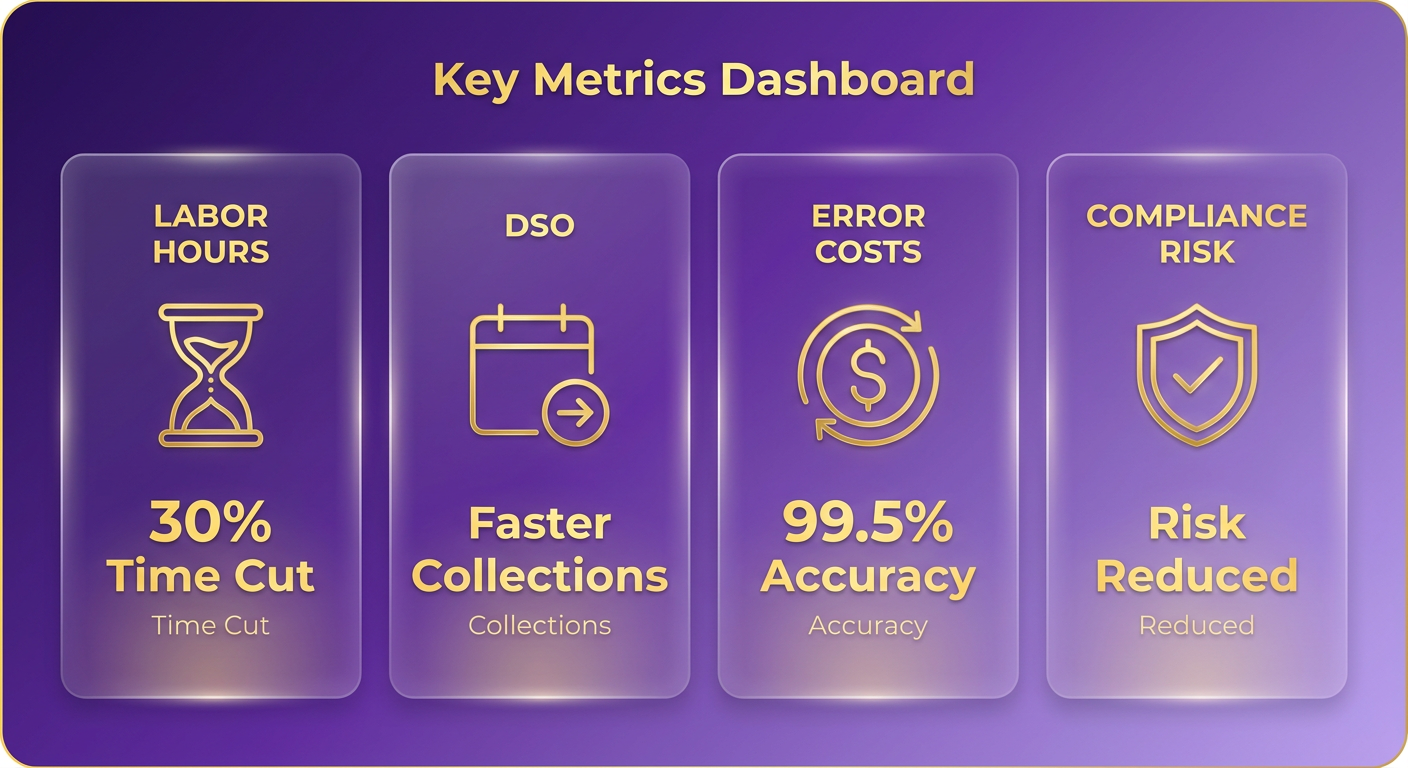
How Do You Calculate Time Saved and Cost Per Invoice?
Start with your current cost per invoice, then measure it again after 90 days of automation. The formula is simple: total AP labor cost plus software cost, divided by invoices processed in the period. Track it monthly and the trend line tells you everything.
For the baseline, log three inputs: average minutes to process one invoice manually, fully-loaded hourly cost of the person doing it, and monthly invoice volume. Multiply them out. Then re-run the same math post-automation, using your observed efficiency gains as your conservative floor.
The company cut its invoice processing time through centralized procurement and automation.
That “no more typing” line is the whole point. Every keystroke you remove is one that can’t introduce a transposition error later.
What KPIs Belong on Your ROI Dashboard?
Three metrics tell you whether automation is actually moving cash, not just moving paperwork: DSO, invoice exception rate, and processing cost per invoice. Track all three on one dashboard and review them monthly against your pre-automation baseline.
- DSO: how many days it takes to collect after billing. Your cash-velocity headline.
- Exception rate: the percentage of invoices that need a human. A falling rate proves your extraction and matching are working.
- Cost per invoice: your efficiency trend. It should drop steadily as volume scales without added headcount.
Exception rate is the leading indicator everyone ignores. It moves weeks before DSO does. Watch it climb and you can fix the root cause before it stalls collections.
Where the Real ROI Hides: Error Avoidance
Manual invoice processing is expensive not because of the labor, but because of the mistakes. Duplicate payments, late fees, misapplied credits, all of them trace back to hand-keyed data. Cloud systems that push digitized invoices straight into accounting software cut those errors at the source.
Here’s what most guides skip. The bigger payoff isn’t the AP hours you save. It’s the collections friction you never create. When invoices go out clean and coded right the first time, your team stops chasing corrections and starts closing accounts.
That’s the difference between automating a workflow and building a cash-flow engine. Measure both, and the second number is usually the one that justifies the whole spend.
Implementation Best Practices & Change Management
Rolling out cloud invoice processing is a change-management project first and a software install second. The technology delivers, but the results only show up when your team adopts the workflow, your data migrates cleanly, and someone owns the process after go-live.
A useful way to structure the rollout: plan, pilot, scale. Each phase has a milestone that has to clear before you touch the next. Skip the gates and you inherit the pitfalls that kill these projects. Scope creep and dirty source data top the list.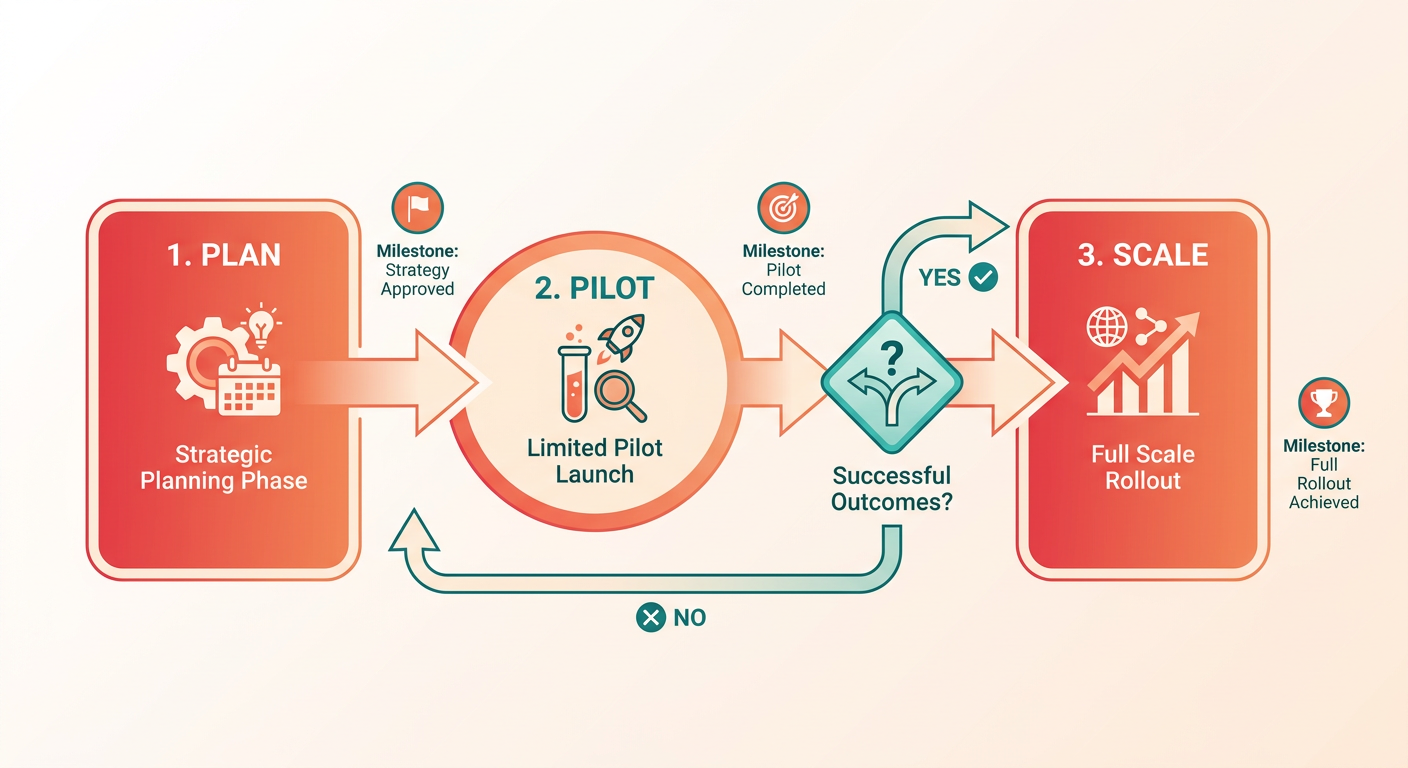
How Do You Phase a Cloud Invoice Processing Rollout?
Phase your rollout by risk, not by feature list. Start with a single invoice channel and a small vendor set, prove accuracy and reconciliation, then expand. A pilot that processes real invoices end-to-end tells you more than any vendor demo.
Assign a clear owner to each phase gate. Plan-phase sign-off comes from finance leadership; pilot sign-off belongs to whoever runs day-to-day AP; scale sign-off needs IT confirmation that integrations hold under volume. When nobody owns a gate, projects stall in review limbo. One common failure: a pilot that drags for months because nobody has the authority to call it done.
During the pilot, validate the parts that break silently. One demonstrated workflow checks payment terms against vendor agreements before an invoice clears, catching mismatches that would otherwise surface after books close. That kind of validation keeps a collections layer from chasing an amount you never should have billed. Same reason Blixo pairs invoicing with automated collections, chasing, and dunning in one platform.
Who Owns the Process After Go-Live?
Stand up a governance board before you scale, not after. Give it finance, IT, and a collections lead, and meet monthly to review exception rates and accuracy drift. Continuous improvement is the whole point. Teams that pair DevOps practices with machine learning report steadier processes and ongoing error reduction as the models retrain on their own invoice history.
Define the metrics the board reviews before the first meeting. Track exception rate, mean time to resolve a flagged invoice, and the share of invoices touched by a human. A board that watches trend lines instead of single-month snapshots catches drift early. A two-point rise in exceptions across three months signals a data or vendor problem worth chasing before it compounds. Set targets against your own baseline, not a vendor’s headline figure.
What Keeps Your Invoice Data Audit-Ready?
Lock down access and log everything from day one. Configure role-based access with least-privilege defaults, so each user sees only what their job requires. Encrypt invoice data at rest and in transit. Then make sure every action leaves a trail.
Audit-ready reporting means change logs and clear data lineage. One AI-driven workflow tracks skipped documents and field mismatches specifically for auditability, so when a regulator asks how a figure was derived, the answer is one query away. That log doubles as collections evidence. When a customer disputes a charge, the lineage shows exactly what was billed and why. Blixo’s audit trail and event log support this kind of compliance and data integrity.
The payoff compounds. Killing manual data entry lets your finance team shift from reactive reconciliation to proactive cash-flow management, and that’s what holds up over the long run.
Frequently Asked Questions
1. Is cloud invoice processing secure enough for sensitive financial data?
Yes. Modern cloud platforms protect sensitive financial data using advanced encryption standards for data both in transit and at rest. They restrict access through strict user authorization protocols and maintain comprehensive, immutable activity logs. This ensures every document modification or approval is documented, meeting corporate compliance and external audit requirements.
2. What happens when an invoice doesn’t match a purchase order?
When a discrepancy occurs, the platform automatically isolates the affected document and alerts the designated team member for review. The system highlights the specific line-item mismatch—such as unit price variances or quantity differences—allowing for rapid resolution. Over time, the system learns from these manual corrections to improve future matching accuracy.
3. Can these systems handle invoices in different formats and languages?
Yes. Intelligent document processing platforms are designed to ingest a wide variety of document types, from digital-native files to low-resolution scans and mobile uploads. By leveraging advanced contextual analysis, the AI can accurately identify key billing fields regardless of the document’s layout, language, or currency, ensuring seamless processing for global supply chains.
4. How does the AI matching improve for vendors with name variations?
The system uses entity resolution algorithms to cross-reference incoming invoice details with your existing vendor database. When a minor spelling variation or subsidiary name is detected, the platform prompts a one-time confirmation. Once verified, the system maps that specific variation to the correct master record, preventing future duplicates and ensuring consistent ledger coding.
5. Should I connect a single all-in-one platform or best-of-breed tools?
It depends on your operational complexity. An all-in-one platform simplifies vendor management and provides a unified interface out of the box. However, a modular, API-first approach allows you to connect specialized tools tailored to your unique billing, payment, and customer relationship needs, ensuring your financial stack can scale and adapt as your business model changes.
6. What if my ERP has heavy customizations a standard connector wasn’t built for?
For highly customized ERP environments, platforms utilize flexible API endpoints or middleware solutions to map data precisely to your unique database schemas. This ensures that custom fields, complex cost-allocation rules, and multi-entity workflows are preserved. Blixo, for example, provides robust integration capabilities that can be tailored to align with both standard accounting software and highly customized enterprise systems.
7. Does automated processing actually help with collecting overdue payments?
Yes, when the platform includes an integrated collections layer. By linking invoice status directly to automated communication workflows, the system can initiate personalized follow-ups the moment an invoice becomes overdue. This continuous, automated outreach keeps accounts active and resolves payment failures early, significantly reducing outstanding balances without increasing administrative workload.