

ERP vs Dedicated AR Software: Time Saved on Payment Matching

In short:
Finance teams often report spending hours each week cross-referencing bank statements against invoices when payments arrive without enough detail to match them. Unmatched payments can mean inaccurate cash-flow reports, misdirected collections, and delayed revenue recognition. Payment data and remittance details frequently travel through separate channels. Depending on the processor and customer behavior, ACH payments may clear before the email explaining what they are for. Many ERP payment workflows are designed around one payment per invoice, which can break down when subscription businesses process mid-cycle upgrades, prorations, or consolidated payments. Manual matching can force your team to reverse-engineer billing logic when customers bundle multiple invoices into a single payment. White-label payment portals can reduce this by capturing payment and remittance data in a single flow, potentially removing post-payment matching for the transactions that go through the portal. Cash application automation speeds up straightforward transactions but does not necessarily fix the root issue: disconnected payment channels.
Why payment matching actually matters
When your finance team reconciles payments manually, every wire transfer, ACH payment, or check has to be opened, decoded, and matched to the right invoice before you can mark anything paid. This compounds quickly. For example, a SaaS company processing a few hundred subscription payments per month may handle straightforward renewals fine, but mid-cycle upgrades, prorated downgrades, and consolidated payments spanning multiple invoices can stall the matching process.
The damage extends past your AR team. Until a payment is matched and applied, your accounting system may still show the invoice unpaid. Cash-flow reports can stay wrong. Collections might chase customers who already paid. Revenue recognition can be delayed—especially for subscription businesses under ASC 606. Finance practitioners sometimes describe wasting hours each week comparing bank statements to invoice records, only to find the customer’s internal PO number does not match the invoice number and the remittance email arrived days after the payment cleared.
Manual matching breaks at scale
Manual processes create errors that compound with transaction volume. The errors are not random. Partial payments, multi-currency transactions, and subscription prorations can all resist simple matching rules. For example, when a customer pays less than the invoiced amount, your team may investigate whether it is a short payment, a disputed line item, or an applied credit that was not recorded.
For subscription SaaS companies, complexity multiplies. A customer who upgrades mid-month may generate a prorated invoice bundled with a base subscription fee and a prior outstanding balance. Manual matching can require team members to reconstruct billing logic behind each payment. Many ERP systems are optimized for straightforward invoice-to-payment pairs. Complex scenarios involving multiple invoices, partial payments, and consolidated transactions are where some dedicated AR software can add value.
Automation removes busywork, not the problem
Cash application automation can clear substantial manual work by auto-matching straightforward payments to invoices. That can be real time savings for high-volume operations. But automation does not necessarily fix the root cause: the information needed to identify a transaction may be split across banking records and customer communications. An ACH payment may arrive with an abbreviated reference while the supporting invoice detail sits in an email inbox. Until both pieces are available, the application decision may still require human review.
Architecture matters more than algorithms here. Platforms with white-label payment portals can be configured to capture payment and remittance data together at the transaction point. In that setup, the customer selects which invoices to pay, enters payment details, and the system records both simultaneously. That can eliminate waiting for remittance emails or decoding cryptic bank references. The payment is pre-matched before it hits the bank account.
Automation makes your team faster. It does not necessarily speed up collections unless unclear invoices, delayed remittance data, and disconnected payment channels are also addressed. A good AR tool can save your team hours. Some platforms are designed to close the loop between invoicing and payment so there is less left to match manually.
Benchmarks for manual-work reduction should be read carefully. For example, Enate has published a manual-work reduction figure in automation materials, but that may reflect broader workflow automation rather than complex SaaS remittance matching.
ERP AR modules: how they approach payment matching
Many ERP systems include a payment-matching module, but those modules are often optimized for a billing model that may not match how recurring revenue companies actually get paid. They often assume one invoice equals one payment, received on or near the due date, with clean remittance details. That model works for many purchase-order-driven B2B transactions. It can break down when you introduce mid-cycle upgrades, prorated downgrades, or consolidated payments spanning multiple billing periods.
Why ERP payment matching struggles with subscription complexity
Billing features built into ERP systems can hit limits with partial, consolidated, or multi-currency payments and may require time-consuming manual intervention. Your bank feed may show a single ACH deposit while your ERP shows several open invoices for that customer. The payment reference may contain the customer’s internal ID instead of your invoice numbers, or it may be truncated as generic text.
The problem is not only identifying the payer. Teams often must determine how the amount should be allocated, whether a credit applies, and which service period the transaction belongs to. That investigation can keep an otherwise complete payment in an exception queue. The longer it stays there, the less reliable daily AR reporting may become.
ERP software may require more input from teams than some dedicated reconciliation tools, whether through rule configuration or manual exception management. When a customer pays less than the full invoice amount, an ERP may log the transaction without automatically sending a follow-up about the shortfall or analyzing whether that customer habitually underpays. It may record transactions but not help you manage cash flow or customer relationships in real time unless additional workflows are configured.
Implementation cycles and integration flexibility
Large-enterprise AR implementations using ERP platforms can require extended implementation cycles, depending on software configuration and IT involvement. Even simple updates can require significant configuration work in some environments. Customizing an ERP for AR team needs can lead to complexity, delays, and limited results.
| Factor | ERP Payment Matching | Dedicated AR Software |
|---|---|---|
| Automation depth | Rule-based matching for straightforward cases in many ERP configurations | May handle partial, consolidated, and multi-currency payments through configurable rules |
| Remittance handling | Often requires clean payment references; exceptions may need manual intervention | Can capture payment and remittance together at transaction point when white-label portals are configured |
| Complex payment scenarios | Manual reconciliation often required | Automated matching with configurable rules in some platforms |
| Implementation timeline | Can involve extended cycles and significant IT dependency | May be faster; varies by platform and integration scope |
The gap often comes down to architecture. ERP platforms integrate multiple business functions—inventory, procurement, HR, general ledger—into one database. That breadth is their strength, but it can also mean the AR module competes for development resources with other departments. Dedicated AR platforms are often built around matching payments to invoices, which may make it easier to address edge cases such as prorated charges, tiered pricing adjustments, and usage-based billing that ERP modules may treat as exceptions requiring manual cleanup.
Integration flexibility matters, but maybe not the way most teams think. Connection quality can matter more than quantity. A deep, reliable integration that preserves transaction context and supports bi-directional invoice status updates may beat shallow connectors that leave finance staff filling in missing fields.
For subscription businesses processing hundreds of recurring transactions monthly, the payments that resist automation may not be random errors. They are often the complex cases: mid-cycle changes, consolidated payments, credits applied against future invoices. Many ERP tools optimize for straightforward scenarios. Your ERP may record those transactions but may not chase the past-due portion or flag customers whose payment behavior suddenly changes unless configured to do so. If your growth depends on solving those edge cases, you may need software purpose-built for them.
Legacy dedicated AR tools: the traditional alternative
When evaluating dedicated AR software against ERP modules, the integration question becomes central. Vendors often advertise extensive connector libraries, which can sound compelling until you examine what “seamless data exchange” actually delivers for payment matching.
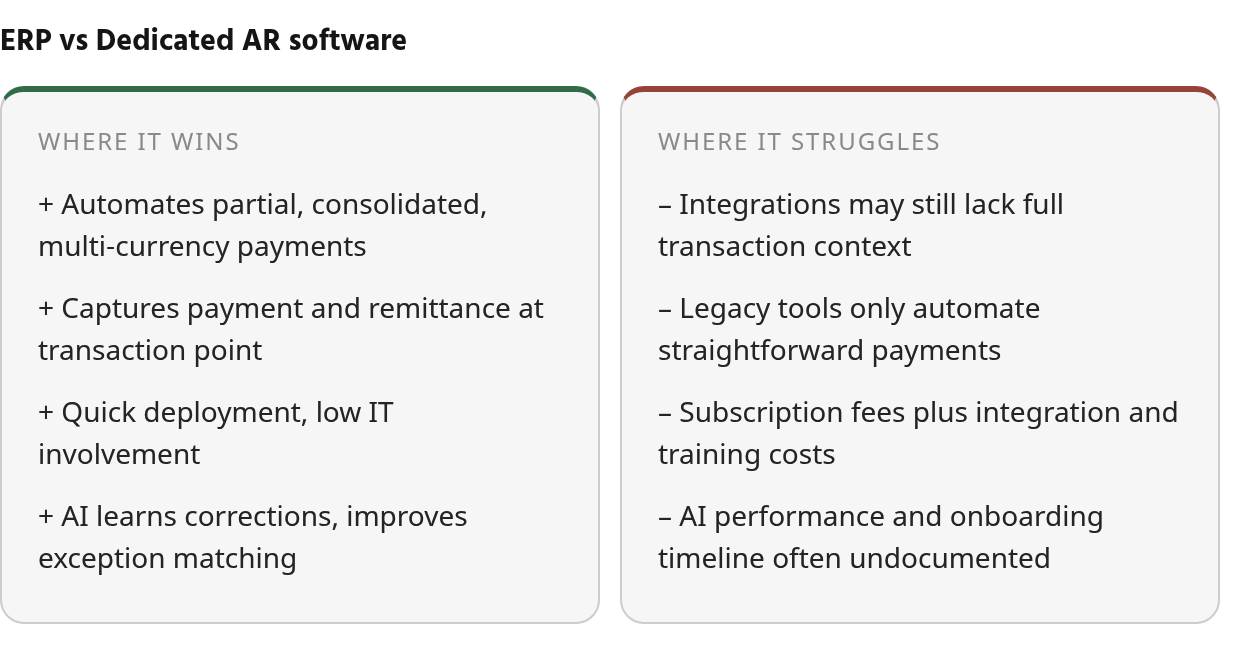
Connector count may matter less than the completeness of the resulting record. A system may connect to a bank and an ERP yet still leave staff searching for context when a transaction lacks a usable invoice identifier. The real test is whether the integration preserves enough detail to support confident application without manual lookup, rather than simply moving records between systems.
Where dedicated AR tools separate from ERP baselines
Dedicated AR platforms often position themselves as specialists built for payment reconciliation. That specialization can show up in automated rule engines for partial and consolidated payments, workflow tools for dispute resolution, and analytics that surface payment patterns that may not be visible in ERP dashboards.
The automation claims need context. Manual process mistakes are frequently cited by financial operations teams as a pain point, and many vendors promote substantial reductions in manual work through automation. For example, Enate has published a manual-work reduction figure in automation materials, but that may reflect broader workflow automation rather than complex SaaS payment matching. In many implementations, automation clears straightforward payments—the clean, one-invoice-per-payment cases that may already work fine in an ERP. The complex minority—prorated upgrades, consolidated payments covering multiple billing periods, multi-currency transactions—may still resist automation because the underlying billing logic is messy.
| Capability | ERP Payment Matching | Dedicated AR Software |
|---|---|---|
| Integration setup | Custom coding may be required for some workflows | Pre-built connectors for common ERPs may be available |
| Partial payment handling | Manual intervention often needed | Automated rule-based application may be available |
| Implementation timeline | Tied to ERP deployment cycle; timelines can stretch with complex billing rules | Varies by platform scale and complexity |
| Payment-invoice matching | Rule-based, often requires clean remittance | Some platforms offer AI-assisted matching for incomplete data |
Cash application benchmarks in some datasets show automated match rates around 70% for the median and around 80% for the top third. Those figures are often directional; they may not isolate complex SaaS payments such as prorations, partial payments, or consolidated invoices, so they should be compared against your own transaction mix.
For subscription businesses juggling mid-cycle changes, those complex cases are where your team may actually lose time. If a dedicated AR tool does not excel at those edge cases, you may be paying for a connector library that does not address your actual bottleneck.
Which solution fits your payment-matching workload
Your transaction volume and billing model should determine which tool makes sense. ERP AR modules can work if you process straightforward invoices, customers pay on time, and transaction records arrive with enough detail to identify the obligation. These systems may require IT configuration for workflow changes, and timelines can stretch further when you introduce proration logic or multi-currency payments—areas the module may not be designed to handle.
Legacy dedicated AR tools can improve on that baseline. Vendor documentation often describes bank-feed capture and rule-based matching. Straightforward payments may be handled automatically. Exceptions often land in a queue for manual review. That queue can grow when customers consolidate multiple invoices into one payment or send partial amounts with vague references. The software may organize the inbox, but your team may still be doing much of the matching work.
AI-powered platforms are often described as flipping that ratio by learning from corrections and applying patterns to future exceptions. Some vendors report that match rates improve after initial billing cycles; available cash application benchmarks include automated match rates around 70% for the median and around 80% for the top third, but these may not isolate complex SaaS payment scenarios such as prorations, mid-cycle upgrades, or consolidated invoices. In some platforms, finance teams may adjust matching rules without waiting for IT, though this varies by product and permissions. These capabilities should be verified in a live demo with your own billing data. The core difference may still be clear: traditional AR software can automate easy payments, while some AI platforms aim to address exceptions that consume the most team time.
Mid-market ownership matters. In 50–500-employee SaaS companies, finance teams often accumulate disconnected AR tools because billing is operated by finance while ERP configuration is controlled by IT. When pricing and proration rules change, finance-controlled dedicated workflows may adapt faster than ERP customization, provided the finance team can maintain the rules without IT escalation.
Total cost beyond the license fee
ERP modules can appear cheaper upfront if you already own the license. Actual costs may emerge during customization. New billing scenarios such as usage-based pricing, tiered discounts, or proration adjustments can require consultant hours to configure. Those projects can stack up. Some companies that move from ERP to dedicated AR solutions cite customization backlogs as a constraint, creating lag time between launching new pricing models and getting payment matching to work correctly.
Legacy AR tools carry subscription costs plus integration setup, training, and ongoing support. Some modern AI platforms may be priced competitively with legacy tools, but the effort shifts. Less time reconciling edge cases could help a team handle higher transaction volumes without adding headcount, but this depends on implementation and match rates. Ramp has published a customer example with a 36-hour invoice-to-payment result; that result may reflect a particular workflow or customer base and does not by itself establish that a platform can auto-match complex SaaS payment scenarios.
Request detailed onboarding timelines and ask how long an AI tool takes to reach target match rates with your specific billing patterns. Vendor materials may suggest total cost of ownership drops when avoided labor is included, but you should confirm training duration, accuracy benchmarks, and support expectations in writing before signing.
Common Questions
When should a subscription business switch from ERP to dedicated AR software?
Consider switching when exception handling consumes more staff time than the software costs. Growing backlogs, repeated allocation reviews, and delayed visibility into customer balances can indicate that the transaction mix has outgrown the ERP’s design assumptions. Compare labor spent resolving those cases with the full cost of a replacement before deciding.
Why do payment and remittance data arrive separately in the first place?
The two records are created by different participants and systems. Banks transmit settlement information, while customers may provide allocation instructions through their own portals, emails, or purchase-order processes. Unless the payment experience connects those actions, the finance team may be responsible for reconstructing the relationship afterward.
How can we tell if an AI-powered matching tool will actually work for our specific billing patterns?
Request a live demo using your actual payment data—partial amounts, consolidated invoices, prorated charges—and ask how long the AI needs to reach target match rates with your billing complexity. Some vendors report performance improvements after initial training cycles, but you should confirm training duration and accuracy benchmarks in writing before signing. Available benchmarks such as automated match rates around 70% for the median and around 80% for the top third may be useful context, but they may not represent your specific subscription mix.
Does cash application automation solve payment matching for subscription businesses?
It can solve the repetitive portion of the workload, but not every judgment call. Evaluate how the platform handles ambiguous allocations, customer-specific payment habits, and exceptions that require an audit trail. If the product only applies fixed rules, finance staff may still need to investigate the cases that create the most delay.