

Automate Accounts Receivable: How Payment Matching Breaks Down With Inconsistent Data

Before we get into it, the short version:
- Payment matching automation fails when incoming data lacks clean references to compare against invoice records because of format variations and missing identifiers.
- Data standardization and harmonization before the matching engine runs prevents automation failures, not improved matching algorithms alone.
- A payment referenced as “Invoice 1234” won’t match an ERP record stored as “INV-001234-2026,” leaving money in unallocated queues.
- Exception queues remain full after automation launches because most vendors skip the data harmonization stage between aggregation and matching.
Related Video
Watch: Automate reconciliations with Power Query | Excel Off The Grid by Excel Off The Grid
In short: why your cash application keeps breaking
Your AR automation can’t match a payment to an invoice when the reference is missing or formatted wrong. The money sits in limbo while someone manually digs through bank statements. Inconsistent data—misspelled customer names, scrambled invoice numbers, batch settlements with no breakdown—turns automated cash application into a manual reconciliation process.
The fix isn’t better matching algorithms. It’s data standardization and harmonization before the matching engine sees the payment.
The table below shows what standardization can improve:
| Metric | What it means for your team |
|---|---|
| DSO reduction | Collections accelerate because payments clear faster instead of sitting in an exception queue |
| AR processing cost | Manual reconciliation drops when payments match cleanly on the first pass |
| Touchless match rate | Most payments apply automatically; your team only handles genuine exceptions |
| Volume threshold | As invoice volumes grow, inconsistent references become a bottleneck that blocks automation |
| Working capital impact | Faster collection times free cash that was trapped in unapplied payments |
Automated matching only works when the incoming payment data is clean enough to compare with your invoice records. A customer pays three invoices in one lump sum but doesn’t list the invoice numbers. Your system can’t auto-apply that payment because it doesn’t know which invoices to clear. The money arrived, but your receivables ledger still shows those invoices as outstanding, inflating DSO and sending your collections team after customers who already paid.
The problem compounds at scale. One unidentified transfer during monthly close delays the entire reconciliation cycle. The digital era increased transaction volumes, but it also introduced new data-quality gaps when customers use automated payment systems that strip reference fields or abbreviate names. Your automation doesn’t fail because the matching logic is weak. It fails because the data feeding the matching engine is inconsistent from the start.
Why inconsistent customer data breaks payment matching
When you try to automate accounts receivable without fixing the underlying data inconsistencies first, you scale the matching failures instead of eliminating them. Data that looks clean in one system becomes unrecognizable in another, and payment matching breaks down long before the algorithm runs.
Payment matching fails at the handoff point. A payment can be marked as received by the bank while the remittance reference remains unusable to the ERP. The money then sits in an unallocated queue while someone determines which customer paid and which invoice the funds were intended to clear.
This happens because most organizations run disparate invoicing systems that each format data differently. One system might store customer names as “ABC Corporation,” another as “ABC Corp,” and a third as “ABC Co.” Batch settlements compound the problem: a single wire transfer covering multiple invoices with no breakdown forces manual allocation across every line item.
AR automation needs the same approach: stable payment references and standardized customer identifiers that survive format variations.
The stage most vendors skip is data harmonization—the work between aggregating data from multiple sources and running the matching engine. Teams try to automate matching before canonicalizing how customer names, invoice numbers, and payment amounts are encoded. Exception queues stay full even after automation launches.
How data inconsistencies disrupt your cash application workflow
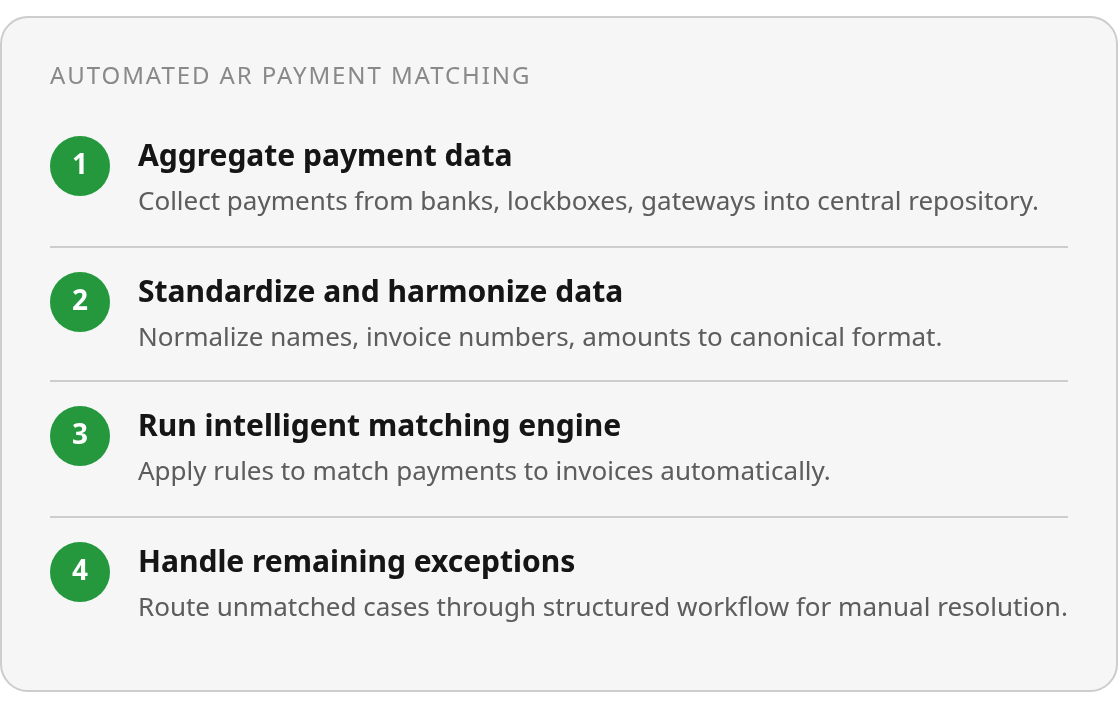
The process breaks into four distinct stages: data aggregation, standardization, intelligent matching, and exception handling. Most vendors sell the matching algorithm as the solution. The real work happens before matching ever runs.
Data aggregation pulls payment information from bank feeds, lockbox services, and payment gateways into a central system. That data arrives in whatever format the source system uses—ACH references from one bank, wire remittance PDFs from another, and check images from a third. Without standardization, you’re feeding inconsistent formats directly into matching logic that expects clean, uniform inputs.
The standardization stage is where you normalize customer names, convert invoice reference formats, standardize currency encoding, and map payment identifiers to a canonical model. References that vary by punctuation, prefixes, or padding need to resolve to the same record before matching can work. When this step is skipped or weak, payments that should match cleanly end up in exception queues.
Where exceptions accumulate without harmonization
Inconsistent reference numbers are the most common exception trigger. A customer pays three invoices in a single wire transfer but lists only two invoice numbers in the remittance notes. Batch settlements from payment processors lump dozens of transactions together with minimal breakdown. Partial payments arrive with no stated reason for the short amount.
At 100 invoices per month, manual formatting and exception resolution are manageable. At 500 or 1,000 invoices, this work consumes a significant portion of the AR team’s week. Each unmatched payment requires someone to dig through bank statements, email the customer for clarification, or manually apply the funds—work that scales linearly with transaction volume.
What you gain from fixing data first
Data standardization before intelligent matching is what lets payments clear faster instead of sitting in exception queues. When manual reconciliation work decreases, AR processing costs decline. The gain comes from giving the matching engine clean inputs, not from point-to-point matching without harmonization.
What it costs: cash flow and DSO
Without fixing the data first, money sits in an unallocated queue after it arrives. When you cut your average collection time by even a few days, you free up working capital that can be deployed instead of waiting for someone to manually match a payment reference to the invoice it was meant to clear.
The DSO impact scales from there. DSO and accounts receivable turnover are mathematically inverse—turnover equals 365 divided by DSO—so when DSO drops, your receivables turnover climbs. You’re converting sales to cash faster, which means you’re funding operations from revenue instead of credit lines.
Processing cost reductions through touchless automation
The labor savings come from reducing manual reconciliation. Touchless automation cuts AR processing costs when teams stop manually matching payments to invoices and chasing down missing remittance data. That cost reduction depends on a data standardization layer that handles inconsistent customer names and scrambled invoice references before the matching engine runs. Otherwise, the team remains occupied with manual lookups instead of higher-value work like dispute resolution or credit decisions.
Practical fix: automated matching and exception handling
The difference between payment matching that works and matching that creates more work comes down to what happens before the algorithm runs. When you try to automate accounts receivable without a canonical data model, you’re asking matching logic to reconcile payment references that were never designed to match in the first place. Standardization eliminates the interpretation layer—the system doesn’t guess what “ABC Corp” and “ABC Corporation” have in common when both map to the same master customer identifier.
Stable identifiers solve the problem that names change but entities don’t. When an employee’s name changes through marriage or legal name change, the employee number remains constant, so payment matching continues to work without manual intervention. The same principle applies to customer accounts. Master identifiers anchor your matching logic to something that doesn’t drift, which means payments keep clearing even when invoice formats, payer names, or bank reference conventions change.
Once the source data has been normalized, the matching engine can apply rules and pattern recognition to dependable inputs, while exception handling deals with genuine edge cases. The real efficiency gains come from standardization, because clean input data means fewer exceptions to route in the first place.
Match rates tell you what percentage cleared automatically, but exception workflow structure determines whether automation reduced your team’s cognitive load. A platform that auto-applies the majority of payments but sends remaining exceptions to an unstructured queue hasn’t solved the problem—your team still handles the highest-value, most complex cases manually, which is where most AR effort concentrates. Configure exception routing with suggested actions, approval flows, and audit trails so the unmatched cases move through a structured resolution process instead of landing in someone’s inbox.
The rollout starts with current-state review to map where payments fail to match today, then data mapping to define canonical formats for customer names, invoice references, and payment identifiers, followed by tool selection that integrates with your ERP and bank feeds. Rule configuration comes next—set matching thresholds and exception triggers based on your transaction patterns—then train your team on the exception workflow before switching to live monitoring of match rates and exception categories through dashboards.
Common Questions
What if my customers keep sending inconsistent payment references even after I standardize my internal data?
The standardization layer should accept the formats customers already use and translate them into the internal structure required by your ERP. That approach places the adjustment in your processing workflow rather than making every customer change its payment habits.
How do I know if my exception queue problem is caused by data inconsistencies versus weak matching algorithms?
Review the fields attached to unresolved payments. If the records contain incomplete remittance details, inconsistent payer names, or identifiers that cannot be linked to an account, the immediate issue is input quality. If the data is complete and consistently structured but valid matches still fail, the matching rules may need attention.
If I operate multiple ERPs with different invoice numbering systems, where does data harmonization actually happen?
Harmonization belongs in the shared processing layer that receives data from each ERP. Each source can retain its own numbering conventions, while the central model maps source-specific customer and invoice fields to the identifiers used for cash application.
Why do batch settlements cause more matching failures than single-invoice payments?
A batch settlement compresses several business events into one bank transaction. The processor may provide only a total amount or a partial remittance file, leaving the system without enough detail to allocate the funds across invoices. Better handling depends on preserving transaction-level remittance data during aggregation and flagging incomplete batches for review.