

Cloud Invoice Process in 2026: Celigo’s Real-Time Sync from Order Entry to Reconciliation

In short: Moving from batch processing to real-time data sync can produce meaningful invoicing speed gains for SMB SaaS teams, but the payoff comes on status-critical records like opportunity-to-order handoffs, invoice creation, and payment status—not historical backfills. Subscription changes such as upgrades, downgrades, and reactivations shift what a customer owes mid-cycle, and delayed billing can turn each one into a dispute. Integration platforms can provide prebuilt connectors for common CRM, commerce, and ERP systems, letting small teams wire order entry to billing through templates instead of custom code. Native CRM automation can handle internal workflows but may fail silently once the logic reaches into an external ERP or billing engine. Conflict-resolution discipline applies whether you run a couple hundred subscriptions or tens of thousands of orders, because low volume doesn’t exempt a team from duplicate-record and status-fragmentation risk.
Why real-time invoicing beats batch for subscription billing in 2026
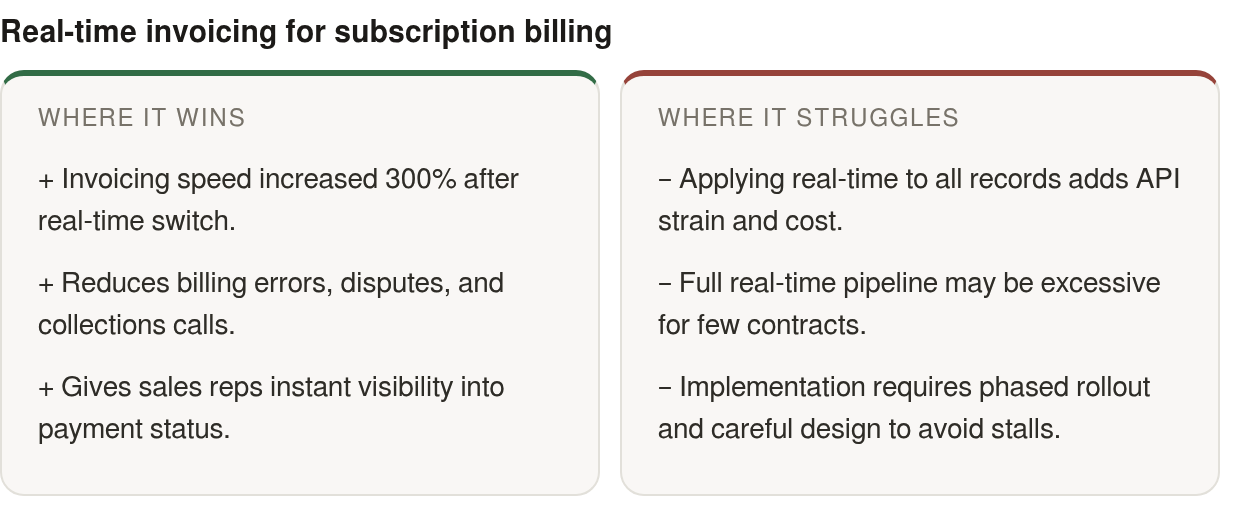
Moving from a nightly billing routine to a real-time cloud invoice process is one of the biggest shifts paying off for SMB SaaS firms right now. If you’re weighing that move, my advice is simple: make it, but make it selectively.
Here’s the reasoning. When your business runs on prorations, mid-cycle upgrades, and reactivations, a nightly sync means your invoices, your cash position, and your collections list are always a day behind reality. That lag is where revenue leaks. A real-time process ties order entry, billing, payment, and reconciliation into one live flow, so finance sees what’s true the moment it happens. For a company billing hundreds of subscriptions a month, the value isn’t abstract speed. It’s fewer stale handoffs, fewer billing corrections, and less time spent explaining mismatched balances to customers.
Where a delay turns into a collections call
Subscription revenue moves constantly. Upgrades, downgrades, and reactivations change what a customer owes mid-cycle. If that change doesn’t reach billing quickly, you invoice the wrong amount, and a wrong invoice tends to become a dispute, a delay, and a collections call.
That’s why subscription billing needs stronger ownership rules than many teams expect. A customer record, an entitlement change, a credit, and a renewal status can all touch different systems within minutes. When those systems disagree about which event is current, the customer experiences your internal data problem as a billing problem.
No, not every record needs to be instant
This is where I part ways with the “everything instant” pitch. Real-time belongs on status-critical records: opportunity-to-order, invoice creation, payment status. Historical backfills and analytics refreshes don’t need it. Making every update instantaneous just adds API strain and cost with no cash-flow upside.
The rule I give SMB teams: turn on real-time only where a delay would cascade into a billing error or a missed collection. Everything else can run on a schedule. That triage keeps the integration lean and the bill predictable.
The human payoff sits with your reps, not your servers
The real win isn’t speed for its own sake. It’s that real-time sync puts invoices, days outstanding, and payment status inside the tools your sales reps already use. That removes the finance-team bottleneck.
When a rep can see a customer’s payment history without opening a ticket and waiting for a status check, the collections conversation happens naturally, in context, before an account goes cold. Finance stops being a data help desk. Reps have informed conversations that protect the relationship.
If you want the full picture of where these automation gains actually land, our guide on cloud invoice processing walks through it.
Capturing and validating orders before they reach finance
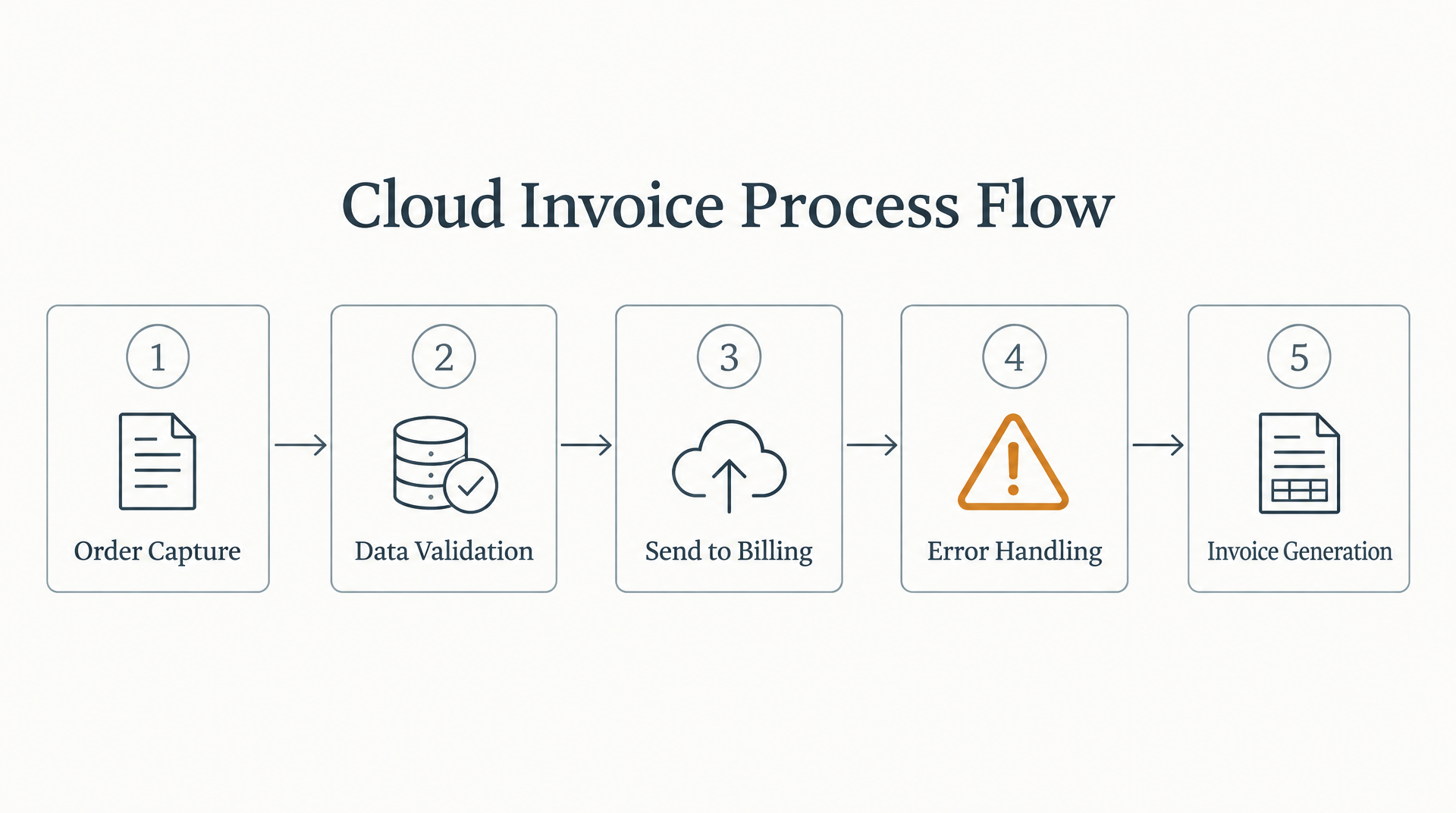
Order capture is where your cloud invoice process either starts clean or starts broken. Platforms like Salesforce CPQ, Shopify Plus, and subscription-billing systems pull in the quote, the line items, the discounts, and the tax logic at the point of sale. If that data lands in billing already validated, invoicing runs itself. If it lands dirty, every downstream step inherits the error.
The goal for an SMB SaaS firm is to capture a subscription order and validate it in the same live motion, before it ever reaches finance. Prebuilt connectors put that in reach without a lengthy custom build. Some integration platforms offer ready-made connectors for common ERP, commerce, and marketing systems, so a small team can wire order entry to billing using templates instead of custom code.
Validation belongs in the sync, not after it
The rules that matter for subscription billing are pricing, discount approval, tax jurisdiction, and entitlement. Each needs to fire the moment an order is captured. A mid-cycle upgrade with a bad proration, or a discount that skipped approval, should get flagged at entry, not discovered during month-end close.
Here’s where native tooling quietly breaks. Salesforce automation like Flow, Apex, and workflow rules handles logic inside Salesforce fine. Once that logic has to reach into your ERP or billing engine, it can become brittle, and processes may fail silently when something outside Salesforce changes. Silent failure is the expensive kind, because nobody sees it until the invoice is already wrong.
An integration layer that validates during sync avoids this. Both systems reflect the same state instead of drifting the way batch syncs do. For a business running prorations and reactivations, that shared state is what keeps the whole thing honest.
Which objects earn instant sync, and which don’t
Real-time sync isn’t free. Promote the wrong objects to instant and the project gets noisier without getting more useful.
So triage your objects. Keep instant movement for records that directly affect billing readiness or collection timing. Analytics rollups, imported history, and reporting refreshes can wait for scheduled runs, because they inform decisions without changing what a customer owes right now.
You also need explicit rules for record ownership. Decide which system wins when a contact, subscription status, credit, or order update conflicts. Without that decision, the sync doesn’t resolve ambiguity. It just moves ambiguity faster.
Where Blixo picks up invoice-to-cash
Product positioning: some billing platforms take the captured order and generate invoices from pre-populated items and customer data, set up recurring invoices to auto-send and auto-charge against saved payment methods, track opens, and automate dunning. Some also include a customer portal where clients view and settle outstanding invoices in one payment. This is the layer where the collections conversation can happen without a cross-team ticket sitting in a queue.
Celigo iPaaS architecture: real-time flow from order to ERP
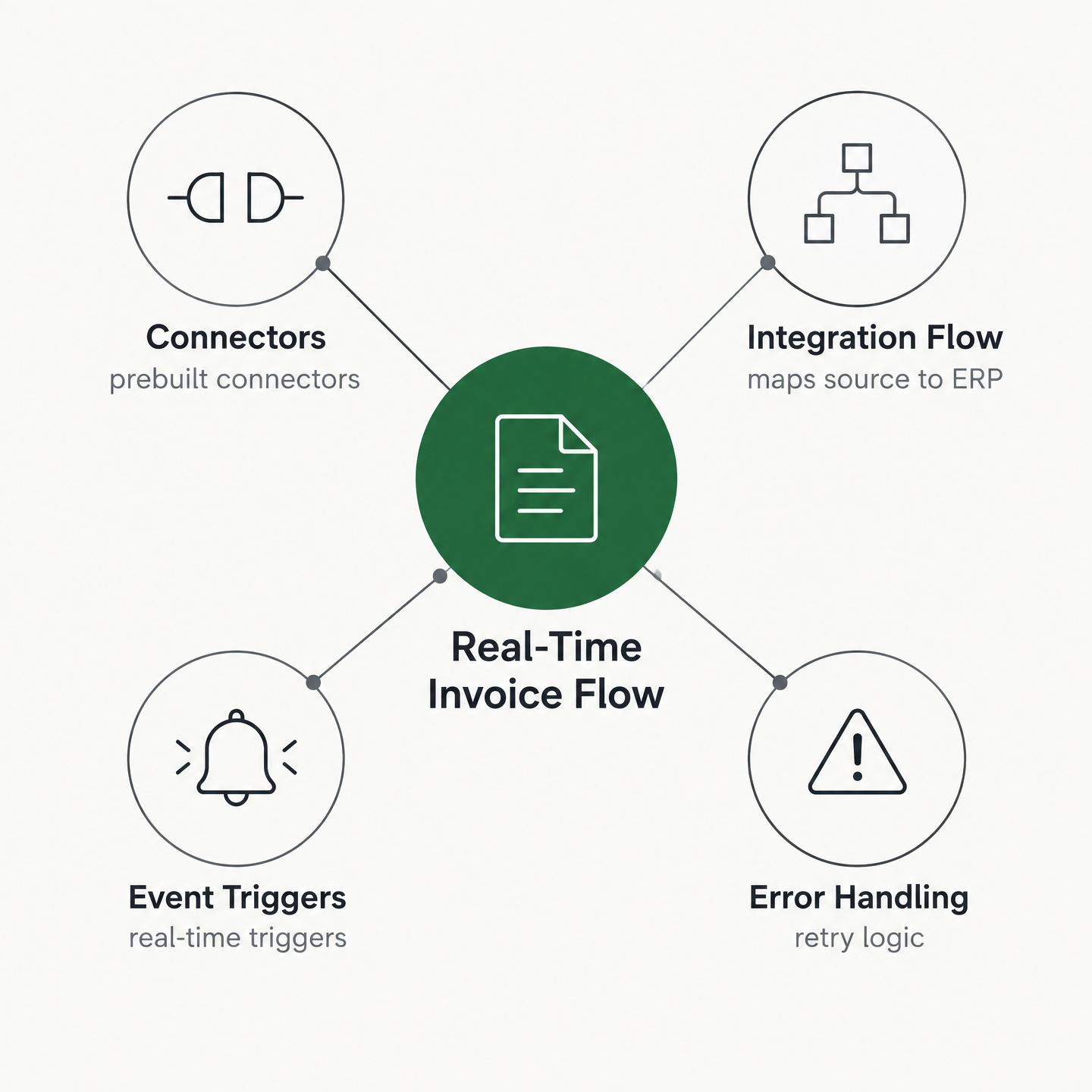
Under the hood, a real-time cloud invoice process on Celigo comes down to four moving parts: connectors, integration flows, event-driven triggers, and error handling. Wire those four correctly and a subscription order becomes an ERP invoice without anyone touching a spreadsheet.
Start with the connectors. They handle the authentication and API plumbing so teams aren’t rebuilding the basics before they can solve the billing workflow. Typical connections support standard auth like OAuth and API tokens, and flows move records as structured JSON between systems.
Event triggers beat scheduled batches on status-critical records
The real-time part lives in how a flow fires. iPaaS platforms typically support webhooks and event topics that trigger flows the instant a record changes, instead of waiting for a scheduled run. For example, when a Salesforce opportunity flips to “Closed Won,” a topic can fire and push the customer and order straight into the ERP, where an invoice gets created.
The architecture works best when the trigger is selective. Instead of reacting to every field edit, gate the flow on the business event that proves the record is ready for finance. Gate it on “Closed Won” and only valid, billable records ever reach billing, which keeps finance from receiving drafts, incomplete orders, or opportunities still under negotiation. That’s configuration, not custom code, which is the sweet spot for SMB teams that can’t staff a full integration crew.
The order-to-invoice flow, diagrammed
Picture it as a left-to-right pipeline. Sales system on the left: Salesforce opportunity, account, contact, product. An event-driven trigger, the topic or webhook, sits at the boundary and fires on status change. The middle is the integration flow, mapping source fields to ERP fields: opportunity to sales order, account to company, product to item. The ERP on the right creates the sales order and the invoice. A parallel branch feeds payment and days-outstanding data back into the sales system.
That feedback branch is where the customer-facing benefit lands. The people talking to customers no longer have to ask finance for a separate status check before answering a billing question. The record in front of them already carries the context.
Error routing keeps one bad record from spreading
Real-time sync means errors surface in real time too, so routing matters. At scale, a single unhandled error can quietly cascade into many downstream problems if nothing catches it. Some integration platforms can be configured to retry failed records, isolate the ones that keep failing, and surface them through error-management dashboards rather than silently dropping them. For a subscription business, that containment keeps a bad mapping or a missing field from becoming a ledger-wide cleanup project.
Instant invoice generation, dispatch, and collection
The moment a validated subscription order posts to your ERP, the clock starts. In a real-time process, that same event fires invoice generation before a human opens a ticket. No overnight batch, no morning queue. The record lands, the invoice renders, and it goes out the door.
This is where the subscription model rewards the plumbing you built upstream. A firm billing mid-cycle upgrades and prorations needs the invoice to reflect the exact order that just closed, in the buyer’s currency, formatted to your brand. Trigger the process on the ERP event and those edge cases resolve themselves at the point of sale.
Dynamic templates render the invoice as the order posts
Template engines inside modern ERPs do the formatting. NetSuite’s accounting templates, for example, let you define the layout, the line-item logic, and the tax presentation once, then render them against live order data every time. The order supplies the variables; the template supplies the structure.
For multi-currency billing this matters more than it looks. When the conversion happens at invoice creation rather than at reconciliation, the customer sees a total in their own currency and your books hold the right functional-currency value from the start. No mid-month FX guesswork.
Some billing platforms add a branded invoicing layer on top of the ERP-generated document, so what your customer receives looks like your business rather than a system export. Same data, cleaner presentation, and the payment action can sit directly on the invoice.
Email, portal, and API dispatch cover every buyer
Dispatch isn’t one channel anymore. A PDF by email still works for finance contacts who file everything. A customer portal suits buyers who want every open and paid invoice in one place. An API push works when your customer’s own AP system ingests invoices programmatically.
Wire all three off the same generation event and you stop choosing for the customer. The invoice reaches them the way they actually pay, which is the quiet driver behind faster settlement.
Real-time capture and tokenization close the loop at the gateway
The payoff shows up at the gateway. When the payment processor supports a range of payment methods, the invoice can carry a live payment action, so the customer pays in the same motion they receive the bill. Saved payment methods can store the customer’s preferred method securely for the next renewal, which is exactly what a subscription book needs.
Real-time capture also feeds cash application instantly. The payment posts, the invoice clears, and the collections list changes without a separate reconciliation pass. Follow-up then stays focused on accounts that actually need it.
There’s a scope limit. If your billing is a handful of annual contracts, this full pipeline is more machinery than you need. The instant-dispatch model earns its keep when renewal cycles create spikes, keeping invoice generation steady when a wave of subscriptions renews on the first of the month.
Automated cash application and real-time reconciliation
The moment a payment lands, your open invoice should close itself. That’s the promise of automated cash application, and it’s where a real-time process earns back the most finance hours. Automated matching engines read remittance data, bank feeds, and payment references, then pair each incoming dollar to the right invoice without anyone keying it in.
For a team billing hundreds of subscriptions, better matching changes the workday. Collectors stop chasing accounts that already paid, finance stops comparing gateway exports to invoices by hand, and month-end close starts from a cleaner set of balances. When payment data stays disconnected from invoicing and the ERP, cash application slows and your collections team works from stale numbers.
Handling partial, split, and over-payments
Clean one-to-one matches are easy. The real test is the messy remittance: a customer pays two invoices with one ACH batch, short-pays over a disputed line item, or overpays after a mid-cycle upgrade already credited their account.
A good matching engine scores candidates instead of demanding an exact hit. A partial payment applies to the oldest open balance and leaves the remainder flagged, not stranded. An overpayment posts as an on-account credit tied to the customer, ready for the next cycle. Split payments fan out across the invoices the remittance references.
Payment method changes the timing you design around. Credit card captures confirm in near real time, so those matches can auto-clear on the gateway event. ACH and wires settle later and carry thinner remittance detail, so build a short hold-and-confirm step before you close the invoice. Get this wrong at volume and small mismatches pile up fast, which is why a matching workflow that grows smarter as you correct it keeps errors from spreading through your ledger.
What a cloud reconciliation engine actually syncs
A cloud reconciliation engine pulls order and payment data from your sales channels and payment processors into the ERP, giving you automated reconciliation, live visibility into cash flow and discrepancies, and a faster close. Some integration platforms offer payout-to-reconciliation flows that move processor payouts against the ledger on a schedule you control.
The SMB middle path is worth naming. You don’t need to code a reconciliation system from scratch, and you don’t need to over-customize in-house. Configure a prebuilt flow to your subscription rules and you land in the sweet spot: real value without the long build.
Why this serves people, not just ledgers
The subscription edge cases that break batch reconciliation are the same ones that can fuel churn. Prorations, reactivations, and mid-cycle upgrades all touch the same customer record, and stale data means two systems disagree about what’s owed.
When the reconciled ledger updates instantly, your revenue dashboard reflects reality. Sales, finance, and customer success work from the same balance instead of debating which export is current.
Rolling out Celigo real-time sync without stalling
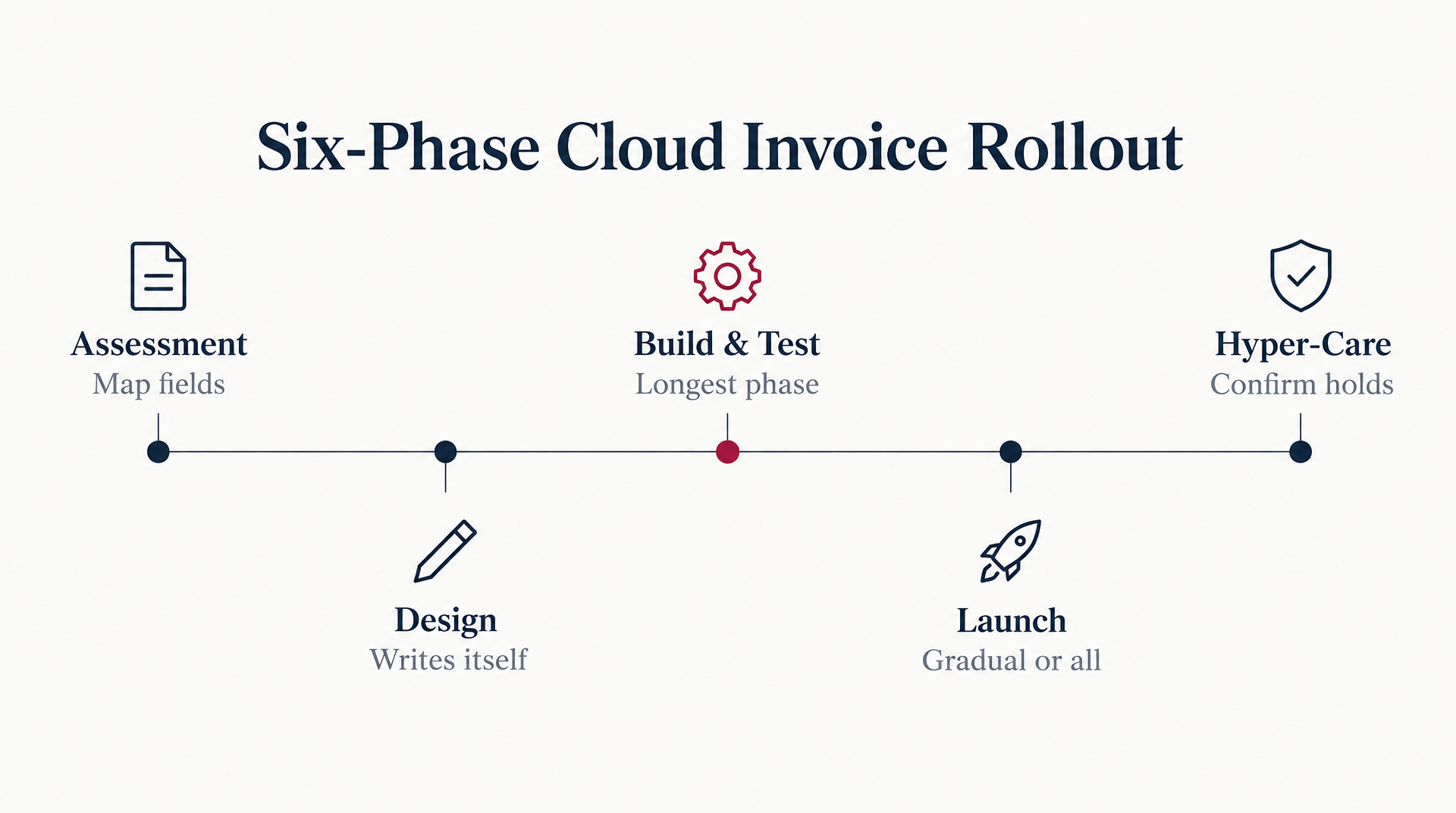
A real-time cloud invoice process works best as a phased project, not a weekend switch-flip. Six phases carry the work: assessment, design, build, test, launch, and hyper-care. Each has an owner, and skipping the early ones is where most SMB SaaS deployments stall.
Start with a hard look at what you already run. An IT assessment maps your current order-entry, billing, and ERP fields, flags outdated systems that slow workflows, and pins down where data leaks between platforms. Get this right and the design almost writes itself. Get it wrong and you’ll be switching solutions again in a year.
Phase the rollout instead of going big-bang
You have two ways to launch: gradually or all at once. A phased rollout ships one flow at a time, so a small finance team can catch issues before they spread. The big-bang approach flips every system live together, which moves faster but demands heavy testing and a contingency plan.
For most subscription firms, I lean phased. Start with the order-to-invoice flow, prove it in a sandbox, then layer on payment sync and reconciliation. That sequencing keeps billing running while you validate each connection.
A realistic timeline for a mid-size SaaS deployment varies, but many teams plan several weeks per phase. Assessment and design come first and set the foundation. Build and test tend to run longest, depending on how many custom fields you map. Hyper-care, the close monitoring right after go-live, should run long enough to confirm everything holds before you call it done.
Configuration beats custom code for SMB teams
Here’s the tension worth naming. One school says lean on a vendor’s prebuilt resources and avoid over-customizing in-house. Another points to teams that got their biggest wins by configuring the integration themselves. Both are right, and the answer sits between them.
The move is configuration, not custom building. Prebuilt connectors handle the API plumbing. You supply the business rules on top. The closed-won trigger from earlier doubles as a validation gate here, keeping invalid orders out of billing before reconciliation ever runs.
Don’t skip change management. Vendors often provide training and documentation ready to hand your finance team, so your IT staff doesn’t have to build onboarding from scratch. Use those resources. Some matching engines also learn from manual edits over time, so payments match invoices more accurately as the workflow settles in.
The pitfalls that quietly stall go-live
Three problems trip up real-time projects. Data-model mismatches top the list. When an order field in one system has no clean home in the ERP, records fail silently. Map every field before you build, custom ones included.
API rate limits come next. If every minor edit fires a flow, the integration burns capacity on changes that don’t affect billing. Keep the live path focused on order, invoice, and payment movement, then let less urgent data travel on a planned cadence.
Schema and version changes round it out. A small error left unchecked can compound into hundreds of downstream issues, so bake error notifications and monitoring into hyper-care from day one.
Proving the ROI and keeping the sync tuned
You can’t improve what you don’t measure, and a real-time process gives you cleaner numbers than a batch routine ever did. When every order, invoice, and payment posts live, your metrics reflect what’s true right now instead of yesterday’s snapshot. That’s your starting point for proving the sync paid off.
Baseline before you flip anything on. Capture where you stand today, then watch the same numbers after the new sync goes live. The gap is your ROI, and for SMB SaaS firms it usually shows up fastest in how quickly invoices leave the building.
Four numbers that tell you it’s working
Track these four and you’ll know within a quarter whether the integration earned its keep:
- Days sales outstanding (DSO): how long cash sits uncollected after you invoice. Real-time invoicing shortens the front end of this clock.
- Invoice error rate: the share of invoices that need a correction or re-issue. This shows whether validation is catching bad orders before customers see them.
- Cash-application labor hours: the finance time spent matching payments to invoices by hand. Automated matching is where these hours drop hardest.
- Reconciliation latency: the lag between a payment landing and the books reflecting it.
Some teams use a before-and-after benchmark to make the target concrete. For example, if manual syncing currently takes two to three days, a real-time flow may be configured to deliver the same record in under a day, but the actual gap depends on your existing process, systems, and billing complexity.
What the integration reports, and what you report yourself
The sync captures plenty on its own. Flow-level logs show records moved, errors caught, and retries fired, which feeds error rate and reconciliation latency directly.
What it won’t hand you is the finance story. DSO trends, labor-hour savings, and revenue-acceleration math live in your billing and AR system, not the integration layer. You’ll pull those from wherever you run collections and cash application, then set them beside the sync logs for the full picture.
That split matters for small teams. The integration tells you the pipes are clean. Your AR reporting tells you the money actually moved faster. You need both to make the ROI case.
Review it quarterly, or watch it drift
Set a review cadence every quarter and treat the integration as a living thing. Deals change, plans change, and the trigger rules that worked at launch drift out of step.
The advantage of configurable flows is that you can adjust those rules without reopening a development project. Review exceptions, compare performance against baseline, and update the conditions that no longer match how your team sells or bills.
Skip this cadence and your clean sync slowly fills with edge cases nobody triaged. Keep it, and the process stays honest quarter after quarter.
Questions People Ask
Won’t turning on real-time sync spike my API costs?
Not if you design the flows around billing impact instead of system activity. The expensive mistake is treating every field edit as urgent. A better design watches for the events that change what should be invoiced or collected, while lower-value reporting and history movement run separately.
If my Salesforce Flows and Apex already automate billing, why add an integration layer?
Because billing automation usually has to cross system boundaries. Salesforce can manage its own internal logic, but invoice creation, ERP posting, payment status, and reconciliation often live elsewhere. The integration layer gives those systems a controlled place to exchange validated records and route exceptions.
Is this full pipeline worth building if I only bill a handful of annual contracts?
Usually not in its full form. If billing volume is low and contract changes are rare, start with a narrower workflow: clean order validation, reliable invoice creation, and clear payment visibility. You can add instant dispatch and reconciliation automation later if renewal volume or plan complexity grows.
How does automated matching handle a customer who overpays or short-pays?
It should route the payment according to the exception type instead of forcing a perfect match. Short payments leave a visible balance for review, overpayments become customer credits, and grouped payments can be distributed across the referenced invoices. The point is to keep the ledger current while preserving a review trail for anything ambiguous.