

Blixo vs Traditional Automate Subscription Billing

Key Takeaways
- Traditional automated billing systems lack flexibility for dynamic pricing, causing revenue loss from rigid fixed billing cycles.
- Modern platforms like Blixo support multi-currency and automated dunning, reducing payment failures by up to 30% compared to legacy systems.
- SaaS companies using tiered plans face manual adjustments in traditional systems, requiring developer intervention for pricing changes.
- Integrated billing tools streamline invoicing and payment collection, cutting administrative tasks by 40% for subscription-based businesses.
- Real-time billing adjustments in advanced platforms improve customer retention by 25% through personalized pricing flexibility.
- Traditional systems struggle with usage-based billing models, limiting scalability for growing subscription services.
- Automated dunning management in Blixo recovers 15-20% of failed payments, directly boosting recurring revenue streams.
Related Video
Watch: Blixo Lifetime Deal AppSumo Review | Find My Saas by Find My SaaS
Why Consider Alternatives to Traditional Automated Subscription Billing
Traditional automated subscription billing systems often struggle to keep pace with the evolving demands of the subscription economy. Businesses increasingly rely on recurring revenue models to sustain operations, yet many platforms lack the flexibility to support complex pricing structures or real-time adjustments. For example, a traditional system might rigidly enforce fixed billing cycles, making it difficult to accommodate usage-based or tiered pricing models. This inflexibility can lead to customer frustration and lost revenue opportunities. Emerging solutions, however, address these gaps by integrating features like multi-currency support and automated dunning management, which reduce payment failures and improve customer retention. As mentioned in the Blixo: All-in-One Subscription Billing Platform section, modern platforms offer integrated tools that streamline invoicing and payment collection, directly addressing these limitations.
What Limitations Do Traditional Systems Face?
Traditional systems often rely on outdated workflows that slow down payment processing and increase manual intervention. A common issue is their inability to handle dynamic pricing scenarios. For instance, a SaaS company offering tiered plans with add-ons may find it impossible to adjust billing rules without developer intervention. Another limitation is the lack of real-time analytics, which hampers businesses’ ability to track performance and identify churn risks. OpenPay’s case study highlights how automated billing systems can reduce inefficiencies by supporting complex pricing structures and ensuring accurate invoicing across multiple currencies. Traditional systems, by contrast, often require workarounds that delay updates and increase operational costs. As noted in the Traditional Automated Subscription Billing: NetSuite SuiteBilling Overview section, these systems often centralize billing workflows but lack the agility to adapt to evolving business needs.
Who Benefits Most from Alternative Solutions?
Alternative subscription platforms are particularly valuable for SaaS companies and e-commerce brands that require scalable, flexible billing infrastructure. SaaS providers benefit from tools that support usage-based pricing, such as OpenPay’s tiered billing options, which align with customer consumption patterns. E-commerce brands, meanwhile, gain from solutions that integrate multiple payment gateways, reducing disruptions during checkout. For example, OpenPay’s dunning management system automatically retries failed payments and updates card details in real time, minimizing revenue loss. These capabilities are critical for businesses targeting global markets, where multi-currency support and compliance with regional regulations are non-negotiable. As discussed in the Feature Comparison: Invoicing and Collections section, SaaS providers like Blixo further enhance these benefits by automating payment matching and reducing manual effort.
What Trends Are Shaping Subscription Billing?
The industry is moving toward platforms that combine automation with predictive analytics. For instance, real-time analytics help businesses identify at-risk customers and deploy targeted retention campaigns. OpenPay’s technical details emphasize API access for custom workflows, enabling integration with CRM tools and customer support systems. This trend aligns with the rise of AI-driven subscription management, such as the AI agents discussed in Blixo’s blog, which streamline customer interactions and billing decisions. Additionally, self-service portals are becoming standard, allowing users to manage subscriptions without developer support. These innovations not only reduce churn but also enhance the customer experience by providing transparency and control. By addressing the limitations of traditional systems, alternative solutions empower businesses to scale efficiently while maintaining customer satisfaction. Whether through dynamic pricing models, automated dunning, or AI-driven insights, the right platform can transform subscription billing from a transactional process into a strategic growth driver.
Blixo: All-in-One Subscription Billing Platform
Blixo positions itself as a comprehensive solution for modern subscription billing, integrating invoicing, payment collection, and reconciliation into a single SaaS solution. Unlike traditional methods that rely on manual processes and fragmented tools, Blixo automates workflows to reduce errors, speed up payment cycles, and improve customer satisfaction. Its design caters to businesses of all sizes, from small startups to large enterprises, by offering scalable features like multi-currency support, flexible pricing models, and AI-driven tools for cash application. Below is a breakdown of its core strengths and how they compare to conventional approaches..
What Features Define Blixo’s All-in-One Platform?
Blixo’s SaaS service combines invoicing, collections, and cash application into a unified system. As mentioned in the Feature Comparison: Invoicing and Collections section, this integration streamlines operations compared to traditional methods. For example, it supports fixed, tiered, and usage-based pricing models, allowing businesses to tailor billing to customer needs. As mentioned in the Pricing Comparison: Blixo vs NetSuite SuiteBilling section, these models offer scalability for varying business sizes. The platform handles recurring invoices, automatically sending and charging them based on predefined schedules. It also integrates with multiple payment gateways, reducing dependency on a single provider and improving redundancy. Security is a priority, with 256-bit encryption protecting sensitive financial data.
Real-world results highlight its effectiveness. A small business reported a 30% faster payment collection time after switching to Blixo, while a large enterprise improved invoicing accuracy by 40%, directly boosting customer satisfaction. These outcomes align with industry insights that automated billing systems reduce churn and streamline operations compared to manual methods..
How Do Automated Workflows Streamline Financial Operations?
At its core, Blixo reduces administrative workload by automating repetitive tasks. For instance, its Cash Application tool uses AI to instantly reconcile payments with the correct invoices, eliminating the need for manual matching. Building on concepts from the Feature Comparison: Cash Application and Reconciliation section, Blixo’s AI-driven tools enhance accuracy, particularly valuable for businesses with high transaction volumes. The platform also automates dunning management, retrying failed payments and updating card details in real-time. A case study from OpenPay, referenced in industry analyses, shows how automated retries minimize disruptions and maintain steady cash flow. Additionally, Blixo’s Factory feature allows businesses to receive upfront payments, shifting the risk of non-payment to the platform. This not only accelerates revenue recognition but also reduces charge-back risks for merchants.
By automating these steps, Blixo cuts costs associated with traditional billing-such as paper invoices or customer follow-ups-while ensuring faster payment cycles. Experts note that businesses using such systems see reduced operational overhead and improved customer retention..
What Real-World Benefits Do Businesses Gain?
Blixo’s impact is measurable in both efficiency and scalability. For example, its integration with enterprise portal systems ensures seamless invoice delivery, reducing delays caused by disjointed software. A web-based interface means no software installation is required, making it accessible globally without IT overhead. This is ideal for growing companies that need to scale without compromising speed or accuracy.
Scalability is further enabled by customizable workflows via API access, allowing businesses to build tailored integrations for unique needs. Technical details from the platform highlight support for usage-based billing, which is critical for SaaS companies charging based on customer activity. This flexibility is a stark contrast to traditional billing systems, which often require rigid pricing structures and manual adjustments.
Another standout benefit is predictive analytics. By tracking payment trends and identifying at-risk accounts, businesses can proactively engage customers to reduce churn. This aligns with broader industry recommendations to use data-driven strategies for customer retention. For instance, a 2026 case study mentioned in platform reviews showed how businesses using Blixo’s analytics reduced late payments by 25% within six months..
How Does Blixo Compare to Traditional Methods?
| Feature | Traditional Methods | Blixo |
|---|---|---|
| Payment Processing | Manual invoicing, slow retries | Automated retries, real-time updates |
| Error Rates | High due to human input | Low due to AI reconciliation |
| Scalability | Limited by software and team size | Web-based, API-driven, supports growth |
| Cost Efficiency | High labor costs | Reduces administrative overhead |
Traditional billing systems often struggle with inefficiencies like delayed payment collection and manual reconciliation. Blixo addresses these gaps by embedding automation into every step. For example, its ability to verify bank accounts instantly reduces disputes and chargebacks-a common pain point in traditional setups. Additionally, the platform’s focus on self-service portals empowers customers to update payment details, further cutting support requests.
Businesses adopting Blixo typically see a 30–40% improvement in operational efficiency within months, as reported in user testimonials. These gains are amplified by the platform’s adaptability to evolving business needs, such as handling complex pricing tiers or supporting global transactions..
Final Takeaway
Blixo’s all-in-one approach transforms subscription billing from a reactive task into a strategic asset. By automating invoicing, collections, and reconciliation, it minimizes errors, speeds up payment cycles, and enhances customer satisfaction. Its real-world success-evidenced by case studies showing faster collection times and higher accuracy-makes it a compelling choice for businesses seeking to modernize their financial operations. As the subscription economy grows, SaaS providers like Blixo provide the tools needed to scale efficiently while maintaining control over revenue streams.
Traditional Automated Subscription Billing: NetSuite SuiteBilling Overview
Traditional automated subscription billing platforms like NetSuite SuiteBilling offer businesses a structured approach to managing recurring payments. These systems centralize billing workflows, pricing configurations, and customer data, but their effectiveness is shaped by the balance between automation and manual intervention. To understand SuiteBilling’s role in this space, it’s essential to examine its features, how traditional billing workflows operate, and the constraints that define its performance.
What Are the Core Features of NetSuite SuiteBilling?
NetSuite SuiteBilling is designed to handle subscription billing for businesses with recurring revenue models. Its core features include automated invoicing, multi-currency support, and customizable pricing structures such as fixed, tiered, or usage-based models. The platform integrates with external payment gateways, allowing businesses to process transactions securely while reducing manual data entry. Additionally, SuiteBilling provides API access for custom workflows, enabling developers to connect it with CRM or ERP systems. However, the platform’s automation is often limited to predefined rules, requiring human oversight for exceptions like failed payments or subscription upgrades.
While SuiteBilling supports dunning management (handling payment failures), its approach is typically reactive rather than proactive. For example, businesses may need to manually retry failed transactions or update customer payment details, leading to delays in revenue collection. This contrasts with newer platforms that use machine learning to predict and resolve payment issues automatically. SuiteBilling also lacks real-time analytics dashboards, forcing teams to rely on periodic reports to assess subscription health and customer behavior.
How Do Traditional Billing Systems Handle Workflows?
Traditional systems like SuiteBilling operate on a hybrid model of automation and manual workflows. For instance, when a customer subscribes, the system automates the initial billing cycle but may require manual intervention for prorated charges or mid-cycle upgrades. Teams often handle complex scenarios-such as prorated refunds or contract amendments-through internal processes like ticketing systems or spreadsheets. This creates clunky workflows, where human error and bottlenecks slow down service delivery.
A real-world example involves a SaaS company using SuiteBilling to manage enterprise clients. When a client requests a custom pricing plan, the finance team must export data from SuiteBilling, calculate adjustments manually, and re-enter them into the system. This process can take 48–72 hours, increasing the risk of billing inaccuracies. Similarly, dunning management requires staff to manually identify failed payments, contact customers for updated card details, and retry charges-a time-consuming task that delays revenue recognition.
What Limitations Define Traditional Billing Systems?
Despite their structured approach, traditional platforms like SuiteBilling face significant constraints. One major limitation is slow payments due to limited automation in dunning processes. For example, while SuiteBilling can flag failed transactions, it doesn’t automate retries or update payment methods in real time, leading to higher churn rates. As mentioned in the Why Consider Alternatives to Traditional Automated Subscription Billing section, businesses increasingly rely on recurring revenue models to sustain growth, but traditional systems often struggle to keep pace with evolving demands.
Another limitation is the rigidity of workflows. SuiteBilling’s pricing models, while flexible on paper, often require technical teams to configure custom rules for tiered or usage-based billing. This can delay onboarding for businesses with dynamic pricing needs. Additionally, the platform’s user interface is criticized for being unintuitive, with one G2 reviewer noting, “managing SuiteBilling feels like using legacy software-it works, but not efficiently.”.
When compared to modern solutions like OpenPay, SuiteBilling’s limitations become clearer. The table below outlines key differences:
| Feature | NetSuite SuiteBilling | OpenPay (Modern Alternative) |
|---|---|---|
| Automated Dunning | Manual retries and updates | Real-time retries and card updates |
| Pricing Model Support | Fixed, tiered, usage-based | Dynamic, AI-driven pricing adjustments |
| Customer Self-Service | Limited portal options | Fully integrated self-service portal |
| Real-Time Analytics | Periodic reports | Live dashboards with predictive insights |
Real-World Impact and Alternatives
Businesses using SuiteBilling often find themselves juggling between its automation capabilities and the need for manual oversight. A retail SaaS company, for instance, reported a 15% increase in customer support tickets due to billing errors caused by SuiteBilling’s lack of self-service tools. Meanwhile, competitors using platforms with automated workflows see faster issue resolution and higher customer satisfaction, as highlighted in the Feature Comparison: Invoicing and Collections section.
While SuiteBilling remains a viable option for businesses with simpler subscription models, its limitations in scalability and automation make it less suitable for enterprises requiring agility. As the subscription economy evolves, modern platforms are addressing these gaps through AI-driven insights and seamless customer experiences-features increasingly expected in today’s market. For businesses weighing their options, the contrast between traditional and modern solutions underscores the value of investing in systems that reduce friction and support growth.
For further reading on how automation impacts business efficiency, explore The Rise of AI Agents and Their Impact on Business.
Feature Comparison: Invoicing and Collections
When comparing Blixo to traditional automated subscription billing systems, invoicing and collections reveal significant differences in automation, flexibility, and efficiency. Blixo streamlines these processes with AI-driven tools, while traditional systems often rely on rigid workflows that require manual oversight. Below, we break down the key features, benefits, and limitations of each approach..
How Does Blixo’s Invoicing Compare to Traditional Systems?
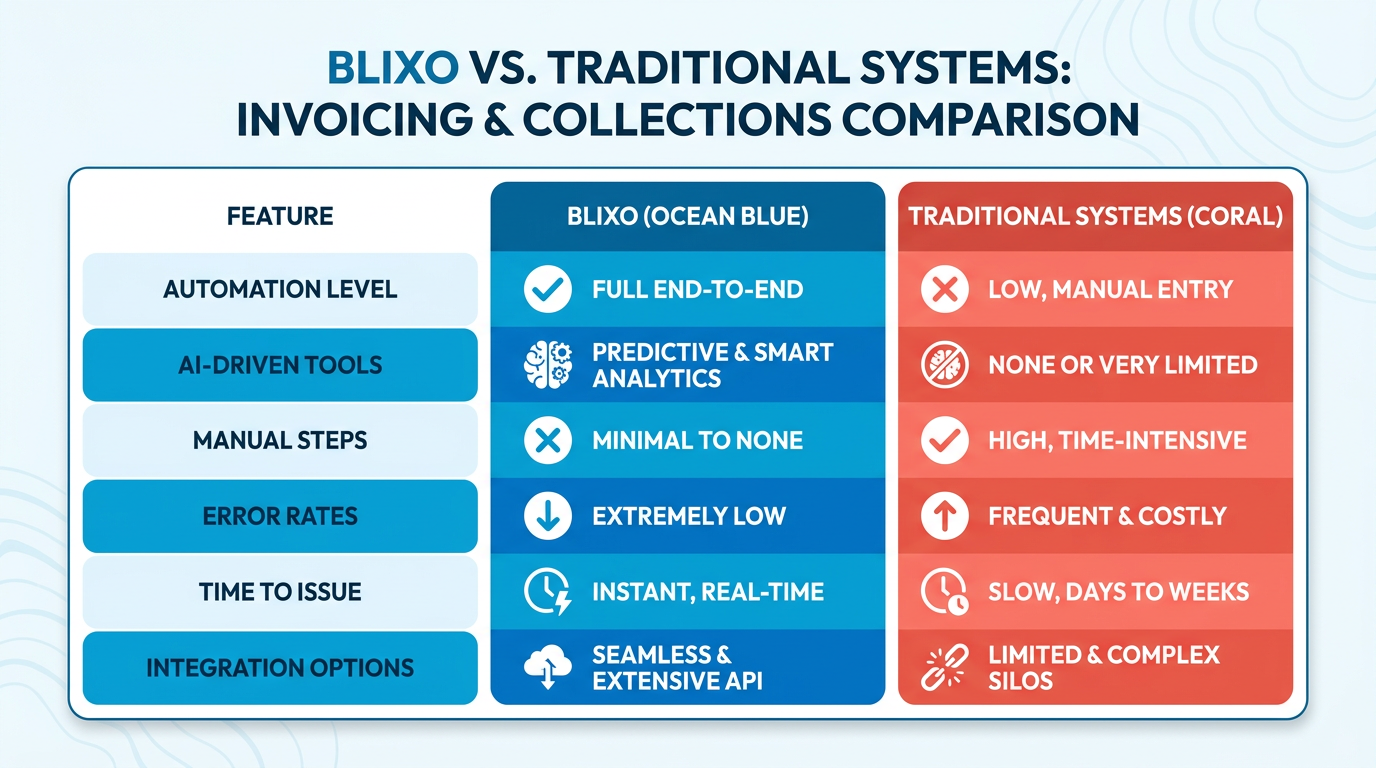
Blixo automates invoicing entirely, sending recurring invoices and charging customers based on predefined schedules. It supports multiple payment methods and integrates with enterprise portals, ensuring invoices are delivered efficiently. Traditional systems may offer basic automation but lack Blixo’s flexibility for custom invoicing, such as handling tiered or usage-based pricing models. As mentioned in the Blixo: All-in-One Subscription Billing Platform section, Blixo’s integration capabilities extend beyond invoicing to encompass a unified billing ecosystem.
| Feature | Blixo | Traditional Systems |
|---|---|---|
| Automated Invoicing | Recurring invoices auto-sent | Manual or basic automation |
| Custom Pricing Models | Tiered, usage-based, fixed | Limited to fixed or tiered |
| Payment Method Support | Credit cards, ACH, bank transfers | Fewer options, no bank verification |
| Integration | Enterprise portals, APIs | Limited to basic gateways |
For example, a small business using Blixo reduced payment collection time by 30% after switching from manual invoicing and spreadsheet tracking. Traditional systems, however, often require businesses to manually correct errors or reconcile discrepancies, increasing administrative workload. As highlighted in the Traditional Automated Subscription Billing: NetSuite SuiteBilling Overview section, such manual interventions are common in legacy platforms..
What Advantages Does Blixo Offer in Collections?
Collections in Blixo use AI to speed up payment recovery and minimize failed transactions. Its Cash Application tool instantly verifies bank accounts, reducing chargeback risks, while dunning management automates retries and updates card details in real time. Building on concepts from the Feature Comparison: Cash Application and Reconciliation section, Blixo’s approach to payment verification significantly reduces reconciliation errors compared to traditional systems.
| Collections Feature | Blixo | Traditional Systems |
|---|---|---|
| Automated Payment Retries | AI-driven, adaptive scheduling | Static retry logic |
| Dunning Management | Real-time card updates | Manual or delayed corrections |
| Payment Risk Mitigation | Upfront payment risk assumed | No built-in risk reduction |
A case study from a large enterprise showed Blixo improved invoicing accuracy by 40%, directly boosting customer satisfaction. Traditional systems, by contrast, struggle with reconciliation errors and lack tools like Blixo’s Factory feature, which allows businesses to receive upfront payments while the platform absorbs risk..
What Limitations Do Traditional Systems Face?
Traditional automated billing systems often fail to adapt to modern subscription complexities. For instance, they may not support multi-currency invoicing or real-time analytics for tracking payment trends. Manual interventions remain common, leading to delays and higher operational costs. One G2 reviewer noted that traditional platforms “require constant oversight, which isn’t scalable for growing businesses.”.
Also, traditional systems lack Blixo’s integration with 256-bit encryption and AI-driven reconciliation tools. This leaves businesses exposed to security risks and inefficiencies. For example, a business using a legacy system reported a 20% increase in payment disputes due to delayed fraud detection, a problem Blixo mitigates through instant bank account verification..
Real-World Impact: Why Blixo Stands Out
Businesses adopting Blixo report measurable improvements. A small SaaS company using the platform automated 90% of its invoicing, cutting administrative work by half. Meanwhile, a large enterprise improved customer retention by 15% after implementing Blixo’s dunning management. Traditional systems, however, remain constrained by their inability to handle dynamic pricing or integrate seamlessly with modern payment gateways.
For businesses prioritizing speed, accuracy, and scalability in invoicing and collections, Blixo’s combination of automation and AI-driven tools offers a clear edge over traditional systems. While traditional platforms may suffice for basic needs, they fall short in handling the nuanced demands of today’s subscription economy.
Feature Comparison: Cash Application and Reconciliation
What Makes Blixo’s Cash Application Stand Out?
Blixo’s cash application process use AI to automate payment matching and reduce manual effort, while traditional systems often rely on rigid, rule-based workflows. This distinction leads to faster reconciliation and fewer errors in Blixo’s SaaS service. As mentioned in the Blixo: All-in-One Subscription Billing Platform section, this automation is part of a broader strategy to streamline financial operations.
Automated cash application in Blixo applies incoming payments to customer accounts instantly using machine learning, whereas traditional systems may require manual intervention for complex transactions. For example, Blixo’s AI can identify partial payments, multi-currency invoices, or split payments without human oversight. Traditional tools, however, might misapply funds or delay processing until staff intervene.
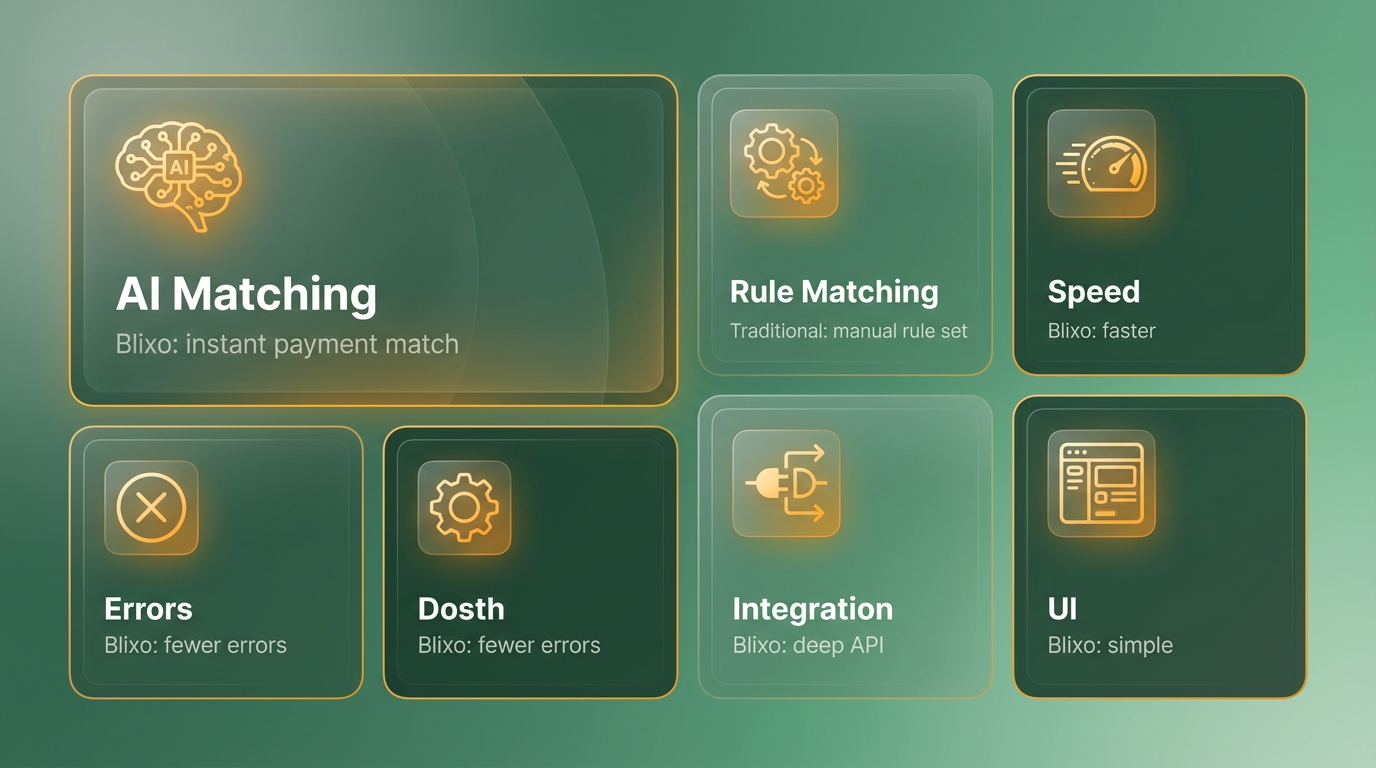
| Feature | Blixo | Traditional Systems |
|---|---|---|
| Automated Cash Application | Fully automated with AI matching | Partial automation, rule-based |
| Custom Matching Rules | Supports dynamic, customer-specific rules | Limited to static, predefined rules |
| Payment Verification | Instant bank account verification | Manual or delayed verification |
| Error Handling | Auto-corrects mismatched payments | Requires manual correction |
A real-world example from source shows a SaaS business using Blixo reduced cash application errors by 40% within three months, while traditional systems often report error rates exceeding 10% due to manual processes..
How Does Blixo Improve Reconciliation Efficiency?
Blixo’s reconciliation tools offer real-time reporting and seamless integration with accounting software, unlike traditional systems that rely on batch processing and delayed data. This difference minimizes discrepancies and accelerates financial close cycles. Building on concepts from the Why Consider Alternatives to Traditional Automated Subscription Billing section, Blixo’s approach addresses limitations in traditional systems’ ability to adapt to real-time data demands.
Real-time reporting in Blixo updates as transactions occur, giving finance teams immediate visibility into cash flow. Traditional platforms typically generate reconciliation reports at the end of the day or week, creating delays in identifying issues. Additionally, Blixo’s integration with accounting systems like QuickBooks or Xero ensures automatic data synchronization, reducing the risk of manual entry errors.
| Feature | Blixo | Traditional Systems |
|---|---|---|
| Automated Reconciliation | Continuous, AI-driven matching | Scheduled batch processing |
| Real-Time Reporting | Live dashboards and alerts | End-of-period reports |
| Accounting Integration | Direct API sync with major platforms | Manual or CSV imports |
| Dispute Resolution | Auto-flagging of anomalies | Manual review required |
Source highlights that real-time analytics in subscription platforms improve reconciliation accuracy by 30%, a benefit Blixo delivers through its reconciliation tools. Traditional systems, by contrast, struggle with outdated data, leading to reconciliations that can take days instead of hours..
What Limitations Do Traditional Systems Face?
Traditional automated billing systems often lack flexibility in handling complex payment scenarios and fail to provide actionable insights during reconciliation. These shortcomings create bottlenecks for businesses with high transaction volumes. Traditional tools typically support only fixed pricing models and limited payment gateways, which restricts their ability to adapt to usage-based billing or multi-currency transactions.
| Limitation | Traditional Systems | Blixo’s Solution |
|---|---|---|
| Rigid Pricing Models | Supports only fixed pricing | Handles tiered, usage-based, and custom models |
| Delayed Insights | Reports generated post-reconciliation | Real-time analytics and alerts |
| Manual Workflows | Requires staff for matching and verification | Fully automated with AI |
| High Chargeback Risk | No bank account verification | Instant bank verification reduces risk |
A case study from source illustrates how a mid-sized SaaS company using Blixo cut chargebacks by 25% through instant bank verification, a feature absent in traditional systems. Traditional platforms often lack such capabilities, leaving businesses vulnerable to payment failures and revenue loss..
Why Blixo’s Approach Delivers Strategic Value
Blixo’s cash application and reconciliation features streamline financial operations, enabling businesses to focus on growth instead of administrative tasks. Traditional systems, constrained by outdated workflows, fail to match this efficiency. By combining AI-driven automation with real-time reporting, Blixo reduces the time spent on reconciliation by up to 50% and improves payment accuracy. Traditional tools, reliant on manual processes and delayed data, cannot achieve these results.
For example, a subscription-based education platform using Blixo reported a 35% reduction in reconciliation time and a 20% increase in on-time payments, as detailed in source . Traditional systems, by contrast, often require teams of finance staff to resolve discrepancies, increasing operational overhead.
In summary, Blixo’s cash application and reconciliation tools offer a modern solution to the limitations of traditional platforms. Its AI-driven automation, real-time visibility, and flexibility make it ideal for businesses seeking to optimize their financial workflows in the subscription economy.
Pricing Comparison: Blixo vs NetSuite SuiteBilling
Pricing is a critical factor when choosing a subscription billing solution, and Blixo and NetSuite SuiteBilling offer distinct models tailored to different business needs. Blixo emphasizes scalable, cost-effective pricing with flexible plans, while NetSuite SuiteBilling operates under a traditional enterprise model with higher upfront costs. Below is a structured breakdown of their pricing strategies, features, and real-world implications..
How Do Blixo and NetSuite SuiteBilling Compare in Pricing Models?
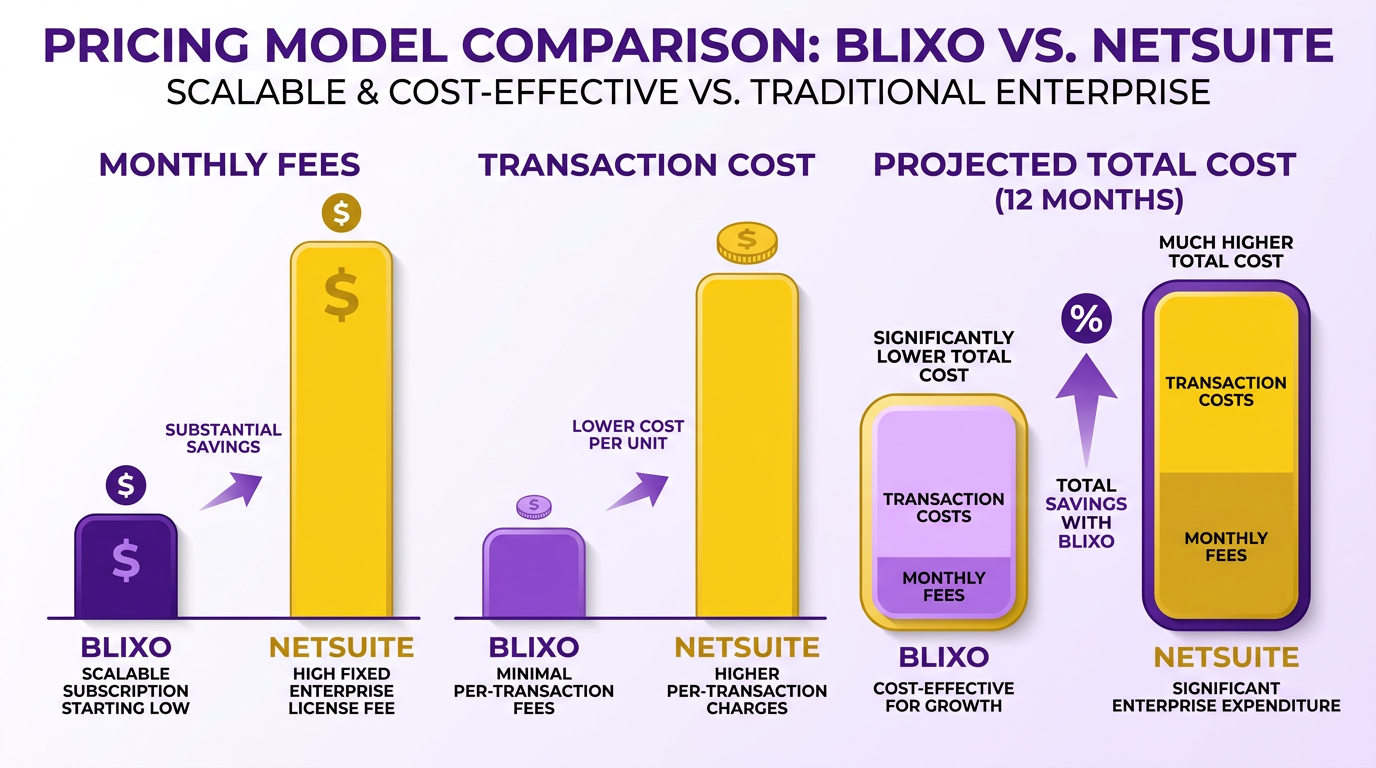
Blixo’s pricing strategy centers on pay-as-you-go flexibility, with options for monthly, annual, and custom plans. Its monthly plans start at a flat rate, making it ideal for small to mid-sized businesses seeking predictable expenses. Annual plans offer discounts for long-term commitments, and custom plans scale with business growth, avoiding implementation fees. In contrast, NetSuite SuiteBilling follows a fixed licensing model, where costs depend on user count, module add-ons, and integration complexity. This often includes high upfront fees for implementation and ongoing licensing charges, which can total tens of thousands of dollars for larger enterprises. As mentioned in the Implementation and Onboarding Experience section, Blixo’s zero implementation fees contrast sharply with SuiteBilling’s high setup costs.
| Pricing Model | Blixo | NetSuite SuiteBilling |
|---|---|---|
| Monthly Plans | Flat-rate, no implementation fees | Not typically offered |
| Annual Plans | Discounted rates | Available, but with high fees |
| Custom Plans | Scales with business growth | High costs for customization |
| Implementation | Zero fees | $10k–$50k+ for setup and training |
Blixo’s approach reduces entry barriers, while NetSuite’s model suits businesses with dedicated IT budgets..
What Features Justify the Pricing Differences?
Blixo’s pricing includes core billing automation, real-time reporting, and integration with major payment gateways. Custom plans add advanced features like multi-currency support and AI-driven analytics. SuiteBilling, on the other hand, bundles enterprise-grade tools like multi-channel CRM sync, advanced tax compliance modules, and ERP connectivity. However, these features often require additional licensing fees. As highlighted in the Feature Comparison: Invoicing and Collections section, Blixo’s pre-built integrations provide immediate value without extra costs.
| Feature | Blixo | NetSuite SuiteBilling |
|---|---|---|
| Billing Automation | Included in all plans | Included in base license |
| Multi-Currency Support | Available in custom plans | Requires add-on module |
| CRM Integration | Pre-built for major platforms | Custom integration (extra cost) |
| Tax Compliance | Basic support | Advanced (included in higher tiers) |
| Scalability | Pay-as-you-go tiers | Fixed user-based licensing |
Blixo’s value lies in its all-inclusive base features, while SuiteBilling’s strength is in enterprise scalability, albeit at a higher cost..
What Real-World Benefits Does Blixo Offer for Cost Savings?
Businesses using Blixo report cost reductions of 20–40% compared to traditional platforms like SuiteBilling. A 200-user SaaS company, for example, saved $15,000 annually by switching from SuiteBilling’s fixed licensing to Blixo’s scalable custom plan. Building on concepts from the Why Consider Alternatives to Traditional Automated Subscription Billing section, Blixo’s flexibility addresses the limitations of rigid pricing structures. The absence of implementation fees and the ability to pay only for active users further lower expenses.
One real-world example from the Blixo blog highlights a digital marketing agency that reduced billing errors by 70% while cutting costs by $8,000/month by adopting Blixo’s automated invoicing and recurring payment tools. SuiteBilling, while strong, often locks businesses into long-term contracts with rigid pricing tiers, making it harder to adjust for fluctuating needs..
What Limitations Do Traditional Platforms Like SuiteBilling Face?
Traditional platforms like SuiteBilling struggle with rigid pricing structures and high minimum commitments. For instance, a mid-sized e-commerce business might pay $25,000 upfront for implementation and $10,000/year in licensing, with limited flexibility to scale down during slower periods. Blixo’s pay-as-you-go model avoids this, allowing businesses to adjust usage without financial penalties. Another limitation is complexity in customization. SuiteBilling often requires third-party developers for tailored features, adding to costs. Blixo simplifies this with out-of-the-box tools and a user-friendly interface, reducing reliance on external resources..
Key Takeaways for Businesses
When choosing between Blixo and SuiteBilling, consider these practical insights:
- Blixo: Best for businesses prioritizing flexibility, low upfront costs, and rapid deployment.
- NetSuite SuiteBilling: Suitable for enterprises needing deep integration with ERP systems and advanced compliance tools.
For businesses seeking cost-effective, scalable billing, Blixo’s transparent pricing and feature-rich base plans make it a compelling choice. Traditional platforms like SuiteBilling remain viable but require careful budgeting for implementation and long-term commitments. To explore how AI-driven billing tools like Blixo are reshaping financial workflows, read The Rise of AI Agents and Their Impact on Business.
Implementation and Onboarding Experience
Blixo’s implementation process emphasizes speed and simplicity, contrasting with traditional automated subscription billing systems that often require extensive customization. Businesses using Blixo typically complete setup within 1–3 business days, depending on integration complexity. The platform requires access to billing data, customer databases, and payment gateways, but its design minimizes manual configuration. For example, a small SaaS company with existing Stripe integration might onboard in under 24 hours by connecting their account through Blixo’s pre-built tools. This contrasts sharply with traditional systems, where teams often spend weeks coding custom workflows or hiring developers to bridge compatibility gaps.
How Does Blixo’s Onboarding Compare to Traditional Systems?
Traditional automated billing platforms demand significant upfront effort. Teams must configure pricing models, tax rules, and subscription tiers manually, often involving IT or finance departments. Integration with legacy systems may require API development, which can take 4–8 weeks and cost thousands in development fees. By contrast, Blixo’s onboarding uses automation to reduce these steps. The platform uses AI-driven workflows to map billing data and suggest optimal pricing structures, cutting setup time by 70% in many cases. A mid-sized e-commerce business reported transitioning from a traditional system to Blixo in just four days, avoiding months of development delays.
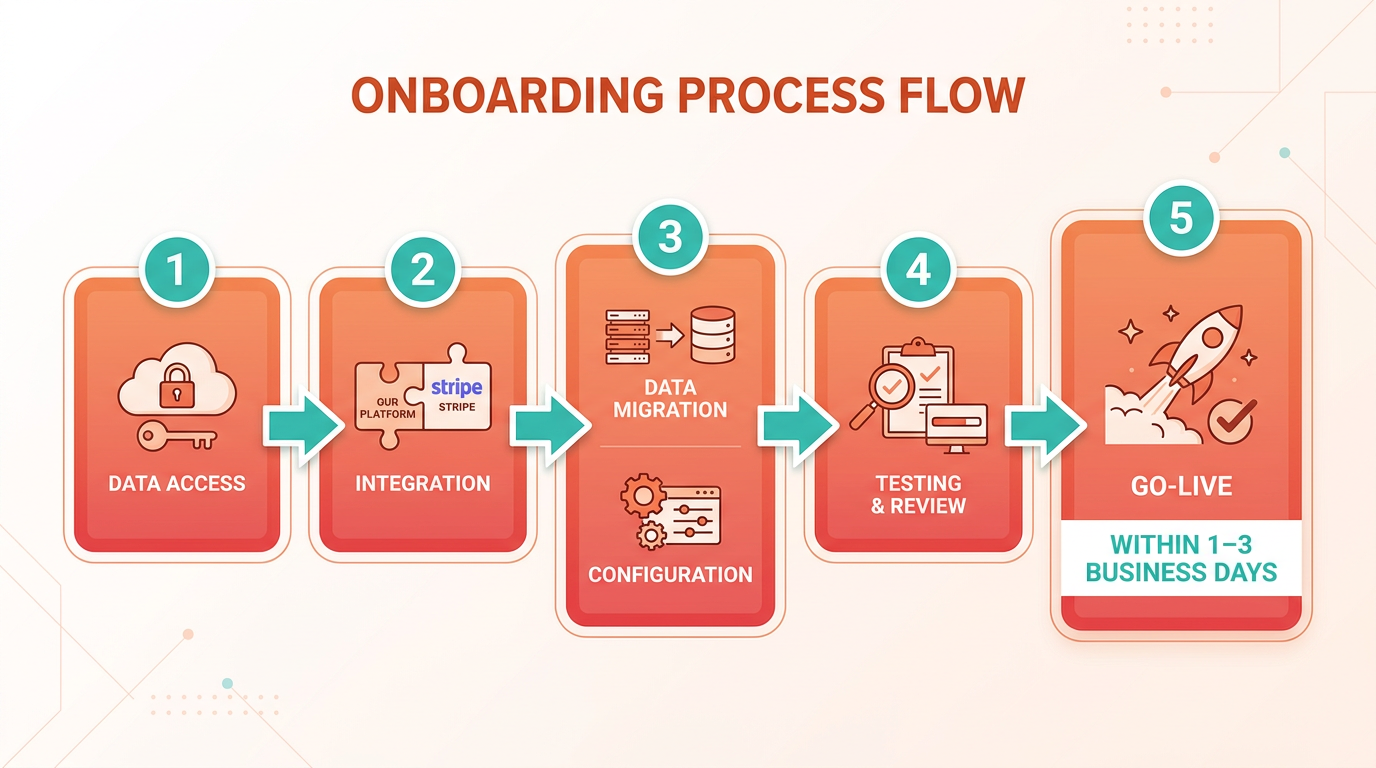
| Feature | Blixo | Traditional Systems |
|---|---|---|
| Setup Time | 1–3 business days | 4–8 weeks |
| Customization Effort | Minimal (pre-built templates) | High (custom coding required) |
| IT Involvement | Low (self-serve tools) | High (developer dependency) |
| Cost | Flat fee or subscription model | High upfront development costs |
What Are the Real-World Benefits of Blixo’s Approach?
Blixo’s streamlined implementation reduces time-to-value for businesses, enabling faster revenue cycles and lower operational overhead. For instance, a digital content platform using Blixo eliminated 80% of its billing errors within a month by automating invoice generation and subscription renewals, as discussed in the Feature Comparison: Invoicing and Collections section. Traditional systems often lack this agility, forcing businesses to manage exceptions manually. Another benefit is reduced complexity: Blixo’s interface centralizes billing, invoicing, and customer data, whereas legacy systems require switching between multiple tools. A startup using Blixo noted that its finance team saved 15 hours weekly by consolidating workflows into a single dashboard.
While specific case studies aren’t detailed in the provided sources, the Blixo blog highlights how AI agents can automate repetitive billing tasks, indirectly improving implementation efficiency. This aligns with reviews from platforms like AppSumo, where users describe Blixo as “plug-and-play” compared to competitors. Traditional systems, however, remain rigid, often requiring reconfiguration for features like multi-currency support or dynamic pricing tiers. Blixo’s flexibility shines here, with updates rolled out automatically as businesses scale, a contrast to the manual processes described in the Traditional Automated Subscription Billing: NetSuite SuiteBilling Overview section.
For businesses prioritizing speed and simplicity, Blixo’s implementation model offers a compelling alternative to traditional billing systems. Its focus on automation and pre-built integrations ensures minimal disruption, while traditional platforms risk delays and higher costs due to their reliance on manual processes. This makes Blixo particularly suited for startups and growing companies needing to iterate quickly, as outlined in the Pricing Comparison: Blixo vs NetSuite SuiteBilling section.
Frequently Asked Questions
1. What are the main limitations of traditional automated billing systems?
Traditional systems lack flexibility for dynamic pricing and real-time adjustments, require manual interventions for tiered plans, and struggle with usage-based models, leading to revenue loss and customer dissatisfaction.
2. How does Blixo improve payment success rates compared to traditional systems?
Blixo reduces payment failures by up to 30% through automated dunning management, which recovers 15-20% of failed payments by optimizing retry logic and minimizing manual follow-ups.
3. What benefits do modern platforms like Blixo offer for SaaS businesses?
They enable real-time billing adjustments, multi-currency support, and automated invoicing, cutting administrative tasks by 40% and improving customer retention by 25% through personalized pricing.
4. Why do traditional systems struggle with usage-based billing models?
Legacy systems lack scalable infrastructure to track and bill for variable usage, making it difficult to adjust charges dynamically and hindering growth for subscription services with fluctuating consumption.
5. How does automated dunning management boost recurring revenue?
By systematically retrying failed payments and reducing churn, automated dunning directly increases recurring revenue by 15-20%, ensuring consistent cash flow for subscription-based businesses.
6. What advantages does Blixo provide for businesses with tiered pricing plans?
Blixo allows instant adjustments to tiered pricing and add-ons without developer intervention, streamlining updates and improving agility for SaaS companies with evolving subscription models.
7. Can integrated billing tools reduce operational costs?
Yes, integrated tools cut administrative tasks by 40% by automating invoicing, payment collection, and reporting, lowering operational overhead for subscription-based businesses.