

Automate Subscription Billing Checklist with Blixo

Key Takeaways
- Automate subscription billing to cut error rates from 2–5% to under 0.1%, preserving profit margins.
- Reduce invoice processing time from 3–5 hours manually to 5–10 minutes with automation.
- Accelerate payment cycles from 7–10 days to 1–3 days using automated systems like Blixo.
- Recover $250,000 in delayed payments within six months by streamlining billing workflows.
- Eliminate revenue leaks by automating tax rates, subscription renewals, and calculation accuracy.
- Cut manual billing errors that cost high-volume businesses 2–5% in revenue annually.
- Free up operational resources by shifting 3–5 hours of manual work to 5–10 minutes automation.
Why Automating Subscription Billing Matters
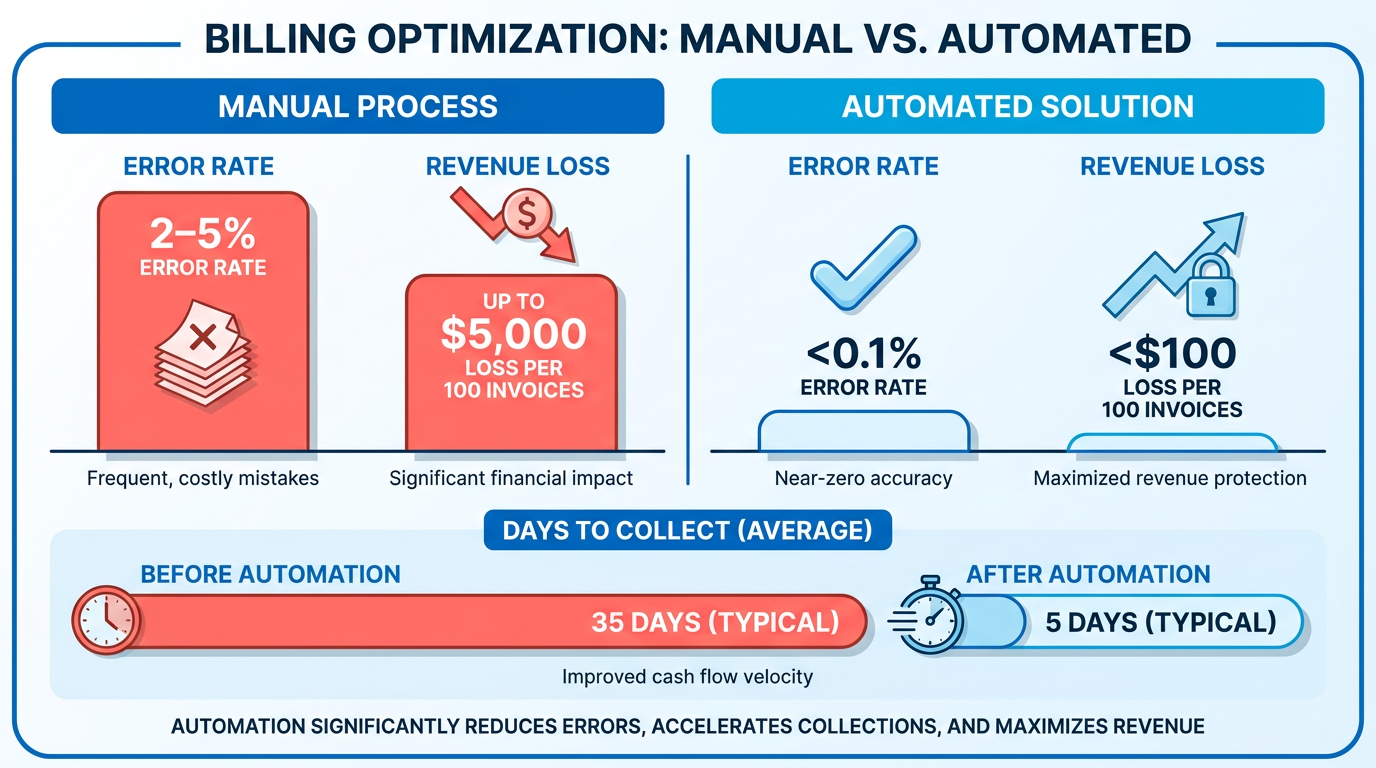
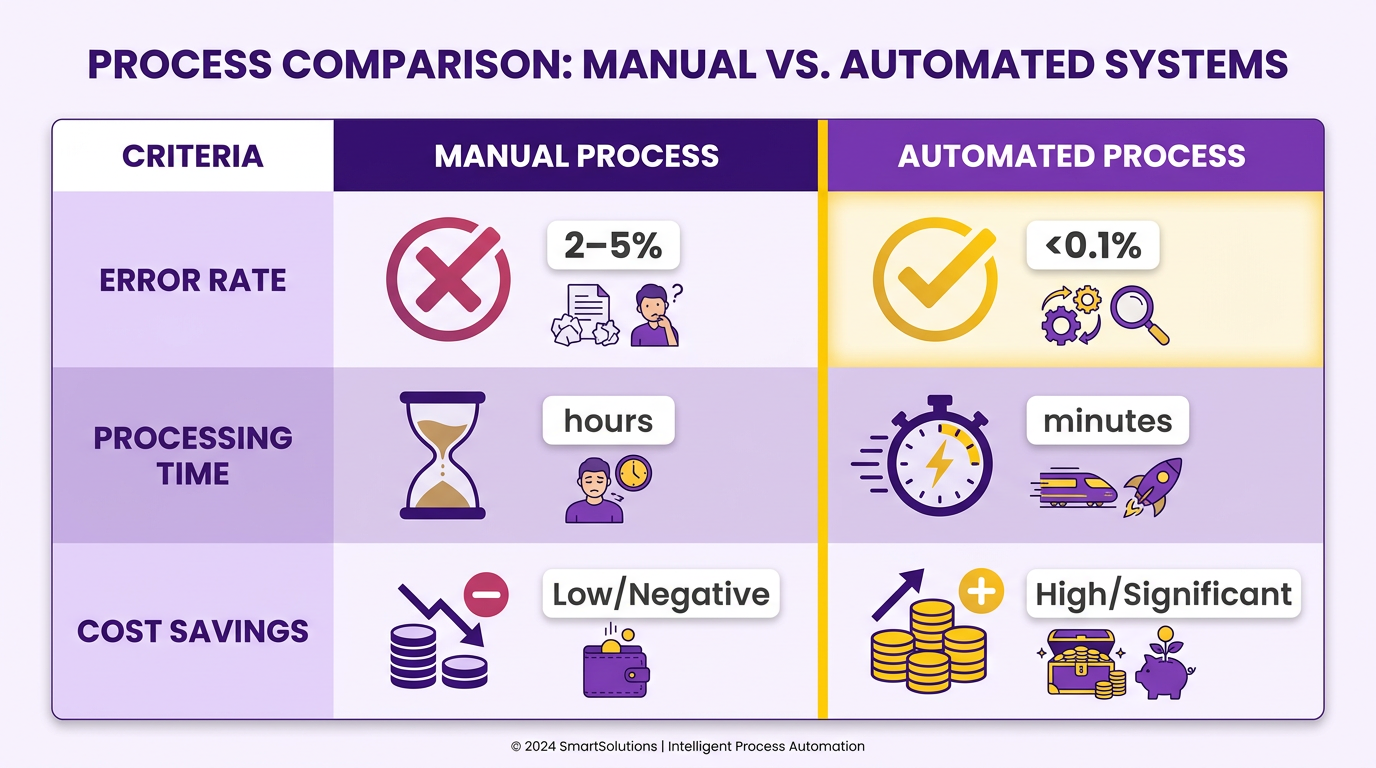
Automating subscription billing directly impacts a business’s cash flow, reduces operational friction, and minimizes revenue leaks caused by human error. For example, manual billing processes often result in 2–5% error rates, which can translate to significant revenue loss for high-volume businesses. By contrast, automated systems like Blixo cut errors to less than 0.1%, ensuring accurate invoicing and faster payment cycles. This shift isn’t just about efficiency-it’s about preserving profit margins in industries where recurring revenue is the lifeblood of operations. As mentioned in the Configuring Automated Collections and Dunning with Blixo section, this reduction in error rates directly accelerates invoicing and payment accuracy.
What Challenges Does Manual Billing Create?
Manual billing introduces delays, errors, and inefficiencies that compound over time. Invoice processing that takes 3–5 hours manually can be completed in 5–10 minutes with automation, freeing up resources for strategic tasks. Payment cycles also shrink dramatically-7–10 days in manual systems versus 1–3 days with automation. These improvements matter: one company using Blixo reported recovering $250,000 in delayed payments within six months by streamlining their billing workflow. For businesses with thousands of subscribers, even small gains in speed and accuracy translate to measurable financial benefits.
- Reduce human error by automating calculations, tax rates, and subscription renewals
- Accelerate payment cycles to improve cash flow predictability
Who Needs Subscription Billing Automation Most?
Businesses with recurring revenue models-SaaS platforms, digital media, and membership services-rely on consistent, error-free billing to retain customers and scale. Consider a SaaS company charging 10,000 monthly subscribers: a 2% error rate means 200 failed payments each month, often due to outdated card details or miscalculations. Automation not only corrects these issues but also proactively updates payment methods and sends targeted reminders. As mentioned in the Configuring Automated Collections and Dunning with Blixo section, this proactive management ensures 98% success rates in recurring transactions. For businesses aiming to scale, building on concepts from the Audit and Define Your Subscription Billing Process section helps establish workflows that minimize administrative overhead while maximizing payment reliability.
- Proactively manage failed payments with automated retries and customer notifications
- Scale effortlessly as subscriber counts grow without added administrative overhead
Why the Shift to Automation Is Critical Now
The subscription economy is booming, with global spending projected to exceed $1.5 trillion by 2027. Yet many businesses still rely on outdated methods like spreadsheet tracking or manual invoicing. This creates bottlenecks during peak seasons and increases the risk of customer dissatisfaction due to billing errors. Automation isn’t optional-it’s a necessity for staying competitive. Blixo’s SaaS service addresses these pain points by integrating seamlessly with existing systems, offering real-time analytics, and adapting to complex pricing models. For businesses juggling usage-based billing or tiered subscription plans, this level of flexibility ensures no revenue is left on the table.
- Support complex pricing models without manual intervention
- Generate real-time reports to track revenue and subscription health
By automating subscription billing, businesses eliminate the guesswork from revenue management. They gain control over payment workflows, reduce administrative burdens, and create a smoother experience for customers. Whether you’re a small startup or an enterprise with millions in recurring revenue, the shift to automation isn’t just about avoiding mistakes-it’s about enabling growth.
Audit and Define Your Subscription Billing Process
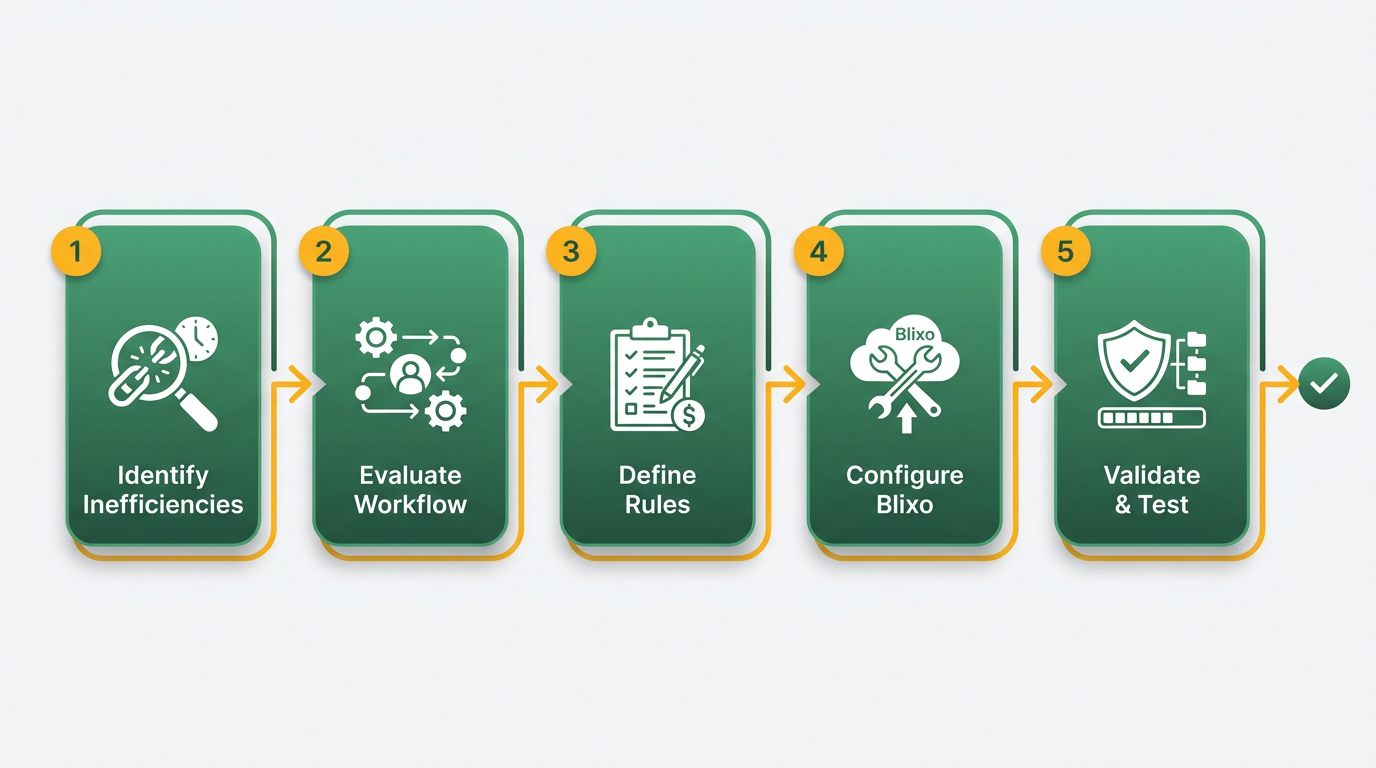
To streamline your billing process with Blixo, start by systematically auditing and defining your workflows. This ensures clarity, reduces errors, and sets the foundation for automation. Below, we break down the key steps to evaluate, configure, and validate your subscription billing setup in Blixo.
What Should You Audit in Your Billing Workflow?
Begin by identifying inefficiencies in your current billing process. Manual invoicing, inconsistent pricing rules, or delayed payment reconciliation are common pain points. Use Blixo’s analytics dashboard to track metrics like invoice generation time, error rates, and payment processing delays. Document every step of your existing workflow-from customer onboarding to renewal notifications-to pinpoint where automation can add value.
- Map your current billing process: List all steps, including how you track subscriptions, generate invoices, and handle disputes. This helps identify bottlenecks.
- Review pricing and billing rules: Check for inconsistencies in pricing tiers, discounts, or billing cycles that may confuse customers or lead to revenue loss.
- Analyze payment reconciliation: Identify delays in matching payments to invoices. Manual reconciliation often causes cash flow gaps.
How to Define Subscription Pricing and Billing Cycles
Clear pricing structures and flexible billing cycles improve customer satisfaction and reduce churn. Blixo supports tiered pricing, usage-based models, and custom discounts, allowing you to align billing with your business goals.
- Set pricing models: Choose between flat-rate, tiered (e.g., $10/month for basic, $25/month for premium), or usage-based (e.g., per API call). Use Blixo’s pricing templates to standardize rules.
- Configure billing cycles: Define monthly, quarterly, or annual billing periods. Blixo lets you schedule invoicing in advance and send automated renewal reminders.
- Add discounts and promotions: Apply one-time or recurring discounts via coupon codes. For example, offer a 10% discount for annual subscriptions.
For more on automated invoicing benefits, see Automated Billing System: 5 Advantages.
How to Configure Blixo for Automated Invoicing and AI Payments
Once your pricing is defined, automate invoice generation and payment matching using Blixo’s tools. This reduces manual work and speeds up cash application. Building on concepts from the Configuring Automated Collections and Dunning with Blixo section, enable features that reduce manual errors and accelerate invoice processing.
- Schedule automated invoices: Set invoices to generate on specific dates or after service delivery. Customize templates with your branding for a professional look.
- Enable AI-powered cash application: Blixo’s AI matches incoming payments to invoices automatically, even if payment amounts differ slightly. This reduces errors and accelerates reconciliation.
- Test scenarios for edge cases: Simulate late payments, partial payments, or failed transactions to ensure your rules handle them correctly.
Best practices for testing include using Blixo’s staging environment to validate workflows before going live. For hybrid billing models (e.g., subscriptions + usage-based charges), see Billing automation for usage + subscriptions hybrid.
How to Validate Your Subscription Billing Process
After setup, rigorous testing ensures your billing system works as intended. Start with small-scale trials and gradually scale to full automation. As outlined in the Launching and Monitoring Your Automated Subscription Billing Process section, regular testing and adjustments are critical for long-term accuracy.
- Run test transactions: Create dummy accounts with varying billing plans to verify invoicing, discounts, and payment matching.
- Validate reconciliation reports: Check if AI-captured payments align with invoices. Adjust rules if discrepancies arise.
- Monitor customer feedback: Track billing-related support tickets to identify issues like unexpected charges or missed invoices. As mentioned in the Creating a Custom Customer Self-Service Portal with Blixo section, empowering users with self-service tools can reduce billing disputes and errors.
Configuring Automated Collections and Dunning with Blixo
To streamline your subscription billing workflow, start by enabling automated collections and dunning within Blixo. This feature reduces manual errors from 2–5% to less than 0.1% and accelerates invoice processing from hours to minutes. Begin by managing to the billing settings dashboard and toggling on the automated collections option. Next, customize rules like retry schedules and communication templates to align with your business policies. For example, set the initial retry to occur 48 hours after a failed payment, followed by a second attempt three days later. Adjust thresholds for late fees and grace periods based on your customer agreements. As mentioned in the Audit and Define Your Subscription Billing Process section, a clear understanding of your workflows ensures these configurations align with your operational goals.
Setting Up Payment Gateway Integrations
Integrating your preferred payment gateway ensures seamless transactions and minimizes delays. Blixo supports connections to Stripe, PayPal, and other major processors. In the payment settings, enter your gateway’s API keys and test the integration using sample transactions. Verify that recurring billing cycles sync correctly with your gateway’s system to avoid mismatches. For businesses handling international payments, confirm currency conversion settings and regional compliance rules within the gateway configuration. This step reduces payment cycle durations from 7–10 days to 1–3 days, improving cash flow predictability.
Configuring Automated Chasing and Reminders
Automated dunning workflows reduce the need for manual follow-ups by sending timely reminders. In Blixo, create tiered email templates for different stages of delinquency. For instance, send a first reminder 24 hours after a missed payment, a second notice three days later, and a final warning with a payment link on Day 7. Customize the tone of these messages to balance urgency and customer empathy. For high-value clients, add a phone call step after the second email to resolve issues proactively. Track response rates in the dunning analytics to refine timing and messaging for better results. Building on concepts from the Tracking Performance with Reporting and Analytics section, use these insights to optimize engagement strategies.
Customizing the Dunning Process
Tailor the dunning process to reflect your brand’s voice and customer support policies. In Blixo, adjust the number of retries allowed before escalating an account to collections. Options include limiting retries to two attempts or offering alternative payment methods like bank transfers for customers with a history of failed card transactions. Use segmentation rules to apply different dunning rules to tiers of subscribers-for example, providing extended grace periods for long-term customers. Test these workflows in a sandbox environment before deployment to avoid unintended disruptions. As outlined in the Launching and Monitoring Your Automated Subscription Billing Process section, rigorous testing ensures workflows operate as intended.
Tracking Performance with Reporting and Analytics
Blixo’s built-in dashboards let you monitor the effectiveness of your collections and dunning strategies. Key metrics include payment success rates, average days to resolution, and customer churn linked to billing issues. Export these reports to identify trends, such as seasonal fluctuations in payment failures or recurring problems with specific card types. Use this data to optimize retry schedules or adjust communication strategies. For instance, if 30% of failed payments stem from expired credit cards, prioritize automated card update prompts in future workflows.
Creating a Custom Customer Self-Service Portal with Blixo
Creating a custom customer self-service portal in Blixo streamlines billing processes while giving users control over their subscriptions. Start by using Blixo’s intuitive tools to design a branded portal that aligns with your business identity and meets customer needs.
Branding and Customization Setup
Your portal’s branding builds trust and familiarity. Begin by uploading your logo, selecting a color scheme, and adjusting fonts to match your company’s style. Blixo allows you to customize dashboard layouts, ensuring users can manage subscriptions, invoices, and payment methods effortlessly.
- Upload your logo and brand assets to establish visual consistency.
- Choose a color palette that reflects your brand identity and improves user experience.
- Customize dashboard widgets to prioritize frequently used features like payment history or subscription management.
- Set up branded email templates for a cohesive experience during notifications, as mentioned in the Audit and Define Your Subscription Billing Process section to ensure alignment with defined workflows.
Setting Up Payment Methods
Offering flexible payment options reduces friction and increases customer satisfaction. Configure credit card and bank transfer methods directly through Blixo’s payment gateway. Ensure currency settings match your target audience’s preferences, building on concepts from the Configuring Automated Collections and Dunning with Blixo section to support international customers effectively.
- Enable credit card payments with secure input fields for card details and expiration dates.
- Add bank transfer instructions with clear account details for manual payments.
- Configure currency options to support international customers.
- Test payment flows to confirm transactions process smoothly without errors.
Configuring Automated Notifications
Timely updates keep customers informed and reduce support inquiries. Use Blixo’s notification templates to automate alerts for payments, invoices, and subscription changes.
- Set up payment confirmation emails with transaction details and timestamps.
- Schedule recurring invoices to align with billing cycles and send them automatically, as outlined in the Audit and Define Your Subscription Billing Process section.
- Enable SMS alerts for urgent updates like failed payments or upcoming renewals.
- Customize message content to match your brand’s tone and clarity.
Testing and Security Compliance
A well-tested portal prevents errors and protects sensitive data. Validate all features using test accounts, and verify Blixo’s security protocols meet industry standards.
- Run functional tests on payment processing, subscription upgrades, and cancellation workflows.
- Conduct user testing with a small group to identify usability issues.
- Verify encryption for data in transit and at rest using Blixo’s built-in SSL/TLS protocols.
- Review compliance features like PCI DSS and GDPR to ensure customer data stays protected.
By following these steps, you ensure a seamless, secure portal that empowers customers while automating billing tasks efficiently.
Launching and Monitoring Your Automated Subscription Billing Process
Launching your automated subscription billing process with Blixo requires careful setup, rigorous testing, and ongoing monitoring to ensure accuracy and reliability. This section walks you through the critical steps to deploy and maintain your system effectively.
What Steps Are Required to Launch Your Billing Process?
Begin by connecting your preferred payment gateways through Blixo’s integration settings. This step ensures seamless transaction handling and compliance with regional payment standards. Next, configure billing cycles, pricing tiers, and tax rules directly in your dashboard. For example, if your service offers monthly and annual plans with discounts, define these clearly to avoid billing errors.
- Connect payment gateways to enable secure transaction processing
- Define billing cycles and pricing to align with your business model
- Set up tax compliance rules to automate regional tax calculations
As mentioned in the Audit and Define Your Subscription Billing Process section, thorough planning ensures clarity and reduces errors before deployment.
How Do You Test and Validate Your Billing System?
Testing ensures your automated billing process handles edge cases like failed payments, subscription upgrades, and prorated refunds. Use Blixo’s sandbox environment to simulate transactions without charging real customers. For instance, test a scenario where a customer upgrades from a monthly to an annual plan mid-cycle to verify proration accuracy.
- Run sandbox tests for subscriptions, upgrades, and cancellations
- Validate payment notifications to confirm customers receive timely updates
- Check error handling for declined payments or invalid card details
Building on concepts from the Configuring Automated Collections and Dunning with Blixo section, validate how automated dunning workflows handle failed payments during testing.
Which Metrics Should You Monitor for Performance?
Once live, track key metrics like payment success rate, churn rate, and revenue trends. Blixo’s analytics dashboard provides real-time insights into these indicators. For example, a sudden drop in payment success rate might signal gateway issues, while rising churn could highlight product dissatisfaction.
- Monitor payment success rate to detect processing issues
- Track monthly recurring revenue (MRR) for cash flow forecasting
- Review churn rate to assess customer retention health
Set up custom alerts in Blixo to notify your team when metrics deviate from expected ranges. Proactive monitoring prevents small problems from escalating.
What Are Best Practices for Troubleshooting?
Issues like failed payments or subscription pauses require swift resolution. Start by checking Blixo’s transaction logs to pinpoint the root cause. For recurring payment failures, update customer payment details via the dashboard or send automated reminders. If a customer reports an incorrect charge, use Blixo’s audit trail to review the billing event and resolve disputes transparently.
- Check transaction logs for detailed error diagnostics
- Update customer payment methods automatically for failed charges
- Use audit trails to resolve billing disputes efficiently
For persistent problems, use Blixo’s 24/7 support team or consult their knowledge base for step-by-step solutions.
How Can You Optimize Long-Term?
Blixo offers ongoing resources to refine your billing strategy. Review their documentation for updates on features like dynamic pricing or add-on subscriptions. Engage with their support team to optimize tax rules or integrate new payment methods. Regularly audit your billing configurations to adapt to business growth or regulatory changes.
- Stay updated with Blixo’s feature releases and best practices
- Audit configurations quarterly to align with evolving business needs
- Engage support for advanced use cases or customization
As outlined in the Audit and Define Your Subscription Billing Process section, periodic reviews ensure your workflows remain aligned with operational goals. By combining proactive monitoring with Blixo’s tools, you’ll maintain a reliable, scalable subscription billing system. For deeper insights into automated billing strategies, explore Blixo’s blog on recurring billing solutions.
Frequently Asked Questions
1. How much does automation reduce billing errors compared to manual processes?
Automating subscription billing cuts error rates from 2–5% to under 0.1%, preventing revenue loss for high-volume businesses. Tools like Blixo ensure precise calculations and tax compliance, minimizing inaccuracies that cost companies 2–5% annually in manual systems.
2. How much time can automation save in invoice processing?
Automated systems reduce invoice processing from 3–5 hours manually to 5–10 minutes. This efficiency frees employees to focus on strategic tasks while ensuring faster, error-free billing for businesses with recurring revenue models.
3. Can automation accelerate payment cycles? If so, by how much?
Yes, automation shortens payment cycles from 7–10 days to 1–3 days. By streamlining billing workflows, platforms like Blixo help businesses recover delayed payments, such as $250,000 reclaimed within six months for one user.
4. Which industries benefit most from subscription billing automation?
SaaS platforms, digital media, and membership services gain the most. These industries rely on consistent, error-free billing to retain customers and scale, making automation critical for managing thousands of recurring transactions.
5. How does automation prevent revenue leaks?
Automation eliminates revenue leaks by enforcing accurate tax rates, subscription renewals, and calculation precision. This prevents manual errors that cost businesses 2–5% in revenue annually, preserving profit margins for high-volume operations.
6. What operational savings does automation provide?
Automating billing frees 3–5 hours of manual work weekly to just 5–10 minutes. This shift reduces labor costs and allows teams to prioritize growth strategies while maintaining customer trust through timely, accurate invoicing.