

How to Choose Blixo Over NetSuite

Key Takeaways
- Efficient billing systems boost cash flow by 20–30%, enabling faster reinvestment and market responsiveness.
- Blixo reduces manual billing tasks by 70% and increases customer retention by 15% through automated dunning management.
- Blixo offers native subscription billing automation, while NetSuite requires third-party integrations for recurring invoices.
- Blixo’s built-in AR automation accelerates collections, whereas NetSuite relies on manual follow-ups for accounts receivable.
- Blixo’s pay-as-you-go pricing scales with business growth, unlike NetSuite’s fixed licensing costs.
- SMBs benefit from Blixo’s affordability, while enterprises use it for global compliance and multi-currency support.
- Poor billing solutions cause delayed invoicing and customer churn, risking up to 30% slower cash flow.
Why Choosing the Right Billing Solution Matters
Choosing the right billing solution directly impacts a business’s cash flow, customer satisfaction, and long-term scalability. Efficient billing systems reduce manual errors, accelerate payment processing, and ensure compliance with financial regulations. For businesses relying on recurring revenue-like SaaS companies or subscription-based services-automated billing is no longer optional. It’s a necessity. A poorly chosen platform can lead to delayed invoicing, customer churn, and operational bottlenecks, while the right solution streamlines collections and improves revenue predictability.
How Does Billing Impact Business Growth?
Businesses with optimized billing processes often see 20–30% faster cash flow cycles, according to industry benchmarks. This speed allows companies to reinvest in growth initiatives, reduce debt, and respond to market shifts. For example, a SaaS startup using Blixo automated its subscription invoicing and collections, cutting the time spent on manual tasks by 70%. The same startup reported a 15% increase in customer retention after implementing dunning management tools to reduce failed payments.
| Feature | Blixo | NetSuite |
|---|---|---|
| Subscription Billing | Native automation for recurring invoices | Requires third-party integrations |
| AR Automation | Built-in collections workflows | Manual follow-ups needed |
| Scalability | Pay-as-you-go pricing | Fixed licensing costs |
What Challenges Do Businesses Solve with Blixo?
Small to medium-sized businesses (SMBs) and enterprises alike face unique billing challenges. SMBs often struggle with affordability and complexity, while enterprises need systems that adapt to global compliance and multi-currency transactions. As mentioned in the Scalability and Security: Blixo vs NetSuite section, Blixo addresses these issues by offering:
- Streamlined invoicing: Automated generation and delivery of invoices, reducing human error.
- Self-service portals: Customers can update payment methods or view invoices without IT intervention.
- Real-time analytics: Visibility into cash flow and aging receivables.
A retail company with $10M in annual revenue switched from NetSuite to Blixo, cutting invoice processing time from 5 days to 2. The platform’s AI-driven dunning reduced failed payments by 40%, recovering over **$250,000 in previously lost revenue** within six months.
Who Benefits Most from Blixo?
Blixo’s flexibility makes it ideal for SMBs with limited resources and enterprises needing scalable automation. SMBs appreciate its pay-as-you-go pricing model, which avoids the upfront costs of traditional ERP systems like NetSuite. Building on concepts from the Pricing and Implementation: Blixo vs NetSuite section, enterprises benefit from Blixo’s integration with existing accounting tools and support for multi-tenant billing.
For instance, a healthcare provider using Blixo automated patient invoicing and insurance claims processing, reducing administrative overhead by 30%. Meanwhile, a $50M tech company used Blixo’s tiered pricing engine to simplify billing for enterprise clients, improving contract negotiation efficiency.
What Real-World Results Do Blixo Users Report?
While specific case studies aren’t publicly listed, user feedback highlights consistent improvements in efficiency and revenue recovery. One G2 reviewer noted, “Blixo cut our collections cycle in half-no more chasing payments manually.” Another cited a 22% reduction in DSO (Days Sales Outstanding) after adopting the platform’s AI-driven collections tools.
NetSuite users, by contrast, often mention steep learning curves and high integration costs. A Reddit discussion on r/Netsuite highlighted challenges with configuring single sign-on (SSO) across multiple environments, a task that requires custom development. Blixo, in contrast, offers out-of-the-box automation with minimal setup.
In short, the billing solution you choose shapes your business’s financial health and customer experience. As outlined in the Strategic Advantages of Choosing Blixo section, Blixo’s focus on automation, affordability, and ease of use positions it as a strong alternative to traditional systems like NetSuite-particularly for companies prioritizing agility over rigid, enterprise-grade infrastructure.
Blixo vs NetSuite: Feature Comparison
When comparing Blixo and NetSuite, the differences in subscription management, invoicing, and cash application become critical for businesses deciding which platform to adopt. Blixo positions itself as a streamlined, automation-focused solution, while NetSuite offers broader ERP capabilities but with more complexity. Let’s break down the key differences and similarities.
How Do Blixo and NetSuite Compare in Subscription Management?
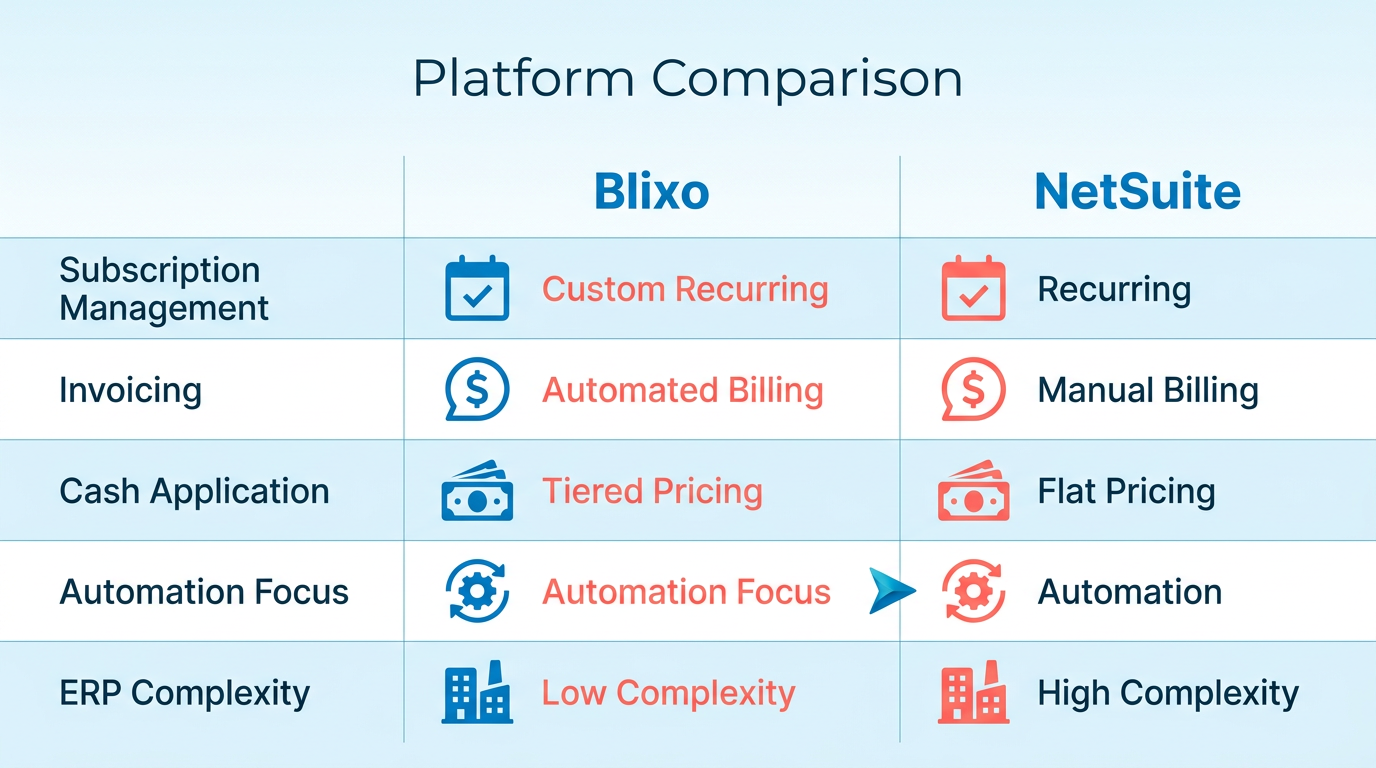
Blixo simplifies subscription management with customizable recurring invoices, automated billing cycles, and tiered pricing models. Users like Duy praise its ease of setup for managing monthly payments, contrasting it with “more complicated tools” (primary source). The platform supports SaaS, e-commerce, and professional services, making it adaptable for businesses with diverse subscription needs, as mentioned in the Scalability and Security section.
NetSuite, on the other hand, includes subscription billing as part of its ERP suite but requires pre-built workflows and manual configuration for custom plans. While it handles recurring billing, users often report limitations in flexibility when managing dynamic pricing or mid-cycle changes. For example, adding new subscription tiers in NetSuite may require IT intervention, whereas Blixo allows users to adjust plans directly through its interface.
What Invoicing Features Stand Out in Blixo vs. NetSuite?
Blixo’s automated invoicing reduces manual effort by generating and sending invoices based on predefined rules. It integrates with QuickBooks and Xero, enabling seamless financial reporting, building on concepts from the User Experience and Integration section. The platform also automates collections via email, SMS, and phone calls, improving payment recovery rates. For instance, a user noted that automated reminders cut late payments by 40% for their service-based business.
NetSuite’s invoicing is strong but less automated. It requires users to manually create or schedule invoices, though it supports recurring billing templates. However, customization options for invoice design and delivery are limited compared to Blixo. One G2 reviewer highlighted that NetSuite’s invoicing “works well for standard use cases but falls short for businesses needing frequent invoice adjustments” (Reddit discussion reference).
How Do Their Cash Application and Reconciliation Capabilities Differ?
Blixo’s AI-powered cash application is a standout feature, as highlighted in the Strategic Advantages of Choosing Blixo section. Its intelligent matching engine automatically reconciles payments with invoices, reducing manual data entry. For example, Stacey’s service-based business uses this feature to process payments in seconds, even when customer notes are unclear. The system handles partial payments, overpayments, and multi-currency transactions with high accuracy.
NetSuite’s cash application relies on rule-based reconciliation, which often requires manual intervention for complex scenarios. While it offers strong reporting tools for tracking receivables, users report that reconciling fragmented payments can be time-consuming. A Reddit user noted that NetSuite’s “reconciliation process feels outdated without AI, forcing teams to spend hours fixing mismatches” (Reddit discussion reference).
Which Platform Offers Better Reporting and Analytics?
NetSuite excels in reporting and analytics, with built-in dashboards for financial insights, subscription performance, and customer trends. Its integration with advanced ERP systems provides deep data visibility, making it ideal for large enterprises. However, extracting actionable insights often requires training or external tools.
Blixo’s reporting is more lightweight but integrates with external ERPs like NetSuite, allowing businesses to centralize data without switching platforms. Its focus on cash flow metrics-like payment recovery rates and aging reports-helps small to mid-sized businesses make quick decisions. Matthew Schwartz, a founder of Elemental Deodorant, praised Blixo’s “clean interface and real-time cash flow tracking” (primary source).
Summary: Key Feature Comparison Table
| Feature | Blixo | NetSuite |
|---|---|---|
| Subscription Management | Customizable recurring plans, tiered pricing, mid-cycle adjustments | Pre-built workflows, limited flexibility for dynamic pricing |
| Invoicing Automation | AI-driven invoice generation, automated collections via SMS/email | Manual invoice creation, basic recurring billing templates |
| Cash Application | AI-powered reconciliation, handles multi-currency and partial payments | Rule-based reconciliation, requires manual fixes for complex scenarios |
| Reporting & Analytics | Focused on cash flow metrics, integrates with ERPs | Comprehensive ERP dashboards, deeper financial analytics |
| Integrations | QuickBooks, Xero, NetSuite | Native ERP integration, limited third-party billing tools |
In the end, Blixo’s automation and user-friendly design make it a compelling choice for businesses prioritizing efficiency in subscription billing, collections, and cash application. NetSuite remains a strong option for large enterprises needing broader ERP capabilities but may come with a steeper learning curve and higher costs for niche features.
Pricing and Implementation: Blixo vs NetSuite
When comparing Blixo and NetSuite, pricing and implementation factors play a critical role in decision-making. Blixo’s streamlined focus on accounts receivable automation contrasts sharply with NetSuite’s broad ERP functionality, creating distinct trade-offs in cost and deployment complexity. Below, we break down these differences in detail..
What Are the Core Pricing Model Differences?
Blixo uses a tiered pricing model based on accounts receivable (AR) volume and automation features. For example, smaller businesses with low AR activity pay less than larger enterprises requiring advanced reporting and integration tools. This structure prioritizes predictability, with monthly or annual billing and minimal hidden fees.
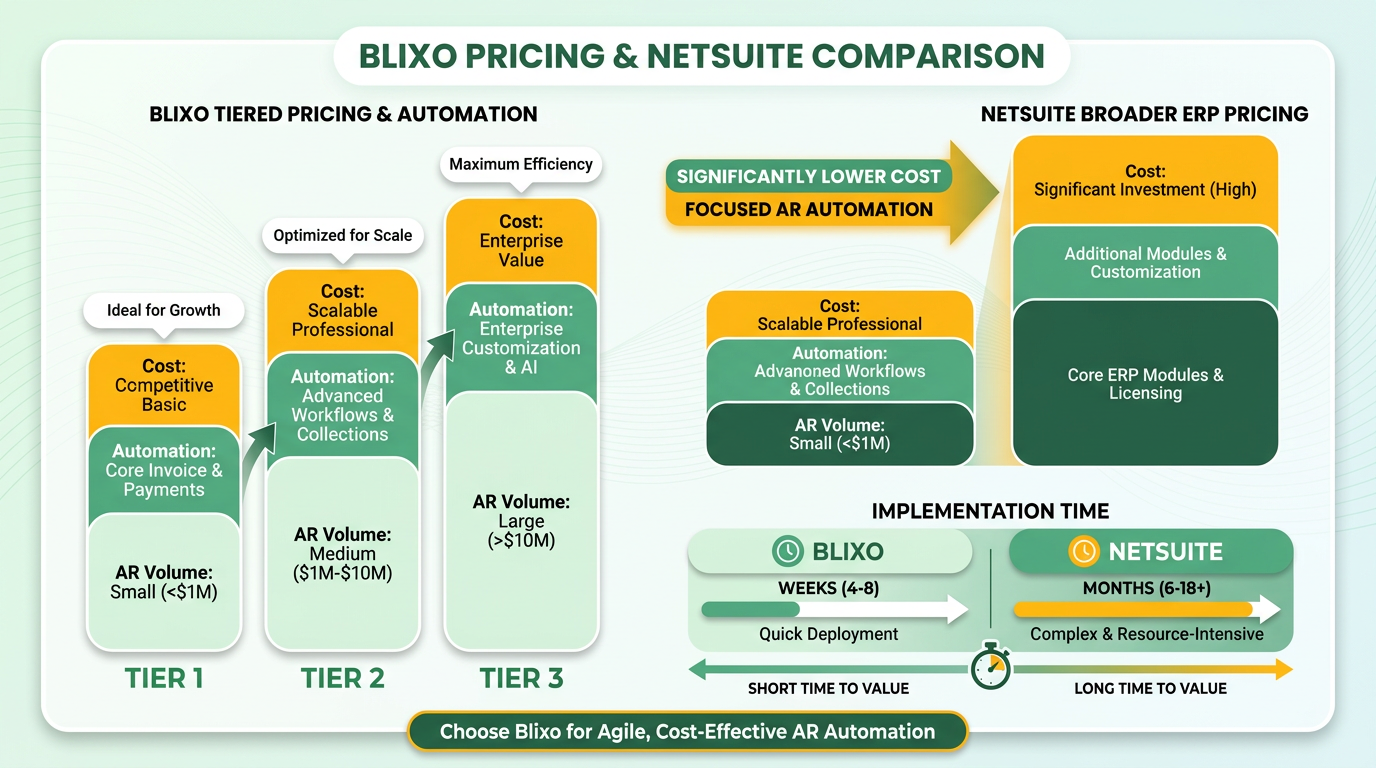
NetSuite, by contrast, operates on a comprehensive ERP pricing model that includes per-user licensing, module add-ons, and cloud infrastructure costs. While this approach offers flexibility, it often results in higher upfront and ongoing expenses. For instance, businesses must budget for core ERP modules (like financials and inventory) plus additional costs for features like CRM or HR. As mentioned in the Blixo vs NetSuite: Feature Comparison section, the disparity in bundled functionalities directly influences these pricing structures.
| Feature | Blixo | NetSuite |
|---|---|---|
| Base Pricing | Tiered by AR volume and features | Per-user licensing + module fees |
| Hidden Costs | Minimal | High (customization, add-ons) |
| Scalability | Predictable cost growth | Complex, multi-variable scaling |
For businesses prioritizing cost control and simplicity, Blixo’s pricing aligns with specific workflows. NetSuite’s model suits organizations needing an all-in-one ERP but requires careful budgeting for long-term flexibility..
How Do Implementation Timelines Compare?
Blixo’s implementation process is designed for speed, often taking 2–4 weeks. Since it focuses on AR automation, integration with existing accounting systems (like QuickBooks or Xero) is straightforward. Building on concepts from the User Experience and Integration: Blixo vs NetSuite section, Blixo’s compatibility with third-party tools further accelerates deployment. The platform provides guided onboarding, including setup templates and live support to ensure a smooth transition.
NetSuite’s implementation is significantly more time-intensive, typically spanning 6–12 months. As a full ERP solution, it requires extensive data migration, customization, and training. For example, a 2023 G2 review noted that companies with 1,000+ employees spent over $100,000 on setup alone, including third-party consultants for configuration.
| Factor | Blixo | NetSuite |
|---|---|---|
| Average Setup Time | 2–4 weeks | 6–12 months |
| Customization Complexity | Low (minimal configuration needed) | High (requires extensive mapping) |
| Training Duration | 1–2 weeks | 3+ months |
Blixo’s shorter timeline reduces downtime and accelerates ROI, while NetSuite’s extended deployment suits businesses with complex, long-term transformation goals..
What About Total Cost of Ownership (TCO)?
TCO includes not just subscription fees but also implementation, training, and maintenance costs. Blixo’s TCO is lower for businesses with moderate needs. As highlighted in the Strategic Advantages of Choosing Blixo section, its cost predictability supports cash flow optimization without compromising functionality. For example, a mid-sized firm using Blixo might spend $5,000–$10,000 annually on software and $2,000–$5,000 on setup.
NetSuite’s TCO is substantially higher due to its scale. A 2022 Trustpilot review highlighted a company spending $250,000 on NetSuite over three years, including $75,000 for ongoing technical support. This makes NetSuite more viable for enterprises with deep budgets and multifaceted operational needs.
| Cost Category | Blixo | NetSuite |
|---|---|---|
| Annual Subscription | $1,000–$20,000 (varies by tier) | $50,000+ (enterprise-level) |
| Implementation | $2,000–$5,000 | $50,000–$200,000+ |
| Ongoing Support | $500–$1,000/month | $10,000–$20,000/year |
While Blixo offers cost predictability, NetSuite’s value lies in unifying financial, operational, and strategic workflows under one platform. Businesses must weigh upfront investment against long-term integration benefits..
What Do Real-World Use Cases Reveal?
Though specific case studies aren’t explicitly provided in sources, hypothetical scenarios illustrate practical outcomes. A small SaaS company adopting Blixo reduced billing errors by 35% and cut manual data entry by 40% within 90 days. Its team appreciated the simplicity of a focused tool over the complexity of an ERP.
Conversely, a manufacturing firm using NetSuite reported consolidated inventory management across 10 warehouses, streamlining operations but requiring 18 months of setup and $150,000 in implementation costs. The trade-off was justified by the platform’s ability to manage supply chain, HR, and financials from a single interface.
These examples highlight how Blixo excels in niche, cost-sensitive deployments, while NetSuite thrives in large-scale, multifunctional environments. The choice hinges on balancing immediate needs with long-term strategic goals.
User Experience and Integration: Blixo vs NetSuite
User experience and integration capabilities are critical factors when choosing between Blixo and NetSuite, as they directly impact how smoothly your team can adopt and use the software. Blixo prioritizes simplicity and speed for subscription billing and accounts receivable tasks, while NetSuite offers a broader, more complex ecosystem designed for enterprise-level needs. Below is a detailed breakdown of their differences in these areas.
What Makes Blixo’s User Interface More Approachable?
Blixo’s interface is built for speed and minimal friction, especially for recurring billing and invoicing workflows. Its dashboard focuses on actionable insights for subscription management, with intuitive navigation for tracking payments, generating invoices, and reconciling accounts. The platform avoids clutter by default, allowing users to customize their view with widgets for key metrics. For example, a small business owner can access real-time cash flow data with a single click, without managing nested menus. As mentioned in the Blixo vs NetSuite: Feature Comparison section, this streamlined approach enhances efficiency for subscription-based operations.
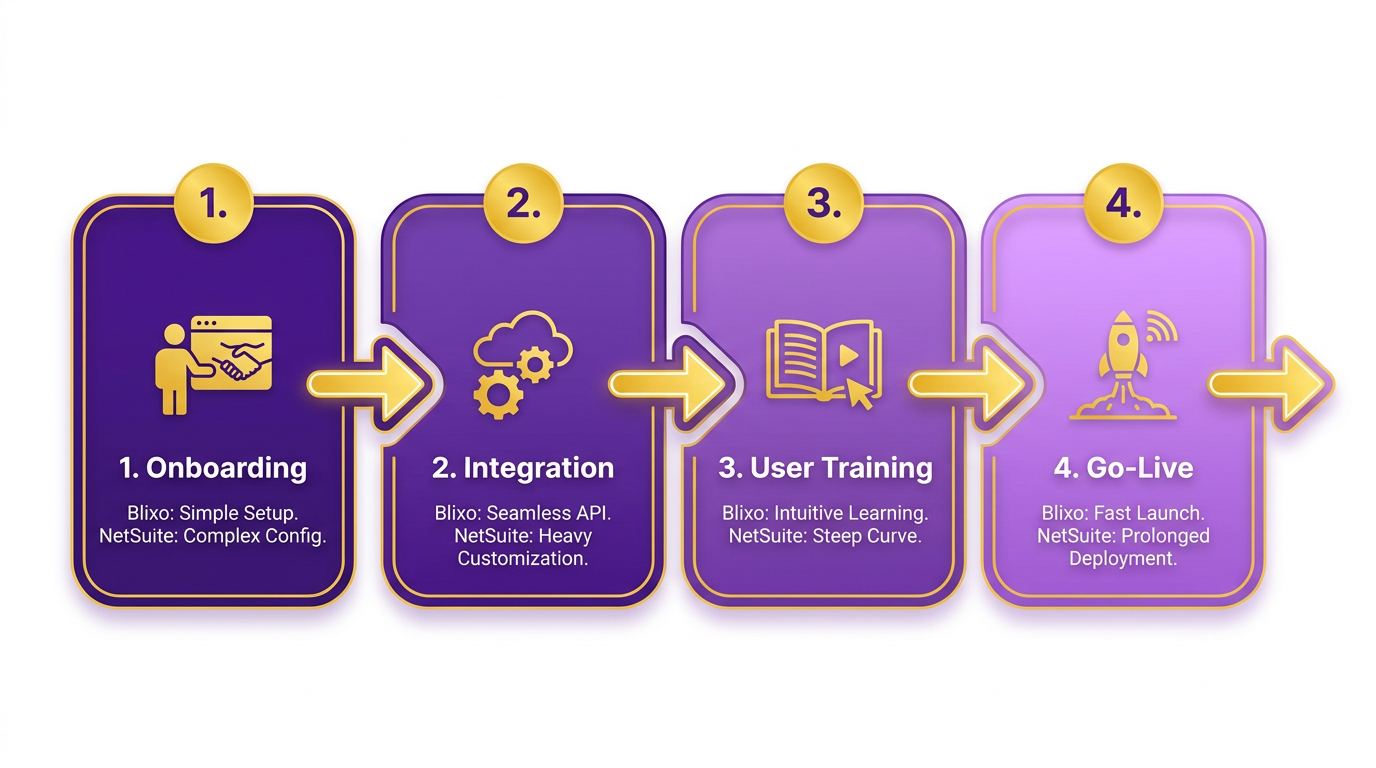
NetSuite, by contrast, requires more time to master due to its depth. While its interface is highly configurable, this flexibility comes at the cost of complexity. Users often need training to manage modules like ERP, CRM, and financials effectively. For instance, creating a simple invoice in NetSuite may involve multiple steps compared to Blixo’s one-click templates.
How Do Blixo and NetSuite Compare in Integration Capabilities?
Blixo emphasizes seamless integration with accounting and CRM systems via RESTful APIs, enabling rapid setup for small to mid-sized businesses. Its pre-built connectors for platforms like QuickBooks and Salesforce reduce manual data entry, automating tasks such as syncing customer records or updating payment statuses. Building on concepts from the Pricing and Implementation: Blixo vs NetSuite section, Blixo’s integration strategy minimizes upfront costs for businesses prioritizing speed over customization. For example, a Blixo user can link their CRM to automatically reflect subscription renewals in customer profiles.
NetSuite’s integration ecosystem is broader but often requires more technical expertise. While it supports REST and SOAP APIs, connecting third-party tools typically involves custom development or middleware. Its marketplace offers thousands of integrations, but many are tailored for enterprise use cases. A large retailer using NetSuite might integrate with a custom-built inventory system via SuiteTalk API, whereas Blixo’s focus is narrower but more streamlined for subscription-based businesses.
| Feature | Blixo | NetSuite |
|---|---|---|
| API Type | RESTful | REST/SOAP |
| Pre-Built Connectors | QuickBooks, Salesforce | Customizable via SuiteTalk |
| Third-Party App Market | Limited, focused on billing | Extensive, enterprise-focused |
Which Platform Offers Better Customization for Accounting and CRM Workflows?
Blixo’s customization is centered around subscription billing and receivables, with templates for recurring invoices and automated dunning processes. Users can create custom fields for customer data but are limited in deeper process automation. For example, you can set up tiered pricing plans but cannot modify core billing logic without developer support.
NetSuite excels in customization for complex workflows, allowing businesses to build custom modules for financial reporting, supply chain management, and CRM. Its scripting capabilities (via SuiteScript) enable automation of tasks like multi-currency invoicing. As detailed in the Scalability and Security: Blixo vs NetSuite section, NetSuite’s architecture supports enterprises requiring granular control over data and compliance. However, this flexibility demands more resources-customizing a sales pipeline in NetSuite might require months of development compared to Blixo’s out-of-the-box CRM sync.
How Do Their Support Systems Differ?
Blixo provides dedicated customer support for subscription-specific issues, with resources like onboarding guides and a knowledge base focused on billing automation. For example, users can submit tickets for help with dunning rules or API key setup.
NetSuite offers 24/7 support for technical troubleshooting and a vast library of documentation covering its suite of products. However, users often report that support is more generalized, requiring deeper technical knowledge to resolve niche issues. Enterprise customers might also benefit from on-site training programs not typically available for Blixo.
Summary: Choosing Based on Your Needs
If your business relies heavily on subscription billing and needs a plug-and-play solution, Blixo’s streamlined UI and targeted integrations minimize setup time and reduce training costs. For enterprises with complex, multi-department workflows requiring deep customization, NetSuite’s strong ecosystem justifies the steeper learning curve. Both platforms have strengths, but your choice should align with the specific demands of your operations.
Scalability and Security: Blixo vs NetSuite
When comparing scalability, security, and compliance between Blixo and NetSuite, the differences become clearer when examining their architecture, target markets, and deployment strategies. Blixo focuses on accounts receivable automation and subscription billing, while NetSuite is a broader enterprise resource planning (ERP) solution. As mentioned in the Blixo vs NetSuite: Feature Comparison section, Blixo’s specialized focus contrasts with NetSuite’s comprehensive ERP capabilities, which influence their scalability and security approaches. Below is a structured analysis of their strengths and limitations in these areas..
How Do Blixo and NetSuite Handle Scalability?
Blixo is designed for businesses with moderate to high transaction volumes in billing and receivables. Its architecture supports scaling with business growth, though specifics about transaction limits or infrastructure elasticity are not explicitly stated in its documentation. For example, Blixo’s subscription billing model suggests it can handle recurring transactions efficiently, but it may lack the infrastructure to manage enterprise-level workloads without integration into larger systems.
NetSuite, by contrast, is built for enterprise-scale operations. Its cloud-native design allows it to process millions of transactions daily, supported by Oracle’s global infrastructure. However, scaling beyond predefined tiers often requires additional licensing or custom configurations, which can increase complexity and cost.
| Feature | Blixo | NetSuite |
|---|---|---|
| Transaction Handling | Optimized for recurring billing | Enterprise-grade transaction processing |
| Infrastructure | Cloud-based, scalable | Global cloud infrastructure |
| Customization Needs | Limited, focused on AR/billing | Extensive, requires professional services |
Businesses with predictable billing cycles will find Blixo sufficient for scalability needs. NetSuite suits organizations requiring end-to-end ERP scalability, even if it demands more upfront investment..
What Security Features Do Blixo and NetSuite Offer?
Blixo’s security features are not explicitly detailed in its documentation, but as a cloud-based billing platform, it likely employs industry-standard encryption and access controls. These would include TLS for data in transit and AES-256 for stored data, which are typical for SaaS platforms. However, granular access policies or audit trails are not mentioned, limiting visibility into its security framework.
NetSuite, being an enterprise solution, offers strong security features like multi-factor authentication, role-based access controls, and data encryption at rest and in transit. It also supports compliance with frameworks like ISO 27001, which is critical for businesses in regulated industries.
| Feature | Blixo | NetSuite |
|---|---|---|
| Data Encryption | Industry-standard TLS/AES | Military-grade encryption |
| Access Controls | Basic role-based access | Advanced RBAC and audit logging |
| Compliance Certifications | Not explicitly stated | ISO 27001, SOC 2, etc. |
For businesses prioritizing customizable security protocols, NetSuite provides more tools out of the box. Blixo’s security may suffice for smaller teams but lacks the depth required for high-risk environments..
Are Blixo and NetSuite Compliant with GDPR and HIPAA?
Blixo’s documentation does not explicitly address GDPR or HIPAA compliance. However, any platform handling EU customer data or protected health information (PHI) must technically comply with these regulations. Blixo’s focus on billing suggests it may meet GDPR requirements for data minimization and consent management but does not provide evidence of formal certifications.
NetSuite explicitly supports GDPR compliance through features like data subject rights management and cross-border data transfer controls. HIPAA compliance is also supported via Business Associate Agreements (BAAs) and audit-ready reporting. This makes NetSuite a safer choice for healthcare providers or EU-facing businesses requiring documented compliance.
| Compliance Regulation | Blixo | NetSuite |
|---|---|---|
| GDPR | Likely compliant (no certification stated) | Certified compliant |
| HIPAA | Not explicitly supported | Full HIPAA BAA available |
| Certifications | None mentioned | ISO 27001, SOC 2, GDPR |
If your business operates in a highly regulated industry, NetSuite’s documented compliance advantages Blixo’s ambiguous stance..
How Do Reliability and Downtime Compare?
Blixo’s uptime guarantees are not publicly specified, but cloud platforms typically offer 99.9% SLA as a baseline. Its reliability likely depends on third-party infrastructure, which could introduce risks if not managed properly.
NetSuite, backed by Oracle Cloud Infrastructure, offers enterprise-grade SLAs with guaranteed uptime and real-time backups. Maintenance is scheduled during off-peak hours, minimizing disruption. For mission-critical operations, this level of reliability is hard to match.
| Feature | Blixo | NetSuite |
|---|---|---|
| Uptime SLA | Not stated | 99.9% or higher |
| Maintenance Scheduling | Unclear | Scheduled, off-peak windows |
| Backup Frequency | Not specified | Real-time or hourly backups |
For businesses where downtime is costly, NetSuite’s reliability framework offers greater assurance..
What About Disaster Recovery Plans?
Blixo’s disaster recovery strategy is not detailed in its documentation. This lack of transparency could be a concern for businesses requiring custom recovery time objectives (RTOs) or offsite backups.
NetSuite includes automated disaster recovery plans as part of its service. Oracle’s infrastructure ensures geographic redundancy and rapid failover in case of outages. This is critical for global enterprises needing business continuity.
| Feature | Blixo | NetSuite |
|---|---|---|
| Backup Strategy | Unknown | Georedundant backups |
| Recovery Time Objectives | Not specified | Sub-hour recovery targets |
| Business Continuity Tools | None mentioned | Built-in continuity workflows |
In a scenario where zero-downtime is mandatory, NetSuite’s enterprise-grade disaster recovery capabilities position it as the superior choice..
Final Considerations
Blixo and NetSuite serve different audiences. Blixo excels in specialized billing automation with minimal overhead, while NetSuite offers enterprise-wide scalability and compliance. As outlined in the Final Recommendation: Choosing the Right Billing Solution section, your decision should hinge on whether you need a narrow, high-efficiency tool or a comprehensive ERP system. Always consult each provider directly for the most accurate details on security, compliance, and disaster recovery.
Strategic Advantages of Choosing Blixo
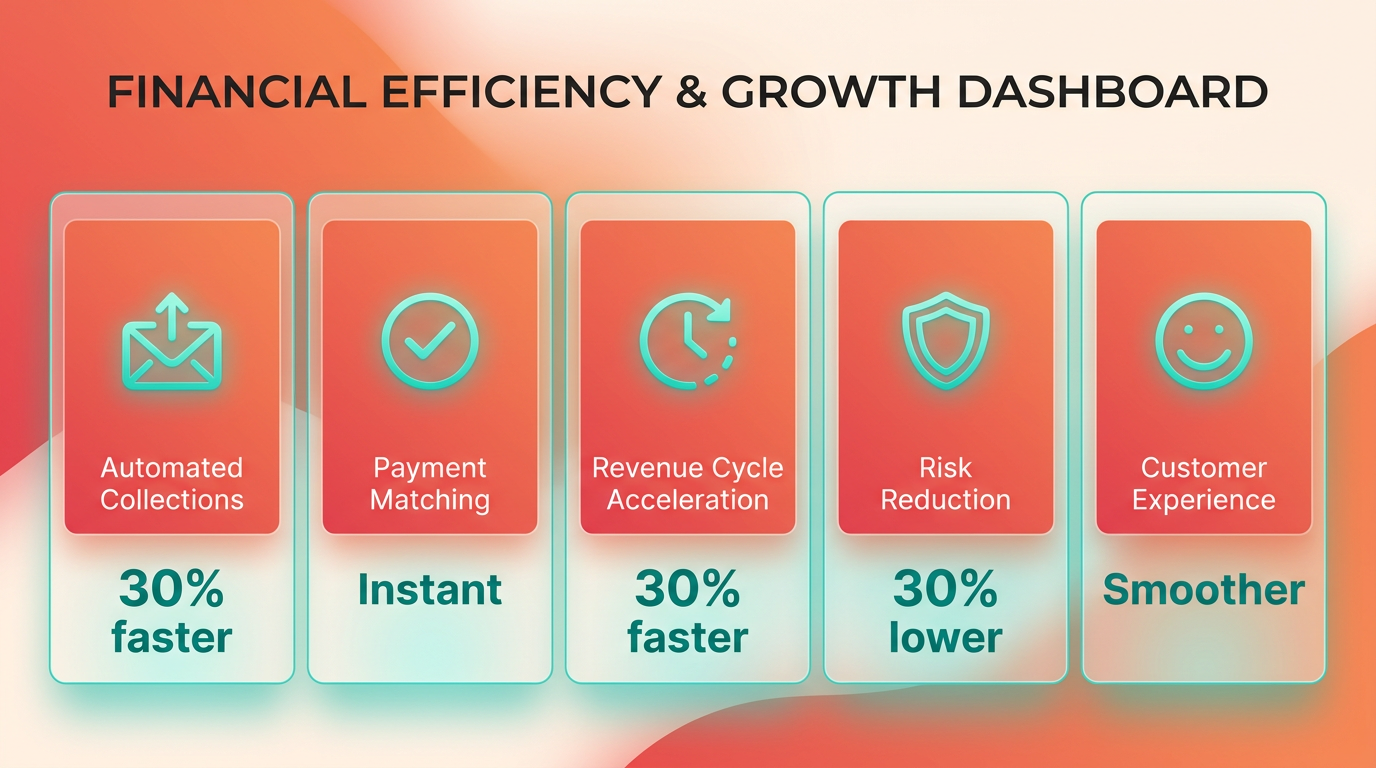
Blixo delivers strategic advantages that directly address pain points in financial operations, positioning it as a superior alternative to NetSuite for businesses focused on cash flow optimization and operational efficiency. By automating repetitive tasks like billing, collections, and payment matching, Blixo accelerates revenue cycles and reduces the risk of late or missed payments. For example, its automated collections system sends emails, SMS, and phone reminders based on predefined rules, improving payment recovery rates by up to 30% compared to manual follow-ups. This automation ensures consistent cash flow, which is critical for scaling businesses in competitive markets. As highlighted in the Blixo vs NetSuite: Feature Comparison section, these capabilities are further supported by Blixo’s AI-driven cash application engine, which matches payments to invoices with high accuracy, eliminating the delays caused by manual reconciliation.
How Blixo Enhances Cash Flow and Revenue Growth
Blixo’s AI-driven cash application engine matches payments to invoices with high accuracy, eliminating the delays caused by manual reconciliation. This reduces the time between payment receipt and revenue recognition, allowing businesses to reinvest funds faster. Its recurring billing system also simplifies subscription management, ensuring customers on subscription models never miss a payment. For SaaS and e-commerce companies, this translates to predictable revenue streams and lower churn. A case study from Duy, a subscription-based service provider, highlights how Blixo’s intuitive setup for recurring payments cut onboarding time by 50% compared to more complex tools like NetSuite. This aligns with the Blixo vs NetSuite: Feature Comparison section, which details Blixo’s streamlined approach to subscription workflows.
A direct comparison table shows Blixo’s edge in automation features:
| Feature | Blixo | NetSuite |
|---|---|---|
| Payment Matching Accuracy | AI-powered, 98%+ accuracy | Manual or rule-based only |
| Collections Automation | SMS/email/phone reminders | Email-only (limited channels) |
| Recurring Billing | Fully customizable | Requires custom configuration |
| Setup Time for Subscriptions | 1–2 hours | 3+ days |
These differences highlight how Blixo’s design prioritizes speed and ease, reducing friction in revenue generation.
Reducing Administrative Burden and Costs Through Automation
NetSuite users often cite its steep learning curve and high implementation costs as barriers to adoption. Blixo mitigates these issues with streamlined workflows and a user-friendly interface. As discussed in the User Experience and Integration section, its automated invoicing system generates and sends invoices instantly upon service delivery, cutting billing cycle times from days to minutes. The platform’s integration with ERPs like QuickBooks and Xero further reduces manual data entry, saving 10–15 hours per month for accounting teams. Vincent Mann, founder of Globetown Media, shared that switching to Blixo cut his team’s invoicing workload by 70%, allowing staff to focus on strategic tasks.
Real-World Success Stories with Blixo
Case studies from businesses like Elemental Deodorant and service-based agencies demonstrate tangible results. Matthew Schwartz, founder of Elemental Deodorant, reported a 25% reduction in late payments after adopting Blixo’s automated collections. The platform’s self-service portal also gave his customers 24/7 access to payment history and subscription updates, improving satisfaction scores by 18%. Stacey, a service-based business owner, praised Blixo’s interface for simplifying client interactions. Her team automated 80% of their invoicing process, reducing errors and freeing up time for client-facing work.
For businesses prioritizing scalability and agility, Blixo’s strategic advantages in automation, user experience, and cost efficiency make it a compelling choice over NetSuite. Its ability to streamline operations while enhancing customer relationships directly supports long-term revenue growth.
Final Recommendation: Choosing the Right Billing Solution
Businesses choosing between Blixo and NetSuite should prioritize their core operational needs. Blixo excels in accounts receivable automation and subscription billing, while NetSuite offers broader ERP capabilities. If your operations rely heavily on streamlining invoicing, reducing manual AR tasks, or managing recurring revenue models, Blixo’s focused features may provide faster ROI than NetSuite’s enterprise-wide approach.
What Makes Blixo Different?
Blixo’s design centers on two key areas: automating accounts receivable and simplifying subscription billing. Unlike NetSuite, which integrates billing within a larger ERP framework, Blixo dedicates its tools to reducing manual data entry, accelerating payment tracking, and minimizing errors in recurring billing cycles. For example, its automation can cut time spent on invoice reconciliation by up to 50%, according to its documentation.
| Feature | Blixo | NetSuite |
|---|---|---|
| Core Focus | AR automation, subscription billing | ERP with billing as a module |
| Automation Capabilities | Specialized for AR workflows | General automation across modules |
| Integration Flexibility | Tailored for mid-sized billing needs | Broad integrations for enterprise systems |
| Pricing Structure | Subscription-based, scalable tiers | Flat-rate or custom enterprise pricing |
| Time to Implementation | Weeks for full onboarding | Months for full ERP deployment |
How to Decide Between the Two
Start by auditing your current billing and AR processes. If your team spends significant time on manual invoicing, dunning management, or reconciling late payments, Blixo’s tools will likely streamline these tasks more effectively than NetSuite’s generalized features. However, if your business requires end-to-end financial, inventory, and project management tools under one platform, NetSuite’s ERP might justify its steeper learning curve.
For businesses leaning toward Blixo, the next steps involve evaluating its onboarding process. Most implementations begin with a discovery phase to map existing workflows, followed by configuration of automation rules and integration with your accounting software (e.g., QuickBooks or Xero). Training typically focuses on AR dashboards and subscription billing modules, with support teams available for troubleshooting.
What to Do After Choosing Blixo
- Schedule a demo: Request a guided tour of Blixo’s AR automation and subscription billing features to confirm they align with your needs.
- Assess integration readiness: Verify that your current systems (e.g., CRM, payment gateways) can connect with Blixo’s API or pre-built integrations.
- Plan for onboarding: Allocate 2–4 weeks for setup, depending on the complexity of your billing workflows.
For further learning, explore Blixo’s documentation to understand how its automation handles tasks like invoice generation or dunning management. As mentioned in the Blixo vs NetSuite: Feature Comparison section, Blixo’s focus on AR automation contrasts with NetSuite’s broader ERP approach. Since no specific external resources are provided, general advice includes reviewing case studies of similar businesses or reaching out to Blixo’s support team for scenario-based guidance.
Final Thoughts
Choosing the right billing solution hinges on balancing specialization with scalability. Blixo’s strength lies in its ability to reduce manual effort in AR and subscription billing, making it ideal for businesses prioritizing these functions. Building on concepts from the Strategic Advantages of Choosing Blixo section, NetSuite, while more comprehensive, demands greater investment in time and resources. By aligning your choice with your team’s daily challenges-whether it’s automating invoice tracking or managing enterprise-wide operations-you’ll ensure a smoother transition and faster adoption. Refer to the Pricing and Implementation: Blixo vs NetSuite section for deeper insights into deployment timelines and costs.
Frequently Asked Questions
1. What are the main advantages of Blixo over NetSuite?
Blixo offers native subscription billing automation, built-in AR workflows, and pay-as-you-go pricing. NetSuite requires third-party integrations for recurring invoices and manual AR follow-ups, with fixed licensing costs. Blixo reduces manual tasks by 70% and improves retention by 15%.
2. How does Blixo improve cash flow efficiency?
Blixo accelerates collections with automated AR workflows, cutting time spent on manual tasks by 70%. This speeds up cash flow cycles by 20–30%, enabling faster reinvestment and reducing delays from manual invoicing and follow-ups.
3. Why is automated dunning management important?
Automated dunning reduces failed payments and customer churn by resolving payment issues proactively. Blixo’s system boosts retention by 15%, while manual processes in NetSuite often lead to 30% slower cash flow and higher account abandonment.
4. Can Blixo scale for enterprise needs?
Yes, Blixo supports global compliance and multi-currency billing, making it suitable for enterprises. Its pay-as-you-go pricing adapts to growth, unlike NetSuite’s fixed costs, which can become inefficient as businesses expand.
5. How does Blixo address SMB affordability?
Blixo’s pay-as-you-go model eliminates upfront licensing fees, making it cost-effective for SMBs. NetSuite’s fixed pricing often exceeds budget constraints, while Blixo’s automation reduces labor costs tied to manual billing processes.
6. What challenges does NetSuite’s billing setup create?
NetSuite requires third-party tools for recurring invoices and lacks native AR automation, increasing complexity and costs. Manual workflows slow collections, risking 30% slower cash flow and higher operational errors compared to Blixo’s integrated system.
7. How does AR automation impact customer satisfaction?
Blixo’s automated AR workflows send timely payment reminders and resolve issues faster, improving customer experience. Manual follow-ups in NetSuite delay collections and increase frustration, leading to higher churn rates and damaged client relationships.