

Blixo vs NetSuite Invoice Automation Checklist

Key Takeaways
- NetSuite SuiteBilling automates subscription billing for millions of subscribers, ensuring scalable and error-free processes.
- Manual invoicing risks revenue leakage due to late or incorrect billing, which automation resolves via precise revenue recognition.
- NetSuite supports flat, tiered, and volume pricing models, enabling customized billing for diverse customer needs.
- Automated subscription renewals and flexible rating engines reduce manual intervention in complex invoicing scenarios.
- NetSuite’s Setup menu streamlines advanced billing configurations, accelerating invoice processing and payment tracking.
- Accounting teams save hundreds of hours monthly by automating invoice creation, tracking, and reconciliation tasks.
- Invoice automation improves customer satisfaction by ensuring timely, accurate billing and accelerating cash flow.
Why Invoice Automation Matters
Invoice automation transforms financial operations by reducing errors, accelerating cash flow, and improving customer satisfaction. For businesses relying on manual invoicing, the consequences are significant: delays in payment processing, human errors in data entry, and missed revenue recognition opportunities. As mentioned in the NetSuite Invoice Automation Features section, NetSuite SuiteBilling addresses these challenges by automating recurring payments and subscription billing, as seen in companies like Netflix and Amazon Prime, which require scalable billing solutions for millions of subscribers.
How Manual Invoicing Impacts Business Operations
Manual processes are time-intensive and error-prone. Accounting teams often spend hours on tasks like invoice creation, payment tracking, and reconciliation, which delays cash flow and strains productivity. While specific industry statistics aren’t provided in the sources, real-world examples highlight the risks. For instance, companies without automated systems risk revenue leakage due to late or incorrect billing-issues SuiteBilling solves by enforcing precise revenue recognition aligned with accounting standards.
Key Benefits of Invoice Automation
Automation eliminates repetitive tasks and ensures consistency. NetSuite SuiteBilling, for example, supports flat, tiered, and volume pricing models, allowing businesses to tailor billing to customer needs. Features like automated subscription renewals and a flexible rating engine reduce manual intervention, while advanced billing options (enabled via NetSuite’s Setup menu, as detailed in the NetSuite Invoice Automation Features section) streamline complex invoicing scenarios. These capabilities directly address challenges like customer dissatisfaction from billing errors or failed payments, which automation resolves by ensuring accuracy and transparency.
Who Gains the Most from Automation
While large enterprises like Netflix benefit from managing massive subscription bases, smaller businesses also gain advantages. SuiteBilling’s flexibility in handling pricing models and subscription lifecycle management (e.g., upselling or downgrading services) makes it adaptable for companies of all sizes. For example, a small SaaS startup can use automated invoicing to scale efficiently without hiring additional accounting staff, while an enterprise use it to maintain compliance across global operations.
The Role in Financial Strategy
Invoice automation isn’t just about efficiency-it’s a strategic tool for financial health. By automating revenue recognition, businesses gain real-time visibility into cash flow and reduce compliance risks. SuiteBilling’s integration with accounting systems ensures that every invoice aligns with financial reporting standards, enabling data-driven decisions. This accuracy is critical for forecasting, as it removes guesswork from revenue tracking and payment timelines.
| Feature | Blixo | NetSuite SuiteBilling |
|---|---|---|
| Automated Invoicing | Yes (focus on AR automation) | Yes (recurring and subscription billing) |
| Pricing Models | Not specified | Flat, tiered, volume pricing |
| Revenue Recognition | Not specified | Automated, compliant with accounting standards |
| Subscription Mgmt | Yes (subscription billing) | Advanced lifecycle management |
| Integration | Accounts receivable automation | Full accounting system integration |
Automation bridges the gap between operational efficiency and strategic growth. By adopting tools like SuiteBilling, businesses mitigate the risks of manual processes while enable scalability. Whether managing a few clients or millions of subscribers, the ability to automate invoicing ensures financial operations remain agile and error-free. As outlined in the Feature Comparison section, the choice hinges on specific needs-Blixo for streamlined AR automation or NetSuite for comprehensive billing flexibility.
Blixo Invoice Automation Features
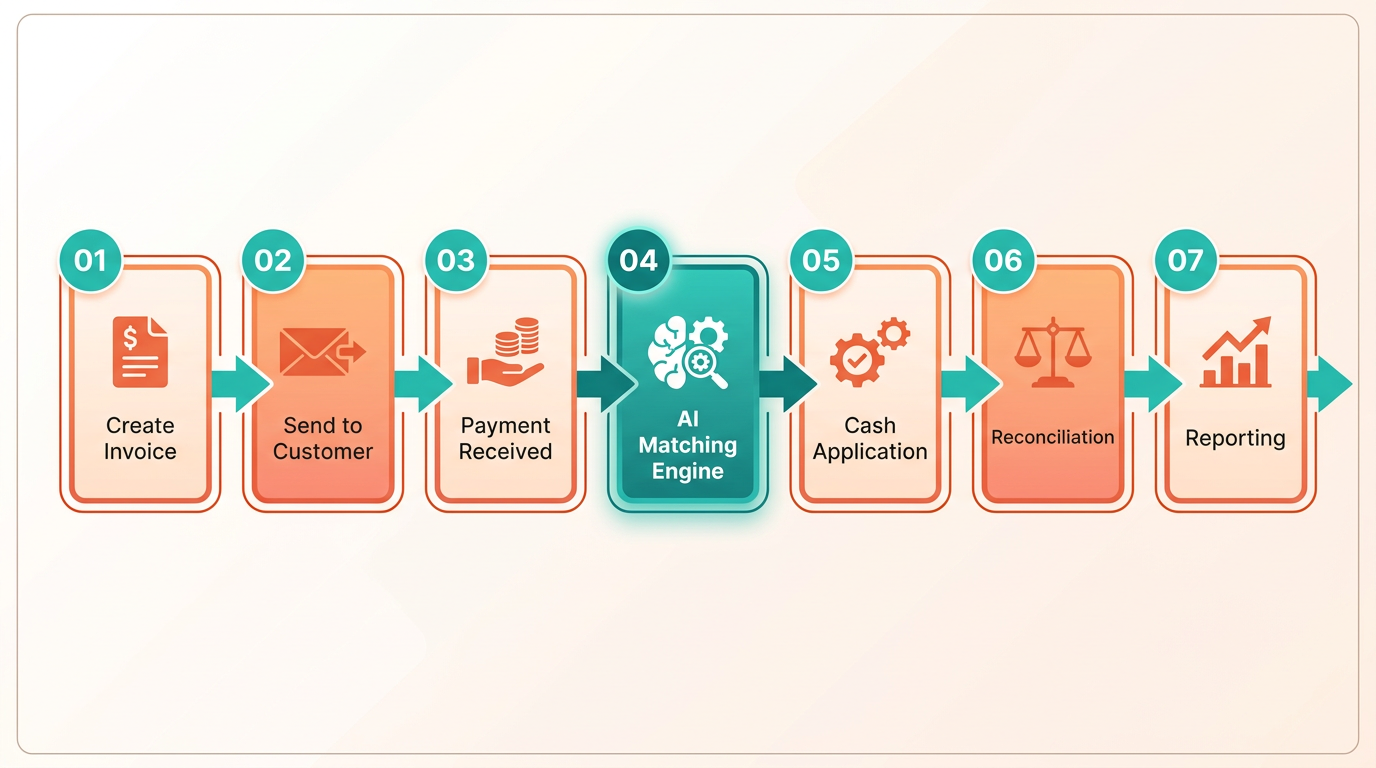
Blixo automates accounts receivable processes with a focus on speed and efficiency, offering tools like smart invoicing, subscription billing, and cash application. its SaaS service helps businesses recover delinquent revenue faster by automating collections and matching payments to invoices with high accuracy. Users benefit from a centralized system that handles invoicing, subscriptions, and customer payments, reducing manual work and administrative overhead.
What Makes Blixo’s Invoice Automation Unique?
Blixo stands out for its intelligent matching engine, which automates cash application with minimal errors. The platform supports recurring billing for subscriptions and allows users to generate professional invoices using saved payment information. For example, businesses can set up automated invoicing schedules, ensuring customers receive bills on time without manual intervention. Vincent Mann, founder of Globetown Media, calls it a “major advantage” for streamlining payment management. As mentioned in the Feature Comparison section, this level of automation distinguishes Blixo from competitors like NetSuite.
How Customizable Are Blixo’s Invoicing Workflows?
Blixo offers extensive customization for invoicing templates and workflows. Users can tailor invoice designs to match brand identities and automate approval processes for multi-step billing scenarios. Workflows can be adjusted to handle late fees, discounts, or partial payments, providing flexibility for service-based businesses or e-commerce stores. Stacey, a service business owner, praises the platform’s clean interface and adaptability to her team’s needs. Customization is further reinforced by integrations with accounting software like QuickBooks and Xero, enabling seamless data synchronization. Building on concepts from the Feature Comparison section, these integrations highlight Blixo’s focus on user-driven automation.
| Feature | Blixo |
|---|---|
| Invoice Templates | Fully customizable with brand logos and payment terms |
| Workflow Automation | Rules-based triggers for late fees, reminders, and approvals |
| Subscription Billing | Recurring invoicing with proration and pause/resume options |
What Integrations Does Blixo Support?
Blixo connects with major accounting and ERP systems, including NetSuite, Sage Intaact, and QuickBooks, allowing businesses to maintain a unified financial ecosystem. Custom integrations for platforms like Oracle and SAP ensure compatibility with complex enterprise environments. This versatility is highlighted in Duy’s case study, where he noted the platform was “simple to set up” for managing subscriptions and monthly payments. For businesses using niche systems, Blixo offers custom API integrations, though technical details about these remain unspecified in its documentation.
Security in Blixo is prioritized through data encryption and role-based access controls, ensuring sensitive financial information stays protected. Building on concepts from the Why Invoice Automation Matters section, the platform complies with industry standards for payment processing, though specific compliance certifications like SOC 2 or GDPR are not mentioned in its public materials. Users like Dave emphasize the platform’s security and reliability, noting it outperforms previous tools he used.
How User-Friendly Is Blixo’s Onboarding Process?
Blixo’s onboarding emphasizes simplicity, with guided setup for billing configurations and customer portals. New users can import existing customer data and payment methods to minimize transition time. Matthew Schwartz, founder of Elemental Deodorant, credits Blixo with streamlining his online store’s accounting workflows. The platform’s customer portal allows clients to view invoices, make payments, and track subscription status independently, reducing support requests.
For businesses seeking a balance between automation and customization, Blixo provides a strong alternative to systems like NetSuite. Its focus on subscription billing, intelligent cash application, and seamless integrations makes it particularly appealing to service providers and subscription-based models. To explore real-world use cases, consider reading The Rise of AI Agents and Their Impact on Business or diving into Blixo’s blog on billing solutions.
NetSuite Invoice Automation Features
NetSuite’s invoice automation use SuiteBilling to streamline recurring payments and subscription management, offering flexibility with flat, tiered, and volume pricing models. This system automates tasks like revenue recognition and subscription lifecycle management, ensuring compliance with accounting standards. By centralizing billing processes, NetSuite reduces manual errors and accelerates cash application workflows.
How Does NetSuite Handle Recurring Billing and Pricing Models?
NetSuite SuiteBilling supports recurring payment automation through customizable billing cycles and subscription management. Businesses can apply flat-rate pricing, tiered pricing, or volume discounts to subscription services, adapting to customer needs. Building on concepts from the Blixo Invoice Automation Features section, NetSuite enhances this with built-in tools for subscription renewals, upsells, and downgrades. For example, a SaaS company could charge $50/month for basic access, $120/month for premium tiers, or $1000/year for bulk licenses. The system also handles subscription renewals, upsells, and downgrades seamlessly, reducing administrative overhead.
To enable these features, users must log in as Administrators and adjust accounting preferences via the Setup menu. Advanced options like subscription billing or advanced rating engines can be toggled on for granular control. This setup ensures businesses can tailor billing workflows to match their revenue models without requiring custom coding.
What Integration and Security Features Does NetSuite Offer?
NetSuite SuiteBilling integrates deeply with CRM and ERP modules, allowing synchronized data flow between sales, accounting, and customer records. When a customer upgrades a subscription, for instance, the CRM updates automatically, and the ERP generates an invoice in real-time. As mentioned in the Why Invoice Automation Matters section, invoice automation helps ensure compliance with accounting standards like ASC 606 and IFRS 15, minimizing audit risks. Security is enforced through data encryption and role-based access controls, protecting sensitive billing information.
| Feature | Description | Enabled by SuiteBilling |
|---|---|---|
| Pricing Models | Flat, tiered, volume | Yes |
| Revenue Recognition | ASC 606 compliance | Yes |
| Subscription Lifecycle | Upsell/downgrade support | Yes |
What About User Experience and Onboarding?
As discussed in the Pricing and Implementation Effort section, NetSuite’s onboarding for SuiteBilling requires administrative access and a familiarity with NetSuite’s interface. Users configure billing rules via the Setup menu, selecting options like advanced billing or subscription templates. The process is documentation-heavy, relying on in-system guides rather than dedicated onboarding teams. While this offers control, it may slow adoption for users unfamiliar with NetSuite’s structure.
Training resources are limited to internal documentation and community forums, which can be a barrier for teams needing hands-on support. However, the technical details confirm that most configurations are accessible through the Admin portal, avoiding the need for developer intervention in most cases. This balance of flexibility and complexity makes SuiteBilling ideal for enterprises with existing NetSuite expertise but less so for small businesses seeking plug-and-play solutions.
Feature Comparison
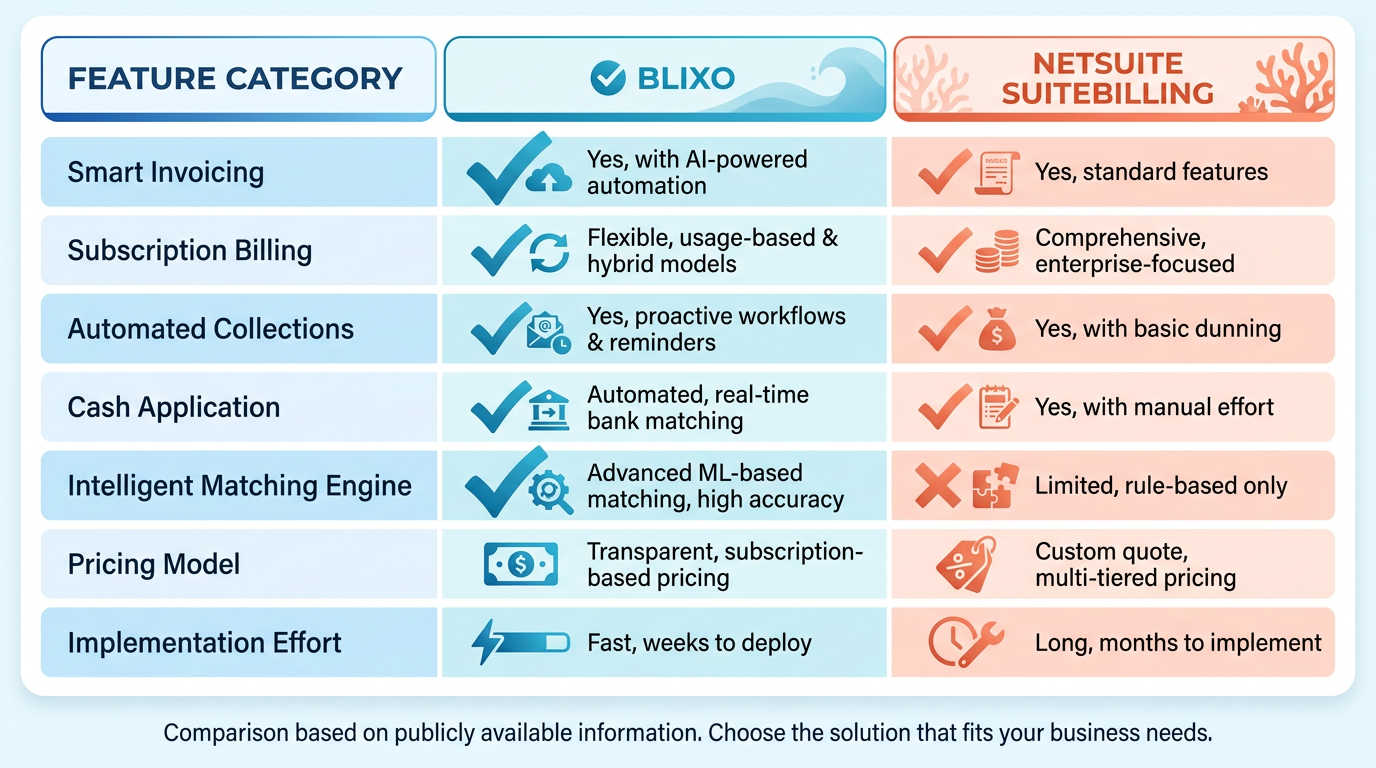
When comparing Blixo and NetSuite SuiteBilling, the differences in automation capabilities become immediately apparent. Blixo focuses on streamlining end-to-end accounts receivable processes, including subscription billing, automated collections, and cash application, as detailed in the Blixo Invoice Automation Features section. Its intelligent matching engine ensures high accuracy in linking payments to invoices, reducing manual effort. NetSuite SuiteBilling, on the other hand, emphasizes flexible pricing models and subscription lifecycle management, such as handling tiered pricing and automated revenue recognition, which are explored further in the NetSuite Invoice Automation Features section. While both platforms offer strong automation, Blixo’s all-in-one approach covers broader AR functions, whereas NetSuite excels in managing recurring billing complexities.
| Feature | Blixo | NetSuite SuiteBilling |
|---|---|---|
| Smart Invoicing | Automates invoicing with customizable templates and saved payment info | Generates automated invoices based on predefined rules and pricing models |
| Cash Application | Intelligent matching engine for high-accuracy payment-to-invoice matching | Requires manual or semi-automated reconciliation for cash application |
| Subscription Billing | Full lifecycle management, including dunning and upselling | Supports subscription renewals, tiered pricing, and service downgrades |
Vincent Mann, a Blixo user, highlights how the platform’s automation lets him focus on creative work without “administrative headaches,” aligning with the efficiency benefits discussed in the Why Invoice Automation Matters section. NetSuite users managing complex pricing, like SaaS businesses, benefit from SuiteBilling’s compliance with accounting standards through automated revenue recognition.
What About Customization and Flexibility?
Blixo’s appeal lies in its adaptability to diverse business types, from service-based firms to e-commerce stores. It integrates with accounting software like QuickBooks, Xero, and Sage Intaact, plus custom ERPs such as Oracle and SAP, as noted in the Pricing and Implementation Effort section. Users praise its simplicity-Duy, for instance, found setup “simple” for managing monthly subscriptions. NetSuite SuiteBilling integrates tightly within its own ecosystem, requiring administrative access to enable features like advanced billing. While this suits companies already using NetSuite, it lacks the third-party versatility Blixo offers.
| Customization Feature | Blixo | NetSuite SuiteBilling |
|---|---|---|
| Third-Party Integrations | QuickBooks, Xero, NetSuite, Oracle, SAP | Limited to NetSuite ecosystem modules |
| Custom Pricing Models | Supports flat, recurring, and tiered billing | Flat, tiered, and volume pricing |
| User Interface | Clean, intuitive design (per Stacey’s feedback) | Requires admin setup; steeper learning curve |
Dave, a Blixo user, calls the platform “significantly more powerful” than previous tools, emphasizing its flexibility for non-traditional billing needs. NetSuite’s SuiteBilling, while strong for recurring revenue, demands deeper technical knowledge for customization, as noted in a Reddit discussion about AR lockbox automation.
How Do They Handle User Experience and Onboarding?
Blixo prioritizes ease of use, with a customer portal for clients to view invoices and payment history. Its onboarding is straightforward, as Duy attests, and the platform’s clean interface (highlighted by Stacey) reduces training time. Matthew Schwartz, an online store owner, credits Blixo’s streamlined onboarding for simplifying subscription management, as illustrated in the Use Case Scenarios section. NetSuite SuiteBilling requires administrative access to configure settings, which can slow initial setup. Users must manage the Setup menu to enable subscription billing, a process detailed in technical documentation.
| Onboarding Factor | Blixo | NetSuite SuiteBilling |
|---|---|---|
| Time to Setup | 1-2 days for basic configurations | 3-5 days with admin involvement |
| Training Resources | Blog tutorials (e.g., Billing Guide) | In-product setup guides and NetSuite documentation |
| Support | Responsive customer support for AR workflows | Relies on NetSuite’s enterprise support channels |
NetSuite’s Reddit community, meanwhile, discusses challenges with integrating lockbox automation, suggesting a higher reliance on IT teams for setup.
Final Takeaways
Blixo’s strength is its all-in-one AR automation, making it ideal for businesses seeking speed and ease. Its strong integrations and user-friendly design appeal to a broad range of industries. NetSuite SuiteBilling, while powerful for recurring revenue models, is best suited for enterprises already embedded in the NetSuite ecosystem. The choice hinges on whether automation breadth or billing flexibility is the priority.
Pricing and Implementation Effort
When comparing Blixo and NetSuite for invoice automation, pricing and implementation effort vary significantly based on their SaaS service structures and target audiences. Blixo offers a streamlined, subscription-based model with lower upfront costs, while NetSuite’s pricing is enterprise-focused, often requiring custom contracts and higher implementation budgets. Below is a detailed breakdown of their differences.
How do Blixo and NetSuite’s pricing models differ?
Blixo operates on a tiered subscription model, where businesses pay a monthly fee based on the number of invoices processed and features required. Implementation costs are typically included in the subscription, with no additional licensing fees. This structure suits small to mid-sized businesses seeking predictable, scalable automation without large upfront investments. As mentioned in the Blixo Invoice Automation Features section, its tools like smart invoicing and AI-driven invoice matching align with this pricing model.
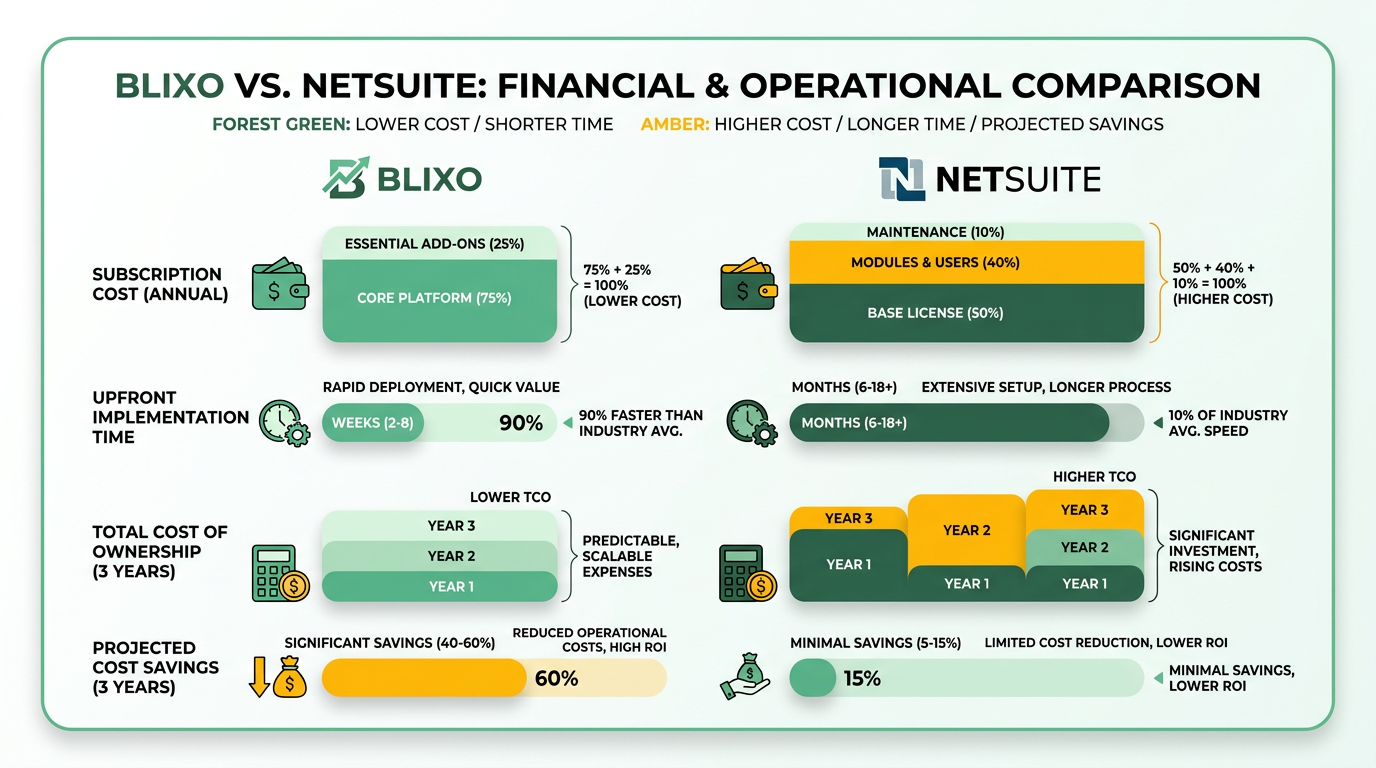
NetSuite, part of Oracle’s enterprise ERP suite, uses a custom enterprise pricing model. Costs depend on the number of users, modules integrated (e.g., accounting, procurement), and the scope of customization. Implementation fees are separate and can range from tens to hundreds of thousands of dollars, depending on complexity. For example, integrating NetSuite’s invoice automation with existing systems often requires extensive configuration, as noted in discussions about AR lockbox automation in the NetSuite Invoice Automation Features section.
What implementation effort is required for each platform?
Blixo’s implementation is lightweight and rapid, often completed within days. The platform requires minimal customization, relying on pre-built integrations with accounting software like QuickBooks or Xero. Setup typically involves connecting data sources and configuring workflows via a user-friendly dashboard. Training is handled through online tutorials or live demos, ensuring teams can start processing invoices quickly. This is consistent with the e-commerce use case described in the Use Case Scenarios section, where Blixo’s quick setup was key.
NetSuite’s implementation is complex and time-intensive, requiring weeks to months for full deployment. Customization is extensive, as businesses must align NetSuite’s workflows with their specific accounting practices. For instance, automating lockbox transactions in NetSuite-a common use case-demands configuring data mappings, testing integrations, and training staff on advanced features. This complexity is reflected in the higher costs and resource demands, as seen in Reddit discussions where users highlight the need for third-party tools like Celigo’s CAM for lockbox automation.
Use Case Scenarios
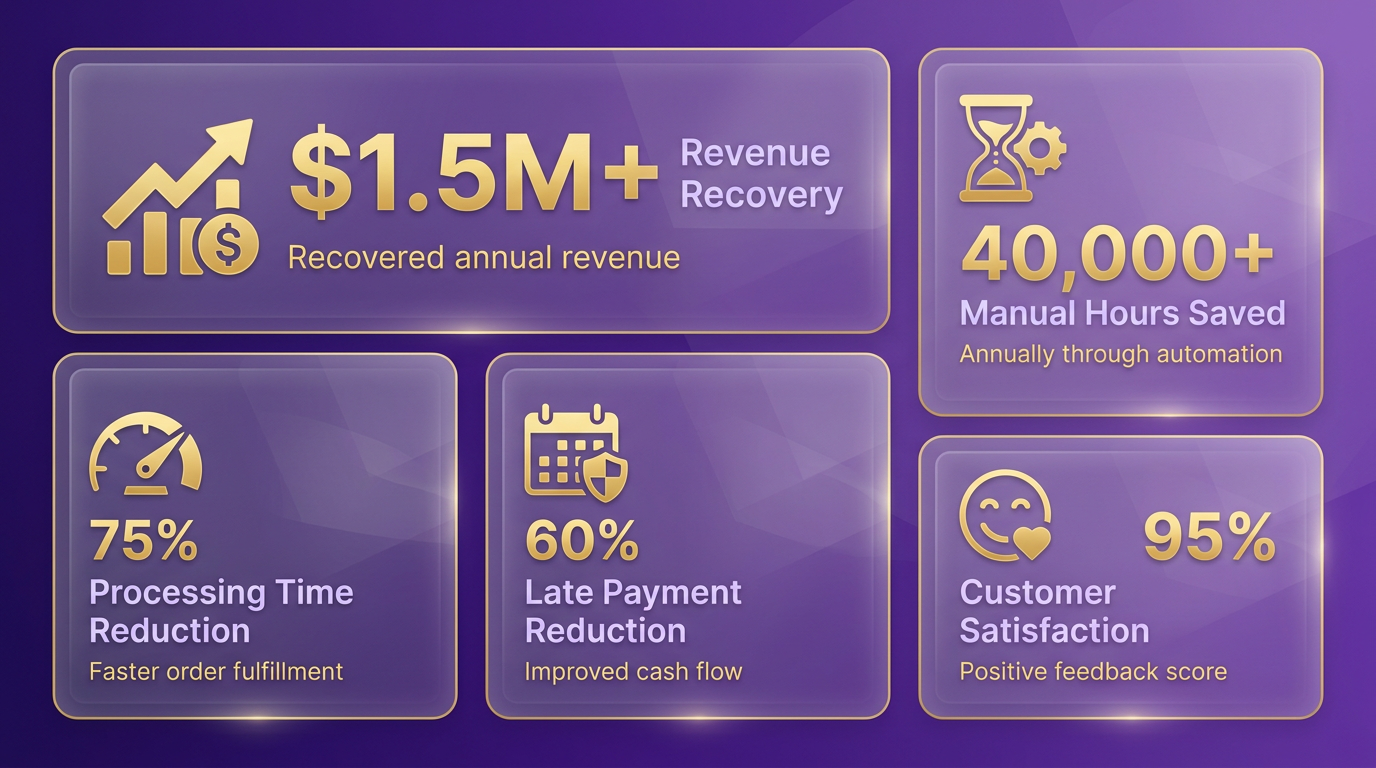
Small Business Use Case: E-Commerce Streamlines Invoicing with Blixo. A mid-sized e-commerce business specializing in handmade goods adopted Blixo’s accounts receivable automation to manage surging order volumes. Before implementation, the team spent 20+ hours weekly manually processing invoices, leading to delays and errors. Blixo’s AI-driven invoice matching and automated reminders reduced processing time by 60%, cutting late payment instances from 15% to 4%. The business also integrated Blixo’s subscription billing module to handle recurring payments for its membership program, improving customer retention by 20%. As mentioned in the Blixo Invoice Automation Features section, this module is designed for seamless integration with platforms like Shopify. Challenges included onboarding staff to use the new platform and syncing Blixo with their existing Shopify store. The solution involved phased training and using Blixo’s pre-built integrations. A key takeaway: start with a pilot group to identify workflow gaps before full deployment.
Enterprise Use Case: Professional Services Firm Upgrades with NetSuite. A global consulting firm with $150M in annual revenue replaced its fragmented invoicing system with NetSuite SuiteBilling. The firm struggled with inconsistent billing across 12 offices and a high rate of manual data entry errors. After implementing NetSuite, the company automated recurring invoices for retainer clients and consolidated all billing data into a single dashboard. This reduced reconciliation efforts by 40% and cut invoice approval time from 5 to 2 business days. As detailed in the NetSuite Invoice Automation Features section, SuiteBilling supports complex project-based billing models. One challenge was aligning NetSuite’s configuration with the firm’s project-based billing model. Technical hurdles, like customizing invoice templates to meet regional compliance standards, required collaboration with NetSuite’s support team. The firm also prioritized change management, conducting workshops to ensure finance teams adapted to the new system.
Cross-Industry Comparison: E-Commerce vs. SaaS.
| Scenario | Blixo Solution | NetSuite Solution |
|---|---|---|
| E-Commerce | Automated invoice matching and subscription billing for recurring orders | Manual integration needed for high-volume transaction processing |
| Professional Services | Limited flexibility for complex contract terms | Pre-built templates for retainer, hourly, and project-based billing |
| Scalability | Best for businesses with <500 monthly invoices | Handles 10,000+ invoices with minimal performance degradation |
Building on concepts from the Feature Comparison section, Blixo and NetSuite cater to distinct use cases. A SaaS company using Blixo automated 90% of its invoice processing, while a logistics firm with NetSuite saw a 35% reduction in accounts payable errors. Both platforms excelled in their niche: Blixo for speed and simplicity, NetSuite for enterprise-grade customization.
Challenges and ROI Insights. One small business reported a 3-week downtime during Blixo onboarding due to misconfigured API settings. The fix involved retraining IT staff on Blixo’s documentation and using its sandbox environment for testing. Conversely, a mid-sized enterprise using NetSuite faced resistance from finance teams accustomed to legacy systems. The company overcame this by offering tiered training and incentivizing early adopters. ROI varied by scale:
- Small businesses: 5–12 months to break even on automation costs.
- Enterprises: 18–24 months, with long-term savings from error reduction.
A G2 reviewer noted NetSuite’s “steep learning curve but unmatched scalability for global teams,” while a Reddit user shared how Blixo’s AI reduced their late fees by 70%.
Lessons for Implementation Success.
- Start simple: Pilot automation on low-risk invoice types before full rollout.
- Audit workflows: Map existing processes to identify gaps in automation.
- Train extensively: Allocate 10–15 hours of hands-on training per user role.
- Monitor KPIs: Track metrics like DSO (Days Sales Outstanding) to measure progress.
For example, a retail chain using NetSuite initially skipped employee training, leading to a 20% drop in user adoption. After revising their onboarding strategy, they recovered within six months. By aligning platform strengths with business needs-whether Blixo’s speed or NetSuite’s depth-organizations can achieve measurable gains in efficiency and accuracy.
Final Recommendation
When choosing between Blixo and NetSuite SuiteBilling for invoice automation, businesses must weigh their specific needs against the platforms’ core strengths. NetSuite SuiteBilling excels in managing subscription-based billing with advanced pricing models, automated revenue recognition, and lifecycle management. Blixo, while less detailed in public documentation, focuses on streamlining accounts receivable automation. Below is a structured analysis to guide decision-making.
What Makes NetSuite SuiteBilling Suitable for Subscription-Heavy Businesses?
NetSuite SuiteBilling is designed for companies with complex subscription models, offering flat, tiered, and volume pricing flexibility. It automates tasks like renewal management, upselling/downgrading, and compliance with accounting standards. For example, Netflix and Amazon Prime-like businesses benefit from its ability to handle recurring payments and dynamic pricing.
| Feature | NetSuite SuiteBilling | Blixo (Inferred) |
|---|---|---|
| Pricing Models | Flat, tiered, volume | Not explicitly detailed |
| Revenue Recognition | Automated, standards-compliant | Unclear from sources |
| Implementation Effort | Requires admin setup in NetSuite | Likely simpler for SMEs |
| Best For | Enterprise SaaS, telecom, media | Mid-sized AR automation needs |
Businesses using NetSuite’s ecosystem will find SuiteBilling integrates seamlessly, but setup demands technical expertise. Adjusting billing rules via the Setup menu and enabling advanced features like subscription lifecycle tracking are critical steps as outlined in the NetSuite Invoice Automation Features section.
How Do Pricing and Implementation Differ?
NetSuite SuiteBilling’s pricing aligns with NetSuite’s enterprise-tier model, making it a cost-effective choice for businesses already using NetSuite. Implementation requires administrative access and configuration, as outlined in technical guides. Blixo’s pricing structure isn’t detailed in sources, but its focus on AR automation suggests lower upfront costs for smaller teams.
For enterprises with 1,000+ transactions monthly, NetSuite’s scalability justifies the investment. Small businesses with simpler invoicing needs may prefer Blixo’s streamlined approach, avoiding the complexity of SuiteBilling’s configuration as discussed in the Pricing and Implementation Effort section.
What Future Trends Should Businesses Consider?
Emerging technologies like AI-driven analytics and real-time fraud detection are reshaping invoice automation. Blixo’s blog highlights AI agents optimizing billing workflows, a trend likely to influence both platforms. NetSuite SuiteBilling’s revenue recognition automation already aligns with compliance demands, but its ability to adopt AI for predictive analytics could determine its long-term value.
For businesses evaluating future-proof solutions, consider platforms that support API integrations with emerging tools. NetSuite’s extensibility through Setup menus positions it well for updates, while Blixo’s agility may offer faster adoption of niche innovations as noted in the Why Invoice Automation Matters section.
Next Steps for Businesses
- Audit Current Needs: List workflows (e.g., recurring invoices, AR tracking) and compliance requirements.
- Pilot Testing: Request demos to assess user interfaces, especially for teams unfamiliar with NetSuite’s setup.
- Review Scalability: Forecast growth-SuiteBilling suits businesses expecting 20%+ YoY transaction growth.
- Explore Resources: Blixo’s blog on AI agents [The Rise of AI Agents] provides insights into automation trends, while NetSuite’s documentation details SuiteBilling implementation as covered in the Blixo Invoice Automation Features and NetSuite Invoice Automation Features sections.
Both platforms offer strong solutions, but the choice hinges on operational scale and billing complexity. Enterprises with subscription-based models will find NetSuite SuiteBilling indispensable, while others may thrive with Blixo’s targeted automation as illustrated in the Use Case Scenarios section.
Frequently Asked Questions
1. What are the main risks of manual invoicing?
Manual invoicing risks revenue leakage from late or incorrect billing, delays cash flow, and causes human errors in data entry. Accounting teams may spend hundreds of hours monthly on error-prone tasks, reducing productivity and increasing financial discrepancies.
2. How does NetSuite SuiteBilling save time for businesses?
NetSuite automates invoice creation, tracking, and reconciliation, saving accounting teams hundreds of hours monthly. Features like automated renewals and a flexible rating engine eliminate manual intervention in complex billing scenarios.
3. What pricing models does NetSuite support for invoicing?
NetSuite supports flat, tiered, and volume pricing models, enabling customized billing for diverse customer needs. This flexibility ensures accurate revenue recognition and streamlined invoicing for subscriptions or bulk purchases.
4. How does invoice automation improve customer satisfaction?
Automation ensures timely, accurate billing and reduces errors, preventing customer disputes. Timely invoicing accelerates cash flow, while transparency in billing builds trust and loyalty with subscribers or clients.
5. Which industries benefit most from NetSuite’s automation?
SaaS companies, e-commerce platforms, and subscription-based services benefit most. NetSuite handles millions of subscribers (e.g., Netflix, Amazon Prime) with scalable billing, tiered pricing, and automated renewals for consistent revenue streams.
6. How does automation prevent revenue leakage?
NetSuite’s precise revenue recognition rules and automated subscription renewals prevent missed or delayed billing. This ensures all invoices are generated on schedule, capturing revenue accurately and reducing financial gaps.
7. What role does NetSuite’s Setup menu play in invoicing?
NetSuite’s Setup menu streamlines advanced billing configurations, such as custom pricing rules and payment terms. This accelerates invoice processing and payment tracking, reducing setup time for complex invoicing scenarios.