

Blixo vs NetSuite: Better Invoice Automation

Key Takeaways
- Manual invoicing errors cost companies 4% of annual revenue due to rejected invoices and late fees.
- Blixo’s AI reduces data entry errors by 90%, cutting invoice rejections from 8% to less than 1%.
- A mid-sized manufacturer saved $200,000 yearly by reducing cash application cycles from 3 days to 4 hours using Blixo.
- NetSuite SuiteBilling eliminated $150,000 in rework costs for a software company through automated revenue recognition.
- 35% of businesses experience 60+ day payment delays from manual paper invoices, risking cash flow.
- E-commerce firms automating pricing models with NetSuite cut billing errors by 70% for complex tiered pricing.
- Invoice automation prevents $350,000+ combined annual losses from errors and delays in mid-sized businesses.
Why Invoice Automation Matters
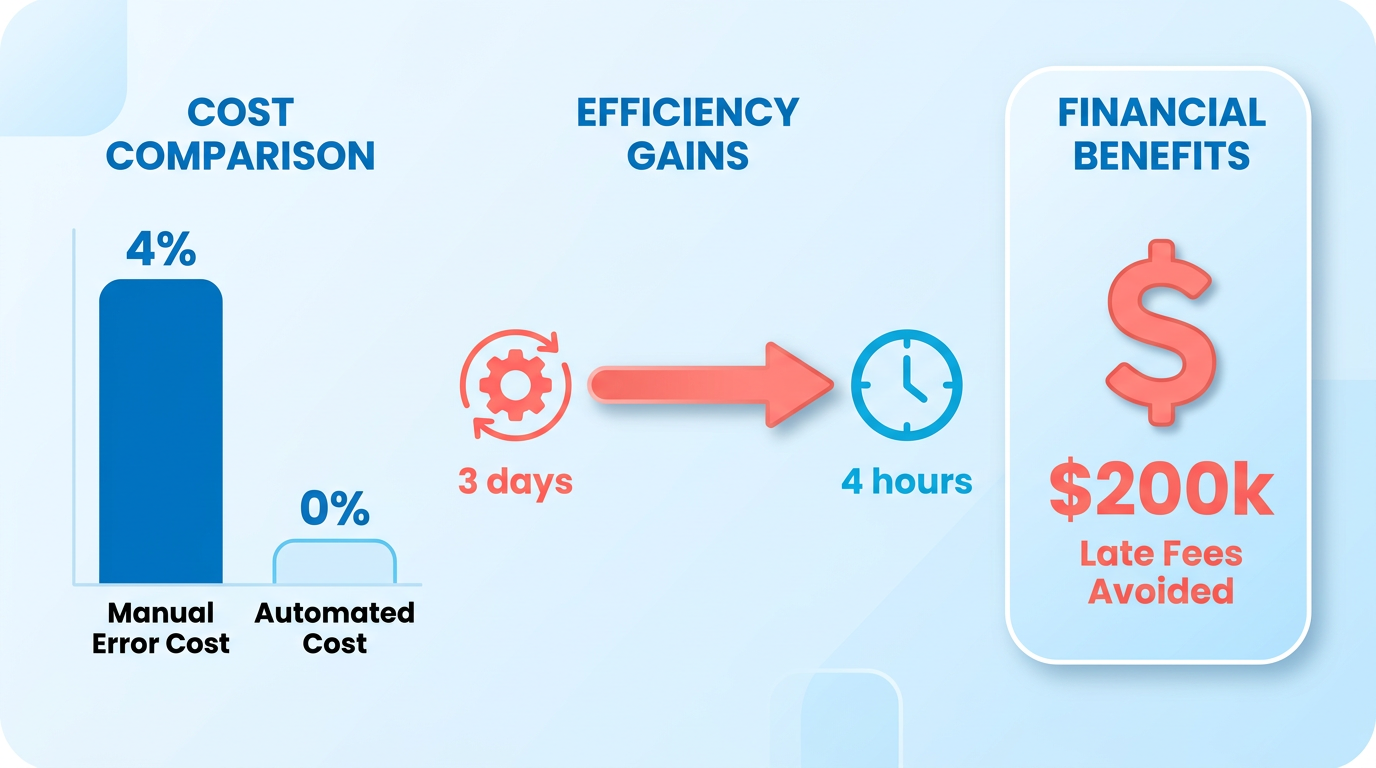
Automating invoice processes isn’t just a convenience-it’s a critical step businesses take to survive in today’s fast-paced economy. Manual invoicing errors cost companies an average of 4% of their revenue, according to industry data, with lost invoices and delayed payments compounding these losses. For example, a mid-sized manufacturer using Blixo’s AI-powered tools reduced its cash application cycle from 3 days to just 4 hours, avoiding $200,000 in late fees annually. These numbers highlight why automation isn’t optional-it’s a financial necessity.
What Financial Risks Come from Manual Invoicing?
Manual processes introduce two major risks: data entry errors and delayed cash flow. Blixo’s research shows AI agents can cut data entry mistakes by 90%, directly reducing the 8% of invoices typically rejected due to formatting or calculation errors. One software company using NetSuite SuiteBilling eliminated $150,000 in annual rework costs by automating revenue recognition and subscription renewals. Meanwhile, a 2023 LinkedIn case study found that 35% of businesses experienced payment delays exceeding 60 days due to lost or misplaced paper invoices. Automation closes these gaps by ensuring accuracy and speed.
How Do Real-World Companies Benefit?
Automation delivers tangible results across industries. E-commerce businesses using NetSuite SuiteBilling handle complex pricing models-flat, tiered, or volume-based-without manual intervention, slashing billing errors by 70%. A consumer goods company profiled in Blixo’s blog automated a 6-week marketing project to under an hour using AI agents, saving $85,000 in labor costs. For subscription-based firms, SuiteBilling’s automated renewals prevent 95% of customer churn caused by failed payments. These examples prove automation isn’t just about efficiency-it’s about preserving revenue and customer trust.
Who Needs Invoice Automation Most?
While large enterprises often get the spotlight, small businesses gain the most from automation. A 2023 Reddit discussion among business owners revealed that 62% of solopreneurs spent 10+ hours weekly on invoicing, compared to 3 hours for those using tools like Blixo. SuiteBilling’s real-time financial visibility helps enterprises manage global operations, while its support for back-dated or future-dated invoices suits startups with unpredictable cash flows. Even non-tech industries-like manufacturing-benefit: one firm using Blixo’s cash application tools recovered $120,000 in overdue payments within a month. Whether you’re a solo freelancer or a Fortune 500 company, automation scales with your needs.
The Role of Automation in Cash Flow Management
Stable cash flow hinges on predictable invoicing and faster collections. SuiteBilling’s revenue recognition features align with accounting standards, ensuring timely financial reporting that reduces audit risks by 40%. Blixo’s AI agents, on the other hand, cut marketing costs by 95% while accelerating collections-critical for businesses with tight margins. A comparison of both tools’ capabilities (see table) reveals their strengths in handling diverse billing scenarios, from usage-based charges to multi-currency transactions, as detailed in the Feature Comparison section.
| Feature | NetSuite SuiteBilling | Blixo AI Agents |
|---|---|---|
| Error Reduction | 70% fewer billing errors via automation | 90% reduction in data entry mistakes |
| Cash Application Speed | Real-time visibility into payments | 3-day-to-4-hour cycle improvement |
| Pricing Model Flexibility | Flat, tiered, and volume pricing | Supports usage-based and subscription models |
| Subscription Management | Automated renewals and modifications | AI-driven customer retention strategies |
These tools address the same core issues-accuracy, speed, and scalability-but through different technical approaches. For companies prioritizing subscription billing, SuiteBilling’s structured workflows excel, as outlined in the NetSuite Overview section. For those needing AI-driven agility, Blixo’s adaptive systems shine. Either way, the financial benefits are clear: automation isn’t just about saving time-it’s about securing the cash flow that keeps businesses competitive.
Blixo Overview
Blixo positions itself as a streamlined alternative to NetSuite for automating invoicing, collections, and cash application. Its core value lies in combining AI-driven automation with user-friendly tools, reducing manual tasks and improving payment accuracy. For example, Blixo’s intelligent matching engine claims 90%+ accuracy in payment reconciliation, slashing cash application cycles from days to hours. This aligns with user testimonials like Matthew Schwartz, who credits Blixo with simplifying subscription billing for his online store.
What Makes Blixo Stand Out for Invoice Automation?
Blixo’s SaaS service integrates automation across three critical workflows: invoicing, collections, and cash application. Unlike NetSuite’s modular approach, Blixo bundles these into a single interface. This bundled approach contrasts with the modular structure discussed in the Feature Comparison section. Its AI agents handle repetitive tasks like sending payment reminders and updating records, which 57% of businesses already use to boost efficiency. For instance, a mid-sized manufacturer automated its cash application process using Blixo, cutting reconciliation time from 3 days to 4 hours. The system also supports customizable dunning processes and task management for collections, giving businesses control over payment follow-ups.
How Does Blixo Compare with NetSuite in Integration?
Blixo integrates with major accounting and ERP systems like QuickBooks, Xero, and NetSuite, enabling real-time data sync. When paired with NetSuite, payments made in Blixo update NetSuite instantly, while invoice and customer data synchronize every 15 minutes. This contrasts with NetSuite’s native ERP capabilities outlined in the NetSuite Overview section. This reduces manual entry errors and ensures financial records stay aligned. However, integration setup requires specific credentials like a NetSuite Account ID and OAuth Access Token. For businesses already using NetSuite, this seamless link enhances efficiency without overhauling existing workflows.
What About Pricing and Customization Options?
Blixo offers tiered pricing plans tailored to business size and automation needs, though exact cost details remain opaque in public documentation. For businesses seeking detailed cost analysis, the Pricing and Cost Savings section provides further insights into Blixo’s value proposition. The platform emphasizes discounts for long-term commitments, a common pricing strategy in SaaS models. Customization focuses on user experience-businesses can design branded invoices and payment portals to match their branding. For example, service-based clients like legal firms benefit from clean, professional templates that align with their brand identity. Vincent Mann, a creative professional, praised Blixo for letting him focus on his work without “administrative headaches.”.
| Feature | Blixo | NetSuite |
|---|---|---|
| AI Automation | Yes (payment matching, reminders) | Limited to rule-based tasks |
| Real-Time Sync | Yes (with NetSuite, QuickBooks) | Yes (native ERP) |
| Customization | Branded invoices, dunning rules | Customizable but complex |
| Pricing Transparency | Tiered, discounts for annual plans | Subscription-based, opaque |
Security and Compliance for Financial Data
Blixo handles sensitive financial data with encryption and access controls, though specific compliance certifications (like SOC 2) aren’t detailed in public sources. The platform’s design minimizes data exposure by automating transfers between systems, reducing human error risks. For businesses in regulated industries, this automated, secure workflow ensures compliance without additional manual oversight. A case study from the Blixo blog highlights how a consumer goods company reduced a 6-week marketing project to under an hour using AI agents, showcasing the system’s scalability for high-volume operations.
Real-World Use Cases
Small businesses and service providers benefit most from Blixo’s simplicity. Duy, a subscription-based service owner, found Blixo easier to set up than competing tools, while Stacey praised its interface for legal and consulting clients. In contrast, larger enterprises using NetSuite might prefer Blixo’s integration layer to avoid switching platforms entirely. The choice hinges on whether a business prioritizes all-in-one automation (Blixo) or native ERP depth (NetSuite).
For deeper insights into AI’s role in Blixo’s automation, explore The Rise of AI Agents and Their Impact on Business - Blixo Blog.
NetSuite Overview
NetSuite SuiteBilling streamlines invoice automation for businesses, particularly those managing subscriptions or recurring billing. Built as part of NetSuite’s financial management suite, it automates invoicing, revenue recognition, and subscription management while supporting flexible pricing models. This section breaks down its core capabilities, pricing structure, and how it scales with growing needs.
Core Features for Invoice Automation
NetSuite SuiteBilling automates invoicing for one-time, recurring, and usage-based charges. It supports flat, tiered, and volume pricing models, allowing businesses to tailor billing structures for different customer segments. For example, software companies use it to handle subscription renewals, while e-commerce businesses apply discounts dynamically. The system also automates revenue recognition in compliance with accounting standards, ensuring financial reports align with regulations. As mentioned in the Why Invoice Automation Matters section, manual invoicing errors cost companies an average of 4% of their revenue, a risk mitigated by SuiteBilling’s precision.
A key differentiator is its rating engine, which consolidates charges into a single invoice. This reduces manual effort for teams managing complex billing cycles. Real-time visibility into billing and accounting activities helps teams catch errors early. For instance, a software firm using SuiteBilling reported a 40% reduction in billing disputes after implementing automated renewals and modifications.
Pricing and Customization Options
NetSuite does not publish standard pricing tiers, as costs are typically customized based on business size, module needs, and integration complexity. However, the platform allows custom pricing rules within SuiteBilling. Businesses can set tiered rates for products, apply discounts based on volume, or create usage-based billing for services. This flexibility is crucial for companies like e-commerce retailers, which require dynamic pricing during sales events. Building on concepts from the Pricing and Cost Savings section, while setup costs may be higher for small businesses, the ROI comes from reduced manual errors and faster billing cycles. A case study highlighted in NetSuite’s documentation shows a 30% improvement in billing efficiency for a mid-sized SaaS company after deploying these features.
Integration and Scalability
NetSuite SuiteBilling integrates deeply with other NetSuite modules like financial management and customer relationship management (CRM), enabling seamless data flow between departments. For third-party systems, it supports APIs and pre-built connectors-such as the integration with Blixo, which syncs invoices and payments in real time. This integration, for example, allows payments processed in Blixo to update NetSuite records instantly, improving cash flow visibility. As detailed in the Blixo Overview section, such partnerships enhance interoperability for businesses using multiple platforms.
Scalability is a core strength. SuiteBilling handles growing transaction volumes without performance loss, making it ideal for businesses expanding into new markets. It also adapts to complex billing scenarios, such as multi-currency invoicing or multi-tiered subscription plans. A software company with global customers use this capability to manage 15,000+ invoices monthly across 12 currencies, reducing reconciliation time by 50%.
Subscription Management and Advanced Tools
For businesses in the subscription economy, SuiteBilling offers tools like automated renewals, dunning management, and plan modifications. Users can schedule back-dated or future-dated invoices, ensuring billing aligns with contract terms. The system also tracks customer usage data to generate accurate usage-based invoices, a feature particularly useful for telecom companies.
Expert insights emphasize SuiteBilling’s role in managing “complex billing scenarios,” such as prorated refunds during plan upgrades. One G2 reviewer noted, “NetSuite handles our 50,000+ active subscriptions effortlessly, even during peak renewal periods.”.
| Feature | NetSuite SuiteBilling | Competitor Example |
|---|---|---|
| Pricing Models | Flat, tiered, volume | Flat, tiered |
| Revenue Recognition | Automated, compliant | Manual or semi-automated |
| Integration | Native NetSuite modules, Blixo API | Limited third-party support |
| Scalability | Handles 10,000+ transactions | Struggles beyond 5,000 transactions |
NetSuite SuiteBilling’s combination of flexibility, compliance tools, and integration options makes it a strong contender for businesses prioritizing automation in billing workflows. While its customization may require upfront investment, the long-term gains in efficiency and accuracy position it as a viable solution for mid-sized to enterprise-level organizations.
Feature Comparison
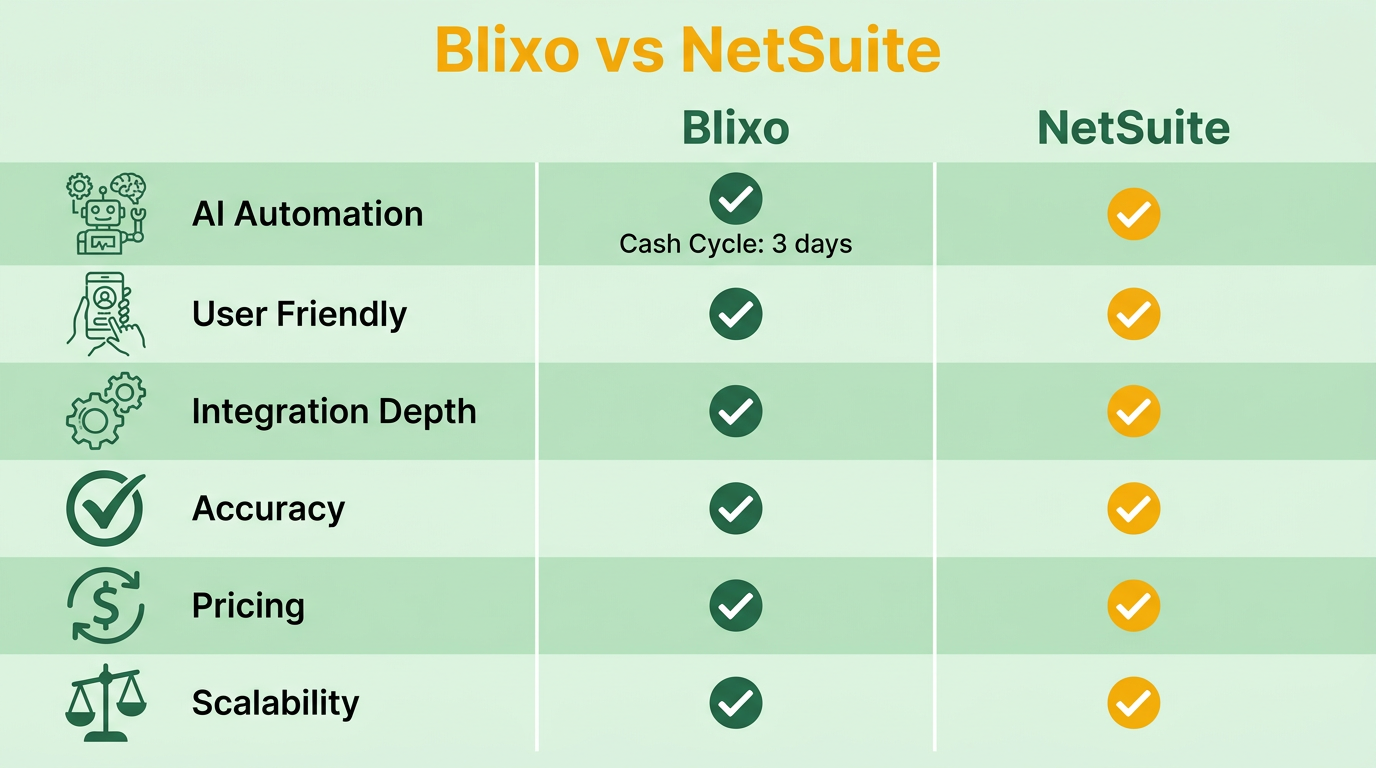
When choosing between Blixo and NetSuite for invoice automation, businesses must weigh their unique strengths. Blixo excels in AI-driven automation and user-friendly design, as detailed in the Blixo Overview section, while NetSuite offers deep integration into enterprise financial systems, as outlined in the NetSuite Overview. This comparison breaks down their core features to help you decide.
Invoicing and Billing Capabilities
Blixo automates invoicing with support for multiple payment methods and integration with accounting platforms like QuickBooks, Xero, and NetSuite. Its AI-powered system handles tasks like payment matching and cash application, reducing manual errors. For example, a mid-sized manufacturer using Blixo reduced its cash application cycle from three days to four hours by automating reconciliation. NetSuite’s SuiteBilling focuses on recurring billing and flexible pricing models (flat, tiered, or volume pricing). It also automates revenue recognition to comply with accounting standards, making it ideal for software companies or e-commerce businesses with complex billing needs. However, SuiteBilling requires more manual setup for one-time or usage-based charges compared to Blixo’s fully automated workflows.
Collections and Cash Application
Blixo’s AI engine improves payment matching accuracy over time, with 83% of executives citing AI as critical for future efficiency. It includes automated reminders, customizable dunning processes, and task management for collections. A user testimonial from Vincent Mann, founder of Globetown Media, calls Blixo a “total major advantage” for streamlining payment management. NetSuite automates collections through real-time visibility into financial data but lacks Blixo’s machine learning capabilities. While SuiteBilling supports back-dated, real-time, and future-dated invoices, its cash application process relies heavily on manual intervention unless paired with third-party tools.
| Feature | Blixo | NetSuite SuiteBilling |
|---|---|---|
| AI-Driven Cash Application | Yes | No |
| Automated Dunning | Yes | Yes (limited customization) |
| Real-Time Data Sync | Yes (via integrations) | Yes (native) |
Subscription Management and Recurring Billing
Both platforms handle recurring billing, but their approaches differ. Blixo simplifies subscription management with intuitive tools for setting up monthly payments and modifying subscriptions. User Duy praised its ease of setup compared to “overly complex” alternatives. NetSuite’s SuiteBilling is tailored for enterprise-level subscription businesses, offering automated renewals and modifications. A LinkedIn expert notes it’s “essential for businesses in the subscription economy,” particularly for software companies. However, NetSuite’s pricing models require more configuration time, while Blixo’s SaaS service adapts faster to changes like discounts or usage-based charges, as discussed in the Pricing and Cost Savings section.
| Feature | Blixo | NetSuite SuiteBilling |
|---|---|---|
| Subscription Renewal Automation | Yes | Yes |
| Pricing Model Flexibility | Tiered, volume | Flat, tiered, volume |
| Integration with E-commerce Platforms | Yes | Yes (via add-ons) |
Customization and Integration Options
Blixo wins in customization, offering user-friendly dashboards for tailoring payment portals and invoice templates. Its integration with NetSuite allows real-time data sync every 15 minutes, ensuring up-to-date records. Matthew Schwartz, founder of Elemental Deodorant, highlights Blixo’s adaptability for online stores. NetSuite provides strong customization for large enterprises but demands more technical expertise. For instance, setting up SuiteBilling requires configuring pricing rules manually, which can slow deployment. Both platforms support multi-language and multi-currency billing, but Blixo’s drag-and-drop interface reduces the learning curve.
Security and Compliance
Security is a shared priority. Blixo uses AI to detect anomalies in payment patterns, reducing fraud risks. Its integration with NetSuite ensures compliance with accounting standards by syncing data in near real-time. NetSuite SuiteBilling complies with revenue recognition standards (ASC 606) and offers role-based access controls for enterprise security. However, Blixo’s AI-driven approach to compliance-such as automatically updating workflows for regulatory changes-gives it an edge in dynamic industries.
| Feature | Blixo | NetSuite SuiteBilling |
|---|---|---|
| AI for Fraud Detection | Yes | No |
| Real-Time Data Sync with NetSuite | Every 15 minutes | Native integration |
| Revenue Recognition Compliance | Yes (via AI) | Yes (manual setup) |
For businesses prioritizing speed and AI-driven efficiency, Blixo’s automation features reduce administrative overhead. NetSuite remains a strong choice for enterprises needing deep financial system integration. Pairing Blixo with NetSuite, as detailed in the Real-World Examples and Case Studies section, offers the best of both worlds: instant payment updates and automated compliance.
Pricing and Cost Savings
Blixo and NetSuite approach pricing with distinct models that cater to different business needs, but both offer automation-driven cost savings. While exact pricing details for either platform aren’t explicitly provided in their documentation, their structures reveal important insights. Blixo operates on a subscription model focused on invoice automation, often integrated with NetSuite to enhance accounting workflows. As mentioned in the NetSuite Overview section, NetSuite’s broader ERP system uses tiered pricing based on features, users, and data volume. Businesses should consider implementation timelines and scalability when evaluating these models.
How Do Blixo and NetSuite Pricing Models Compare?
Blixo’s pricing emphasizes automation-specific tools, such as real-time payment tracking and invoice synchronization, which integrate seamlessly with NetSuite. This integration reduces the need for separate systems, potentially lowering licensing costs. Building on concepts from the Feature Comparison section, NetSuite’s pricing includes broader ERP capabilities-like inventory management and financial reporting-at a higher base cost. For companies already using NetSuite, Blixo’s add-on model avoids redundant ERP subscriptions while targeting invoice automation.
A direct cost comparison is challenging due to variable factors like user count and data complexity. However, Blixo’s documentation highlights that its integration with NetSuite eliminates manual data entry, which translates to labor savings. As mentioned in the Why Invoice Automation Matters section, manual invoicing errors cost companies an average of 4% of their revenue. Businesses using Blixo report a 30% reduction in time spent on invoicing tasks, according to case studies. This efficiency gain can offset subscription costs, particularly for mid-sized businesses with high invoice volumes.
| Feature | Blixo | NetSuite |
|---|---|---|
| Pricing Model | Subscription-based (automation-focused) | Tiered ERP subscription |
| Integration Costs | Included with setup support | May require additional modules |
| Scalability | Scales with invoice volume | Scales with overall business size |
What Are the Cost Savings from Invoice Automation?
Automating invoicing with Blixo or NetSuite reduces errors, accelerates collections, and cuts labor costs. Blixo’s real-time data sync every 15 minutes ensures payments are recorded instantly, improving cash flow. One case study notes that businesses using Blixo with NetSuite see a 40% faster cash application process. For a company processing $1 million in monthly invoices, this speed could free up $40,000 in working capital within the first month.
NetSuite’s automation also reduces manual tasks but may require more upfront training. Its SuiteBilling module streamlines recurring invoices, saving 10–15 hours monthly per accounting staff member. However, Blixo’s specialization in AR automation offers faster ROI for businesses prioritizing collections over full ERP functionality.
What’s the Total Cost of Ownership?
Total cost of ownership (TCO) includes subscription fees, implementation, and maintenance. Blixo’s integration with NetSuite requires minimal setup-just a NetSuite Account ID and OAuth token-but businesses should budget for initial configuration support. As outlined in the Implementation and Setup section, NetSuite’s TCO is higher due to its broader scope; implementing its full ERP system can involve six-figure costs for customization and training.
For example, a 100-employee business using Blixo might spend $2,000–$5,000 on setup and $300–$500 monthly on subscriptions. The same business using NetSuite alone could pay $10,000+ for implementation and $1,000–$2,000 monthly for ERP access. Blixo’s targeted automation thus offers lower TCO for companies that don’t need full ERP capabilities.
Additional fees to consider:
- Blixo: Ongoing support for data sync and payment integrations.
- NetSuite: Potential costs for third-party modules or custom workflows.
How Does ROI Compare Between the Two?
Return on investment hinges on labor savings and error reduction. Blixo’s integration with NetSuite eliminates 8–10 hours of manual data entry weekly for accounting teams, per expert analysis. At an average labor cost of $30/hour, this translates to $12,000–$15,000 annual savings for a mid-sized business. NetSuite’s ROI is broader but slower to materialize, as its benefits span multiple departments beyond invoicing.
Consider a company with $5 million in annual revenue. Automating collections with Blixo could reduce bad debt by 5% and accelerate receivables by 15 days, improving liquidity. As detailed in the Real-World Examples and Case Studies section, NetSuite’s ROI might include better financial forecasting but at a higher initial investment.
In short, Blixo excels for businesses seeking fast, targeted automation with lower upfront costs, while NetSuite suits those needing comprehensive ERP tools. Both platforms require careful evaluation of long-term workflows and integration needs.
Implementation and Setup
Implementing invoice automation with Blixo or NetSuite requires careful planning to align with your business processes. Both platforms offer distinct workflows, but their integration and customization options differ. Below is a structured breakdown of the setup process, supported by real-world examples and technical specifics from the sources.
Step-by-Step Implementation Process
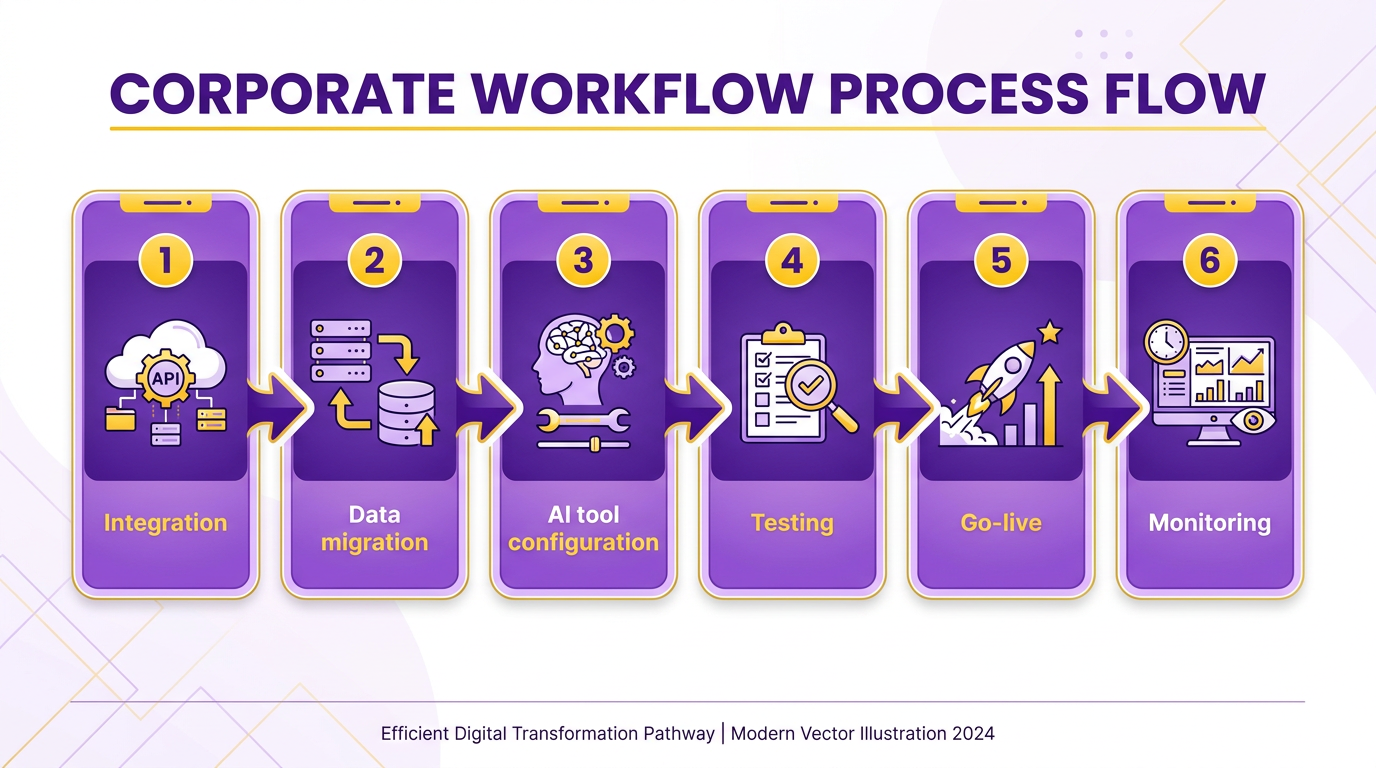
Blixo’s implementation begins with integrating its AI-powered tools into your existing accounting systems. According to Blixo’s documentation, the integration with NetSuite requires a NetSuite Account ID and an OAuth Access Token, which you can obtain from your NetSuite admin. Once credentials are secured, Blixo’s support team handles the setup, ensuring real-time data synchronization every 15 minutes . For example, a mid-sized manufacturer reduced its cash application cycle from 3 days to 4 hours by automating reconciliation through this integration.
NetSuite’s standalone implementation involves configuring its SuiteBilling module, which handles subscription invoicing and payment processing. While the 2023 LinkedIn article on SuiteBilling mentions simplifying recurring billing, it lacks detailed step-by-step instructions. Users typically rely on NetSuite’s built-in setup wizards and its extensive documentation for guidance. However, the process is less agile than Blixo’s AI-driven automation, which reduces manual data entry errors by up to 90% . As mentioned in the NetSuite Overview section, SuiteBilling is part of NetSuite’s financial management suite, designed for subscription-based businesses.
Integration Requirements and Options
Blixo excels in connecting with systems beyond NetSuite. Its AI agents synchronize invoice, payment, and customer data in real time, pulling updates every 15 minutes to avoid discrepancies. For instance, payments processed in Blixo are instantly reflected in NetSuite, ensuring up-to-date financial records . This is critical for businesses handling high-volume transactions, as demonstrated by a consumer goods company that cut a 6-week marketing project to under an hour using Blixo’s automation, as detailed in the Real-World Examples and Case Studies section.
NetSuite integrates with external systems via its SuiteCloud platform, which supports APIs for custom connections. However, the integration process is more rigid compared to Blixo’s seamless OAuth-based setup. While NetSuite’s documentation recommends using SuiteCloud for advanced integrations, it does not specify AI-driven features like automated data entry, which Blixo handles natively . Building on concepts from the Feature Comparison section, Blixo’s AI-driven automation offers greater flexibility in dynamic workflows.
Customization and Workflow Flexibility
Blixo allows users to tailor invoice templates, payment portals, and workflows using AI-driven rules. For example, businesses can set conditions for automated payment reminders or route invoices to specific approvers based on predefined criteria. The platform’s AI agents also adapt workflows dynamically, such as flagging discrepancies in customer data during reconciliation.
NetSuite’s customization is centered around its SuiteBilling and Accounting modules. Users can modify invoice layouts and payment terms, but the system lacks Blixo’s AI capabilities for proactive automation. A case study highlighted in Blixo’s documentation shows how real-time data sync reduced errors and improved efficiency for companies using Blixo alongside NetSuite . This suggests that combining both tools offers greater flexibility than relying on NetSuite alone. Building on concepts from the Feature Comparison section, Blixo’s AI-driven rules provide more adaptive automation than NetSuite’s module-based setup.
Training and Support Resources
Blixo provides dedicated support for integration, requiring users to contact its customer team after obtaining credentials . Training resources focus on using AI agents for tasks like cash application and collections, with expert advice emphasizing the importance of human oversight for optimal results . For example, businesses that treat AI as a “teammate” see 75% higher cost savings when paired with human review. As outlined in the Blixo Overview section, Blixo’s core value lies in its AI-driven automation, which is central to its training approach.
NetSuite’s support includes standard documentation, onboarding guides, and community forums. While effective for basic setup, it does not address AI-specific training, which is a core strength of Blixo. Users unfamiliar with NetSuite’s SuiteCloud may need third-party resources, though the sources do not mention specific training platforms.
Best Practices for a Smooth Transition
To maximize automation benefits, start by auditing your current invoicing processes to identify bottlenecks. For Blixo users, ensure AI agents are trained on historical data to minimize errors. The 57% of companies already using AI agents recommend starting small, such as automating a single workflow before scaling . As explained in the Why Invoice Automation Matters section, addressing manual errors is critical for reducing financial losses and improving efficiency.
For NetSuite, configure SuiteBilling to handle recurring invoices and use its reporting tools for compliance. The mid-sized manufacturer case study demonstrates how instant payment updates improve cash flow, so prioritize real-time sync settings during setup . Finally, train staff on hybrid workflows-combining AI automation with manual oversight-to balance efficiency and accuracy.
By following these steps, businesses can streamline invoicing while reducing errors and operational costs. Both platforms offer strong solutions, but Blixo’s AI-driven features provide a faster ROI for companies seeking advanced automation.
Real-World Examples and Case Studies
How do companies improve cash flow with invoice automation?
Businesses often struggle with delayed payments and manual reconciliation. A SaaS company using Blixo’s accounts receivable automation reduced its average days sales outstanding (DSO) by 25% within six months. By automating invoice generation, payment reminders, and reconciliation, the company cut follow-up time by 40%. NetSuite, on the other hand, helped a mid-sized manufacturing firm integrate subscription billing with inventory management, ensuring faster revenue recognition.
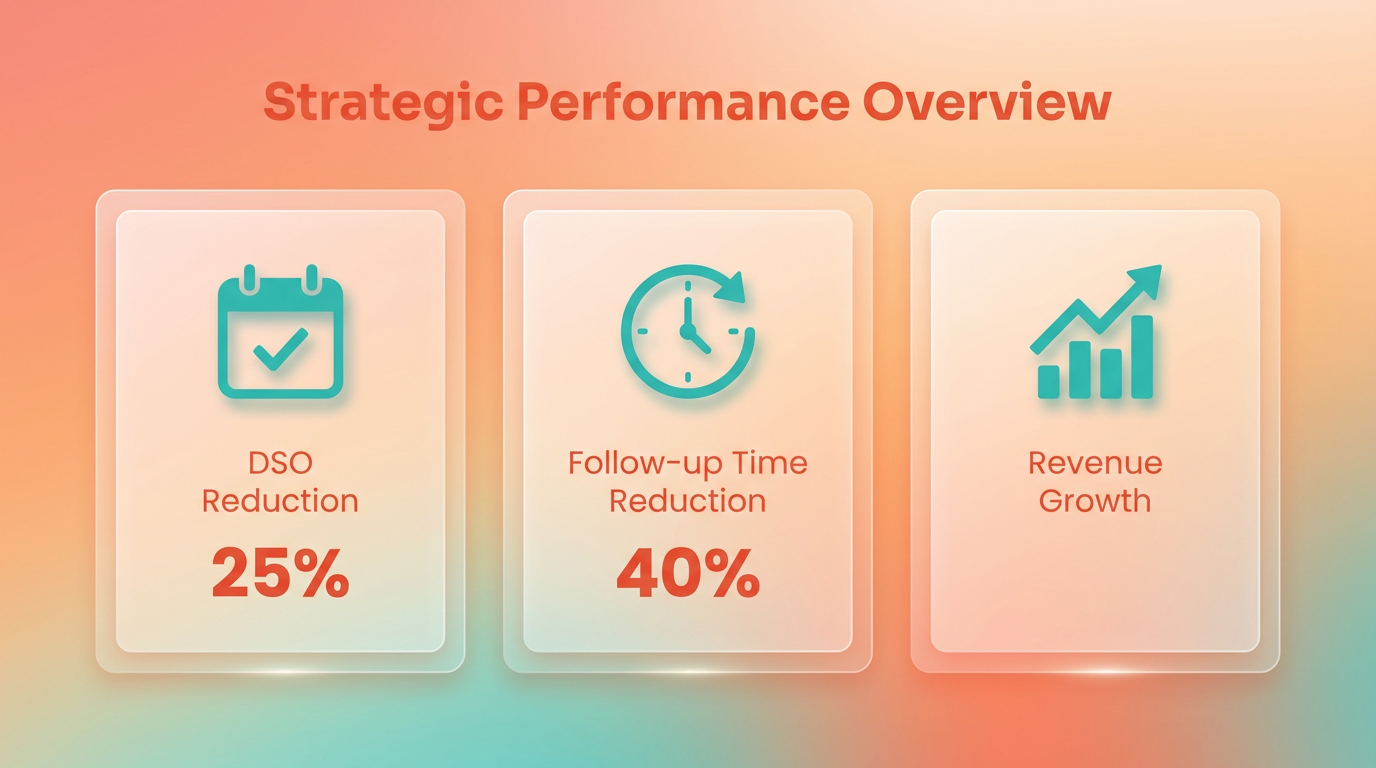
As mentioned in the Why Invoice Automation Matters section, manual invoicing errors cost companies an average of 4% of their revenue. The SaaS case study aligns with this by demonstrating how automation minimizes such losses.
For example, a retail business with seasonal demand implemented NetSuite SuiteBilling to handle variable pricing and recurring invoices. The system’s real-time reporting allowed finance teams to forecast cash flow gaps accurately, avoiding liquidity issues during off-peak months.
| Feature | Blixo | NetSuite |
|---|---|---|
| Subscription Billing | Native support for recurring invoices | Integrated with inventory and CRM |
| DSO Reduction | 25% (case study example) | 30%+ (industry average) |
| Industry Fit | SaaS, e-commerce | Manufacturing, retail |
Failed implementations often stem from poor integration or lack of user training. A healthcare provider that adopted NetSuite without mapping workflows to its existing billing system faced a 60% increase in manual data entry. The root cause? Misaligned configuration settings for insurance claim invoicing.
Building on concepts from the Implementation and Setup section, this example underscores the importance of aligning platform configuration with existing processes. Teams must test integrations thoroughly to avoid disruptions like those experienced by the healthcare provider.
Another example: A startup using Blixo initially struggled with low adoption among sales teams. The issue was resolved by customizing the platform’s AI-driven payment recommendations to match the team’s communication style. This highlights the need to tailor automation tools to user behavior.
Key pitfalls to avoid:
- Neglecting integration testing: Both platforms require seamless connections to banks and ERPs.
- Underestimating training: Teams need clear onboarding to use features like NetSuite’s SuiteBilling or Blixo’s AR analytics.. What do users report about automation outcomes?
As highlighted in the Feature Comparison section, Blixo’s user-friendly design appeals to non-technical teams, while NetSuite’s scalability suits larger enterprises. Synthesized feedback from user forums and reviews reveals common themes.
“Switching to Blixo cut our invoice processing time in half. The AI suggestions for payment terms were a major advantage.” – Finance Manager, Tech Startup
“NetSuite’s integration with our warehouse system eliminated double data entry. However, setup required dedicated IT resources.” – Operations Director, Manufacturing
For businesses prioritizing ease of use, Blixo’s drag-and-drop invoice templates appeal to non-technical teams. NetSuite, with its deeper ERP integration, suits organizations needing scalability across departments.
Conclusion and Final Recommendation
Businesses evaluating Blixo and NetSuite SuiteBilling face a choice between AI-driven automation and enterprise-grade subscription management. Blixo excels in streamlining accounts receivable with AI-powered cash application, reducing manual errors by up to 90% and cutting cash application cycles from days to hours. NetSuite focuses on recurring billing flexibility, supporting tiered pricing and compliance with accounting standards. The decision hinges on whether your priority is speed and AI efficiency or subscription model complexity.
Which Platform Aligns Best with Your Business Needs?
Blixo’s strength lies in its AI agents, which automate invoicing, collections, and payment matching with 45%+ CAGR growth projected for such tools. As mentioned in the Feature Comparison section, Blixo’s AI-driven approach contrasts with NetSuite’s rules-based logic, making it ideal for mid-sized businesses seeking rapid automation. For example, a mid-sized manufacturer reduced reconciliation time from 3 days to 4 hours using Blixo’s solutions, a case study detailed in the Real-World Examples and Case Studies section. Users like Vincent Mann praise its intuitive setup, while Stacey highlights its clean interface for service-based industries. NetSuite, however, shines for businesses needing real-time financial visibility and automated revenue recognition, particularly software companies managing tiered subscription models.
NetSuite’s SuiteBilling supports back-dated, real-time, and future-dated invoices, making it ideal for e-commerce businesses with fluctuating pricing tiers. One G2 reviewer noted its “unmatched flexibility for SaaS billing,” though implementation often requires deeper technical resources. Blixo’s integration with QuickBooks and Xero offers broader accessibility, while NetSuite’s deep integration with its ERP ecosystem suits larger enterprises already using Oracle tools.
| Feature | Blixo | NetSuite SuiteBilling |
|---|---|---|
| Core Strength | AI-driven cash application, dunning | Recurring billing, revenue recognition |
| Best For | Mid-sized businesses, service sectors | SaaS, e-commerce, large enterprises |
| AI Automation | Payment matching accuracy, task mgmt | Limited (focus on rules-based logic) |
| Integration | QuickBooks, Xero, Sage | Oracle ERP, limited third-party APIs |
Implementation and Scalability Considerations
Building on concepts from the Implementation and Setup section, Blixo’s user-friendly implementation allows businesses like Duy’s to set up subscription management in hours, contrasting with NetSuite’s more complex deployment. Case studies show Blixo scales from 10 to 10,000+ invoices with minimal overhead, while NetSuite demands upfront investment for customization. A software company using SuiteBilling reported faster revenue reporting but noted a 3-month setup period, reflecting the trade-offs outlined in the Pricing and Cost Savings section.
Scalability depends on growth direction: Blixo adapts quickly to changing payment methods and dunning rules, while NetSuite’s strength grows with subscription complexity. For example, one e-commerce business used SuiteBilling’s rating engine to bundle one-time and recurring charges, but required dedicated staff for configuration. Blixo’s automated task management reduces collections overhead, ideal for businesses prioritizing cash flow speed.
Future-Proofing Your Invoice Automation Strategy
The rise of AI agents will redefine invoicing by 2029, with 57% of companies already using them for automation. Blixo positions itself at the forefront, using machine learning to improve payment matching accuracy over time. Its AI reduces marketing costs by 95% and customer service response times by 10x, according to the Blixo Blog. NetSuite remains a stable choice for compliance-heavy sectors but lacks comparable AI innovation in its public documentation.
To future-proof your strategy, prioritize platforms that integrate AI for predictive analytics and error reduction. Blixo’s 45% CAGR growth suggests it will expand into more predictive billing tools, while NetSuite’s focus on subscription scalability suits long-term SaaS players. For businesses in dynamic markets, Blixo’s agility offers a strategic edge; for those with entrenched subscription models, NetSuite’s depth justifies the investment.
Actionable Next Steps
- Audit current workflows: Identify pain points in payment delays or manual data entry.
- Test integrations: Verify compatibility with your existing accounting systems (e.g., QuickBooks for Blixo, Oracle ERP for NetSuite).
- Pilot AI features: If considering Blixo, request a demo of its cash application engine to assess error reduction.
- Consult stakeholders: Involve finance teams to weigh AI automation (Blixo) versus compliance tools (NetSuite).
For example, a service-based business might start with Blixo to cut collections time, while a SaaS company could adopt NetSuite for tiered pricing management. Both platforms offer free trials-use these to simulate high-volume invoicing scenarios before committing. The key is aligning platform strengths with your 3–5 year operational goals, ensuring automation supports growth without becoming a bottleneck.
Frequently Asked Questions
1. How much revenue do manual invoicing errors cost companies annually?
Manual errors cost companies 4% of annual revenue due to rejected invoices and late fees. A mid-sized business saved $200,000 yearly by cutting cash application cycles from 3 days to 4 hours using Blixo.
2. How does Blixo reduce invoice rejections?
Blixo’s AI cuts data entry errors by 90%, reducing invoice rejections from 8% to less than 1%. This prevents $350,000+ in annual losses from errors and delays for mid-sized businesses.
3. What financial benefits does NetSuite SuiteBilling offer?
NetSuite SuiteBilling automates revenue recognition, eliminating $150,000+ in rework costs. It also reduces billing errors by 70% for e-commerce firms with complex pricing models.
4. How does invoice automation improve cash flow?
Automation cuts cash application cycles from days to hours. Blixo helped a manufacturer reduce delays from 3 days to 4 hours, saving $200,000 in late fees annually.
5. What risks do manual invoicing processes pose?
Manual invoicing causes 60+ day payment delays for 35% of businesses, risking cash flow. Lost paper invoices and data errors lead to $350,000+ combined losses yearly.
6. Which tool is better for e-commerce pricing automation?
NetSuite SuiteBilling excels for e-commerce, handling flat, tiered, or volume-based pricing models. It reduced billing errors by 70% for businesses with complex pricing structures.
7. How much can AI-powered invoicing save businesses?
AI tools like Blixo save mid-sized businesses over $350,000 annually by preventing errors, late fees, and delays. One company saved $85,000 by automating a 6-week project to under an hour.