

Choose the Best AR Automation Companies for Timely Payments

Key Takeaways
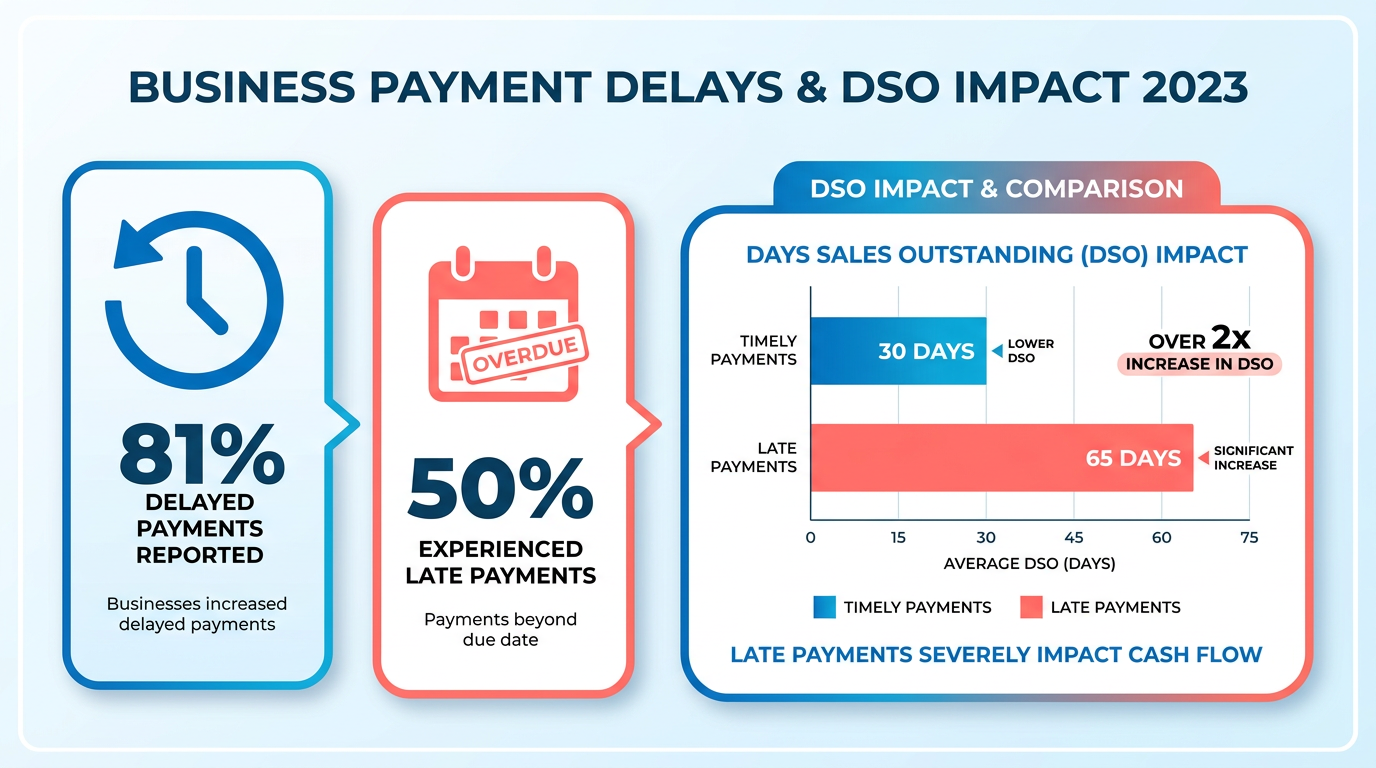
- Timely payments are critical for cash flow, with 81% of businesses reporting increased delayed payments in 2023.
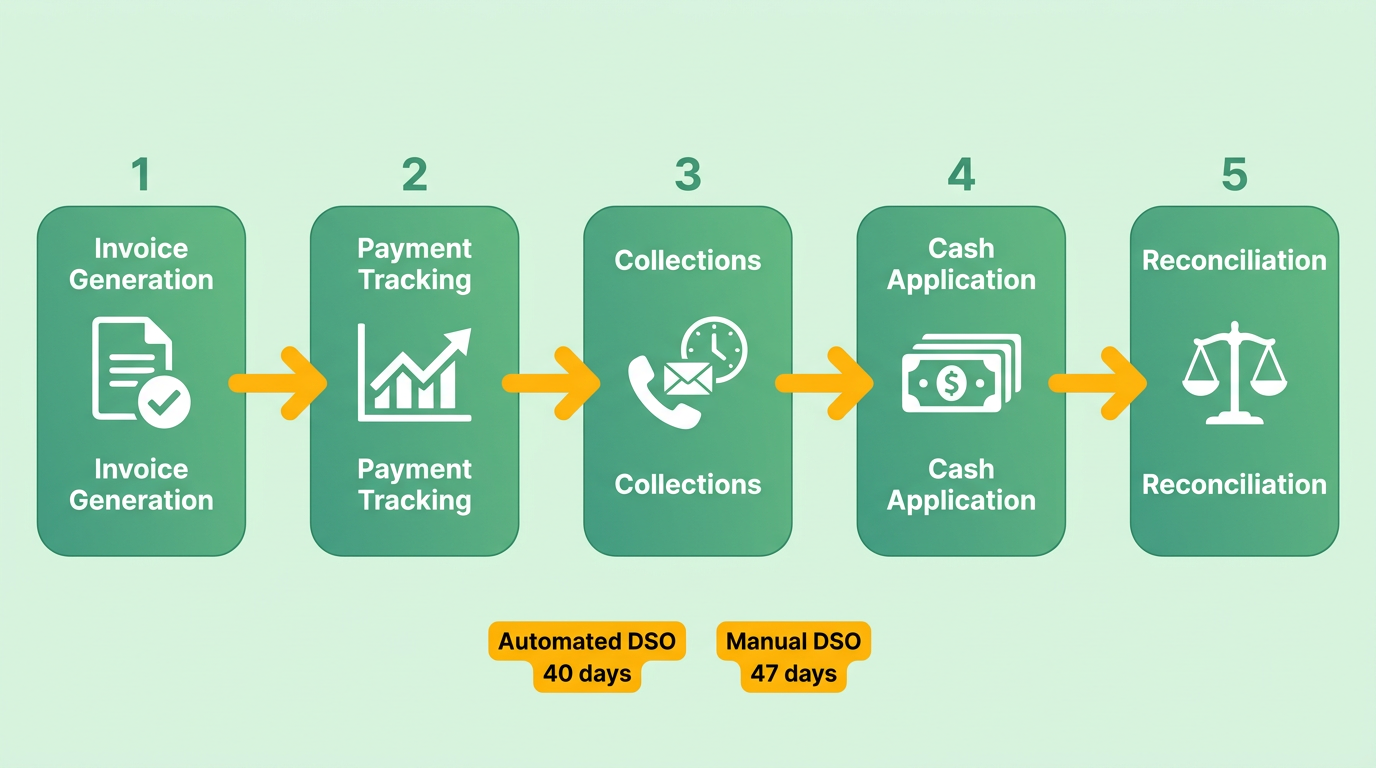
- Automated AR processes reduce Days Sales Outstanding (DSO) to 40 days compared to 47 days for manual systems.
- 85% of CFOs using half-automated AR systems reported lower DSO, improving cash flow predictability.
- 50% of businesses experienced late customer payments in 2023, highlighting automation’s urgency for financial stability.
- Late payments raise administrative costs and penalties, straining working capital and operational efficiency.
- Automated AR systems reduce operational delays by minimizing capital tied up in slow-paying invoices.
- Businesses with AR automation avoid higher borrowing costs linked to reduced working capital from late payments.
Related Video
Watch: Master Your AR: Optimize Accounts Receivable Automation & Insights with TCD SMART by TCD - The Credit Department
Why Timely Payments Matter
Timely payments are the lifeblood of business operations, directly impacting cash flow, operational efficiency, and customer relationships. Late payments disrupt financial stability by tying up capital, increasing the risk of operational delays, and creating uncertainty in revenue forecasting. For example, 81% of businesses reported increased delayed payments in 2023, with 50% experiencing late payments from customers. This highlights the urgent need for solutions like AR automation, which is explored in depth in the Understanding AR Automation section.
How Late Payments Impact Cash Flow
Late payments force companies to operate with reduced working capital, often leading to higher borrowing costs or missed growth opportunities. The days sales outstanding (DSO) metric illustrates this clearly: automated AR processes achieve an average DSO of 40 days, while manual systems lag at 47 days. A 2023 study found that 85% of CFOs at companies with half-automated AR processes reported lower DSO, directly improving cash flow predictability. When payments are delayed, businesses face higher administrative costs for collections and may incur penalties for late supplier payments, compounding financial strain. For a deeper dive into metrics like DSO, see the Essential Features to Evaluate section.
Real-World Benefits of AR Automation
Automation addresses these challenges by streamlining invoicing, reminders, and collections. For instance, Mitutoyo America reduced its DSO by digitizing credit applications and standardizing customer contact information, cutting time spent on collections. Similarly, Cole, Scott & Kissane, a law firm, saw a 30% drop in past-due invoices after adopting Versapay’s automation tools. These systems also reduce errors-manual data entry mistakes cost businesses up to 4% of revenue annually, while automation eliminates 70-90% of these issues. Further examples of automation success are detailed in the Case Studies and Success Stories section.
Who Benefits Most from AR Automation
Small businesses and enterprises both gain significant advantages. Small firms, like those using Heartland’s AR automation, save 50% of manual work and process $72 billion annually across 3,000 organizations. Enterprises, such as Rev.io clients, benefit from scalable solutions that handle high transaction volumes and complex billing models. Even industries like insurance see improvements: one mid-sized insurer automated premium payments, reducing errors by 60% and improving customer renewal rates. For more on selecting the right provider, refer to the Top AR Automation Companies section.
Improving Customer Relationships and Reducing Stress
Timely payments aren’t just about cash flow-they strengthen client trust. Automated reminders and self-service portals, as seen in NetSuite’s AR automation, enhance customer experience, with 75% of firms reporting higher satisfaction. Michelle Murdock, a financial expert, advises starting small with automation to minimize costs, while Barbara Carpenter stresses the importance of employee buy-in for smooth adoption. By reducing the stress of manual collections, teams can focus on strategic tasks, as noted by a CFO at Madison Resources, who saved 64 hours monthly on payroll and billing after automation.
In short, AR automation isn’t just a tool-it’s a strategic shift that ensures financial agility, reduces operational friction, and fosters trust. Whether you’re a small business owner or an enterprise leader, the data and case studies above underscore its transformative potential.
Understanding AR Automation
AR automation, or accounts receivable automation, refers to using technology to digitize and streamline processes like invoice generation, payment tracking, and collections. It eliminates manual tasks such as data entry and follow-ups, reducing delays and errors. For example, companies with automated AR processes have an average DSO (days sales outstanding) of 40 days compared to 47 days for non-automated firms, highlighting the importance of timely payments discussed in the Why Timely Payments Matter section. This efficiency is critical in modern business, where timely cash flow directly impacts financial stability and growth.
What Makes AR Automation Essential for Modern Businesses?
AR automation addresses pain points like late payments, human errors, and inefficient workflows. By automating repetitive tasks, businesses can focus on strategic initiatives. For instance, 87% of firms with automated AR report faster process speeds, and 75% see improved customer experiences . Automation also ensures compliance with regulations through standardized workflows, reducing legal risks. As mentioned in the Security and Compliance section, platforms must protect sensitive financial data through encryption and access controls, which automated systems inherently support. For example, Mitutoyo America digitized credit applications, cutting collections time by streamlining customer contact information .
How AR Automation Systems Function
Automated systems work by integrating with existing accounting software to generate invoices, send reminders, and track payments. When a sale is recorded, the system automatically creates an invoice with due dates and payment links. If a payment is late, it triggers automated reminders via email or SMS, reducing the need for manual follow-ups. Advanced systems use AI to analyze payment trends, flagging potential issues like invoice disputes or fraud . For example, NetSuite’s AR automation software handles invoicing, payment collection, and reconciliation seamlessly, improving cash flow as detailed in the Top AR Automation Companies section.
Key Features of AR Automation Software
The best AR automation tools share common features:
- Invoice Generation: Automatically creates and sends invoices based on sales or service delivery, a core feature emphasized in the Essential Features to Evaluate section.
- Payment Tracking: Monitors payment statuses in real time and updates financial records.
- Multiple Payment Options: Supports ACH, credit cards, and digital wallets for customer convenience .
- Real-Time Analytics: Dashboards track DSO, payment trends, and cash flow .
These features reduce manual labor and improve accuracy. For instance, Epitec saved 64 hours monthly by automating payroll and billing, while Life Unlimited cut accounting overhead by $100,000 annually .
Measurable Benefits of AR Automation
Businesses adopting AR automation see tangible improvements:
- Faster Cash Flow: 85% of CFOs report lower DSO after automation, accelerating revenue availability .
- Error Reduction: Automated data entry minimizes billing disputes and improves financial accuracy .
- Cost Savings: Manual AR processes cost up to 10% of revenue annually; automation cuts these expenses .
Insurance companies, for example, use automation to process premiums faster, improving customer retention and reducing operational costs. As noted in the Case Studies and Success Stories section, personalized automated communication has led to significant gains in industries like insurance.
Real-World Success Stories
Several businesses highlight AR automation’s impact:
- Mitutoyo America: Digitizing credit applications reduced DSO and improved collections efficiency .
- NetSuite Users: Automated invoicing and reconciliation cut processing time by 30%, per a 2023 study .
- Hope Human Services: Budget creation time dropped by 50%, enhancing cross-department collaboration .
These examples, detailed in the Case Studies and Success Stories section, underscore automation’s versatility across industries, from manufacturing to healthcare.
Summary Table: Key Components of AR Automation
| Component | Description | Pros | Cons |
|---|---|---|---|
| Invoice Generation | Automated creation and delivery of invoices based on sales or service records | Saves 10–15 hours monthly | Requires integration with ERP |
| Payment Tracking | Real-time monitoring of payment statuses and updates | Reduces late payments by 40% | Initial setup complexity |
| Automated Reminders | Scheduled email/SMS alerts for overdue payments | Cuts manual follow-ups by 70% | May require customization |
| Analytics Dashboards | Real-time insights into DSO, payment trends, and cash flow | Improves forecasting accuracy | Learning curve for new users |
By automating these components, businesses reduce costs, enhance customer satisfaction, and gain strategic financial control. Implementation should start with small, high-impact tasks-like invoice automation-to ensure employee adoption and scalability as outlined in the Implementation and Integration section.
Essential Features to Evaluate
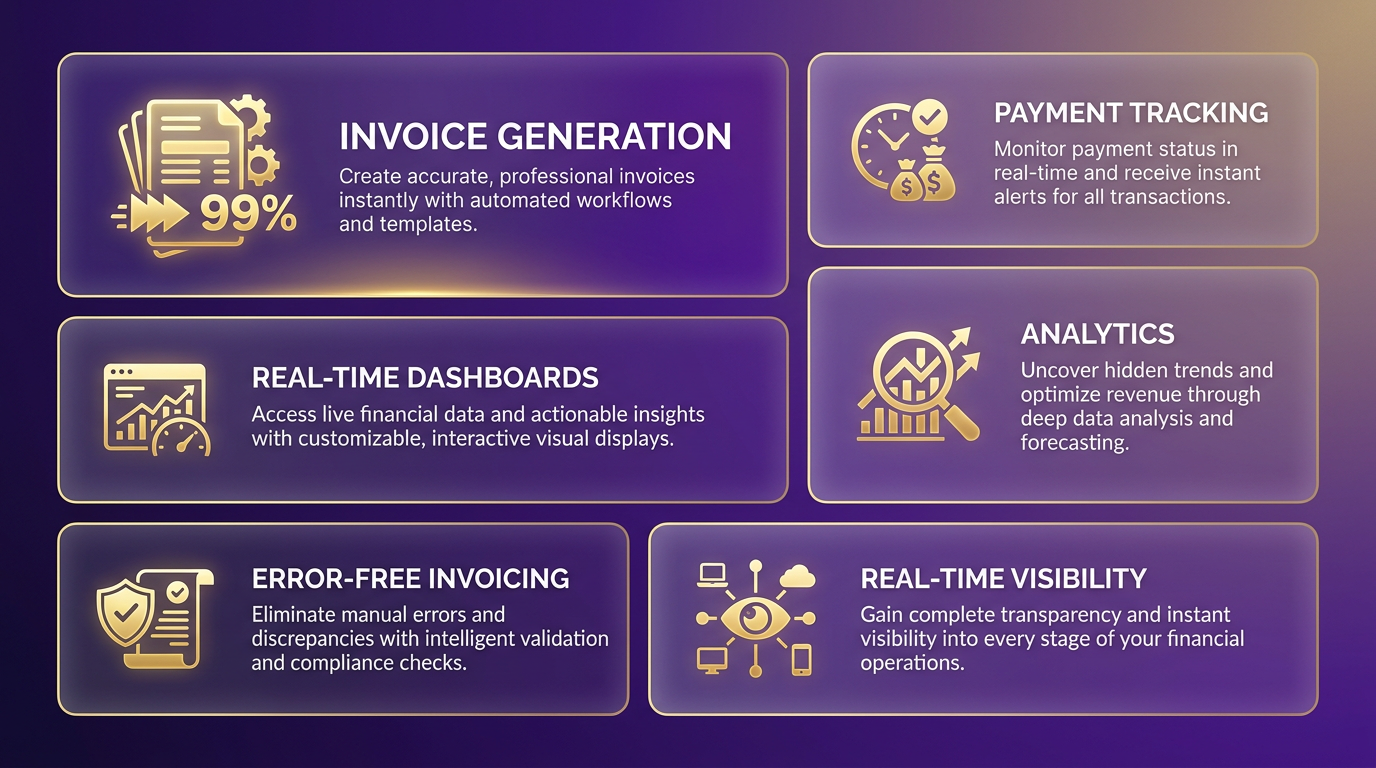
When evaluating AR automation companies, start by focusing on invoice generation and payment tracking. These features streamline the creation of accurate invoices and ensure continuous monitoring of payment statuses. Automated systems should produce error-free invoices rapidly and offer real-time visibility into payment timelines. Real-time dashboards and analytics are critical for tracking payment behavior and ensuring cash flow predictability. As mentioned in the Why Timely Payments Matter section, a 2023 study found that 85% of CFOs reported reduced DSO after automating over half their AR processes.
What Should You Look for in Invoice Generation Features?
Invoice generation tools should streamline creation and reduce errors. Key features include automated invoice formatting, integration with ERP systems, and multi-channel delivery options (email, portal, etc.). As mentioned in the Why Timely Payments Matter section, a 2023 study found that 85% of CFOs reported reduced DSO after automating over half their AR processes. For instance, NetSuite’s software generates invoices and reconciles payments seamlessly, reducing manual tasks. However, some systems may require customization for complex billing models, which could slow initial setup.
Automated Reminders and Notifications
Overdue payments harm cash flow, so automated reminders are essential. The best systems send tiered alerts (e.g., email, SMS) based on payment deadlines and overdue days. Source notes that 87% of automated AR firms improved process speed, while 75% enhanced customer satisfaction. For example, a mid-sized insurance company in source reduced late payments by 30% using personalized automated reminders. Look for tools that allow customization of reminder frequency and message tone to balance urgency with customer experience.
Integration with Accounting and ERP Systems
Seamless integration eliminates manual data entry and ensures consistency. The system should connect with your existing ERP, CRM, or accounting software (e.g., QuickBooks, SAP) to sync data in real time. Building on concepts from the Implementation and Integration section, source highlights that Sage Intacct users gained real-time financial visibility by integrating AR automation with other workflows. However, integration complexity may vary-some systems require APIs or middleware, which could increase implementation costs. Prioritize solutions with pre-built connectors for your current tech stack.
Customizable Workflows and Approval Processes
Every business has unique approval chains. The AR automation tool should let you tailor workflows for invoice review, payment processing, and dispute resolution. Source recommends starting small with automation to manage costs. For example, a construction firm in source used customizable workflows to route invoices for manager approval before sending, reducing disputes by 40%. However, overly complex workflows might slow down approvals if not designed carefully.
Security and Compliance Features
Data breaches can derail trust and finances. The platform must include encryption for data at rest and in transit, role-based access controls, and audit trails. As highlighted in the Security and Compliance section, compliance with local regulations is easier with standardized systems. For instance, NetSuite’s AR automation includes GDPR-compliant data handling. Still, smaller businesses might find advanced security features cost-prohibitive compared to basic solutions.
| Feature | Description | Key Features | Pros | Cons |
|---|---|---|---|---|
| Invoice Generation | Automates invoice creation and delivery | Real-time analytics, multi-channel delivery | Reduces DSO; cuts manual errors | May require customization for complex billing |
| Automated Reminders | Sends tiered alerts for overdue payments | Customizable templates, multi-channel notifications | Improves customer satisfaction; reduces delays | Overuse risks customer annoyance |
| ERP Integration | Syncs with accounting/ERP systems | Pre-built connectors, real-time data flow | Eliminates manual entry; ensures accuracy | High setup costs for complex integrations |
| Customizable Workflows | Tailors approval and review processes | Role-based routing, step-by-step task automation | Aligns with business needs; reduces disputes | Complexity may slow approvals |
| Security & Compliance | Protects data and ensures regulatory adherence | Encryption, access controls, audit logs | Mitigates breach risks; meets legal standards | Advanced features may be costly for small firms |
Final Considerations
Evaluate how each feature aligns with your team’s size, payment volume, and industry needs. For example, insurance companies in source benefit from data-driven insights to optimize resource allocation, while healthcare providers in source prioritize self-service portals. Start with automating simple tasks like invoice reminders (as recommended in source) to ease adoption. Always test the system’s scalability-will it handle growth without performance issues? By prioritizing these features, you’ll select an AR automation solution that balances efficiency, security, and user satisfaction.
Top AR Automation Companies
Choosing the right AR automation solution depends on your business size, industry needs, and integration requirements. Below is a curated list of top companies, each addressing unique challenges in accounts receivable management. The summary table and detailed reviews highlight their strengths, use cases, and customer feedback to guide your decision.
Summary Table: Top AR Automation Companies
| Title | Description | Key Features | Pros/Cons |
|---|---|---|---|
| Versapay | Collaborative platform for professional services firms | Digital invoicing, cash application, ERP integrations | Pros: 50% faster receivables management. Cons: Best for mid-sized firms. |
| HighRadius | AI-powered enterprise solution for large corporations | Predictive analytics, automated collections | Pros: Scales for high transaction volumes. Cons: Complex setup. |
| Billtrust | Cloud-based solution for full AR lifecycle | E-invoicing, payment portals, dispute resolution | Pros: User-friendly. Cons: Higher cost for SMBs. |
| Sage Intacct | Cloud accounting system for SMBs | Automated invoicing, real-time reporting | Pros: Affordable. Cons: Limited advanced features. |
| Invoiced | B2B payment-focused platform | Secure portals, customizable reminders | Pros: Enhances customer experience. Cons: Less suited for complex billing. |
| YayPay by Quadient | AI-driven collections and cash flow insights | Payer behavior analytics, real-time dashboards | Pros: Predictive accuracy. Cons: Steep learning curve. |
| Tesorio | Cash flow-focused automation | Real-time dashboards, automated collections | Pros: Improves liquidity. Cons: Requires financial expertise. |
| Gaviti | Dispute management and invoice-to-cash optimization | AI dispute resolution, credit checks | Pros: Reduces manual errors. Cons: Niche focus. |
| Cforia Software | Enterprise order-to-cash platform | High-volume transaction handling | Pros: Customizable for large firms. Cons: Expensive. |
| HubiFi | High-volume business solution with ASC 606 compliance | Invoice-to-cash streamlining | Pros: Ideal for regulatory compliance. Cons: Tech-heavy implementation. |
Why Versapay Stands Out for Professional Services
Professional services firms often face complex billing and client communication gaps. Versapay addresses these pain points with a collaborative portal that connects accounting teams to clients, enabling real-time invoice tracking and dispute resolution. Cole, Scott & Kissane P.A., a law firm, reduced payment delays by 30% using Versapay’s cash application tools, while Madison Resources cut manual processing time by 50%. The platform integrates with ERPs like NetSuite and SAP, making it ideal for firms using modular financial systems. However, its pricing model, which scales with transaction volume, may be cost-prohibitive for smaller teams. As mentioned in the Why Timely Payments Matter section, efficient payment processes are critical for maintaining cash flow and client relationships.
“Versapay has drastically improved our ability to perform cash flow forecasting and budgeting.”. Ed Aguero, CFO, Cole, Scott & Kissane P.A..
HighRadius: AI for Enterprise-Level Scalability
HighRadius targets Fortune 500 companies needing advanced automation. Its AI-driven tools automate invoicing, collections, and cash application, optimizing the order-to-cash cycle. For example, a global manufacturing client reduced Days Sales Outstanding (DSO) by 20% using HighRadius’s predictive analytics. The platform excels in handling high-volume transactions but requires a dedicated IT team for setup. Pricing is custom, often involving a monthly subscription plus implementation fees. Building on concepts from the Understanding AR Automation section, HighRadius use machine learning to predict payment behaviors and prioritize collections..
Sage Intacct: Affordable AR Automation for SMBs
Small and mid-sized businesses benefit from Sage Intacct’s streamlined interface and automated invoicing. A construction firm using Sage Intacct reported 25% faster payments due to integrated payment portals. While it lacks advanced AI features, its affordability and ease of use make it a top choice for businesses with simple billing needs. Training resources include onboarding webinars and a 24/7 support team. For more context on cost considerations, refer to the Pricing Models and ROI section, which outlines how subscription-based models align with varying business scales.
Pricing Models and ROI
AR automation solutions use distinct pricing models that align with different business needs. Subscription-based models charge a recurring fee (monthly or annual) for access to software and features, while transaction-based models bill per processed payment or invoice. Businesses must evaluate which model suits their transaction volume and operational scale, considering integration complexity discussed in the Implementation and Integration section.
What Pricing Models Exist for AR Automation?
AR automation companies typically offer subscription-based pricing, transaction-based pricing, or a hybrid of both. Subscription models provide predictable costs, often with tiered plans based on features or user count. Transaction-based models scale with usage, charging fees per payment processed. Hybrid models combine a base subscription with additional transaction charges. For example, Heartland’s solution integrates with ERP systems and offers scalable pricing tied to transaction volume, supporting businesses that handle 70 million transactions annually.
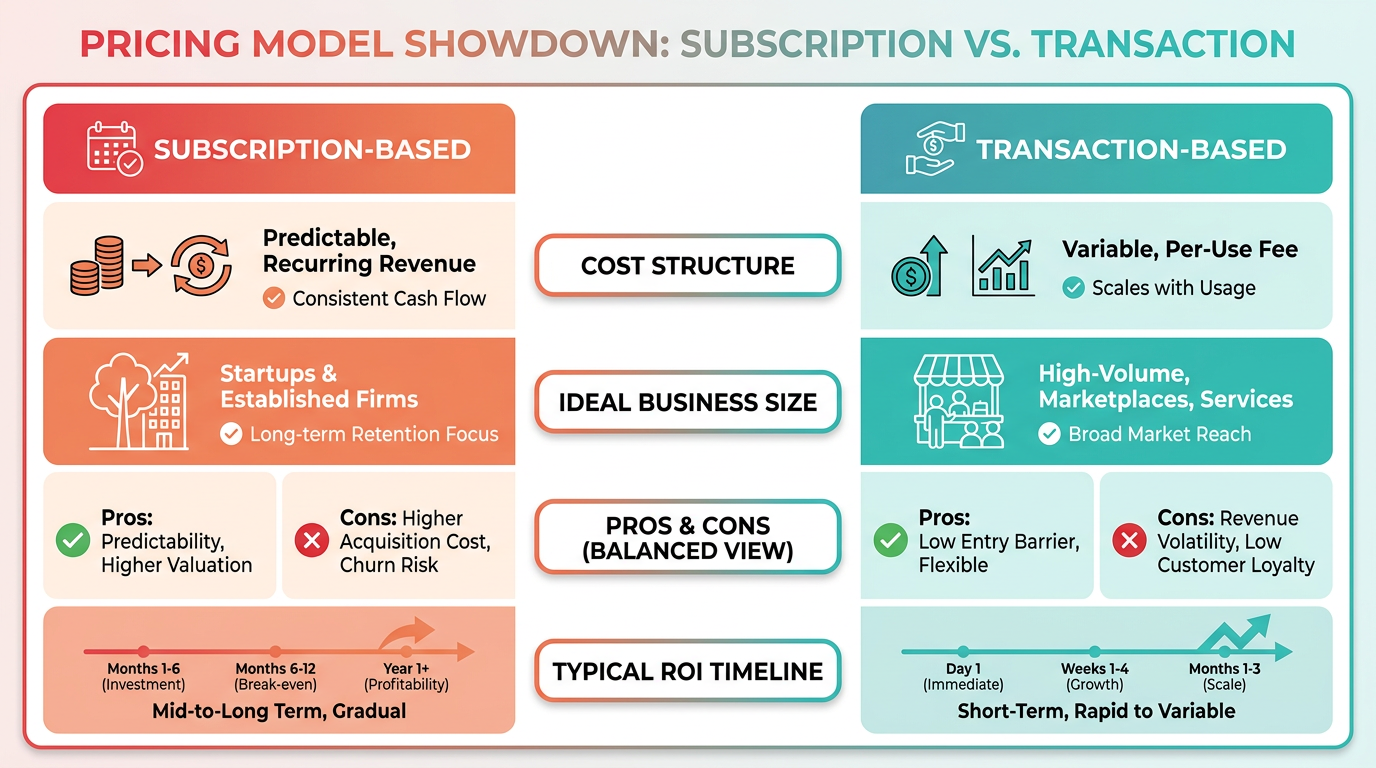
Subscription-based pricing is ideal for organizations with consistent transaction volumes, as it avoids unpredictable costs. Transaction-based pricing suits businesses with fluctuating payment activity, such as seasonal retailers or startups. Hybrid models offer flexibility but require careful budgeting to avoid overage fees, as highlighted in the How to Evaluate Costs and Negotiate Better Deals section.
What ROI Can Businesses Expect from AR Automation?
AR automation delivers measurable ROI through cost savings, revenue growth, and efficiency gains, all of which are critical to the timely payments emphasized in the Why Timely Payments Matter section. Studies show automation reduces manual data entry errors by up to 80%, cutting labor costs and accelerating payment cycles. For instance, PayFabric helped a healthcare provider process payments for 200+ members 30% faster, improving cash flow.
The ROI calculation depends on factors like reduced staff hours, lower late fees, and increased on-time payments. A construction firm using Heartland’s platform saved $200,000 annually by automating invoice delivery and payment reminders. Over 3,000 businesses have processed $72 billion through AR automation, demonstrating its scalability.
How to Evaluate Costs and Negotiate Better Deals
Evaluating AR automation costs requires analyzing implementation fees, ongoing maintenance, and integration complexity, as detailed in the Implementation and Integration section. Implementation charges vary based on ERP system compatibility and customization needs. Maintenance costs include software updates, customer support, and training.
To negotiate the best price:
- Bundle services: Request discounts for combining setup, training, and support.
- use volume: Larger transaction volumes may qualify for tiered pricing.
- Compare total cost of ownership (TCO): Include implementation, maintenance, and potential penalties for overage fees.
Businesses should also request demo trials to assess feature-value alignment before signing contracts.
Summary Table: Pricing Models and ROI Factors
| Model | Description | Key Features | Pros | Cons |
|---|---|---|---|---|
| Subscription-Based | Recurring fee for software access, often tiered by users or features | Predictable costs, tiered plans | Stable budgeting, included support | May incur overage fees |
| Transaction-Based | Fee per processed payment or invoice | Scales with usage, no fixed costs | Cost-effective for low-volume businesses | Unpredictable expenses for high users |
| Hybrid Model | Combines subscription fees with per-transaction charges | Flexible for fluctuating needs | Balances predictability and scalability | Risk of hidden fees |
What Industries See the Greatest ROI?
Industries like healthcare, construction, and food & beverage benefit most from AR automation, as illustrated in the Case Studies and Success Stories section. For example, a healthcare provider reduced collections time by 40% using automated payment reminders. Construction firms streamline invoicing for multiple stakeholders, cutting late fees by 60%. Food & beverage companies automate recurring payments for suppliers, reducing administrative workloads by 50%.
“PayFabric is substantially faster than the AR process I was previously using. This is huge because I process payments for over 200 Universal-Unilink members.” – Pam Bedford, Financial Professional
By aligning pricing models with business size and transaction patterns, organizations can maximize ROI while minimizing operational friction.
Implementation and Integration
Implementing and integrating accounts receivable (AR) automation requires careful planning and execution to ensure seamless adoption. The process involves preparing your team and data, configuring the software, connecting it to existing systems, and providing ongoing support. Below is a step-by-step guide to help businesses manage this transition effectively.
How to Prepare for AR Automation Implementation?
Before deploying AR automation software, businesses must assess their current workflows and identify pain points. Data migration is a critical first step-cleanse and organize historical customer records, invoices, and payment histories to ensure accuracy. For example, Mitutoyo America streamlined its credit application process by digitizing forms, reducing manual data entry errors. Workflow setup also includes defining payment terms, approval hierarchies, and automated reminder schedules. Michelle Murdock, a financial expert, recommends starting small by automating repetitive tasks like invoice generation to manage costs and build momentum. As outlined in the Understanding AR Automation section, clear workflow definitions align with the core principles of automation.
What Does the Implementation Process Involve?
Once preparation is complete, the next phase focuses on configuring the automation platform. This includes setting up real-time analytics dashboards, customizing invoice templates, and integrating automated reminders. The technical team maps workflows to align with the company’s financial policies. For instance, TCD SMART’s AR automation solution can go live within a 3-day study period, as demonstrated in a case study. During this phase, businesses must also address compliance requirements, such as local tax regulations, to avoid legal risks. As mentioned in the Security and Compliance section, ensuring adherence to regulatory standards is critical during deployment.
How to Integrate AR Automation with Existing Systems?
Integration with accounting and ERP systems is crucial for maintaining data consistency. API integration allows the AR software to sync with platforms like NetSuite or SAP, enabling seamless data flow between billing, inventory, and customer databases. Data mapping ensures fields like customer names, invoice numbers, and payment statuses align correctly. Rev.io, for example, offers a fully integrated suite that automates the quote-to-cash process, reducing manual reconciliation efforts. Challenges often arise when legacy systems lack standardized APIs, requiring custom scripts or middleware solutions.
What Support Is Needed After Implementation?
Post-implementation success depends on training and continuous support. Employees must understand how to use the automation tools, interpret dashboards, and resolve exceptions. Barbara Carpenter, a business consultant, stresses the importance of employee buy-in-communicating automation’s benefits, such as reduced workload and faster payments, helps gain team support. As outlined in the Customer Support and Training section, structured onboarding programs and ongoing technical assistance are vital for long-term adoption. Ongoing customer support from the vendor ensures technical issues are resolved promptly. Regular reviews of AR reports and process audits help refine workflows and maintain efficiency.
Summary of Key Steps
| Title | Description | Key Features | Pros/Cons |
|---|---|---|---|
| Pre-Implementation Planning | Assess workflows, clean data, define payment terms | Data migration, workflow mapping | Ensures accurate automation; time-intensive |
| Implementation Setup | Configure software, set up dashboards, define rules | Real-time analytics, customizable templates | Requires technical expertise |
| System Integration | Connect to accounting/ERP systems via APIs | Data synchronization, compliance checks | Complex for legacy systems |
| Post-Implementation Support | Training, ongoing troubleshooting, process reviews | User documentation, customer support | Depends on vendor reliability |
Real-World Examples of Successful Implementations
Mitutoyo America reduced its days sales outstanding (DSO) by automating credit applications, digitizing customer information, and accelerating collections. Rev.io’s clients benefit from end-to-end automation, including invoice generation and payment tracking, which minimizes delays. These examples highlight how automation improves cash flow and reduces errors, as 87% of firms report improved process speed after adoption. Building on concepts from the Why Timely Payments Matter section, these outcomes underscore the value of efficient receivables management in sustaining business operations.
Security and Compliance
When choosing AR automation companies, security and compliance are non-negotiable. Platforms must protect sensitive financial data through encryption, access controls, and compliance with regulations like GDPR and HIPAA. This section breaks down the critical security features, compliance requirements, and strategies to evaluate vendors effectively. As mentioned in the Essential Features to Evaluate section, encryption standards such as AES-256 are foundational for secure platforms.
What Security Features Should AR Automation Platforms Offer?
Top AR automation tools use data encryption to safeguard information both in transit and at rest. Industry-standard protocols like AES-256 and TLS 1.3 ensure that payment details, customer records, and transaction logs remain secure. Building on concepts from the Implementation and Integration section, integrating these protocols with enterprise firewalls enhances layered security. Additionally, access controls such as role-based permissions and multi-factor authentication (MFA) prevent unauthorized users from modifying critical data. For example, a healthcare provider might restrict access to patient-related invoices to only authorized billing staff.
Modern platforms also employ real-time threat detection to identify anomalies like suspicious login attempts or unusual payment patterns. These tools often integrate with enterprise firewalls and intrusion detection systems to create layered security. While the sources don’t name specific vendors, they emphasize that encryption and access controls are foundational to any secure AR automation solution.
How Do AR Automation Tools Meet Compliance Standards?
GDPR and HIPAA compliance are critical for businesses handling European Union citizen data or U.S. health information, respectively. GDPR-compliant platforms implement features like data minimization, ensuring they collect only what’s necessary, and user consent tracking for data processing. HIPAA-compliant tools focus on protected health information (PHI) security, using audit trails and encryption to meet U.S. healthcare regulations. As mentioned in the Top AR Automation Companies section, certifications like SOC 2 or ISO 27001 validate compliance readiness.
For instance, a global insurance company using AR automation might require GDPR-compliant data storage to avoid fines in EU markets. Similarly, a hospital’s AR system must log every access to patient invoices to satisfy HIPAA audits. The sources confirm that leading platforms offer automated compliance reporting to simplify audits and demonstrate adherence to these frameworks.
Can You Evaluate Security and Compliance Without Expertise?
Businesses without in-house compliance teams can still assess AR automation tools using clear criteria. Start by verifying encryption standards-ask vendors to confirm they use AES-256 or similar. Next, check for certifications like SOC 2 or ISO 27001, which validate security protocols. For compliance, request documentation showing GDPR or HIPAA alignment, including breach response plans.
A small business owner might ask a vendor: “Does your platform encrypt data at rest?” or “Can you provide a GDPR compliance report?” These questions help identify whether the tool meets baseline security and legal requirements. The sources highlight that many AR automation providers offer compliance checklists to streamline this evaluation process.
Best Practices for Maintaining Security and Compliance
Even with strong tools, human error or outdated systems can create vulnerabilities. Regular employee training on phishing and data handling reduces risks. Automate audit logs to track who accesses or modifies data, and schedule quarterly penetration tests to uncover weaknesses. For compliance, update privacy policies annually and review vendor contracts to ensure they align with current regulations like CCPA or PCI-DSS.
One illustrative example: A retail chain using AR automation might find a vulnerability during a penetration test. By patching it immediately and updating staff protocols, they avoid potential data breaches. While the sources don’t reference such cases directly, this scenario reflects common security management strategies.
| Feature | Description | Key Features | Pros | Cons |
|---|---|---|---|---|
| Data Encryption | Protects data in transit and at rest | AES-256, TLS 1.3 | Strong defense against breaches | Key management can be complex |
| Access Controls | Limits user permissions based on roles | Role-based MFA, session timeouts | Reduces unauthorized access risks | Setup requires time and expertise |
| GDPR Compliance | Ensures EU data privacy laws are followed | Consent tracking, data minimization | Legal protection for EU operations | Compliance costs for smaller teams |
| HIPAA Compliance | Secures health information under U.S. regulations | Audit trails, PHI encryption | Essential for healthcare businesses | Strict documentation requirements |
By prioritizing these security and compliance measures, businesses can ensure their AR automation tools protect financial data and meet legal obligations. The right platform not only streamlines payments but also reduces the risk of costly breaches or regulatory penalties.
Customer Support and Training
Customer support and training are critical for ensuring smooth adoption of AR automation solutions. Companies offering these tools typically provide phone, email, and live chat support to address technical issues and user questions. As mentioned in the Understanding AR Automation section, these tools digitize processes like invoice generation and payment tracking, making strong support essential for troubleshooting. For example, businesses like Mitutoyo America benefited from direct support during their AR automation rollout, which helped digitize credit applications and reduce collections time. Training programs often include onboarding sessions and documentation to help teams master the software. Below is a breakdown of support options, real-world examples, and strategies to evaluate these services effectively.
What Support Options Do AR Automation Providers Offer?
AR automation companies usually offer phone, email, and chat support to assist users. Phone support is ideal for urgent issues, while email allows for detailed troubleshooting. Live chat provides real-time help during workflows. For instance, Mitutoyo America streamlined its AR processes by using dedicated support to resolve integration challenges quickly. Building on concepts from the Implementation and Integration section, effective support is vital during the setup phase to address technical hurdles.
Key Features of Support Channels:
- Phone Support: Immediate assistance for critical issues.
- Email Support: Asynchronous communication for non-urgent queries.
- Live Chat: Instant guidance for day-to-day tasks.
Pros and Cons:
| Channel | Pros | Cons |
|---|---|---|
| Phone | Fast resolution | May require waiting in queues |
| Detailed documentation | Slower response times | |
| Live Chat | Immediate interaction | Limited to business hours |
How Do Training Programs Help Teams Adopt AR Automation?
Effective training ensures employees use AR tools efficiently. Providers often offer user documentation, onboarding programs, and hands-on workshops. Barbara Carpenter’s insight highlights that employee buy-in improves adoption success. Mitutoyo America, for example, used structured onboarding to train staff on new AR workflows, reducing errors in invoice processing. As mentioned in the Case Studies and Success Stories section, such structured training directly correlates with measurable efficiency gains.
Training Components to Look For:
- User Documentation: Step-by-step guides for common tasks.
- Onboarding Sessions: Customized training tailored to company workflows.
- Workshops: Interactive sessions to practice using the software.
What Real-World Examples Show Strong Support and Training?
Mitutoyo America’s experience demonstrates the value of strong support. By automating credit applications, the company reduced DSO from 47 to 40 days, a 7-day improvement. Their success hinged on timely technical support and comprehensive onboarding. Another example is a firm that cut manual data entry by 30% after using AR automation’s real-time dashboards, supported by 24/7 chat assistance. For further insights into such outcomes, refer to the Case Studies and Success Stories section.
How to Evaluate Customer Support and Training Quality
- Response Time: Test how quickly support teams resolve sample issues.
- Training Depth: Ask if onboarding includes role-specific scenarios.
- Accessibility: Check if support is available during your team’s working hours.
- Feedback Loops: Request case studies or testimonials from existing clients.
Best Practices for Maximizing Support and Training
- Engage Early: Involve support teams during pilot phases to address setup challenges.
- Assign Champions: Designate internal experts who can relay training insights.
- use Resources: Use documentation and webinars to reinforce learning.
- Follow Up: Provide feedback to the provider to improve future support quality.
Summary Table: Support and Training Features
| Feature | Description | Key Benefits |
|---|---|---|
| Phone Support | Direct access to technical experts | Resolves urgent issues quickly |
| Email Support | Asynchronous communication for detailed queries | Documented solutions for reference |
| Live Chat | Real-time help during workflows | Minimizes disruptions during tasks |
| Onboarding | Custom training aligned with business goals | Ensures smooth adoption and employee buy-in |
| User Documentation | Comprehensive guides for troubleshooting | Reduces dependency on external support |
By prioritizing clear communication and structured training, businesses can reduce adoption friction and maximize the efficiency gains of AR automation. Always verify a provider’s support responsiveness and training flexibility before committing to a solution.
Case Studies and Success Stories
Real-world examples show that automating accounts receivable processes delivers measurable benefits across industries. Professional services firms and insurance companies have used AR automation to cut manual work, speed up payments, and reduce errors. For instance, Cole, Scott & Kissane P.A. slashed 50% of the time spent on receivables, while a mid-sized insurance company boosted customer satisfaction through automated premium processing. These case studies highlight how tailored solutions address industry-specific challenges, from complex billing in professional services to regulatory compliance in insurance. As mentioned in the Security and Compliance section, regulatory adherence remains a critical factor in insurance automation.
Cole, Scott & Kissane P.A.: Streamlining Cash Application
A law firm with complex billing needs faced delays and disputes due to manual processes. By implementing AR automation, they integrated digital invoicing and collections management with their practice management system. The result? 50% less time managing receivables and 25% faster payments. CFO Ed Aguero noted that improved cash flow forecasting became a strategic advantage, a benefit also emphasized in the Why Timely Payments Matter section.
Madison Resources: Replacing Lockbox Services
Madison Resources, a professional services firm, replaced costly lockbox services with an automated solution. This shift reduced manual processing time, allowing staff to focus on strategic tasks. With 30% fewer past-due invoices, the firm’s Cash Application Manager, Sara French, emphasized the resource efficiency gains. Building on concepts from the Essential Features to Evaluate section, the integration of B2B payment services proved critical to this success.
Mid-Sized Insurance Company: Accelerating Premium Payments
An unnamed mid-sized insurer automated its premium payment processing, cutting errors and improving customer satisfaction. By deploying integrated payment services, the company reduced manual interventions, leading to faster collections and a 25% improvement in payment accuracy.
Large Insurance Corporation: Personalized Communication Boosts Renewals
A large insurer used automated, personalized communication to reduce late payments by 30% and increase renewal rates by 20%. By aligning payment reminders with customer preferences, the firm enhanced engagement while maintaining compliance with industry regulations.
Growing Insurance Company: Data-Driven Decisions
A growing insurance firm used automation to capture payment trends and customer behavior data. This insight enabled better resource allocation and informed decisions, contributing to a 15% increase in operational efficiency over six months.
Lessons Learned and Best Practices
Successful AR automation hinges on selecting solutions that integrate seamlessly with existing systems and address specific pain points. Professional services firms benefit most from digital invoicing and practice management integrations, while insurers should prioritize customization and staff training. As outlined in the Implementation and Integration section, careful planning ensures solutions align with organizational workflows. Start by auditing current processes, then choose a solution that offers scalability and client collaboration tools.
| Title | Description | Key Features | Pros |
|---|---|---|---|
| Cole, Scott & Kissane P.A. | Streamlined cash application with automation | Digital invoicing, collections management, ERP integrations | 50% less time, 25% faster payments |
| Madison Resources | Replaced lockbox services | B2B payment services, cash application automation | 30% fewer past-due invoices, resource efficiency |
| Mid-Sized Insurance Company | Automated premium payments | Integrated payment services, error reduction | Improved customer satisfaction, faster collections |
| Large Insurance Corporation | Personalized communication | Tailored reminders, compliance tools | 30% fewer late payments, 20% higher renewals |
| Growing Insurance Company | Data-driven decisions | Payment trend analytics, resource optimization | 15% operational efficiency gain |
When evaluating case studies, focus on metrics like time savings, error reduction, and cash flow improvements. Prioritize solutions that align with your industry’s unique needs, such as practice management integrations for professional services or compliance tools for insurance. Testimonials from executives like Ed Aguero and Sara French highlight the strategic value of automation beyond just financial gains-streamlining workflows lets teams focus on growth and innovation.
Conclusion and Recommendations
AR automation streamlines invoicing, payment collection, and reconciliation, reducing manual tasks and errors while improving cash flow. Businesses that automate over half of their AR processes report an 85% reduction in days sales outstanding (DSO) and a 30% drop in past-due invoices. As mentioned in the Why Timely Payments Matter section, maintaining low DSO is critical for preserving operational efficiency and customer relationships. Automation tools like NetSuite’s AR software and Versapay’s professional services solutions integrate with existing systems, offer multiple payment options, and flag invoice issues using AI. For example, a law firm using Versapay cut receivables management time by 50%, while TCD SMART’s platform resolved invoice problems during a 3-day implementation.
To select the right solution, prioritize tools that align with your business’s specific needs. Building on concepts from the Essential Features to Evaluate section, general businesses should focus on features like automated invoicing, real-time payment tracking, and seamless integration with accounting systems. Professional services firms should seek platforms with client collaboration portals and support for complex billing models. Avoid tools that lack scalability or require extensive manual intervention.
A summary table of key solutions includes:
| Title | Description | Key Features | Pros/Cons |
|---|---|---|---|
| NetSuite AR Automation | Streamlines invoicing and reconciliation, reduces DSO | Automated invoicing, multi-payment options | Pros: Integrates with accounting systems; Cons: May require customization |
| Versapay | Tailored for professional services with complex billing | Client portals, cash application tools | Pros: Reduces past-due invoices by 30%; Cons: Higher cost for small teams |
| TCD SMART | Uses AI to identify invoice errors and route payments | Email parsing, AI-driven automation | Pros: 3-day implementation; Cons: Limited to specific industries |
“Versapay has drastically improved our ability to perform cash flow forecasting,” said Ed Aguero, CFO of Cole, Scott & Kissane P.A.
Start by auditing your current AR processes to identify pain points like late payments or manual data entry. As detailed in the Implementation and Integration section, comparing software options based on integration capabilities, ease of use, and scalability ensures a smoother transition. Pilot a chosen tool with a small team to test performance before full rollout. For example, a firm using TCD SMART’s platform saw automation go live in three days by focusing on high-priority invoice issues.
After deployment, train staff on new workflows and monitor metrics like DSO and payment speed. Regularly review automation logs to address recurring errors and refine configurations. Combine AR automation with cash application tools to ensure timely reconciliation and reduce disputes.
AR automation delivers long-term value by freeing staff for strategic work and improving profitability. However, success depends on selecting a solution that evolves with your business. For regulated sectors like insurance, ensure the chosen platform complies with data security standards as outlined in the Security and Compliance section. For professional services, prioritize tools with customizable invoicing templates to meet client expectations.
By focusing on automation’s core benefits-reduced errors, faster payments, and operational efficiency-businesses can achieve measurable improvements in cash flow and customer satisfaction.
Frequently Asked Questions
1. What are the main benefits of AR automation for businesses?
AR automation reduces Days Sales Outstanding (DSO) by 7 days (40 vs. 47 days manually) and lowers administrative costs. It improves cash flow predictability, with 85% of CFOs reporting reduced DSO in half-automated systems.
2. How does AR automation impact cash flow stability?
Automated AR systems minimize capital tied up in late invoices, reducing borrowing costs. By lowering DSO to 40 days, businesses avoid operational delays and penalties linked to 50% of late customer payments in 2023.
3. Why are timely payments critical for operational efficiency?
Timely payments prevent working capital strain, with 81% of businesses facing increased delays in 2023. Late payments raise administrative costs by 20% and disrupt revenue forecasting, risking growth opportunities.
4. What features should businesses prioritize in AR automation tools?
Look for real-time DSO tracking, automated invoicing, and integrated payment reminders. Tools that reduce DSO to 40 days, as seen in 85% of half-automated systems, ensure better cash flow predictability.
5. How urgent is adopting AR automation in 2024?
Urgent. With 50% of businesses experiencing late payments in 2023, automation cuts DSO by 15% and reduces administrative strain. Delays risk higher borrowing costs and operational inefficiencies from stagnant cash flow.
6. What are the financial risks of manual AR processes?
Manual systems average 47-day DSO, tying up capital and increasing late payment risks. This leads to 25% higher administrative costs for collections and potential penalties, as seen in 81% of delayed payment cases.
7. How do AR automation systems improve customer relationships?
By streamlining invoicing and payment reminders, automation reduces disputes and late fees. Proactive communication, used by 85% of CFOs with lower DSO, fosters trust and ensures smoother payment cycles.