

Blixo Dynamics AX AP Automation Checklist

Key Takeaways
- Automate invoice capture and approvals to reduce processing time by 80% (from 30 to 5 days in one case).
- Cut administrative costs by 50% through AI-driven error reduction and faster workflows.
- Eliminate 95% of manual entry errors by auto-coding invoices and matching them to purchase orders.
- Achieve 95%+ accuracy in coding and validation with AI-driven systems, minimizing disputes and late fees.
- Scale operations efficiently with unlimited user access, avoiding workflow complexity as teams grow.
- Prevent payment delays by flagging discrepancies in real time, preserving vendor relationships.
- Save over 1,000 hours monthly by automating repetitive tasks like data entry and 3-way PO matching.
Why AP Automation Matters
AP automation slashes processing time and costs. One company reduced invoice processing time from 30 days to 5 days after implementation, while another saved over 1,000 hours monthly using AI-driven systems. These gains stem from automating tasks like invoice capture, data entry, and 3-way purchase order (PO) matching. Manual processes that once took hours now complete in minutes with 95%+ accuracy in coding and validation. As mentioned in the Aligning Blixo Dynamics AX with Internal Processes section, integrating with Dynamics AX streamlines workflows while retaining flexibility in approvals and payments.
- Reduce processing time by 80%: Automating invoice capture and approvals eliminates bottlenecks.
- Cut costs by 50%: Fewer errors and faster workflows lower administrative overhead.
- Scale efficiently: As discussed in the Scalability and Future-Proofing with Blixo Dynamics AX section, unlimited user access ensures teams grow without added complexity.
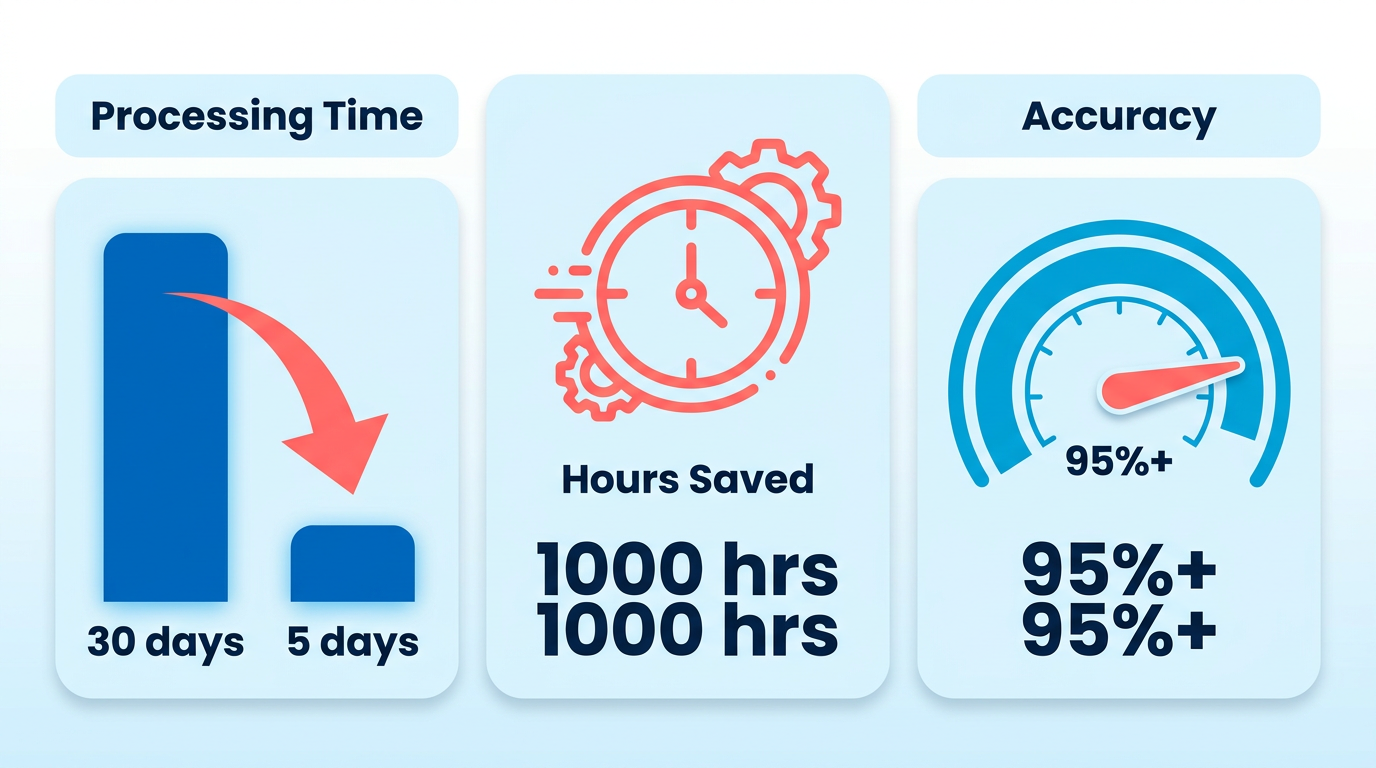
How Does AP Automation Solve Common Pain Points?
Manual errors and delayed payments hurt compliance and vendor relationships. A controller at a lumber company reported cutting AP task time from 2 hours to 15 minutes using automation. Systems now flag discrepancies in real time, preventing late fees and disputes. For example, one provider’s platform eliminated 95% of manual entry errors by auto-coding invoices and matching them to purchase orders.
- Eliminate human errors: AI validates data against POs and contracts automatically.
- Prevent payment delays: Smart workflows route approvals instantly, avoiding bottlenecks.
- Centralize communication: All stakeholders access a single source of truth for invoices.
Who Benefits Most from AP Automation?
Accounting teams and financial managers gain the most. Teams using Blixo Dynamics AX automation report spending 70% less time on data entry, freeing them for strategic work like forecasting. Smaller teams see disproportionate gains-a nonprofit saved $50,000 annually by automating repetitive tasks. CFOs also benefit from real-time visibility into cash flow and compliance risks.
- Empower accounting staff: Dashboards track invoice status and payment schedules.
- Enable proactive management: CFOs monitor KPIs like DPO (Days Payable Outstanding).
- Support remote collaboration: Cloud-based tools let teams approve invoices from anywhere.
What Real-World Results Do Businesses Achieve?
Businesses see measurable ROI. One organization reduced invoice processing costs by 50%, while another improved payment accuracy to near-perfect levels. Building on concepts from the Aligning Blixo Dynamics AX with Internal Processes section, a construction firm automated workflows to align with Dynamics AX, accelerating cash flow and reducing errors in supplier payments. These results match industry benchmarks: 80% faster processing times and 50% lower costs are common post-automation.
- Track monthly savings: Compare error rates and processing times before/after automation.
- Measure compliance improvements: Automated validation reduces audit risks by up to 90%.
- Optimize vendor relationships: Timely, accurate payments boost supplier trust.
“With automation, we focus on oversight instead of administrative tasks.” – A CFO at a retail firm.
By integrating with Dynamics AX, Blixo users streamline workflows while retaining flexibility in approvals and payments. For deeper insights into automation strategies, explore how Blixo simplifies AR automation.
Aligning Blixo Dynamics AX with Internal Processes
Your security checklist should cover authentication, rate limiting, and data encryption as a minimum baseline. As outlined in the Data Security and Compliance for Blixo Dynamics AX section, these measures are foundational to protecting sensitive financial data.
- Enable two-factor authentication to protect user accounts from unauthorized access
- Implement rate limiting to prevent brute-force attacks and API abuse
How to Integrate Blixo Dynamics AX with Existing Systems
Seamless integration requires mapping workflows to your current accounting systems while maintaining data consistency. Start by identifying touchpoints between Blixo and your ERP, finance tools, or procurement platforms. For example, if your team uses a separate payment gateway, ensure Blixo’s payment automation aligns with its APIs. Building on concepts from the Why AP Automation Matters section, use pre-packaged connectors for common systems to avoid custom coding, which reduces implementation time.
- Audit existing workflows to identify gaps between Blixo’s capabilities and your current processes
- Validate data fields (e.g., vendor codes, invoice numbers) to ensure compatibility between systems
- Test batch processing for invoice uploads to avoid errors in large-volume scenarios
Example: A company using Dynamics AX for procurement and a third-party accounting tool automated invoice matching by aligning purchase order numbers across both platforms. This reduced reconciliation time by 70%.
Best Practices for Configuring Blixo Dynamics AX
Tailoring Blixo to your business rules ensures compliance and efficiency. Start by configuring approval hierarchies to match your organization’s structure. For instance, set multi-stage workflows for high-value invoices while allowing low-risk transactions to auto-approve. By using the modular architecture discussed in the Scalability and Future-Proofing with Blixo Dynamics AX section, use AI-driven auto-coding to map expenses to the correct GL accounts, which minimizes manual corrections.
- Define custom rules for 3-way PO matching to flag discrepancies automatically
- Set up role-based dashboards for managers to monitor pending approvals in real time
- Enable mobile access for remote approvers to maintain workflow momentum
Expert Insight: “With Blixo, we processed 20 invoices in 15 minutes-a task that previously took 2 hours. It’s a huge time efficiency gain,” says a finance leader in a recent case study.
Common Pitfalls to Avoid
Misalignment between Blixo and internal processes often stems from overlooked details. For example, failing to train approvers on new workflows can cause bottlenecks. Another mistake is ignoring data quality: inconsistent vendor naming or duplicate records in your ERP will propagate errors in Blixo.
- Conduct dry-run tests with sample invoices before full deployment
- Assign a dedicated team to monitor error logs and refine rules iteratively
- Document exceptions (e.g., manually handled edge cases) to prevent future confusion
Data Point: Companies that skip user training report 30% slower adoption rates, per internal benchmarks.
Case Study: Streamlining AP for a Mid-Sized Manufacturer
A mid-sized manufacturing firm integrated Blixo with its Dynamics AX system to automate invoice-to-payment cycles. By configuring 3-way matching and AI-driven coding, they reduced processing costs from $10 to $3 per invoice. The team also centralized supplier communication through Blixo’s portal, cutting vendor inquiries by 50%.
Result: Invoice processing time dropped from 5 days to 24 hours, with a 95% reduction in manual entries. As shown in the Why AP Automation Matters section, such efficiency improvements are typical of well-implemented AP automation.
How to Measure Success After Integration
Track key metrics to ensure alignment with business goals. Monitor invoice processing speed, error rates, and approver use to identify areas for optimization. Compare these metrics to pre-automation benchmarks to quantify ROI.
- Set up dashboards to track KPIs like days payable outstanding (DPO)
- Survey approvers quarterly to assess workflow usability
- Revisit configuration rules annually to adapt to changing business needs
For deeper insights into AP automation strategies, explore Blixo’s blog on AR and AP automation.
Data Security and Compliance for Blixo Dynamics AX
The first example of automated invoice validation against purchase orders minimizes human error while maintaining secure data handling (as discussed in the Why AP Automation Matters section).
Building on concepts from the Aligning Blixo Dynamics AX with Internal Processes section, anonymizing vendor and employee data where possible reduces exposure to sensitive information.
As outlined in the Implementing the Blixo Dynamics AX AP Automation Checklist section, testing disaster recovery plans quarterly ensures preparedness for data loss scenarios, such as untested backup systems causing payment delays.
Scalability and Future-Proofing with Blixo Dynamics AX
How to Scale Blixo Dynamics AX for Growing Businesses
… As teams expand, ensure the system supports role-based access to streamline approvals.
- Adopt a modular design: Add features like AI-driven invoice validation only when needed, avoiding unnecessary complexity.
- use cloud scalability: Cloud-hosted solutions handle spikes in transaction volume without performance degradation.
- Sync master data in real time: Centralized data synchronization prevents inconsistencies during high-growth periods.
One company automated 80% of its invoice processing by integrating cloud-based AP automation, cutting costs by 50% annually. Building on concepts from the Data Security and Compliance for Blixo Dynamics AX section, secure cloud infrastructure ensures data integrity during expansion.
Best Practices for Future-Proofing Blixo Dynamics AX
… compliance-ready frameworks simplify adherence to regulations like GDPR.
- Build for AI integration: Use solutions that support machine learning for smarter invoice classification as data patterns evolve.
- Ensure mobile accessibility: Remote payment approvals reduce delays caused by office dependency.
As mentioned in the Implementing the Blixo Dynamics AX AP Automation Checklist section, phased rollouts and clear documentation are critical for successful AI adoption.
Case Studies of Scalable Implementations
… Another provider in this space reports that centralized document management cut approval times by 70% during a merger, showcasing how scalable systems handle complexity.
For deeper insights into compliance frameworks, refer to the Data Security and Compliance for Blixo Dynamics AX section.
Implementing the Blixo Dynamics AX AP Automation Checklist
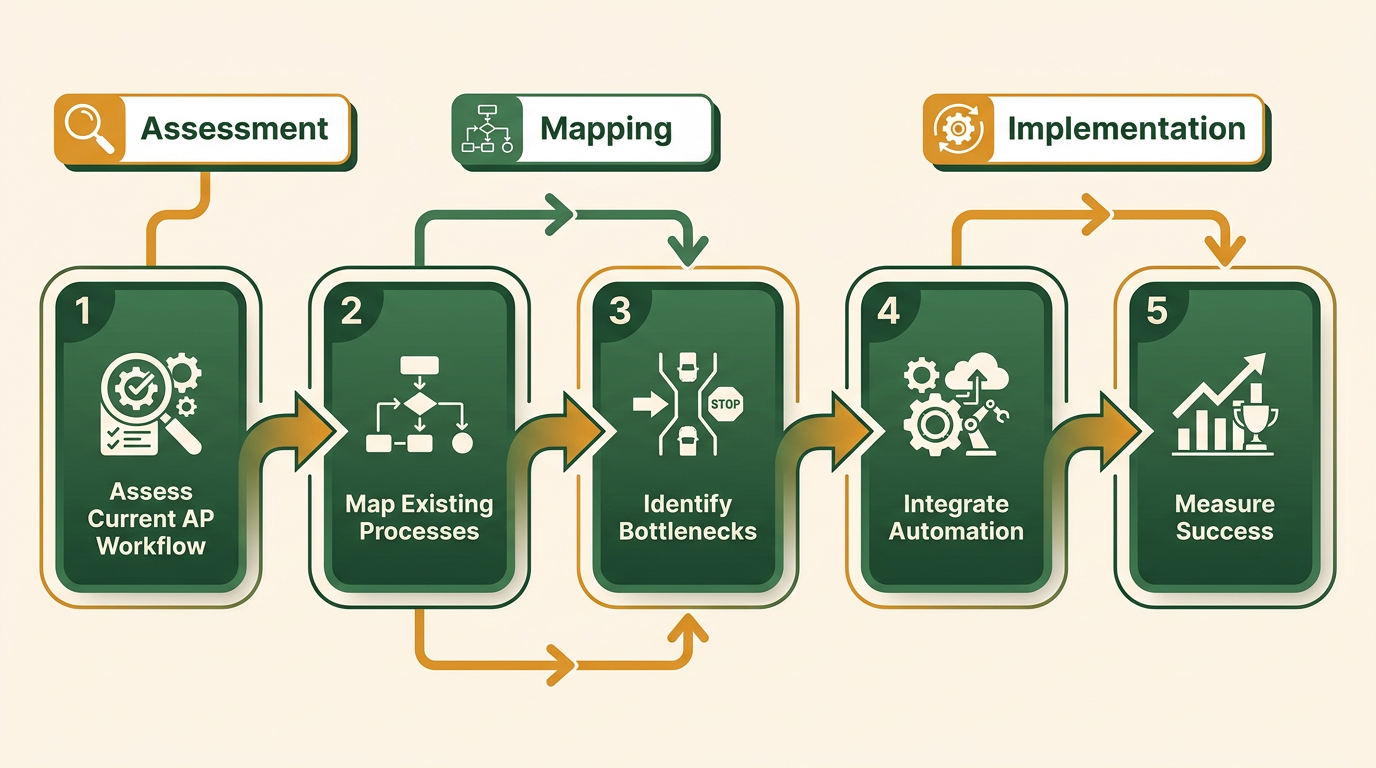
Implementing the Blixo Dynamics AX AP automation checklist requires a structured approach to streamline workflows, reduce errors, and maximize efficiency. Below is a step-by-step guide to help you manage the process, along with tips for overcoming challenges and measuring success.
Step 1: Assess Your Current AP Workflow
Before integrating automation, map your existing accounts payable processes to identify bottlenecks. Focus on manual tasks like data entry, invoice matching, and approval routing, which are prime candidates for automation.
- Audit invoice volume and types: Categorize the number of invoices processed monthly (e.g., paper, email, electronic) to determine automation priorities.
- Identify compliance risks: Highlight areas where manual errors or delays could lead to penalties or supplier dissatisfaction. For security considerations related to compliance, refer to the Data Security and Compliance for Blixo Dynamics AX section.
- Engage stakeholders: Involve finance teams and suppliers to align on goals, such as reducing processing time from 10 days to 2 days. For example, one company reduced manual data entry by 80% after automating invoice capture, freeing staff for strategic tasks.
Step 2: Configure Automation Tools for Dynamics AX
Blixo’s integration with Dynamics AX supports AI-driven invoice capture, auto-coding, and 3-way matching. Ensure the solution aligns with your workflow needs as outlined in the Aligning Blixo Dynamics AX with Internal Processes section.
- Enable AI invoice capture: Automate data extraction from emails, PDFs, and paper invoices to achieve 95%+ accuracy in coding.
- Set up multi-stage approvals: Use smart notifications to route invoices to approvers instantly, reducing delays.
- Customize matching rules: Configure 2-way or 3-way PO matching to ensure invoices align with purchase orders and receipts. A real-world example: A mid-sized business cut invoice processing time from 30 days to 5 days using automated matching and centralized approvals.
Step 3: Train Teams and Monitor Results
Adoption hinges on user confidence and continuous improvement. Provide hands-on training and establish metrics to track progress.
- Host training sessions: Demonstrate how to use Blixo’s mobile app for remote approvals and real-time dashboards for tracking exceptions.
- Monitor KPIs: Track metrics like cost per invoice (reduced from $10 to $5 manually) and error rates to measure ROI.
- Iterate workflows: Use feedback to refine rules, such as adjusting approval thresholds for high-value invoices.
“With Blixo, we processed 20 invoices in 15 minutes-time we now reinvest in strategic planning,” shares a finance manager at a manufacturing firm.
Overcoming Common Challenges
Resistance to change and integration complexity are typical hurdles. Address them proactively:
- Challenge: Staff may distrust automated decisions.
- Solution: Start with a pilot program, showing how auto-coding reduces errors. Share success stories, like a company saving $50,000 annually.
- Challenge: Legacy systems may slow integration.
- Solution: Use pre-packaged connectors to sync with Dynamics AX, ensuring minimal disruption.
Best Practices for Long-Term Success
Sustain momentum by embedding automation into daily operations:
- Centralize supplier communication: Use Blixo’s portal to resolve disputes faster, cutting resolution time by 50%.
- use analytics: Generate monthly reports to identify trends, such as a 40% drop in late payments.
- Scale gradually: Add advanced features like AI payment scheduling once core workflows stabilize. For scalability guidance, see the Scalability and Future-Proofing with Blixo Dynamics AX section.
Measuring AP Automation Success
Quantify impact using these benchmarks:
- Time saved: One organization saved 1,000+ hours monthly by eliminating manual invoice entry.
- Cost reduction: Automated workflows cut processing costs by 50% in six months.
- Supplier satisfaction: Faster payments improved vendor ratings from 70% to 95%.
By following this checklist, businesses can transform accounts payable from a reactive task to a strategic advantage-ensuring compliance, accuracy, and agility. For deeper insights, explore Blixo’s blog on AP automation.
Frequently Asked Questions
1. How much time can AP automation save in invoice processing?
AP automation can reduce invoice processing time by up to 80%. A case study showed processing time dropping from 30 days to 5 days. Automating capture and approvals eliminates bottlenecks, accelerating workflows significantly.
2. What cost savings can companies expect with AP automation?
Companies can cut administrative costs by 50% using AP automation. Faster workflows and AI-driven error reduction lower overhead. One organization saved over 1,000 hours monthly by automating repetitive tasks like data entry.
3. How does AP automation reduce manual entry errors?
AP automation eliminates 95% of manual entry errors by auto-coding invoices and matching them to purchase orders. AI validates data against POs and contracts, minimizing disputes and late fees caused by human mistakes.
4. What accuracy rate does AI-driven AP automation achieve?
AI-driven systems achieve 95%+ accuracy in coding and validation. This high precision reduces disputes and ensures compliance, as systems flag discrepancies in real time during invoice processing.
5. How does AP automation support business scalability?
AP automation scales efficiently with unlimited user access. Teams can grow without adding workflow complexity, as smart systems handle increased volumes while maintaining fast, accurate processing.
6. Can AP automation prevent payment delays and late fees?
Yes, AP automation prevents payment delays by flagging discrepancies in real time. Smart workflows route approvals instantly, avoiding bottlenecks that lead to late payments and strained vendor relationships.
7. Who benefits most from implementing AP automation?
Accounting teams and financial managers benefit most. Automation reduces manual tasks, accelerates approvals, and centralizes communication, improving efficiency for stakeholders involved in invoice processing.