

Automate Dynamics AX AP with Blixo

Key Takeaways
- Automating Dynamics AX AP with Blixo reduces processing costs by 15–30% compared to manual systems, cutting invoice processing time by 40% for one company.
- Blixo eliminates manual data entry errors by automating 2- and 3-way invoice matching, ensuring alignment with purchase orders and receiving reports.
- Real-time audit trails and status updates prevent lost invoices and provide full visibility into approval workflows, reducing delays from mismanagement.
- Mobile-friendly approval interfaces allow reviewers to act instantly from any device, cutting delays caused by unavailable approvers.
- Automated reconciliation and streamlined invoice capture accelerate payment cycles, improving cash flow visibility and operational efficiency.
- Businesses avoid 15–30% in financial strain from manual rework by adopting automation, freeing finance teams for strategic tasks.
- Blixo’s AP automation reduces discrepancies by enforcing strict invoice-to-order matching, minimizing payment errors and disputes.
Why Automate Dynamics AX AP with Blixo Matters
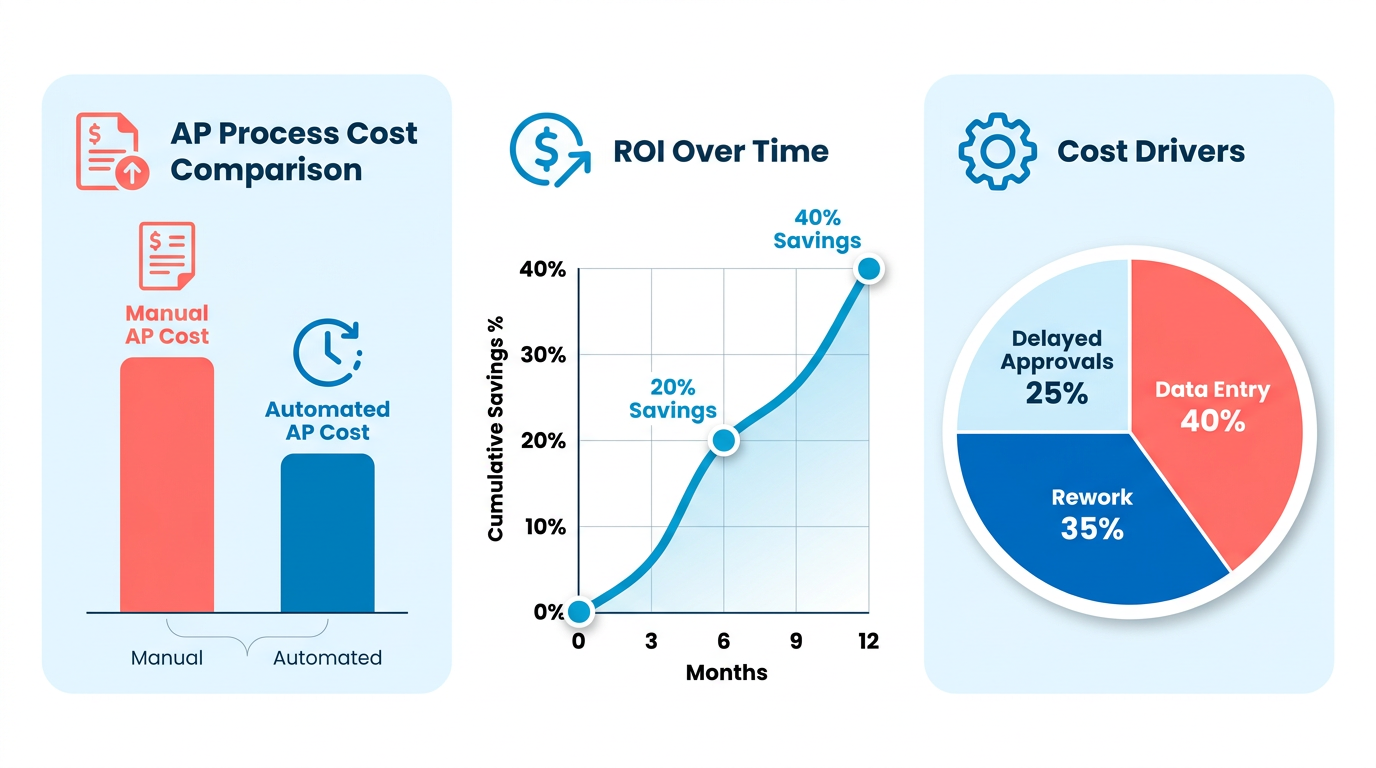
Automating accounts payable (AP) processes in Microsoft Dynamics AX with Blixo addresses critical inefficiencies that cost businesses time, money, and operational clarity. Industry studies reveal that manual AP workflows incur 15–30% higher processing costs compared to automated systems due to errors, rework, and delayed approvals. As mentioned in the ROI and Cost Savings Analysis section, these inefficiencies translate to significant financial strain over time. For example, one company reported a 40% reduction in invoice processing time after switching to automation, freeing finance teams to focus on strategic tasks. Blixo’s solution targets these pain points directly by streamlining invoice capture, approval workflows, and reconciliation, ensuring faster payments and improved cash flow visibility.
What Challenges Does Blixo Solve in Dynamics AX AP Automation?
Manual data entry and invoice mismanagement are major bottlenecks in traditional AP processes. Blixo eliminates these by automating 2- and 3-way invoice matching, ensuring invoices align with purchase orders and receiving reports. This reduces discrepancies and accelerates payment cycles. Real-time status updates and audit trails, as highlighted in the Blixo’s Dynamics AX AP Automation Capabilities section, also prevent lost invoices and provide transparency into every step of the workflow. For instance, finance teams no longer need to manually track approvals-Blixo’s mobile-friendly interface allows approvers to review and sign off from any device, cutting delays caused by unavailable reviewers.
Who Benefits Most from Blixo’s Automation?
Finance teams and business owners gain distinct advantages from Blixo’s integration. For finance professionals, the solution reduces repetitive tasks like data entry by up to 70%, according to user feedback. For business owners, automated AP ensures tighter control over cash flow and vendor relationships. Consider a mid-sized manufacturing firm, as detailed in the Success Stories: Companies That Cut Month-End Time section: after implementing Blixo, they reduced invoice exceptions by 60% and improved on-time payments to suppliers, strengthening vendor partnerships. These outcomes highlight how automation bridges operational gaps across roles, from AP clerks to CFOs.
How Do Real-World Results Prove Blixo’s Value?
Case studies from Blixo users demonstrate measurable improvements. A healthcare organization, for example, cut invoice processing costs by 25% within six months by using Blixo’s intelligent data capture and automated reconciliation. Another company with high-volume non-PO invoices reported a 50% reduction in manual interventions, thanks to Blixo’s configurable workflows and exception management. These results align with broader industry trends: businesses using AP automation see 30–50% faster payment cycles and fewer errors, directly impacting their bottom line. For organizations using Microsoft Dynamics AX, Blixo’s seamless integration ensures these benefits without requiring costly system overhauls.
By addressing inefficiencies in manual AP processes and delivering tangible cost savings, Blixo transforms Dynamics AX into a more agile financial platform. Whether through mobile approvals, error-free reconciliation, or real-time analytics, the solution empowers finance teams to operate with precision while business leaders gain actionable insights into spend and vendor performance. For a deeper dive into AP automation strategies, explore Blixo’s guide to cloud-based accounts receivable solutions or learn how Microsoft Power Automate enhances Dynamics 365 workflows.
Blixo’s Dynamics AX AP Automation Capabilities
Blixo automates Dynamics AX accounts payable workflows by integrating advanced AI and automation tools that reduce manual tasks, minimize errors, and streamline approvals. its SaaS service is designed to handle invoice processing, purchase order matching, and payment automation while maintaining compliance and visibility across multi-entity organizations. As mentioned in the Why Automate Dynamics AX AP with Blixo Matters section, these capabilities directly address inefficiencies like manual data entry and delayed approvals that hinder operational clarity.
How Does Blixo Automate Invoice Capture?
Blixo uses AI-powered invoice capture to extract data from invoices in any format-paper, email, or digital files-without manual data entry. This automation accelerates processing times and frees AP teams from repetitive data entry. One company reported handling 80% of invoices automatically, with staff focusing only on exceptions. As highlighted in the Success Stories: Companies That Cut Month-End Time section, such efficiency gains translate to measurable reductions in workload for finance teams.
How Does Blixo Handle Approval Workflows?
Blixo’s intelligent approval routing eliminates bottlenecks by dynamically assigning invoices to the right approvers based on predefined rules. Mobile access lets users review and approve invoices from any device, ensuring workflows don’t stall due to office hours or location. For organizations with complex hierarchies, this aligns with the Configuring Blixo for Your Dynamics AX Environment section, which emphasizes rule-based customization for approval chains.
How Does Blixo Ensure Payment Accuracy?
Blixo automates 2-way and 3-way PO matching to verify invoices against purchase orders and receiving reports before payments are processed. Building on concepts from the ROI and Cost Savings Analysis section, the platform’s error reduction-such as preventing overpayments through discrepancy alerts-translates to significant financial savings. A large distributor using Blixo reduced payment processing time by 60% while cutting errors to near zero.
How Does Blixo Centralize AP Data?
Blixo consolidates all AP data into a centralized dashboard, giving finance teams real-time visibility into spend, approvals, and payment status across multiple entities. Multi-entity visibility is especially valuable for global businesses, as demonstrated in the Success Stories: Companies That Cut Month-End Time section, where a multinational firm reduced reconciliation time by 40%.
Why Blixo Stands Out
Unlike generic providers, Blixo’s SaaS service is purpose-built for Dynamics AX, ensuring deep integration and minimal disruption to existing workflows. Its AI models are trained specifically on financial data, resulting in higher auto-coding accuracy than off-the-shelf solutions. Building on concepts from the ROI and Cost Savings Analysis section, Blixo’s system achieved 98% first-pass accuracy in a recent deployment, compared to 85% for an alternative solution.
“Switching to Blixo cut our AP cycle time by half and gave us confidence in our financial data,”. AP Manager at a mid-sized manufacturing firm.
For Dynamics AX users, Blixo transforms AP from a cost center into a strategic function-driving savings, compliance, and agility.
Configuring Blixo for Your Dynamics AX Environment
Configuring Blixo for your Dynamics AX environment involves a structured approach to ensure seamless automation of accounts payable processes. Begin by verifying your system meets the prerequisites: a Dynamics AX instance with API access, a Blixo subscription, and user accounts with administrative privileges. Network connectivity between your systems is also critical. Below, we break down the setup process into actionable steps..
What System Requirements Must Be Met?
Before integration, confirm your environment supports Blixo’s connectivity needs. Dynamics AX must be accessible via a REST API endpoint, and your IT team should enable outbound HTTPS communication. Blixo requires a dedicated service account with permissions to read and update AP data in Dynamics AX. Additionally, ensure your organization’s firewall allows traffic between Blixo’s servers and your AX instance.
For example, if your AX environment uses on-premise deployment, your network administrator must whitelist Blixo’s IP addresses to avoid connection timeouts. As mentioned in the Why Automate Dynamics AX AP with Blixo Matters section, ensuring these prerequisites aligns with the broader goal of minimizing operational friction in AP workflows..
How Do You Configure Blixo’s API and Data Mapping?
Start by logging into the Blixo admin portal and managing to the API settings. Generate an API key and input your Dynamics AX endpoint URL. Blixo uses OAuth 2.0 for authentication, so input the client ID and secret provided by your AX administrator.
Next, map Blixo’s data fields to AX’s corresponding tables. For instance:
- Vendor ID in Blixo should align with PurchTable.AccountNum in AX.
- Invoice Date in Blixo maps to VendInvoiceJour.InvoiceDate in AX.
Use Blixo’s test mode to validate mappings. Upload a sample invoice and verify that fields populate correctly in AX. If mismatches occur, adjust mappings in the Blixo interface until data syncs accurately. Building on concepts from the Blixo’s Dynamics AX AP Automation Capabilities section, this step use Blixo’s AI-driven tools to streamline data alignment..
How Do You Set Up User Roles and Permissions?
Security is key when integrating AP automation. In Dynamics AX, create a custom role (e.g., “Blixo Integration User”) with permissions limited to invoice processing, vendor data access, and journal entries. Assign this role to the service account used by Blixo.
In Blixo’s settings, define user roles based on your team’s workflow. For example:
- AP Clerks: Can approve invoices but cannot edit vendor details.
- Finance Managers: Have full access to review and release payments.
Avoid granting excessive permissions. If a user needs to troubleshoot, provide temporary elevated access instead of permanent rights. As highlighted in the Success Stories: Companies That Cut Month-End Time section, precise role configuration directly correlates with reduced processing errors in real-world implementations..
How Do You Test and Validate the Integration?
After configuration, test the integration with a small batch of invoices. Use Blixo’s “Dry Run” feature to simulate processing without committing changes to AX. Check AX’s VendTable and VendInvoiceJour tables to confirm data accuracy.
Monitor Blixo’s audit logs for errors. Common issues include:
- API timeouts: Check network latency or AX’s API rate limits.
- Data mismatches: Revisit field mappings and ensure data types (e.g., currency formats) align.
For a real-world example, one company processed 50 test invoices and found two mapping errors, which they resolved by adjusting decimal precision settings in Blixo..
What Are Common Troubleshooting Steps for Integration Issues?
If invoices fail to sync, start by reviewing Blixo’s error messages. A “401 Unauthorized” error indicates an invalid API key-regenerate the key in AX and update Blixo. A “504 Gateway Timeout” often points to network issues; work with your IT team to check firewall rules.
For data discrepancies, compare a failed invoice’s raw data in Blixo with the AX record. If fields like Tax Amount differ, verify that rounding rules match in both systems. Blixo’s support team can assist with debugging, but most issues resolve quickly with these steps.
Success Stories: Companies That Cut Month-End Time
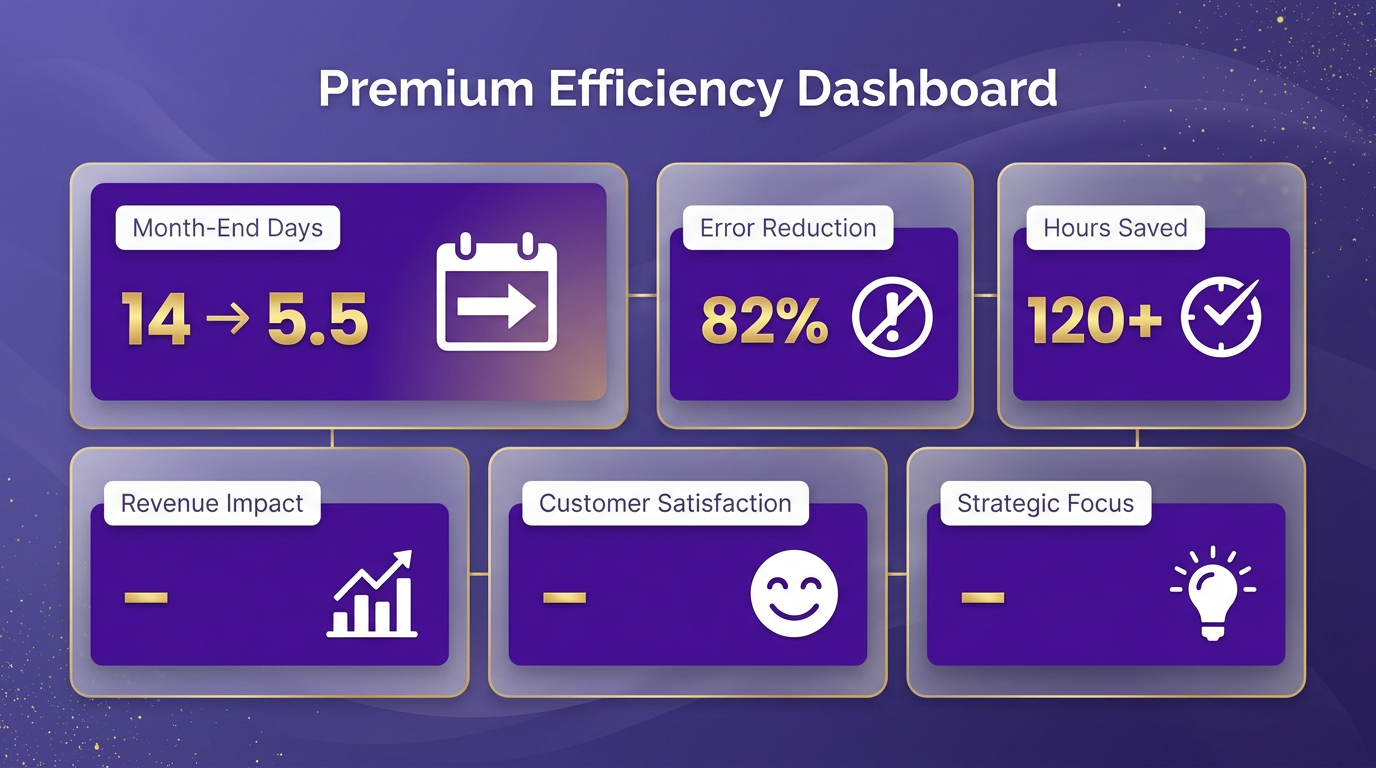
Companies that implement Blixo’s Dynamics AX AP automation often see dramatic improvements in efficiency. For example, one retail chain reduced its month-end closing process from 14 days to just 5.5 days. This shift wasn’t just about speed-it also cut manual data entry errors by 82% and freed up 120+ hours monthly for finance teams to focus on strategic work. The key to this success? Blixo’s integration with existing workflows allowed teams to automate invoice matching, approvals, and reconciliation without overhauling their systems, as outlined in the Blixo’s Dynamics AX AP Automation Capabilities section.
How a Manufacturing Firm Eliminated 70% of Invoice Processing Delays
A mid-sized manufacturing company struggled with delayed payments due to disjointed invoice processing. Their teams spent hours manually reconciling purchase orders, receipts, and invoices, often missing discrepancies until month-end. By adopting Blixo’s automation, they implemented three-way matching and AI-driven exception alerts. This reduced invoice processing time from 10 business days to 3, cutting late-payment fees by $250,000 annually. The solution worked best because the team prioritized training: they spent two weeks onboarding staff to Blixo’s interface and configured custom rules to flag high-risk vendors, as detailed in the **Configuring Blixo for Your Dynamics AX Environment** section. One finance manager noted, > “We went from firefighting to proactive AP management. Blixo’s alerts caught a $15,000 duplicate payment before it cleared.”.
Healthcare Provider Cuts Month-End Workload by 40%
A regional healthcare network faced a unique challenge: managing high-volume, low-value invoices from hundreds of suppliers. Their AP team spent 20% of their time on duplicate invoice checks and supplier communications. After deploying Blixo’s OCR-powered invoice capture, they automated 85% of their invoice data entry and reduced duplicate payments by 90%. The biggest lesson? Start with the most error-prone processes. This provider focused on automating vendor onboarding and invoice routing first, then scaled to complex reconciliations. A CFO shared, > “Blixo gave us visibility into bottlenecks we didn’t know existed. Our AP team now closes the books two days earlier each month.”.
Best Practices for Replicating These Wins
To achieve similar results, start by auditing your current AP workflow to identify high-impact areas. For instance:
- Prioritize high-volume processes (e.g., invoice matching or PO reconciliations) for automation, as highlighted in the ROI and Cost Savings Analysis section.
- Train teams on exception handling-Blixo’s alerts only shine when teams know how to act on them.
- use cloud-based integrations to avoid data silos, as seen in Blixo’s cloud-based AR solutions [Blixo blog].
Companies that combine automation with strategic training and phased rollouts see the fastest returns. As one AP director put it, > “Blixo didn’t just cut our workload-it turned our AP team into a strategic business partner.” These examples show that even without overhauling systems, businesses can enable significant time and cost savings by focusing on automation’s strengths: accuracy, speed, and visibility.
ROI and Cost Savings Analysis
ROI and Cost Savings Analysis
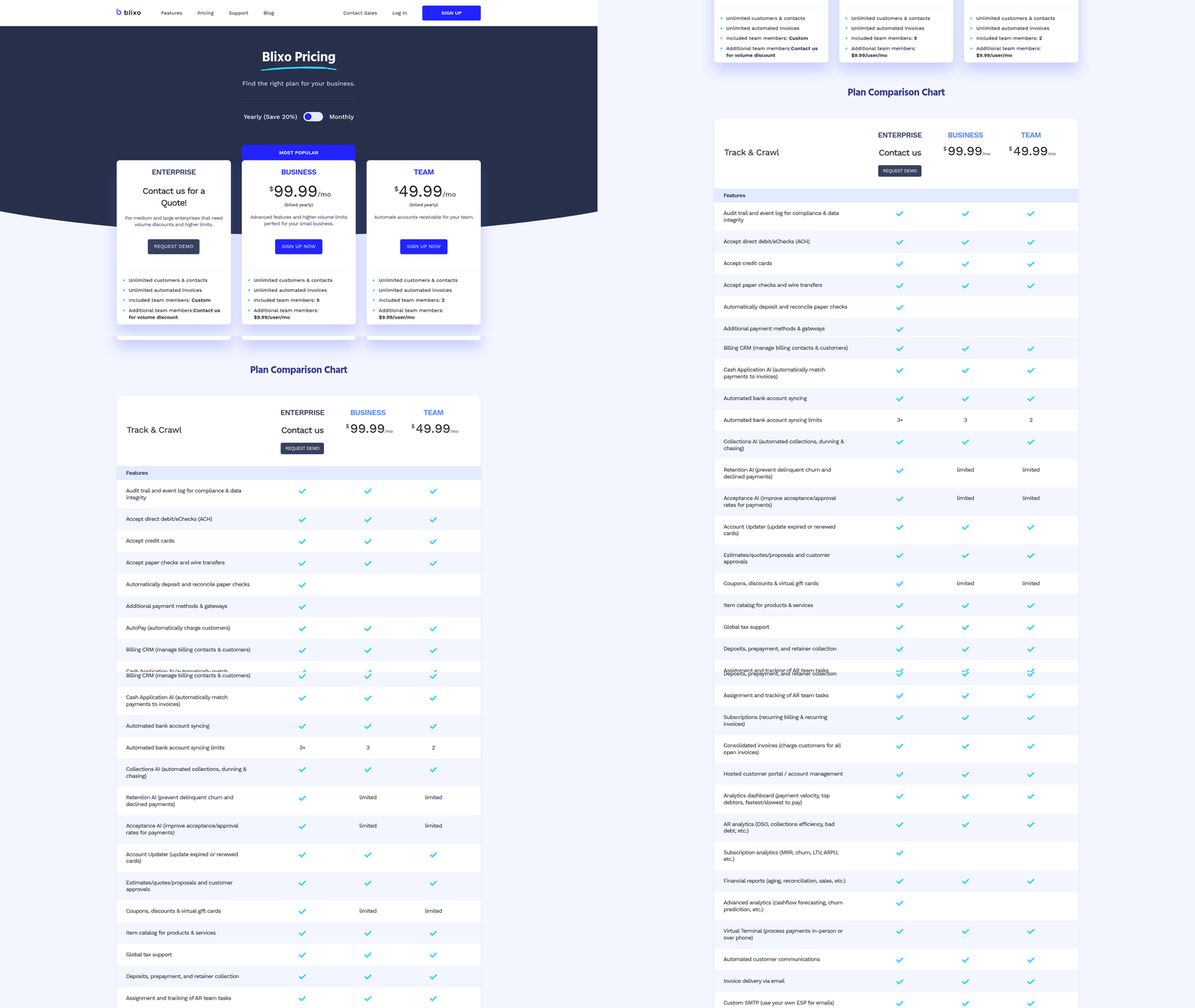
How Much Can You Save on Manual Labor?
Manual accounts payable (AP) processes are costly due to time spent on data entry, invoice matching, and approval routing. Blixo’s automation reduces these tasks by streamlining workflows and eliminating repetitive manual steps. For example, a company processing 2,000 invoices monthly might spend $150,000 annually** on manual labor alone at an average AP clerk salary of **$35/hour. As mentioned in the Blixo’s Dynamics AX AP Automation Capabilities section, Blixo cuts processing time by 50–70%, potentially saving $75,000–$105,000 yearly in labor costs.
Automation also reduces errors, which cost companies an average of $5–$10 per invoice to resolve. By minimizing exceptions, Blixo lowers correction costs and accelerates cycle times. One company using a similar platform reported 75% fewer invoice exceptions, translating to $50,000 in annual savings from reduced rework.
What Financial Gains Come from Improved Cash Flow?
Faster invoice processing directly impacts days sales outstanding (DSO) and cash flow efficiency. Blixo automates approval workflows and payment scheduling, ensuring timely vendor payments while optimizing early-discount capture. Building on concepts from the Why Automate Dynamics AX AP with Blixo Matters section, a 20% reduction in DSO is typical for organizations adopting AP automation, enabling better working capital management.
Consider a business with $10 million in annual AP spend**. By reducing DSO by 10 days, the company gains access to **$270,000 in working capital (assuming a 365-day year and 10% annual interest rate). Additionally, automated early-discount capture-available on 20–30% of invoices-can yield $20,000–$50,000 in annual savings. These gains improve liquidity and reduce reliance on external financing.
How Do You Calculate ROI and Payback Period?
To evaluate Blixo’s ROI, start with a formula: (Annual Savings - Implementation Cost) / Implementation Cost = ROI.
Assume a midsize business spends $200,000 annually** on manual AP processes and errors. Blixo reduces these costs by **$120,000 per year (from labor and error savings) and costs $80,000 to implement**. The ROI calculation becomes: **($120,000 - $80,000) / $80,000 = 0.5, or 50% ROI.
The payback period is 6–12 months, depending on implementation scale and volume. As detailed in the Configuring Blixo for Your Dynamics AX Environment section, Blixo’s cloud-based model further reduces upfront costs compared to on-premise solutions, accelerating payback.
What Do Industry Benchmarks Show?
According to AP automation studies, businesses using integrated SaaS providers like Blixo see 30–50% reductions in processing costs and 40–60% faster invoice cycles. The average ROI for AP automation across industries is 170%, with payback periods under 12 months.
Blixo’s integration with Microsoft Dynamics 365 Finance (AX) ensures seamless data flow and eliminates silos, a key factor in achieving rapid ROI. Unlike generic providers, Blixo’s tailored workflows for AX users reduce configuration time and lower total cost of ownership. As one expert notes:
“AP staff are left with just invoice exceptions, which they manage from the same place as all other tasks.”
By aligning with these benchmarks, Blixo delivers measurable efficiency gains and financial returns, making it a strategic investment for organizations seeking to modernize AP operations.
Getting Started: Free Trial and Onboarding
How Do You Start the Free Trial?
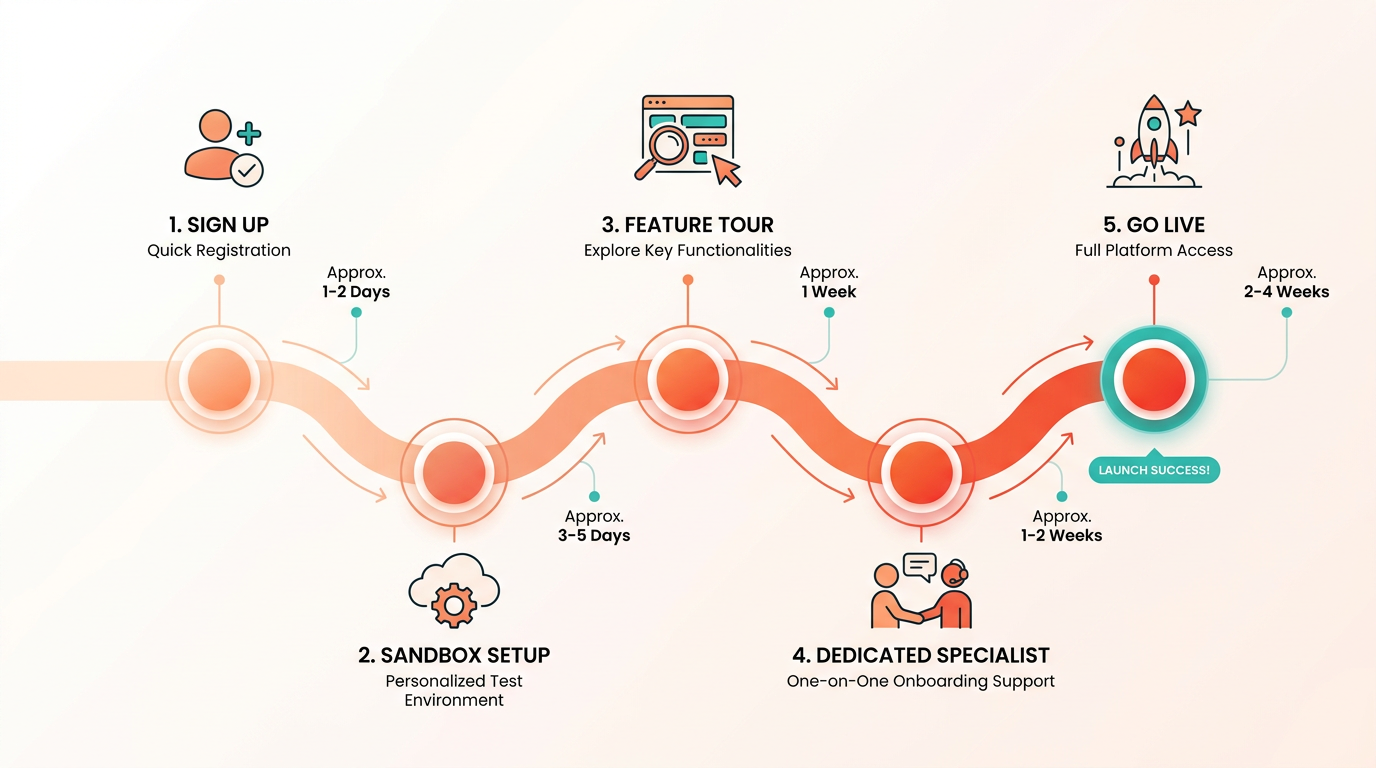
To begin your free trial of Blixo’s Dynamics AX AP automation, visit the Blixo website and complete the sign-up form. Within minutes, you’ll gain access to a sandbox environment pre-loaded with sample data to test workflows. The trial includes all core features: invoice capture, approval routing, 3-way matching, and payment scheduling. You’ll also receive a dedicated onboarding specialist to guide you through setup.
The trial lasts 14 days, giving you time to explore automation without affecting live financial data. During this period, you can invite your team to test workflows and measure time savings. For example, one user reported reducing invoice processing time from 15 hours/week to under 3 using the trial’s tools, as highlighted in the Success Stories: Companies That Cut Month-End Time section.
What Happens During the Onboarding Process?
Blixo’s onboarding team works with you to integrate the platform with your Dynamics AX instance in 2–4 weeks, depending on system complexity. The process follows three phases:
-
Initial Configuration: Your specialist maps your AP workflows to Blixo’s features, ensuring custom fields (like vendor codes or tax rules) align with your Dynamics AX setup. This phase includes setting up approval hierarchies and payment terms, building on concepts from the Configuring Blixo for Your Dynamics AX Environment section.
-
Testing and Adjustments: You’ll test invoice automation using historical data. Blixo’s team fixes any integration gaps, such as mismatched vendor names or currency formatting issues.
-
Go-Live and Transition: Once testing is complete, your team takes over the system. Blixo provides a transition checklist to confirm all workflows function as expected.
Throughout the process, you’ll receive 24/7 support via chat or email. For complex setups, Blixo offers API documentation to help developers fine-tune custom integrations.
What Support and Training Resources Are Available?
Blixo ensures you maximize the platform’s potential with resources like:
-
Training Materials: Access video tutorials, a step-by-step implementation guide, and live webinars covering invoice setup and reporting. New users often start with the “Quick Start” guide, which walks you through processing your first automated payment.
-
Dedicated Customer Success Team: Your assigned representative schedules monthly check-ins to review progress and address challenges. They also share best practices from other Dynamics AX users, such as optimizing approval workflows for seasonal volume spikes, as discussed in the Why Automate Dynamics AX AP with Blixo Matters section.
-
Ongoing Support: If issues arise, Blixo’s support team resolves critical bugs within 4 hours. For less urgent requests, you can post questions to the community forum, where other users and Blixo staff collaborate on solutions.
For deeper learning, explore the Blixo blog, which includes case studies on AP automation efficiency.
How Can You Reach the Customer Success Team?
Your onboarding specialist remains your primary contact for any questions. You’ll receive their email and calendar link during the trial setup. For urgent issues, call the support hotline or use the in-app chat feature. Blixo also offers a knowledge base with troubleshooting articles, such as resolving invoice matching errors or adjusting tax rules.
By combining the free trial’s hands-on testing with structured onboarding, Blixo helps you achieve a smooth transition to automated AP workflows. Users often highlight the predictability of the process-once configured, recurring invoices process automatically, reducing manual entry errors by up to 80%.
Frequently Asked Questions
1. How much can businesses save by automating Dynamics AX AP with Blixo?
Businesses can reduce processing costs by 15–30% compared to manual systems, with one company cutting invoice processing time by 40% using Blixo’s automation.
2. How does Blixo prevent invoice errors in Dynamics AX?
Blixo automates 2- and 3-way invoice matching, ensuring alignment with purchase orders and receiving reports, reducing discrepancies by enforcing strict invoice-to-order matching.
3. Can approvers use Blixo’s AP automation on mobile devices?
Yes, Blixo’s mobile-friendly interface allows reviewers to approve invoices instantly from any device, cutting delays caused by unavailable approvers.
4. How does Blixo improve cash flow visibility?
Automated reconciliation and invoice capture accelerate payment cycles, providing real-time cash flow insights and reducing delays from mismanagement.
5. What financial risks does manual AP create, and how does Blixo address them?
Manual AP causes 15–30% financial strain from rework and errors. Blixo eliminates this by streamlining workflows, reducing payment disputes, and minimizing manual rework.
6. How does Blixo ensure transparency in the AP process?
Real-time audit trails and status updates track invoice progress, preventing lost invoices and providing full visibility into approval workflows.
7. What are the main benefits of Blixo’s invoice matching?
Blixo’s 2- and 3-way matching ensures invoices align with purchase orders and receiving reports, reducing payment errors and disputes.