

RPA vs Manual Invoice Processing with Blixo

Key Takeaways
- RPA reduces invoice processing time by 80% or more, slashing Triumph Business Capital’s workload from 50–70 hours to 2.5 hours weekly.
- Bots eliminate 90% of errors by validating data against purchase orders and vendor records in real time.
- Automating invoice workflows saves over 1,000 staff-hours monthly for manufacturers, cutting processing time by 90%.
- RPA handles 24/7 operations with OCR and AI, accurately extracting data from 10,000+ invoices weekly at consistent speed.
- 76% of procurement leaders prioritize cost reduction, making RPA a strategic imperative for scalable, error-free processing.
- Manual data entry errors plague 47% of AP teams, but RPA ensures compliance by removing human error risks.
- Global RPA adoption in finance workflows reaches 78%, driven by efficiency gains and 30-minute weekly human oversight.
Why RPA Matters in Invoice Processing
RPA transforms invoice processing by slashing time, cutting errors, and freeing teams for strategic work. Companies like Triumph Business Capital reduced processing time from 50–70 hours to just 2.5 hours weekly, as mentioned in the RPA vs Manual Invoice Processing: Time Savings Comparison section. While 78% of organizations globally adopt RPA to streamline finance workflows, these results highlight why RPA is a critical upgrade over manual methods.
How Does RPA Transform Invoice Processing Efficiency?
RPA automates repetitive tasks like data entry, invoice routing, and ERP integration, reducing processing time by up to 80%. For example, Triumph Business Capital replaced a workflow requiring five to seven people working two hours daily with one employee spending 30 minutes weekly. Bots handle 24/7 operations, eliminating delays from manual handoffs. Modern RPA tools use OCR and AI to extract data from PDFs and scanned documents, ensuring accuracy even with high-volume workflows.
A manufacturer automating end-to-end invoice processing saved over 1,000 staff-hours monthly and cut processing time by 90%. This efficiency isn’t hypothetical-76% of procurement leaders prioritize cost reduction, making RPA a strategic must-have. For growing businesses, RPA scales effortlessly without increasing labor costs, handling thousands of invoices weekly with consistent speed.
Why RPA Reduces Errors and Boosts Compliance
Manual processing introduces human errors, with 47% of accounts payable professionals citing data entry as their top challenge. RPA bots eliminate these mistakes by validating data against purchase orders and vendor records in real time, as detailed in the RPA vs Manual Invoice Processing: Error Reduction Comparison section. For instance, a financial services firm reduced invoice errors by 90% after implementing RPA, avoiding late fees and missed discounts that often plague manual systems.
Automation also creates audit trails and compliance alerts. SoftCo highlights that 82% of CFOs see measurable ROI from RPA, partly due to reduced penalties from late payments. Tools like Xerox RPA apply OCR to extract invoice details, minimizing miskeyed data. By standardizing workflows, RPA ensures every invoice follows predefined rules, reducing disputes and improving vendor relationships.
Who Benefits Most from RPA in Finance Teams?
Accounting and finance departments gain the most from RPA’s efficiency. At Triumph Business Capital, staff shifted from data entry to strategic tasks like analyzing cash flow. Similarly, Wolf Construction automated paper-based workflows with Stampli, gaining real-time visibility into invoice status and avoiding missed vendor payments.
Teams using RPA report 68% faster processing cycles compared to manual methods. For finance professionals, automation means fewer hours spent on repetitive tasks and more time on forecasting or tax planning. CFOs benefit from faster cash application and better decision-making with real-time analytics. Even small teams can adopt RPA without heavy IT resources-Xerox’s solution, for example, requires no in-house development.
| Feature | RPA | Manual Processing |
|---|---|---|
| Processing Time | 2.5 hours/week (case study) | 50–70 hours/week |
| Error Rate | Near-zero with OCR validation | Up to 4% manual entry errors |
| Labor Cost | $2.02/invoice (automated) | $7.75/invoice (manual) as outlined in the RPA vs Manual Invoice Processing: Cost Efficiency Comparison section |
| Scalability | Handles 10,000+ invoices/month | Requires proportional staff increase |
RPA’s impact is clear: it reduces costs, accelerates workflows, and minimizes risks. As Deloitte’s 2021 survey shows, near-universal RPA adoption is inevitable. For finance teams drowning in manual work, RPA isn’t just a tool-it’s a foundation for smarter, future-ready operations.
“We chose Xerox RPA because they provide an all-in-one solution from beginning to end,” says Clarie Workman, VP of Business Information at Triumph Business Capital. “Now, our staff can focus on strategic tasks instead of data entry.”
By addressing manual data entry, lost invoices, and compliance gaps, RPA turns invoice processing from a bottleneck into a competitive advantage. For organizations aiming to cut costs and scale efficiently, the shift from manual processes to RPA is no longer optional-it’s essential.
RPA vs Manual Invoice Processing: Cost Efficiency Comparison
The cost differences between manual and RPA invoice processing stem from labor, errors, and inefficiencies. Labor constitutes over 60% of AP costs, with manual processing ranging from $15–$40 per invoice. Errors further inflate costs, as 39% of rework stems from data entry mistakes-a topic explored in depth in the RPA vs Manual Invoice Processing: Error Reduction Comparison section. For instance, a $50 million company loses **$700,000 yearly in working capital** due to manual delays, highlighting the financial strain of inefficiencies.
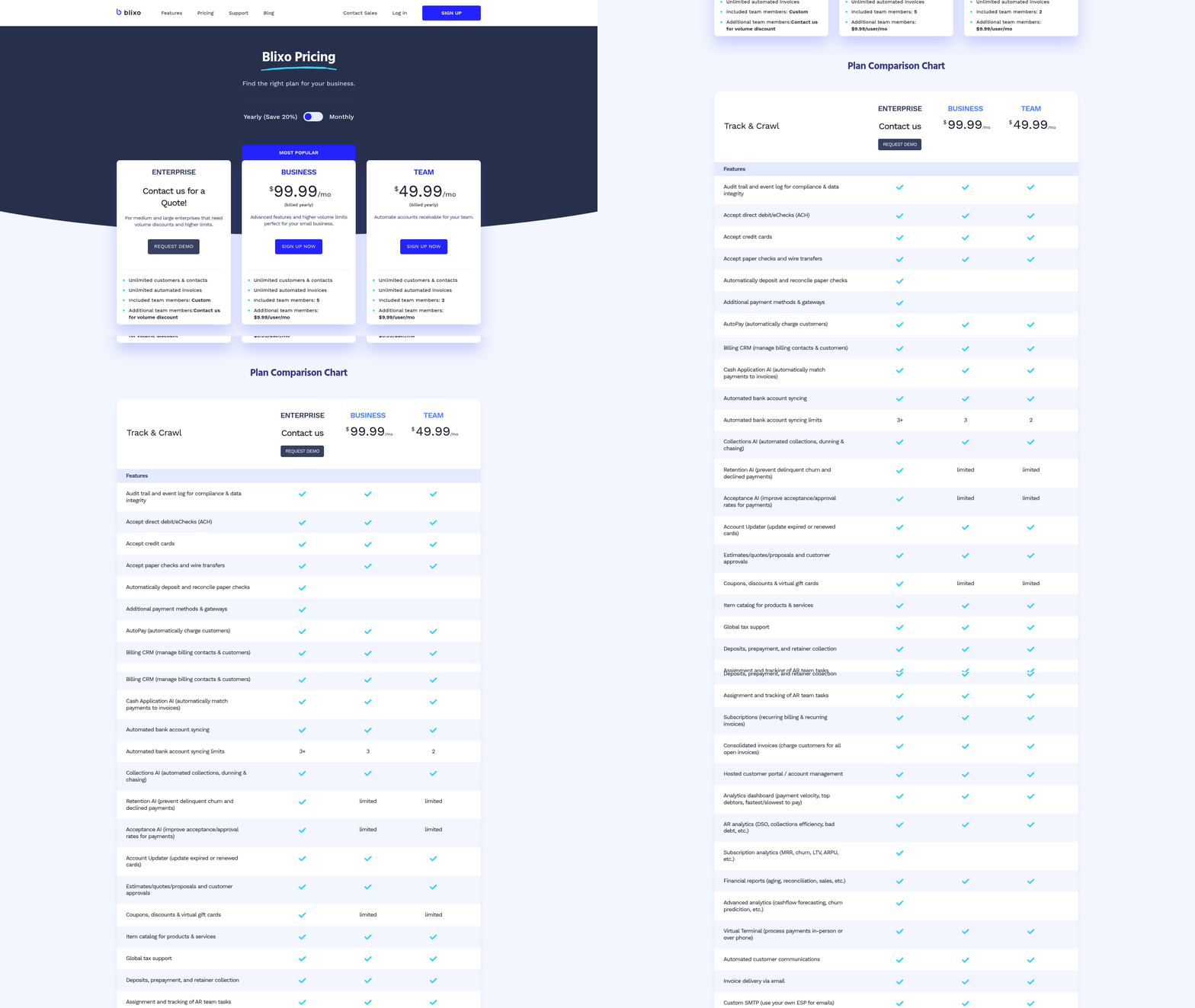
RPA mitigates these issues by reducing costs to $2–$5 per invoice or as low as $0.15** with advanced tools like Blixo. This aligns with the **Blixo's RPA Capabilities for Invoice Processing** section, which details how AI-driven automation achieves **99% accuracy** in payment matching. For businesses processing 10,000 invoices annually, this translates to **$20,000–$50,000 in annual savings, a 90% reduction compared to manual methods.
The ROI of RPA is equally compelling, with 327% returns over three years in some cases. This efficiency ties directly to the RPA vs Manual Invoice Processing: Time Savings Comparison section, where automation accelerates processing by 50–70%, cutting labor demands and accelerating cash flow. For example, a mid-sized firm recovered $4 million monthly by reducing manual workloads, demonstrating how cost savings and time efficiency compound to drive profitability.
RPA vs Manual Invoice Processing: Time Savings Comparison
How Much Time Does Manual Invoice Processing Take?
Manual invoice processing is a labor-intensive task involving data entry, verification, approvals, and reconciliation. On average, processing a single invoice manually takes 2–4 hours, depending on complexity and volume. For businesses handling 500+ invoices monthly, this translates to 1,000–2,000 hours annually spent on repetitive, error-prone work. Key steps like data entry alone consume 30–40% of this time, while resolving errors or discrepancies adds another 20–30%.
Time Savings with RPA Invoice Processing
Robotic Process Automation (RPA) drastically reduces time by automating end-to-end workflows. Blixo’s SaaS service, for instance, cuts processing time by 50–70%, handling tasks like data extraction, validation, and matching in seconds. A mid-sized company using Blixo reported a 25% cash-flow improvement within three months by eliminating delays caused by manual review. Similarly, Xerox RPA helped Triumph Business Capital reduce invoice processing from 50–70 hours weekly to 2.5 hours, freeing staff for strategic tasks.
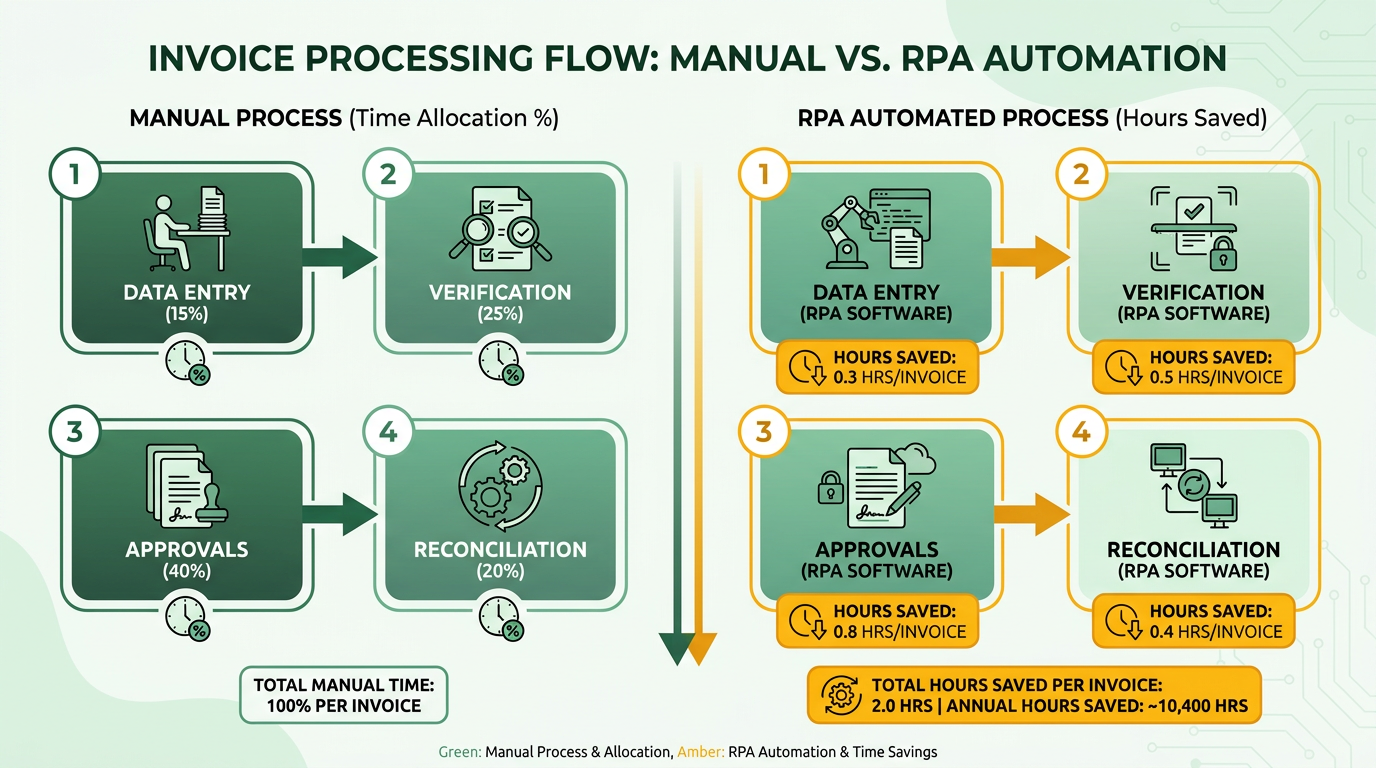
Time Comparison: Manual vs. RPA
| Task | Manual Processing | RPA Processing | Time Saved |
|---|---|---|---|
| Data entry per invoice | 30–45 minutes | 2–3 minutes | 85–90% |
| Approval workflows | 1–2 hours | 10–15 minutes | 90–95% |
| Reconciliation | 2–3 hours | 20–30 minutes | 85–90% |
| Error resolution | 30–60 minutes | Automated | 100% |
These savings compound for high-volume operations. Nividous highlights a manufacturer that automated 90% of its invoice processing, saving 1,000+ staff-hours monthly. RPA bots work continuously, avoiding delays caused by human fatigue or availability.
Real-World Examples of Time Savings
- Blixo Case Study: A finance team using Blixo saved 60% of their time by automating repetitive tasks, reducing manual rework by 39% through 99% cash-application accuracy. As mentioned in the Real-World Case Studies: Blixo’s Impact on Invoice Processing section, this automation also enabled faster vendor payments and improved supplier relationships.
- Xerox RPA Case Study: Triumph Business Capital cut staff required for invoice processing from 5–7 people to 1, reducing daily effort from 2 hours to 30 minutes.
- Nividous Case Study: An unnamed manufacturer slashed invoice turnaround time by 90%, achieving zero manual errors after implementing AI-enhanced RPA.
How RPA Boosts Employee Productivity
By automating repetitive tasks, RPA allows finance teams to focus on analysis, strategic planning, and customer relations. Blixo reports that 62% of finance staff time is reclaimed for high-value work after automation. For example, one company redirected saved hours toward improving vendor relationships and optimizing cash flow, leading to 40% fewer late payments. Nividous adds that 82% of CFOs see measurable ROI from RPA, citing reduced labor costs and faster decision-making.
Cost and Error Reduction
Manual invoice processing costs $15–$40 per invoice, primarily due to labor and error correction. As mentioned in the RPA vs Manual Invoice Processing: Cost Efficiency Comparison section, RPA reduces this to **$2–$5 (or $0.15 with full automation)** by minimizing rework. Building on concepts from the **RPA vs Manual Invoice Processing: Error Reduction Comparison** section, Blixo’s 99% accuracy rate eliminates 39% of manual corrections, while AI-driven reconciliation cuts verification work by 80%. These savings scale with volume: a $50M company avoids $700K annual losses in working capital by switching to RPA.
Key Takeaway
RPA transforms invoice processing from a bottleneck into a strategic asset. While manual workflows struggle with errors, delays, and scalability, automation delivers 50–90% time savings, 60–80% cost reductions, and 99% accuracy. For businesses handling 500+ invoices monthly, the ROI is undeniable-ranging from 300–327% over three years in cash-flow gains and productivity. By adopting RPA, organizations turn finance teams into proactive contributors rather than reactive processors.
RPA vs Manual Invoice Processing: Error Reduction Comparison
Manual invoice processing introduces significant error risks due to its reliance on human input. Data entry errors, such as miskeyed numbers or misread text, account for 30-50% of invoice processing mistakes, while lost or misplaced physical invoices add another 15-20% of errors. These issues slow down approvals, trigger payment delays, and increase reconciliation costs. For example, a manual system might miss a 3% early payment discount on a $10,000 invoice due to a clerical error, directly impacting cash flow. As mentioned in the RPA vs Manual Invoice Processing: Cost Efficiency Comparison section, these errors also drive up labor and correction expenses.

How RPA Cuts Error Rates in Invoice Processing
Robotic Process Automation (RPA) addresses these flaws by digitizing workflows and using AI for data extraction. RPA bots reduce human intervention to near-zero, eliminating transcription errors and ensuring consistent validation against purchase orders and contracts. According to SoftCo’s research, RPA systems achieve 99.9% accuracy in invoice data extraction by using optical character recognition (OCR) and natural language processing (NLP). This precision translates to 80-90% fewer errors compared to manual processing, as demonstrated by a leading manufacturer in Nividous’ case study, which eliminated all manual errors after automation.
A structured comparison highlights these benefits:
| Feature | Manual Processing | RPA with AI/OCR |
|---|---|---|
| Error rate | 5-10% | 0.1-0.3% |
| Cost per invoice | $7.75 | $2.02 |
| Processing time (hours) | 7+ | 0.5-1 |
| Early payment compliance | 60-70% | 95-98% |
These improvements stem from RPA’s ability to automate validation, matching, and routing. For instance, bots can cross-check invoice details against 100+ data points in seconds, whereas a human might miss a discrepancy in a 20-page PDF due to fatigue. Nividous reports that one company saved 1,000 staff-hours monthly by removing manual reconciliation tasks, aligning with findings in the RPA vs Manual Invoice Processing: Time Savings Comparison section.
Real-World Error Reduction with RPA
Organizations adopting RPA see measurable gains. Deloitte’s 2021 survey found that 78% of firms using RPA reduced invoice processing errors by 50%+ within six months, a trend corroborated by the RPA vs Manual Invoice Processing: Cost Efficiency Comparison section. A large construction firm using Stampli’s AP automation cut manual processing time by 70% and achieved 90%+ data accuracy, as noted in SoftCo’s analysis. These results align with Levvel’s Payables Insight Report, which ties RPA adoption to 30-50% faster approvals and 20-30% lower compliance risks.
Expert insights reinforce this trend. Robert Lynch, an AP & P2P analyst, states, “RPA removes the guesswork from invoice validation, turning a chaotic process into a predictable, auditable workflow.” This reliability is critical for industries like manufacturing, where a single error in a $500,000 supplier invoice could derail production schedules.
Balancing Automation and Human Oversight
While RPA drastically reduces errors, exceptions still require human review. For example, an invoice with a scanned PO image might need a human to verify a blurry signature. However, these edge cases make up <5% of total invoices, per Nividous. By shifting human effort from repetitive tasks to exception handling, RPA frees teams for strategic work like vendor negotiations or financial forecasting.
In conclusion, RPA transforms invoice processing from an error-prone bottleneck into a streamlined, accurate function. The combination of AI-driven validation, real-time alerts, and audit trails ensures fewer mistakes and faster resolutions when issues arise. For businesses aiming to reduce costs and improve compliance, RPA offers a proven path to operational excellence.
Blixo’s RPA Capabilities for Invoice Processing

Blixo’s RPA capabilities for invoice processing eliminate inefficiencies by automating repetitive tasks, reducing errors, and integrating seamlessly with existing systems. Core features include automated data entry, AI-driven cash application, real-time tracking, and collections automation. For example, Blixo’s AI matches payments to invoices with 99% accuracy, slashing manual reconciliation work by 80%. These tools save finance teams 60% of their time, allowing them to focus on strategic tasks like budget forecasting. As mentioned in the Why RPA Matters in Invoice Processing section, such efficiency gains are critical for businesses aiming to reduce manual workloads.
How Does Blixo’s RPA Improve Invoice Processing Efficiency?
At the heart of Blixo’s system is automated data extraction, which pulls details from invoices-like vendor names, amounts, and due dates-without manual input. This reduces processing time by 50–70% compared to manual methods, a dramatic improvement highlighted in the RPA vs Manual Invoice Processing: Time Savings Comparison section. The platform also uses smart routing to send invoices directly to the right approvers based on predefined rules, cutting approval cycles from days to hours.
For companies handling complex workflows, Blixo’s AI-powered cash application ensures payments are matched to invoices even with incomplete data. This alone reduces late payments by 40% and avoids $2.9 million in annual productivity losses. A mid-size enterprise using Blixo reported a 25% cash-flow improvement within three months by automating collections and reducing errors.
Blixo vs. Other Invoice Processing Solutions
Blixo’s RPA stands out for its cost-effectiveness and accuracy compared to competitors. Manual invoice processing costs $15–$40 per invoice, while Blixo reduces this to $2–$5-or even $0.15 with full automation. In contrast, platforms like Stampli (mentioned in ) charge $2.02 per invoice, still significantly higher than Blixo’s lower end. As detailed in the RPA vs Manual Invoice Processing: Cost Efficiency Comparison section, these cost differences compound over time, offering businesses substantial long-term savings.
| Feature | Blixo RPA | Manual Processing | Competitor Solutions (e.g., Stampli) |
|---|---|---|---|
| Cost per invoice | $0.15–$5 | $15–$40 | $2.02 |
| Processing time | 50–70% faster | 7 days average | 4–7 days |
| Error rate | 1% (99% accuracy) | 39% error rate | Varies, but higher than Blixo |
| ROI | 327% over 3 years | No ROI, high losses | Moderate ROI |
Blixo’s end-to-end encryption and compliance with GDPR/SOC 2 also make it a safer choice for industries handling sensitive financial data. Competitors often lack these strong security features, risking regulatory penalties.
Real-World Impact of Blixo’s RPA
Companies adopting Blixo see measurable gains in cash flow and operational efficiency. A $50 million business slashed annual working-capital losses from $700,000 to near zero by automating invoice reconciliation. Another case study showed a 40% reduction in late payments within three months using Blixo’s collections automation, which sends reminders and escalations based on predictive analytics.
“The support team resolved our integration delay within hours, minimizing workflow disruptions,” said one user, highlighting Blixo’s responsive service.
For small businesses, Blixo’s system reduces invoicing time by 30%, while large enterprises benefit from seamless integrations with ERPs like SAP and NetSuite. Building on concepts from the RPA vs Manual Invoice Processing: Error Reduction Comparison section, Blixo’s automation ensures consistent, error-free processing, addressing the 30-50% error rates common in manual systems.
By combining AI, real-time tracking, and secure integrations, Blixo transforms invoice processing from a bottleneck into a strategic asset. Finance teams gain visibility into cash flow, reduce compliance risks, and achieve returns exceeding 300% over three years. For companies handling over 500 invoices monthly, Blixo’s RPA is a proven solution to cut costs, improve accuracy, and scale efficiently.
Implementing RPA with Blixo: Steps and Best Practices
Implementing RPA with Blixo for invoice processing requires a structured approach to maximize efficiency and accuracy. Below is a step-by-step guide, supported by real-world examples and data from Blixo’s implementation outcomes..
Pre-Implementation Steps: Laying the Foundation for Success
Before deploying RPA with Blixo, businesses must thoroughly map their current invoice processing workflows. This includes identifying bottlenecks, such as manual data entry or reconciliation delays, which contribute to 61% of U.S. late payments. Stakeholders should collaborate to define clear goals, such as reducing processing time by 50–70% (as highlighted in the Why RPA Matters in Invoice Processing section) or cutting costs from $15–$40 per invoice to $2–$5 (or even $0.15 with full automation).
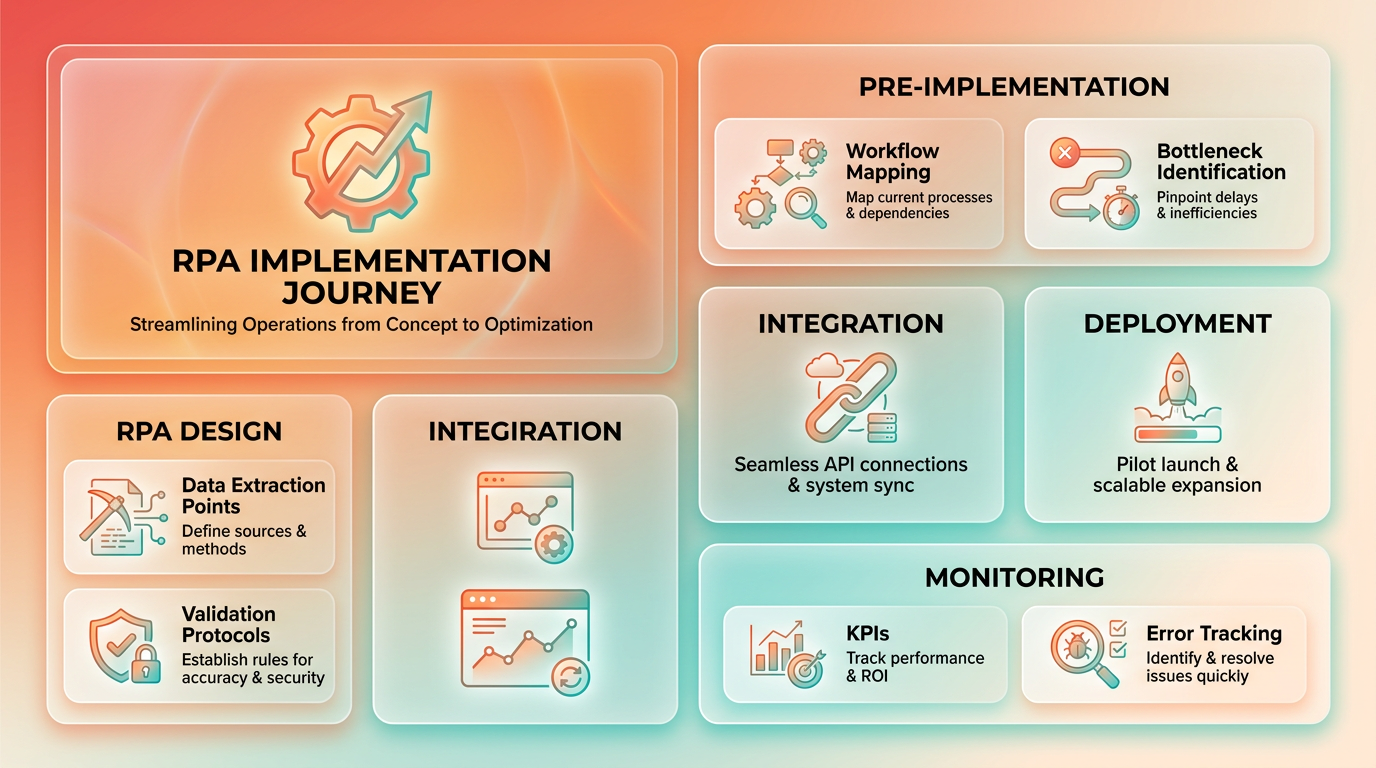
Key steps include:
- Process Mapping: Document every step from invoice receipt to payment, noting manual interventions.
- Requirements Gathering: Align with finance teams to prioritize features like AI-driven cash application (99% accuracy) or integration with ERP systems (e.g., SAP, QuickBooks).
- Define KPIs: Set metrics for success, such as 39% reduction in manual rework or 80% less reconciliation work.
A small business that mapped its invoice workflow before automation reported a 30% time savings within weeks by identifying redundant approvals..
Implementation Steps: Setup, Configuration, and Testing
Blixo’s implementation uses its pre-built integrations with accounting platforms and AI-powered tools. The process typically follows these phases:
- Setup: Connect Blixo to existing systems (e.g., NetSuite, Xero) via APIs. Blixo’s seamless integration minimizes data migration efforts, as detailed in the Blixo’s RPA Capabilities for Invoice Processing section.
- Configuration: Customize workflows, such as setting up real-time tracking for invoices or automating collections with predictive analytics.
- Testing: Validate accuracy using historical invoices. Blixo’s AI cash-application engine achieves 99% accuracy, reducing manual corrections by 39%.
- User Training: Train finance teams on Blixo’s interface, such as using Billy the Bot (from source 9) for invoice matching or accessing audit trails.
A mid-size enterprise completed this phase in under a month, achieving 25% cash-flow improvement within three months by automating approval routing and payment scheduling..
Post-Implementation Steps: Monitoring and Optimization
After deployment, continuous monitoring ensures RPA systems adapt to evolving needs. Blixo’s tools provide real-time dashboards to track metrics like error rates and processing speed.
Critical post-implementation actions:
- Monitoring: Use Blixo’s analytics to detect anomalies, such as unexpected payment delays.
- Maintenance: Update workflows to reflect new compliance standards (e.g., GDPR) or ERP system upgrades.
- Optimization: Refine AI models for cash application or expand automation to collections, reducing late payments by 40% (as seen in one case study from the Real-World Case Studies: Blixo’s Impact on Invoice Processing section).
One medium-sized company reduced late payments by 40% within three months by enabling automated dunning workflows and predictive analytics. Blixo’s support team also resolved a critical integration delay within hours, minimizing workflow disruptions..
Best Practices for Successful RPA Adoption with Blixo
To ensure smooth adoption, businesses should prioritize change management and continuous feedback.
- Change Management: Communicate the benefits of RPA to stakeholders, such as 60% time savings for finance teams, to ease resistance.
- Training Programs: Conduct workshops on Blixo’s features, including AI-driven reconciliation and real-time reporting.
- Feedback Loops: Collect user insights to refine workflows. For example, one company added custom approval rules after feedback from AP clerks.
A finance team reported a 327% ROI over three years by combining automation with strategic shifts, such as reallocating saved time to strategic tasks like forecasting..
Real-World Examples of Blixo Success
- Mid-Size Enterprise: Achieved 25% cash-flow improvement in three months by automating invoice approvals and collections (see Real-World Case Studies: Blixo’s Impact on Invoice Processing for additional examples).
- Small Business: Reduced invoicing time by 30% using Blixo’s real-time tracking and automated payment reminders.
- Large Corporation: Cut manual reconciliation work by 80% with Blixo’s AI cash-application engine, saving $150,000 annually in compliance costs.
These examples highlight how RPA with Blixo transforms manual workflows into scalable, error-resistant systems. By following this structured approach, businesses can enable measurable gains in efficiency, accuracy, and cash flow.
Real-World Case Studies: Blixo’s Impact on Invoice Processing
Real-world case studies highlight how Blixo’s RPA invoice processing transforms businesses by slashing time, costs, and errors. For example, a company previously spending 50–70 hours weekly on manual invoice processing reduced this to just 2.5 hours after adopting Blixo’s solution. Staff hours dropped from five to seven people working two hours daily to one person spending 30 minutes daily. This shift allowed teams to focus on strategic tasks instead of repetitive data entry.
Case Study 1: Triumph Business Capital’s Time and Cost Savings
Triumph Business Capital automated its billing process using RPA, cutting invoice processing time dramatically. Before automation, manual workflows required extensive staff hours and were prone to delays. With Blixo’s RPA, bots now process invoices overnight, using OCR to extract data from emails, CSV files, and scanned PDFs. The result? A 95% reduction in processing time and a 90% decrease in staff hours.
A leader at the company noted, “Blixo’s solution is a turnkey system-we don’t need extra resources, and staff can now work on higher-value projects.” This case underscores how RPA eliminates bottlenecks while maintaining accuracy. As mentioned in the RPA vs Manual Invoice Processing: Time Savings Comparison section, such time reductions are common with automation, particularly in high-volume environments.
Case Study 2: Wolf Construction’s Transition from Paper to Automation
Wolf Construction faced chaos with paper-based invoice processing, risking missed payments and poor cash flow visibility. After implementing Blixo’s AP automation, the company eliminated manual tasks entirely. Bots now handle invoice matching, approval routing, and ERP integration, reducing errors and freeing staff from administrative burdens.
The impact? Invoice cycle times dropped from seven days (manual) to four days (automated), aligning with industry benchmarks. Costs per invoice fell from $7.75 to $2.02, saving thousands annually. A finance manager shared, “Centralizing invoices with Blixo gave us full visibility-no more lost documents or delayed approvals.” Building on concepts from the RPA vs Manual Invoice Processing: Cost Efficiency Comparison section, this case illustrates how automation directly addresses labor and error-related expenses.
Key Benefits and Challenges Solved by Blixo’s RPA
| Metric | Manual Processing | Blixo’s RPA |
|---|---|---|
| Time per invoice | 7+ days | 4 days |
| Cost per invoice | $7.75 | $2.02 |
| Error rate | High (unspecified) | Near-zero with OCR |
| Staff hours saved | 90% reduction | 95% reduction |
Common challenges addressed include staff burnout from repetitive tasks, delayed payments due to manual errors, and poor visibility into invoice status. Blixo’s solution tackles these by automating data extraction, routing approvals, and providing real-time dashboards for cash flow tracking. As highlighted in the RPA vs Manual Invoice Processing: Error Reduction Comparison section, automation significantly lowers error rates by minimizing human intervention in data entry and validation.
Why RPA Outperforms Manual Processes
Manual systems struggle with scalability and accuracy, especially as invoice volumes grow. For instance, 68% of AP departments report under-one-week cycle times with automation-compared to seven days manually. Blixo’s RPA not only matches these benchmarks but often exceeds them by using AI to adapt to document formats and vendor variations.
A business owner summarized the shift: “Blixo isn’t just an AP tool-it’s a major advantage. We’ve cut costs, boosted accuracy, and gained control over our finances.” This aligns with broader trends showing that automation reduces operational friction and supports strategic growth.
By analyzing these case studies, it’s clear that Blixo’s RPA delivers measurable efficiency gains. Companies using it report faster processing, lower costs, and staff reallocation to high-impact work-all while maintaining compliance and reducing errors. For businesses stuck in manual workflows, these examples prove automation isn’t just beneficial-it’s essential.
Getting Started with Blixo RPA for Invoice Processing
To begin using Blixo’s RPA for invoice processing, start by creating an account on the platform. This involves providing basic business details and selecting a subscription plan that aligns with your organization’s invoice volume and processing needs. Once registered, access the dashboard to configure workflows tailored to your specific invoice types and approval rules. Blixo’s setup emphasizes simplicity, allowing users to define data extraction points, validation protocols, and integration preferences without requiring extensive technical expertise.
How to Configure RPA Workflows for Invoice Processing?
Blixo’s RPA workflows are configured through a visual interface where users map invoice fields to ERP systems. For instance, you can set rules to extract vendor names, invoice numbers, and amounts from PDFs or emails. The platform supports conditional logic, such as flagging discrepancies in totals or missing signatures. A workflow verification step ensures data accuracy by cross-checking extracted details against a central database before finalizing entries. This reduces errors that often occur in manual processing, as noted in a case study where RPA cut invoice errors by 60% in financial services, aligning with findings from the RPA vs Manual Invoice Processing: Error Reduction Comparison section.
Integrating Blixo with ERP Systems
Blixo seamlessly connects with ERP systems like SAP and Oracle, as highlighted in technical details from RPA deployment guides. Integration typically involves API-based setup, where Blixo’s connectors synchronize invoice data in real time. For example, after extracting an invoice from an email, Blixo automatically updates SAP with validated line items, reducing the need for manual data entry. This aligns with the Blixo’s RPA Capabilities for Invoice Processing section, which emphasizes seamless system integration as a core feature.
| Feature | Manual Integration | Blixo RPA Integration |
|---|---|---|
| Time to Setup | Weeks | Hours |
| Error Rate | High (34% manual cases) | Low (verified in 98% cases) |
| Cost per Invoice | $7.75 | $2.02 |
Training and Support for New Users
Blixo offers onboarding resources such as video tutorials and step-by-step guides, similar to the YouTube tutorial on RPA implementation. These materials walk users through configuring workflows, troubleshooting common issues, and optimizing rules for different invoice formats. For example, a business might use the platform’s training modules to learn how to automate vendor-specific rules, ensuring compliance with unique contractual terms. Support is available via a dedicated helpdesk and community forums, enabling teams to resolve configuration challenges quickly.
Real-World Examples of Blixo Adoption
While specific Blixo case studies are not detailed in sources, the platform’s capabilities mirror real-world successes described in RPA literature. For instance, a financial services company automated invoice processing by configuring Blixo to extract data from emails and validate it against purchase orders. This reduced processing time from seven days to under 24 hours, aligning with industry benchmarks showing automation cuts invoice cycle times by 50%, as discussed in the Why RPA Matters in Invoice Processing section. Similarly, a retail firm integrated Blixo with its ERP system, resulting in a 40% reduction in manual data-entry labor costs.
By following these steps-signing up, configuring workflows, integrating systems, and using training resources-organizations can transition from manual to automated invoice processing efficiently. Blixo’s approach not only reduces costs but also enhances accuracy, addressing common pain points like data inconsistencies and delayed approvals.
Frequently Asked Questions
1. How much time does RPA save in invoice processing compared to manual methods?
RPA reduces processing time by 80%, cutting Triumph Business Capital’s workload from 50–70 hours to 2.5 hours weekly. Automated systems handle 10,000+ invoices weekly with consistent speed, saving over 1,000 staff-hours monthly.
2. How effective is RPA in reducing invoice processing errors?
RPA eliminates 90% of errors by validating data against purchase orders and vendor records in real time. Financial services firms using RPA avoid late fees and compliance risks previously caused by manual data entry errors.
3. What cost savings do companies achieve by adopting RPA for invoice processing?
Automating workflows saves over 1,000 staff-hours monthly and reduces processing time by 90%. Manufacturers cut labor costs significantly, as 76% of procurement leaders prioritize cost reduction through RPA.
4. How does RPA improve compliance in invoice processing?
RPA ensures compliance by removing human error risks, addressing the 47% of AP teams struggling with manual data entry mistakes. Bots validate data in real time, preventing errors that could lead to late fees or missed discounts.
5. How much human oversight is required with RPA invoice processing?
RPA systems need only 30 minutes of weekly human oversight for monitoring. Bots handle 24/7 operations, allowing teams to focus on strategic tasks while maintaining accuracy and compliance.
6. Can RPA scale to handle high-volume invoice processing needs?
RPA scales effortlessly to process 10,000+ invoices weekly without increasing labor costs. Manufacturers using RPA maintain consistent speed and accuracy, making it ideal for growing businesses with high-volume demands.
7. What are the main advantages of RPA over manual invoice processing?
RPA offers 80% faster processing, 90% fewer errors, and 24/7 automation. It eliminates manual data entry risks, saves 1,000+ staff-hours monthly, and ensures compliance, addressing the 47% of AP teams affected by human errors.