

AI Cash Application Matches More Invoices, Until Your Data Is Messy

The Short Version
In short: AI cash application works — when the data cooperates. Clean customer identifiers, complete remittance fields, and accurate invoice records can drive meaningfully high touchless match rates. The problem is that your data almost certainly isn’t that clean yet, and getting there requires deliberate preparation before you configure a single matching rule.
Two failure modes matter here. The first is the one your team already knows: a payment arrives with no remittance detail, the payer name on the bank statement doesn’t match the customer name in your ERP, and the transaction lands in the exception queue. Unapplied cash. Visible. Manageable.
The second failure is worse. Fuzzy matching can post a payment to the wrong customer account when two names look similar enough. Money gets applied, an invoice closes, no exception fires. Your AR looks clean. It isn’t. That error doesn’t announce itself the way an exception queue does — and that’s exactly what makes it the more dangerous of the two.
The underlying data problem predates any matching algorithm. Spreadsheet-based AR processes carry a documented error rate of 94% when used as enterprise databases. That’s the baseline your matching engine inherits. Feed it inconsistent customer masters, unstructured remittance formats, and invoices with duplicate reference numbers, and the AI will find patterns in that noise. They just won’t always be the right ones.
My advice: before evaluating any matching tool, run an honest audit of your customer identifier consistency and remittance data completeness. The algorithm is the easy part. The data quality that makes it actually work is not easy.

Keep these in mind as you read:
- AI-driven mismatches are harder to detect than unmatched payments in an exception queue.
- Spreadsheet-heavy AR workflows often degrade the source data before a matching engine sees it.
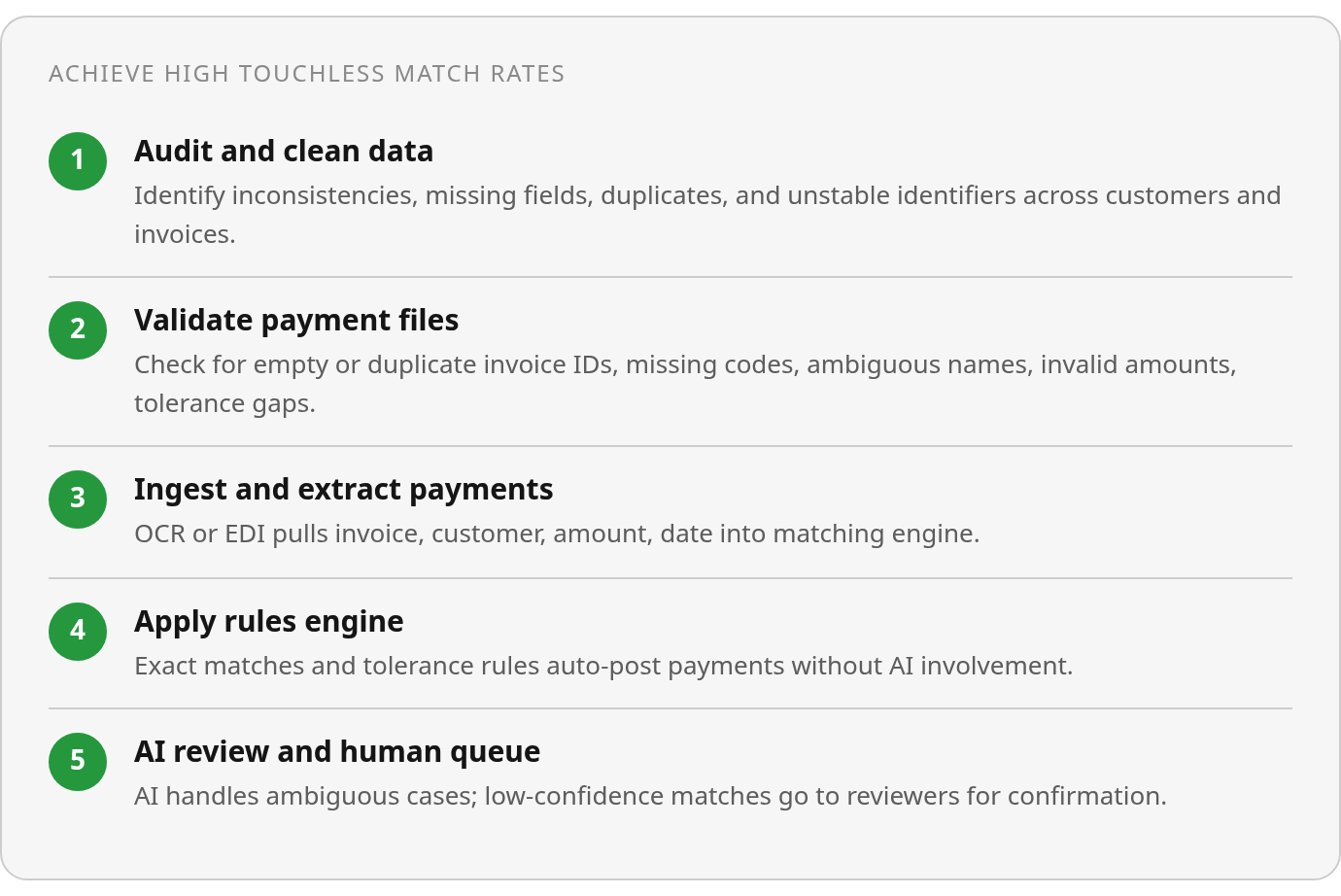
- High touchless match rates depend on five data qualities: accurate records, complete fields, consistent formatting, no duplicate entries, and stable customer identifiers.
- A rules engine handles clean exact matches first; the AI model interprets partial amounts, ambiguous payer names, and wires covering multiple invoices.
Why Clean Data Is the Real Gatekeeper for AI Cash Application
The root problem in AR automation isn’t what the AI does with a clean payment file. It’s what the AI inherits when the file is messy.
A bank file lands late at night. The next morning, unapplied cash is sitting in a holding account, and the controller wants to know why it hasn’t posted yet. That’s not a technology failure. It’s a data-readiness failure: inconsistent customer identifiers, remittance advice that arrived through a separate channel, payer names that don’t match anything in the customer master.
The spreadsheet workflow underneath most AR teams makes this worse. Spreadsheets fail as enterprise databases — especially under close-week pressure, multi-user edits, and formulas nobody wants to touch. Those errors don’t disappear when you layer AI on top. They feed it.
So what does “clean” actually mean in an AR context? The data that supports high touchless match rates shares five characteristics: accurate records, complete fields, consistent formatting across systems, no duplicate customer entries, and stable identifiers linking each payment to the right invoice. If your customer master holds several records for one buyer because sales, billing, and collections each use a slightly different naming convention, the matching engine treats those fragments as separate entities. It can only work with what you give it.
Data readiness has to come before the automation conversation. Matching technology can accelerate a clean process. It cannot reliably repair an inconsistent one.
How AI Cash Application Works When Data Is Clean
The automation process works best when your input data cooperates. AR automation software ingests payment data from wherever it lives: ACH transfers, wires, card transactions, and digital lockbox feeds. Remittance advice that traveled separately arrives as a PDF attachment or an EDI 820 feed. OCR extracts the relevant fields from each source: invoice number, customer identifier, payment amount, and date. It then feeds them into the matching engine.
A rules engine handles exact matches first. When the invoice number is clean, the payer ID is consistent, and the amount matches, the payment posts without any AI involvement. With well-prepared data, straight-through posting rates can be meaningfully high. Tolerance rules extend that range further: configuring a threshold to auto-clear small variances, rounding differences or minor short-pays below a set dollar cap, keeps that noise off the manual review queue without creating audit exposure.
Where the AI Model Fits in Automated Receivables
When the rules engine can’t decide, the AI model takes over. Payments with partial amounts, payer names that don’t map to a customer ID, or wires covering several invoices with no line-item breakdown each need interpretation, not just pattern-matching. The architecture handles both: rules for straightforward exact matches, a model for the messier remainder.
Low-confidence matches don’t post automatically. They route to a review queue for a human to confirm or correct. When that queue starts growing, the useful question isn’t whether the software is working. It’s which upstream inputs are forcing the system to ask for help: remittance formats, customer codes, invoice references, payment tolerances, or some combination of all four.
Common Data Messes That Break AI Matching
The most dangerous failure in AR automation isn’t the payment the system can’t match. It’s the payment the system matches to the wrong customer.
Two customers with similar names, “Apex Services” and “Apex Service Group,” look close enough that fuzzy matching can assign the cash, close an invoice, and move on. No exception fires. The error sits undetected until someone reconciles that account weeks later. A silent false match is harder to catch than unapplied cash, which at least sits in a holding account where you can spot it.
What specific data problems trigger false matches?
Missing or weak invoice identifiers compound the lookalike-name problem. When remittance arrives without a clean invoice number, the matching engine falls back to amount plus customer name — two weak signals instead of one strong one. A payment with no invoice reference and a close-but-not-exact payer name leaves the engine working with ambiguous inputs on both sides. That combination can push a transaction toward an exception or, worse, a silent false match.
Small payment variances add noise. A payment that’s off by a rounding difference shouldn’t need human review. Without a configured tolerance rule, that tiny gap kicks the transaction into the exception queue. Multiply that across hundreds of payments and your team spends the morning clearing rounding noise instead of investigating real issues.
How does unapplied cash pile up so fast?
The visible failure is the backlog. A late bank file plus manual matching leaves the holding account growing, and a busy close week can leave a meaningful sum unapplied overnight. The operational symptom is obvious: cash has arrived, but the ledger hasn’t caught up. The root cause may be a missing remittance file, an unrecognized payer name, or a reference format your rules were never built to parse.
Duplicate-payment review belongs in the same exception-control layer. When two payments hit for the same invoice, the system should flag both rather than posting each independently. The underlying control concept is sound: guardrails must catch what fuzzy logic gets wrong, not just what it misses entirely. Specific AI flagging claims, though, are worth verifying in a live demo rather than assuming from documentation.
Where to Start Before You Touch the Matching Config
Focus first on the data problems that create posting risk. Unapplied cash is frustrating, but it’s visible. Wrongly applied cash can sit inside apparently healthy AR until a customer dispute, reconciliation review, or collections call surfaces it.
What Should Your Validation Checklist Flag?
Standardize your invoice and customer reference fields before you configure any matching rules. AR automation runs on the assumption that your invoice IDs are unique, your customer codes are consistent, and your remittance references point to something real. When they don’t, the rules engine can’t help you and the AI layer guesses.
Run every payment file through these checks before ingestion:
- Empty invoice IDs: no reference means a guaranteed manual touch
- Duplicate invoice IDs: two records create the wrong match and a silent posting error
- Missing customer codes: fuzzy name matching kicks in, which is where false matches happen
- Ambiguous customer names: subsidiaries, abbreviations, and legacy account names need distinct master records with distinct codes, not a note in a spreadsheet
- Invalid amounts: negative values and zeros need a rule, not a human
- Payments outside configured tolerances: short pays just under an invoice total will never match if you haven’t defined a tolerance band yet
How Do You Know If the Cleanup Is Working?
Don’t skip the baseline. Before you adjust reference fields or tolerance settings, pull your current touchless match rate and exception volume. Make the targeted change, then measure again. That comparison tells you whether the fix worked and which failure modes are still open.
Build a quarterly data-quality review into your close calendar. Check your customer master for lookalike names, review your unapplied cash aging for balances sitting without resolution, and audit your top exception reasons. The goal is to turn cleanup into a recurring control — not a one-time project launched after the backlog becomes painful.
Still Wondering?
Is a shrinking exception queue a reliable sign that AI cash application is working correctly?
Not by itself. A smaller queue may mean cleaner incoming data and better-configured rules, but it may also mean the system is posting more aggressively. The missing control is a review of posted activity: sample matched payments, compare them against remittance support, and verify that the right customer and invoice were cleared. Queue volume is an operational metric, not a complete accuracy test.
Should you clean up your customer master before or after deploying a cash application matching engine?
Before. Matching rules depend on stable reference data, so the customer master should be cleaned before automated posting is turned on. Resolve duplicate customer entries, standardize naming conventions, separate similar accounts with clear codes, and confirm that invoice references point back to the right records. Once that structure is in place, the matching engine has something dependable to work from.
If a rules engine handles straightforward matches, what does the AI model actually add?
The two layers solve different problems. A rules engine is best for deterministic matching: the invoice number, payer ID, and amount all line up, so the payment can post cleanly. The AI layer is useful when the signal is incomplete, such as a partial payment, an unclear payer name, or a wire that appears to cover several invoices without a clean breakdown. Cleaner data shifts more work to rules and leaves fewer ambiguous cases for AI interpretation.
Can an AI cash application system detect and flag its own false matches after posting?
Only if there is a control designed to revisit posted matches. Low-confidence items can be routed to a review queue before posting, but a confident wrong match may bypass that workflow. That is why reconciliation, customer-master audits, and periodic sampling of automated postings matter. The system should reduce manual work, but it should not be treated as the only control over cash application accuracy.