

How Credit Notes Affect Cash Application and Customer Balances

In short:
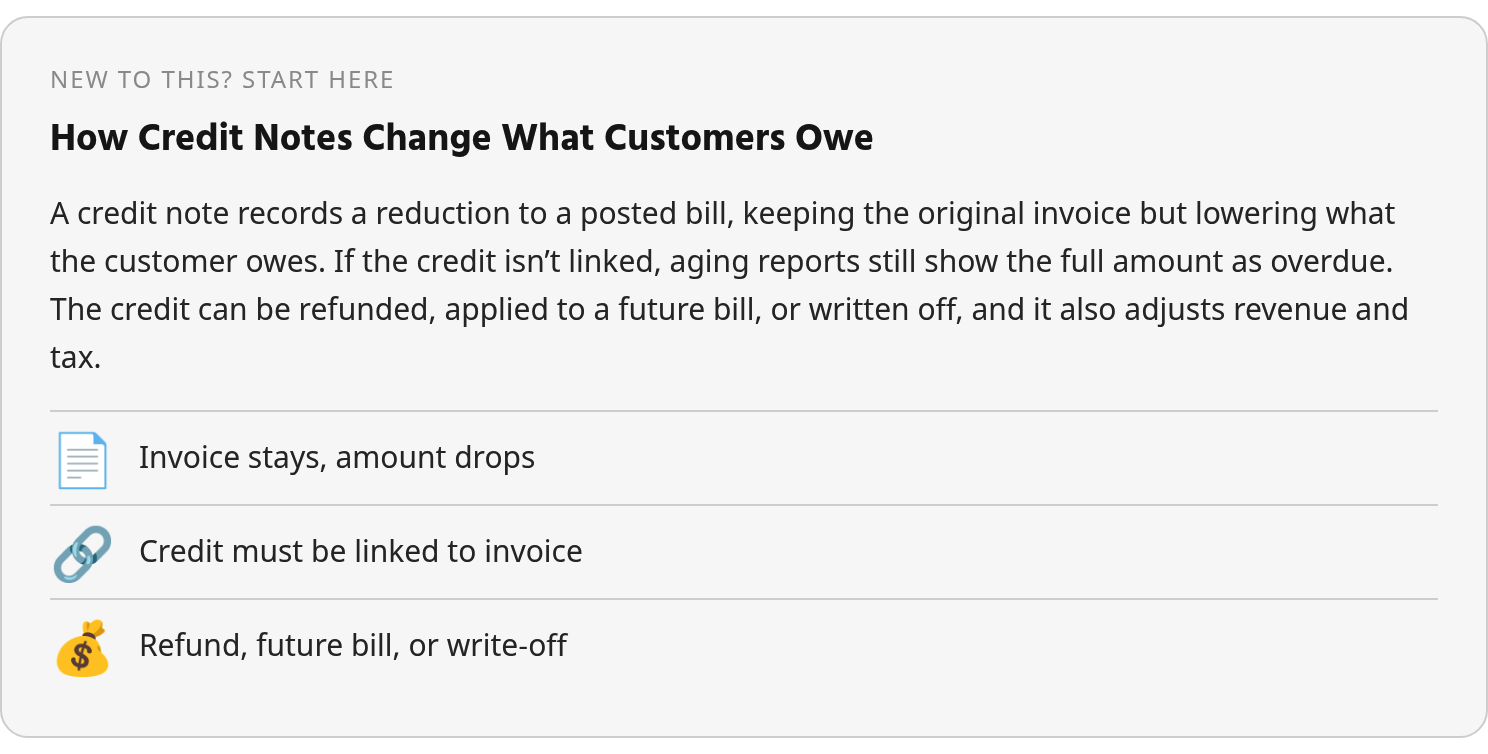
A credit note adjusts a finalized invoice without deleting it—preserving the original transaction while changing what your customer owes. The issued credit and the applied credit are separate steps; skip the second and your aging reports will overstate what’s collectible. Credits affect revenue, receivables, and tax treatment, so documentation and timing matter. Unapplied credits create the same reconciliation drag as unapplied cash. Applying credit to future invoices preserves cash; refunds close the obligation with an outbound payment.
Related Video
Watch: How to Issue a Credit Note for Returned Goods (Step by Step) | Accounting & Finance by VixBooks
Why Credit Notes Matter
You bill a customer $10,000. Later you approve a $1,500 credit—returned goods, pricing error, service shortfall. The outstanding balance becomes $8,500. The original invoice stays in your books. The credit note offsets it. Both documents create a clear audit trail.
That credit can be refunded as cash or applied to the customer’s next invoice, depending on your agreement and their preference.
The mechanics matter because approved credits directly affect open receivable balances. Until the credit is matched and applied, your aging reports still show the unadjusted invoice amount as overdue. Dunning emails keep firing. Your team wastes time chasing payments the customer no longer owes.
Subscription billing surfaces this problem routinely. A customer makes a partial payment. A credit memo is approved for the remaining difference. The collections queue continues to flag the account because the two records were never linked.
Credits Reduce Balances. Applying Them Closes the Loop
Issuing a credit note is not the same as applying it.
Finance teams typically separate those two steps to avoid over-crediting or duplicating adjustments. The credit note documents the liability. The application step links it to specific invoices or applies it to the customer’s open balance. When that second step doesn’t happen automatically, unapplied credits accumulate in customer accounts—creating a mirror-image problem to the unapplied cash that plagues payment processing.
Public research suggests that cash discounts can sometimes apply to credit notes when the original invoice also carried a discount. Your reconciliation may need to account for that. If your billing system doesn’t automatically handle discount logic on credits, small rounding differences become manual cleanup tasks.
Tax, Retention, and Downstream Reconciliation
Credits can reverse both revenue and tax liability in a single action.
Many jurisdictions require credit notes to be issued within strict timeframes after the triggering event. Businesses are typically required to store credit documentation for multiple years for audit purposes. If you issue a refund without formally creating the credit note, tax authorities may still treat the original invoice as valid in full—even if the refund was legitimate.
From a cash-application standpoint, credits create exceptions that require the same matching discipline as incoming payments. An ACH payment can land in your bank with a truncated reference while the remittance details arrive by email two days later. Credits issued in your billing system may sit unlinked to the invoices they offset until someone manually reconciles them.
Subscription environments can generate approved credits automatically during proration or cancellation. But if the ERP integration only pushes them to the ledger overnight, customer portals and aging reports show stale balances for hours.
How Credit Notes Change Customer Balances
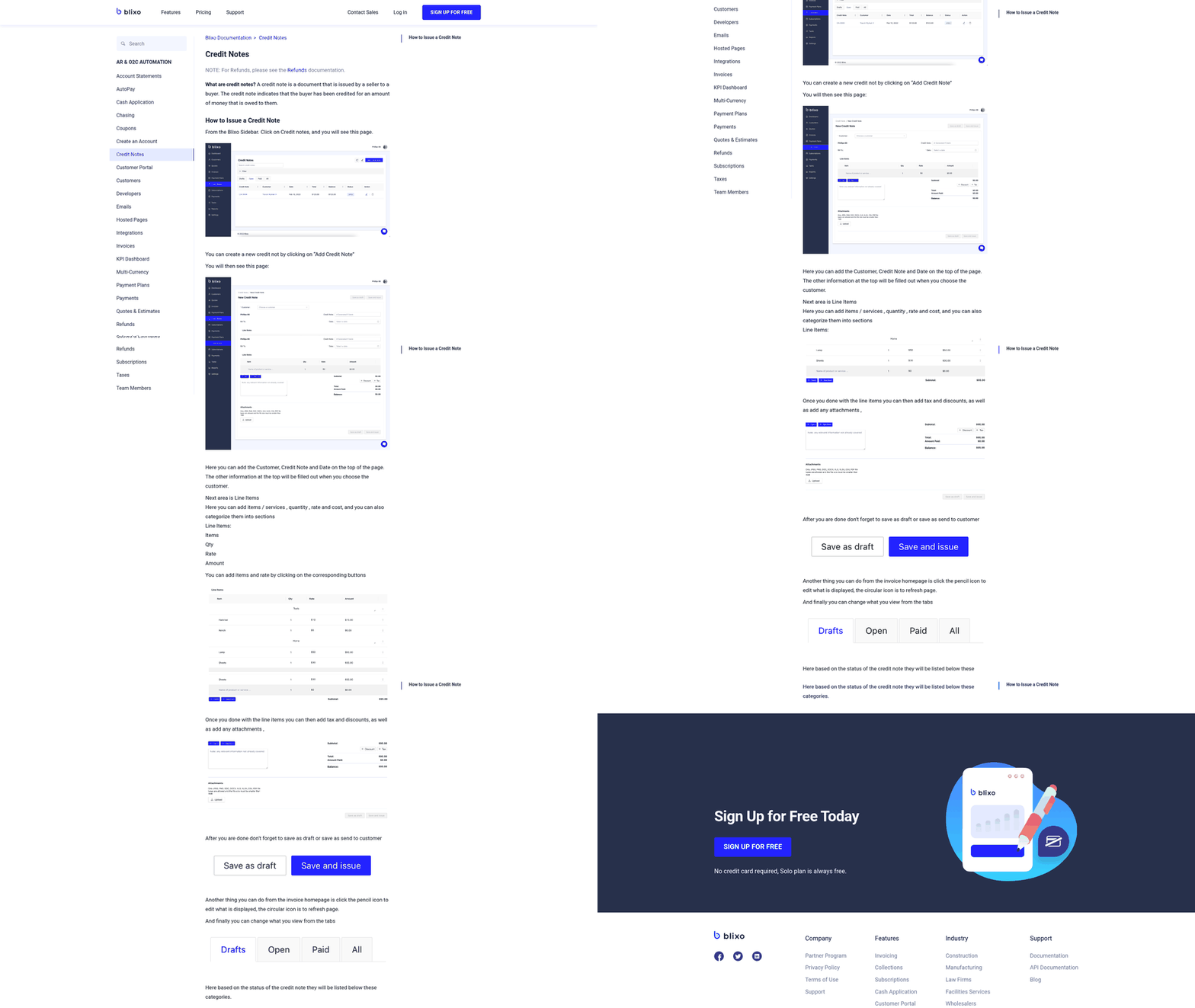
When an approved credit note lands in your system, the customer’s balance drops. That reduction still has to be reflected in AR, customer statements, and any collection workflow tied to the account. The invoice remains posted. The credit note becomes the formal adjustment that changes what is collectible.
Credit Note Application in a Single-Invoice Settlement
The simplest case is when one credit note settles against one invoice.
You invoiced $1,000. The customer returned items worth $100. You issue the credit note. The customer pays $900 to close the transaction. Payment terms may allow for early-payment discounts that affect the final cash amount, but the credit note itself records the $100 adjustment independent of any discount negotiation.
From an accounting standpoint, the credit note debits sales return or a contra-revenue account and credits accounts receivable, lowering both your recognized revenue and the customer’s outstanding balance. The original invoice remains posted. The credit adjusts it. When the customer pays, the net invoice clears, and your books reflect a completed transaction with no unapplied balances.
Refund, Future Credit, or Write-Off
You then face a choice: return money to the customer, apply the credit to their next invoice, or—if the relationship is ending and the balance will not be used—clear it through an approved write-off process.
Each option has a different operational impact. A refund creates an outbound cash movement and typically adds payment-processing work. A future credit keeps cash in the business but requires your AR system to carry the unused balance accurately until another invoice is available.
Write-offs require their own clearing workflow. That approach works when balances are suspect and you need a clean ledger, but it’s not a routine option for active customer accounts.
VAT and Record-Retention Rules
If you operate under VAT regimes, timing matters.
Tax authorities often set deadlines for issuing credit notes after the triggering event occurs. Miss that window and the tax office may treat the original invoice as valid in full, even if you refunded the customer. Credit notes also adjust your VAT liability: when you credit an amount that includes VAT, you reduce both revenue and the VAT you owe by the same proportion. That adjustment must appear on your next VAT return.
Tax jurisdictions typically require you to retain credit note records for audit purposes, with retention periods varying by country. The credit note itself doesn’t execute a refund—it documents the liability. The refund or future-credit decision is a separate step, and your books need to show both: the credit issued and the method of settlement. If you skip the credit note and just refund cash, the tax authority may still see the original invoice as taxable, leaving you liable for VAT on a transaction you’ve already unwound.
Automating Cash Application with Credit Notes in Blixo
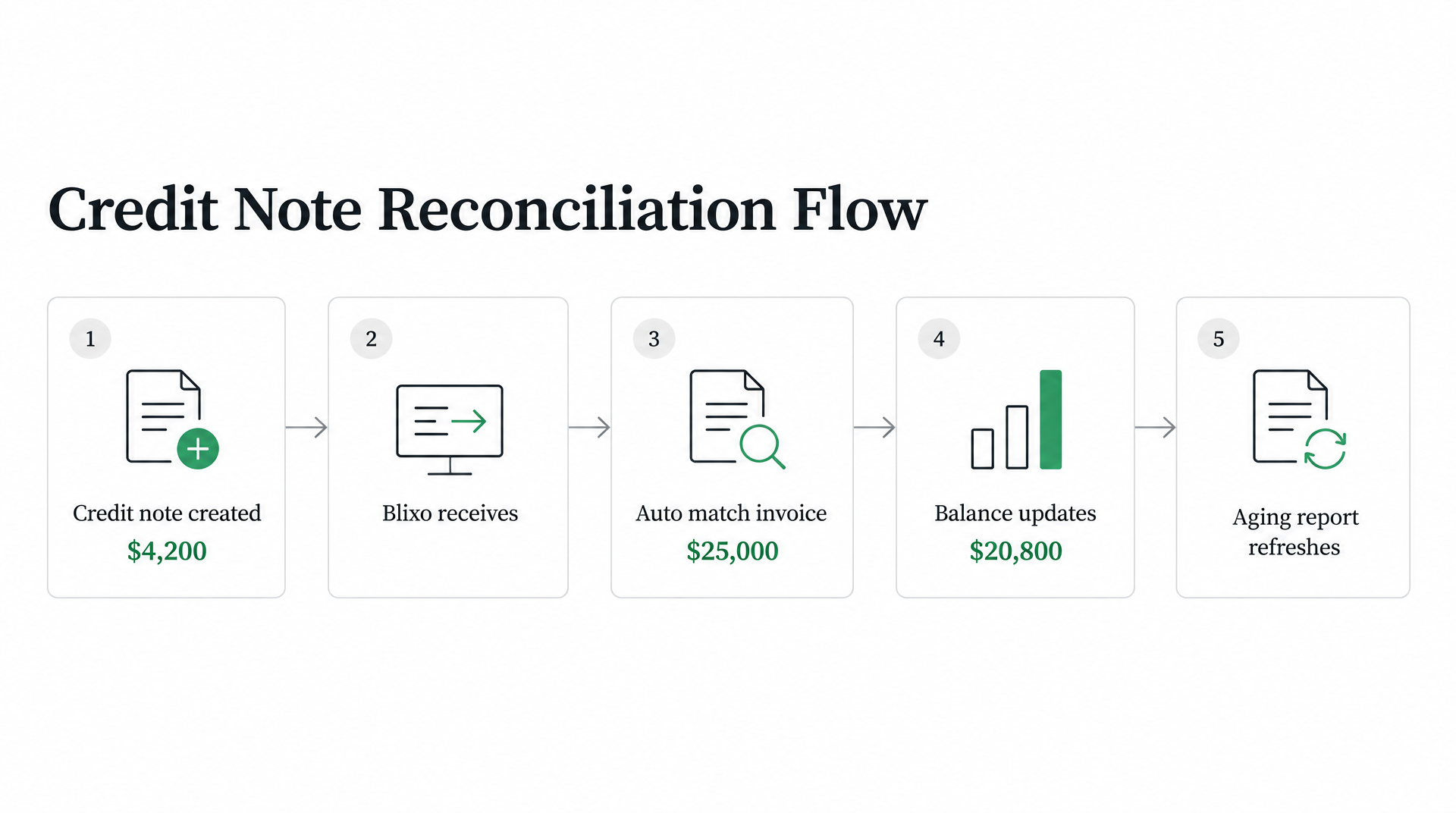
When a credit note lands in your system, it changes the amount your customer owes without requiring a new payment transaction.
A $25,000 invoice reduced by a credit for a cancelled service upgrade leaves a lower balance. The invoice stays on the books. The credit provides the adjustment record needed to keep AR reporting aligned with the revised obligation.
The problem is that issuing the credit note doesn’t automatically reconcile it against the correct invoice. Until that happens, your AR system may still route the account through collection steps as if no adjustment exists. This is the same separation problem that plagues cash application: the credit lands in one place, and the matching work happens later, often manually.
Credit Notes and Unapplied Balances
When credits sit unapplied, they accumulate in customer accounts the same way unmatched payments do.
Unapplied cash payments, outstanding customer deposits, outstanding credit memos, and outstanding invoices can all mix together in a single account, creating reconciliation work that requires manual cleanup.
The matching work grows with volume. More subscriptions mean more mid-cycle adjustments, more prorated refunds, and more credits that need to be applied before your next billing run. If your billing system doesn’t auto-apply approved credits to future invoices, your team is stuck doing it manually or leaving the balances open.
What Blixo Delivers for Credit Note and Cash Reconciliation
Blixo’s matching engine applies payments and balances to invoices automatically. The system provides an approval workflow, and manual edits help improve future matches.
If you’re evaluating automation for credit notes, ask during a demo: Does the system auto-match credits to specific invoices based on customer ID and amount? Does it flag unapplied credits for review? Can it apply a single credit across multiple invoices, or does it require one-to-one matching?
The demo should also show how Blixo handles supporting context when the credit reason lives outside the invoice record. A credit may originate from a cancellation, support concession, returned goods approval, or pricing correction. If that explanation is buried in a support ticket or emailed remittance advice, matching logic needs enough context to route the adjustment correctly rather than leaving finance to interpret it later.
Common Pitfalls and How Automation Avoids Them
When you issue a credit note for returned goods or a pricing error, the document should point back to the original invoice. That is only half the work.
The other half is making sure the credit actually gets applied to the customer’s balance, the right invoice is marked as offset, and your aging reports reflect the updated amount due. Miss that step and you have a customer-facing problem: the customer believes the account has been corrected, while your AR process may still behave as though the full balance is open.
Three problems show up repeatedly when credit notes move through manual workflows.
First, duplicate entry. The same credit gets keyed in twice or applied to the wrong invoice because the team is working across multiple tabs and spreadsheets.
Second, missed tax reversal. The credit reduces the invoice balance but the VAT or sales tax liability stays on the books because no one updated the tax line.
Third, unapplied credits sitting in limbo. The credit note is issued and filed, but it never gets matched to the invoice it was meant to offset, so the customer’s balance looks higher than it should.
Credit Notes Must Be Stored for Years, Not Days
Good storage is not just a compliance habit. It is a retrieval discipline.
If your credit notes live in email threads or scattered PDF folders, you’re building a search problem that surfaces later when someone needs to prove why an invoice was reduced. Proper storage means linking each credit note to its invoice record, preserving the customer reference, and tagging it with the reason for the adjustment so the audit trail is clear without needing tribal knowledge.
This is also where automation can reduce operational risk without changing the underlying accounting rule. A system that attaches the credit note to the invoice, carries the reason code, and keeps the settlement status visible gives finance, support, and collections the same version of the customer balance.
What Automation Can and Cannot Do
Validation rules in billing systems may catch some common errors—flagging if the credit amount exceeds the invoice total, or if the same invoice is being credited twice within a short window. Duplicate detection logic may compare credit note amounts, dates, and invoice references to surface potential repeats before they post. Tax auto-reversal, when configured correctly, may reduce the VAT or sales tax liability line-by-line as each credit is applied.
Public materials don’t detail how specific safeguards work in every system, so claims about validation rules, duplicate detection, tax auto-reversal, or audit trails should be verified in a live demo rather than accepted as documented fact.
What we do know from working with subscription and service businesses is that reducing credit-note disputes comes down to visibility. When the customer can see the credit applied to their account in real time, and when your AR reports show the updated balance immediately, the back-and-forth emails drop off. The goal is to move from “we issued the credit, check your email” to “the credit is already on your account, here’s the updated statement.”
What to actually do
After you’ve issued a credit note, your workflow splits into settlement and reconciliation.
Settlement answers what happens financially: refund, future credit, or approved write-off. Reconciliation answers whether the adjustment reached the invoice, ledger, customer portal, and aging report. Treat those as separate controls, because a credit can be valid and still sit in the wrong place operationally.
Match the Credit Note, Then Decide How to Settle It
When a credit note drops the customer’s balance, your books show less in accounts receivable. But the customer hasn’t necessarily received money yet and their next invoice hasn’t necessarily been offset.
That adjustment stays suspended until you either refund the amount or apply it forward. Most AR teams separate the “credit note issued” step from the “credit applied” step to avoid over-crediting a customer or duplicating adjustments across systems. Stripe’s guide notes that the original invoice remains untouched on your books while the credit creates the adjustment trail, which is why the matching work still matters.
If the customer already paid the invoice before you caught the error, the credit posts to their account and you either return the funds or hold the balance for the next billing cycle. If the invoice is still open, you reduce the amount due and collect the corrected balance. Both paths require the same upfront work: read the credit note, identify which invoice it offsets, and record the adjustment in your AR ledger.
Track DSO and Auto-Match Rate After You Automate
Once credit notes move through an automated workflow, the question is whether automation actually cleared the exception queue or just shifted it.
A platform that auto-matches most payments still leaves the hardest cases in a human queue. Track whether credit-note automation moves your DSO into better territory or just accelerates the easy matches while leaving the short payments and multi-invoice offsets in manual review.
The metric to watch is how many credit notes land in the exception queue after the first matching pass. If the remaining cases include all your partial credits, disputed deductions, and bulk offsets, your team is still reading remittances and chasing explanations for the high-value exceptions that drive DSO. Measure days-to-resolution for the exception queue separately from the clean matches to see whether automation solved the bottleneck or just moved it.
Verify What Your Platform Actually Does in a Live Demo
Public documentation often describes how credit notes should work without confirming that the promised workflow is live in production.
Before committing to a platform, verify in a demo that it can read a credit note from your format—PDF attachment, CSV export, or emailed remittance advice—match it to the correct invoice, and apply the adjustment without manual intervention. Ask the vendor to show you a credit note that references multiple invoices or a partial offset, not only the clean case.
If the demo skips the exception-handling layer and only shows easy matches, that’s a sign the platform routes the messy cases to a human queue. The workflow suite may automate collections and dunning, but if your AR team’s time disappears into reading remittances and resolving short-payment reasons, you’re buying the wrong layer. Test the exception scenarios your team actually sees before you assume the platform will clear them.
FAQ
1. If I issue a credit note but the customer already paid the full invoice, does the credit sit on their account until I manually refund it?
Yes. The credit records that the customer is owed value, but a refund is a separate settlement action. Your team still needs to decide whether to send money back or keep the balance available for a later invoice, then record that decision in AR.
2. Can I apply one credit note across multiple invoices if the customer has several open balances?
That depends on your billing system’s matching logic. Some platforms require one-to-one matching between a credit note and a single invoice, while others allow one credit to be split across several open items. Confirm this in a live demo, especially if your customers often pay or dispute invoices in batches.
3. What happens to my VAT liability if I issue a credit note months after the original invoice date?
The answer depends on local timing rules. In general, the credit is the document that supports reducing taxable revenue and related VAT, but late issuance can create problems if the jurisdiction imposes a deadline after the triggering event. Check the applicable rules before delaying the adjustment.