

Accounts Receivable Automation Checklist for Blixo
Key Takeaways
- Manual AR processes cost U.S. businesses $1.3 trillion annually in errors, disputes, and delayed payments.
- Automating AR reduces administrative costs by 30% and cuts Days Sales Outstanding (DSO) by 30–50% in 6–12 months.
- Blixo’s AI resolves 39% of invoice errors automatically and matches 99.5% of payments to invoices without manual effort.
- Small businesses lose 30% of revenue to inefficient collections, with invoices taking up to 45 days to process manually.
- A manufacturing firm recovered $500,000 by reducing DSO from 72 to 45 days using Blixo’s automation.
- Miami-based startups improved sales conversions by 70% through automated reminders and dynamic discounting.
- SMBs and high-volume enterprises benefit most from AR automation due to scalable efficiency and cash flow gains.
Why Accounts Receivable Automation Matters
What Industry Data Reveals About Manual AR Processes
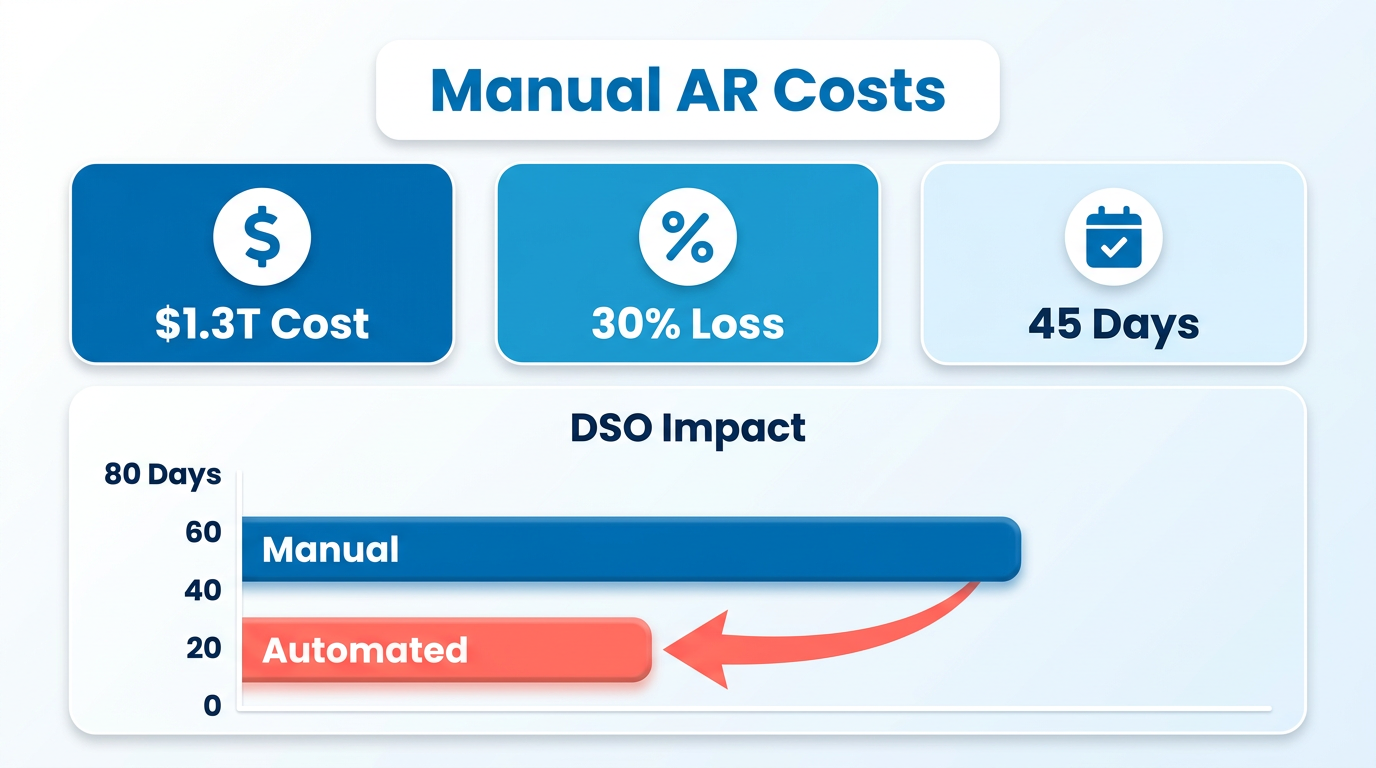
Manual accounts receivable processes cost U.S. businesses $1.3 trillion annually due to errors, disputes, and delayed payments. For small businesses, the impact is even starker: 30% of revenue is lost to inefficient collections, with some invoices taking 45 days to process. These delays directly inflate Days Sales Outstanding (DSO), the metric that measures how long it takes to collect cash from sales. A high DSO ties up working capital, limiting a company’s ability to invest in growth or manage unexpected costs.
How Automation Transforms AR Efficiency
Automating accounts receivable reduces administrative costs by 30% and cuts DSO by 30–50% within 6–12 months. Blixo’s AI-driven platform, for example, resolves 39% of invoice errors automatically and matches 99.5% of payments to invoices without manual intervention. Real-world results from Blixo users include a manufacturing firm recovering $500,000 by reducing DSO from 72 to 45 days and a Miami-based startup boosting sales conversions by 70% through dynamic discounting and automated reminders. These gains translate to faster cash flow, reduced disputes, and improved customer satisfaction. As mentioned in the Automating Cash Application and Reconciliation section, Blixo’s AI capabilities further streamline payment matching and dispute resolution.
Who Benefits Most From AR Automation?
Small and medium-sized businesses (SMBs) and enterprises with high-volume invoicing benefit most from automation. Subscription-based models see 70% fewer manual tasks with recurring billing automation, while customer-centric businesses gain 25% faster on-time payments via self-service portals. Building on concepts from the Creating a Customer Self-Service Portal section, self-service tools empower customers to track payments and resolve issues independently, reducing administrative workloads. Even industries like healthcare and legal services report 18–25% improvements in cash-flow efficiency and month-end closing times. Blixo’s unified platform-combining invoicing, collections, and ERP integration-caters to all these use cases, ensuring businesses of any size can streamline operations.
Common AR Challenges and How Blixo Solves Them
Manual errors and delayed payments remain the biggest pain points in AR management. 39% of invoices contain human-input mistakes, leading to disputes and reconciliation delays. Blixo’s machine-learning engine eliminates these bottlenecks by automating invoice matching, dunning workflows, and multi-currency support. For instance, a logistics firm reduced reconciliation disputes by 20% using Blixo’s intelligent matching engine, while a law firm improved cash-flow efficiency by 25% after automating invoicing. Features like virtual lockbox and AI-driven fraud detection further reduce risks, ensuring secure, error-free transactions.
Cost Savings and Efficiency Gains
Automation slashes operational costs by 30% and accelerates collections by 30–50% compared to manual systems. Blixo users report 70% faster invoice processing and 35% fewer missed payments thanks to multi-channel reminders and predictive analytics. For enterprises, ERP integrations with QuickBooks, Xero, and SAP cut month-end closing times by 18%, while small businesses see 50% fewer billing errors in three months. As outlined in the Setting Up Blixo for Accounts Receivable Automation section, selecting the right modules for ERP compatibility is critical to maximizing these benefits. These savings free up time for finance teams to focus on strategic tasks, such as forecasting and customer relationship management.
Real-World Examples of Blixo’s Impact
- Healthcare provider: Cut month-end closing time by 18% using ERP integration.
- Construction firm: Boosted invoicing conversion by 70% with automated reminders.
- SaaS startup: Reduced billing errors by 50% in three months via AI-powered workflows. These results highlight how Blixo’s SaaS service turns AR from a cost center into a growth driver. As one user notes, “Blixo turned our chaotic billing system into something predictable-our cash flow is more stable than ever.”.
Why This Matters for Your Business
The cost of manual AR isn’t just financial-it’s operational. Every delayed payment disrupts planning, and every error strains customer trust. By automating AR with Blixo, businesses enable faster cash flow, fewer disputes, and predictable revenue cycles. Whether you’re a small business struggling with 45-day invoice delays or an enterprise managing thousands of transactions, automation ensures you’re not losing money to preventable inefficiencies. Start with a pilot test on high-volume invoice categories, configure Blixo’s tools to match your workflow, and watch DSO shrink while operational costs stabilize.
“Blixo is 10x more powerful than what I’ve used before.” – Dave, small-business owner
“Blixo is the ultimate solution for invoicing and payment management-say goodbye to administrative headaches.” – Vincent Mann, founder of Globetown Media
By addressing the root causes of AR inefficiencies, Blixo empowers businesses to focus on growth, not just survival.
Setting Up Blixo for Accounts Receivable Automation
The Smart invoicing module reduces human-input errors by 39%, minimizing disputes-key to aligning with the Creating a Customer Self-Service Portal section, which highlights how portals boost on-time payments by 25%.
When mapping data fields during ERP integration, ensure alignment with Ensuring Compliance and Security guidelines to maintain data integrity across systems.
The 30–50% DSO reduction mentioned in Measuring Success: DSO and Recovery Metrics directly addresses the $1.3 trillion annual cost of manual AR processes outlined in the Why Accounts Receivable Automation Matters section.
Automating Cash Application and Reconciliation
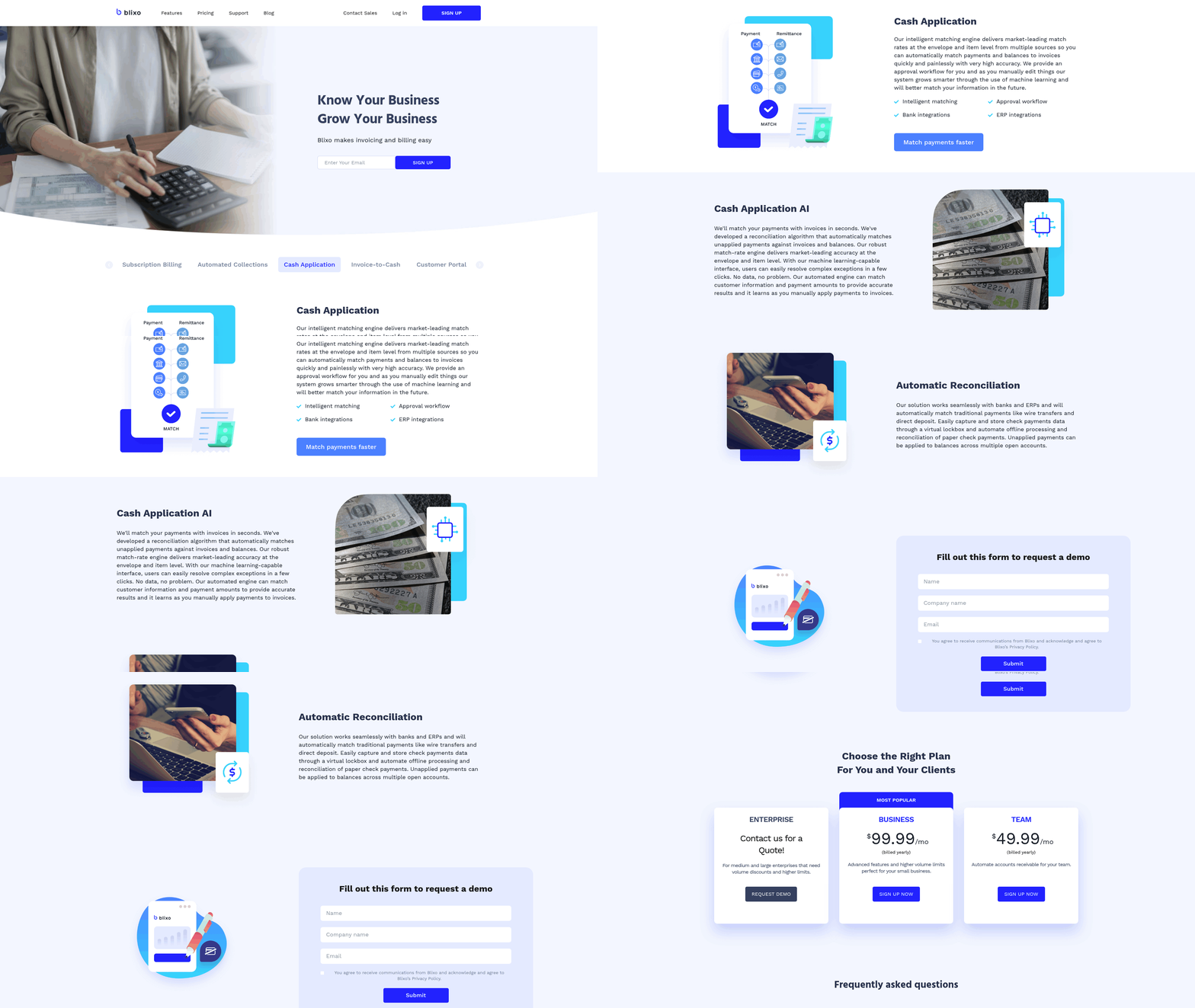
Automating cash application and reconciliation streamlines your accounts receivable process, minimizes manual errors, and provides real-time visibility into your cash flow. With Blixo, you can use AI-powered tools to match payments to invoices automatically and track transactions as they happen. This section walks you through enabling these features, setting up tracking, and understanding the impact on your financial operations.
How to Enable AI-Powered Cash Application
AI-powered cash application uses machine learning to match incoming payments with the correct invoices, reducing manual intervention and errors. This is especially useful for businesses handling high volumes of transactions.
- manage to the Accounts Receivable section in your Blixo dashboard
- Select Cash Application Settings from the menu
- Toggle on AI-Powered Matching to activate the feature
- Review and adjust Matching Rules to align with your invoice structure
As mentioned in the Setting Up Blixo for Accounts Receivable Automation section, configuring these features begins with selecting the appropriate modules for your business needs. By automating this process, you eliminate the risk of human error in payment allocation, ensuring faster reconciliation and fewer disputes. For step-by-step guidance, see Blixo’s setup tutorial.
Setting Up Real-Time Payment Tracking
Real-time tracking allows you to monitor payments as they’re processed, giving your team immediate visibility into cash flow. This helps in forecasting and managing liquidity effectively.
- Access the Payment Monitoring tab under Cash Flow Tools
- Enable Live Payment Updates to receive instant notifications
- Set up Custom Alerts for specific payment events or thresholds
This feature ensures that you’re always aware of incoming funds, reducing delays in recognizing revenue and improving overall financial planning. Learn more about real-time tracking features here.
Implementing Automated Reconciliation
Automated reconciliation matches transactions across accounts, flagging discrepancies for review. This reduces the time spent on manual audits and lowers the risk of accounting errors.
- Go to the Reconciliation Center in Blixo
- Schedule Daily Auto-Reconciliation to run at a set time
- Assign Reviewers to validate flagged transactions
To ensure compliance during the review process, refer to the Ensuring Compliance and Security section for guidelines on maintaining data integrity and regulatory adherence. Studies show that businesses using automated reconciliation see a 40–60% reduction in accounting errors. One company reported resolving discrepancies 70% faster after implementation. Explore best practices for reconciliation automation.
Real-World Examples of Improved Efficiency
Businesses that adopt Blixo’s automation tools often see measurable improvements. For instance, a mid-sized e-commerce firm reduced its DSO by 25% within six months by automating cash application. Another company improved cash flow forecasting accuracy by 50% using real-time payment tracking. Building on concepts from the Why Accounts Receivable Automation Matters section, these efficiency gains directly address the financial losses caused by manual processes. These results highlight the tangible benefits of integrating automation into your financial workflows.
By following these steps, you can ensure your accounts receivable process is efficient, accurate, and scalable. Each feature builds on Blixo’s AI-driven capabilities, allowing you to focus on strategic decisions rather than manual data entry.
Creating a Customer Self-Service Portal
Creating a customer self-service portal with Blixo starts by aligning the portal’s features with your business goals. A well-designed portal reduces manual tasks, improves customer satisfaction, and lowers support costs. Begin by identifying the core functions customers need, such as invoice tracking, payment scheduling, or dispute resolution, and map these to Blixo’s automation capabilities. As mentioned in the Setting Up Blixo for Accounts Receivable Automation section, selecting the right modular tools is essential for achieving these business objectives.
What Features Should Your Portal Include?
Self-service portals thrive on simplicity and accessibility. Start with these foundational elements:
- [ ] Enable real-time access to invoices and payment history to let customers track their financial status without contacting support.
- [ ] Integrate automated payment tools to allow customers to pay bills directly through the portal, reducing delays and manual follow-ups.
- [ ] Add a searchable knowledge base for common questions, such as late fee policies or payment methods, to cut down on repetitive support requests.
- [ ] Implement secure user authentication to protect sensitive financial data, as outlined in the Ensuring Compliance and Security section, while ensuring a seamless login experience.
How to Define Success Metrics and KPIs
Measuring the portal’s impact requires clear benchmarks. Focus on metrics that reflect both customer satisfaction and operational efficiency:
- Average resolution time: Track how quickly customers resolve issues independently versus through support.
- Customer satisfaction score (CSAT): Use post-interaction surveys to gauge whether users find the portal helpful.
- Support query reduction: Measure the percentage drop in tickets related to invoice disputes or payment inquiries.
For example, one company using Blixo’s portal reported a 35% decline in support calls within three months. Building on concepts from the Automating Cash Application and Reconciliation section, which highlights the efficiency gains of automation, these results underscore the value of streamlined workflows.
What Results Can You Expect?
Self-service portals typically boost customer satisfaction by 20–30% while reducing support costs by up to 35%. For instance, a mid-sized company using Blixo’s automation tools saved 200+ hours annually by shifting repetitive tasks to their portal. As noted in the Why Accounts Receivable Automation Matters section, manual processes cost businesses billions annually, making these savings particularly impactful.
To maximize impact, pair your portal with Blixo’s automation features, such as automated invoice reminders and real-time payment tracking. Start with a pilot group of customers to test the portal’s usability, then scale based on performance data.
Ensuring Compliance and Security
Ensuring compliance and security in accounts receivable automation with Blixo requires a structured approach that aligns with regulatory standards, protects sensitive data, and trains teams to maintain accuracy. Below is a detailed checklist to guide your implementation while minimizing risks.
How to Ensure Compliance with GDPR, HIPAA, and Other Regulations
Regulatory compliance starts with understanding the requirements of laws like GDPR and HIPAA. These frameworks mandate strict data protection measures, including encryption, access controls, and audit trails. Blixo supports compliance by offering 256-bit encryption for data at rest and in transit, granular user permissions, and automated audit logging. For example, one company reduced compliance risks by 40% after implementing Blixo’s role-based access controls. Building on concepts from the Setting Up Blixo for Accounts Receivable Automation section, configuring access controls involves tailoring permissions to align with business needs and regulatory requirements.
- Enable data encryption to meet GDPR’s requirement for secure data processing.
- Configure access controls to limit user permissions based on roles.
- Audit logs regularly to demonstrate compliance during regulatory reviews.
The average cost of non-compliance with data protection laws is $4.35 million per incident, according to IBM’s 2023 Cost of a Data Breach Report. Blixo’s built-in compliance features help businesses avoid these costs by automating key safeguards..
What Security Measures Should You Prioritize?
Blixo’s SaaS service includes advanced security tools to protect financial data from breaches and fraud. These include AI-driven fraud detection, multi-factor authentication, and virtual lockbox capabilities for secure payment processing. A logistics firm slashed payment errors by 20% after adopting Blixo’s machine-learning matching engine, which reduces manual reconciliation risks.
- Activate multi-factor authentication for all user accounts to prevent unauthorized access.
- Use virtual lockbox to isolate incoming payments and reduce fraud exposure.
- Run penetration tests quarterly to identify and patch vulnerabilities.
As mentioned in the Setting Up Blixo for Accounts Receivable Automation section, Blixo’s integration with ERPs like QuickBooks and Xero ensures data consistency while maintaining security. For instance, a manufacturing business recovered $500K in delayed receivables by combining Blixo’s automated invoicing with real-time ERP sync..
How to Train Your Team for Compliance and Accuracy
Even the strongest security tools fail without proper training. Blixo’s SaaS service requires teams to understand data handling protocols, compliance workflows, and error resolution processes. Role-specific training, such as onboarding for finance managers versus customer service staff, ensures everyone maintains data integrity. Building on concepts from the Setting Up Blixo for Accounts Receivable Automation section, role-based training should align with the modules selected to address your business’s unique compliance needs.
- Conduct role-based training on Blixo’s compliance features and error-resolution tools.
- Set up monitoring dashboards to track DSO, error rates, and payment success metrics.
- Review compliance policies monthly to adapt to regulatory changes.
A Miami-based startup improved sales conversion by 70% after training teams on Blixo’s dynamic discounting and automated reminders. Regular audits of training effectiveness reduced human errors in invoicing by 39%, aligning with Blixo’s error-resolution benchmarks.
Frequently Asked Questions
1. How much can businesses save by automating accounts receivable?
Automating AR reduces administrative costs by 30% and saves U.S. businesses $1.3 trillion annually by cutting errors, disputes, and payment delays. Small businesses recover 30% of lost revenue through automation.
2. How quickly does AR automation improve cash flow?
Automation cuts Days Sales Outstanding (DSO) by 30–50% in 6–12 months. One manufacturing firm reduced DSO from 72 to 45 days, recovering $500,000 in cash flow.
3. What percentage of invoice errors does Blixo resolve automatically?
Blixo’s AI resolves 39% of invoice errors automatically and matches 99.5% of payments to invoices without manual effort, streamlining reconciliation and dispute resolution.
4. Which businesses benefit most from AR automation?
Small/medium businesses (SMBs) and high-volume enterprises gain the most. Subscription models see 70% fewer manual tasks, while customer-focused firms achieve 25% faster on-time payments.
5. How does automation improve sales conversions?
Automated reminders and dynamic discounting boost sales conversions by 70%, as seen in Miami-based startups. Faster collections and clear payment terms enhance customer trust and retention.
6. What is the average time to process invoices manually?
Manual invoice processing takes up to 45 days for small businesses, compared to 30–50% faster processing with automation, reducing delays and improving cash flow efficiency.
7. Can AR automation reduce payment disputes?
Yes, automation cuts disputes by resolving 39% of errors automatically and matching 99.5% of payments to invoices, minimizing manual intervention and clearing discrepancies quickly.