

Cloud vs On-Premise Accounts Receivable Automation

Key Takeaways
- Cloud-based AR automation reduces DSO by up to 30%, boosting cash flow for businesses like Coca-Cola Bottlers.
- Companies using cloud solutions see an 85% drop in manual collection activities via automated reminders and payment portals.
- Automated systems cut DSO by 30% for healthcare providers switching from paper to electronic statements.
- Cloud AR solutions offer scalability and remote infrastructure, avoiding upfront IT costs for growing businesses.
- On-premise systems provide control but require higher maintenance compared to cloud’s managed infrastructure.
- AR automation can recover millions by streamlining collections and payment tracking, as seen in case studies.
- Manual AR processes cause delays, errors, and 30% higher administrative burdens than automated systems.
Related Video
Watch: Automating AR Invoice Processing: On-Premise to Oracle Fusion using OIC by Bizinsight Consulting Inc
Why Accounts Receivable Automation Matters
Accounts receivable automation transforms financial operations by slashing days sales outstanding (DSO) and accelerating cash flow. For example, companies using cloud-based solutions report up to a 30% reduction in DSO, while manual processes often lead to delays, errors, and increased administrative burdens. These improvements are not hypothetical-businesses like Coca-Cola Bottlers have recovered millions by automating collections and payment tracking. The shift from manual to automated systems isn’t just about efficiency; it’s about survival in markets where cash flow dictates growth. As mentioned in the Cloud-Based Accounts Receivable Automation section, these solutions offer scalability and remote infrastructure that underpin such efficiency gains.
How Automation Improves Cash Flow and Operational Efficiency
Automated accounts receivable systems reduce the time and effort required to track payments, generate invoices, and reconcile discrepancies. Consider the 85% drop in manual collection activities reported by companies using cloud-based automation. By automating reminders, payment portals, and cash application, businesses avoid the delays caused by manual follow-ups. For instance, a healthcare provider cut DSO by 30% after replacing paper statements with electronic delivery, while a manufacturing firm improved cash flow by 25% through automated invoicing. These gains come from faster payment cycles and reduced administrative overhead.
The benefits extend beyond speed. Real-time visibility into aging reports and cash flow projections allows finance teams to act proactively. SAP S/4HANA Cloud users, for example, achieved 30% lower DSO by using AI-driven reconciliation tools. Similarly, NetSuite integrations with platforms like HighRadius report 90% auto-cash application rates, minimizing errors and accelerating month-end close processes. Building on concepts from the Cloud-Based Accounts Receivable Automation section, these integrations highlight how cloud infrastructure enables seamless data synchronization and advanced analytics.
The Hidden Costs of Manual Accounts Receivable Processes
Manual AR workflows create bottlenecks that cost businesses time, money, and customer trust. A single data entry error can delay payments for weeks, while disjointed communication between departments increases the risk of bad debt. For example, one retail company lost $2.5M annually to late fees and write-offs before automating its billing process. Manual systems also force teams to spend 150+ hours monthly on tasks like invoice matching and payment tracking-time that could be redirected to strategic financial planning.
The risks extend beyond internal inefficiencies. Without automation, businesses struggle to enforce consistent payment terms or detect fraud. A finance leader at Duncan-Parnell noted that their back office saved 30% of its time after implementing automated cash application tools, reducing reliance on error-prone spreadsheets. Meanwhile, manual processes leave little room for customer self-service, a feature 80% of B2B buyers now expect. Companies that fail to adopt automation risk losing clients to competitors offering faster, more transparent payment experiences.
Who Gains the Most from AR Automation
Small and medium-sized businesses (SMBs) often benefit most from automation due to limited resources. A midsize supplier using Epicor Prophet 21 reduced bad debt write-offs by 40% after deploying cloud-based A/R tools, while a logistics firm cut DSO from 60 to 34 days using SAP’s cloud solution. Enterprises, meanwhile, use automation to scale operations-Konica Minolta saved $1.3M annually through improved interest calculations and payment scheduling.
Enterprises with high transaction volumes also benefit from automation’s scalability. Cloud solutions integrate seamlessly with ERPs like NetSuite and SAP, enabling real-time data synchronization across departments. For organizations prioritizing cost predictability, cloud-based tools eliminate the need for on-premise infrastructure upgrades. As one financial analyst noted, “Cloud-based solutions are the future of accounts receivable, offering agility and cost-effectiveness”-a sentiment echoed by 80% of businesses adopting automation by 2025.
Real-World Success Stories
Case studies underscore the tangible impact of AR automation. M&A Supply Company saw dozens of online payments within days of deploying a cloud solution, while a financial services firm improved customer satisfaction by 20% through streamlined billing. Duncan-Parnell’s transition to Unified A/R freed 30% of its back-office staff for higher-value tasks, and Coca-Cola Bottlers recovered $33.4M in 34 days-compared to the industry’s 90-day average-by automating dispute resolution.
These examples highlight automation’s versatility. Whether reducing DSO, minimizing errors, or enhancing customer experience, the results align with industry benchmarks: 80% of businesses plan to adopt automation tools by 2025, and cloud solutions lead the charge. As one ERP consultant stated, “Automation is the biggest trend driving AR management”, proving that the shift isn’t just beneficial-it’s inevitable.
Cloud-Based Accounts Receivable Automation
Cloud-based accounts receivable automation streamlines financial operations by using remote infrastructure to manage invoicing, payment processing, and cash flow tracking. These solutions stand out for their ability to scale with business growth, reduce reliance on internal IT resources, and provide real-time insights into receivables. Unlike on-premise systems, cloud platforms handle updates, security, and maintenance centrally, allowing businesses to focus on core operations. Below, we break down the key features, benefits, and practical considerations for adopting cloud-based AR automation..
What Features Define Cloud-Based AR Automation?
Cloud-based accounts receivable solutions are built on flexibility and advanced connectivity. Key features include scalability, enabling businesses to adjust resources as transaction volumes grow, and real-time reporting, which offers instant visibility into aging reports, payment statuses, and cash flow forecasts. For example, platforms like SAP S/4HANA Cloud use AI-powered cash application to automate reconciliation and reduce manual errors. Security is another cornerstone, with enterprise-grade controls such as AES-256 encryption and multi-factor authentication protecting sensitive financial data. Integration capabilities are equally critical-prebuilt APIs allow seamless connections to ERP systems like NetSuite and Epicor Prophet 21, ensuring data flows smoothly across platforms.
| Feature | Cloud-Based Solution | On-Premise Alternative |
|---|---|---|
| Scalability | Adjusts automatically to business growth | Requires hardware upgrades |
| Maintenance | Managed by the provider | Demands dedicated IT staff |
| Real-Time Insights | Dashboards and analytics accessible anytime | Delayed reporting due to manual updates |
| Security | Centralized encryption and compliance audits | Responsibility falls on internal teams |
As mentioned in the On-Premise Accounts Receivable Automation section, cloud systems contrast sharply with on-premise models in infrastructure management and flexibility..
How Do Cloud-Based Solutions Benefit Businesses?
The financial and operational advantages of cloud-based AR automation are substantial. By offloading infrastructure management to vendors, companies reduce IT costs and avoid upfront hardware investments. For instance, a manufacturing firm using Doculivery’s cloud solution cut Days Sales Outstanding (DSO) by 30% through automated payment reminders and online portals. Similarly, healthcare providers improved cash flow by 25% by replacing manual mailing with electronic statements.
Collaboration also improves, as cloud platforms enable remote access for finance teams and customers. Unified A/R for Epicor Prophet 21, for example, lets users process payments and resolve disputes from any device. This flexibility is particularly valuable for distributed teams. Additionally, automation accelerates month-end closes-HighRadius customers reported a 75% improvement in revenue recognition productivity by automating data reconciliation.
Building on concepts from the Comparison of Cloud and On-Preme Solutions section, cloud-based systems offer distinct advantages in agility and operational efficiency..
What Should Businesses Consider When Implementing Cloud-Based AR?
Transitioning to a cloud solution requires careful planning, especially around data migration and system integration. Legacy data must be cleaned and transferred securely, often using tools like Oracle Integration Cloud (OIC) for seamless ERP connections. For example, SAP S/4HANA Cloud users integrated receivables management with existing logistics systems in under an hour, minimizing downtime.
Security remains a top concern. Cloud providers typically enforce PCI compliance through fraud detection tools and encrypted payment gateways, as detailed in the Security and Compliance Considerations section. However, businesses must verify these measures align with their regulatory needs. Duncan-Parnell, a Prophit 21 user, highlighted how Unified A/R’s fraud management reduced risks while streamlining workflows.
Cost structures also differ-cloud solutions often use subscription models, offering predictable expenses compared to on-premise’s capital-heavy approach. However, long-term savings depend on transaction volumes and integration complexity. Companies with high growth potential, like Coca-Cola Bottlers (which recovered $33.4M via HighRadius), often see rapid ROI through reduced manual labor and faster collections..
Real-World Impact of Cloud-Based AR Automation
Case studies underscore the transformative potential of these systems. M&A Supply Company saw immediate savings when customers began using online payment portals, while Konica Minolta achieved $1.3M in annual interest savings by optimizing cash flow. In the financial sector, a services firm improved customer satisfaction by 40% after SAP’s cloud solution automated billing and dispute resolution.
Expert opinions reinforce these outcomes. As one G2 reviewer noted, “Cloud AR platforms eliminate the guesswork in collections.” Similarly, a Reddit discussion on modernizing B2B payments emphasized embedded solutions as the next frontier for reducing friction in receivables.. Cloud-based accounts receivable automation offers a compelling blend of efficiency, security, and scalability. While implementation demands strategic planning, the long-term benefits-such as reduced DSO, lower operational costs, and enhanced customer experiences-make it a strong choice for businesses aiming to future-proof their financial workflows. For organizations prioritizing agility and real-time insights, cloud solutions like Doculivery or SAP S/4HANA Cloud provide a strong foundation for growth.
On-Premise Accounts Receivable Automation
On-premise accounts receivable automation gives businesses full control over their financial data and workflows. This model stores software and data locally, allowing organizations to customize systems to match exact operational needs. Unlike cloud-based alternatives, on-premise solutions do not rely on internet connectivity for core functionality, making them ideal for companies in regions with unstable networks or industries with strict compliance requirements. The key advantage lies in data sovereignty, where sensitive customer and financial information remains within the organization’s physical infrastructure, reducing exposure to external breaches. As mentioned in the Security and Compliance Considerations section, this model aligns with regulatory demands for strict data residency policies.
What Are the Core Features of On-Premise AR Automation?
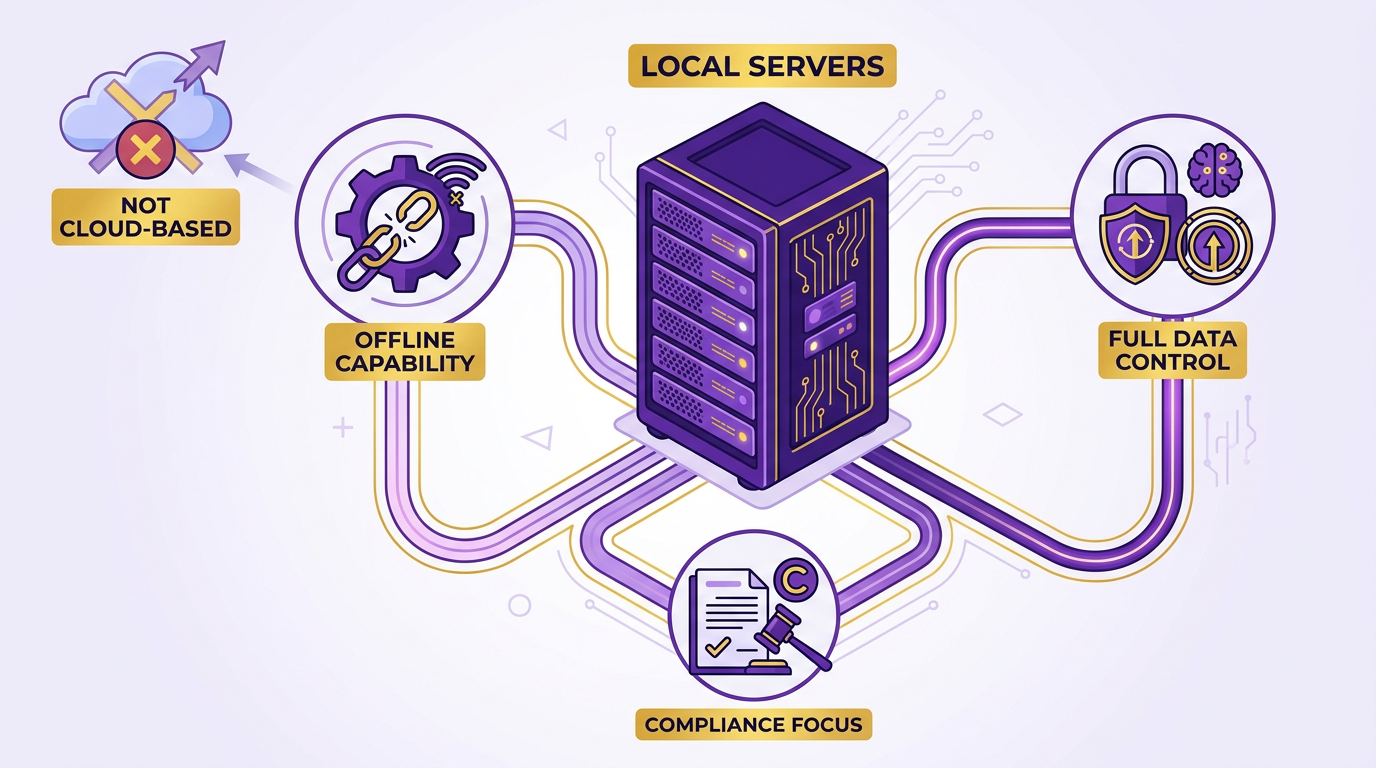
On-premise systems prioritize customization and integration flexibility. Businesses can tailor workflows to align with specific accounting practices, such as unique invoicing cycles or payment terms. For example, a manufacturing firm might integrate AR automation with legacy ERP systems to maintain existing reporting structures, as detailed in the Implementation and Integration Considerations section. These solutions also support offline operations, ensuring uninterrupted function during connectivity outages. Another critical feature is physical data control, where encryption and access permissions are managed internally. This is vital for industries like healthcare or finance, where regulatory standards demand strict data residency policies.
A comparison of on-premise and cloud-based AR solutions highlights their differences clearly:
| Feature | On-Premise | Cloud-Based |
|---|---|---|
| Data Control | Full ownership and physical storage | Data stored remotely by third-party |
| Customization | High (tailored to internal workflows) | Limited to vendor-defined templates |
| Internet Dependency | Minimal (offline functionality) | Requires stable connectivity |
| Security Responsibility | Managed internally | Vendor handles infrastructure security |
What Benefits Does On-Premise AR Automation Offer?
The primary benefit of on-premise solutions is reduced reliance on internet infrastructure. This is critical for companies in remote locations or those handling high-volume transactions that cannot afford downtime. As mentioned in the Cloud-Based Accounts Receivable Automation section, cloud solutions require stable connectivity, which may not always be feasible. For instance, a logistics firm with branch offices in rural areas might prioritize on-premise systems to avoid disruptions during network failures. Another advantage is enhanced data security, as physical servers allow in-house teams to enforce encryption, access logs, and disaster recovery protocols.
A real-world example from the sources shows a manufacturing firm that reduced Days Sales Outstanding (DSO) by 30% using on-premise automation. By automating invoice reminders and integrating with internal payment portals, the company streamlined collections while maintaining compliance with industry-specific data laws, a benefit emphasized in the Why Accounts Receivable Automation Matters section. Similarly, a healthcare provider improved cash flow by 25% after replacing manual billing with on-premise AR tools, ensuring patient information stayed within secured, on-site servers.
What Challenges Should Businesses Consider?
Implementing on-premise AR automation requires significant upfront investment. Organizations must purchase servers, storage hardware, and software licenses, followed by ongoing maintenance costs. A dedicated IT team is essential to manage updates, troubleshoot issues, and ensure compatibility with existing financial systems. For example, a business using Oracle Fusion might need specialized staff to handle integrations between on-premise AR tools and cloud-based ERP modules, as highlighted in the Implementation and Integration Considerations section.
Maintenance also demands long-term commitment. Unlike cloud solutions where vendors handle scalability and security, on-premise systems require businesses to allocate resources for server upgrades, data backups, and compliance audits. A single point of failure, such as a server crash, can disrupt operations until IT resolves the issue. Despite these hurdles, companies with mature IT infrastructures and strict security requirements often find the trade-offs justified.
Comparison of Cloud and On-Premise Solutions
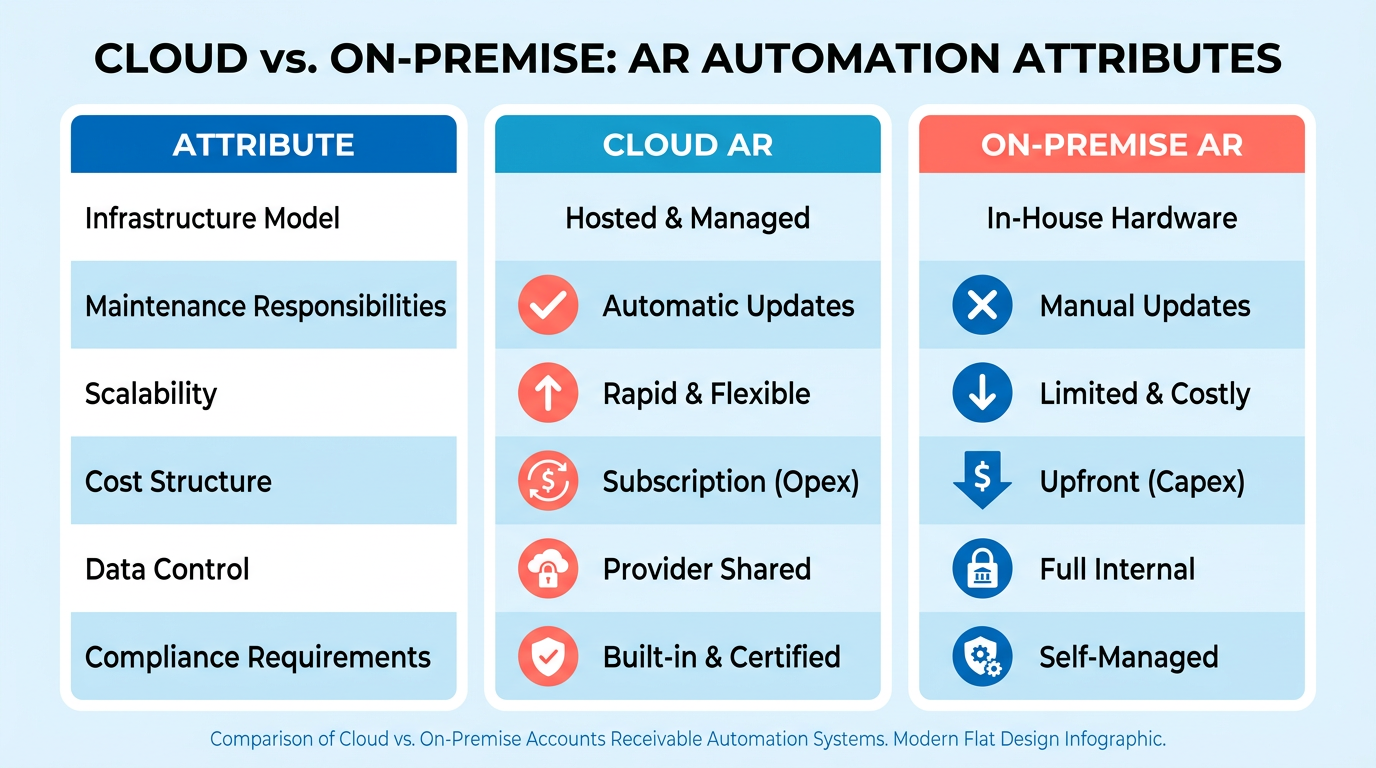
Cloud and on-premise accounts receivable (AR) automation differ fundamentally in how they handle infrastructure, maintenance, and scalability. Cloud solutions offer remote access to software hosted by third-party providers, as detailed in the Cloud-Based Accounts Receivable Automation section, while on-premise systems require businesses to manage hardware, software, and updates internally, as explained in the On-Premise Accounts Receivable Automation section. Cloud platforms scale automatically to handle transaction volumes, whereas on-premise systems need manual infrastructure upgrades. For example, cloud-based AR automation can reduce Days Sales Outstanding (DSO) by 30% through automated reminders, while on-premise systems often rely on manual processes that slow collections.
| Feature | Cloud-Based AR Solutions | On-Premise AR Solutions |
|---|---|---|
| Scalability | Automatically scales with demand | Requires manual hardware/software upgrades |
| Security | Enterprise encryption (e.g., AES-256) | Full data residency control |
| Cost | Predictable monthly fees | High upfront costs + ongoing maintenance |
How Do Security and Compliance Needs Influence the Decision?
Security considerations vary based on industry regulations and data sensitivity. Cloud providers implement multi-factor authentication and real-time threat monitoring, as outlined in the Security and Compliance Considerations section, while businesses in highly regulated sectors may prefer on-premise systems to ensure compliance with HIPAA or SOC 2 standards.
For example, a financial services firm using SAP’s cloud AR solution employs AI-driven fraud detection to maintain PCI compliance while streamlining billing. Meanwhile, a manufacturing company retained on-premise systems to meet specific data residency laws, despite higher maintenance costs.
Best Practices for Choosing the Right Solution
Evaluate these factors to make an informed decision: … 4. Cost Structure: Cloud platforms offer predictable costs; on-premise systems require budgeting for hardware and updates.
For example, a business with 10,000+ monthly invoices and limited IT staff should prioritize cloud solutions like NetSuite’s AR automation, which achieved a 90% auto-cash application rate. Conversely, a firm with static transaction volumes and strict regulatory control might justify on-premise systems despite higher long-term costs.
Implementation and Integration Considerations
Data Migration and System Integration
Cloud-based accounts receivable automation solutions streamline integration with ERP and CRM systems through prebuilt APIs, as seen in platforms like SAP S/4HANA Cloud and HighRadius for NetSuite. These APIs enable bi-directional data synchronization, ensuring real-time visibility between financial and operational systems. For example, Unified A/R integrates seamlessly with Epicor Prophet 21 in both cloud and on-premise environments, reducing manual reconciliation tasks. As mentioned in the Cloud-Based Accounts Receivable Automation section, this seamless integration is a key advantage of cloud-native platforms.
On-premise solutions, however, often require custom middleware or point-to-point integrations, which can delay implementation. A case study from Duncan-Parnell highlights that transitioning to an on-premise system without cloud-native integration tools led to hours wasted on manual data entry, creating a “single biggest point of failure” during invoice processing.
| Integration Method | Cloud-Based | On-Premise |
|---|---|---|
| API Support | Prebuilt connectors for major ERPs (e.g., NetSuite, SAP) | Custom development required |
| Time to Integrate | Hours to days for ERP/CRM sync | Weeks to months for custom workflows |
| Maintenance | Vendor-managed updates | Internal IT team responsible |
Implementation Timelines and Resource Requirements
Cloud solutions often reduce implementation timelines to under an hour, as noted in the Unified A/R case study for Epicor Prophet 21. This speed stems from cloud providers handling infrastructure setup, leaving businesses to focus on configuration. In contrast, on-premise systems demand dedicated IT resources for hardware provisioning, software licensing, and ongoing maintenance. Building on concepts from the Comparison of Cloud and On-Premise Solutions section, cloud deployments offer faster scalability while on-premise models require careful resource planning.
A healthcare provider’s transition to cloud-based AR automation, for example, cut DSO by 25% within weeks by replacing manual mailing with electronic delivery. Meanwhile, a manufacturing firm reported a 30% reduction in DSO after deploying cloud APIs for automated reminders. On-premise projects, however, may take months to complete, especially when hybrid integrations with legacy systems are required.
| Resource Demand | Cloud-Based | On-Premise |
|---|---|---|
| IT Workload | Minimal (vendor-managed) | High (maintenance, updates) |
| Cost Model | Subscription-based | Upfront licensing + hardware |
| Scalability | Auto-scales with transaction volume | Requires manual server upgrades |
Training and Change Management
Adopting AR automation requires dual training for both end-users and IT teams. Cloud platforms like Doculivery offer vendor-led training programs, reducing the burden on internal staff. For instance, Unified A/R’s implementation team provided hands-on support to COO Mike Blasdell’s team, enabling staff to manage cash application workflows within hours.
On-premise systems, however, often lack centralized training resources. A case study from Oracle Fusion highlights that manual data movement between on-premise billing systems and cloud platforms created spaghetti junctions of hybrid integrations, requiring extended onboarding. Change management is critical here: one G2 reviewer noted that resistance to new workflows delayed adoption in their finance department until phased rollouts and role-specific training were introduced.
| Training Focus | Cloud-Based | On-Premise |
|---|---|---|
| User Training | Guided tutorials, live demos | In-house workshops, documentation |
| IT Support | Vendor-managed SLAs | Internal troubleshooting |
| Adoption Strategy | Gradual rollout with feedback loops | Centralized training for all users |
Best Practices for Smooth Implementation
- Evaluate Integration Complexity: Use cloud-native APIs if your ERP (e.g., SAP, NetSuite) requires frequent data sync. Avoid on-premise solutions if real-time analytics are critical.
- Prioritize Vendor Support: Cloud providers like Doculivery offer 24/7 support, while on-premise vendors may charge extra for SLA compliance.
- Plan for Change: A financial analyst noted that automation is the biggest trend in AR, but success hinges on staff readiness. Communicating benefits like 30% faster collections, as discussed in the Why Accounts Receivable Automation Matters section, can reduce resistance.
By aligning implementation strategies with these considerations, businesses can minimize disruptions and maximize ROI from AR automation, regardless of deployment model.
Security and Compliance Considerations
Security and compliance considerations for cloud and on-premise accounts receivable (AR) automation solutions require careful evaluation of how each deployment model handles data protection, regulatory adherence, and operational resilience. Cloud-based solutions centralize security through provider-managed controls, while on-premise systems rely on internal IT teams to implement safeguards. Below is a structured analysis of key factors, supported by real-world examples and technical details from available sources..
How Do Cloud and On-Premise Solutions Differ in Data Security?
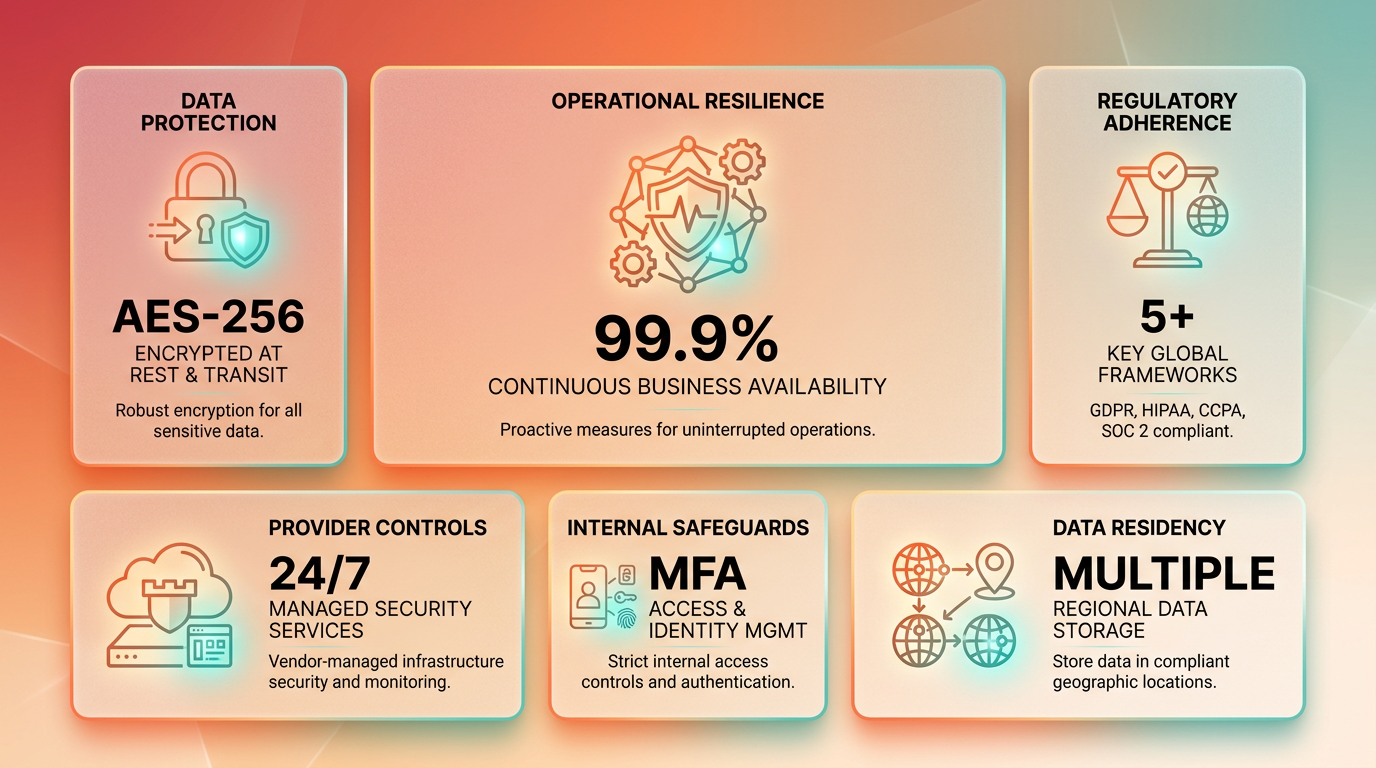
Cloud providers typically enforce enterprise-grade encryption for data at rest and in transit, often using AES-256 encryption and TLS protocols. Multi-factor authentication (MFA) is standard, reducing unauthorized access risks. For instance, cloud AR platforms like Unified A/R integrate fraud management tools to maintain PCI compliance during payment processing. In contrast, on-premise systems require organizations to configure encryption and authentication manually, which demands dedicated IT resources and expertise.
As mentioned in the Comparison of Cloud and On-Premise Solutions section, cloud vendors handle infrastructure security, whereas on-premise systems grant full visibility into data storage locations. This distinction is critical for industries with strict data residency laws. For example, healthcare providers using on-premise AR automation can ensure patient data never leaves internal servers, aligning with HIPAA requirements as detailed in the On-Premise Accounts Receivable Automation section.
A key advantage of cloud solutions is that security updates-such as patching vulnerabilities-are managed by the vendor, minimizing maintenance burdens. On-premise systems, however, grant full visibility into data storage locations, which can be critical for industries with strict data residency laws. For example, healthcare providers using on-premise AR automation can ensure patient data never leaves internal servers, aligning with HIPAA requirements..
What Compliance Challenges Arise for Each Model?
Regulatory compliance hinges on the deployment model’s flexibility to adapt to standards like GDPR and HIPAA. Cloud providers often build compliance into their platforms, offering features like audit trails, role-based access, and automated reporting. Unified A/R, for instance, includes tools to track data handling for GDPR’s “right to be forgotten” clauses.
On-premise systems require organizations to design and enforce compliance measures internally. This includes customizing access logs, encrypting sensitive data, and undergoing third-party audits. A manufacturing firm using on-premise AR automation reduced DSO by 30% while ensuring GDPR compliance by implementing internal encryption and regular compliance training for staff.
Both models face risks if not properly configured. For example, misconfigured cloud storage buckets have exposed financial data in the past, while on-premise systems may lack real-time monitoring for suspicious activity..
How Do Access Controls and Disaster Recovery Compare?
Cloud solutions simplify access management with centralized identity providers and role-based permissions. Users can be granted temporary access for audits or project work, and MFA ensures only authorized personnel can modify financial records. On-premise systems rely on internal directory services, which may require manual updates and increase the risk of human error.
Disaster recovery (DR) planning also differs significantly. Cloud providers typically offer georedundant backups and SLAs guaranteeing uptime, such as 99.9% availability. A healthcare provider using cloud AR automation reported 25% faster cash flow after switching to a DR plan that auto-migrated data to backup regions during outages, a benefit highlighted in the Cloud-Based Accounts Receivable Automation section. On-premise systems must invest in redundant hardware and offsite storage, which can be costly. For example, a midsize firm spent $50,000 annually on on-premise DR infrastructure, while a cloud alternative offered similar resilience for $15,000 per year..
Best Practices for Secure AR Automation
Regardless of deployment model, businesses should adopt these practices:
- Encrypt all sensitive data at rest and in transit, using standards like AES-256.
- Conduct regular penetration testing to identify vulnerabilities, especially for cloud APIs.
- Implement least-privilege access policies, granting users only the permissions they need.
- Validate compliance certifications (e.g., SOC 2, ISO 27001) for cloud providers.
- Maintain offline backups for on-premise systems and test DR drills quarterly.
A case study from Duncan-Parnell highlights the value of these practices: after enabling MFA and automated compliance reports, the company reduced manual reconciliation errors by 40% while maintaining HIPAA compliance..
Key Considerations at a Glance
| Feature | Cloud Solutions | On-Premise Solutions |
|---|---|---|
| Data Encryption | AES-256, TLS, managed by provider | Self-managed encryption |
| Compliance Tools | Built-in audit logs, GDPR/HIPAA templates | Custom configurations, internal audits |
| Access Controls | Role-based, MFA, centralized management | Manual updates, internal directory |
| Disaster Recovery | Georedundant backups, SLA guarantees | Redundant hardware, offsite storage |
| Cost of Compliance | Fixed cost in vendor pricing | Ongoing labor and infrastructure |
Conclusion and Recommendations
Summary of Key Findings
Cloud-based accounts receivable automation excels in flexibility, scalability, and cost predictability, making it ideal for businesses prioritizing rapid deployment and remote accessibility. On-premise solutions, while requiring higher upfront investment, offer granular control over data and systems, appealing to organizations with strict compliance or legacy infrastructure needs. As mentioned in the Comparison of Cloud and On-Preme Solutions section, cloud platforms like SAP S/4HANA and NetSuite’s integrations enable real-time cash flow insights and AI-driven automation, reducing Days Sales Outstanding (DSO) by up to 30% in some cases. Conversely, on-premise systems remain preferred in industries where data sovereignty is non-negotiable.
| Feature | Cloud-Based Solutions | On-Premise Solutions |
|---|---|---|
| Cost Model | Subscription-based, low upfront costs | High initial investment, ongoing maintenance |
| Scalability | Scales with business growth | Requires hardware upgrades for expansion |
| Security | Enterprise-grade encryption (e.g., AES-256) | Full internal control over security protocols |
| IT Dependency | Minimal-vendors handle updates | Requires dedicated IT staff for management |
Recommendations for Business Needs
Businesses with limited IT resources or fluctuating transaction volumes should prioritize cloud solutions. For instance, a mid-sized manufacturer adopting cloud AR automation reported a 30% faster collections process through automated payment reminders and online portals. Startups and scaling companies benefit from cloud-based flexibility, as seen in Epicor Prophet 21 integrations that cut implementation time to under an hour. However, enterprises in regulated sectors (e.g., healthcare) with strict data residency laws may find on-premise systems more aligned with compliance requirements, as discussed in the On-Premise Accounts Receivable Automation section.
For organizations with existing ERP ecosystems like SAP or NetSuite, hybrid approaches are worth exploring. Building on concepts from the Cloud-Based Accounts Receivable Automation section, SAP S/4HANA Cloud users achieved 30% DSO reductions by using AI-powered cash application tools, while NetSuite integrations delivered 90% auto-cash application rates. Businesses should evaluate their transaction complexity, integration needs, and long-term growth plans before deciding.
Future Trends and Best Practices
The accounts receivable market will continue shifting toward embedded automation and AI-driven insights. Over 80% of businesses are projected to adopt AR automation tools by 2025, prioritizing features like self-service customer portals and predictive cash flow analytics. To future-proof implementations, companies should:
- Prioritize API compatibility with existing systems (e.g., prebuilt connectors for ERPs), as detailed in the Implementation and Integration Considerations section.
- Adopt phased rollouts to test automation impacts on workflows without disrupting operations.
- Invest in employee training to maximize tool adoption-case studies show 75% productivity gains post-training.
For ongoing performance, regular audits of automation rules and reconciliation processes are critical. The healthcare provider case study, for example, improved cash flow by 25% after replacing manual mailing with electronic delivery but required continuous monitoring to address exceptions.
Final Steps for Implementation
Before committing to a solution, businesses should conduct a needs assessment focusing on:
- Volume and complexity: High transaction volumes favor cloud scalability.
- Compliance: Data residency laws may dictate on-premise needs.
- Budget: Cloud’s predictable costs contrast with on-premise’s CAPEX model.
Pilot programs are recommended to validate vendor claims. For example, Coca-Cola Bottlers recovered $33.4 million in 34 days using cloud-based automation, but this success hinged on aligning the tool with their specific billing cycles. Finally, partner with vendors offering strong support-experts emphasize that post-implementation guidance is key to sustaining efficiency gains.
By aligning technical requirements with strategic goals, companies can enable significant operational and financial benefits, whether through cloud agility or on-premise control.
Frequently Asked Questions
1. What are the main advantages of cloud-based AR automation over on-premise systems?
Cloud solutions offer scalability, remote access, and up to 30% faster DSO reduction. They eliminate upfront IT costs, unlike on-premise systems that require higher maintenance but provide greater control. Companies like Coca-Cola Bottlers report significant cash flow improvements with cloud platforms.
2. How much can automated AR systems reduce manual collection efforts?
Automated systems cut manual collection activities by 85% through reminders and payment portals. This reduces administrative burdens by 30% and accelerates payment processing for businesses like healthcare providers and manufacturers.
3. What impact does AR automation have on days sales outstanding (DSO)?
AR automation can decrease DSO by up to 30%. For example, healthcare providers switching to electronic statements achieved a 30% DSO reduction, while manufacturing firms improved cash flow by 25% via automated invoicing.
4. Do cloud-based AR solutions require significant upfront IT investments?
No, cloud AR solutions avoid upfront IT costs through remote infrastructure. This scalability benefits growing businesses, whereas on-premise systems require higher maintenance and initial capital expenditures for hardware and software.
5. How does automation improve cash flow for businesses?
Automation accelerates cash flow by reducing DSO and minimizing payment delays. A manufacturing company improved cash flow by 25% using automated invoicing, and Coca-Cola Bottlers recovered millions through streamlined collections and payment tracking.
6. What are the key drawbacks of on-premise AR systems?
On-premise systems demand higher maintenance, IT resources, and upfront costs. They lack the scalability of cloud solutions, making them less ideal for growing businesses needing flexible, remote infrastructure and rapid deployment.
7. Can AR automation help recover unpaid invoices more effectively?
Yes, automation streamlines collections by sending timely reminders and tracking payments in real time. This reduces errors and delays, helping businesses recover millions by improving payment accuracy and speeding up dispute resolution.