

Your Recurring Payment System Has Two Engines. You Automated One.

Key Takeaways
- Every recurring payment system runs on two engines: one that generates invoices and charges cards, and one that reconciles the money coming back in.
- Most SMBs automate the billing engine and run reconciliation by hand. That’s exactly where cash leaks and staff hours vanish.
- The billing engine is the invoice generator, pricing logic, subscription scheduler, and gateway connection working as one unit.
- Billing models come in three flavors: fixed charges the same amount, quantity-based scales with seats, usage-based meters consumption.
- Automating the billing engine is a solved problem. 42% of US customers already pay monthly bills on autopay.
- Netflix and Spotify run fixed billing. SaaS tools like Microsoft 365 blend fixed and quantity-based charges.
- The payment engine does the harder job: matching incoming payments to open invoices and chasing charges that never cleared.
The two engines nobody tells you about
A subscription business runs on two systems, and most founders only think about one. The front end invoices customers and charges their cards. That part’s visible. A second system works behind it, reconciling the funds and recovering the transactions that failed. When a growing business obsesses over the front end and leaves the back end to manual labor, it builds a bottleneck where revenue slips out and admin hours pile up.
The billing engine: who owes what, and when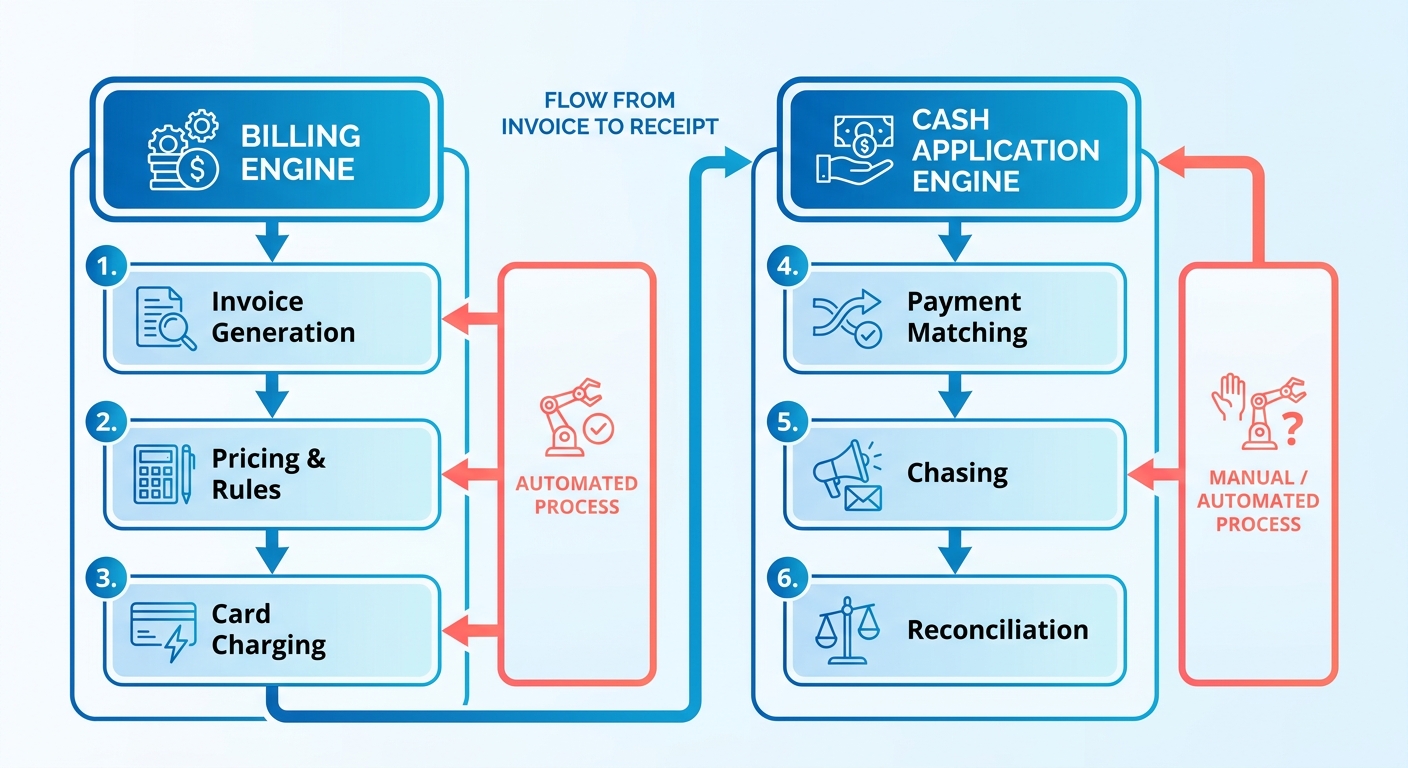
The billing engine creates the charge. It figures out the correct amount based on active subscriptions and customer profiles, then kicks off the transaction.
It coordinates a few things at once: it generates the invoice, applies your pricing rules, schedules the recurring charge, and hands the transaction securely to the gateway. All of it answers one question. Who owes what, and when do we charge them?
It handles different billing models without breaking a sweat. Flat rate, tiered pricing by user, consumption-based metering. The system adapts, so you can offer everything from a simple monthly access fee to a complex enterprise license without touching anything by hand.
And automating it is a solved problem. A recurring billing system generates invoices, applies the right price, and debits the card without anyone lifting a finger. Automated payments are the default consumer expectation now, so a hands-off checkout is just table stakes.
The payment engine: what happens after the charge fires
The payment engine reconciles money after the charge goes out. It takes over the moment a transaction starts, verifying that funds cleared, updating customer ledgers, and running recovery when a payment fails.
Its four jobs: cash application, reconciliation, dunning, collections. This is the engine most teams still run in spreadsheets. A support rep manually flags a delinquent account, pauses service, and drafts a series of awkward emails asking for updated card details.
That manual work is where involuntary churn hides. A card expires, the charge fails, and nobody follows up in time. Account updater tools and automated retries fix this, yet most SMBs never wire them in.
How the two engines work together
The billing engine fires the charge. The payment engine confirms the money landed and handles everything that goes sideways. Connect them, and a failed payment triggers an automatic retry, a friendly reminder, and a clean reconciliation once cash arrives.
Here’s the comparison, laid out:
| Engine / Task | Manual Approach | Automated Approach | Setup Effort | Difficulty (Manual) | Time Saved |
|---|---|---|---|---|---|
| Invoice generation | Hand-typed each cycle | Auto-generated on schedule | Low (1-2 days) | High | Hours per cycle |
| Recurring charge | Manual card entry | Scheduled auto-debit | Low (1-2 days) | Medium | Hours per cycle |
| Cash application | Spreadsheet matching | Auto-matched to invoice | Medium (3-5 days) | Very High | Days per month |
| Dunning / retries | Manual reminder emails | Smart retry + reminders | Medium (2-4 days) | Very High | Days per month |
| Collections follow-up | Ad-hoc phone calls | Sequenced, tone-aware outreach | Medium (3-5 days) | High | Days per month |
The billing engine is easy to automate, and most teams already have. The payment engine is fiddlier to set up but pays off bigger, because cash application and collections eat days, not hours.
Automate cash application and dunning together, and a bounced card gets a retry, then a reminder, then a sequenced follow-up that keeps the relationship intact. That’s the second engine most SMBs never turn on. Turning it on recovers revenue without souring anyone’s mood.
Setting up recurring payments: the checklist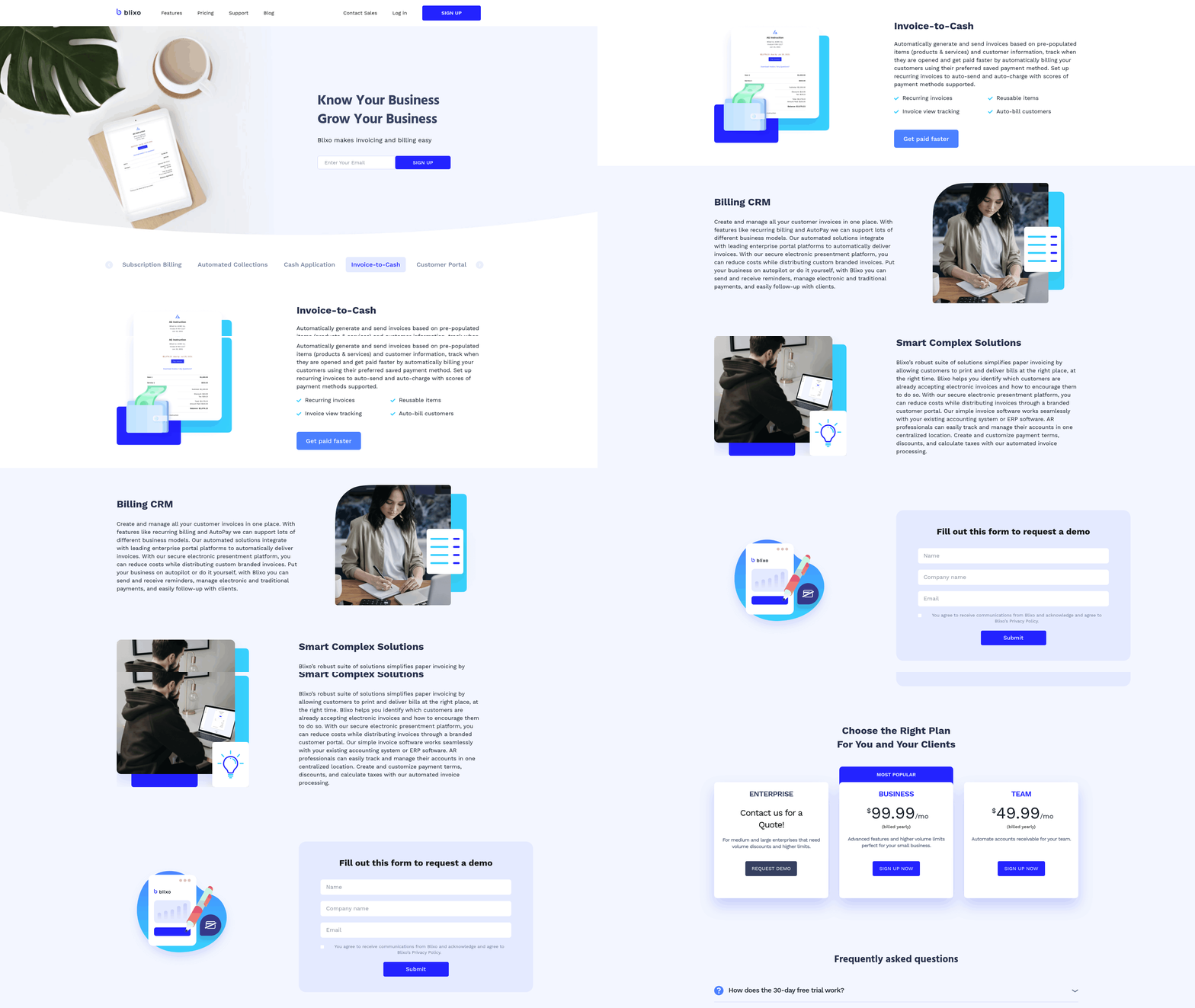
You need two things to run recurring payments: a payment gateway to move the money, and a subscription management platform to decide who gets charged what and when. Get both right and the first engine runs itself. The checklist below also wires up the second engine, cash application, which most SMBs still do by hand.
What you need before you start
Get four things in place before you charge a single card. Each one heads off a failure that leaks cash or annoys customers later.
- A payment gateway with tokenization. Secure gateways store card data as tokens, which protects customers and keeps you compliant with PCI DSS. Non-negotiable.
- Card networks and bank debit options. In the U.S., 60% of payments were made with cards between 2022 and 2023, per the Federal Reserve. But bank debit churns less. GoCardless reports churn as low as 0.5%, versus 5–10% for credit cards.
- An account updater tool. Refreshes expired or reissued card details automatically, killing involuntary churn before it starts.
- Clear billing terms shown to customers. Transparent terms cut inquiries and build trust every cycle.
How to configure the billing model
Pick your billing model first, because it dictates how the platform schedules and calculates every charge. Three models cover most SMBs, and each fits a different kind of product.
Fixed billing. The customer pays a flat rate on a schedule. Predictable cash flow, simple reconciliation. It won’t flex if usage swings, but that’s the tradeoff you signed up for.
Quantity-based billing. The charge scales with user licenses or units. Great for growing teams, though you need precise seat tracking or you’ll land in billing disputes.
Usage-based billing. The customer pays for exactly what they consume. Cost lines up with value and you capture revenue from heavy users, but the variability makes forecasting and payment matching harder.
A good platform handles all three without manual intervention, including retries and mid-cycle plan changes. The demand is there: 94% of subscription professionals expected revenue growth this year, per Chargebee.
How to connect the two engines
Most setups stop right here. You integrate the gateway, schedule the charges, then reconcile payments by hand. That leaves the second engine manual, and it’s where cash quietly leaks.
Integrate your billing system with customer records using APIs, hosted billing pages, or an admin dashboard. That links every charge to the right account, so incoming money matches what’s owed automatically. Skip it, and your team is back to chasing invoices in spreadsheets.
Then automate dunning. Failed payments cost the global economy over $118 billion in 2020, and subscription businesses lose around 9% of annual revenue to involuntary churn. Automated retries recover roughly one in four failed transactions on their own.
Automation alone won’t get you there, though. Customer outreach drives about 50% of payment recovery, so pair the retries with personalized reminders over email, SMS, or in-app. One subscription service cut churn 25% just by personalizing its dunning messages.
That mix of automation and a human touch is how you keep the second engine running without making customers sit through awkward payment nags.
What automating the billing engine actually buys you
Two things, fast: quicker payment recovery and fewer hours lost to manual work. It closes the gap between when work happens and when money lands. But the biggest win shows up in the second engine, cash application, where most SMBs still burn staff time by hand.
Faster payment recovery
Automation recovers money faster because it generates invoices instantly and chases failed payments without a human touching anything. Scheduled charges pull funds on a set cadence. Failed payments trigger automatic retries and reminders across email, SMS, or in-app.
Retry timing is what actually drives results. Recovery rates climb when the system spaces attempts around a customer’s likely payday instead of hammering the same card twice in an hour. Smart retry logic pulls back a meaningful chunk of transactions you’d otherwise write off, no manual follow-up required.
The customer-friendly part matters too. Automation handles the timing and retries; the copy in each reminder keeps the relationship intact. A polite, well-timed message reads as a helpful nudge, not a collections notice. That’s the difference between saving an account and losing it.
Less time lost to reconciliation
Automation strips out the manual grind of matching payments and reconciling accounts. Instead of clerks tying bank deposits to open invoices by hand, the system applies cash automatically and flags only the exceptions. Your team stops touching every transaction and works the accounts that actually need attention.
Manual billing is where errors breed. Wrong invoices, missed charges, late reconciliation, all leaking cash quietly. Finance teams report burning a big chunk of every month-end close on reconciliation that adds no strategic value. A bookkeeper spends Monday morning cross-referencing a bank statement against dozens of invoices, hunting one minor mismatch. Automated cash application does that instantly and surfaces the single payment that doesn’t reconcile. That’s the second engine finally running on its own.
Who gets the most out of it
SMBs, mostly, because they’re the ones still running cash application by hand while bigger firms automated it years ago. Any subscription business bleeding revenue to failed payments gains immediately. So does any team drowning in month-end reconciliation.
The math makes the case. Teams that automate matching often cut reconciliation time by more than half, freeing days each month that used to disappear into spreadsheets. Those hours move straight into work that grows the business.
Real-time revenue data is the quieter payoff. When cash application runs automatically, your reporting shows what’s actually been paid, not what someone keyed in three days ago. You see deferred versus earned revenue clearly, which keeps you compliant with standards like ASC 606.
Automated dunning has pushed timely payments up by 30% for the businesses that adopt it. Faster cash, fewer write-offs, and a finance team not spending its week on data entry.
The pattern holds across the board. Automate the invoicing, automate the retries, automate the matching. Then let humans handle the handful of accounts where a real conversation moves the needle.
Measuring success: the metrics that matter
You automated the billing engine. Now the dashboard tells you whether the whole system actually works. The metrics that matter for recurring revenue track two things: how much money you keep, and how much you lose to churn and failed payments. Most of these numbers trace back to the second engine.
The core recurring revenue metrics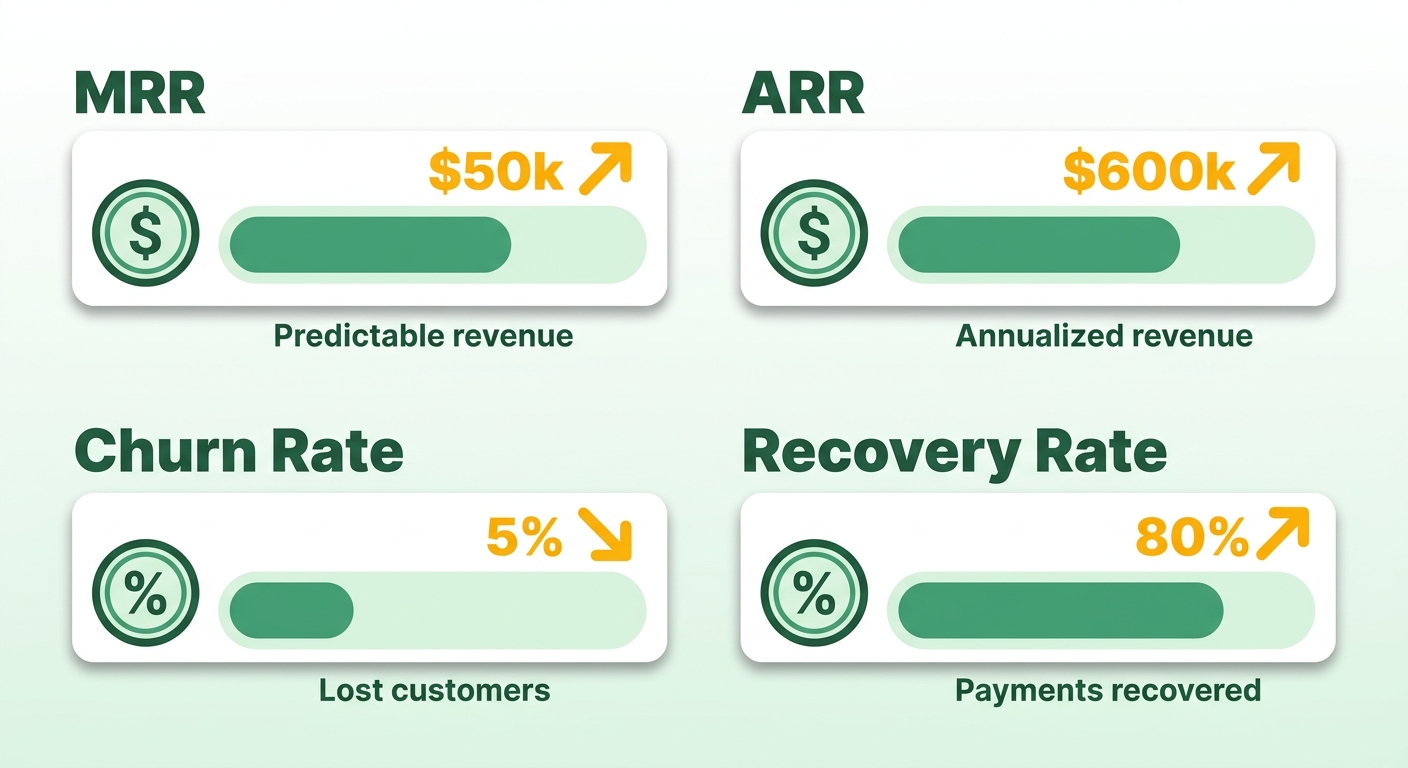
Every subscription business tracks four: MRR, ARR, churn rate, and recovery rate. Together they tell you whether revenue is growing, holding, or quietly leaking.
MRR (Monthly Recurring Revenue). The predictable revenue you bill every month across all active subscriptions. Your baseline for growth.
ARR (Annual Recurring Revenue). MRR times twelve. Useful for longer planning cycles and investor conversations.
Churn rate. The percentage of customers or revenue you lose in a period. Ignore it and it kills growth.
Churn splits two ways, and the split matters. Voluntary churn is a customer choosing to cancel. Involuntary churn is a payment failing silently. One needs a product or pricing fix, the other needs a billing fix. Lump them together and you hide which problem you actually have.
Why churn deserves more attention than growth
Retention compounds. In your favor when you get it right, against you when you don’t. Winning back a lost subscriber costs far more than keeping one, so every point you shave off churn drops straight to the bottom line.
The good news: churn from failed payments is highly recoverable. A solid share of failed payments can be won back through structured retry schedules. That means a chunk of your “lost” revenue is sitting there, waiting for a well-timed retry or reminder.
This is where your second engine earns its keep. Recovery rate measures how much failed-payment revenue you win back through retries and outreach. A big portion of that comes from direct customer communication, not automatic retries alone. Track both and you’ll see where your process holds and where it breaks.
Timing shapes recovery too. Retries scheduled around payday cycles recover more than ones fired off at random, and a failed card caught in the first few days is far easier to save than one left for weeks. If involuntary churn is bleeding you, retry timing is a lever most SMBs never pull.
Tracking these without the manual grind
Track recurring revenue metrics through real-time reporting tied directly to your billing and collections data. The mistake most SMBs make is pulling these numbers by hand from spreadsheets, which means they’re always staring at last month.
You need churn reporting in real time, segmented by voluntary versus involuntary. Manual reconciliation buries that distinction. When cash application runs by hand, you can’t tell whether revenue dropped because customers left or because payments failed and nobody noticed.
Skip the spreadsheet approach past a handful of subscriptions. The math breaks down fast. Automated subscription analytics that pull churn prediction, recovery rate, and MRR from the same source keep your numbers current and your decisions grounded in this week, not last quarter.
The point of measuring is action. If your dunning recovery rate sits below benchmark, your outreach needs work. If involuntary churn creeps up, your retry logic or payment options need attention. The metrics only help if the second engine feeding them runs on its own.
Frequently Asked Questions
1. How is bank debit different from credit card payment for recurring billing?
Bank debit produces significantly lower churn than credit cards because bank accounts do not expire, get lost, or get reissued like physical cards do. While credit cards remain popular for their speed and consumer familiarity, bank debits establish a direct, long-term link to the customer’s funding source, which dramatically reduces involuntary payment failures over time.
2. What is an account updater tool and why does it matter?
This tool works behind the scenes with card networks to automatically update cardholder credentials when a card is reissued, expired, or replaced. By keeping card details current without requiring customer intervention, it prevents transaction failures before they happen, keeping the recurring payment cycle completely seamless.
3. How does usage-based billing complicate reconciliation compared to fixed billing?
Reconciling usage-based billing is complex because invoice totals fluctuate based on consumption data that must be synced and calculated at the end of each cycle. This variability makes it difficult to predict cash flow and match incoming payments to open balances. In contrast, flat-rate billing uses identical, pre-determined amounts every cycle, allowing systems to easily auto-match payments without calculating variable consumption data.
4. Can I run recurring payments on spreadsheets if I only have a few subscribers?
While spreadsheets are manageable for a very small customer base, they quickly become a liability as your business scales. Manual tracking makes it difficult to isolate why customers are leaving and delays financial reporting. Transitioning to an automated system early ensures your records remain accurate and frees up valuable administrative time as your subscriber count grows.
5. Why do retries scheduled around payday recover more revenue?
Timing retries to align with common payroll cycles increases the likelihood that the customer’s account has sufficient funds to clear the transaction. If a system repeatedly attempts to charge a card immediately after a failure, it often hits the same insufficient-funds barrier. Spacing out these attempts gives the customer time to resolve balance issues or receive their next deposit.
6. What role does customer outreach play versus automatic retries in recovery?
While automated retries handle technical card issues, direct communication resolves personal or administrative payment hurdles, such as a customer needing to update their billing address or choose a different payment method. Combining automated retries with polite, personalized notifications ensures you reach customers who genuinely want to keep their subscriptions active but simply need a gentle reminder.
7. How does automated cash application help with ASC 606 compliance?
Revenue recognition standards require strict tracking of when service is delivered versus when payment is secured. Automated cash application instantly links received funds to the corresponding service period, eliminating the delays and human errors associated with manual bookkeeping. This ensures your financial statements always reflect an accurate, audit-ready breakdown of earned and deferred revenue.