

Automate Your Subscription Billing Once, Then Forget It

Key Takeaways
- Manual billing bleeds cash from B2B SaaS: hand-keyed invoices, email payment chasing, and spreadsheet reconciliation all add delay between the work you deliver and the money you collect.
- The global recurring payments market hit $130 billion in 2022 and is projected to reach $268 billion by 2033.
- Finance teams often burn 80% of their time on manual data entry instead of the analysis that actually drives decisions.
- Involuntary churn from silently failed payments accounts for a big chunk of total subscriber loss at most SaaS businesses.
- Automation fixes billing’s three core problems, wasted time, recurring errors, and late payments, by pulling humans out of routine tasks.
- Generic accounting software can spit out recurring invoices, but it rarely handles multiple charge types, automatic payment processing, or the messy proration B2B contracts demand.
Why manual billing is quietly costing you money
Manual billing drains cash from B2B SaaS companies, and it does it quietly. Every invoice keyed by hand. Every payment chased over email. Every reconciliation done in a spreadsheet. Each one adds delay between the work you ship and the money you collect. Automation closes that gap by running invoicing, collections, and cash application as one connected loop.
Recurring revenue is only predictable if the billing behind it actually works. As the volume of recurring transactions keeps climbing, scaling businesses need systems that can capture that value. But that same growth turns into an operational anchor if your finance team is stuck on admin work instead of strategy.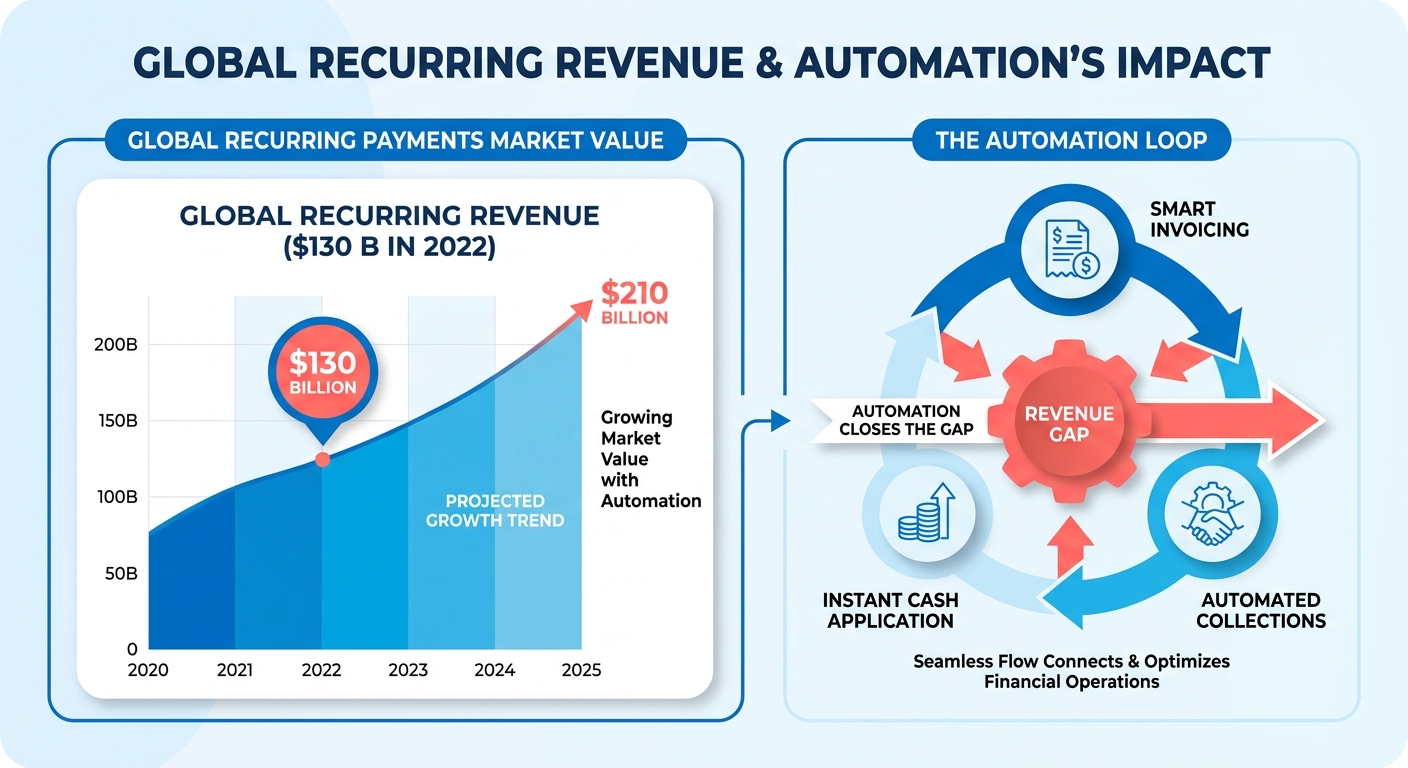
What manual billing actually costs you
Time, accuracy, and cash flow. Finance teams get stuck on repetitive invoicing, errors slip into every cycle, and late payments pile up. Automation reverses all three by removing the human bottleneck.
The errors are the expensive part. When a transaction fails and nobody notices, you lose the customer and the revenue silently. Legacy billing tools and generic accounting software rarely give you the visibility to catch and fix these before they hit the bottom line.
Basic bookkeeping tools can generate standard recurring templates. They fall apart on variable usage fees, immediate payment collection, or mid-cycle contract changes. That mismatch is exactly where the cracks show up as you scale.
Who gets the most out of automation
B2B SaaS companies with complex payment terms. If you’re juggling variable pricing, tiered plans, multiple billing cycles, and extended payment windows across a customer base, automation is the only way to stay accurate at volume.
One enterprise software provider that automated its billing workflows cut billing errors by 30% and lifted retention by 20%. Those two are directly linked: fewer errors mean fewer disputes, which keeps customers around.
The pattern holds beyond software. A large fitness club switched to automatic monthly billing and got more predictable revenue and simpler cash-flow planning. A tennis club saw 25% membership growth after moving to direct debit. Software seats or gym memberships, the lesson is the same: reliable billing keeps money moving.
Why automate the full loop, not just invoicing
Automating only invoicing leaves half the problem sitting there. You still chase collections and match incoming payments to open invoices by hand. An end-to-end loop handles invoicing, dunning, and cash application together, so revenue recognition and collections stay in sync.
Smart dunning is where this earns its keep. Intelligent retry logic adapts to why a payment failed and pairs retries with targeted customer messages. One dating app improved renewal performance by roughly 20% after adding multi-acquirer routing and smart retries. That’s revenue that would otherwise vanish.
This is where an all-in-one platform pulls ahead of point solutions. Chargebee and similar tools automate invoicing well, but B2B teams still bolt on separate collections and reconciliation workflows. Handling the whole loop under one roof is what most competitors miss, and it’s the difference between billing that runs itself and billing you babysit. For a deeper breakdown, see this guide to automating subscription billing.
Setting up automated billing (the one-time part)
Automated subscription billing is a one-time setup that runs on its own afterward. For B2B SaaS with complex payment terms, that setup covers four things: customer records, service catalogs, pricing rules, and payment connections. Get them right once, and invoicing, collections, and cash application run as a single loop with no manual touchpoints.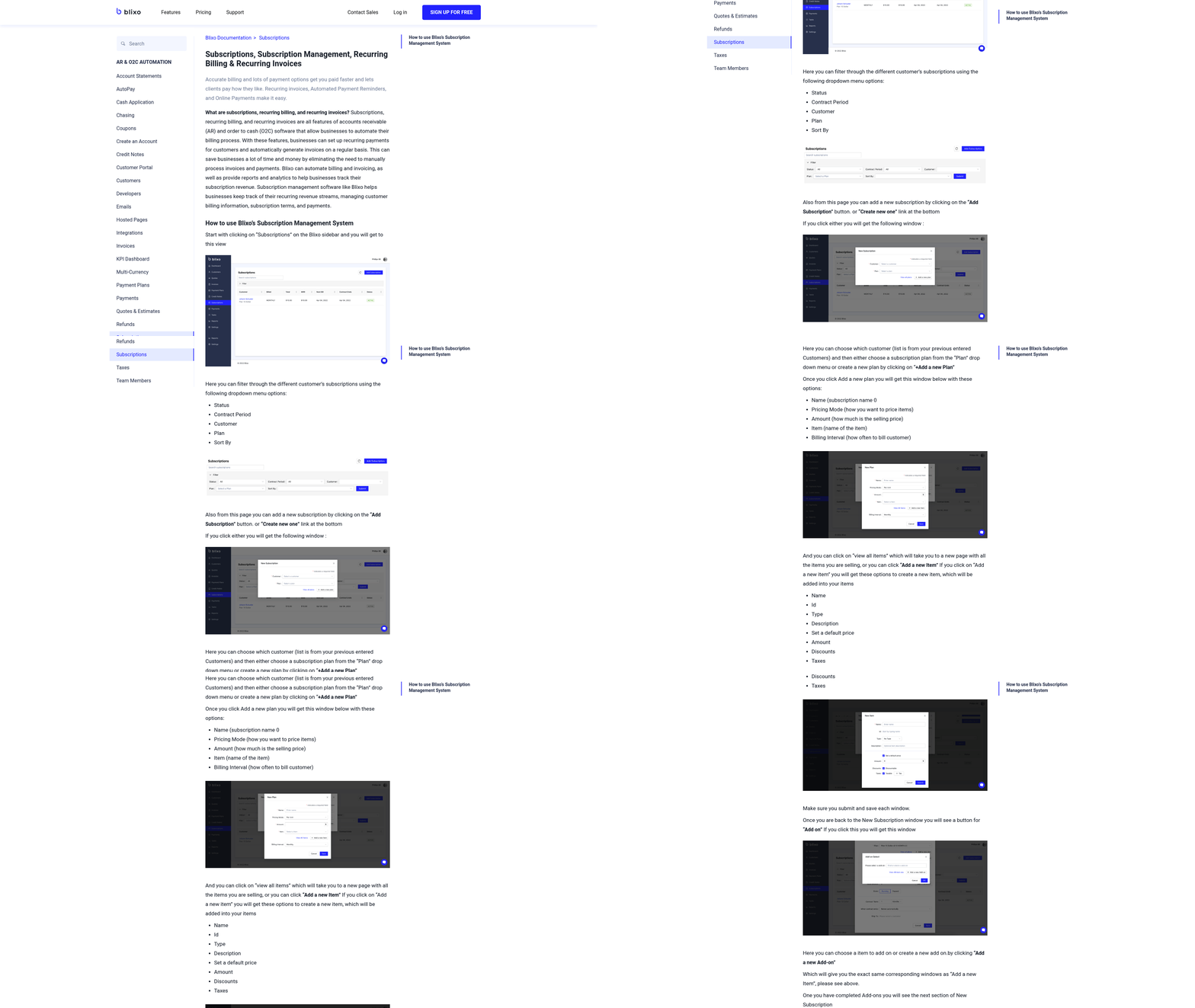
Here’s how to build it from scratch.
Customer and subscription data
Start with customer records, and map each account to a subscription plan. This is the foundation. Every automated invoice, dunning email, and payment match traces back to accurate customer data here.
For B2B accounts, capture the details generic billing tools skip. Billing contacts separate from technical contacts. Purchase order numbers. Negotiated net terms like Net 30 or Net 60. Complex payment terms are the norm in B2B, and your records need to reflect that from day one.
Then attach a subscription plan to each account. Plans define the billing cycle, whether daily, weekly, monthly, or annual. You can also set advance invoices for customers who prepay, which is standard in multi-year enterprise contracts.
Services and pricing structures
Build a service catalog first, then apply a pricing model to each service. The main ones are flat-rate, tiered, per-user, and usage-based. Choose based on how your customers actually consume the product.
Per-user and usage-based pricing matter most for B2B SaaS. A team adds seats mid-cycle, or spikes API calls one month. Your pricing rules need to handle prorated charges and variable amounts without someone recalculating the invoice by hand.
Say you sell a platform at $50 per seat per month plus overage fees for data processing. The setup ties seat count to the customer record and overage to metered usage. When usage changes, the next invoice reflects it automatically. No spreadsheet, no re-keying.
This is where the all-in-one loop pays off. Accurate pricing at setup feeds clean invoices, which feed accurate cash application later.
Payment gateways and terms
Integrate a payment gateway so invoices collect payment on their own. Your gateway has to be PCI DSS compliant and support recurring transactions, automated retries, and dunning management. Those features close the collections side of the loop.
Set your payment terms and retry logic here. Since declines are a primary driver of customer loss, smart retry logic based on the specific failure reason recovers revenue you’d otherwise write off. Timing matters: retrying a declined card two or three days after a typical payroll cycle clears often succeeds where an immediate retry fails.
Connect ACH and bank transfers too, not just cards. B2B buyers often pay by bank transfer, and supporting it takes friction off large invoices.
Testing before you go live
Run a pilot before you flip the switch on your full customer base. Test one full billing cycle end to end. Create a test customer, generate an invoice, process a payment, confirm the cash applies back to the right account.
Validate the edge cases that break B2B billing:
- Proration when a customer adds seats mid-cycle
- Failed payment retries and dunning emails firing correctly
- Net terms applying the right due dates
- Cash application matching partial payments to the correct invoice
Audit again as you scale into new markets or add pricing tiers. A configuration that works for 10 accounts can crack at 500. Watch for currency handling, tax rules that vary by region, and rounding differences that compound across thousands of line items. Catching these in a controlled pilot costs far less than issuing corrected invoices to live customers.
Once the pilot passes, the loop runs itself. Your finance team stops chasing invoices and starts analyzing the numbers.
Automating invoices and payment collection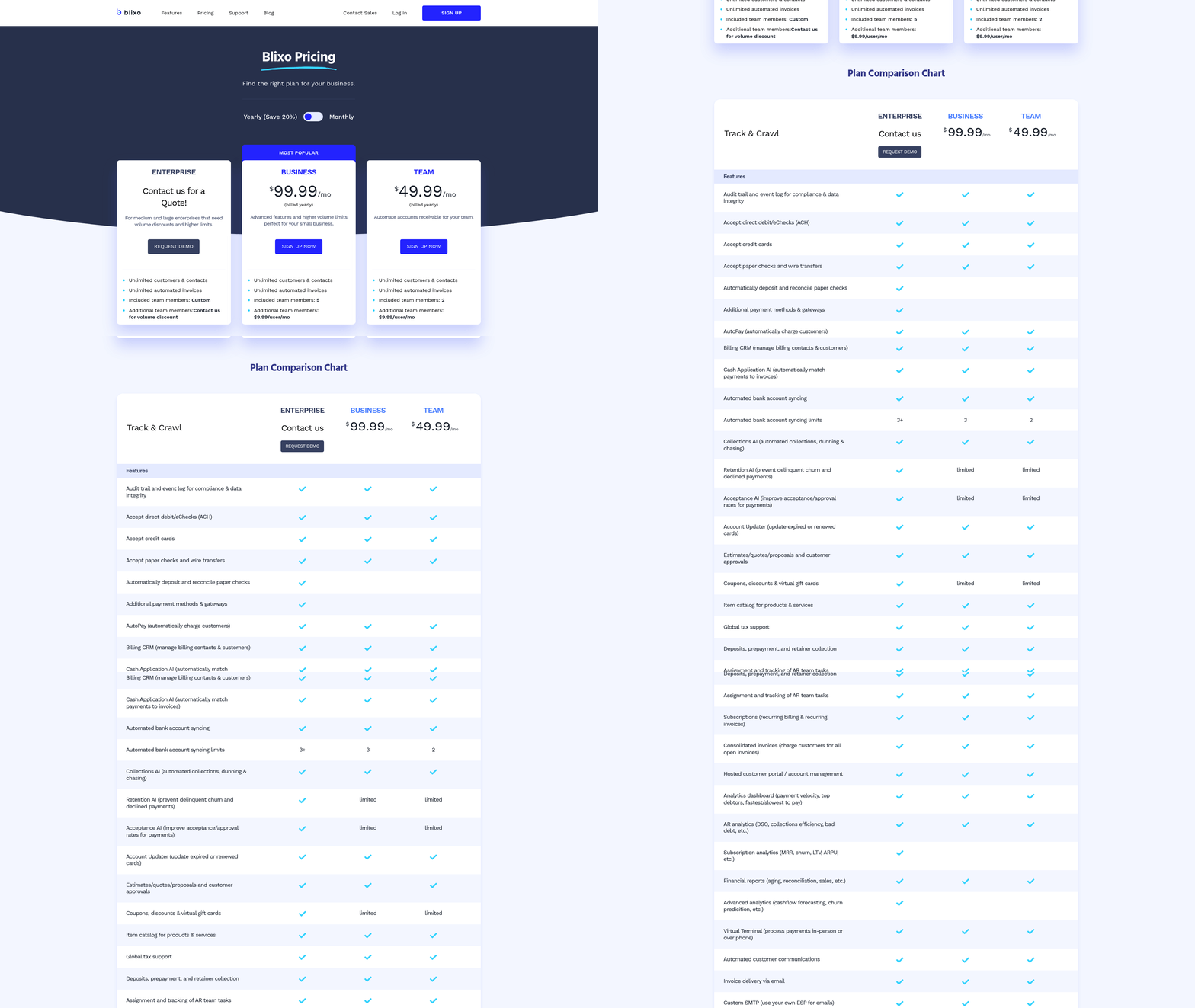
Once your setup is locked, invoice generation and payment collection run without you touching them. The system creates invoices on schedule, charges the payment method on file, and applies the cash back to the right account. That’s the gap disconnected tools leave open.
Here’s how each piece works, and how to handle the messy parts: failed payments, tax, and discounts.
Automating invoice generation and collection
Automated invoicing means invoices generate on your schedule and send themselves, then collect payment through a connected processor. You set the billing interval once, and the system handles daily, weekly, monthly, or annual cycles without manual input.
For business accounts, this matters more than for consumer subscriptions. You’ve got custom credit terms, advance invoices, and different cycles per contract. The system reads each customer’s terms from setup and bills accordingly.
Autopay is the collection half. When a customer’s card or ACH details sit on file, the invoice charges automatically on the due date. That kills the delay between sending an invoice and getting paid. Companies that wire invoicing directly to a payment processor often shorten average collection time from weeks to days, which steadies cash flow and cuts the hours spent chasing overdue accounts.
Retry logic and dunning
Retry logic: automatic re-attempts on a failed payment, timed and sequenced by why the charge failed. Dunning management: the customer-facing messaging that runs alongside those retries to prompt an update.
Unresolved transaction issues quietly erode your subscriber base. Roughly 40% of card failures come from temporary issues like insufficient funds, which means a well-timed second attempt often clears with no customer action at all.
Configure retries to adapt to the failure reason. An expired card needs a different path than an insufficient-funds decline. Pair each retry with a dunning email that tells the customer exactly what to fix.
Keep the sequence short and specific. First notice on failure, retry over the following days, and a self-service link to update the card. That link matters. Letting customers fix payment details themselves recovers revenue faster than back-and-forth email ever will.
Tax, discounts, and fees
Automated systems apply tax, discounts, and convenience fees to each invoice based on rules you set once. The system calculates the right amount per customer, so you’re not recomputing anything by hand.
Tax gets complicated fast for software sold across regions. You might owe US Sales Tax on one account, EU VAT on another, and GST somewhere else. Configure tax rules per jurisdiction, and the system applies the right rate to every invoice automatically.
Discounts and fees follow the same logic. Set a percentage discount on a contract, and it flows into each recurring invoice. Add a convenience fee for a card payment, and it shows up as a line item without manual entry.
That’s the payoff of the whole loop. Kill manual transaction handling, and finance gets to spend its time on strategic planning instead.
Wiring automated billing into your ERP and CRM
Your billing system only closes the loop if it talks to your ERP and CRM. Integration means invoices, payments, and cash application sync automatically across every system where finance and sales data lives. When those systems run in isolation, reconciliation becomes a manual chore and your reported revenue rarely matches across tools.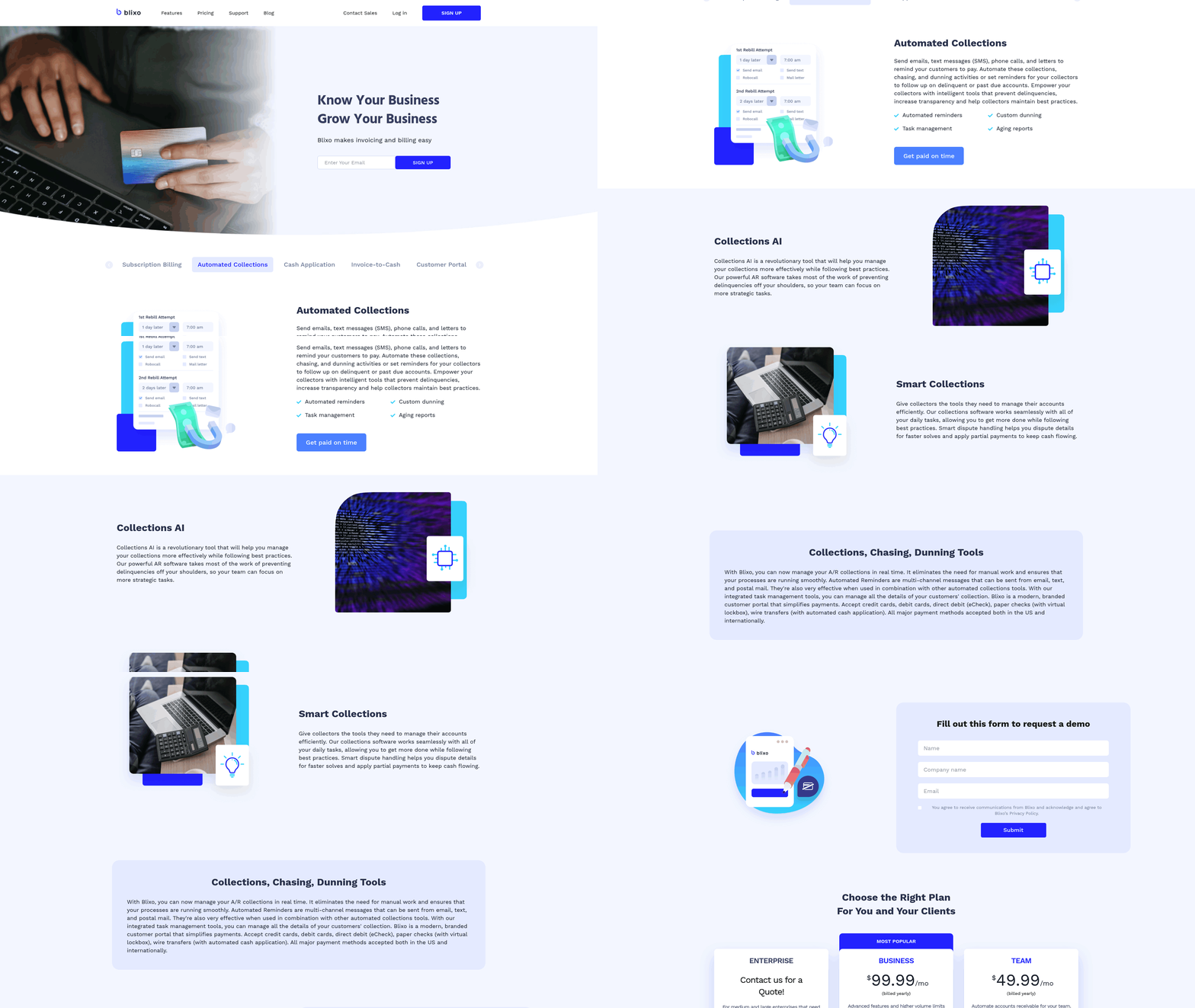
Here’s how to connect billing to the systems you already run.
Connecting billing to your ERP and CRM
Integration means your billing platform exchanges data with your accounting, ERP, and CRM systems in real time through APIs. A deal closes in your CRM, the customer and contract flow into billing. A payment clears, the cash application posts back to your ERP ledger. No re-keying, no export files.
Modern billing tools connect through standard APIs to CRM and payment systems like Salesforce, HubSpot, and Stripe. That gives your team real-time data across the whole revenue chain.
For companies with staggered net terms, this sync is what keeps collections accurate. Change a payment schedule in one system, and it updates everywhere at once.
Migrating your data without wrecking it
Start with clean data before you migrate anything. Map each field in your old system to its match in the new one: customer records, active contracts, billing schedules, open balances. Bad data in migration becomes bad invoices later.
Validate data integrity before you complete the transition. Move a small batch of accounts, generate a test billing cycle, and confirm the invoices, payments, and ledger entries reconcile perfectly. Making sure historical balances and contract terms line up across systems prevents discrepancies when the new platform goes live.
Match your billing periods during migration too. If a customer bills quarterly in your ERP, that schedule has to carry over exactly. Monthly, quarterly, annual periods should map one to one so nothing drifts.
What integration actually delivers
Integration frees your finance team from data entry so they can analyze the business. That shift is the whole point of connecting billing to your ERP and CRM.
One recruiting software company automated its financial transactions inside its accounting platform and changed how the team spent its time. Customers on that same platform report an average of 250% ROI and a 79% reduction in close time. Those numbers come straight out of tighter integration between billing and the general ledger.
The three things that go wrong, and how to fix them
The biggest one is relying on third-party add-ons that break during upgrades. Some ERP systems now include subscription billing natively, which removes that dependency and keeps recurring invoicing inside one platform.
Duplicate records are the second problem. When billing and CRM both create customer entries, cash application misfires. Fix it by making one system the source of truth for customer data and syncing the rest from there.
The third is security and compliance on stored payment methods. Recurring billing holds card and bank details, so your integration has to protect that data at every handoff between systems. Get these three right, and invoicing, collections, and cash application run as one loop across your whole stack.
Watching subscription health so revenue doesn’t leak
Automated billing doesn’t run itself forever without checks. Even a clean setup drifts. Cards expire, payments fail, and revenue leaks out through gaps you can’t see in a spreadsheet. Monitoring subscription health means watching the metrics that predict those failures before they cost you cash.
Enterprise accounts raise the stakes. One high-value subscription failing silently can be months of recurring revenue, and unlike a lost consumer account, it rarely comes back on its own.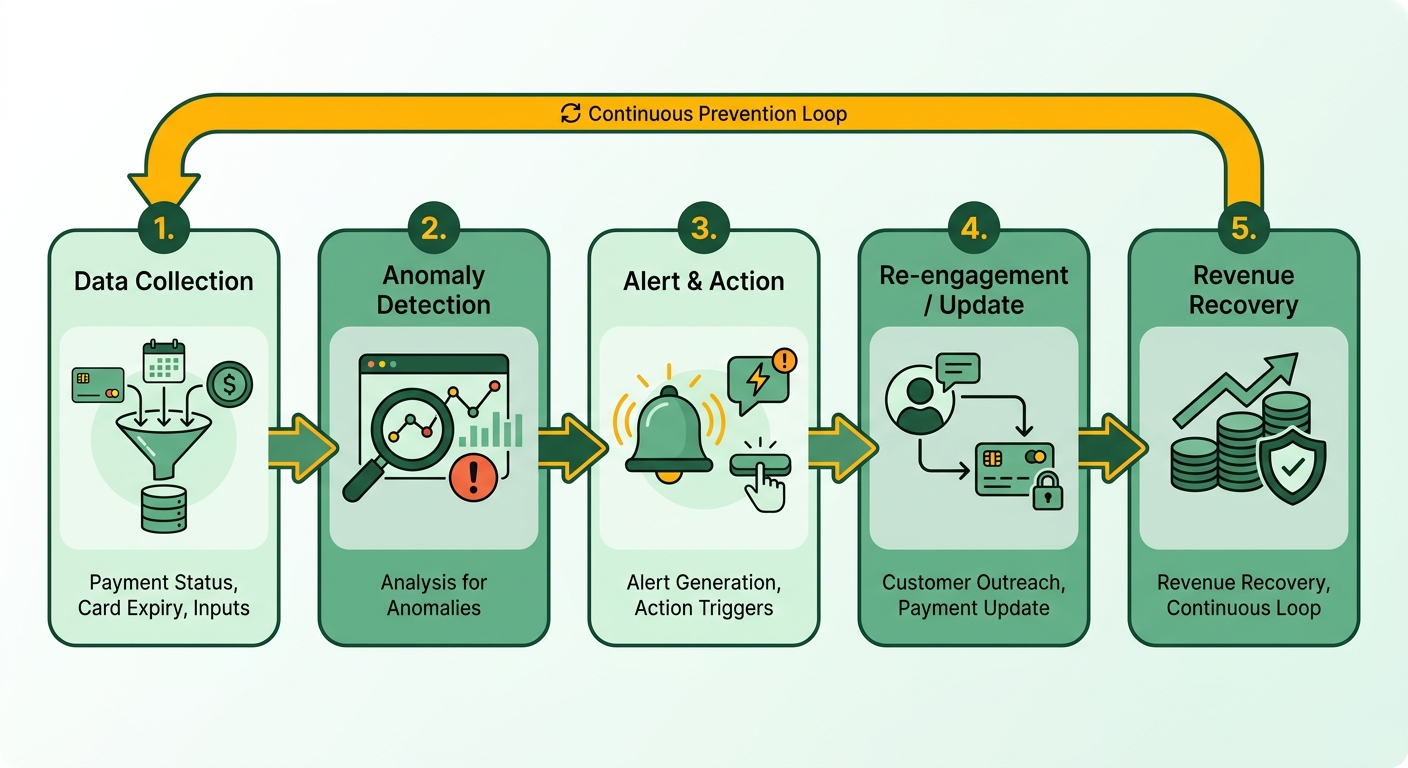
What to put on a subscription health dashboard
Track the numbers that flag involuntary churn early: failed payment rate, retry recovery rate, expiring cards, and past-due account aging. These four tell you where revenue is leaking before a customer ever cancels.
Silent transaction failures are the real risk. A customer doesn’t decide to leave. Their card fails, retries run out, and the subscription lapses. Recurring billing is about managing the full subscriber relationship, not just processing a charge.
Set up a dashboard that surfaces these signals in one view. When you can see a failed-payment rate climbing across a segment, you catch a processor issue or a batch of expired cards before it turns into a churn spike.
Alerts that actually prevent failures
Configure alerts on the thresholds that give you time to act: a failed payment on a high-value account, a card expiring in the next 30 days, or an invoice crossing your past-due line. Alerts turn a passive dashboard into a system that tells you when to step in.
The most effective prevention runs before you ever see an alert. Smart retry logic adapts to the specific reason a payment failed, retrying at times more likely to clear. Network tokenization keeps card credentials current when a customer’s bank issues a replacement, so an expired card doesn’t break the charge.
Industry data from Recurly shows account updater services alone recover roughly 40% of would-be failed transactions tied to outdated card details. That recovery happens automatically, before a dunning email ever goes out. Pair automated retries with targeted dunning, and you recover most failed transactions without touching them.
Preventing the common failure points
Audit your billing setup on a regular schedule, especially as you add plans or expand into new markets. A pricing rule that worked for three plans breaks quietly when you add a usage-based tier.
Here’s what prevents the most leakage:
- Close the loop between billing and analytics. A Columbia Business School study found organizations with integrated payment analytics achieve higher revenue growth than those running disconnected systems. When cash application feeds your health dashboard directly, you spot problems in real time instead of at month-end close.
- Make cancellation and payment updates easy. Customers who can update a card themselves in a portal fix the failure before it churns them.
- Watch aging on enterprise accounts individually. Consumer tools average failures across thousands of accounts. For a large SaaS contract, one account’s 60-day past-due balance deserves a named alert, not a rounding error in a churn percentage.
Skip the heavy monitoring only if you run a handful of flat-rate accounts with cards on file that rarely fail. For anyone with complex terms, usage-based pricing, or enterprise contracts, this is where you stop revenue from slipping out unnoticed.
Frequently Asked Questions
1. How long does it take to implement automated subscription billing?
Implementation timelines vary by complexity, but the core work involves establishing your foundational customer records, service catalogs, pricing rules, and payment connections. Most teams should budget time to run a trial cycle with a subset of accounts before a full rollout. Complex B2B contracts with usage-based pricing and custom credit terms will naturally extend this timeline.
2. Can automated billing handle multiple currencies and international tax rules?
Yes. Modern platforms are built to manage global transactions and regional tax compliance requirements. Once you define your tax rules for each active market, the system automatically calculates and applies the correct rates to every invoice. It is important to monitor currency conversion and rounding differences during international expansion, as these small variances can compound across thousands of transactions and complicate reconciliation.
3. What happens to my existing customer contracts during migration?
Existing contracts carry over through careful field mapping between your legacy database and the new platform. This process maps customer records, active agreements, billing schedules, and outstanding balances. To ensure accuracy, billing periods must align precisely (for example, keeping quarterly billing cycles intact). Validating a small batch of accounts first helps confirm that invoices and ledger entries reconcile perfectly before migrating your entire customer base.
4. Is stored payment data secure in automated billing systems?
Stored payment data is highly secure when using PCI DSS compliant gateways. Because recurring billing requires storing sensitive card and bank details, security protocols must protect this data at every integration point across your ERP and CRM systems. Advanced tokenization methods further secure these transactions by replacing sensitive card details with secure, non-sensitive tokens, which minimizes data exposure while keeping payment credentials updated automatically.
5. How does automated billing differ for B2B versus consumer subscriptions?
B2B billing involves complex requirements that consumer tools rarely support, such as routing invoices to specific billing departments, managing purchase orders, handling custom credit terms, and calculating mid-cycle proration. Additionally, the financial stakes are much higher: while consumer platforms manage high volumes of low-value accounts, a single enterprise account issue can result in significant revenue loss if not detected immediately.
6. What is network tokenization and why does it matter for billing?
Network tokenization is a security and recovery technology that replaces traditional card numbers with secure, merchant-specific tokens issued directly by the card networks. If a customer’s physical card is replaced or updated, the token remains valid and automatically links to the new account details. This process runs seamlessly in the background, allowing recurring charges to succeed without requiring the customer to manually update their payment information, thereby preventing service interruptions.
7. When is heavy billing monitoring unnecessary?
Continuous monitoring is only optional if your business model is extremely simple—such as managing a small number of fixed-rate accounts with highly reliable payment methods. For any organization handling variable pricing, custom contracts, or enterprise clients, tracking key billing health indicators is vital to identify and stop revenue leakage before it impacts your bottom line.