

Your ERP Records Revenue, But Won't Get You Paid

Key Takeaways
- Only 38% of B2B firms turn 90%-plus of invoiced revenue into cash within 30 days, according to Atradius data.
- The revenue-cash gap separates revenue booked in your ledger from cash collected and reconciled. That is where working capital gets stuck.
- Late payments cost firms an average of 3.8% of revenue. For a mid-sized company, that represents roughly $18 million in lost growth.
- ASC 606 and IFRS 15 tie revenue recognition to the transfer of control. Earned revenue and received cash therefore diverge by design.
- A SaaS company with a $36,000 annual contract recognizes $3,000 monthly, regardless of when the customer pays.
- About 62% of B2B firms look profitable on paper while bank balances trail reported revenue.
- When recognized revenue outpaces collections, hiring, R&D, and marketing spending can stall until cash arrives.
Why the Revenue-Cash Gap Matters
Booking revenue in your ERP is not the same as holding cash. If you rely only on ledger entries, you can miss collection-cycle friction. That delay traps working capital and leaves finance teams covering daily expenses without the liquidity promised by sales.
Closing that space is why accounts receivable automation exists. Your ERP recognizes revenue when control transfers. Your bank confirms payment days or weeks later. The gap between those events is where working capital disappears.
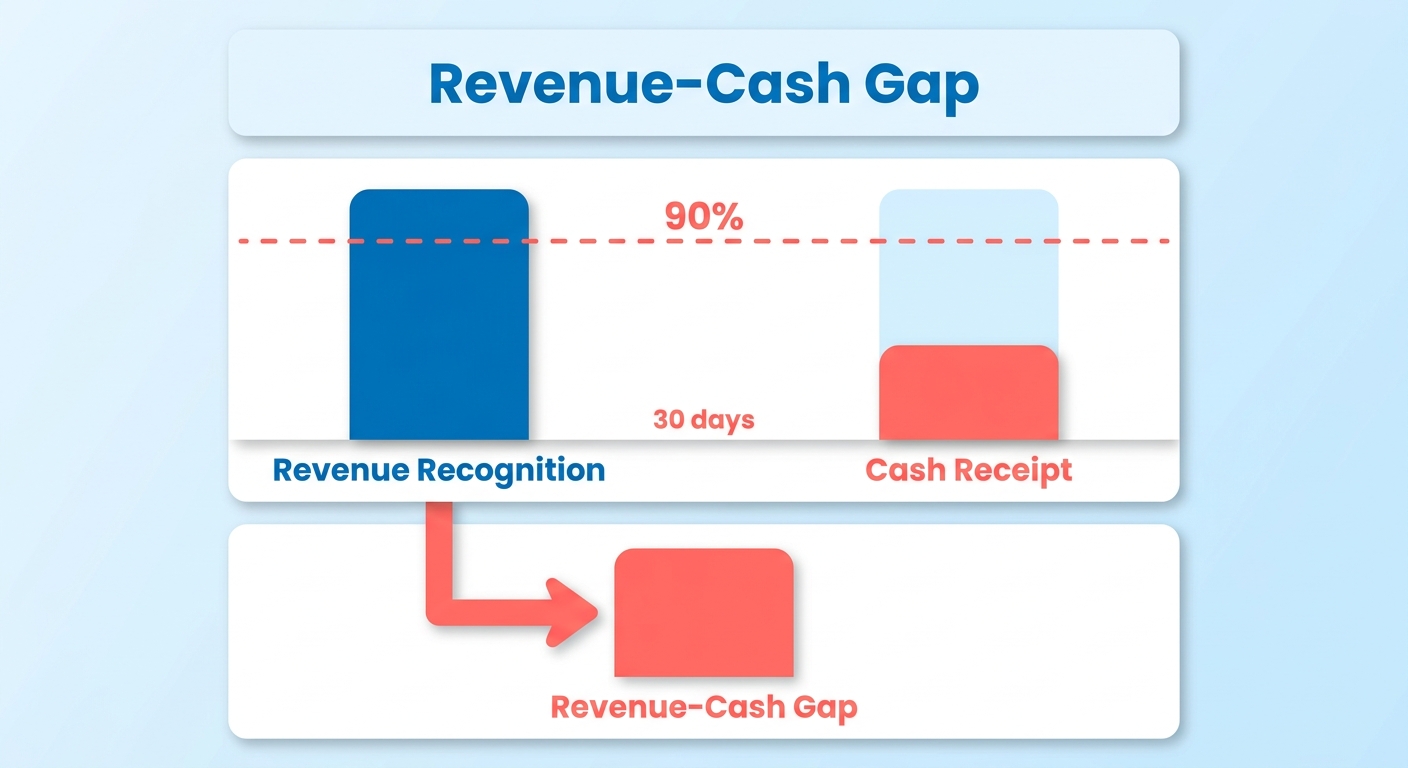
Why recorded revenue can hide a cash shortage
Revenue-cash gap: the difference between revenue booked in your ledger and cash collected and reconciled.
Modern accounting standards separate revenue recognition from cash movement. When you sign a contract, the ledger reflects earned value as performance obligations are met. If the customer’s payment schedule lags those milestones, you fund operations from existing reserves instead.
That divergence can create false confidence. The executive dashboard shows rising revenue while the treasury team sees a different reality. They ration cash, sometimes delaying vendor payments or postponing capital expenditures, because the money has not cleared the bank.
Delayed collections also carry an opportunity cost. Every invoice past its terms is an interest-free loan to your customer. That idle capital cannot support product development or expansion, limiting growth.
Who feels the reconciliation gap most
Subscription businesses, professional services firms, and B2B manufacturers with recurring invoices carry the heaviest load. For subscriptions, the math is difficult: an average of 26 revenue-related transactions per subscription across upgrades, downgrades, and renewals.
Add that transaction volume to ASC 606’s monthly recognition rule, and revenue-to-cash match points grow nonlinearly. Manual cash application becomes unsustainable well before most teams expect.
It does not have to remain that way. Bettercloud closes its books every month in five days with only 2.5 full-time employees while growing 100% year over year. The Dyn COO described the alternative: “For every 500 customers, we needed another billing person, so a stack of people were doing very repetitive tasks and not adding a lot of value.”
That leaves two choices: add headcount as you grow or close the gap with automation.
What changes when you close the gap
The reconciliation gap runs in both directions. Your ERP can over-record by recognizing revenue you have not collected. It can also under-record by missing bank payments that have already arrived. Cash application must close a two-way blind spot, not just chase late invoices.
Automating this matching lowers Days Sales Outstanding, improves working-capital visibility, and reduces bad-debt write-offs. Middle-market finance leaders who actively managed working capital enabled an average of $19 million in savings. Nearly 94% plan to adopt working-capital solutions this year.
One caveat matters. Zuora warns against treating tools as a cure for structural problems. If sales and finance incentives are misaligned, automation only speeds up a broken process. Fix the root cause first, then automate the repetitive work. The freed capacity should support judgment-based work such as dispute resolution and cash application, not disappear.
Diagnose the Revenue-Cash Gap in Your ERP
Start with a revenue-to-cash variance report. Pull posted revenue from your ERP and compare it with bank-statement receipts from the last 12 months. The difference is your reconciliation gap and the most useful number in an AR automation audit.
Most finance teams have never made this comparison cleanly. Revenue sits in one module, bank receipts in another, and no one owns the reconciliation. That silence is where working capital goes missing.
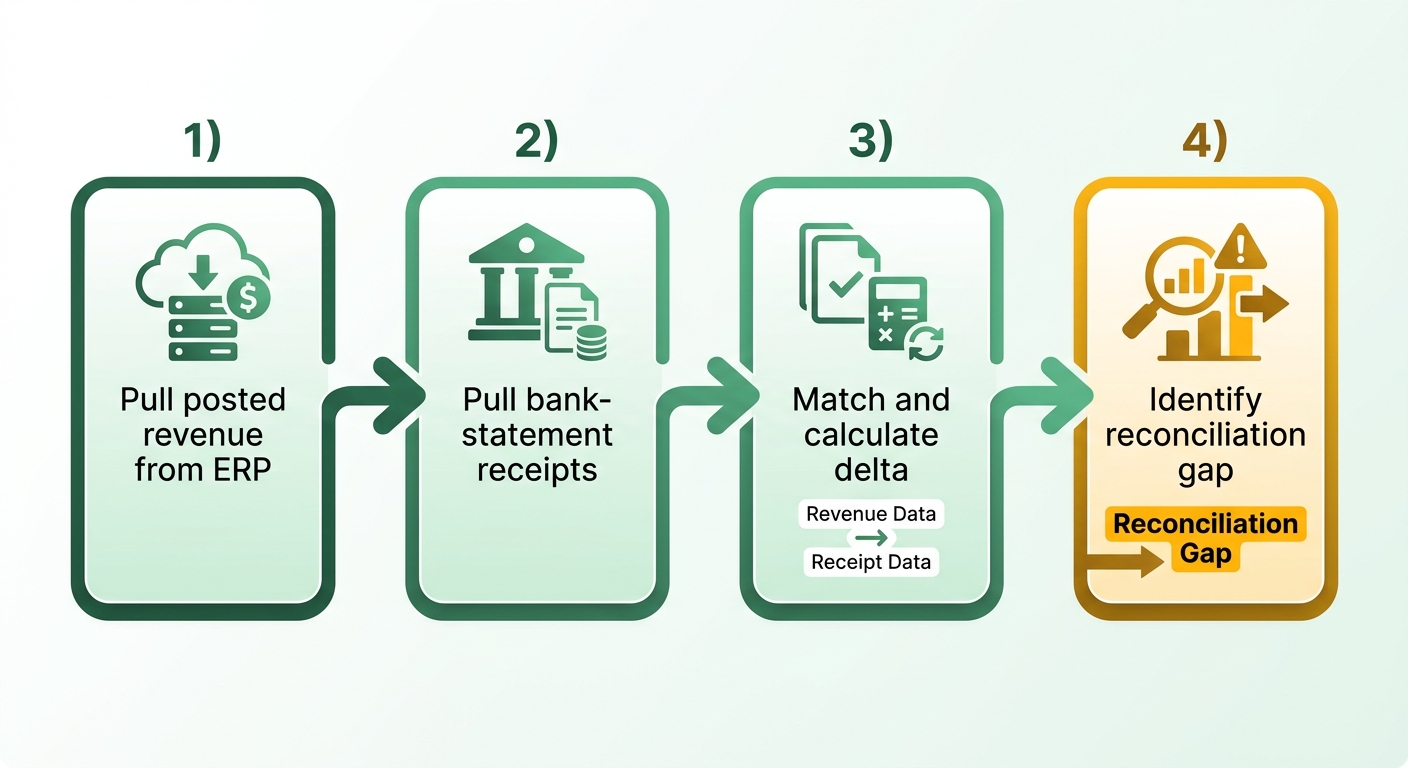
How to find orphaned invoices and unapplied cash
Orphaned invoice: posted revenue in your ERP with no matching payment record, even though the customer may have paid. Sort your receivables ledger by invoices past their terms. Then compare each invoice with actual bank deposits. Payments that reached the account but were never applied are recoverable cash.
Run the audit, and you will usually find more than slow payers. The bank may have the funds, but remittance advice went missing or reached another inbox. The transaction then remains unapplied. The ERP shows the invoice as outstanding while the cash sits in a suspense account.
This is the two-way blind spot that an intelligent matching engine addresses. Blixo matches payments and balances to invoices at the envelope and item level from multiple sources. It surfaces and reconciles cash that reached the bank but was never applied, with an approval workflow you control.
Configuration red flags worth checking first
Poor ERP configuration can hide the gap before you run the variance report. Look for incorrect posting periods, missing payment terms, and disabled cash-application rules. Any of these can break the link between an invoice and its payment.
Run these checks in order:
- Posting periods: confirm revenue lands in the period it was earned, rather than a default period
- Payment terms: flag customer records with blank or inconsistent terms
- Cash-application rules: verify that auto-matching is enabled and was not disabled during an old migration
- Dunning workflows: check whether your ERP’s reminders trigger or remain dormant
Then compare your aging bucket distribution with ERP revenue entries. If much of the posted revenue sits in the 60-plus-day bucket, you have a collection problem disguised as booking success.
Why this compounds at scale
Partial payments often break reconciliation. When a customer pays $8,400 against a $10,000 invoice, most ERPs leave the record open. They do not show whether the $1,600 shortfall is a dispute, short-pay, or timing issue. Across hundreds of accounts, manual triage quickly outgrows available headcount.
Remittance data can also arrive through emails, PDFs, and lockbox files. This multiplies the match points between one payment and its invoices. That makes automating the volume more practical than staffing it. Blixo’s matching engine gets smarter over time through machine learning as you manually edit matches. Accuracy therefore increases with transaction volume instead of declining under it.
Document everything in a gap-analysis matrix with cause, impact, and priority. Benchmark internal DSO against industry averages to identify outliers. Rank each finding by recoverable dollars. The matrix becomes your integration roadmap.
One exception matters. If data-entry errors at the point of sale corrupt customer records, fix those training gaps first. Automation depends on clean inputs. Feeding disorganized contract data into an automated system only creates exceptions faster.
Wire Invoicing, Collections, and Payments into Your ERP
Closing the reconciliation gap starts by connecting invoicing, collections, and payment systems to your ERP. The goal is simple: whenever cash arrives, the ERP records it without manual data entry. This connection turns accounts receivable automation into collected cash.
Map four touchpoints before writing integration logic: invoice creation, payment receipt, dunning schedule, and cash-application posting. Each one can separate revenue from cash. Sync all four, and you reduce the manual reconciliation required during close.
Which integration method fits your stack
Your options are API-first, webhooks, and middleware. Choose based on your real-time needs and available native connectors.
An API-first approach uses RESTful endpoints to push invoice data into your ERP as sales orders or AR documents. It works well for structured, scheduled synchronization. It handles large record volumes and gives you control over field mapping.
Webhooks support real-time updates. When a payment clears, a webhook updates your ERP’s cash-receipt table. There is no polling or overnight batch. You see paid invoices in the ledger as payments arrive.
If your ERP lacks native connectors, middleware platforms such as Dell Boomi, MuleSoft, or Zapier can bridge the systems. They cost more to run but avoid custom-code maintenance. For lean finance teams, that tradeoff is often worthwhile.
What belongs on your data-mapping checklist
Data mapping determines whether an integration works reliably. A mismatched field creates an orphaned record, which becomes a small version of the reconciliation gap.
Map these at minimum:
- Invoice ID ↔ ERP document number so every invoice has one home
- Payment reference ↔ bank transaction ID so cash application has a match key
- Tax codes consistently across both systems
- Currency conversion rules tied to a defined rate source
The payment-reference-to-bank-ID link is easy to overlook. It also matters most. Without it, automated cash application has no anchor and requires manual matching.
Build error handling before going live. Set up a dead-letter queue for failed records. Route those records to human review instead of letting them disappear. A mismatched currency field can misstate a receipt by the full FX delta. Without retry logic, these errors may surface only at close. Test each mapping against sandbox data first. Partial matches and null payment references cause many integration failures. Set fallback rules in your middleware to flag incomplete records before they reach the ledger.
Locking it down and what you get back
Secure the connection with token-based authentication. Keep raw card data out of your ERP to limit PCI-DSS scope. Payment processors should hold sensitive fields; your ERP needs only references.
The results are measurable. Companies that automated AR reported a 25% cut in invoice processing time and a 15% lift in cash flow. With manual entry reduced, finance teams can focus on credit analysis, payment terms, and customer relationships.
Automate Cash Application and Reconciliation for Real-Time Visibility

A cash-application engine turns bank feeds into posted cash inside your ERP. It ingests payments, matches them to open invoices, and records receipts in the cash ledger. This is the mechanical core of accounts receivable automation and closes the reconciliation gap.
Connecting bank accounts and your ERP reduces the delay caused by manual reconciliation. Instead of waiting for weekly or monthly batches, the system processes transactions continuously. Your cash position stays current.
How intelligent matching works
Payments often arrive with incomplete metadata, such as a missing invoice number or one payment covering multiple subsidiaries. The matching system reviews payment patterns and customer profiles. It weighs transaction amounts, payment dates, and sender details before proposing an allocation.
The system also learns from user feedback. When a finance specialist corrects or confirms a difficult match, the algorithms adapt to that customer’s behavior. The automation rate can then improve over time.
This matters for complex billing structures, including usage-based pricing and multi-tiered subscriptions. Customers may change plans mid-cycle, creating many adjustments. Automated matching handles these transaction streams without additional administrative headcount.
What happens to payments that do not match
Low-risk mismatches post automatically. High-risk items enter an approval workflow. This exception model lets automation support your team while retaining human review.
Suppose a customer short-pays an invoice because of a disputed line item. The system can isolate the disputed amount while posting the undisputed portion. Cash enters the ledger while collections receives an alert about the specific discrepancy.
When staff review only genuine exceptions, they spend less time searching bank statements. They can focus on billing disputes and customer relationships instead.
Why real-time posting changes your numbers
Direct bank-feed integration records cash receipts in the ledger soon after they arrive. This reduces processing lag and improves reporting. Executives get a current view of available cash, supporting investment and operating-expense decisions.
Forecasting also benefits. Unapplied cash in suspense accounts distorts cash-flow projections and complicates treasury management. Real-time posting accounts for each dollar as it arrives. For a live walkthrough, see our guide on faster cash application and fewer reconciliation errors.
Measuring Success and Avoiding Common Pitfalls
After closing the reconciliation gap, prove it stays closed. Track how quickly cash reaches the ledger, not only whether the software runs. A weak scorecard can allow gains to disappear within two quarters.
Do not judge performance by one metric. Lower outstanding receivables are useful, but they do not describe the full cash cycle. Track the process from invoice generation through bank reconciliation. Make sure faster processing does not introduce errors.
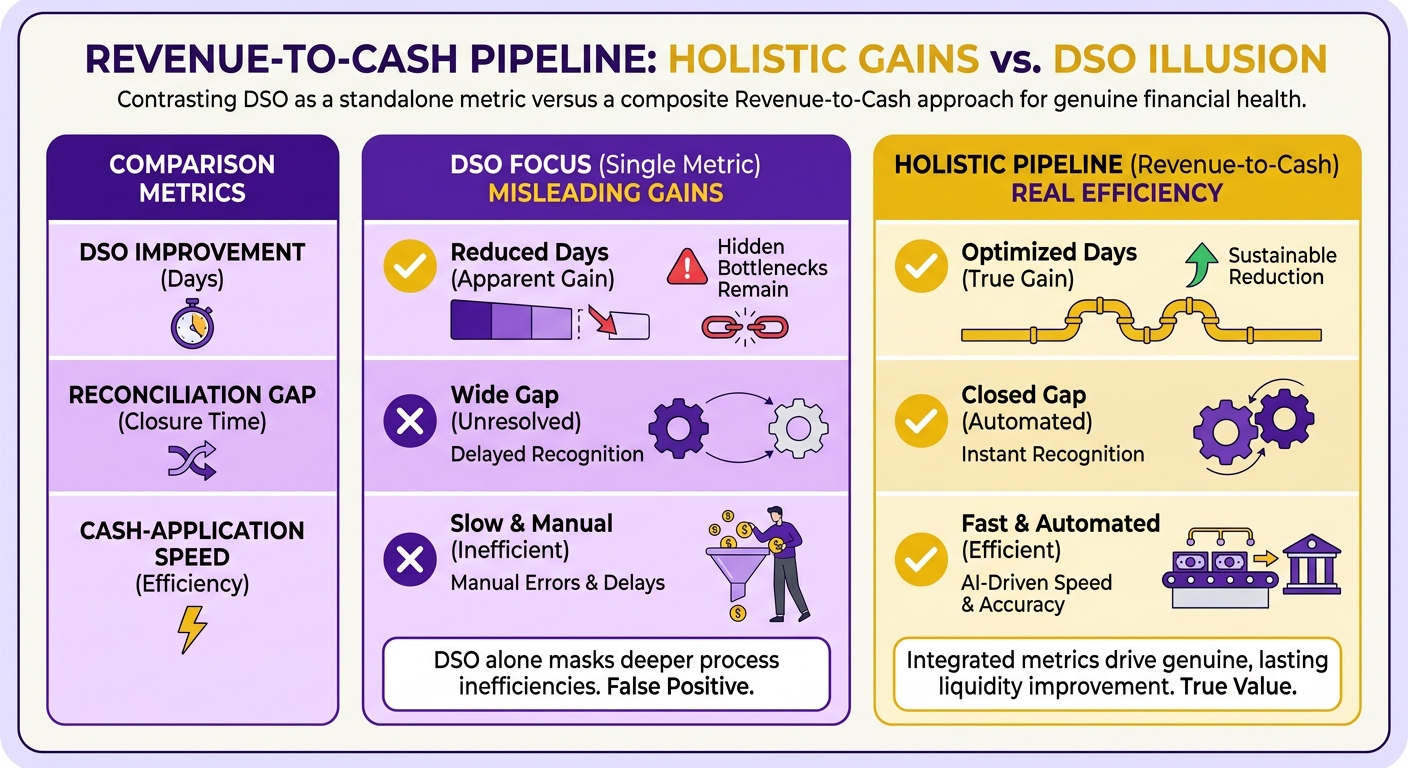
Which KPIs prove the gap is closed
Track five metrics, and give cash-application accuracy more weight than DSO. Faster collection means little if payments post to incorrect invoices.
- Days Sales Outstanding (DSO): the average time between invoicing and payment. Useful, but never read it alone.
- Cash-application accuracy %: the share of incoming payments matched to the correct open invoice without human intervention. This directly measures reconciliation progress.
- Unapplied cash balance: money received but not matched to an invoice. A rising balance means cash is arriving but remains invisible in the ledger.
- Collection cost per invoice: total collections labor divided by invoice volume. Automation should lower this as headcount shifts toward disputes.
- Month-end close time: the days your team spends reconciling. If close time does not fall, the gap may remain open.
Pair DSO with invoice accuracy and the cash conversion cycle. Industry research suggests that one metric can hide bottlenecks such as billing errors or slow dispute resolution. Fix those process issues so automation gains hold.
How often to benchmark
Use three review cadences. Weekly operational dashboards can catch match-rate declines early. Monthly finance reviews should compare DSO, unapplied cash, and close time with the previous quarter. Quarterly audit-readiness checks should confirm that your chart of accounts still maps to your revenue-cash logic.
What pitfalls undo the progress
Four traps can erase gains. Each treats automation as a finished project.
-
Set-and-forget matching. Matching rules can decay as customers change payment methods. Tune them monthly. The engine learns from corrections only when someone reviews exceptions.
-
Under-trained collections staff. New workflows can create resistance when roles are unclear. Train staff to manage exception queues and handle analytical, customer-facing problems.
-
Chart-of-accounts drift. If ERP mapping no longer matches your revenue-cash logic, reporting drifts and reconciliation reopens. Audit the mapping before go-live and each quarter afterward.
-
Ignoring data-privacy rules. Bringing payment data into your ERP creates compliance obligations. Define who can view cardholder and bank data before connecting the feeds.
30-60-90 plan: During the first 30 days, establish baselines for all five KPIs and assign exception-review ownership. By day 60, tune matching rules using real mismatches and complete staff training. By day 90, run the first quarterly audit check and confirm that close time has fallen. Without that final check, you may pay for software without realizing the cash benefit.
Frequently Asked Questions
1. Does revenue recognized under ASC 606 count as taxable income before the cash arrives?
Under accrual accounting, revenue recognition depends on the transfer of control or performance obligations, not cash receipt. A business may therefore report taxable income on recognized revenue before collecting the related cash. Tax rules vary by jurisdiction and business structure. Consult a tax professional about the resulting cash-flow implications.
2. How is the revenue-cash gap different from a standard accounts receivable aging report?
An aging report focuses on outstanding invoices and how long they have been overdue. The revenue-cash gap covers the entire reconciliation lifecycle. It includes recognized but unpaid revenue and payments that reached the bank but remain unmatched in the ledger. Managing the gap requires reconciling receivables and unapplied cash.
3. Will automating cash application let me reduce my finance headcount?
Automation typically helps teams scale without hiring linearly. By reducing repetitive data entry, it lets existing staff focus on complex billing disputes, customer relationships, and credit-risk analysis. These areas still require human judgment and communication.
4. What if my revenue-cash gap comes from misaligned sales and finance incentives rather than broken tooling?
Software alone cannot solve organizational causes of collection delays. For example, sales incentives based only on contract signings may overlook payment terms and create collection bottlenecks. Align policies and incentives across departments before implementing automation. Your tools should support that unified process.
5. My ERP shows healthy revenue, so why should I run a variance report anyway?
A healthy revenue report can hide cash-flow problems when payment reconciliation is incomplete. A variance report compares bank deposits directly with ledger entries. This audit can identify unapplied cash, incorrect posting periods, and other discrepancies. It helps confirm that reported profitability reflects actual liquidity.
6. Is DSO improvement enough to prove my reconciliation gap is closed?
Improving DSO is positive but not comprehensive. A business can lower DSO while carrying substantial unapplied cash or lengthy month-end close times. To confirm the gap is closed, also assess cash-application accuracy and the time needed to finalize monthly books.
7. How does Blixo handle a payment that arrives short or references nothing?
The platform analyzes incoming payments against open invoices, even when key details are missing. If a payment lacks a reference number, the system evaluates contextual clues and suggests a likely match. Clear matches process automatically. Complex exceptions go to your team for approval, and the system adapts to manual corrections over time.