

Automated Invoice Processing Cloud Service for Finance Teams

Key Takeaways
- Heavily automated AP pipelines close invoices in about 3 days. Less automated firms average 17 days per cycle.
- Manual errors hit 39% of processed invoices, and each mistake costs roughly $15 to find and fix.
- Only 1 in 10 organizations gets anywhere near full automation. That’s a selection failure, not a technology gap.
- Straight-through processing rate is the wrong scorecard. It ignores how a platform handles the high-stakes exceptions.
- 98% of CFOs say they’ve invested in automation. Few turn that spend into real end-to-end results.
- 56% of finance teams spend more than 10 hours a week on invoices and supplier payments.
- The exceptions, disputed amounts and overdue accounts, matter most. Clunky queues wreck both team morale and customer trust.
Quick Overview
Most finance teams we work with land at the same crossroads. They know manual invoicing is costing them, but they’re not sure whether an automated invoice processing cloud service will actually fix the problem or just bolt on a new layer of complexity. This guide is our attempt to answer that honestly.
The drag from manual work is easy to see. When you run billing on paper or a tangle of email threads, the whole cycle stretches out, cash flow slips, and month-end turns into a grind. Manual data entry also breeds mistakes, and someone has to spend hours tracking them down, verifying, and correcting. Those are hours that could have gone to actual financial planning.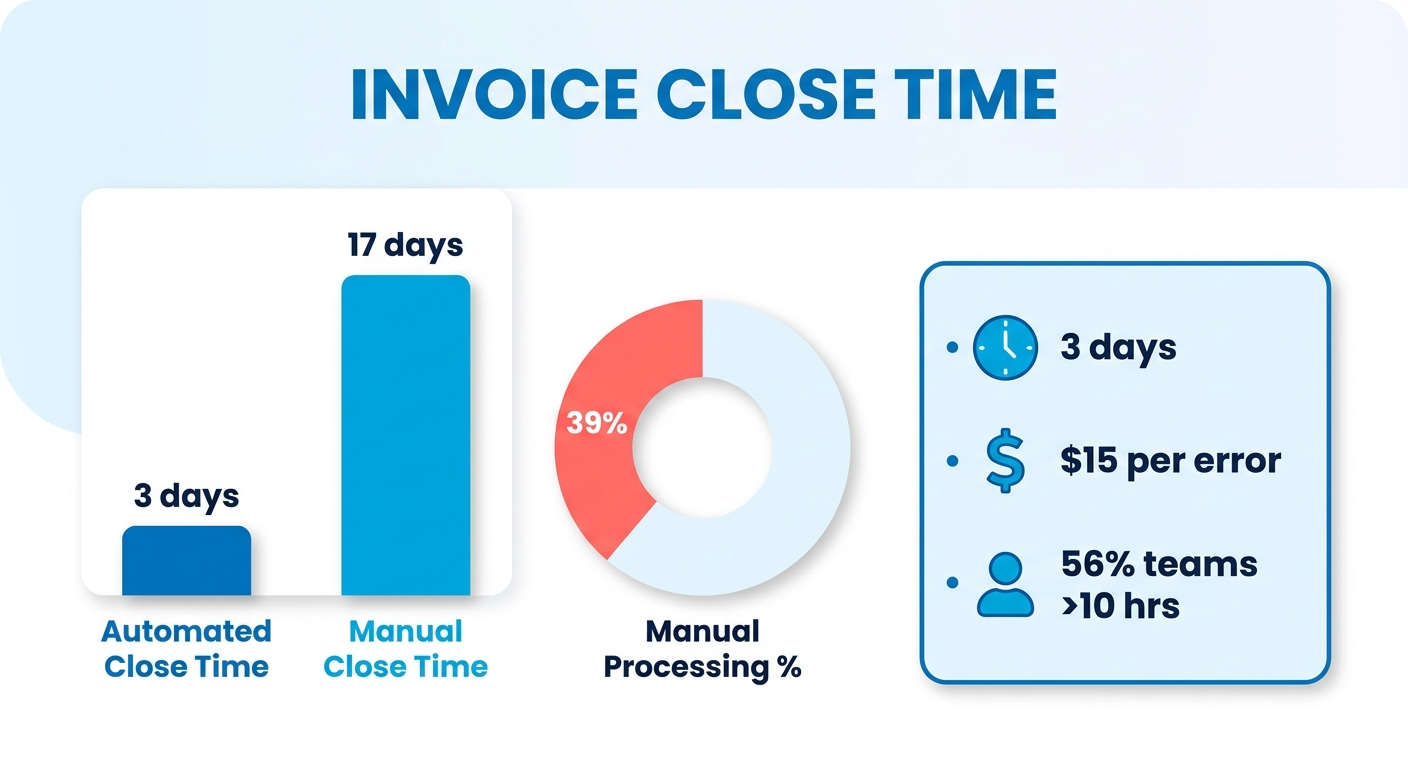
But there’s a tension we watch play out constantly, and it’s the real reason we wrote this.
The automation paradox nobody warns you about
Money is pouring into digital transformation. Very few finance departments actually kill off their manual workarounds. That gap usually traces back to one thing: buying a platform based on the demo-day fantasy instead of how the work really goes.
Most software evaluations fixate on hands-free processing. But the real test is how a system handles the messy cases, the billing discrepancies and the sensitive client accounts. If a platform has no clear, intuitive way to surface those, you end up with strained customer relationships and a frustrated team. Touchless processing is a fine long-term goal. In practice, a model that pairs machine speed with human oversight works better. So when you’re evaluating vendors, watch how the software flags low-confidence data and hands it to your team for a quick check.
What this guide covers
We built this around the buying decision, not just the tech. Here’s the map, and roughly how long each section takes.
| Section | What You’ll Learn | Read Time |
|---|---|---|
| How automated invoice processing works | The full workflow from capture to payment | 5 min |
| Key features to evaluate | What separates good platforms from shelfware | 6 min |
| Keeping the human touch in collections | Why exception UX matters more than automation rate | 7 min |
| Integration with your existing stack | ERP, CRM, and payment system considerations | 5 min |
| Implementation approach | Phased rollout vs. Big-bang, and when each fits | 4 min |
| How to evaluate and choose | The questions to ask, the red flags to watch for | 6 min |
Difficulty level: Intermediate. We assume you know your current AP workflow and have bought SaaS before. No technical background required.
Who gets the most from this: Finance leads, controllers, and ops managers at service businesses, agencies, and SaaS companies who invoice customers directly and care what collections feels like on the receiving end.
A shorter monthly close is a genuine payoff. But it comes from picking a platform that fits how your team actually works, including the moments when a customer needs a person, not a workflow.
Why This Guide Matters
Most finance teams have already spent the money on automation software. Far fewer have finished the job of putting it to work. Tools get bought. Workflows stay broken.
That gap is the whole reason for this guide. The technology doesn’t fail. Platforms get picked for their feature lists instead of how well they handle the moments that actually need a human.
Who is this guide for?
Finance teams at businesses that invoice customers and live or die on getting paid on time. Agencies, consultancies, dev shops, SaaS companies with recurring billing, professional services firms. If your team is buried in admin billing work, this will help you find a way out.
The stakes are concrete. Misplaced invoices cost organizations thousands in lost early-payment discounts, and manual data entry error rates sit near 4%. A resilient workflow is what actually solves that.
What will you learn?
How to evaluate a cloud-based invoice platform on the criteria that matter for collections, not the ones vendors put in bold on the pricing page. Exception handling, human-escalation workflows, and how to spot shelfware before you sign.
Here’s the argument we keep coming back to. The sources genuinely disagree on the target: one camp says full end-to-end automation is the goal, another says a hybrid AI-plus-human model wins. Our read reconciles the two: early on, you need close human supervision to validate accuracy, and that gradually opens the door to more hands-free processing as the system learns your business rules. Be wary of any system claiming full autonomy with no dedicated interface for manual overrides. Keeping human oversight for complex billing isn’t a technical limitation. It’s a sign of software built by people who’ve done this before.
Why the human touch matters more, not less
Automate the routine data extraction and your team gets back the bandwidth to handle delicate customer conversations with actual care.
A well-designed system sends the standard reminders promptly, but lets your staff step in before an automated message goes out to a client with an active dispute or a one-off payment arrangement.
When a complex billing issue lands, it needs to get resolved fast. A system with poor exception visibility will frustrate your staff and delay payment from your most important accounts. So evaluate the interface for managing flagged items and how easily an issue escalates to senior staff.
By the end, you’ll know how to choose a service that closes the gap between buying automation and actually adopting it. For a broader primer on where this fits, our overview of what finance teams need is a useful companion.
Fundamentals
An automated invoice processing cloud service captures, reads, validates, and routes invoices with minimal manual data entry, then hands off to payment or collections. It runs on cloud infrastructure, connects to your accounting or ERP system, and uses OCR plus machine learning to turn messy documents into structured data your team can act on.
Tidy definition. The reality is messier, and understanding the mechanics is how you avoid buying shelfware. Most organizations that have invested in automation report real gaps between expected and actual performance. Not because the tech fails, but because the design doesn’t match where human judgment is genuinely needed.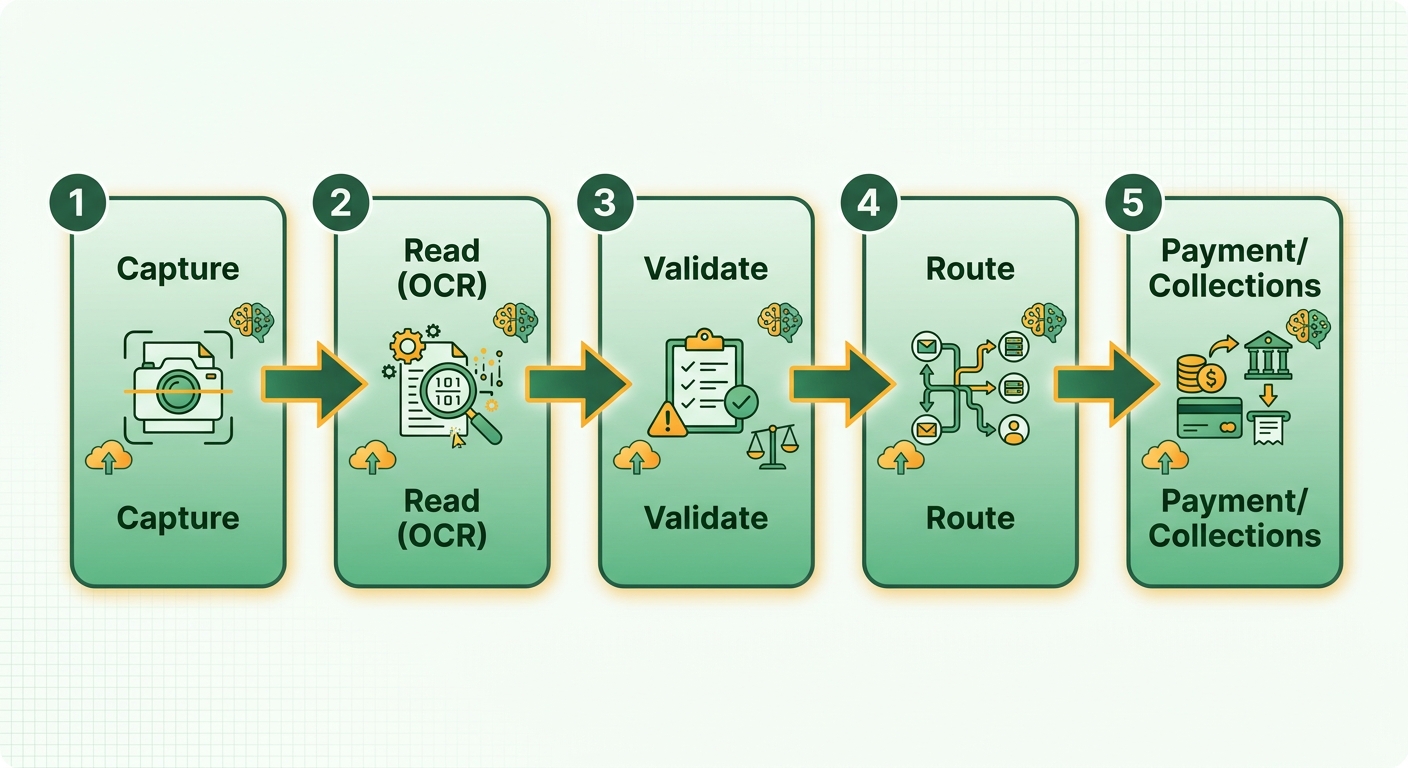
How does it actually work?
The core pipeline runs five stages: capture, extraction, validation, approval routing, and payment. An invoice arrives by email, upload, or file transfer. OCR converts unstructured text into structured fields. The system validates against business rules like duplicate detection, tax checks, and PO matching. Then it routes for approval or flags an exception.
Where the numbers get interesting is throughput under load. High-volume deployments running thousands of invoices a day see error rates climb sharply when extraction confidence thresholds aren’t tuned to the actual document mix. Scanned PDFs, emailed images, and EDI files each behave differently. Vendors that quote accuracy figures from controlled benchmarks rarely tell you how those numbers shift against your real supplier base.
The cloud part matters more than it sounds. Cloud platforms cut transaction processing time by 27% and maintenance costs by 34%, and API-driven integration hits 82% straight-through processing versus 24% for manual reconciliation. That straight-through rate is the headline vendors love. It’s also where the trap lives.
What does the architecture actually look like?
A modern system stacks distinct layers: document ingestion, OCR engine, AI processing, validation, and ERP integration. High-volume deployments add asynchronous, queue-based processing so document handling never chokes ERP performance. Master data gets cached to stay responsive under load.
Here’s the design detail most buyers skip. When a vendor-specific format shows up or a confidence score falls below threshold, the invoice should route to a human, not vanish into a queue. Industry research points the same direction: pairing machine learning with structured human validation gives the most reliable results, and it lets you scale without sacrificing data integrity.
Platforms differ sharply on rollout. Some demand a full cutover before you see production-grade accuracy. Others support parallel processing, where the AI and your existing workflow run side by side until confidence thresholds hold up against your real document mix. The second approach surfaces integration gaps before they turn into payment delays.
Why the exception UX decides everything
A system that clears the majority of invoices flawlessly but buries the rest in a clunky queue is the worst kind of purchase. Those flagged invoices are the ones that need careful handling: disputed amounts, long-standing vendor relationships, overdue collections conversations.
Judge a platform on how well it hands the hard cases to a person, not just its straight-through rate. The time your team recovers from less manual processing isn’t the win by itself. The win is what your team does with those hours, and whether the exception workflow is fast enough that reviewers actually use it instead of building a shadow process alongside it. More on that next.
Getting Started
Most finance teams treat setup as a technical problem. It isn’t. The real challenge is deciding what to automate first, and in what order, so your team doesn’t burn three months configuring a cloud invoicing service only to find the approval workflow doesn’t match how your business runs.
Before you touch any settings, map your current invoice flow on paper. Where do invoices arrive? Who approves them, and under what conditions? Where do things stall? This takes an afternoon, and it’s the step most teams skip. Every hour here saves days of reconfiguration later.
What should you set up first?
Data connections, not automation rules. Connect your accounting system or ERP before you configure anything else. Blixo integrates with QuickBooks, Xero, Sage Intacct, and NetSuite, plus custom ERP integrations for Oracle, SAP, and Microsoft Dynamics. Customer records, payment terms, GL codes, and matching logic all pull from that foundation. If the connection is loose or incomplete, your automation rules will produce garbage.
Once the integration is stable, bring in your customer data. Clean it before import. Duplicate records and mismatched payment terms are the most common reason early automation runs kick exceptions right back onto your team’s desk.
How do you configure the human-review layer?
This is where most implementations go sideways, and it decides whether your finance team ends up relieved or resentful.
Set your exception thresholds deliberately. Blixo’s Cash Application AI uses an intelligent matching engine with an approval workflow, so invoices that fall outside defined parameters route to a human queue. The question is where you draw the line. Too tight and your team reviews everything by hand. Too loose and errors slip through to customers.
Our approach: start conservative. For the first 60 days, route any invoice above a set dollar threshold, any first-time customer, and any line-item mismatch to human review. As you manually edit matches during that window, the system learns and matches your data better over time. The patterns also show you exactly where to tighten or loosen the rules.
That efficiency doesn’t come from automation handling everything. It comes from automation handling the routine volume, so the team can move fast on the exceptions that actually need judgment.
What about collections and customer-facing touchpoints?
Configure customer communications last, not first. Counterintuitive, but the sequence matters. Your reminder cadence, escalation timing, and tone should reflect what you’ve learned about your customers, not a default template.
Start with a single reminder sequence for overdue invoices. Watch response rates for 30 days. Then layer in SMS or phone escalation for accounts that ignore email. Blixo’s automated collections support emails, texts, phone calls, and letters, and multi-channel delivery consistently beats single-channel. But only when timing and tone are calibrated to your customers, not copied from a vendor’s default playbook.
One thing we’d flag: skip the fully automated collections path for any account with a relationship history or an open dispute. Firing a collections sequence at a long-term client who has a legitimate billing question does more damage than a late payment ever would. Build that carve-out into your rules from day one.
Core Features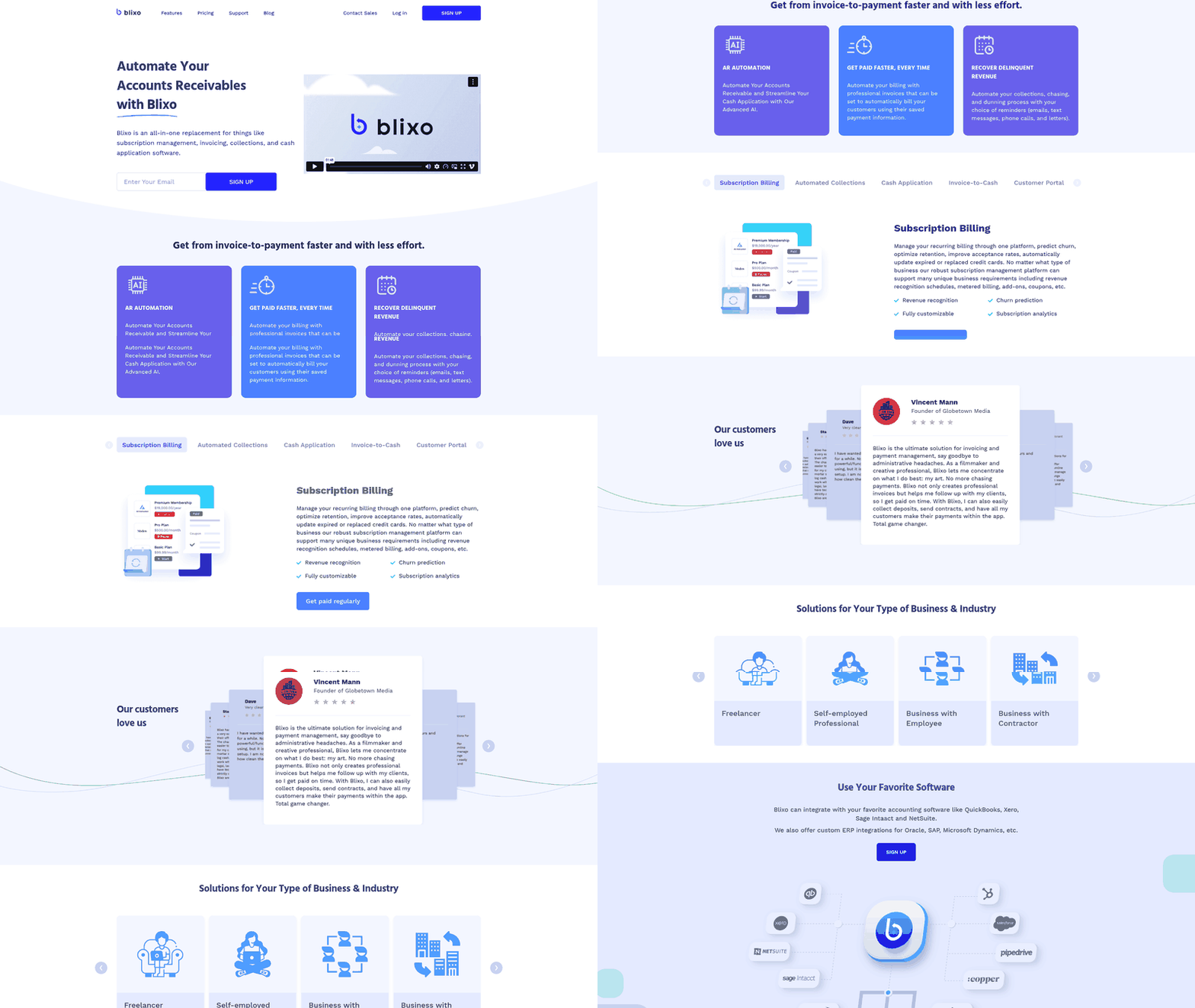
The features that matter in an automated invoice processing cloud service aren’t the ones on the sales sheet. They’re the ones that decide what happens on the invoices that go wrong. Here’s how we evaluate them.
What are the core capabilities to look for?
Every serious platform shares a baseline: OCR-driven capture, data extraction, matching, approval routing, and payment. The tech here is mature, and the accuracy gains are well documented by now.
Those gains compound. Once capture is automated, the downstream work shifts from typing numbers to reviewing exceptions. A team that once spent most of its month keying line items can redirect that time toward vendor management and forecasting.
But baseline capture is the floor. The features that separate good platforms from shelfware are the ones that handle the invoices the AI can’t fully process on its own.
How should exception handling work?
This is where most platforms quietly fail. The invoices that slip past clean automation are usually the ones tied to money and relationships: disputed amounts, long-standing vendor accounts, collections calls that need a human voice.
Research on AI-powered ERP automation is blunt about this. The most effective deployments run a collaborative validation model, escalating to a person exactly when confidence scores fall below threshold. In one implementation, vendor-specific formats needed extra handling logic the moment the model’s confidence dropped.
Our take: judge a platform on its exception UX, not its straight-through processing rate. Ask to see the escalation workflow in a demo. If a flagged invoice takes six clicks to resolve, that’s six clicks multiplied across every messy invoice you’ll ever get.
Touchless processing stays the goal. But a clear path for human intervention is what keeps quality control intact during a volume spike or a system transition.
Which features actually improve cash flow?
Integration, delivery options, and real-time tracking. When invoice data flows straight into your ledger, reconciliation stops being a manual chore. Firms that give customers several ways to receive and pay invoices collect faster than those locked into a single channel.
| Feature | What it does | Impact |
|---|---|---|
| ERP/API integration | Syncs invoice data automatically | Cuts reconciliation time |
| Multi-channel delivery | Reaches customers on their terms | Faster collections |
| Real-time tracking | Shows who opened what | Clear view into interactions |
| Duplicate detection | Flags fraud and double-billing | Fewer costly errors |
The connection worth sitting with: automate standard data entry and your staff can put their energy into resolving complex billing questions and keeping client relationships healthy. Blixo supports that shift with deep compatibility across major financial ledgers and ERP systems, so data moves cleanly across your stack.
Advanced Topics
Most platforms sell you on their straight-through processing rate. That number is misleading. High touchless rates make a nice benchmark, but focusing on that metric alone ignores the operational reality of managing exceptions.
Finance leaders have poured serious budget into automation, yet most organizations still haven’t closed the gap between what the platform handles and where human judgment is genuinely needed. Investment isn’t adoption. Buying a tool doesn’t close the gap between what the platform automates and where your team actually has to step in.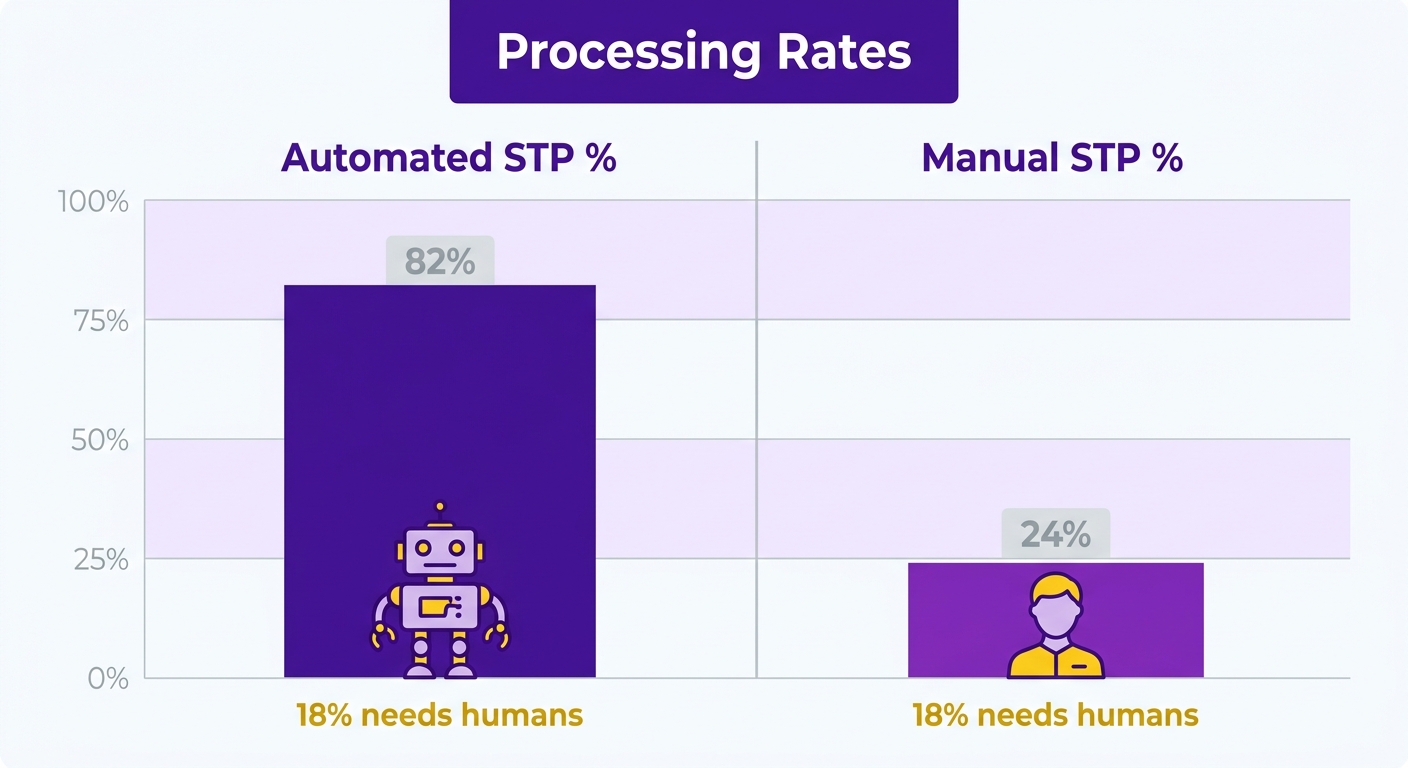
Full automation or hybrid review?
Hybrid. A collaborative approach is generally more effective. Industry analyses show the most successful transformations run systems that combine automated extraction with structured human oversight, rather than trying to eliminate human review entirely.
The key is how the system behaves when it hits an unfamiliar layout or a low-quality scan. Instead of stalling, a solid platform routes these items to a review queue with the relevant context highlighted.
Software that promises full autonomy with no visible interface for manual adjustments tends to fall short in practice. Keeping human oversight for critical financial decisions is a sign of practical, resilient design.
How do you evaluate exception handling?
By how easily your team can resolve flagged items. If the interface is cumbersome, it creates bottlenecks and delays the resolution of sensitive billing issues.
During demos, ask to see the exact steps to correct an extraction error. Fast verify-and-update prevents costly delays and helps you secure early-payment incentives.
Extraction accuracy above 90% is your baseline. Below that, your team spends its day correcting the machine instead of handling genuine judgment calls.
Where does the human touch actually pay off?
This is where the machine learning earns its keep. As your team resolves exceptions, the algorithms adapt to your billing patterns, steadily cutting the number of manual interventions over time.
The real return comes from moving your staff’s focus off repetitive data entry and onto high-value work: resolving complex account discrepancies and strengthening client relationships.
And by keeping a continuous, real-time sync with your primary ledger, the platform keeps your records accurate without manual exports or double entry.
Best Practices
Choosing an automated invoice processing cloud service comes down to one principle: design for the invoices that go wrong, not the ones that go right. Automation handles the clean, predictable invoices without much fuss. Your customer relationships live and die on the exceptions.
Here’s what we’ve learned watching finance teams adopt these tools. The platforms that stick aren’t the ones with the flashiest capture accuracy. They’re the ones that make human review feel like a feature, not a punishment.
How do you avoid buying shelfware?
Match the tool to your actual workflow before you buy, not after. Plenty of deployments underperform because the rollout ignored the finance team’s daily habits.
Before launch, define clear ownership for flagged items. When the system spots an anomaly, it should route to the right person with clear instructions, so unresolved items don’t pile up.
A few practices we recommend:
- Pilot on a subset of invoices first. Hybrid AI-plus-human review works best rolled out incrementally, not flipped on all at once.
- Focus your evaluation on the daily workspace of your AR team. The interface has to support fast decisions.
- Verify the data sync handles network interruptions gracefully, so you don’t get duplicate entries or missed updates during peak processing.
Should you chase full automation?
No. Aim for hybrid review, with full automation as the direction of travel. There’s a real split in the industry worth naming here.
Full automation is a valid long-term target. But a phased approach that keeps human oversight during the transition protects operational continuity and client trust.
Ask how the platform tracks learning progress. Over time, it should adapt to your recurring invoice formats and steadily reduce manual reviews. A vendor should be able to show how their models improve on user feedback. Skip any vendor that can’t explain how they surface human judgment at the right moments.
Why speed is a best practice, not just a benefit
Streamlining these workflows lets your department work more strategically, shifting from reactive data entry to proactive financial management.
That shift frees your team to spend real time resolving complex customer issues, which improves cash flow and strengthens retention.
A platform that balances automated efficiency with clear escalation paths gets you modern tech without losing the personal touch. Solutions like Blixo help manage that balance by streamlining the receivables lifecycle while keeping your team in control of the decisions that count.
Comparison with Alternatives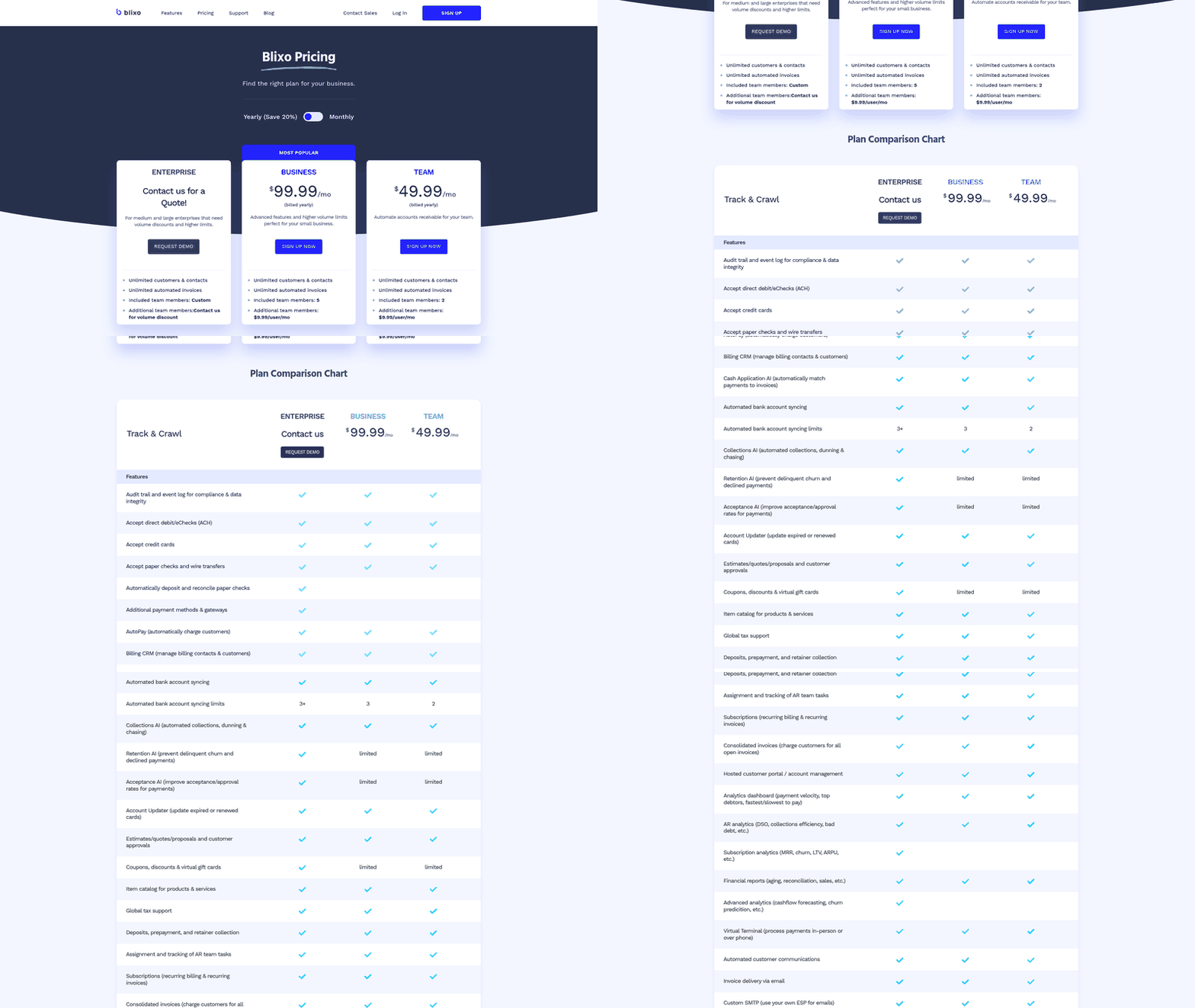
Manual processing costs you time and accuracy. ERP-native modules cover the basics but rarely handle exceptions well. Dedicated cloud platforms win when your customer relationships hinge on how you manage the invoices that go wrong.
What are your real alternatives?
Three practical options. Stick with manual or spreadsheet-based processing. Use the invoice module bundled inside your ERP or accounting system. Or adopt a dedicated cloud platform built for capture, matching, and collections.
Manual processing is the default most teams are trying to escape. Payment cycles stretch when everything runs by hand, and the average manual invoice takes days to clear versus hours on an automated system. Reconciling by keyboard also means late nights at month-end. That’s not a workflow. It’s a tax on your team’s attention.
ERP-native modules are the middle ground. They sync data and apply GL codes automatically. But they were built to record transactions, not to manage a disputed amount or a delicate collections call. The exception handling tends to live in a clunky queue nobody wants to open.
When should you choose a dedicated cloud platform?
When the invoices that need a human are the ones that matter most to your business. Disputed balances, long-term client relationships, overdue accounts. These are the cases where a bad automated experience costs you a customer.
The speed gains are real across every automated option. One mid-sized company cut invoice processing time by 30% after adopting automation. Another finance manager described closing the prior month’s books in two days instead of 10 to 15. That’s the baseline any serious tool should deliver.
But fast processing is only half the battle. The real advantage is reclaiming your team’s focus, so they can work sensitive account issues directly instead of keying in numbers all day.
A balanced approach is far more practical. Let the software handle standard, high-confidence matches, and your team can put their expertise on the complex anomalies that need human judgment.
Prioritize systems that make exception management straightforward. Blixo’s matching technology, for instance, is built to highlight discrepancies clearly, so users can make quick adjustments that also train the system for future transactions.
When should you skip the upgrade?
Skip a dedicated platform if you send fewer than a handful of invoices a month. The setup and integration won’t pay back at that volume. A basic ERP module or even careful manual work is fine.
Skip it too if your invoices are near-identical, low-value, and never disputed. Straight-through automation from any tool covers that. You don’t need collections-focused exception handling for invoices nobody ever argues about.
For everyone else, it comes down to one question. Does the tool make human review feel like a feature or a punishment? Evaluate the exception UX, not just the capture accuracy. That single test predicts whether your team adopts the platform or lets it rot into shelfware.
Troubleshooting
When a cloud service stalls, the problem is rarely the OCR engine. It’s almost always the handoff. Something the platform can’t read gets stuck in a queue nobody checks, and a customer waits three weeks for a resolution that should have taken a day.
Most issues fall into three buckets: capture failures, integration breaks, and exception pileups. The last one is where finance team morale quietly dies. Here’s how to diagnose each without blaming your staff for the platform’s blind spots.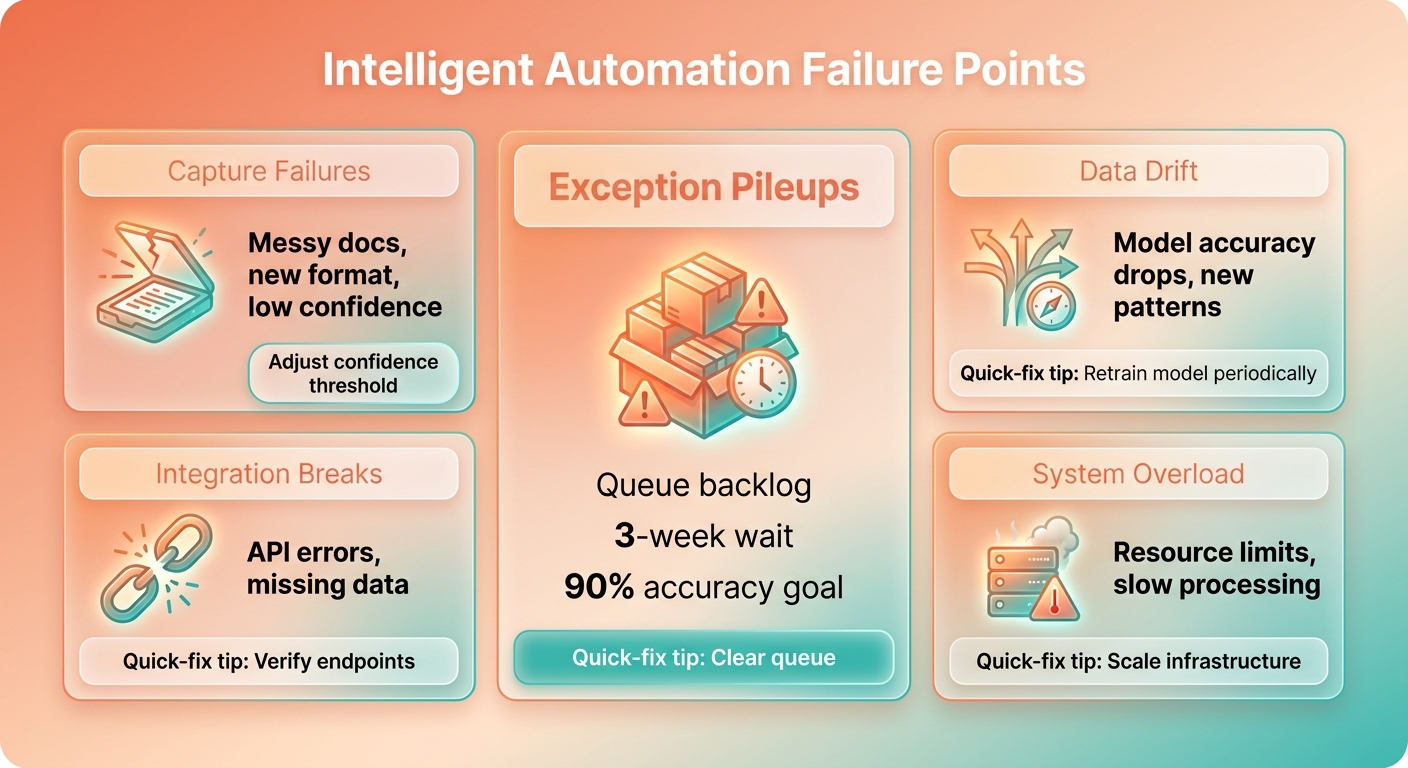
Why are invoices getting stuck in capture?
Capture fails when the document is messy, the format is new, or the confidence score falls below your threshold.
When extraction falls short, the admin burden just shifts from typing invoices to correcting software errors, which defeats the point. Unusual layouts or poor scan quality drag confidence down, so you need a clear process for manual verification.
Route low-confidence invoices to a human fast, with the extracted fields visible for a quick correction. A good platform teaches itself from those corrections. Blixo’s cash application engine, for example, uses machine learning to grow smarter as your team reviews and edits matches, improving accuracy over time. One company cut manual data entry errors by 25% after tuning OCR against its own invoice mix.
How do you debug integration and performance problems?
Integration breaks show up as duplicate entries, failed syncs, or invoices that clear in the platform but never hit your ERP. The cause is usually retry logic and idempotency handling, not a broken connection.
Direct database integrations can accelerate reconciliation, but they need a stable connection to prevent data mismatches. To hold performance during peak periods, look for platforms that move data in controlled batches rather than continuous, real-time writes that can strain your ledger.
Check your error logs before you blame the vendor. A duplicate almost always traces back to a payload sent twice without a unique identifier. Blixo’s integration architecture is built to shield your core accounting systems from performance lag, giving you a reliable bridge between invoice processing and your general ledger.
Why does the “full automation” setting backfire?
Because automation isn’t binary. Teams that push straight to full automation without tuning their exception rules typically see a spike in disputed invoices in the first 90 days. Not because the tech failed, but because edge cases weren’t mapped before go-live.
Rather than an all-or-nothing switch, successful teams treat automation as an evolving partnership: software does the heavy lifting, humans keep final oversight.
A poorly designed review interface is a major bottleneck. Make sure your team can navigate and resolve flagged items easily. It’s the difference between a team that trusts the tool and one that works around it. Blixo helps with clear dashboards and task management that keep complex cases organized.
Resources and Tools
Building your shortlist for an automated invoice processing cloud service shouldn’t start with vendor demos. It should start with the questions you ask and the numbers you use to score the answers. This section gives you both: the evaluation tools and the benchmarks that separate a platform that finishes the job from one that stalls at “mostly automated.”
The connection worth making first: days-to-payment drop from 47 to 18 with digital invoicing, and labor hours per 100 invoices fall from 36.4 to 8.2.
Those reclaimed hours are what let your finance team shift from repetitive admin to proactive client engagement and dispute resolution.
What should your evaluation checklist include?
Score every platform against the moments that need a human, not the features that impress in a demo. The best tools make exception review feel like a designed workflow, not a punishment queue.
Use this as your working checklist:
- Exception routing: When capture confidence drops, does the invoice land with the right person and full context, or in an anonymous queue?
- Audit trail depth: Can you trace every edit, approval, and payment back to a timestamp and a name? Clean records cut dispute resolution time and protect you at tax season.
- Embedded payment options: These cut payment completion to roughly 37 seconds. For cash-tight businesses, that’s a survival feature.
- Duplicate detection: Systems that flag repeat invoice numbers and matching amounts catch the errors that quietly drain 1.5% of total spend in overpayments.
- Native accounting and ERP connections: A platform that attaches to your existing systems beats one that demands a rebuild.
How do you benchmark cost savings?
Present savings as a range, because they scale with integration depth. Partial automation delivers around 30% in labor and error-correction savings. Full end-to-end digital transformation, including payment, pushes cost per invoice as low as $2.56, a 76% reduction.
The two figures aren’t a contradiction. They measure different depths of adoption. Our judgment: if a vendor quotes you the high number, ask what integration they assume to get there. If you only plan to automate capture, expect the lower figure. That one question exposes more about realistic ROI than any case study.
Blixo’s compatibility with major accounting and ERP systems lets you capture these efficiencies without disrupting your existing stack.
Which benchmarks matter most for small teams?
If your business runs on thin cash reserves, weight your scoring toward payment speed over enterprise ERP depth. Small businesses hold a median of 27 days of cash, and 75% face payment volatility above 18% of monthly inflows. When your runway is that short, every day shaved off collections matters more than any advanced reporting module.
Mobile invoicing proves the point. Construction firms generating invoices on-site cut days sales outstanding by 35%. The lesson generalizes: prioritize embedded payments, fast delivery, and clean exception handling. Those are the tools that protect cash flow while keeping your customer conversations human.
Conclusion
What happens on the invoices that go wrong? That’s the thread we’ve pulled through this whole guide, and it’s where your customer relationships and your team’s morale actually live.
The case for automating isn’t theoretical anymore. Teams that have made the switch report measurable cuts in close cycles and a real drop in manual touchpoints per invoice. But adoption isn’t the same as finishing the job. The platforms worth your money treat human review as a designed feature, not an afterthought buried in a queue nobody checks.
What should you take away from this guide?
Pick for exception handling, not straight-through processing rates. A cloud service that clears the easy invoices flawlessly but hides disputes and overdue accounts in a clunky workflow will quietly damage the relationships that matter most.
Automate the routine data entry and reconciliation, and your team gets the room to focus on high-value client interactions. Blixo’s matching capabilities help streamline these daily workflows, keeping records accurate while freeing up staff time. That’s not just a faster close. That’s a team no longer buried under manual work, with room to handle the human moments automation can’t.
What are your next steps?
Start small and prove it works before you scale. The order we recommend:
- Map your exception paths on paper first. Before any demo, document where invoices stall today and who steps in. This afternoon of work saves months of reconfiguration.
- Pilot on a subset of invoices. Test the platform against your messiest cases, not your cleanest. The invoices that need judgment calls tell you everything about whether a platform is ready for your business.
- Score the exception UX, not the marketing. Ask every vendor to show you exactly how a disputed invoice gets escalated to a person. If that workflow feels like a punishment, walk away.
- Connect your accounting system early. Data integration comes before automation rules, always.
Focus on building a reliable, collaborative workflow instead of chasing full autonomy. A system that keeps your team in the loop for the critical decisions is the most resilient way to scale your financial operations.
Where should you learn more?
Keep your evaluation grounded in your own numbers. Track days-to-payment, labor hours per 100 invoices, and error rates before and after any pilot. Those three metrics tell you whether a platform is finishing the job or stalling at “mostly automated.”
With broad compatibility across major financial platforms, Blixo helps you tune your accounts receivable without a complex software overhaul.
The best platforms don’t replace your team. They give your people back the hours that let them be human where it counts.
Frequently Asked Questions
1. Can I keep my current accounting software, or do I need to switch systems?
Yes. Blixo is designed to work alongside your existing financial ecosystem, establishing a secure, real-time data sync that keeps your primary ledger updated without requiring manual exports or double entry.
2. How long should I wait before tightening my exception review rules?
We recommend beginning with a highly supervised phase. By routing complex or high-value transactions to your team for validation during the initial weeks, you can safely monitor accuracy and adjust the system’s sensitivity based on real-world performance.
3. Will automated collections damage relationships with long-term clients?
They can if you apply a one-size-fits-all approach. To protect key relationships, ensure your system allows you to exclude sensitive accounts or active disputes from automated dunning sequences, leaving those interactions to your account managers.
4. What extraction accuracy should I expect before a platform is worth using?
Look for a platform that consistently extracts key fields correctly under real-world conditions. If accuracy is too low, your team will spend more time correcting software errors than they would have spent on manual entry. Always test vendors using your own actual invoice formats rather than relying on idealized demo files.
5. Why shouldn’t I just pick the platform with the highest automation rate?
A high hands-free processing rate is meaningless if the remaining exceptions are difficult to resolve. The most critical transactions—such as billing disputes or key client accounts—often require human intervention. Prioritize a platform with an intuitive interface for managing these flagged items quickly.
6. What order should I configure things in during setup?
Begin by establishing a stable connection to your primary ledger. Once your core financial data is syncing correctly, set up your internal review workflows and validation thresholds. Save customer-facing communication templates and automated reminders for the final phase, ensuring they are tailored to your specific client relationships.
7. How do I test a platform’s exception handling before buying?
During product demonstrations, ask the vendor to walk you through a failed match or a low-confidence scan. Pay close attention to how many steps are required to correct the data and whether the interface presents all necessary context on a single screen to minimize administrative friction.