

How Mid-Size SaaS Teams Use Blixo to Shrink Collections Work by 70%

Key Takeaways
- Mid-size SaaS teams using Blixo’s automated dunning report a roughly 70% drop in collections work.
- SaaS firms typically carry Days Sales Outstanding of 45 to 60 days.
- A January 2025 McKinsey analysis found receivables optimization can improve working capital by 30% or more within weeks.
- Every day trimmed from DSO returns capital for product, hiring, or sales.
- Blixo’s approach centers on AI-driven dunning that cuts manual chasing.
- Collections is a hidden tax on scaling SaaS businesses.
- The case for automating collections rests on cash speed, cost, and trust.
Why Collections Is Quietly Eating Your Finance Team
Scale a SaaS company and accounts receivable becomes a bottleneck fast. Finance ends up buried in follow-up instead of strategic work. Automating the busywork lets you tighten billing cycles without souring client relationships.
As subscription volume climbs, unpaid balances tie up capital that should fund operations. That delay directly hits your ability to reinvest. Modernize the collections setup and finance leaders get better working capital, less overhead, and clearer communication with customers.
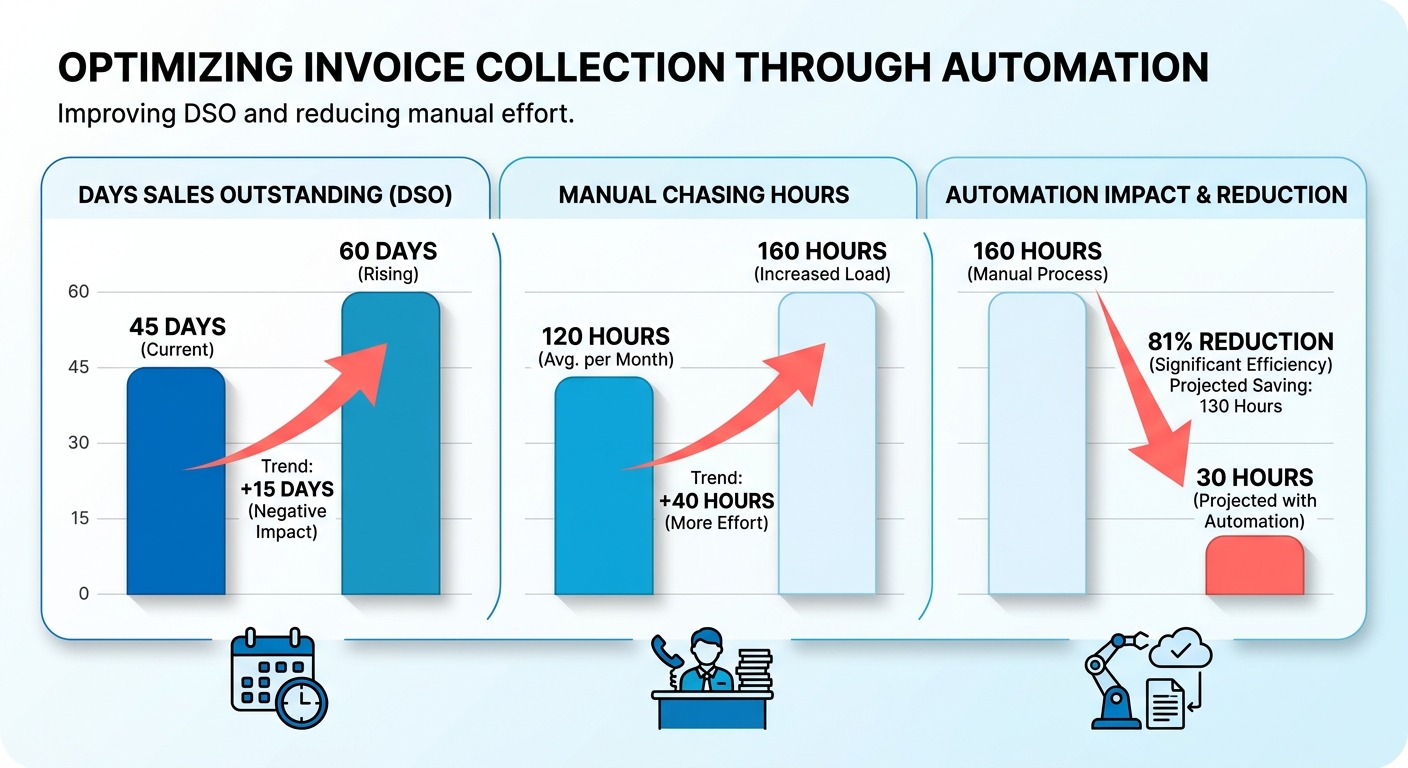
Why DSO decides your runway
DSO is the health metric for subscription businesses. When payment cycles stretch, earned revenue stays locked in unpaid invoices. That restricts what you can do next.
Speed up the conversion cycle and you get liquidity now. Instead of tapping a credit line or dipping into reserves, you fund immediate needs with recovered cash. Capital lands where it’s needed, and the business stays agile.
Handle outstanding balances systematically and you pull cash flow forward steadily. Balances resolve on a predictable schedule, which gives finance a clearer read on near-term cash.
What manual collections actually costs
Manual collections run $25 to $40 per invoice in labor and error-related costs. Multiply that across hundreds of monthly invoices and your finance team’s time disappears into follow-up emails and status spreadsheets.
The throughput gap is stark. Human collectors make 15 to 20 calls per day, and most of it is repetitive follow-up. Move that to systematic outreach and your people stop doing routine chasing and start handling exceptions that need judgment.
Mid-size SaaS teams carry extra weight: multiple subscription models, usage-based billing, customers spread across time zones and currencies. Doing that outreach by hand also raises compliance risk under GDPR and PCI, where inconsistent payment handling gets expensive fast. Pull recurring invoicing, subscription management, and collections into one platform and juggling several billing types stops meaning several manual processes.
Does automation make you the cold-email company?
It doesn’t have to. Centralize AR into a single source of truth for reconciled, real-time revenue data and you get fewer surprises and fewer awkward conversations with paying customers. When status is clear and payments match automatically, disputes resolve faster.
The payoff shows up as faster cash and fewer disputed invoices. With Blixo’s automatic cash application, intelligent matching, and automated reconciliation, mid-size teams can hand off repetitive collections work and still get paid.
A scalable communication setup fits SaaS growth because it absorbs rising invoice volume without a matching bump in headcount. Structure reminders to be helpful rather than adversarial and you protect the relationship while still getting paid on time.
Setting Up Blixo Collections Without Writing Code
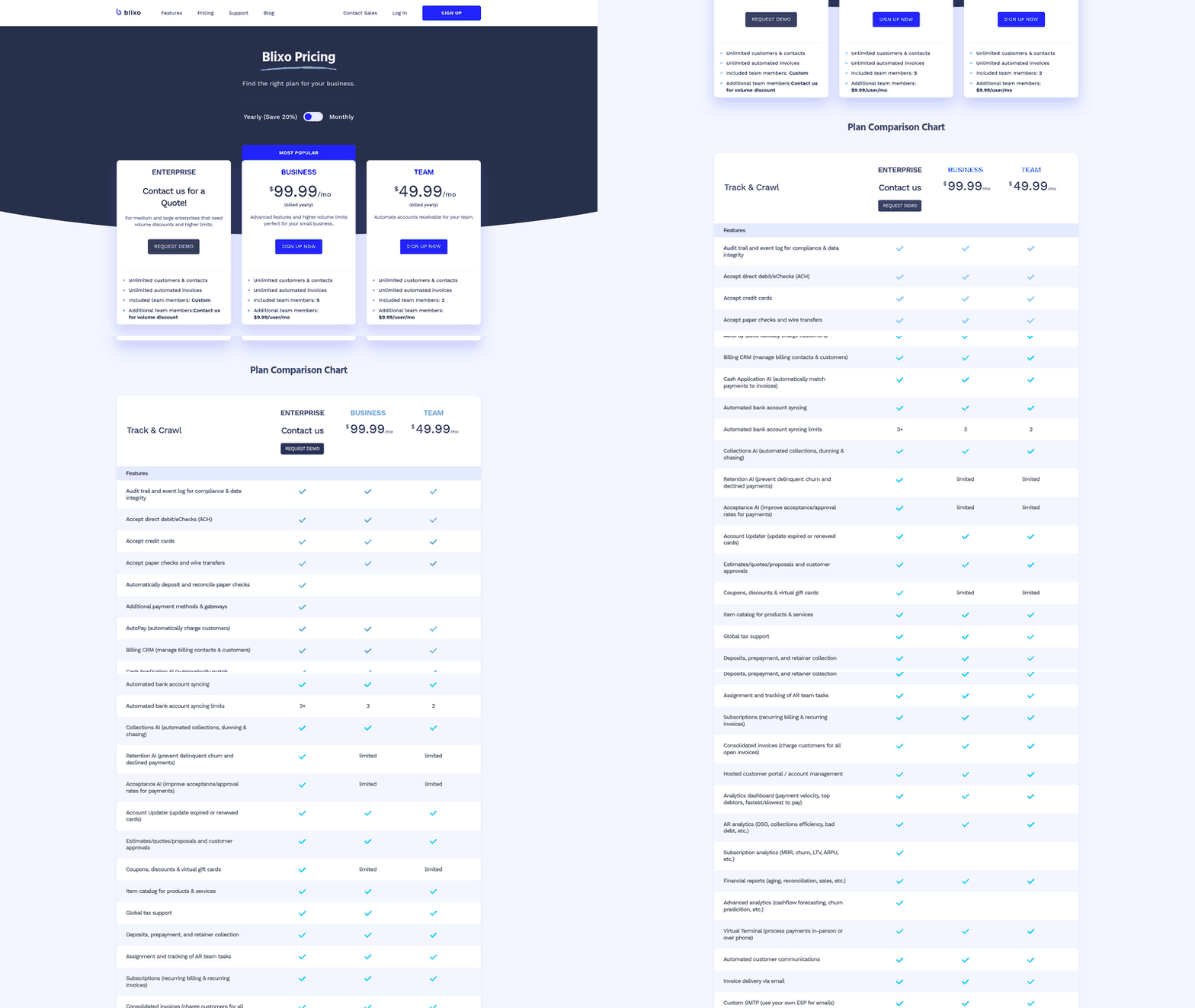
Standing up automated collections in Blixo takes zero engineering time. You map your data sources, configure dunning stages, set overdue thresholds, and test before going live. Finance ops runs the whole thing.
Here’s the sequence we walk teams through when they replace manual chasing. Each step builds on the last, so don’t skip the audit.
What data you need before you start
Start with an audit of three sources: your invoice database, your payment gateway, and your ERP. Without clean data flowing in, no workflow fires correctly. This is the single most common reason a rollout stalls.
Pull every open invoice with its due date, amount, and customer contact fields. Check that email and phone data is current. Stale contact records break email and SMS reminders before they ever send.
Confirm your payment gateway exposes real-time status. Blixo reads payment events to know when to stop chasing. If an invoice clears mid-sequence, the workflow needs to pause on its own, and that only works with a live gateway feed.
How to build tiered dunning stages
Stack your reminder stages by channel and timing. You add a stage, pick a channel, set the trigger. No code, no scripts.
A tiered structure stays friendly early and escalates only when needed:
- 7-day overdue: A soft email reminder. Warm tone, clear payment link.
- 14-day overdue: A second email plus an SMS nudge for customers who opted in.
- 30-day overdue: A firmer email, an optional voice reminder, and a physical letter for high-value accounts.
Set auto-escalation between stages. If payment lands, the sequence stops itself. If it doesn’t, the customer moves to the next tier without anyone lifting a finger. That’s what pulls the manual work out of getting paid. Your team handles exceptions, not routine work.
Keep the language human at every tier. The goal is friendly reminders that recover cash without souring the relationship. That balance holds easier with recurring-revenue accounts, where consistent billing across cycles heads off payment friction before it starts.
How to connect your stack and test it
Use the built-in integrations to sync your existing tools, then validate everything before a single customer sees anything. Shopify, QuickBooks Online, BigQuery, Klaviyo, and Recharge Payments are included on all plans. For NetSuite and other ERPs like Microsoft Dynamics 365, Sage Intacct, Xero, or SAP ERP, contact the Blixo Customer Support Team for a custom integration.
Wire up billing and CRM first so invoice status and customer context flow in automatically. Then set up the custom customer portal so customers can pay through self-service, and batch-upload invoices for bulk runs.
Now test. Run a sample invoice batch and watch the sequence fire end to end. Check that reminders send on the right days, escalations trigger correctly, and paid invoices exit the flow.
Do a KPI sanity check before go-live. Confirm your DSO baseline and reminder open rates are tracking. Once the sample run behaves, flip to production.
Multi-Channel Collections, Running on Its Own
Automated collections work best when chasing runs without eating your team’s time. Manual follow-up alone means slow payment and stalled cash. Blixo automates chasing, collections, and dunning so overdue invoices get pursued consistently without someone burning hours on the phone.
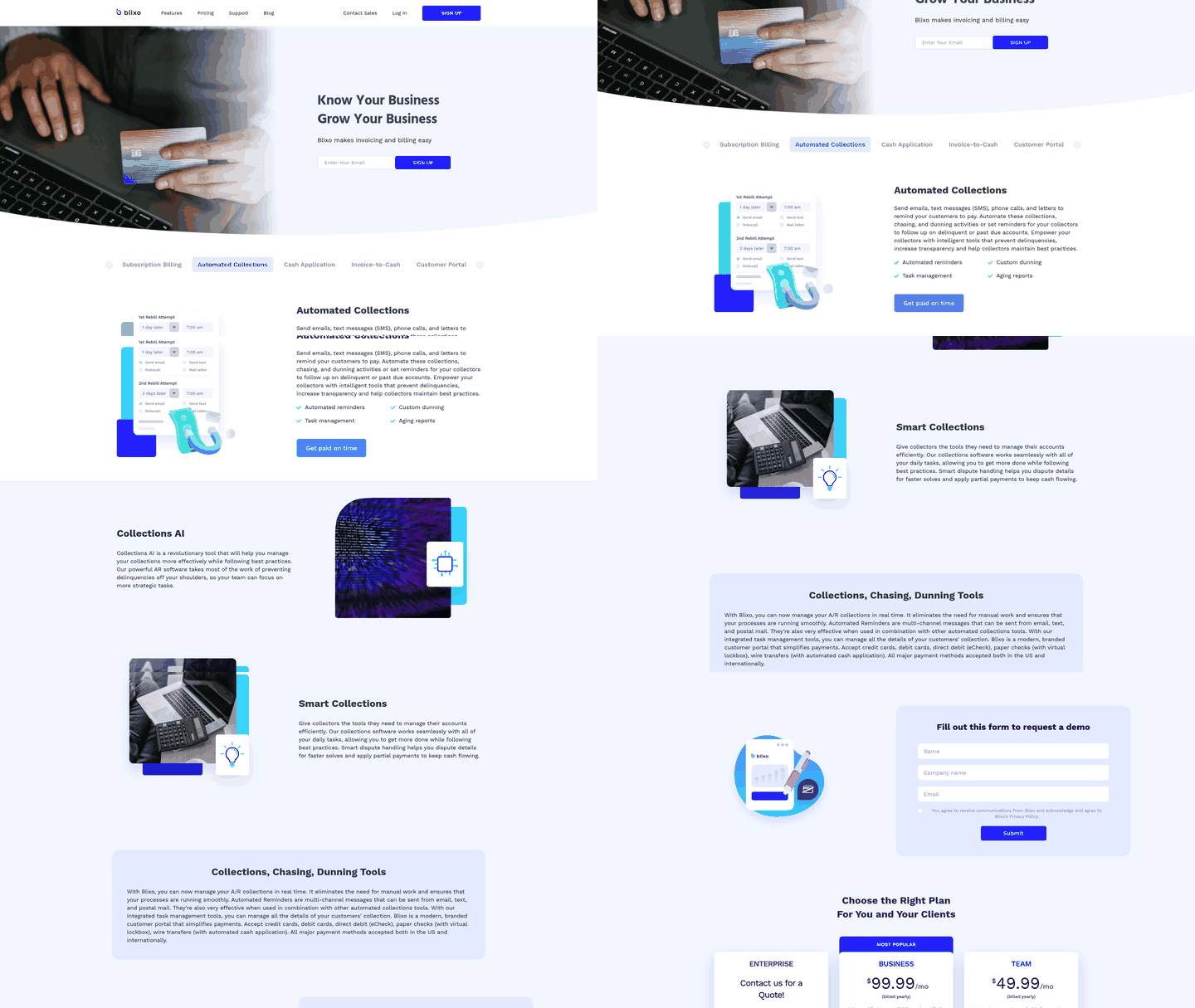
Here’s how the collections logic plays out once finance configures it. The workflows take manual work off your plate, so you’re not tracking each overdue account by hand. That’s how mid-size teams shrink the time they spend on collections.
Why automated chasing beats manual follow-up
Manual collections force your team to decide which customers to contact each day, often without current payment status. At-risk accounts slip, recovery slows. Automated dunning removes that guesswork by chasing unpaid invoices on a consistent schedule.
Blixo’s collections tools help by:
- Giving your team visibility into payment status so you don’t chase customers who already paid
- Keeping recovery moving without adding to your team’s workload
No manual process keeps pace at scale. Automation holds the recovery effort steady at every stage.
What automated dunning looks like
A good collections process escalates over time, starting with reminders and adding formality only when needed. That keeps goodwill intact while steadily pursuing payment. With Blixo, the sequence runs itself:
-
Send the invoice. Smart invoicing pulls in customer details and gives each client a one-click payment option.
-
Automated reminders. Blixo chases open invoices automatically, so anyone who missed the first send gets followed up without your team lifting a finger.
-
Credit hold on lapse. When an invoice stays unpaid, the customer can be marked and their credit put on hold, keeping risk in check.
-
Documented trail. Every prior attempt is recorded, which matters if the account heads to formal collections.
Automation runs the whole process, so getting paid stays simple. No manual grind.
How Blixo keeps collections consistent
Blixo chases overdue accounts on schedule instead of whenever someone remembers. That consistency is what pushes recovery past a stop-and-start manual approach.
Because the platform centralizes billing records, your team always sees where each invoice stands. You can tell exactly what’s been sent and whether payment landed, which keeps you from contacting customers who already paid.
Pair automated collections with intelligent payment matching and deposits get applied to outstanding balances without the manual cleanup. Your books stay accurate as recovery climbs.
Watch how your overdue invoices trend over time. When recovery lags, adjust your invoicing and reminder setup and let the automation run. That tight loop is how recovery improves quarter over quarter. Pair it with automated invoicing upstream and fewer invoices go overdue in the first place.
Measuring ROI: From 70% Less Work to Bottom-Line Impact
ROI on collections automation comes down to three numbers: hours saved, cash pulled forward, and total cost of ownership. You calculate your baseline, model the post-implementation state, and compare. Run this math before you commit and the labor savings and faster cash stop being abstract benefits and become line items you can defend to a CFO.
Here’s the framework we walk finance leaders through. It takes about an hour to build once your numbers are pulled.
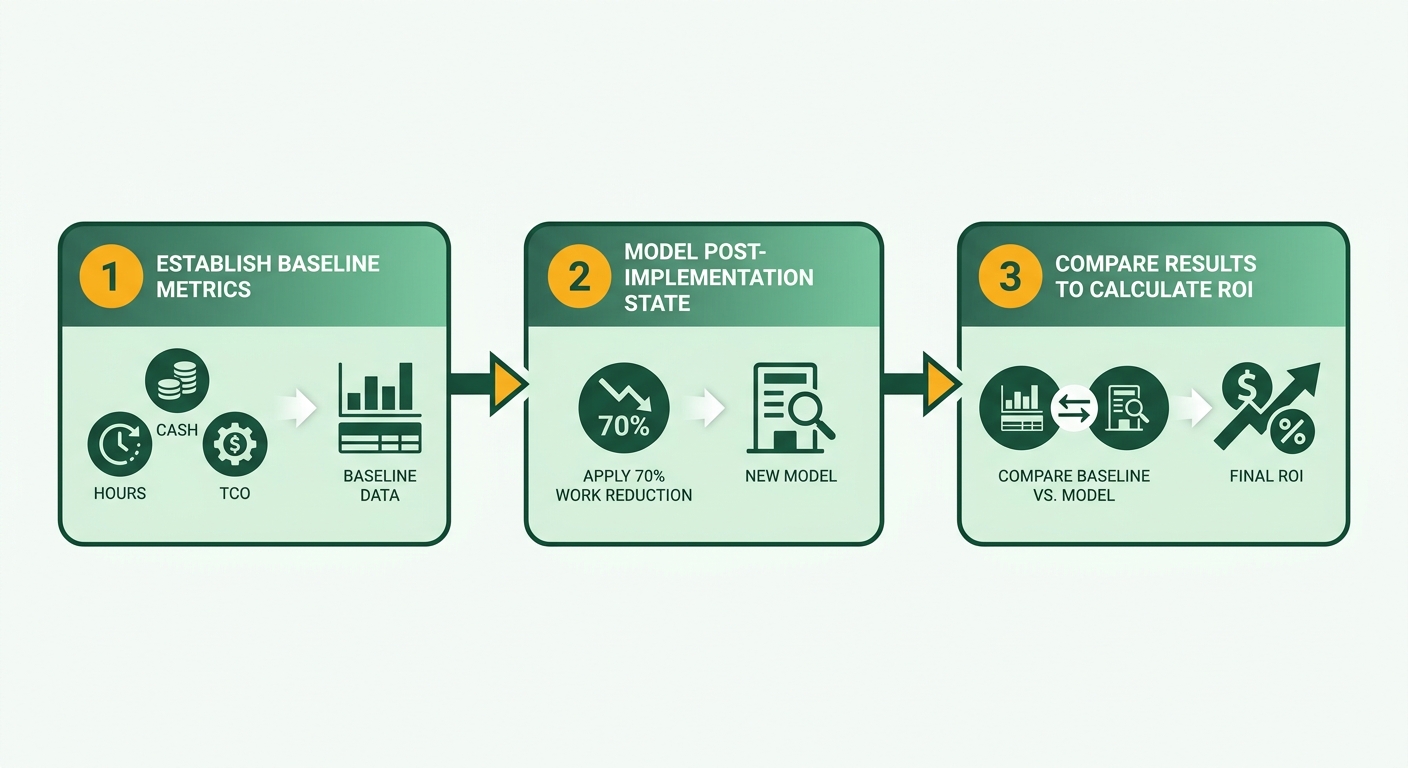
How to calculate your collections baseline
Your baseline is the total monthly cost of your current manual process, in hours and dollars.
Three inputs. Count the FTE hours per month your team spends chasing overdue invoices. Multiply by the fully loaded hourly cost of those staff. Then record your current DSO in days.
A mid-size SaaS team often runs one to two people spending 60 to 80 hours a month on collections. At a loaded rate of $45 an hour, that's roughly $2,700 to $3,600 monthly in labor alone. Your DSO sits somewhere in the typical unoptimized range if you’re still chasing by hand.
Write those three figures at the top of your sheet. Every ROI calculation flows from them.
What automating collections looks like in numbers
The first ROI lever is hours saved. Automated chasing and dunning move routine follow-up off your team’s plate, leaving them to handle exceptions and dispute review.
That freed capacity is real ROI. You either cut headcount or reallocate people to revenue work. Most teams we see reallocate rather than fire, and the collections analyst becomes a cash-flow forecaster.
The second lever is DSO. Moving from 45 days to 30 days on $2M in monthly receivables pulls about $1M of cash forward. At a 15% APR on your working capital line, that $1M arriving 15 days sooner saves roughly **$150K in annual financing costs**.
Streamline the workflows and give finance clear visibility into outstanding balances, and the metrics you model are the ones you can actually track.
How total cost of ownership compares
A flat monthly fee beats percentage-based legacy pricing once your AR volume scales. Percentage tools quietly tax every dollar you collect. Flat pricing doesn’t.
Model both over 12 months. A percentage-based tool taking even 1% of collected AR on $24M annual receivables costs you $240K. A flat fee runs a fraction of that, and it doesn’t grow when you do.
Then layer in the wins that don’t show up on the labor line. Friendlier, more human reminders improve the customer experience and cut dispute tickets, which shrinks your exception queue further. Consistent, auditable dunning also lowers compliance risk when finance gets audited.
Blixo lets you start on the always-free Solo plan with no credit card, so your ROI clock can start early. Advanced matching features sit on paid tiers, and if you need an integration with a popular tool that isn’t already supported, the Blixo Customer Support Team can typically set up a custom one in under a month. If your AR is under a few hundred invoices a month, skip the elaborate model. The labor savings alone won’t justify a heavy build until your volume climbs.
What 70% Less Collections Work Looks Like in Practice
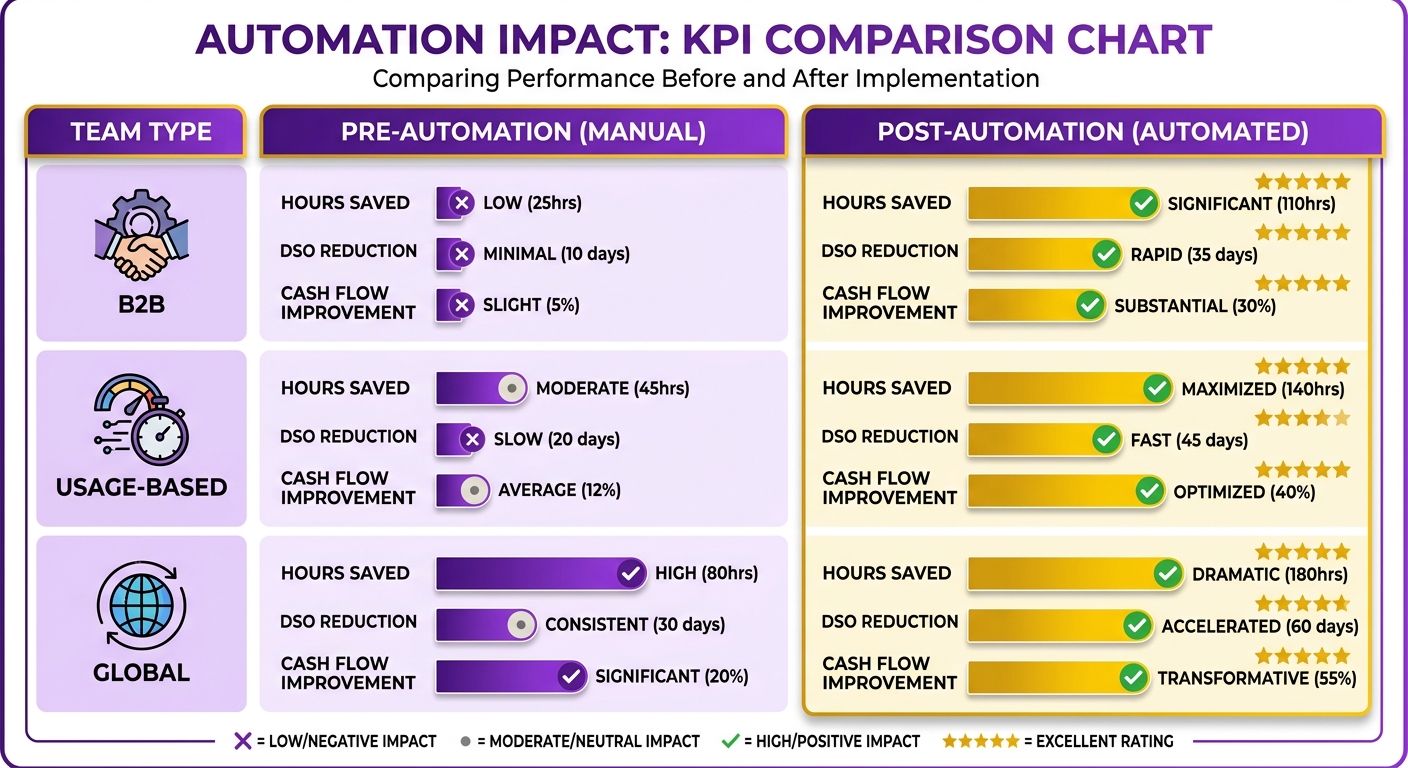
Cutting collections work isn’t a far-off promise. It’s what mid-size SaaS finance teams aim for when they swap manual chasing for structured, automated workflows. Below are three illustrative scenarios drawn from patterns we see across B2B, usage-based, and global SaaS teams.
Each follows the same arc: a stuck process, a phased rollout, and meaningful KPI shifts. The common thread is that automation frees finance from chasing so they can move to higher-value work.
A B2B analytics team trades chasing for forecasting
Scenario one: a B2B analytics SaaS at roughly $30M ARR, call it DataPulse. Their finance team spent most of each week manually chasing overdue invoices. After rolling out automated multi-channel dunning, manual dunning tasks dropped sharply and the team spent far less time on collections.
The bigger win was cultural. With chasing off their plates, the team re-skilled toward cash forecasting. Instead of hunting down late payers, finance started coaching the business on where cash was headed.
Data hygiene made it possible. The rollout only worked because they cleaned invoice and contact fields first. Skip that audit and the whole thing stalls.
What AI cash application looks like for usage billing
Scenario two: a usage-based infrastructure monitoring platform near $18M ARR, call it CloudMeter. Usage billing meant messy, variable payments that were painful to reconcile by hand. Automated payment matching let them link incoming deposits directly to open accounts.
That single change cleared their manual reconciliation backlog. No more staff tying deposits to invoices line by line. For usage-based teams, this is the highest-use automation you can turn on.
If your billing is flat and predictable, cash application matters less. But when payments vary every cycle, automated reconciliation changes what your finance team does all day. The platform’s documentation walks through how to set up rules that match payments to invoices for teams like this.
A global creative SaaS gets paid faster
Scenario three: a global creative-agency SaaS at about $22M ARR, call it CreativeHub. They deployed a personalized, branded payment interface so overdue reminders felt like part of their own brand, not a jarring collections notice.
The result: customers paid faster and raised fewer complaints. When reminders read as friendly and branded, on-time payments improve and goodwill stays intact.
That’s the whole point of relationship-first collections. You’re not trading client trust for faster cash.
What these teams share
All three shared the same core traits: a phased rollout, automated multi-channel dunning, a self-service payment interface, and KPIs they could defend to a CFO.
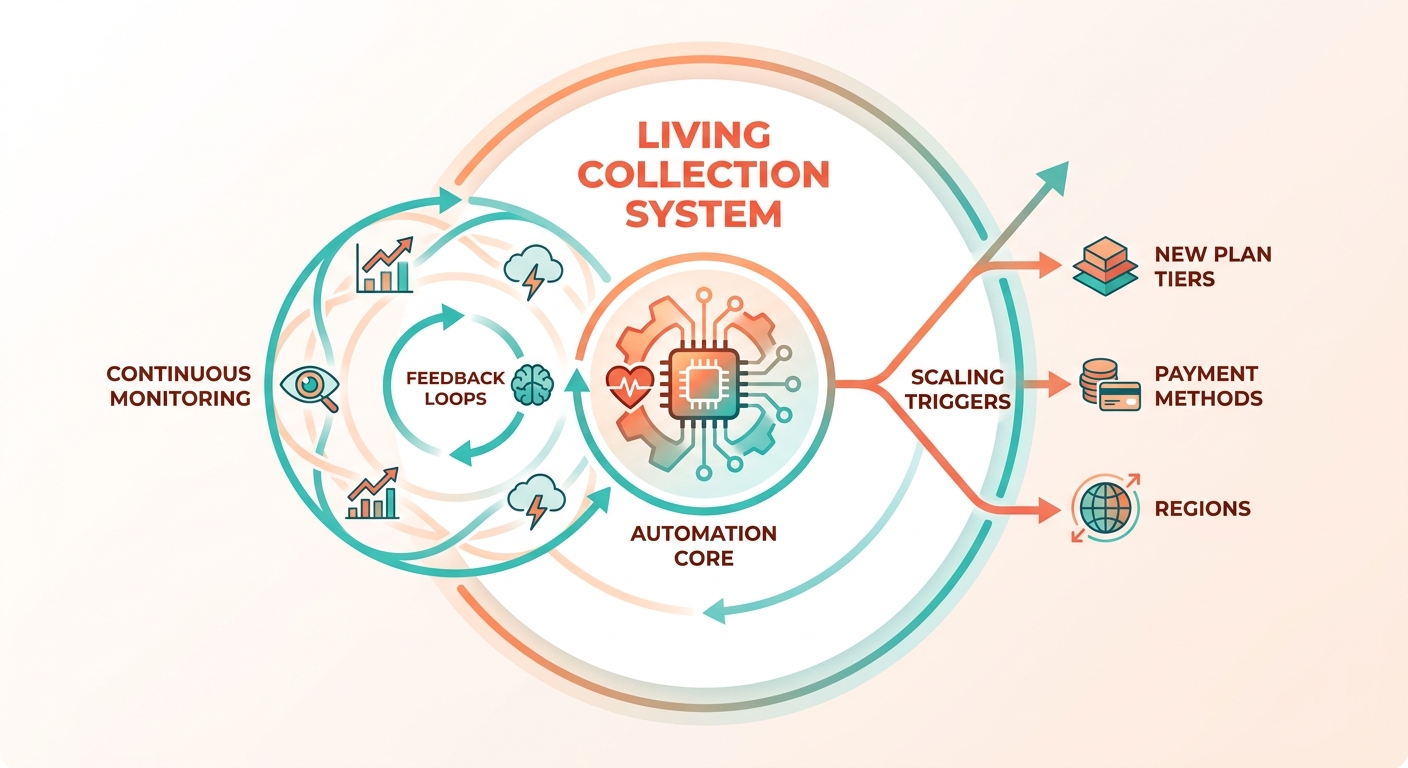
The lessons repeat too. Clean your data first. Roll out in phases instead of flipping everything on at once. Then monitor continuously so your dunning stages stay tuned as customer behavior shifts.
Start with one segment, prove the numbers, then expand. That phased path is why these teams see results steadily rather than all at once.
Keeping Collections Lean as You Grow
Automating collections is the start, not the finish line. As your customer base grows, new plan tiers, payment methods, and regions each add friction that can quietly erode your efficiency gains. The teams that hold their gains treat collections as a living system and review it on a schedule instead of setting it once and walking away.
Here’s what keeps collections lean at scale. If you’re figuring out how to sustain automation past the initial rollout, these are the practices that matter. Each one is about catching drift early, before it costs you cash.
How to govern dunning policy as you scale
Set up a small collections governance board that meets quarterly. Pull in Finance Ops, Sales Ops, and Customer Success. The logic is simple: dunning rules that fit a 200-customer book will misfire at 2,000, and no single team sees the whole picture.
Finance Ops owns the numbers. Sales Ops flags contract terms that break your assumptions. Customer Success catches the accounts where a hard reminder would tank a renewal. Review your overdue thresholds, channel escalation, and tone every quarter. Kill rules that no longer fire and add ones that reflect how you actually sell now.
What to watch on the analytics dashboard
Use your analytics view to catch trends before they hit DSO. Rising churn in one plan tier is the classic early signal. If a specific tier starts paying late at a higher rate, that’s a product or pricing problem wearing a collections costume.
Watch three things monthly: recovery rate by segment, average days-to-pay by tier, and dispute frequency. When one number moves, trace it back. A jump in disputes on enterprise invoices usually means a billing accuracy issue upstream, not a collections issue at all.
Keep an eye on premium-channel usage too. Postal letters cost real money per send. Set a cap, review it quarterly, and reserve physical mail for genuinely high-value or unresponsive accounts. Most overdue invoices resolve over email long before a letter helps.
How to future-proof for new payment methods
Feed new payment patterns back into your matching so accuracy keeps climbing. As you add payment methods, the platform’s matching rules link payments to invoices cleanly and reconcile automatically. That flexibility lets you support emerging payment rails without rebuilding your process.
For international growth, lean on the self-service portal so clients can pay and check status on their own. That independent access lifts payment rates and cuts the follow-up your team has to do by hand.
Two directions worth planning for now: getting ahead of at-risk accounts by reaching out before an invoice goes overdue, and streamlining dispute handling so documentation gets gathered and routed with less manual chasing. Both shift you from reacting to problems toward preventing them. That’s where the next efficiency gain lives once the obvious manual work is gone.
If you want fewer headaches around recurring billing as you expand, consolidating your subscription billing and collections handles the repetitive work automatically, all from one platform.
Frequently Asked Questions
1. Can I start using Blixo for collections without paying upfront?
Yes, you can begin exploring the platform’s core collections features at no initial cost. The entry-level tier allows you to set up basic automated reminders and test the system’s workflows. Advanced features, such as automated payment matching and deep ERP integrations, are available as you scale into paid tiers, allowing you to align your software spend directly with your transaction volume.
2. My ERP isn’t NetSuite or QuickBooks. Can I still connect it?
Yes. While the platform provides native, out-of-the-box connections for popular accounting, e-commerce, and marketing tools, it also supports custom integrations for enterprise-grade systems. If your team uses a specialized ERP or database, the technical support team can work with you to build a tailored data bridge, ensuring your invoice and payment records sync seamlessly without requiring internal engineering resources.
3. What happens if a customer pays in the middle of a dunning sequence?
The system instantly pauses any active outreach the moment a transaction is processed. By monitoring payment gateway activity continuously, the workflow engine detects successful settlements and immediately removes the corresponding account from the reminder queue. This real-time response ensures customers never receive redundant payment requests after they have settled their balance.
4. Is automated collections worth it for a small SaaS team with low invoice volume?
While smaller operations may not see massive labor savings immediately, establishing automated workflows early builds a scalable foundation. Instead of spending time building complex financial models, low-volume teams can use basic automated reminders to establish payment discipline. This ensures that as your customer base expands, your collections process is already structured to handle the growth without requiring sudden administrative hires.
5. Why does flat-rate pricing matter compared to percentage-based collections tools?
Percentage-based pricing models penalize your growth by taking a cut of every dollar recovered, which quickly escalates into a significant expense as your transaction volume expands. A predictable, fixed pricing model ensures that your software costs remain stable regardless of how much revenue you collect. This predictability makes it much easier to forecast software expenses and preserve your margins as your business scales.
6. Which Blixo automation delivers the most value for usage-based billing?
For companies with variable billing models, automated payment reconciliation is highly valuable. Because usage-based invoices fluctuate in amount each month, matching incoming bank transfers or card payments to the correct accounts is incredibly tedious. Automating this reconciliation process eliminates the manual effort of pairing variable deposits with open balances, allowing your finance team to keep the ledger accurate without manual intervention.
7. Once collections are automated, what should finance teams monitor to keep it efficient?
Finance teams should regularly review operational metrics to ensure the system remains aligned with business goals. Key indicators include tracking how quickly different customer cohorts settle their balances and identifying which billing cycles generate the most inquiries. Additionally, establishing a cross-functional review process ensures that your communication templates and escalation thresholds are updated to reflect changes in your product offerings and sales contracts.