

Younium’s 2026 Dunning Engine: A Better Cloud Invoice Process for SaaS Billing Teams

Key Takeaways
- Younium is generally positioned as a subscription hub between CRM and ERP systems, but capability coverage should be verified against your specific billing model.
- Public materials describe support for complex B2B contract structures such as ramp deals and hybrid pricing; high-volume consumer billing capabilities are not clearly documented.
- Public materials do not confirm a specific 2026 dunning-engine release; detailed dunning configuration options require live demo verification.
- Younium’s public integration pages commonly list native connectors for systems such as NetSuite, Dynamics 365, QuickBooks Online, Xero, Salesforce, HubSpot, Stripe, and GoCardless.
In short
When you’re evaluating Younium as a cloud invoice process platform for your SaaS billing, the available public information points to a clear positioning: it is generally described as a subscription-hub product that sits between your front-office and back-office systems. Younium is commonly described as a Stockholm-based vendor with an apparent focus on SMB and mid-market companies. Pricing is typically not published, so budget planning usually requires a sales conversation rather than a published tier comparison.
Public materials reference recurring invoices, usage billing, and multi-step dunning as part of the offered feature set. What needs closer inspection is not whether dunning exists, but how deeply it can be configured for your operating model: retry timing, escalation paths, event visibility, and handoffs to any receivables workflow you already use. If collections logic is central to your buying decision, make that walkthrough a core part of the demo rather than a follow-up question.
Where Younium fits and where it doesn’t
Younium tends to be described as a connective layer rather than a replacement system. In that model, you keep your existing sales, accounting, payment, and finance applications, while Younium acts as the subscription record that syncs changes between them. That architecture can reduce implementation risk for lean teams because you’re not ripping out infrastructure. The tradeoff is that adjacent workflows—especially payment processing and parts of receivables operations—may depend on the surrounding stack.
The capability picture is strongest for complex B2B contract structures. Public materials reference ramp deals, co-termination, hybrid pricing models that combine recurring, usage, and one-time charges, and mid-term amendments with proration. High-volume consumer billing is less clearly evidenced, and tax automation appears narrower than the broader billing feature set. Revenue recognition capabilities are frequently discussed in the context of IFRS 15 and ASC 606, which may matter for mid-market companies facing audit scrutiny.
Public review presence appears limited, giving you a smaller external track record than some larger competitors. The available customer references seem to center on European B2B SaaS companies. If your billing model fits that profile—complex contracts, mid-market deal sizes, European or multi-currency operations—Younium is worth shortlisting. If you need consumer-scale billing or highly specialized standalone collections automation, the available public evidence does not establish that fit on its own.
For budgeting, assume the commercial conversation will be tailored. That is normal in subscription billing software, but it does mean procurement teams should request implementation scope, support expectations, and integration assumptions alongside any subscription quote.
Integrating the engine with your existing stack
When you’re connecting a cloud invoice process platform to your existing SaaS stack, the mapping work starts with customer and subscription identifiers. Your CRM holds accounts and opportunities. Your billing system tracks subscriptions and invoices. Your payment gateway records transactions. Your accounting system expects journal entries and AR aging buckets. If Younium functions as a subscription hub, you need to verify how it propagates subscription changes—new deals, upgrades, cancellations—into invoicing, payment status updates, and collection states without creating duplicate customer records or mismatched invoice IDs.
In our experience, the integration questions that matter most during a demo center on dunning event visibility. Some subscription platforms describe automated dunning steps, but the practical buying question is whether your team can see and act on each state change. If your accounts-receivable automation depends on real-time triggers—say, to route a failed payment into a white-glove collection workflow or pause feature access after a defined retry sequence—ask the vendor to walk through the event payloads, failure states, and exception handling in a live environment.
Integration due diligence: what to verify before you commit
Start with the accounting and ERP sync behavior. Because Younium is meant to coordinate subscription data across the systems you already use, the critical issue is connector depth: which fields sync automatically, which require configuration, and which never leave the billing platform. If your stack includes a receivables automation layer, confirm how Younium hands off collection outcomes. Does an overdue status flow into your ledger? Can an external workflow tool pick up a payment-plan change? Are writebacks bi-directional, or is finance expected to reconcile certain statuses manually? Treat those data flows as demo-stage proof points, not assumed platform behavior.
Your integration checklist should include audit logs, permissions, and data-export options. Ask how Younium tracks subscription amendments and proration adjustments across mid-term changes—upgrades, downgrades, co-terminations—and whether those version-controlled audit trails sync back to your CRM deal history. Confirm what happens when a payment fails at the gateway but succeeds on a later attempt: does the billing record update customer-facing and accounting-facing status fields automatically, or does that require custom integration work? If you operate across multiple legal entities or currencies, verify whether your accounting system receives separated entries by entity or a consolidated push that your finance team will need to split manually.
Metrics, dashboards, and reporting
When you switch to a cloud invoice process that automates dunning and collection steps, the first question your CFO will ask is: did it actually move the numbers? In our experience, most SaaS finance teams skip the baseline measurement step, which makes proving ROI nearly impossible six months later. You need a structured before-and-after framework that captures days sales outstanding (DSO), failed-payment recovery rate, recovered revenue, and involuntary churn before you change any billing workflow.
What to measure first
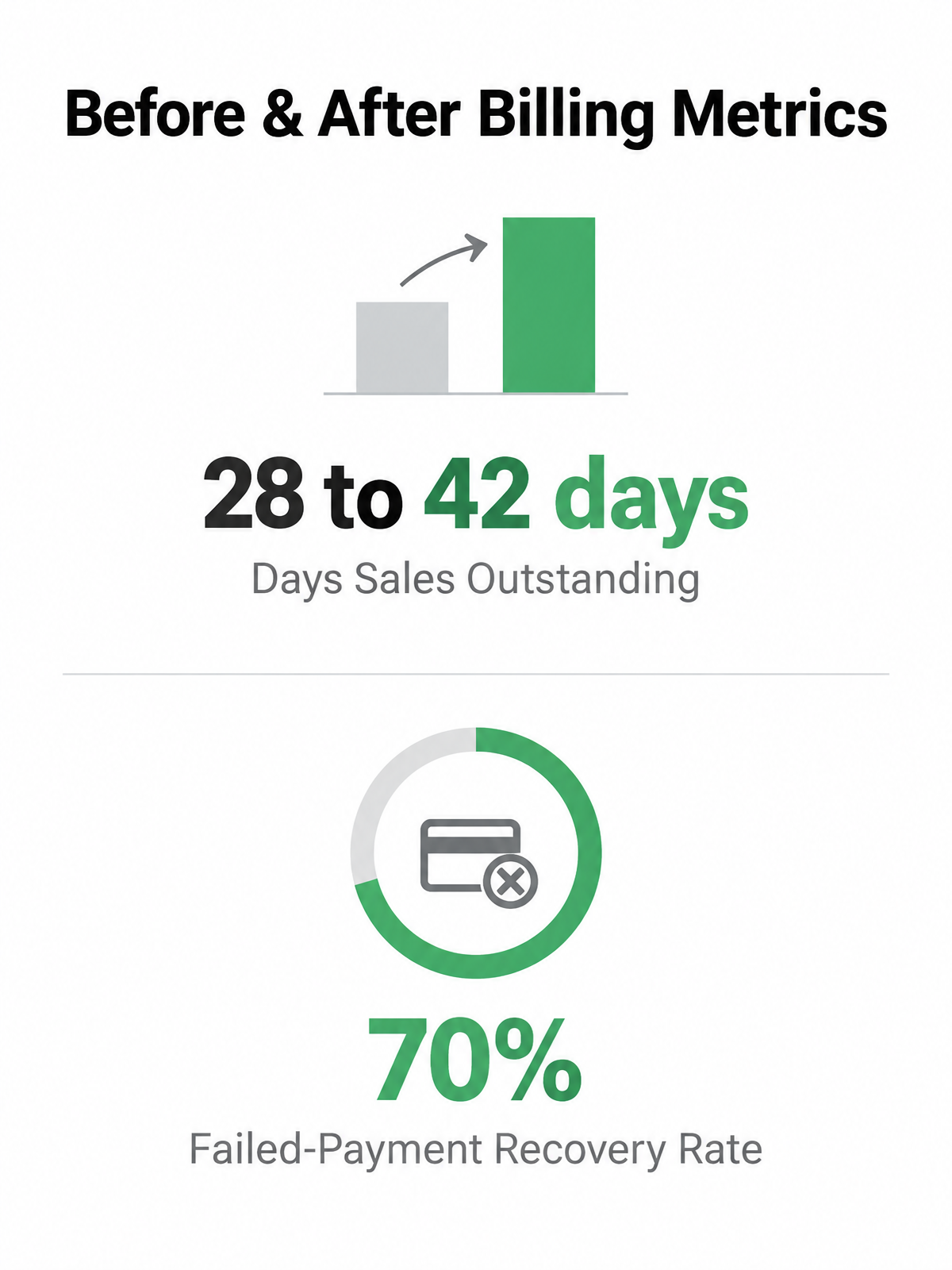
Start with DSO—the average number of days between invoice issue and cash receipt. Calculate it monthly by dividing your accounts receivable balance by average daily revenue. For example, if your DSO climbs from 28 to 42 days after a new billing rollout, your automation is not working as intended. Pair that with overdue invoice aging buckets: count how many invoices sit in 1-30 days overdue, 31-60, 61-90, and 90+ categories. A healthy dunning process pushes most overdue balances into early buckets and resolves them before they hit 60 days.
Track failed-payment recovery rate by dividing the number of failed charges that eventually succeed by the total number of failures. For example, if your payment gateway logs 200 failed transactions in a month and your retry logic recovers 140, your recovery rate is 70%. The corresponding recovered revenue figure tells you the dollar impact: multiply recovered transaction count by average invoice value. For collection cost, divide total labor hours spent on manual follow-up—emails, calls, reconciliation—by the number of invoices processed. That gives you cost per invoice, which should drop once automated dunning handles first and second retry attempts.
How to structure a before-and-after plan
Capture a three-month baseline before you change any workflow. Segment by customer type (annual prepay versus monthly recurring), invoice value (under $500, $500-$2,000, over $2,000), and payment method (credit card, ACH, wire). High-value enterprise customers often have longer payment terms and manual AP workflows, so their DSO will naturally run higher than self-serve SMB accounts on auto-pay. If you lump all customers into one aggregate DSO figure, you’ll miss which segment actually improved and which got worse.
Run monthly trend lines for each KPI and compare the three months before automation to the three months after. Flag any spike in involuntary churn—customers who cancel because a failed payment wasn’t retried in time—by counting subscription cancellations that occurred within seven days of a declined charge. Set up alerts for high-value overdue invoices (for example, anything over $5,000 past due for more than 15 days), repeated failed payments on the same subscription (three failures in 30 days), and accounts with worsening aging status (an invoice that moves from 30-day to 60-day overdue without any payment activity). These thresholds let your AR team intervene manually on the cases that matter, while the automated process handles routine retry logic for the long tail.
Implementation checklist and best practices
When you’re standing up a cloud invoice process that connects subscription billing to dunning automation, your implementation sequence depends on clean data and clear ownership. In our experience working with SaaS billing teams, most rollout friction comes from undefined collection policies and mismatched customer records between systems, not from the technical integration itself. Before you configure a single reminder template, you need to define when a payment becomes overdue, who owns retry logic, and what happens when automated dunning reaches its escalation limit.
Start with your collection policy document. Map out grace periods by customer segment, define reminder cadences, and decide which payment failures trigger immediate outreach versus automated retry. This document becomes your configuration blueprint and your finance team’s operating manual. Next, audit your customer and invoice data: duplicate customer records, mismatched billing emails, and invoices missing accounting-dimension tags will break dunning flows before they start. Clean this data in your source systems—CRM and ERP—before you sync anything into the billing hub.
Roles and configuration steps
A lean rollout typically involves five stakeholders: a founder or business owner who defines collection policy and signs off on tone, a finance or revenue operations lead who maps accounting fields and validates invoice flows, a customer success owner who reviews reminder language and escalation handoffs, an engineering or integrations owner who handles API connections and usage imports, and an accounting or ERP administrator who confirms journal entries and revenue recognition. You don’t need a dedicated billing team. You need clear ownership of each decision point.
Configuration generally follows this sequence: set up your product catalog and subscription templates, map accounting dimensions (GL accounts, cost centers, tax codes), connect payment gateways and configure retry rules, build a dunning schedule with clear reminder copy and easy payment-update links, and define stop rules for manual collections. Test every scenario: successful renewal, failed payment with successful retry, failed payment with expired card, and failed payment that exhausts all retries.
The pricing question matters early. Younium’s commercial terms are not fully public in the available materials; pricing appears to be quote-based. Your demo should confirm onboarding duration, integration requirements for your specific ERP and payment stack, dunning-specific configuration depth, reporting export formats, and support coverage during rollout. Ask for a rollout plan that reflects your actual catalog, contract complexity, and finance workflow.
Common Questions
Does Younium actually have a 2026 dunning engine release, or is that marketing language?
Treat the “2026” framing as something to validate directly with the vendor. The safer evaluation approach is to focus less on the label and more on the workflow proof: how retries are configured, how escalations work, what data is exposed, and how failed-payment events can be routed into your finance or customer-success process.
If Younium sits between my CRM and ERP, who handles cash application when payments come in?
Do not assume cash application is fully handled inside the billing hub. Ask whether payment matching, remittance details, partial payments, credits, and bank-feed reconciliation are managed in Younium, your accounting system, or a separate receivables tool. The answer will depend on your stack design and the depth of the connectors you use.
What happens to my DSO measurement if I segment customers incorrectly during baseline tracking?
Your ROI readout becomes unreliable. Blended DSO can hide the difference between customers who pay automatically and customers who move through procurement or AP approval. Build segments before rollout, then compare like with like after automation is live so finance can see which workflows improved and which still need manual attention.