

Workflow Invoice Processing Checklist for Blixo

Key Takeaways
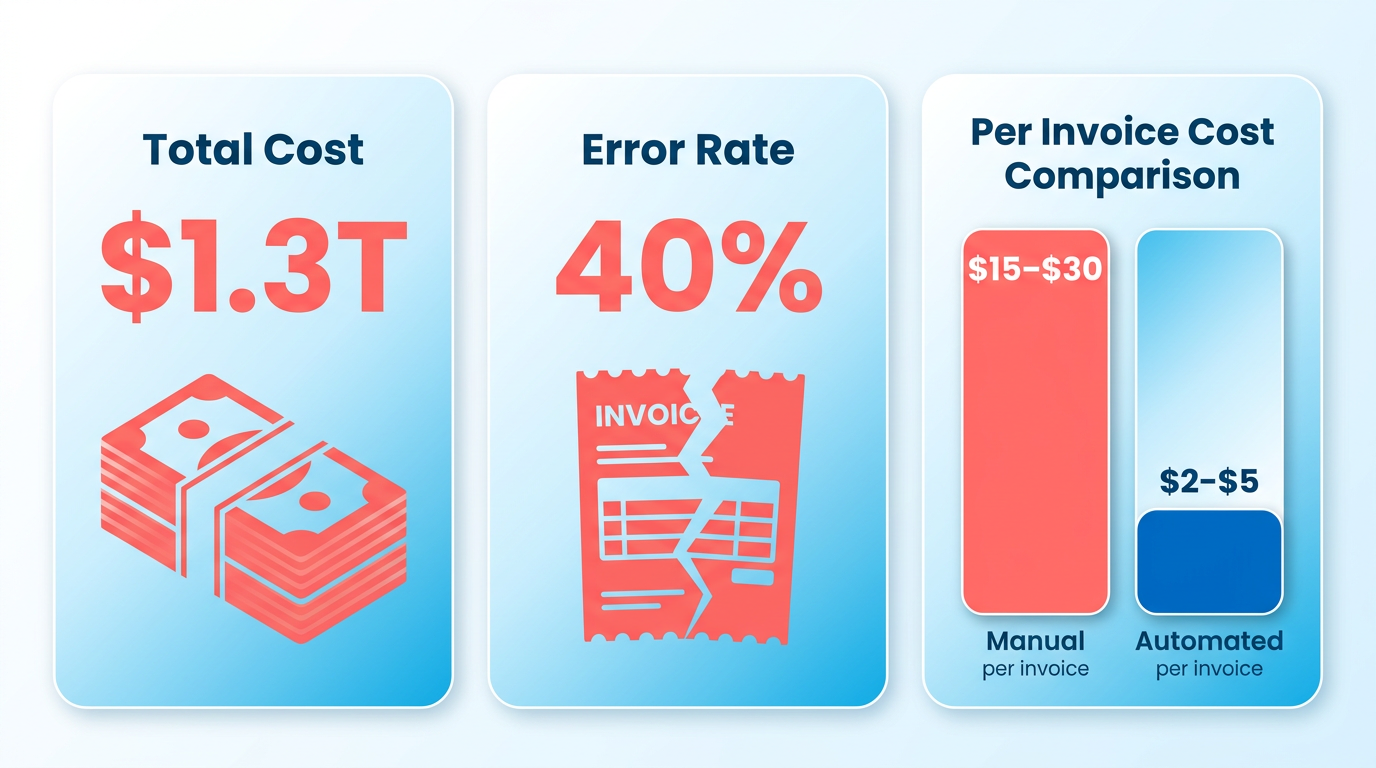
- Manual invoice processing costs U.S. businesses $1.3 trillion annually due to errors, disputes, and delays.
- Automation reduces invoice processing costs from $15–$30 per invoice to $2–$5, cutting manual errors by 40%.
- 52% of invoices remain manually processed, causing 80% of businesses to face payment delays linked to human mistakes.
- Blixo helped a mid-sized manufacturer slash payment delays by 61% and reduce costs to $2–$5 per invoice.
- Automated three-way matching identified $50,000 in duplicate payments for a logistics company within a quarter.
- Healthcare providers using Blixo cut month-end closing time by 18%, improving operational efficiency.
- A $50 million business saved $700,000 annually by automating dunning workflows with Blixo.
Why Efficient Workflow Invoice Processing Matters
Inefficient invoice processing isn’t just a back-office headache-it directly impacts revenue and cash flow. Manual systems cost U.S. businesses $1.3 trillion annually** due to errors, disputes, and delays. For example, **40% of manually processed invoices contain errors**, leading to late fees, damaged vendor trust, and costly rework. A single invoice processed manually can cost **$15–$30**, compared to **$2–$5 with automation. As mentioned in the Common Invoice Processing Errors and Mitigation section, many of these errors stem from human oversight, further inflating costs. Worse, 52% of invoices are still processed manually, with 80% of businesses facing payment delays caused by human mistakes. These delays alone can increase Days Sales Outstanding (DSO) by 30%, tying up capital and limiting growth.
Businesses that adopt Blixo’s automated workflows see measurable improvements in efficiency and accuracy. A mid-sized manufacturer cut invoice processing costs from $15–$40 per invoice to $2–$5 while reducing payment delays by 61%. Building on concepts from the Setting Up Blixo for Workflow Invoice Processing section, this integration use cloud-based infrastructure to streamline operations. A logistics company automated three-way matching, slashing manual work by 50% and identifying **$50,000 in duplicate payments** within a quarter. Healthcare providers using Blixo reduced month-end closing time by **18%**, and a $50 million revenue business saved $700,000 annually by automating dunning workflows.
Businesses with recurring billing models or high-volume invoice processing gain the most from Blixo. For example, a company handling 15,000+ invoices annually achieved zero manual configuration by integrating Blixo’s AI-driven OCR and three-way matching. Similarly, a global manufacturer automated 100% of its invoice validation, enforcing tax rules in real time and reducing errors by 80%. As highlighted in the Workflow Invoice Processing Checklist section, Blixo’s approach combines automation with real-time compliance checks to ensure accuracy at scale. Small businesses also benefit: one agency reduced invoice rejections by 30% using Blixo’s structured workflows.
The financial impact of automation is undeniable. Companies processing 500+ invoices monthly recover their investment in 12–18 months by eliminating postage, storage, and manual labor costs. Blixo’s AI-driven validation cuts error rates by 90% for some clients, avoiding late fees and disputes. As discussed in the Optimizing Workflow Invoice Processing for Scalability and Growth section, these efficiencies directly enhance a business’s ability to scale. One healthcare firm saw an 87% drop in payment delays, enabling 2% early-payment discounts on millions in spend. Over three years, a mid-sized manufacturer achieved a 327% ROI, while a $50 million firm reduced collections time by 70%.
“Blixo lets me focus on my art without chasing payments,” says Vincent Mann, a filmmaker. “Our subscription management and accounting are seamless with Blixo-no more manual reconciliation,” shares Matthew Schwartz, founder of Elemental Deodorant.
By addressing manual cash application, messy reconciliations, and error-prone workflows, Blixo empowers businesses to streamline operations and focus on growth. The result? Reduced administrative burdens, fewer delays, and a financial system that works as efficiently as your team.
Setting Up Blixo for Workflow Invoice Processing
What System Requirements Must You Meet?
Before configuring Blixo, ensure your infrastructure aligns with its technical specifications. Blixo operates on cloud-based servers but supports on-premises deployment for businesses with strict compliance needs. A stable internet connection and API-compatible ERP systems (e.g., SAP, Oracle, QuickBooks) are mandatory for seamless integration. For high-volume users processing 500+ invoices monthly, allocate dedicated resources to handle real-time OCR processing and AI validation.
- Verify API compatibility with your existing ERP or accounting software. Without API access, Blixo cannot sync invoice data automatically.
- Assign roles and permissions for users before deployment. Role-based access ensures only authorized personnel can approve or edit invoices.
- Enable AES-256 encryption for data in transit and at rest. This meets GDPR/HIPAA compliance requirements as outlined in the Common Invoice Processing Errors and Mitigation section..
How Do You Customize Blixo for Your Workflow?
Blixo’s flexibility lies in its configuration options. Tailor workflows to match your business rules, such as mandatory fields, approval hierarchies, and tax validation. For instance, a manufacturing firm might enforce three-way matching for all purchase orders, as detailed in the Workflow Invoice Processing Checklist section. A retail chain could automate product-code validation against existing inventory.
- Define mandatory fields (e.g., invoice number, tax codes, vendor details). Missing required fields triggers automated alerts, reducing manual corrections.
- Set up approval workflows with custom routing rules. Example: Invoices over $5,000 require dual approvals from finance and procurement teams.
- Integrate tax rule engines for dynamic compliance. Blixo validates tax codes in real time, cutting errors by 80% in one logistics case study..
What Best Practices Should You Follow for Setup?
A phased rollout minimizes disruption. Start by migrating a subset of invoices (e.g., low-complexity vendor bills) to test configurations. Use Blixo’s built-in dashboards to monitor key metrics like processing time and error rates. One healthcare firm reduced payment delays by 87% within three months by refining workflows based on these insights.
- Test with sample invoices before full deployment. Simulate edge cases (e.g., duplicate invoices, mismatched POs) to stress-test configurations.
- Train users on AI-driven validation tools. Highlight how OCR automatically extracts data and flags discrepancies.
- Conduct a data-cleansing audit. Remove outdated vendor records and standardize formatting to prevent integration errors..
How Does Blixo Integrate With Existing Systems?
Integration hinges on API mapping and middleware configuration. For example, a logistics company reduced manual work by 50% after aligning Blixo’s three-way matching with their ERP’s purchase-order module. Use Blixo’s pre-built templates to accelerate setup, and validate field mappings (e.g., linking invoice numbers to ERP transaction IDs).
- Map ERP fields to Blixo’s data model. Ensure critical fields like vendor codes and tax IDs sync without manual intervention.
- use middleware for legacy systems. Middleware bridges gaps between older ERPs and Blixo’s API, maintaining 90%+ matching accuracy.
- Enable real-time alerts for discrepancies. Automated notifications flag mismatches instantly, preventing payment delays..
What Real-World Examples Prove Blixo’s Effectiveness?
Several businesses achieved measurable results after implementing Blixo. A mid-size manufacturer slashed invoice-processing costs from $15–$40 per invoice to $2–$5, achieving a 327% ROI over three years. Another company flagged $50,000 in duplicate payments within the first quarter by enabling automated three-way matching. These outcomes highlight Blixo’s ability to scale across industries, aligning with strategies in the Optimizing Workflow Invoice Processing for Scalability and Growth section.
Workflow Invoice Processing Checklist
The checklist is structured to cover every phase of implementation and beyond, ensuring businesses maximize efficiency from day one. As mentioned in the Setting Up Blixo for Workflow Invoice Processing section, aligning infrastructure with Blixo’s technical specifications is critical before deployment..

Pre-Implementation Checklist: Steps to Take Before Setting Up Blixo
- Assess ERP compatibility Verify Blixo’s integration with systems like QuickBooks, SAP, or Oracle. Building on concepts from the Setting Up Blixo for Workflow Invoice Processing section, API-based sync ensures 99.5% data accuracy, as seen in healthcare providers’ case studies..
Implementation Checklist: Key Steps During Blixo Setup
- Set up compliance and security Enable AES-256 encryption, digital signatures, and GDPR/HIPAA-ready dashboards. These measures safeguard $50M+ in transactions annually for enterprise clients, as outlined in the Common Invoice Processing Errors and Mitigation section..
Troubleshooting Checklist: Resolving Common Issues
- Handle duplicate payments Use three-way matching to flag mismatches. Blixo’s system saved one firm $50,000 in overpayments by alerting teams instantly, addressing errors highlighted in the Common Invoice Processing Errors and Mitigation section..
Real-World Impact of Blixo’s Checklist
Implementing this checklist transforms invoice processing from a time-consuming task to a strategic advantage. For example:
- A mid-sized manufacturer cut per-invoice costs from $15–$40 to $2–$5, achieving 327% ROI in three years. Building on concepts from the Why Efficient Workflow Invoice Processing Matters section, this efficiency directly counters the hidden costs of manual systems.
Optimizing Workflow Invoice Processing for Scalability and Growth
Optimizing invoice processing workflows isn’t just about saving time-it’s a strategic move that directly impacts your business’s ability to scale. Manual errors cost U.S. businesses $1.3 trillion annually, while automation can slash administrative costs by 30% and reduce Days Sales Outstanding (DSO) by the same margin. Below, we break down actionable steps to future-proof your invoice processing with Blixo, ensuring efficiency keeps pace with growth. As mentioned in the Why Efficient Workflow Invoice Processing Matters section, inefficient workflows create bottlenecks that stifle expansion..
Why Invoice Processing Impacts Scalability
Inefficient workflows create bottlenecks that stifle expansion. For example, 80% of businesses face payment delays due to manual errors, increasing DSO by 30%. Every 1% error rate in processing costs $15–40 per invoice, compounding into significant losses for high-volume operations. By automating data extraction and validation, Blixo reduces error rates to 0.5% and accelerates payment cycles, letting you focus on scaling instead of troubleshooting..
Configuring Blixo for High-Volume Scalability
To handle growing invoice volumes, start with these configuration best practices:
- Enable OCR and machine learning: Blixo’s AI extracts invoice data with 99.5% accuracy, minimizing manual corrections. Building on concepts from the Workflow Invoice Processing Checklist section, this is critical for businesses processing thousands of invoices monthly, as it cuts data entry time by 80%.
- Set up automated 3-way matching: Aligning purchase orders, invoices, and receipts reduces disputes by 50%. A logistics firm slashed invoice disputes by 20% using this feature, avoiding revenue leakage.
- use batch processing: Grouping invoices for bulk approval speeds up month-end closing. Healthcare providers cut their closing time by 18% after implementing this strategy..
Integration Strategies for End-to-End Automation
Disconnected systems create silos that slow growth. Blixo integrates seamlessly with major ERPs like QuickBooks, SAP, and NetSuite, ensuring real-time data sync. For instance, one agency reduced invoice rejections by 30% after connecting Blixo to their ERP, eliminating double entries. To maximize automation:
- Map invoice workflows to ERP triggers: Automatically generate invoices when a delivery is confirmed, reducing delays.
- Use APIs for bidirectional sync: This ensures payment status updates in Blixo reflect instantly in your accounting software, cutting reconciliation time.
- Enable cloud-based access: Remote teams can approve invoices in real time, avoiding bottlenecks during peak periods..
Real-World Results from Blixo Users
Businesses using Blixo report measurable gains in efficiency and cost savings:
- A mid-sized vendor cut processing delays by 40% using automated workflows, avoiding $16,000 in late fees annually.
- Elemental Deodorant’s founder notes: “Blixo’s automation eliminated manual reconciliation, letting us scale without adding staff.”
- Healthcare providers saved 18% on month-end tasks, redirecting resources to patient care..
Avoiding Common Pitfalls
Scaling without the right tools risks compounding inefficiencies. As highlighted in the Common Invoice Processing Errors and Mitigation section, 39% of invoices contain errors, costing small businesses 30% of revenue annually. To stay ahead:
- Audit workflows quarterly to identify lagging steps.
- Train teams on Blixo’s advanced features, like customizable approval hierarchies.
- Monitor DSO and error rates as KPIs to track progress.
By embedding these practices, businesses transform invoice processing from a cost center into a growth driver. For deeper insights into automation strategies, explore this guide on invoice workflow design.
Common Invoice Processing Errors and Mitigation
What Security Items Should You Check?
Your security checklist should cover authentication, rate limiting, and data encryption as a minimum baseline.
- Enable two-factor authentication to protect user accounts from unauthorized access. As mentioned in the Setting Up Blixo for Workflow Invoice Processing section, this step is critical when configuring user access during initial system setup.
- Implement rate limiting to prevent brute-force attacks and API abuse.
Common Invoice Processing Errors and How to Prevent Them
Invoice processing errors can disrupt cash flow, damage vendor relationships, and increase operational costs. Here are the most frequent issues and how Blixo’s tools address them:
1. Duplicate Payments
Duplicate payments occur when the same invoice is processed multiple times, often due to manual entry errors or system misconfigurations. For example, one logistics company flagged $50,000 in duplicate payments after implementing Blixo’s three-way matching system.
- Enable automated duplicate detection: Blixo’s AI cross-references invoice numbers, vendor details, and payment history in real time to block redundant transactions.
- Use three-way matching: Align purchase orders, receipts, and invoices automatically to ensure consistency before approval.
2. Incorrect Invoice Data
Manual data entry errors-such as wrong amounts, tax codes, or vendor details-can lead to payment delays or disputes. Real-time validation reduces manual intervention by 40% in high-volume environments.
- use OCR and AI validation: Blixo’s optical character recognition extracts invoice data with 99.5% accuracy and validates fields like tax codes against compliance rules.
- Set up mandatory field checks: Ensure critical details (e.g., invoice number, vendor ID) are auto-populated or flagged for review if missing.
3. Payment Delays and Late Fees
Manual processing delays invoices by weeks, triggering late fees or lost early-payment discounts. A healthcare firm reduced payment delays by 87% after automating workflows with Blixo.
- Automate payment scheduling: Use Blixo’s calendar sync to align payments with invoice due dates and take advantage of 2% early-payment discounts.
- Enable real-time alerts: Get instant notifications for invoices nearing deadlines or requiring approval.
4. Compliance and Audit Risks
Inconsistent record-keeping or missing documentation can lead to compliance violations, especially under regulations like GDPR or HIPAA.
- Maintain immutable audit trails: Blixo logs every action in a tamper-proof ledger, ensuring transparency for audits.
- Enforce role-based access: Limit sensitive operations (e.g., payment approvals) to authorized users only.
Best Practices for Testing and Quality Assurance
Prevent errors before they impact operations with these testing strategies:
1. Simulate Real-World Scenarios
- Run test invoices through the full workflow: Identify bottlenecks in data extraction, validation, or approval steps. Building on concepts from the Workflow Invoice Processing Checklist section, this process ensures alignment with Blixo’s recommended validation steps.
- Stress-test high-volume workflows: Ensure systems handle 500+ invoices per month without performance degradation.
2. Monitor Key Performance Indicators (KPIs)
Track metrics like error rate, processing time, and on-time payment percentage. One mid-sized manufacturer cut invoice processing costs from $15–$40 to $2–$5 per invoice by refining workflows based on KPIs.
3. Conduct Regular Audits
- Review flagged invoices monthly: Investigate why certain transactions were rejected or delayed.
- Update validation rules quarterly: Adjust tax codes, vendor details, or compliance requirements as needed.
Troubleshooting Common Blixo Workflow Issues
When errors occur, resolve them quickly using these strategies:
1. Invoice Rejection Errors
Cause: Mismatched data (e.g., PO numbers not aligning with receipts). Fix: Use Blixo’s three-way matching tool to highlight discrepancies. Reconcile manually or adjust system rules to auto-correct minor mismatches.
2. Payment Processing Failures
Cause: Incorrect bank details or insufficient funds. Fix: Enable Blixo’s payment validation checks before funds leave the account. Set up alerts for low balances to avoid overdrafts.
3. User Workflow Bottlenecks
Cause: Overly complex approval chains or unclear task assignments. Fix: Simplify workflows by removing redundant steps. Assign specific roles (e.g., “approver,” “validator”) in the Blixo dashboard.
Case Studies: How Businesses Mitigated Errors with Blixo
- A Mid-Sized Manufacturer.
- Challenge: 61% of invoices had payment delays due to manual processing.
- Solution: Automated OCR and three-way matching reduced errors by 90%.
- Result: ROI of 327% over three years and cost per invoice dropped to $2–$5.
- A Logistics Firm.
- Challenge: $50,000 in duplicate payments went undetected monthly.
- Solution: Blixo’s duplicate detection and three-way matching flagged redundant transactions.
- Result: 50% reduction in manual work and $1.2M annual savings.
By addressing errors proactively and using Blixo’s automation tools, businesses can eliminate costly mistakes while improving efficiency and compliance. Regular testing, KPI tracking, and iterative workflow improvements ensure long-term success.

Frequently Asked Questions
1. How much can businesses save by using Blixo’s invoice processing?
Businesses can reduce invoice processing costs from $15–$30 to $2–$5 per invoice, saving up to $700,000 annually for a $50 million revenue business through automation and error reduction.
2. How does automation reduce invoice errors?
Automation cuts manual invoice errors by 40%, preventing $1.3 trillion in annual losses for U.S. businesses caused by human mistakes in processing 52% of manually handled invoices.
3. Which industries benefit most from Blixo’s automation?
Healthcare, manufacturing, and logistics see the highest ROI. A healthcare provider reduced month-end closing time by 18%, while a logistics company identified $50,000 in duplicate payments.
4. How quickly do businesses see results with Blixo?
A mid-sized manufacturer cut payment delays by 61% in months, and a $50 million business saved $700,000 annually by automating workflows within a single quarter.
5. Can Blixo prevent duplicate payments?
Yes, automated three-way matching in Blixo uncovered $50,000 in duplicate payments for a logistics company within 90 days of implementation.
6. How does Blixo improve cash flow?
By reducing manual invoice costs and payment delays, Blixo lowers Days Sales Outstanding (DSO) by 30%, freeing up capital for growth.
7. What volume of invoices is ideal for Blixo?
Companies processing 15,000+ invoices annually gain the most, achieving zero manual configuration and $2–$5 per-invoice costs through automation.