

Manual vs Automated Workflow Invoice Processing

Key Takeaways
- Automate invoice processing to save $10.10 per invoice and reduce costs from $12.88 to $2.78.
- Cut invoice processing time from 17.4 days to 3.1 days using automation for faster payments.
- Minimize errors by reducing rates from 1–3% in manual workflows to 0.1–0.5% with automation.
- Boost on-time payment rates from 36% manually to 95% with automated systems.
- Accelerate processing speed from 12.5 minutes per invoice manually to 1.2 minutes with automation.
- Avoid $103,800 in annual costs for businesses handling 1,000 invoices by adopting automation.
- Eliminate late payment penalties by improving accuracy and reducing manual delays.
Why Efficient Invoice Processing Matters
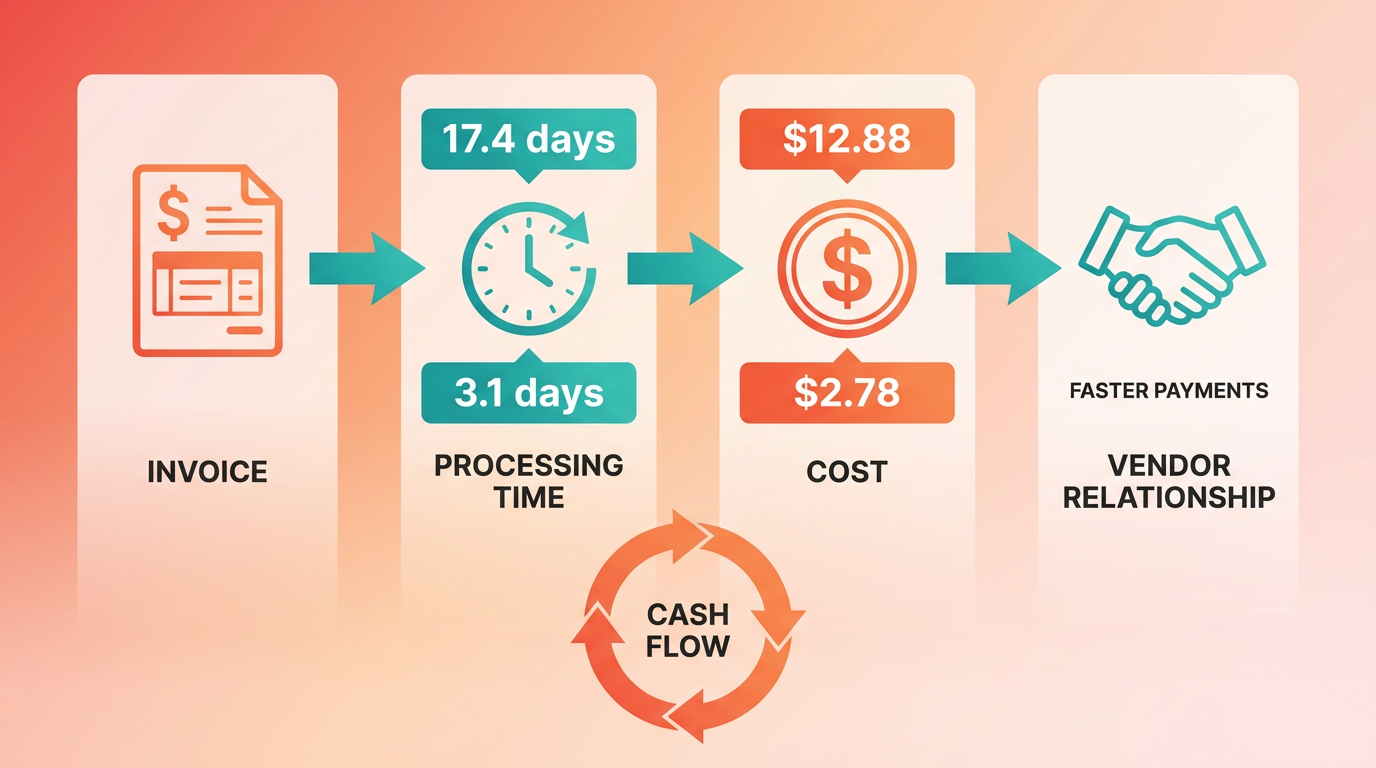
Efficient invoice processing is a critical component of financial operations, directly impacting a company’s cash flow, operational costs, and vendor relationships. Manual processes, while traditional, are riddled with inefficiencies that modern automation solutions address effectively. As mentioned in the Key Differences Between Manual and Automated Invoice Processing section, automation significantly reduces processing time and error rates, offering tangible benefits for businesses of all sizes.
How Much Time and Money Do Manual Processes Waste?
Manual invoice processing is notoriously slow and costly. On average, processing a single invoice manually takes 17.4 days and costs $12.88**, while automation can reduce this to **3.1 days** and **$2.78 per invoice. For businesses handling 1,000 invoices monthly, this translates to $103,800 in annual savings by switching to automation. Processing time alone reveals stark differences: manual workflows average 12.5 minutes per invoice, whereas AI-native automation completes the same task in 1.2 minutes. These delays compound, with manual errors occurring at 1–3% compared to 0.1–0.5% in automated systems, leading to costly corrections and late payment penalties.
| Metric | Manual Processing | Automated Processing |
|---|---|---|
| Cost per invoice | $12.88–$16 | $2.78–$3 |
| Processing time | 12.5 minutes/invoice | 1.2 minutes/invoice |
| Error rate | 1–3% | 0.1–0.5% |
| On-time payment rate | 36% | 95% |
Real-World Impact: Businesses Transforming Operations
Companies adopting automation report dramatic improvements. For example, Schaeffler cut invoice reconciliation time from 30 minutes to 1 minute per invoice, while Riviera Travel reduced processing costs by 42% and boosted productivity by 33%. A telecom company automated 72 invoices daily, shrinking processing time from a full day to 45 minutes. These cases highlight how automation enable resources for strategic tasks rather than repetitive data entry.
Small businesses also benefit significantly. A CPA firm saved 1,100 hours annually by automating tax season data extraction, redirecting staff to advisory services. For enterprises, the stakes are even higher: a company processing 2,000 invoices monthly saves 376 hours monthly with AI-native automation, equivalent to nearly 16 full-time employees’ worth of labor.
Who Gains the Most from Automation?
While large enterprises often lead in automation adoption, small businesses reap equally transformative rewards. Manual processing costs $15–$40 per invoice for small teams, whereas automation drops this to $3–$5. For businesses handling 500 invoices monthly, this equates to $181,800 in annual savings. Enterprises benefit from scalability, handling thousands of invoices with touchless processing (49% of invoices require no human intervention in automated systems).
Automation also strengthens vendor relationships. Timely payments, enabled by automation’s 95% on-time payment rate, reduce penalties and foster trust. Late payment penalties-often 1.5% monthly interest-are avoided, preserving cash flow and vendor goodwill.
Challenges Solved by Automation
Manual workflows struggle with errors, delays, and limited visibility. Automation tackles these head-on:
- Error reduction: AI-powered systems use OCR and three-way matching to eliminate duplicate payments and data inaccuracies, as discussed in the Overcoming Challenges in Automated Invoice Processing section.
- Speed: AI-native automation resolves 60–70% of exceptions automatically, slashing manual intervention.
- Visibility: Real-time dashboards track invoice status, ensuring transparency for stakeholders.
By addressing these pain points, automation transforms accounts payable from a cost center into a strategic asset. Building on concepts from the Implementing Automated Invoice Processing: A Step-by-Step Guide section, the shift toward automation is not just beneficial but essential for competitive businesses as technology advances.
Understanding Manual Invoice Processing
Manual invoice processing involves a labor-intensive workflow where each step-from receiving invoices to final payment-requires human intervention. This method is prevalent in small businesses or organizations with low invoice volumes but becomes increasingly inefficient as transaction complexity grows, as highlighted in the Why Efficient Invoice Processing Matters section, which emphasizes its impact on cash flow and vendor relationships.
Manual invoice processing typically follows a structured sequence:
- Invoice Receipt: Invoices arrive via paper, email, or fax.
- Data Entry: Staff manually input invoice details (supplier name, amount, due date, purchase order number) into accounting systems.
- Three-Way Matching: Invoices are cross-checked against purchase orders and receiving reports for accuracy.
- Approval Routing: Invoices are sent to relevant managers or departments for authorization.
- Payment Execution: Approved invoices are scheduled for payment, often via check or bank transfer.
- Tracking and Reconciliation: Payments are recorded, and invoices are archived for audit purposes.
Each step is time-consuming, with manual data entry alone averaging 10–30 minutes per invoice depending on complexity [source: 8†L466-L467]. For example, a small business processing 50 invoices monthly might spend over 25 hours weekly on data entry alone.
Manual workflows introduce significant risks and inefficiencies:
- High Error Rates: Manual data entry has an error rate of 1–4%, leading to costly corrections [source: 4†L466-L467].
- Slow Processing Times: A single invoice can take 12.5–17.4 days to process manually, delaying vendor payments and increasing late fees [source: 11†L461-L462].
- Labor Costs: Manual processing costs $12.88–$16 per invoice, compared to $2.78–$3 for automated systems [source: 10†L466-L467].
- Scalability Issues: Businesses handling over 1,000 invoices monthly often face bottlenecks, with 68% of teams still relying on manual keying [source: 4†L466-L467].
For instance, a trucking company in one case study spent $225,000 annually on six full-time employees for document processing, with errors causing repeated rework [source: 8†L466-L467].
Manual processing remains viable for small businesses or low-volume operations due to its low upfront costs and simplicity. For example:
- Small Retail Stores: A local shop with 10–20 invoices monthly might find manual tracking manageable using spreadsheets.
- Freelancers or Consultants: Solo professionals with minimal transactions may prefer manual systems to avoid automation costs.
However, scalability becomes an issue. A study of Company Perintis Mandiri revealed that replacing a 15-step manual invoice process with automation reduced processing time by 90% and cut error rates significantly [source: 15†L461-L462]. This highlights the tipping point where automation becomes essential for efficiency, as discussed in the Key Differences Between Manual and Automated Invoice Processing section.
To minimize errors in manual invoice processing, businesses can adopt best practices like standardizing invoice formats, using three-way matching, and training staff. Additionally, tools such as OCR-enabled scanners can automate data entry for paper invoices, as detailed in the Implementing Automated Invoice Processing section. For example, a CPA firm reduced data-entry errors by 80% after implementing OCR technology, saving over 1,100 hours annually [source: 8†L466-L467].
Manual vs. Automated Invoice Processing: Key Comparisons.
| Feature | Manual Processing | Automated Processing |
|---|---|---|
| Cost per Invoice | $12.88–$16 | $2.78–$3 |
| Processing Time | 12.5–17.4 days | 3.1 days (automated) |
| Error Rate | 1–4% | 0.1–0.5% |
| Scalability | Limited (best for <500 invoices) | Scales efficiently for high volumes |
| Late Payment Risk | High (36% on-time payment rate) | 95% on-time payment rate |
The data underscores why 70–85% of businesses with 1,000+ monthly invoices see cost reductions of 70–85% after automation [source: 12†L466-L467].
Businesses like Company Perintis Mandiri provide concrete examples of manual processing pitfalls. Before automation, their 15-step workflow led to lost invoices, delays, and inefficiencies. Post-automation, they achieved 80% staff approval for improved speed and accuracy [source: 15†L461-L462]. Similarly, a telecom firm reduced 72 invoice processing hours from a full day to 45 minutes by adopting basic automation [source: 8†L466-L467].
In summary, manual invoice processing remains a feasible short-term strategy for small-scale operations but introduces significant risks as transaction volumes grow. By understanding its limitations and adopting targeted improvements, businesses can optimize workflows until automation becomes the clear next step, as outlined in the Automated Invoice Processing: An Overview section.
Automated Invoice Processing: An Overview
Automated invoice processing transforms accounts payable workflows by using technology to streamline tasks that were once time-consuming, error-prone, and costly. By replacing manual data entry and paper-based systems, automation accelerates processing times, reduces human error, and provides real-time visibility into financial operations. For example, a single invoice that takes 17.4 days and $12.88 to process manually can be handled in 3.1 days at a cost of $2.78 with automation, according to Ardent Partners. This shift not only cuts expenses but also minimizes risks like duplicate payments and late fees. Below is a breakdown of key metrics comparing manual and automated methods:
| Feature | Manual Processing | Automated Processing |
|---|---|---|
| Cost per invoice | $12.88–$16 | $2.78–$5 |
| Processing time | 12.5 minutes/invoice | 1.2–4.8 minutes/invoice |
| Error rate | 1–3% | 0.1–0.5% |
| On-time payment rate | 36% | 95% |
| Human intervention | Full involvement | 20–40% (for exceptions) |
What Technologies Power Automated Invoice Processing?
Automation relies on a combination of artificial intelligence (AI), optical character recognition (OCR), and robotic process automation (RPA) to digitize and validate invoices. OCR scans and extracts text from documents, while AI algorithms verify data against purchase orders and contracts. For instance, three-way matching-comparing invoices to purchase orders and receiving reports-ensures accuracy and prevents overpayments. RPA then automates workflows like approvals and payments. Advanced systems, such as Collatio Accounts Payable, use AI-native automation to resolve 60–70% of exceptions automatically, reducing manual rework. As mentioned in the Key Differences Between Manual and Automated Invoice Processing section, these technologies directly contribute to the efficiency gains highlighted in processing speed and error reduction.
How Do Businesses Benefit from Automation?
The advantages of automation extend beyond speed and cost savings. By minimizing human error, businesses avoid costly mistakes like incorrect payments or tax miscalculations. For example, KPMG reports that accrual processes can drop from 10 days to just a few hours with automation. Additionally, automation enhances compliance by maintaining audit trails and flagging anomalies. A telecom company reduced processing time for 72 invoices from a full day to 45 minutes after implementing automation, while a trucking firm saved $225,000 annually by cutting labor costs for document processing. Building on concepts from the Why Efficient Invoice Processing Matters section, these benefits underscore the importance of automation in maintaining healthy cash flow and vendor relationships.
What Challenges Should Businesses Consider?
While automation offers clear benefits, successful implementation requires careful planning. Integrating systems with existing ERPs like SAP or QuickBooks is critical for seamless data flow. Training teams to use new tools and adapt to reduced manual tasks is also essential. For example, Company Perintis Mandiri replaced a 15-step manual process with an automated system, achieving 80% user satisfaction after aligning workflows with internal control frameworks like COSO. Phased rollouts-starting with a small vendor group-help identify bottlenecks before full-scale adoption. As outlined in the Implementing Automated Invoice Processing: A Step-by-Step Guide section, addressing these challenges systematically ensures smoother transitions and maximizes long-term efficiency.
Key Differences Between Manual and Automated Invoice Processing
Processing speed and accuracy are critical factors in invoice processing, with automation offering significant advantages. Manual processing typically takes 12.5 minutes per invoice, while AI-native automation reduces this to just 1.2 minutes-a 90% improvement-according to benchmark studies. As mentioned in the Understanding Manual Invoice Processing section, this method relies on human data entry, introducing higher error rates (1-3%) and slower processing times (17.4 days on average for full cycle completion). Automated systems resolve 60-70% of exceptions without human intervention, minimizing delays.
| Feature | Manual Processing | Automated Processing |
|---|---|---|
| Processing Time | 12.5 minutes per invoice | 1.2 minutes per invoice |
| Error Rate | 1-3% | 0.1-0.5% |
| Exception Handling | 100% manual intervention | 60-70% auto-resolved |
Expert Jyoti Kumari highlights that manual processing “drains time and increases error risk,” while KPMG notes automation can cut accrual processes from 10 days to hours. For example, a company handling 500 monthly invoices saves 94 hours monthly by switching to AI-native systems, enabling teams to focus on strategic tasks.
Cost efficiency is another major differentiator. Manual processing averages $12.88-$16 per invoice due to labor and error correction, whereas automation reduces costs to $2.78-$3 per invoice. Building on concepts from the Why Efficient Invoice Processing Matters section, businesses processing 1,000 invoices monthly can save $181,800 annually by transitioning to automation. Hidden costs like late fees and duplicate payments further inflate manual expenses, with 61% of U.S. late payments linked to invoice errors.
| Cost Factor | Manual Processing | Automated Processing |
|---|---|---|
| Per-Invoice Cost | $12.88–$16 | $2.78–$3 |
| Annual Savings | Up to $181,800 (1K invoices) | $120,000 (1K invoices) |
| Error Cost | 1.6% error rate | 0.5% error rate |
Labor accounts for 60-80% of manual costs, while automation uses AI and OCR to eliminate repetitive tasks. As discussed in the Automated Invoice Processing: An Overview section, tools like AI-driven validation reduce duplicate payments by 80%, enhancing compliance and security. For instance, Schaeffler reduced invoice reconciliation from 30 minutes to 1 minute per invoice using automated tools, capturing $1.4M in overcharge savings annually.
Flexibility, security, and customer satisfaction define long-term operational success. Automated systems scale seamlessly with business growth, handling 2,000+ invoices monthly with minimal infrastructure adjustments. They also enhance compliance through three-way matching and AI-driven validation. Security benefits include encrypted data storage and audit trails, addressing 61% of businesses’ concerns about manual data exposure.
| Aspect | Manual Processing | Automated Processing |
|---|---|---|
| Scalability | Limited by human capacity | Scales to high-volume workflows |
| Compliance | Prone to manual oversight | Enforces rules via AI validation |
| Vendor Relations | Late payments common (36% on-time) | 95% on-time payments |
Customer satisfaction improves with faster payment cycles. Riviera Travel reported a 33% productivity boost and 42% cost reduction after automation, enabling early payment discounts and stronger vendor partnerships. Conversely, manual errors-such as incorrect amounts or tax miscalculations-damage trust and incur penalties, costing businesses up to 1.5% monthly interest on overdue balances.
Automation’s ability to centralize workflows via cloud storage and integrate with ERP systems like SAP or QuickBooks further future-proofs operations. As the Institute of Finance & Management concludes, “automation doesn’t just save money-it prevents future costs.” By prioritizing accuracy, speed, and scalability, automated invoice processing transforms accounts payable into a strategic asset.
Implementing Automated Invoice Processing: A Step-by-Step Guide
Implementing automated invoice processing requires a structured approach to ensure efficiency gains and minimize disruptions. Below is a step-by-step guide to help businesses transition smoothly from manual to automated workflows, using insights from industry benchmarks and technical best practices..
How Do You Assess Readiness for Automated Invoice Processing?
Start by evaluating current workflows to identify pain points. Compare manual processing metrics like time per invoice, error rates, and cost per transaction against automation benchmarks. For example, manual processing averages 12.5 minutes per invoice with a 1.6% error rate, while automation reduces time to 1.2 minutes and cuts errors to 0.1–0.5% . Document bottlenecks such as manual data entry, invoice matching delays, or reconciliation inefficiencies. A readiness assessment should also include stakeholder buy-in and budget alignment for implementation. As mentioned in the Key Differences Between Manual and Automated Invoice Processing section, these benchmarks highlight the efficiency gains achievable through automation..
Key Steps to Evaluate Readiness:
- Audit Existing Workflows: Track invoice volume, processing time, and error rates. Use tools like Excel or AP management software to quantify current performance.
- Identify Pain Points: Highlight areas where manual tasks consume the most time, such as duplicate checks or PO matching.
- Set Goals: Define clear objectives, such as reducing processing time by 80% or cutting costs to $3 per invoice .
| Metric | Manual Processing | Automated Processing |
|---|---|---|
| Time per invoice | 12.5 minutes | 1.2 minutes |
| Cost per invoice | $12.88–$30 | $2.78–$3 |
| Error rate | 1.6% | 0.1–0.5% |
How Do You Choose the Right Automated Invoice Processing Software?
Selecting software depends on your business size, invoice volume, and technical needs. Prioritize systems with AI-native automation over basic OCR tools. AI-native platforms resolve 60–70% of exceptions automatically and handle fuzzy matching for non-exact purchase order matches . Evaluate integration capabilities with existing ERP systems like NetSuite, SAP, or QuickBooks . Building on concepts from the Overcoming Challenges in Automated Invoice Processing section, selecting scalable software is critical to addressing data quality issues and ensuring long-term adaptability.
Criteria for Software Selection:
- Scalability: Ensure the solution handles projected growth (e.g., 2,000+ invoices/month).
- Accuracy: Look for 95%+ data extraction accuracy using machine learning .
- Compliance: Verify support for standards like IFRS or GAAP to avoid audit risks.
For example, a mid-sized company processing 500 invoices/month might prioritize cost savings, while a large enterprise with 10,000+ invoices/year would focus on touchless processing and real-time analytics ..
How Do You Integrate Automation with Accounting Systems?
Integration involves data migration, system compatibility checks, and validation rules. Begin by mapping invoice data fields (e.g., vendor name, PO number) to your ERP system’s structure. Use Optical Character Recognition (OCR) and Intelligent Data Capture (IDC) to extract unstructured data from PDFs or scanned invoices . A real-world example: A manufacturing firm reduced reconciliation time from 30 minutes to 1 minute per invoice after integrating AI-native automation with its SAP system, demonstrating the efficiency improvements emphasized in the Why Efficient Invoice Processing Matters section.
Integration Steps:
- Data Migration: Transfer historical invoice data using bulk upload tools or APIs. Clean and format data to match ERP requirements.
- Validation Rules: Set up duplicate detection, three-way matching (PO, receipt, invoice), and supplier master data checks .
- Testing: Run a pilot with 100–200 invoices to identify integration gaps, such as mismatched fields or formatting errors..
How Do You Train Staff for Automated Systems?
Training ensures teams use automation effectively. Focus on three areas: system navigation, exception handling, and performance monitoring. Use role-based training modules-AP clerks need hands-on practice with the interface, while managers should analyze dashboards for bottlenecks.
Best Practices for Training:
- Phased Rollout: Start with a small team to address issues before full deployment .
- Documentation: Provide cheat sheets for common tasks like uploading invoices or resolving errors.
- Continuous Learning: Schedule quarterly refreshers on new features, such as AI-driven anomaly detection.
A case study from shows how a SaaS company trained its AP team to handle 95% of invoices within a day post-automation by emphasizing workflow automation and early payment discount tracking..
How Do You Monitor Automation Effectiveness?
Post-implementation, track KPIs like processing time, cost per invoice, and exception resolution rate. Compare these to pre-automation benchmarks. For instance, a business processing 2,000 invoices/month could save 376 hours monthly by reducing time per invoice to 1.2 minutes .
Key Metrics to Monitor:
- Time Savings: Measure average hours saved per month using time-tracking software.
- Error Reduction: Track the percentage of errors resolved automatically (e.g., 60%+ with AI-native systems ).
- ROI: Calculate savings from reduced labor costs and late fees. One company saved $181,840/year by switching to automation .
Regularly review system logs to identify recurring exceptions and refine AI models. A phased evaluation-like the “measure-benchmark-iterate” approach from the Key Differences Between Manual and Automated Invoice Processing section-helps sustain improvements over time.. By following these steps, businesses can transition from manual to automated invoice processing while maximizing efficiency and minimizing risks. The result? Faster payments, fewer errors, and a team freed to focus on strategic tasks.
Overcoming Challenges in Automated Invoice Processing
Implementing automated invoice processing systems requires addressing specific challenges to ensure long-term success. A key hurdle is data quality issues, where inconsistent formatting or incomplete information in invoices can slow down automation. System integration problems also arise when connecting automated workflows to existing financial software. The case study of Company Perintis Mandiri-where a 15-step manual process was replaced by an automated system-provides actionable strategies for overcoming these obstacles. As mentioned in the Key Differences Between Manual and Automated Invoice Processing section, automation’s ability to standardize data entry directly addresses many of these quality concerns.

How to Address Data Quality and Integration Challenges
Data cleansing is the first step in resolving quality issues. Before automation, Perintis Mandiri’s manual process relied on fragmented data entry, increasing the risk of errors. By standardizing invoice formats and using validation rules, the automated system (IAS) reduced these risks. For example, 34 out of 40 finance staff reported fewer lost invoices after automation. System integration problems were tackled through customization. The IAS aligned with the company’s internal workflows, ensuring seamless communication between procurement and finance teams. Building on concepts from the Implementing Automated Invoice Processing: A Step-by-Step Guide section, Perintis Mandiri prioritized compatibility with legacy systems during implementation.
A table below compares manual and automated approaches to these challenges:
| Challenge | Manual Workflow | Automated Workflow |
|---|---|---|
| Data Quality | High risk of human error | Automated validation reduces errors |
| Integration | Siloed systems, slow communication | Customized APIs ensure seamless sync |
| Error Resolution | Time-consuming manual checks | Real-time alerts flag discrepancies |
Best Practices for Sustaining Automation Success
Maintaining automated systems requires proactive strategies. Regular audits are critical. Perintis Mandiri conducted post-launch evaluations using a questionnaire, setting an 80% approval threshold for success. This approach identified areas for improvement, such as refining user interfaces based on staff feedback. Continuous monitoring also plays a role. The IAS was adjusted over time to align with the COSO internal-control framework, improving transparency and reducing fraud risks.
Another best practice is iterative system updates. For instance, after the IAS launch in January 2009, Perintis Mandiri added new features like automated alerts for invoice delays. These updates were driven by feedback from 38 out of 40 users, who found the system faster and easier to use than manual methods.
Real-World Lessons from Perintis Mandiri
The case study highlights measurable outcomes. Before automation, the 15-step manual process was costly and error-prone. Post-implementation, 80% of staff agreed the IAS met efficiency standards, with processing times dropping significantly. A SWOT analysis revealed automation’s cost advantages: manual workflows had high labor costs, while automation reduced risks and improved control. As highlighted in the Why Efficient Invoice Processing Matters section, these efficiency gains directly contribute to stronger cash flow and vendor relationships.
One key takeaway is the importance of aligning automation with internal controls. The IAS strengthened oversight by making invoice data visible to all stakeholders, a factor tied to the COSO framework’s focus on transparency. This alignment not only improved compliance but also boosted staff confidence in the system.
For businesses considering automation, Perintis Mandiri’s experience offers a roadmap. Start with data cleanup, invest in integration that fits existing workflows, and commit to ongoing audits. By addressing challenges with targeted strategies, companies can replicate the efficiency and risk-reduction benefits seen in this case.
Conclusion and Future Outlook
Automated invoice processing offers measurable efficiency gains over manual methods, with AI-native systems reducing processing time from 12.5 minutes to just 1.2 minutes per invoice. This shift not only accelerates workflows but also cuts costs from $16 per invoice manually to as low as $3 with automation. Below, we break down the implications of these advancements, emerging trends, and strategic recommendations for businesses.
How Does Automated Invoice Processing Transform Business Efficiency?
Automation reduces human error, streamlines workflows, and frees teams for strategic tasks. Manual processes risk delays, duplicate payments, and missed savings, while automated systems resolve 60–70% of exceptions autonomously. For instance, companies with high invoice volumes report up to 40% faster month-end closing cycles when automation is implemented. These gains scale: a company handling 2,000 invoices monthly could save 376 hours monthly, redirecting staff to higher-value projects.
| Metric | Manual Processing | AI-Native Automation |
|---|---|---|
| Time per invoice | 12.5 minutes | 1.2 minutes |
| Error rate | 1.6% | 0.5% |
| Cost per invoice | $16 | $3 |
What Emerging Technologies Are Shaping Invoice Automation?
AI and machine learning dominate current advancements, with systems achieving 95%+ accuracy in data extraction and fuzzy matching. Blockchain, though less explored in the sources, holds potential for immutable audit trails and smart contracts to automate payments. As mentioned in the Why Efficient Invoice Processing Matters section, frameworks like COSO emphasize transparency, which automation directly supports. The Perintis Mandiri case study highlights how automation aligns with these frameworks, improving transparency and control. Future systems may integrate predictive analytics to flag anomalies or forecast cash flow, further reducing manual oversight.
When Should Businesses Prioritize Automation?
The decision hinges on volume, error costs, and strategic goals. Smaller businesses with 500+ monthly invoices can save 94 hours monthly using AI-native tools, while larger enterprises see exponential returns. For instance, HSB Real Estate saved 60,000 man-hours annually via automation. Companies should evaluate ROI using benchmarks: Nexus AP emphasizes invoice processing time as the “most measurable metric” for automation success.
Key Considerations for Transitioning to Automation
- Volume thresholds: Automation becomes cost-effective at 100+ invoices monthly.
- Exception handling: Choose systems that resolve 60–70% of issues autonomously.
- Integration: Opt for platforms compatible with ERP systems like SAP or QuickBooks. Building on concepts from the Implementing Automated Invoice Processing section, seamless integration with existing systems is critical for minimizing disruption.
What’s the Long-Term Outlook for Invoice Processing?
The future leans toward fully touchless workflows, where AI handles 90%+ of tasks and blockchain secures transactions. By 2025, Gartner predicts 70% of finance teams will adopt AI-driven AP automation, up from 30% in 2023. As systems integrate with procurement and supply chain tools, businesses will gain real-time visibility into cash flow and spend.
For now, the priority is balancing automation levels to avoid overcomplication. Basic OCR tools suffice for small teams, while AI-native platforms suit high-volume operations. As one expert notes: “The difference between basic digitization and AI-native automation is massive and should not be overlooked.”
Final Recommendations for Businesses
Start by auditing current workflows: if manual processing consumes 10+ hours weekly or errors exceed 1% of invoices, automation is justified. Pilot AI-native systems to benchmark time/cost savings, and prioritize solutions with fuzzy matching and exception reporting. For companies like Perintis Mandiri, aligning automation with internal control frameworks ensures compliance and scalability.
In the end, invoice automation is more than a cost-cutting tool-it’s a catalyst for digital transformation. By reducing friction in financial workflows, businesses gain agility to innovate, compete, and scale. As one AP manager summarizes: “Automation isn’t just about efficiency-it’s about enabling time to focus on growth.”
Frequently Asked Questions
1. How much money can automation save per invoice?
Automated invoice processing reduces costs from $12.88 to $2.78 per invoice. This cuts annual expenses by $10.10 per invoice, saving businesses $103,800 annually for 1,000 invoices.
2. What is the average processing time difference between manual and automated systems?
Manual processing takes 17.4 days, while automation reduces this to 3.1 days. Automation also cuts individual invoice processing time from 12.5 minutes to 1.2 minutes.
3. How does automation improve error rates in invoice processing?
Automation reduces error rates from 1–3% in manual workflows to 0.1–0.5%. This minimizes costly corrections and late payment penalties by improving accuracy and reducing delays.
4. What is the impact on on-time payment rates with automation?
Automation boosts on-time payment rates from 36% manually to 95%. This strengthens vendor relationships and avoids late fees by ensuring timely invoice approvals.
5. Can you provide a real-world example of automation’s benefits?
Schaeffler reduced invoice reconciliation time from 30 minutes to 1 minute per invoice. Riviera Travel cut processing costs by 42% and increased productivity by 33% using automation.
6. How much time does manual invoice processing waste annually for 1,000 invoices?
Manual processing takes 12.5 minutes per invoice, totaling 1,250 hours yearly for 1,000 invoices. Automation reduces this to 1.2 minutes per invoice, saving 1,130 hours annually.
7. What are the financial risks of manual invoice errors?
Manual errors occur at 1–3%, leading to late payment penalties and correction costs. Automation lowers errors to 0.1–0.5%, avoiding $103,800 in annual penalties for 1,000 invoices.